
The best Western Digital hard drives depend on whether you need portable backup, a desktop storage pool, or drives built for a NAS. I’d choose the WD Red Plus 8TB as the best overall balance for NAS storage, while the WD Elements 5TB Portable stands out for high-capacity storage you can carry, and the WD My Passport 2TB adds password protection and backup software for personal files. The main tradeoffs are portability versus capacity, NAS-oriented features versus general desktop use, and lower-cost storage versus added protection or workload suitability. A drive that fits a home backup routine may be a poor match for continuous multi-drive operation. Continue reading for the full comparison and help matching a drive to your setup.

Get the latest gadgets delivered free with Prime
- Fast, free delivery on millions of items
- Prime Video, Amazon Music and more included
- Member-only deals all year
Complete the kit



Key Takeaways
- WD Red Plus models are the NAS-focused choices: the lineup includes 4TB, 8TB, and 10TB options, so capacity can scale with a multi-bay setup; they are not interchangeable with portable backup drives.
- WD Elements Portable gives capacity without a separate power adapter: the 5TB and 6TB options suit carry-around storage better than the 8TB Elements Desktop, which trades portability for a desktop-sized drive.
- My Passport adds software and security features: the 2TB model lists backup software and password encryption, while the 5TB model is a capacity-first portable alternative.
- WD Blue internal drives serve general PC storage needs, not every workload: the listed 8TB, 10TB, and 12TB models offer different capacities, while the 1TB 2.5-inch drive fits a narrower mobile-drive form factor.
- WD_BLACK and WD Red Pro address more specialized builds: the 10TB WD_BLACK is a 7200 RPM internal option, while the 16TB Red Pro targets NAS use; neither is the simplest pick for routine portable backups.
| WD 2TB My Passport Portable External Hard Drive – Black, Backup Software, Ransomware Protection, Password Encryption, USB 3.1/3.0 |  | Best Overall Portable External Hard Drive | Storage Capacity: 2 TB | Interface: USB 2.0 / USB 3.0 (compatible with USB 3.1) | Form Factor: 2.5 inches | VIEW LATEST PRICE | See Our Full Breakdown |
| Western Digital WD_BLACK 10TB 7200 RPM Internal Hard Drive |  | Best High-Capacity Internal Hard Drive for Gaming and Creative Use | Storage Capacity: 10 TB | Drive Type: Internal mechanical hard drive | Rotational Speed: 7200 RPM | VIEW LATEST PRICE | See Our Full Breakdown |
| WD Elements 2TB Portable External Hard Drive |  | Best Budget-Friendly Portable External Hard Drive | Storage Capacity: 2 TB | Interface: USB 2.0/3.0 | Data Transfer Rate: 5 Gbps | VIEW LATEST PRICE | See Our Full Breakdown |
| WD Elements 6TB Portable External Hard Drive |  | Best Large-Capacity Portable Hard Drive for Backup and Storage | Storage Capacity: 6 TB | Interface: USB 3.2 Gen 1 / USB 3.0 | Data Transfer Rate: Up to 5 Gbps | VIEW LATEST PRICE | See Our Full Breakdown |
| Western Digital WD Blue 12TB 7200 RPM Internal Hard Drive |  | Best High-Capacity Internal Drive for Desktop Use | Storage Capacity: 12 TB | Drive Type: Mechanical HDD | Rotational Speed: 7200 RPM | VIEW LATEST PRICE | See Our Full Breakdown |
| Western Digital WD Elements 5TB Portable External Hard Drive |  | Best for Portable Bulk Storage | Capacity: 5 TB | Drive type: Mechanical hard drive | Form factor: 2.5 inches | VIEW LATEST PRICE | See Our Full Breakdown |
| Western Digital WD Blue 8TB 3.5-Inch Internal Hard Drive (WD80EAAZ) |  | Best for Everyday Desktop Expansion | Capacity: 8 TB | Drive type: Mechanical internal hard drive | Form factor: 3.5 inches | VIEW LATEST PRICE | See Our Full Breakdown |
| Western Digital WD Blue 10TB Internal Hard Drive, 7200 RPM, SATA 6 Gb/s, 512 MB Cache, 3.5-Inch (WD100EAGZ) |  | Best for Faster High-Capacity Desktop Storage | Capacity: 10 TB | Drive type: Mechanical hard drive | Form factor: 3.5 inches | VIEW LATEST PRICE | See Our Full Breakdown |
| Western Digital WD Red Pro 16TB NAS Internal Hard Drive |  | Best for Heavy-Duty NAS Workloads | Capacity: 16 TB | Intended use: 24/7 NAS environments | Form factor: 3.5 inches | VIEW LATEST PRICE | See Our Full Breakdown |
| Western Digital WD Red Plus 8TB NAS Internal Hard Drive | 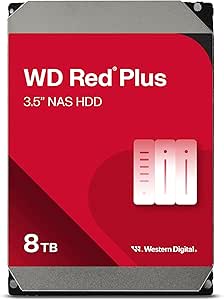 | Best for Home and Small-Business NAS | Capacity: 8 TB | Interface: SATA 6 Gb/s | Form factor: 3.5 inches | VIEW LATEST PRICE | See Our Full Breakdown |
| Western Digital WD Red Plus 10TB NAS Internal Hard Drive (WD100EFGX) |  | Best for Higher-Capacity NAS Storage | Capacity: 10 TB | Interface: SATA 6 Gb/s | Rotational speed: 7200 RPM | VIEW LATEST PRICE | See Our Full Breakdown |
| Western Digital WD Blue 1TB 2.5-Inch Mobile Hard Drive (WD10SPZX) |  | Best for Laptop Drive Replacement | Model: WD10SPZX | Storage capacity: 1 TB | Form factor: 2.5 inches | VIEW LATEST PRICE | See Our Full Breakdown |
| Western Digital WD Red Plus 4TB NAS Internal Hard Drive, 3.5-Inch, SATA 6 Gb/s, CMR |  | Best for Smaller NAS Builds | Model: WD40EFZZ | Capacity: 4 TB | Form factor: 3.5 inches | VIEW LATEST PRICE | See Our Full Breakdown |
| Western Digital Elements Desktop 8TB External Hard Drive | | Best for Simple Desktop Backups | Model: WDBWLG0080HBK-NESN | Storage capacity: 8 TB | Drive type: Mechanical | VIEW LATEST PRICE | See Our Full Breakdown |
| WD My Passport 5TB Portable External Hard Drive |  | Best for Secure Portable Storage | Model number: WDBPKJ0050BBK-WESN | Storage capacity: 5 TB | Interface: USB 2.0/3.0 | VIEW LATEST PRICE | See Our Full Breakdown |
| Western Digital hard drife | Interface | Form Factor | Warranty | Rotational Speed |
|---|---|---|---|---|
| WD 2TB My Passport Portable Ex | USB 2.0 / USB 3.0 (compatible with USB 3.1) | 2.5 inches | 3‑year limited | — |
| Western Digital WD_BLACK 10TB | SATA 6 Gb/s | 3.5 inches | 5-year limited | 7200 RPM |
| WD Elements 2TB Portable Exter | USB 2.0/3.0 | — | 2-year limited | 5400 RPM |
| WD Elements 6TB Portable Exter | USB 3.2 Gen 1 / USB 3.0 | — | 2-year limited | 5400 RPM |
| Western Digital WD Blue 12TB 7 | SATA 6 Gb/s | 3.5 inches | 2-year limited | 7200 RPM |
| Western Digital WD Elements 5T | USB 2.0/3.0 | 2.5 inches | 2-year limited warranty | — |
| Western Digital WD Blue 8TB 3. | SATA 6 Gb/s | 3.5 inches | 2-year limited warranty | 5,640 rpm |
| Western Digital WD Blue 10TB I | SATA 6 Gb/s | 3.5 inches | 2-year limited warranty | 7,200 RPM |
| Western Digital WD Red Pro 16T | SATA 6 Gb/s | 3.5 inches | — | 7,200 rpm |
| Western Digital WD Red Plus 8T | SATA 6 Gb/s | 3.5 inches | 3-year limited warranty | 5,640 rpm |
| Western Digital WD Red Plus 10 | SATA 6 Gb/s | 3.5 inches | 3-year limited warranty | 7200 RPM |
| Western Digital WD Blue 1TB 2. | SATA 6 Gb/s | 2.5 inches | — | — |
| Western Digital WD Red Plus 4T | SATA 6 Gb/s | 3.5 inches | 3-year limited warranty | Conflicting information: title says 5400 rpm; product information says 7200 rpm |
| Western Digital Elements Deskt | USB 2.0/3.0 | 3.5 inches | — | — |
| WD My Passport 5TB Portable Ex | USB 2.0/3.0 | 2.5 inches | 3-year limited warranty | — |
More Details on Our Top Picks
WD 2TB My Passport Portable External Hard Drive – Black, Backup Software, Ransomware Protection, Password Encryption, USB 3.1/3.0
The WD My Passport stands out for its combination of portability, security, and included backup features. Its durable aluminum enclosure makes it ideal for on-the-go use, and the built-in ransomware protection plus hardware encryption address security concerns better than the more basic WD Elements. However, it relies solely on USB-A connectivity, which may limit compatibility with newer devices that favor USB-C. Compared to the WD Elements, this drive offers more comprehensive security, but at the expense of slightly lower transfer speeds, possibly due to its reported data rate. This drive is best suited for users needing secure, portable storage with backup software, especially those with existing USB-A devices.
Pros:- Compact, durable aluminum enclosure enhances portability
- Includes backup software with ransomware defense
- Hardware encryption and password protection ensure data security
- Supports USB 3.1/3.0 for decent transfer speeds
Cons:- Only offers USB-A connectivity, limiting compatibility with newer devices
- Reported transfer speeds may be lower than expected, affecting performance
Best for: Travelers and remote workers who need secure, portable storage with backup options.
Not ideal for: Users seeking USB-C native support or faster transfer speeds for large file transfers on newer devices.
- Storage Capacity:2 TB
- Interface:USB 2.0 / USB 3.0 (compatible with USB 3.1)
- Form Factor:2.5 inches
- Enclosure Material:Aluminum
- Hardware Encryption:Yes
- Backup Software:Included, ransomware defense
- Compatibility:Desktop, Laptop, Tablet, Xbox 360
- Warranty:3‑year limited
Our verdict“This drive is ideal for security-conscious users who prioritize portability and backup features over ultrafast speeds.”
Western Digital WD_BLACK 10TB 7200 RPM Internal Hard Drive
The WD_BLACK 10TB offers an impressive capacity for gaming, media libraries, or creative projects, with its 7200 RPM speed and large 512 MB cache supporting quick access to large files. Compared to the smaller capacity WD Blue 12TB, this drive’s faster RPM provides better performance for active workloads, though it’s still a mechanical drive, which limits its speed against SSDs. Its SATA 6 Gb/s interface ensures compatibility with most desktop systems, but it requires a 3.5-inch bay, making it less suitable for compact builds. This drive makes the most sense for users who need lots of storage and decent performance without investing in SSDs.
Pros:- Massive 10TB capacity ideal for large libraries
- 7200 RPM speed enhances data access times
- Large 512 MB cache supports smooth operation
- Compatible with most desktop systems
Cons:- Mechanical drive with slower speeds than SSDs
- Requires a 3.5-inch drive bay, not suitable for small form factor PCs
Best for: Gamers and creative professionals needing large internal storage for active projects.
Not ideal for: Users seeking silent, energy-efficient storage or faster SSD performance for demanding tasks.
- Storage Capacity:10 TB
- Drive Type:Internal mechanical hard drive
- Rotational Speed:7200 RPM
- Interface:SATA 6 Gb/s
- Cache:512 MB
- Form Factor:3.5 inches
- Data Transfer Rate:267 MB/s
- Warranty:5-year limited
Our verdict“This drive offers high capacity and solid performance for desktop users who prioritize storage space over speed.”
WD Elements 2TB Portable External Hard Drive
The WD Elements 2TB provides reliable storage in a lightweight, portable package. Its simple plug-and-play setup makes it accessible for users who need quick access to files on multiple devices, including PCs, Macs, or gaming consoles. Compared to the WD My Passport, it lacks advanced security features like encryption or ransomware protection, but it compensates with a straightforward design and broad compatibility. Its 5400 RPM speed is typical for mechanical drives and sufficient for everyday file storage, though not optimized for high-speed data transfers. This drive is well-suited to budget-conscious users prioritizing capacity and ease of use.
Pros:- Lightweight and highly portable design
- Reliable 2TB capacity for everyday storage
- Supports USB 3.0 and USB 2.0 for broad compatibility
- Plug-and-play setup for quick use
Cons:- Mechanical hard drive with moderate speeds
- Lacks security features like encryption
Best for: Casual users needing affordable, portable storage for photos, videos, and documents.
Not ideal for: Those requiring enhanced security features or faster transfer speeds for large file editing.
- Storage Capacity:2 TB
- Interface:USB 2.0/3.0
- Data Transfer Rate:5 Gbps
- Hard Disk Type:Mechanical
- Rotational Speed:5400 RPM
- Compatibility:PC, Mac, desktop, laptop, gaming console
- Weight:4.64 ounces
- Warranty:2-year limited
Our verdict“This drive is ideal for budget-minded users seeking simple, portable storage without advanced security needs.”
WD Elements 6TB Portable External Hard Drive
The WD Elements 6TB offers substantial storage capacity in a portable form factor, making it suitable for backing up large media collections or extensive document libraries. Its USB 3.2 Gen 1 interface ensures decent transfer speeds, comparable to other mechanical drives like the WD Blue 12TB, but with less speed due to its rotational nature. The drive’s plastic enclosure is lightweight but less durable than metal options. For users who need a lot of space on the go without the need for high-speed data transfer, this model provides a balanced option, though it’s less suitable for speed-critical workflows.
Pros:- Generous 6TB capacity in a portable size
- USB 3.2 Gen 1 support for reasonable transfer speeds
- Plug-and-play setup for easy use
- Lightweight and portable
Cons:- Mechanical drive with transfer speeds dependent on device interface
- Plastic enclosure may reduce durability
Best for: Photographers, videographers, or travelers who need large capacity for backups on the move.
Not ideal for: Power users requiring fast data transfer or SSD-like performance for editing large files directly from the drive.
- Storage Capacity:6 TB
- Interface:USB 3.2 Gen 1 / USB 3.0
- Data Transfer Rate:Up to 5 Gbps
- Hard Disk Type:Mechanical
- Rotational Speed:5400 RPM
- Compatibility:PC, Mac, desktop, laptop
- Warranty:2-year limited
Our verdict“This drive balances large storage capacity with portability, making it suitable for users who prioritize space over speed.”
Western Digital WD Blue 12TB 7200 RPM Internal Hard Drive
The WD Blue 12TB provides an enormous amount of storage for desktop PCs, ideal for users who need to keep large files locally. Its 7200 RPM speed and 512 MB cache support relatively quick data access for a mechanical drive, outperforming slower 5400 RPM options. Compared with the WD Black 10TB, it offers higher capacity but at a slightly lower rotational speed, which may affect performance slightly under heavy load. Its SATA 6 Gb/s interface ensures broad compatibility, but the 3.5-inch form factor makes it less suitable for compact or portable builds. This drive is best for desktop users prioritizing capacity and reliability over speed.
Pros:- Massive 12TB capacity for extensive storage needs
- 7200 RPM speed improves data access times
- Includes Acronis True Image WD Edition for cloning
- Reliable SATA interface compatibility
Cons:- Mechanical drive with inherent speed limits compared to SSDs
- Not suitable for small or portable systems due to size
Best for: Power users and professionals needing extensive internal storage for data-heavy applications.
Not ideal for: Users seeking ultra-fast performance or compact internal drives for small form factor systems.
- Storage Capacity:12 TB
- Drive Type:Mechanical HDD
- Rotational Speed:7200 RPM
- Interface:SATA 6 Gb/s
- Cache:512 MB
- Form Factor:3.5 inches
- Warranty:2-year limited
Our verdict“This drive offers enormous capacity for desktop setups where storage space outweighs the need for speed.”
Western Digital WD Elements 5TB Portable External Hard Drive
The WD Elements 5TB is the portable pick for buyers who need substantially more room than a small backup drive can offer, without installing a drive inside a computer. Its 2.5-inch, 8.32-ounce design is easier to carry than the desktop-bound WD Blue 8TB, while plug-and-play USB connection keeps setup straightforward on compatible Windows and Mac devices. The tradeoff is mechanical storage: it is less suited to frequent knocks and quick transfers than an SSD, and actual transfer rates depend on the host and USB connection. Compared with the WD My Passport 5TB, Elements focuses on simple capacity and connectivity rather than advertised password encryption and backup extras. Choose this model for moving or storing large file collections; skip it if you need ruggedness or consistently fast file access.
Pros:- 5TB capacity in a compact portable drive
- Lightweight 2.5-inch form factor
- Plug-and-play setup on compatible Windows and Mac devices
- Works with USB 2.0 and USB 3.0 connections
Cons:- Mechanical storage is more vulnerable to impact than solid-state storage
- Transfer performance depends on the USB port and connected device
- Does not list the password-encryption features associated with WD My Passport
Best for: Laptop owners and travelers who need a large, simple drive for photo, video, and file backups.
Not ideal for: People who need fast editing scratch storage, shock-resistant travel storage, or built-in encryption features.
- Capacity:5 TB
- Drive type:Mechanical hard drive
- Form factor:2.5 inches
- Interface:USB 2.0/3.0
- USB data transfer rate:Up to 5 Gbps
- Dimensions:4.35 × 3.23 × 0.82 inches
- Weight:8.32 ounces
- Compatibility:Windows, Mac, desktop, laptop, and tablet
- Warranty:2-year limited warranty
Our verdict“Choose the WD Elements 5TB if portable capacity and straightforward backups matter more than SSD speed or added security features.”
Western Digital WD Blue 8TB 3.5-Inch Internal Hard Drive (WD80EAAZ)
The WD Blue 8TB WD80EAAZ suits desktop owners who want a large secondary drive for documents, media, and routine backups without paying for a NAS-focused design. Its SATA 6 Gb/s connection and 256 MB cache fit standard desktop builds, and the included Acronis True Image WD Edition software can help when cloning a system or moving data. At 5,640 rpm, it prioritizes everyday storage over the faster spindle speed listed for the WD Blue 10TB. That makes the 10TB model a better fit for buyers seeking greater capacity and higher rotational speed, while this 8TB version is the more measured choice for general desktop workloads. Like any internal 3.5-inch mechanical drive, it needs a compatible desktop bay and SATA connection, and it cannot match SSD responsiveness.
Pros:- 8TB capacity for desktop files and media
- SATA 6 Gb/s interface for compatible PCs
- Includes Acronis True Image WD Edition cloning software
- Designed for everyday office, web, and multimedia use
Cons:- Requires a compatible desktop bay and SATA connection
- Mechanical storage is slower to access than an SSD
- 5,640 rpm is lower than the WD Blue 10TB model’s listed 7,200 rpm
Best for: Desktop PC owners adding a roomy drive for everyday files, media libraries, and system migration.
Not ideal for: Laptop users, people without an open 3.5-inch bay, or buyers who need SSD-like access speeds.
- Capacity:8 TB
- Drive type:Mechanical internal hard drive
- Form factor:3.5 inches
- Rotational speed:5,640 rpm
- Interface:SATA 6 Gb/s
- Cache:256 MB
- Read speed:185 MB/s
- Included software:Acronis True Image WD Edition cloning software
- Warranty:2-year limited warranty
Our verdict“Pick this WD Blue when you want substantial, general-purpose desktop storage and do not need the faster spindle speed or extra capacity of the 10TB model.”
Western Digital WD Blue 10TB Internal Hard Drive, 7200 RPM, SATA 6 Gb/s, 512 MB Cache, 3.5-Inch (WD100EAGZ)
Among the two WD Blue internal drives here, the WD100EAGZ is the stronger fit for desktop users who want both 10TB capacity and a 7,200 rpm spindle. Its 512 MB cache and SATA 6 Gb/s interface are aimed at everyday desktop work, while the listed 100–150 MB/s media speed gives buyers a practical reference rather than a promise of SSD-like responsiveness. Compared with the WD Blue 8TB WD80EAAZ, this drive offers 2TB more space and a higher stated rotational speed, making it more appealing for a growing media archive. The tradeoff is the same desktop-only installation requirement, along with mechanical-drive latency. It also is not the NAS-oriented choice: buyers building shared storage should look at the WD Red Plus 8TB or Red Pro 16TB instead.
Pros:- 10TB capacity for large desktop archives
- 7,200 rpm spindle speed
- 512 MB cache
- Includes Acronis True Image WD Edition cloning software
Cons:- Requires a compatible desktop system and SATA connection
- Mechanical access times remain slower than solid-state storage
- Not positioned for NAS workloads like WD Red drives
Best for: Desktop users storing large media libraries or work files who want more capacity and a higher spindle speed than the WD Blue 8TB.
Not ideal for: Laptop owners, NAS builders, or users who need silent, shock-resistant, SSD-level responsiveness.
- Capacity:10 TB
- Drive type:Mechanical hard drive
- Form factor:3.5 inches
- Rotational speed:7,200 RPM
- Interface:SATA 6 Gb/s
- Cache:512 MB
- Media speed:100–150 MB/s
- Dimensions:5.9 × 4.2 × 1 inches
- Warranty:2-year limited warranty
Our verdict“Choose the WD Blue 10TB for a high-capacity desktop archive with a faster listed spindle speed than the WD Blue 8TB.”
Western Digital WD Red Pro 16TB NAS Internal Hard Drive
The WD Red Pro 16TB is the specialist choice here: it is built for 24/7 NAS use, RAID configurations, and workloads rated up to 550TB per year. That workload rating and 16TB capacity make it a better match for a busy shared-storage system than the WD Red Plus 8TB, whose listed workload limit is 180TB per year and whose focus is smaller NAS setups. The Pro model’s 7,200 rpm speed, 512 MB cache, and stated 259 MB/s read speed also suit heavier file traffic. The price of that headroom is fit: it is excessive for a basic desktop archive, and this 3.5-inch SATA drive needs a compatible NAS enclosure or desktop. Choose it for sustained multi-user storage demands, not simply because its capacity is the largest in this batch.
Pros:- Designed for continuous 24/7 NAS operation
- 16TB capacity for large shared-storage pools
- Rated for workloads up to 550TB per year
- 7200 rpm speed and 512 MB cache
Cons:- NAS-focused features may be unnecessary for basic desktop storage
- Requires a compatible 3.5-inch NAS or desktop SATA bay
- Mechanical drive access remains slower than solid-state storage
Best for: Owners of medium or large NAS systems running RAID and handling frequent, sustained shared workloads.
Not ideal for: Home users seeking a simple external backup drive or a low-workload single-PC storage upgrade.
- Capacity:16 TB
- Intended use:24/7 NAS environments
- Form factor:3.5 inches
- Interface:SATA 6 Gb/s
- Rotational speed:7,200 rpm
- Cache:512 MB
- Read speed:259 MB/s
Our verdict“Choose the WD Red Pro 16TB for a high-workload, always-on NAS; for a smaller home NAS, the WD Red Plus 8TB is a more fitting class of drive.”
Western Digital WD Red Plus 8TB NAS Internal Hard Drive
The WD Red Plus 8TB is the more accessible NAS fit in this group for home and small-business systems that need shared folders, archives, or RAID rebuilding support. Its NASware firmware, CMR recording, and support for up to eight bays point to NAS duty rather than a standard desktop upgrade. Compared with the WD Red Pro 16TB, it has half the capacity and a lower 180TB-per-year workload rating, but that is a more appropriate scale for lighter shared-storage demands. The 5,640 rpm spindle and 256 MB cache also distinguish it from the Pro model’s 7,200 rpm and 512 MB cache. It is not the choice for the heaviest always-on workloads, and buyers should confirm their NAS supports this 3.5-inch SATA drive and its capacity.
Pros:- Designed for NAS use with NASware firmware
- Supports NAS systems with up to eight bays
- CMR recording technology
- 3-year limited warranty
Cons:- 180TB-per-year workload rating is below the WD Red Pro 16TB’s 550TB rating
- 5,640 rpm and 256 MB cache trail the Red Pro 16TB specifications
- Requires a compatible NAS or desktop SATA bay
Best for: Home NAS owners and small teams sharing files, maintaining archives, or rebuilding RAID arrays in systems with up to eight bays.
Not ideal for: Large NAS operators with sustained heavy workloads, or desktop users who do not need NAS-specific features.
- Capacity:8 TB
- Interface:SATA 6 Gb/s
- Form factor:3.5 inches
- Rotational speed:5,640 rpm
- Cache:256 MB
- Recording technology:CMR
- Workload rate:Up to 180 TB per year
- NAS bay support:Up to 8 bays
- Warranty:3-year limited warranty
Our verdict“Choose the WD Red Plus 8TB for a modest home or small-business NAS, and step up to the Red Pro 16TB for heavier workloads and more capacity.”
Western Digital WD Red Plus 10TB NAS Internal Hard Drive (WD100EFGX)
The WD Red Plus 10TB is the strongest fit here for a NAS that needs substantial capacity alongside around-the-clock operation. Its CMR recording, NASware firmware, and support for up to eight bays suit shared storage and RAID rebuilding better than the WD Blue 1TB, which is a general-purpose mobile drive rather than a NAS choice. The 7200 RPM speed and stated read speed of 260 MB/s also make this a more performance-oriented NAS option than the 4TB WD Red Plus, though the larger capacity is only useful if your workload fits its stated 180 TB per year limit. It uses a 3.5-inch bay, so it will not fit smaller laptop-style enclosures, and it is not meant for workloads beyond that limit.
Pros:- Designed for continuous NAS operation
- CMR recording suits RAID rebuilds and file storage
- Supports NAS configurations with up to eight bays
- 10TB capacity and stated 260 MB/s read speed
Cons:- Workload rating is limited to 180 TB per year
- 3.5-inch form factor does not fit smaller devices
- Requires a NAS or other compatible SATA enclosure
Best for: Small-business and advanced home-NAS owners who need a high-capacity drive for shared files, archives, or RAID storage in an enclosure with up to eight bays.
Not ideal for: Laptop owners, users with compact 2.5-inch enclosures, and NAS operators whose annual workload exceeds 180 TB.
- Capacity:10 TB
- Interface:SATA 6 Gb/s
- Rotational speed:7200 RPM
- Recording technology:CMR
- Cache:512 MB
- Form factor:3.5 inches
- Maximum NAS bays:8
- Workload rate:Up to 180 TB/year
- Warranty:3-year limited warranty
Our verdict“Choose the WD Red Plus 10TB for a compatible NAS that needs substantial capacity and CMR storage within its 180 TB-per-year workload rating.”
Western Digital WD Blue 1TB 2.5-Inch Mobile Hard Drive (WD10SPZX)
The WD Blue 1TB mobile drive earns its place as a straightforward replacement or expansion drive for devices that need a 2.5-inch SATA disk. At 3.2 ounces and 0.28 inches thick, it suits compatible laptops and compact enclosures where the 3.5-inch WD Blue 12TB or WD Elements Desktop 8TB cannot fit. Its 5400 RPM spindle and low-power, noise-reducing features favor modest power use and quieter operation over speed; it is a mechanical drive, so it will not feel as responsive as an SSD. The 1TB capacity is also far below the 5TB My Passport or desktop options, making it a better match for a system drive, console storage, or a modest file collection than a large media archive.
Pros:- Compact 2.5-inch form factor for compatible laptops and enclosures
- 1TB capacity for system files, games, and everyday storage
- SATA 6 Gb/s interface with backward compatibility to SATA 3 Gb/s
- Low-power and noise-reducing features
Cons:- 5400 RPM speed is slower than faster-spinning hard drives
- Mechanical storage is less responsive than an SSD
- Requires a compatible bay or external enclosure
Best for: Laptop and all-in-one PC owners replacing a compatible 2.5-inch SATA hard drive, or users adding modest storage through an external enclosure.
Not ideal for: Buyers seeking SSD-like responsiveness, high-capacity archives, or a ready-to-use external drive with its own USB connection.
- Model:WD10SPZX
- Storage capacity:1 TB
- Form factor:2.5 inches
- Spindle speed:5400 rpm
- Interface:SATA 6 Gb/s
- Cache:128 MB
- Weight:3.2 ounces
- Dimensions:3.94 × 2.75 × 0.28 inches
Our verdict“Pick the WD Blue 1TB when you need an affordable-size 2.5-inch SATA replacement and value fit and modest power use over speed or capacity.”
Western Digital WD Red Plus 4TB NAS Internal Hard Drive, 3.5-Inch, SATA 6 Gb/s, CMR
The WD Red Plus 4TB brings NAS-oriented CMR storage to smaller home or small-business systems without requiring the capacity of the 10TB Red Plus. It is designed for continuous operation and RAID-optimized NAS configurations with up to eight bays, giving it a better-defined role for shared storage than the general-purpose WD Blue 1TB. The tradeoff is capacity: 4TB may be limiting for a growing media library or a business archive, where the 10TB Red Plus offers more room and a stated 260 MB/s read speed. There is also a specification conflict: the supplied title lists 5400 RPM while the product information lists 7200 RPM. I would verify the exact drive revision before buying if spindle speed affects your setup.
Pros:- Designed for continuous operation in NAS systems
- CMR recording is suited to RAID workloads
- Supports RAID-optimized systems with up to eight bays
- Includes a 3-year limited warranty
Cons:- 4TB capacity may be restrictive for large archives
- Provided information conflicts on 5400 versus 7200 RPM
- 3.5-inch drive requires a compatible NAS or desktop bay
Best for: Home and small-business NAS owners building a RAID-capable system who need a NAS-focused 4TB drive and can confirm the exact model specifications.
Not ideal for: Buyers with large storage needs, anyone without a 3.5-inch NAS bay, or shoppers who need confirmed spindle speed before purchase.
- Model:WD40EFZZ
- Capacity:4 TB
- Form factor:3.5 inches
- Interface:SATA 6 Gb/s
- Recording technology:CMR
- Rotational speed:Conflicting information: title says 5400 rpm; product information says 7200 rpm
- Read speed:180 MB/s
- NAS compatibility:RAID-optimized systems with up to 8 bays
- Warranty:3-year limited warranty
Our verdict“Choose this 4TB Red Plus for a smaller NAS build if its capacity fits and you confirm the spindle-speed specification for the drive being sold.”
Western Digital Elements Desktop 8TB External Hard Drive
The WD Elements Desktop 8TB is the practical pick for adding a large block of external storage to a Windows computer without installing an internal drive. It connects over USB 3.0 or USB 2.0 and includes the cable and AC adapter, so setup is more direct than buying the internal 10TB WD Red Plus and arranging a compatible NAS or enclosure. That convenience comes with a desk-bound design: unlike the 5TB WD My Passport, this model is a 3.5-inch unit that needs external power. It is formatted for Windows 7, 8.1, and 10, so users of other systems may need to check compatibility or reformat it. The product data does not specify a transfer rate, so I would not choose it based on speed expectations.
Pros:- 8TB capacity for backups and large file collections
- USB 3.0 and USB 2.0 connectivity
- Includes an AC adapter and USB cable
- Designed for straightforward Windows PC setup
Cons:- 3.5-inch desktop design needs a separate AC adapter
- Windows formatting may require changes for other systems
- No transfer-speed figure is provided in the product data
Best for: Windows PC owners who want a simple, high-capacity desktop backup or file-storage drive and have space near a power outlet.
Not ideal for: Traveling users, buyers who need bus-powered storage, or anyone who needs a drive confirmed for a non-Windows operating system without reformatting.
- Model:WDBWLG0080HBK-NESN
- Storage capacity:8 TB
- Drive type:Mechanical
- Interface:USB 2.0/3.0
- Form factor:3.5 inches
- Weight:2.1 pounds
- Dimensions:9 × 8 × 3.5 inches
- Compatible operating systems:Windows 10, Windows 8.1, Windows 7
- Included items:AC adapter, quick start guide, USB cable
Our verdict“Choose the WD Elements Desktop 8TB for substantial, mostly stationary Windows storage; choose the My Passport 5TB instead if portability matters more.”
WD My Passport 5TB Portable External Hard Drive
The WD My Passport 5TB combines a portable 2.5-inch design with more storage and data-protection features than the WD Blue 1TB mobile drive, which is an internal disk rather than a ready-to-connect external solution. At 7.4 ounces, it is easier to carry than the 8TB WD Elements Desktop, and its included backup software, password protection, and hardware encryption suit people moving sensitive files between locations. The compromise is the listed USB 2.0/3.0 interface, which lacks a stated newer USB standard and may constrain transfers compared with newer connections. It also remains a mechanical hard drive, so buyers who prioritize fast file access or rugged solid-state storage should look elsewhere.
Pros:- 5TB capacity in a portable 2.5-inch drive
- Weighs 7.4 ounces and has a slim profile
- Includes backup software with ransomware defense
- Password protection and hardware encryption help protect stored files
Cons:- Listed USB 2.0/3.0 interface may limit transfer speeds versus newer connections
- Mechanical drive is less responsive than an SSD
- Portable capacity is lower than the 8TB WD Elements Desktop
Best for: Traveling professionals and students who need several terabytes of portable backup space with password protection and hardware encryption.
Not ideal for: Buyers who need the fastest transfers, rugged solid-state storage, or a desktop drive for stationary high-capacity backups.
- Model number:WDBPKJ0050BBK-WESN
- Storage capacity:5 TB
- Interface:USB 2.0/3.0
- Form factor:2.5 inches
- Weight:7.4 ounces
- Dimensions:4.22 × 2.95 × 0.75 inches
- Security:Password protection and hardware encryption
- Warranty:3-year limited warranty
Our verdict“Pick the My Passport 5TB for portable, protected backups when capacity and security matter more than the speed of a newer interface.”

How We Picked
I compared these 15 drives by the jobs buyers are likely trying to solve: carrying files, backing up a computer, expanding a desktop, building a NAS, or adding internal PC storage. I looked at form factor, stated capacity, connection or interface details where provided, and features that affect setup and ongoing use, such as portability, backup software, password protection, and NAS positioning. I treated a drive’s stated role as a major factor: a NAS drive should not rank ahead of a portable option for someone who needs a pocketable backup drive.
The ranking logic favors products that make a clear case for a common use without asking buyers to accept an avoidable mismatch. That puts versatile, well-defined options ahead of specialized models for general recommendations, while higher-capacity or purpose-built drives earn their place for buyers who need those traits. Capacity alone does not determine rank: power needs, physical size, system compatibility, and workload matter too. Product specifications can vary by capacity and model revision, so buyers should confirm the exact model’s compatibility and included features before ordering.
| Western Digital hard drife | Interface |
|---|---|
| WD 2TB My Passport Portable Ex | USB 2.0 / USB 3.0 (compatible with USB 3.1) |
| Western Digital WD_BLACK 10TB | SATA 6 Gb/s |
| WD Elements 2TB Portable Exter | USB 2.0/3.0 |
| WD Elements 6TB Portable Exter | USB 3.2 Gen 1 / USB 3.0 |
| Western Digital WD Blue 12TB 7 | SATA 6 Gb/s |
| Western Digital WD Elements 5T | USB 2.0/3.0 |
| Western Digital WD Blue 8TB 3. | SATA 6 Gb/s |
| Western Digital WD Blue 10TB I | SATA 6 Gb/s |
| Western Digital WD Red Pro 16T | SATA 6 Gb/s |
| Western Digital WD Red Plus 8T | SATA 6 Gb/s |
| Western Digital WD Red Plus 10 | SATA 6 Gb/s |
| Western Digital WD Blue 1TB 2. | SATA 6 Gb/s |
| Western Digital WD Red Plus 4T | SATA 6 Gb/s |
| Western Digital Elements Deskt | USB 2.0/3.0 |
| WD My Passport 5TB Portable Ex | USB 2.0/3.0 |
Factors to Consider When Choosing Best Western Digital Hard Drives
Before choosing among WD portable, desktop, internal, and NAS drives, start with the system the drive will serve. Similar capacities do not mean similar use: a USB portable drive is built around convenience, while an internal or NAS drive needs an appropriate enclosure or computer and a compatible workload. These checks can prevent a drive that looks right on capacity from being wrong for the job.
Match the drive type to where it will live
A portable drive is the straightforward choice when files need to travel between locations or computers, while a desktop external drive makes more sense when it will stay beside a workstation. Internal drives require a compatible PC bay, cabling, and power connection; NAS drives belong in a supported NAS enclosure rather than a casual USB setup. A common mistake is buying by terabytes alone and discovering that the drive needs a different power arrangement or enclosure. Decide where the drive will sit and how often it will move before comparing capacities. If you want one drive for both travel and a large stationary archive, that compromise may be less convenient than keeping separate portable and desktop storage.
Choose capacity around your backup plan
Estimate the space you need now, then account for growth from photos, video, project files, and system backups. A drive that barely fits the current library can become inconvenient when backups run out of room, but buying far more capacity than a single computer or NAS can use may not be the best allocation of a storage budget. Also check whether your backup software keeps multiple versions: version history can consume more space than a simple copy. For a NAS, total usable capacity depends on the number of bays and the storage configuration, not just the capacity printed on one drive. Plan for redundancy and backups separately; a multi-drive setup does not by itself protect against every kind of data loss.
Check compatibility before choosing an internal drive
Internal hard drives differ by physical size, interface, and the computer or enclosure they are meant to fit. The 3.5-inch WD Blue models require a compatible desktop bay, while the 2.5-inch WD Blue mobile drive serves a different form factor and may suit only specific older systems or enclosures. Confirm the motherboard or enclosure connection, available power, operating-system support, and physical clearance before buying. Buyers sometimes assume that a SATA connection guarantees a simple drop-in replacement, but mounting and firmware support can also matter. If the drive will be used externally, check that the enclosure supports its form factor and capacity.
Treat NAS suitability as a workload decision
NAS drives are intended for storage systems that can run for long periods and may use multiple drives together, so the drive’s stated NAS role matters more than a small capacity difference. Match the drive to the NAS maker’s compatibility list, bay count, and intended workload rather than assuming any internal drive will behave the same way. A general desktop drive may be fine for occasional file storage, but it is not automatically the best fit for continuous multi-drive use. Also compare the Red Plus and Red Pro options against the system’s requirements; a higher-tier label does not make a drive useful if the NAS cannot take advantage of its intended capabilities. Keep a separate backup of important NAS data, since NAS operation is not a substitute for an independent copy.
Weigh convenience features against your security routine
Portable models with backup software and password protection can simplify personal-file backup, but those features are useful only if they fit the way you work. Check whether the software supports your operating system and whether you prefer scheduled backups, manual copies, or another backup tool. Password protection can reduce casual access to stored files, but it does not replace a separate backup or a plan for recovering access if credentials are lost. A capacity-first portable drive may be a better fit if you already use your own backup and encryption tools. Think through how files will be restored, not just how they will be copied.
Pay for the capability your setup can use
It can make sense to pay more attention to a NAS-specific model when the drive will run inside a NAS, or to a larger portable model when carrying one drive matters more than splitting files across several. For a basic archive or secondary backup, specialized internal performance may not improve the everyday experience if the computer, connection, or task is the limiting factor. Check the exact model number and specification sheet rather than assuming all drives in a product family share the same speed, recording method, or included software. A listed rotational speed is only one part of performance; workload, access pattern, and connection also affect results. Choose for the slowest or most restrictive part of the actual setup, not a headline spec in isolation.
Frequently Asked Questions
Should I buy a WD Elements Portable or a WD My Passport?
Choose between them based on whether you value straightforward storage or built-in backup and security features. The My Passport 2TB listing includes backup software and password encryption, which can suit someone who wants those tools in the drive’s package. Elements Portable models are a better fit when you want a simple portable external drive and are comparing the listed 2TB, 5TB, and 6TB capacities. Check the exact model’s supported software and operating system before relying on a feature for your backup routine. Either way, keep another copy of important files rather than treating one portable drive as the only backup.
Can I use a WD Red Plus drive as a regular desktop hard drive?
A Red Plus is an internal SATA drive, but its stated NAS role makes it most relevant for a compatible NAS or a desktop build with a NAS-like storage workload. A standard desktop may be able to connect it if the bay, cabling, and power supply support the drive, but physical compatibility does not mean it is the best match for every use. For a general PC storage expansion, compare the WD Blue options as well. If you plan to install the drive in a NAS, check the NAS maker’s compatibility list and drive-bay requirements. Keep a separate backup of files stored on it.
Is the WD Elements Desktop 8TB a better choice than a portable 5TB or 6TB drive?
It is a better fit when the drive will stay in one place and you want a desktop external option with 8TB capacity. The Elements Portable 5TB and 6TB models are more suitable when carrying the drive or using it away from a fixed desk matters. Compare the desktop model’s power and placement needs with the convenience of a portable drive before deciding. A larger stationary drive can simplify an archive, but it is less practical for regular travel. Whichever you pick, plan how you will store a second copy of important data.
Which WD drive should I choose for a multi-bay NAS?
Start with the NAS manufacturer’s drive compatibility list, then match capacity and NAS tier to the system’s supported workload and bay count. The WD Red Plus 4TB, 8TB, and 10TB models offer several capacity points, while the 16TB WD Red Pro is a higher-capacity NAS-oriented option. Do not pick solely by capacity or assume a Pro model is necessary for every home NAS. Consider the total storage plan, redundancy configuration, and whether the NAS can use the drive’s capabilities. Keep an independent backup because RAID or similar arrangements do not protect against every failure or accidental deletion.
Will a 3.5-inch WD Blue drive work in my laptop or external enclosure?
A 3.5-inch WD Blue is generally intended for a compatible desktop bay, not the smaller internal space in most laptops. An external enclosure may work if it supports 3.5-inch SATA drives, the drive’s capacity, and the required power supply. The listed WD Blue 1TB 2.5-inch mobile drive is a different form factor, but buyers should still verify the laptop’s interface, thickness clearance, and support for the specific model. Check the computer or enclosure documentation before ordering, rather than relying on the WD Blue family name. If you want a simple external connection without assembly, compare the prebuilt WD Elements or My Passport options.
Conclusion
For a balanced NAS recommendation, my best overall is the WD Red Plus 8TB, with the 4TB or 10TB Red Plus versions making more sense when your storage plan calls for less or more capacity. The best value-style pick for uncomplicated portable storage is WD Elements Portable; choose the 5TB or 6TB version according to your file library and travel needs. For a best premium, high-capacity NAS choice, look at the WD Red Pro 16TB, provided your NAS supports it and can use its intended role. Beginners who want a portable drive with backup and password features should start with the WD My Passport 2TB; buyers who want simple plug-in storage can favor WD Elements instead. For specific needs, choose the WD Elements Desktop 8TB for stationary external storage, WD Blue for compatible internal PC builds, or WD_BLACK for a 7200 RPM internal-drive option. The right pick is the one that matches your system and backup routine—not simply the largest capacity in the list.
Evergreen bestsellers Picks
bestsellers
As an affiliate, we earn on qualifying purchases.