AR smart glasses range from wearable movie screens to glasses with spatial tracking, cameras, translation, or teleprompters. I rank the XREAL One Pro as the best overall because its X1 chip, native 3DoF, and 120Hz display balance immersive viewing with useful spatial features. The VITURE Luma Ultra stands out for 6DoF, while the RayNeo Air 4 Pro is a strong choice for HDR viewing and entertainment. The main tradeoffs are display performance versus fit, tracking capability versus simplicity, and entertainment features versus practical hands-free tools. Read on for the full breakdown and guidance on choosing glasses that match how you plan to use them.

Get the latest gadgets delivered free with Prime
- Fast, free delivery on millions of items
- Prime Video, Amazon Music and more included
- Member-only deals all year
Complete the kit


Key Takeaways
- Native 3DoF separates spatial-display models from simpler screen glasses: XREAL One Pro, XREAL 1S, and RayNeo GT Max list this capability, while VITURE Luma Ultra goes further with 6DoF.
- The XREAL One Pro earns the overall lead through balance: its 120Hz display and X1 chip pair with native 3DoF, avoiding a choice between smooth viewing and spatial features.
- Entertainment-focused picks emphasize different strengths: RayNeo Air 4 Pro highlights HDR10 and B&O audio, while RayNeo Air 3s combines a 120Hz FHD display with a simpler feature set.
- Large virtual-screen claims do not tell the whole story: listed sizes span 147 to 500 inches, but field of view, tracking, fit, and source-device compatibility affect the experience.
- AI and camera glasses serve a different job: GO3 AI and AiLens emphasize translation and teleprompter tasks, so buyers seeking a private virtual display should compare them separately from display-first models.


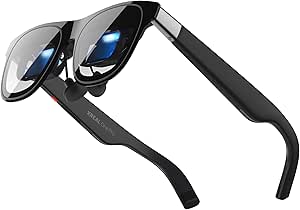

| AR smart glasse | Refresh rate | Weight |
|---|---|---|
| VITURE Pro 2 XR/AR Glasses | 120Hz | 63g |
| XREAL xbx a01+ AR Glasses | — | 62g |
| RayNeo Air 4 Pro AR/XR Glasses | 120Hz | 2.72 ounces |
| RayNeo Air 3s AR/XR Glasses | 120Hz | — |
| GO3 AI Translation Smart Glass | — | 58g |
| VITURE Luma Ultra XR Glasses | 120Hz | — |
| AiLens AR Smart Glasses Telepr | — | 37 g |
| XREAL 1S AR Glasses | 120Hz | — |
| Rokid Max2 Black AR Glasses | 120Hz | 75 g |
| AI Smart Glasses with Camera | — | 1.4 ounces |
| VITURE Beast XR/AR Glasses: 17 | 120 Hz | 88 g |
| RayNeo Air 4 Pro AR/XR Glasses | 120Hz | 2.88 ounces |
| Rokid AR Spatial Video Glasses | 120Hz | 75 g |
| XREAL One Pro AR Glasses with | 120Hz | — |
| RayNeo GT Max AR/XR Glasses | 120Hz | — |
More Details on Our Top Picks
VITURE Pro 2 XR/AR Glasses – UltraClarity 3.0 Myopia Adjustment -5.0D, 120Hz
The VITURE Pro 2 stands apart from the XREAL xbx a01+ by building adjustable myopia correction up to -5.00D into the glasses, which can spare nearsighted viewers from needing prescription inserts. Its 1080p, 120Hz Micro-OLED display is suited to fast games as well as films, while the stated 146-inch virtual screen and edge-to-edge clarity focus this model on private, big-screen viewing rather than spatial overlays. At 63g, it remains relatively light for longer sessions, and 2D-to-3D conversion adds an optional way to revisit standard content. The tradeoff is device dependence: it needs a compatible USB-C video output, and some phones or consoles may require an adapter. Extended use can also feel warm. I’d choose it over the xbx a01+ chiefly for built-in vision correction, not for a larger screen.
Pros:- Adjustable myopia correction up to -5.00D is built into the glasses.
- 120Hz 1080p Sony Micro-OLED display supports smooth gaming and clear video.
- Light 63g design is suited to extended viewing sessions.
- Real-time 2D-to-3D conversion offers an extra viewing mode.
Cons:- Requires compatible USB-C video output; some devices need an adapter.
- May feel warm during extended use.
- Not compatible with iPhone 16e or iPhone 17 Air.
Best for: Nearsighted gamers and movie viewers who fall within the -5.00D correction range and want a USB-C-connected personal display.
Not ideal for: People with stronger or different prescription needs, owners of devices without compatible USB-C video output, and viewers seeking true room-anchored AR overlays.
- Display:146-inch virtual display
- Resolution:1080p
- Panel:Sony Micro-OLED
- Refresh rate:120Hz
- Brightness:1600 nits
- Field of view:50 degrees
- Myopia adjustment:Up to -5.00D
- Weight:63g
Our verdict“Choose the VITURE Pro 2 if built-in correction for nearsightedness matters more than the XREAL xbx a01+’s slightly larger virtual screen.”
XREAL xbx a01+ AR Glasses, 147” Big-Screen Display for Movies & Gaming
The XREAL xbx a01+ is a straightforward pick for people who want a large private screen without adding many extra features to learn. Its 147-inch Full HD Micro-OLED display is marginally larger than the VITURE Pro 2’s stated 146-inch screen, and stabilized tracking helps keep the image settled as your view shifts. Open-ear directional speakers let you listen without sealing off nearby sounds, a practical difference from using headphones for every movie or gaming session. The 62g frame and eye-comfort features also suit longer viewing stretches. Compared with the more specialized VITURE, though, this model does not list built-in myopia adjustment or 120Hz refresh. It still depends on a USB-C DisplayPort connection and an external power source, so compatibility and untethered use are limited. I’d put it ahead for simple, comfortable media viewing, not prescription flexibility.
Pros:- 147-inch Full HD Micro-OLED display provides a large private viewing image.
- At 62g, the glasses are light enough for extended wear.
- Open-ear directional speakers allow awareness of nearby sounds.
- Flicker-free dimming, blue-light reduction, and TÜV Eye Comfort 5.0 certification support viewing comfort.
Cons:- Requires USB-C DisplayPort video and may need adapters for some devices.
- Has no built-in battery and relies on the connected device or another power source.
- No 120Hz refresh rate or built-in myopia adjustment is specified.
Best for: Movie watchers and handheld-console players who want a light USB-C personal screen with open-ear audio and broad device support.
Not ideal for: Buyers who need built-in prescription correction, a stated 120Hz refresh rate, or glasses that work without an external device and power source.
- Display:147-inch virtual display
- Resolution:1920 × 1080
- Display type:Micro-OLED
- Maximum brightness:1600 nits
- Connectivity:USB-C DisplayPort
- Audio:Open-ear directional speakers
- HDR:HDR10
- Weight:62g
Our verdict“Pick the XREAL xbx a01+ for light, open-ear movie and gaming sessions, but choose the VITURE Pro 2 if built-in nearsightedness correction is a priority.”
RayNeo Air 4 Pro AR/XR Glasses – HDR10 201” Display, B&O Audio, Gaming & Movie
For viewers who put image processing and motion smoothness first, the RayNeo Air 4 Pro offers a more ambitious media setup than the RayNeo Air 3s: it pairs a stated 201-inch HDR10 virtual screen with 120Hz refresh, a Vision 4000 AI chip, and B&O spatial audio. The AI chip’s real-time HDR upscaling is intended to improve compatible viewing material, while the higher refresh rate is a useful match for fast-paced games. Compared with the VITURE Pro 2, this model claims a much larger virtual screen and adds B&O audio, but it does not list built-in myopia adjustment. That makes prescription flexibility a notable omission for some buyers. Like the other display-focused glasses here, it connects over USB-C and has no internal battery, so it is a wearable screen tethered to a host rather than a standalone AR computer.
Pros:- 201-inch stated virtual display with HDR10 targets immersive movie viewing.
- 120Hz refresh rate is suited to smooth gameplay.
- Vision 4000 AI chip supports real-time HDR upscaling.
- B&O spatial audio adds integrated sound without separate headphones.
Cons:- No internal battery; the glasses rely on an attached device or external power.
- Open-ear audio does not isolate the wearer from surrounding noise.
- USB-C connectivity limits use with devices that lack compatible video output.
Best for: USB-C device owners who prioritize HDR movies, smooth gaming, and integrated spatial audio in a large private display.
Not ideal for: Buyers who need built-in vision correction, noise-isolating audio, or a self-powered headset for untethered use.
- Virtual display:201 inches
- HDR:HDR10
- Refresh rate:120Hz
- Processor:Vision 4000 AI chip
- Audio:B&O spatial audio
- Connectivity:USB Type-C
- Compatible devices:iPhone 15/16/17, Android, MacBook, iPad, Steam Deck, PS5, Switch 2
- Weight:2.72 ounces
Our verdict“Choose the RayNeo Air 4 Pro over the Air 3s if HDR processing, 120Hz gaming, and B&O spatial audio matter more than lower listed brightness or built-in prescription adjustment.”
RayNeo Air 3s AR/XR Glasses – 201″ 120Hz FHD HueView Display for Movie & Game
The RayNeo Air 3s puts its emphasis on color and viewing comfort rather than the Air 4 Pro’s HDR-processing extras. Its 1080p OLED panel specifies ΔE <2 color accuracy and a 200,000:1 contrast ratio, giving this model a clearer case for viewers who value faithful color and deep blacks in films or games. The listed 201-inch virtual display and 120Hz refresh rate keep it competitive for immersive media, while low-blue-light certification and flicker-free technology address comfort during longer sessions. Against the Air 4 Pro, the Air 3s lists 650-nit brightness and enhanced dual-chamber speakers, but it does not specify the same HDR10 support, AI chip, or B&O audio. Product data also leaves battery details unclear and lists unusual features such as GPS and geotagging, so I’d verify what is included before buying.
Pros:- 1080p OLED display combines a stated 201-inch virtual screen with 120Hz refresh.
- ΔE <2 color accuracy and 200,000:1 contrast are strong listed image specifications.
- Low-blue-light certification and flicker-free technology are aimed at viewing comfort.
- Dual opposing acoustic chambers provide built-in audio.
Cons:- Maximum brightness is listed as 650 nits, below the 1600-nit figures of several alternatives here.
- Battery information is unspecified, making power expectations hard to judge.
- Not water resistant, so it is unsuitable for wet conditions.
Best for: Viewers who care about color fidelity, high contrast, and a 120Hz personal screen for films and games.
Not ideal for: Buyers who need clearly documented battery performance, water resistance, or the Air 4 Pro’s stated HDR10 processing and B&O audio.
- Virtual display:201 inches
- Display type:OLED
- Resolution:1920 × 1080
- Maximum brightness:650 nits
- Refresh rate:120Hz
- Color accuracy:ΔE <2
- Contrast ratio:200,000:1
- Audio:Built-in speakers with dual opposing acoustic chambers
Our verdict“Pick the Air 3s for its specified color accuracy and contrast, but favor the Air 4 Pro if HDR10 processing and B&O audio are more important.”
GO3 AI Translation Smart Glasses with Teleprompter and Camera
The INMO GO3 serves a different purpose from the VITURE and RayNeo display glasses: it focuses on communication tools rather than projecting a cinema-sized screen. Its real-time translation in 98 languages and invisible teleprompter are aimed at conversations, travel, and presentations, while an 8MP camera adds photo and video capture. That makes it the lineup’s most practical choice for speakers or multilingual users who want information available while wearing glasses. It is not a substitute for the Air 4 Pro’s 201-inch HDR display or the Air 3s’s 120Hz gaming focus. At 58g, it is relatively light, but its feature set depends on becoming comfortable with voice and AI functions. The glasses are also not water resistant, and the product data’s 256GB storage and 64GB RAM figures are unusually stated, so buyers may want to confirm those details.
Pros:- Real-time AI translation is specified for 98 languages.
- Invisible teleprompter supports speeches and presentations.
- 8MP camera adds photo and video capture.
- Magnetic quick-swap battery system includes two removable batteries.
Cons:- Does not provide the large virtual display or stated gaming refresh rates of the VITURE and RayNeo models.
- Not water resistant, limiting use in wet conditions.
- At 58g, it may feel heavy to users accustomed to lighter glasses.
Best for: Presenters, frequent travelers, and multilingual users who want translation, a discreet teleprompter, and camera functions in wearable glasses.
Not ideal for: Movie and gaming viewers seeking a large virtual screen, or people who need water-resistant eyewear for outdoor work.
- Operating system:RTOS
- Camera:8MP HD
- Weight:58g
- Battery capacity:660 mAh
- Memory storage:256 GB
- RAM:64 GB
- Battery system:Magnetic quick-swap; two removable batteries included
- Water resistance:Not water resistant
Our verdict“Choose the INMO GO3 for translation and speaking prompts, not as a replacement for the VITURE Pro 2 or RayNeo glasses’ large-screen media experience.”
VITURE Luma Ultra XR Glasses, 152-inch, 1200p Resolution, 6DoF AR Glasses
I’d choose the VITURE Luma Ultra when spatial interaction matters more than a simple screen floating in front of me. Its 6DoF support is the key distinction: with the required Pro Neckband and related setup, the display can suit users who want to work with anchored screens or interact through gestures. The 1200p Sony Micro-OLED display, 120Hz refresh rate, and 1500-nit brightness also make it a capable choice for gaming and video. Compared with the XREAL 1S, which emphasizes plug-and-play viewing and native 3DoF, the Luma Ultra offers a more ambitious interaction path but depends more on accessories and software. I’d skip it if I only want uncomplicated USB-C viewing; its extra spatial features bring setup and compatibility caveats.
Pros:- 6DoF support enables more spatial interaction than basic screen mirroring.
- 1200p Sony Micro-OLED display pairs sharp visuals with a 120Hz refresh rate.
- 1500-nit brightness is suited to vivid viewing.
- Supports a range of phones, computers, and gaming devices.
Cons:- Full 6DoF and gesture control require specific accessories.
- Multi-screen and 3D features may depend on additional software or hardware.
- Feature availability varies by device and operating system.
Best for: AR users who want gesture-enabled, 6DoF spatial experiences and are prepared to add the required accessory.
Not ideal for: Buyers seeking simple, accessory-free screen mirroring or consistent feature support across operating systems.
- Virtual display size:152 inches
- Resolution:1200p
- Display technology:Sony Micro-OLED
- Brightness:1500 nits
- Refresh rate:120Hz
- Field of view:52°
- Spatial features:6DoF, hand gesture control, multi-screen, 3D
- Connectivity:USB-C
Our verdict“Choose the VITURE Luma Ultra if you want spatial AR interaction and accept the extra accessory and compatibility requirements.”
AiLens AR Smart Glasses Teleprompter Translator AI Assistant Speech
The AiLens AR Smart Glasses take a different route from the screen-first XREAL 1S: their appeal is quick access to translation, navigation, messaging, and AI assistance rather than a large cinema-style display. At 37 grams, the stated weight favors all-day wear, while the dual-lens waveguide display can put notifications in view without requiring the wearer to reach for a phone. The listed eight-hour battery life gives them a broader use window than a short-session accessory, though heavy use may shorten it. The tradeoff is that the product data gives limited detail on display resolution and application specifics, making it harder to judge visual quality and software depth. I’d also be cautious about outdoor use: no water resistance is listed, so rain and wet conditions are a poor match.
Pros:- 37-gram weight is suited to extended wear.
- Translation, navigation, messaging, and AI assistance cover practical daily tasks.
- Dual-lens waveguide display supports glanceable information.
- Listed battery life is up to eight hours.
Cons:- No water resistance is listed, limiting confidence in wet outdoor conditions.
- Battery capacity is 175 mAh, which may constrain heavy use.
- Resolution and supported application details are not specified.
Best for: Professionals, students, and travelers who want lightweight access to translation, navigation, and glanceable notifications.
Not ideal for: Buyers who need a detailed virtual monitor, verified weather protection, or clearly specified app support.
- Display type:Waveguide LED
- Listed display size:60 inches
- Maximum brightness:1200 nits
- Battery capacity:175 mAh
- Battery life:Up to 8 hours
- Weight:37 g
- Operating system:THINKAR OS
- Water resistance:Not water resistant
Our verdict“Pick AiLens for lightweight information and assistant features, not for a high-detail virtual screen or wet-weather use.”
XREAL 1S AR Glasses, 500″ Virtual Screen, Powered by X1 Chip, Native 3DoF
For buyers who mainly want a large virtual screen, the XREAL 1S is the clearest fit in this group. Its native 3DoF lets the view remain spatially positioned without the accessory-dependent 6DoF setup associated with the VITURE Luma Ultra. The 1920 × 1200 OLED display and 120Hz refresh rate are well matched to movies and gaming, while USB-C DisplayPort connection supports a straightforward link to compatible phones, computers, and consoles. The advertised 500-inch screen is a scale claim, not a guarantee of the same perceived size in every setup. I’d also check device compatibility before buying: the glasses work best with a compatible USB-C video output. Compared with the Rokid Max2, this model emphasizes spatial viewing and listed Bose audio, while the Max2 offers built-in myopia adjustment.
Pros:- Native 3DoF adds spatial screen positioning without the Luma Ultra’s accessory-dependent 6DoF route.
- 1920 × 1200 OLED display and 120Hz refresh rate suit video and gaming.
- USB-C DisplayPort connection supports plug-and-play use with compatible devices.
- Bose audio system is listed as part of the glasses.
Cons:- Optimal use requires a compatible USB-C DisplayPort device.
- Native tracking is 3DoF rather than full 6DoF.
- No built-in myopia adjustment is listed, unlike the Rokid Max2.
Best for: People who want a large, spatially positioned virtual screen for films, games, or laptop viewing with compatible USB-C devices.
Not ideal for: Buyers who need 6DoF interaction, wireless standalone use, or built-in correction for nearsightedness.
- Virtual display size:Up to 500 inches
- Display type:OLED
- Maximum resolution:1920 × 1200
- Refresh rate:120Hz
- Field of view:52°
- Tracking:Native 3DoF
- Connectivity:USB-C DisplayPort
- Audio:Bose audio system
Our verdict“Choose the XREAL 1S for straightforward spatial big-screen viewing, provided your device supports USB-C video output.”
Rokid Max2 Black AR Glasses, 215″ Micro-OLED Display, 50° FOV, 600 Nits Brightness, Compatible with Smartphones, Windows Laptops, iPad
The Rokid Max2 stands apart from the XREAL 1S through a practical feature rather than a larger screen claim: its adjustable myopia correction up to 600 diopters can reduce the need for separate prescription inserts for some nearsighted wearers. The 215-inch virtual display, 50° field of view, and 120Hz refresh rate make it a capable choice for streaming or gaming, while USB-C power and video keep the connection simple with compatible devices. At 75 grams, it is listed as relatively lightweight, but it is still a tethered display accessory rather than a standalone pair of glasses. The correction does not cover astigmatism or presbyopia, and the product data does not list resolution. I’d favor it over the XREAL 1S when myopia adjustment is the deciding factor, but not when broad vision correction is needed.
Pros:- Adjustable myopia correction is listed up to 600 diopters.
- 120Hz refresh rate supports smooth motion for video and games.
- USB-C connection works with compatible phones, tablets, and computers.
- 50° field of view and a 215-inch virtual display support immersive viewing.
Cons:- Myopia adjustment does not address astigmatism or presbyopia.
- Requires a compatible USB-C video device and a wired connection.
- Resolution is not specified in the supplied product data.
Best for: Nearsighted viewers who want USB-C-connected AR viewing and may benefit from adjustable myopia correction.
Not ideal for: People with astigmatism or presbyopia, or buyers who need standalone wireless operation.
- Virtual display size:215 inches
- Field of view:50°
- Brightness:600 nits
- Refresh rate:120Hz
- Weight:75 g
- Myopia adjustment:Up to 600 diopters
- Power and connection:USB-C; no internal batteries
- Compatibility:Smartphones, Windows laptops, iPads, Mac, and Android phones
Our verdict“The Rokid Max2 is a strong fit for nearsighted viewers who want a tethered virtual screen, but it does not replace broader prescription correction.”
AI Smart Glasses with Camera, 4K Video, Real-Time Translation
Unlike the display-centered XREAL 1S and VITURE Luma Ultra, these AI smart glasses put a camera and connected everyday functions first. The 4K camera with EIS and stated 32MP photo resolution make them the more relevant pick for hands-free capture, while real-time translation, voice assistance, Bluetooth music, and calls add travel utility. Their 1.4-ounce weight and water-repellent build suit active days better than the non-water-resistant AiLens, although water-repellent is not the same as a stated waterproof rating. The tradeoff is that there is no virtual-screen size, field of view, or AR tracking specification in the supplied data, so I wouldn’t buy them expecting the spatial display experience of the other glasses here. Battery life is also use-dependent: the listed ten hours applies to music playback.
Pros:- 4K video capture with EIS is aimed at smoother hands-free footage.
- Real-time translation and voice assistance add travel-focused functions.
- At 1.4 ounces, the listed weight supports extended wear.
- Water-repellent construction is better suited to outdoor activity than the non-water-resistant AiLens.
Cons:- No AR display size, field of view, or tracking specifications are provided.
- Up to 10 hours refers to music playback, not necessarily camera or translation use.
- Water-repellent does not provide a stated waterproof protection rating.
Best for: Travelers and outdoor users who want hands-free video capture, translation, music, and calls in a lightweight frame.
Not ideal for: Buyers seeking a virtual monitor, spatial AR tracking, or a clearly stated waterproof rating.
- Camera resolution:4K
- Photo resolution:32MP
- Battery capacity:300 mAh
- Battery life:Up to 10 hours music playback; 7 days standby
- Water resistance:Water repellent
- Weight:1.4 ounces
- Connectivity:Bluetooth 5.3, Wi-Fi
- Supported devices:Android, iOS
Our verdict“Choose these glasses for hands-free travel capture and connected features, not for a spatial AR screen.”
VITURE Beast XR/AR Glasses: 174″ 1200p, 58° FOV
I’d put the VITURE Beast near the top for buyers who care more about a bright, sharp personal screen than built-in spatial computing. Its 1200p-per-eye display, 58° field of view, and 1250-nit brightness are a strong combination for films and games, including in brighter surroundings. Compared with the XREAL One Pro, it offers higher stated brightness, while XREAL has the clearer advantage in native 3DoF tracking. The Beast’s auto transparency and customizable screen modes add flexibility, but the product information gives little detail about battery life or connectivity, so I wouldn’t choose it for a self-contained setup. Its 88 g metal frame is also heavier than the Rokid Max2 listed here. I see this as a premium display-first pick, not the most feature-transparent choice.
Pros:- 1200p resolution per eye supports detailed viewing
- 1250-nit brightness is suited to brighter environments
- Auto transparency and customizable screen modes add viewing flexibility
- Adjustable arms, magnetic nose pads, and a durable metal frame
Cons:- At 88 g, it is heavier than the Rokid Max2
- Battery life and connectivity details are limited
- Its advanced display features may take time to configure
Best for: Movie and gaming viewers who want a bright, high-resolution virtual screen and can connect the glasses to a compatible device.
Not ideal for: Buyers who want built-in spatial tracking, clearly documented battery and connection details, or the lightest glasses for long sessions.
- Virtual display size:174 inches
- Resolution:1200p per eye
- Field of view:58°
- Refresh rate:120 Hz
- Brightness:1250 nits
- Weight:88 g
- Frame material:Aerospace-grade aluminum-magnesium alloy
- Fit:Tilt-adjustable arms; magnetic nose pads; prescription-ready; up to 74 iPD
Our verdict“Choose the VITURE Beast if a bright, detailed virtual display matters more to you than native spatial tracking or a lightweight build.”
RayNeo Air 4 Pro AR/XR Glasses HDR10 201″ Display, 120Hz 3D Movie & Gaming
The RayNeo Air 4 Pro is the entertainment-first choice here: HDR10, AI SDR-to-HDR upscaling, 3D movie conversion, and Bang & Olufsen audio are aimed at making ordinary video feel more theatrical. Its listed 201-inch display is larger than the VITURE Beast’s 174-inch equivalent, and the 120Hz refresh rate also suits fast-moving games. The tradeoff is a simpler, more dependent setup: it has no internal battery and connects by USB-C, so your phone, computer, or console needs to supply power and support the connection. Unlike the Rokid Max2 bundle’s listed operating system, storage, and onboard battery, the Air 4 Pro is better understood as a connected display than a standalone spatial device. I’d favor it for plugged-in viewing, not untethered use.
Pros:- HDR10 and AI SDR-to-HDR upscaling target richer video
- 120Hz refresh rate supports smooth gaming
- 3D movie conversion adds another viewing mode
- Bang & Olufsen audio with spatial sound features
Cons:- No internal battery, so a connected device or power source is required
- USB-C-only connectivity may limit compatibility
- Display resolution is listed as 819 × 461, which is lower than the stated resolution of several alternatives
Best for: Console, PC, and smartphone users who want HDR movies or smooth gaming from a compatible USB-C device.
Not ideal for: Travelers seeking untethered viewing, or buyers whose devices lack compatible USB-C video output and a suitable power connection.
- Virtual display size:201 inches
- Listed display resolution:819 × 461
- Refresh rate:120Hz
- Video features:HDR10, AI SDR-to-HDR upscaling, and 3D movie conversion
- Processor:Vision 4000 chip
- Audio:Bang & Olufsen; 360° spatial sound; whisper mode; optional Sound Tube
- Connectivity:USB-C
- Power:No internal battery; plug and play
- Weight:2.88 ounces
Our verdict“Pick the RayNeo Air 4 Pro for HDR-focused movies and gaming when you’re comfortable staying connected to a compatible USB-C device.”
Rokid AR Spatial Video Glasses with 3-Screen Display, Max2 Black AR Glasses & Station2 Spatial Computer
The Rokid Max2 and Station2 bundle makes the most sense for someone who wants more than a screen connected to a phone: its listed YodaOS-Master system, 8GB of RAM, 128GB of storage, and 5000mAh battery support a more self-contained spatial setup. Multi-screen and 3DoF modes suit people who want to keep several virtual work or entertainment panels in view. Compared with the RayNeo Air 4 Pro, Rokid offers onboard power and software, while RayNeo’s listed strengths center on HDR video and B&O audio. The Rokid’s 3.5-hour runtime limits long sessions away from power, and some multi-screen app support via Android DLNA is restricted. At 75 g, it is lighter than the VITURE Beast, but its feature set and controls add setup complexity.
Pros:- Onboard operating system, 128GB storage, and 8GB RAM
- Multiple screen layouts and 3DoF modes support varied tasks
- 75 g weight is lighter than the VITURE Beast
- Automatic IPD adjustment and myopia support up to 600°
Cons:- Listed battery runtime is approximately 3.5 hours
- Some apps have limited multi-screen support over Android DLNA
- Myopia correction is limited to 600°, with separate lenses needed for stronger prescriptions
Best for: Multitaskers and media users who want onboard apps, storage, battery power, and adjustable virtual-screen layouts.
Not ideal for: People who need all-day battery life, rely on unsupported Android DLNA apps in multi-screen mode, or have prescriptions beyond the stated correction range.
- Display:OLED, 1920 × 1200
- Refresh rate:120Hz
- Maximum brightness:600 nits
- Weight:75 g
- Battery:5000mAh; approximately 3.5 hours runtime
- Memory and storage:8GB RAM; 128GB storage
- Operating system:YodaOS-Master
- Connectivity:Wi-Fi 6 and Bluetooth 5.2
- Spatial features:3DoF in Giant Screen and Multi-Screen modes; automatic IPD adjustment from 55–72mm
Our verdict“Choose the Rokid bundle if standalone apps and multi-screen flexibility matter more than long battery runtime or a simple plug-in setup.”
XREAL One Pro AR Glasses with X1 Chip, 171″ 120Hz FHD Display, Native 3 DoF
I’d steer buyers who want a screen that stays anchored in space toward the XREAL One Pro. Its X1 Spatial Computing Chip enables native 3DoF without making an external tracking accessory part of the basic feature set; optional 6DoF is available with XREAL Eye. That gives it a clearer spatial-computing focus than the VITURE Beast, whose listed strengths lean toward brightness, transparency, and display customization. The One Pro pairs tracking with a 120Hz FHD Sony Micro-OLED display and Bose-tuned audio, making it a balanced pick for gaming and viewing. Its 700-nit maximum brightness falls below the VITURE Beast’s stated 1250 nits, and it depends on compatible USB-C devices or adapters. I’d also want more battery-life information before choosing it for extended, untethered sessions.
Pros:- Native 3DoF is built around the X1 Spatial Computing Chip
- Optional 6DoF tracking is available with XREAL Eye
- 120Hz Sony Micro-OLED FHD display
- Dual IPD options and Bose-tuned audio
Cons:- Maximum stated brightness of 700 nits is below the VITURE Beast’s 1250 nits
- Full functionality depends on compatible USB-C devices or adapters
- Battery-life details are not specified
Best for: USB-C device owners who want native 3DoF screen anchoring for gaming, media, or spatial work, with an upgrade path to 6DoF.
Not ideal for: Buyers prioritizing the brightest stated display, a standalone battery-powered experience, or a setup that avoids adapters.
- Display:Sony Micro-OLED, FHD
- Virtual display size:171 inches
- Field of view:57°
- Refresh rate:120Hz
- Maximum brightness:Up to 700 nits
- Processor:XREAL X1 Spatial Computing Chip
- Tracking:Native 3DoF; optional 6DoF with XREAL Eye
- IPD:Dual options: 57–66mm and 66–75mm
- Connectivity and audio:USB-C compatibility; Bose-tuned sound chamber
Our verdict“Choose the XREAL One Pro if native 3DoF matters more to you than maximum brightness or a self-powered design.”
RayNeo GT Max AR/XR Glasses, 267″ 59° FOV, Native 3DoF, Audio by Bang & Olufsen
The RayNeo GT Max leads this group on stated virtual-screen scale: its 267-inch equivalent and 59° field of view make it the cinematic pick for buyers who want a more expansive view. It also combines native 3DoF with 120Hz refresh, Dolby Vision, and Bang & Olufsen spatial audio, so unlike the RayNeo Air 4 Pro it does not require an external tracking unit for its listed 3DoF feature. Its 1200-nit brightness is close to the VITURE Beast’s 1250 nits, while the GT Max claims a much larger display. The compromise is fit: its three IPD size bands are less fine-grained than the XREAL One Pro’s dual ranges, and some devices may need adapters. The provided specs also don’t state resolution, so screen size alone cannot settle image-detail comparisons.
Pros:- 267-inch equivalent display and 59° field of view
- Native 3DoF tracking without external tracking hardware
- 1200-nit brightness with Dolby Vision support
- Bang & Olufsen spatial audio and native 3D features
Cons:- Three IPD size bands may not suit every wearer
- Some device connections may require adapters
- Resolution is not specified in the provided product data
Best for: Movie and gaming viewers who want a large virtual screen, native 3DoF, and spatial audio from compatible devices.
Not ideal for: Buyers who need finely adjustable IPD, documented resolution for close image-quality comparisons, or guaranteed direct connection to every device.
- Virtual display size:267-inch equivalent
- Field of view:59°
- Refresh rate:120Hz
- Brightness:1200 nits
- Color gamut:145% sRGB; 98% DCI-P3
- Contrast ratio:200,000:1
- Tracking:Native 3DoF with Zone 360 chip
- IPD sizes:S: under 64mm; M: 64–67mm; L: over 67mm
- Connectivity and audio:USB-C; Bang & Olufsen spatial audio
Our verdict“Choose the RayNeo GT Max if a large cinematic screen and native 3DoF matter more than precise IPD adjustment or fully specified display resolution.”

How We Picked
I compared the listed glasses by the features that change the buying decision: display resolution and refresh rate where specified, field of view, native 3DoF or 6DoF tracking, audio, adjustment options, and stated use cases. I also separated display-first glasses from camera- and AI-focused models, since a teleprompter or translation tool cannot be judged by the same priorities as a wearable cinema screen. Compatibility claims and the range of intended uses matter because these glasses depend on a host device or companion hardware for much of their value.
The ranking favors models that combine useful spatial features with a strong entertainment display, then gives specialized picks credit for doing a narrower job well. That puts XREAL One Pro first for its stated combination of 120Hz, an X1 chip, and native 3DoF; models with strong HDR, high refresh rates, or 6DoF follow according to their particular appeal. I treat headline virtual-screen size as a supporting detail rather than a ranking shortcut, and I call out gaps in listed specifications instead of assuming every model offers the same tracking, compatibility, or everyday usability.
Factors to Consider When Choosing AR Smart Glasses
Before choosing AR smart glasses, decide what you expect to see through them and how you will connect them. A wearable screen, a spatial interface, and an AI camera tool solve different problems, even when product names use the same AR label. These factors help prevent a mismatch between the headline features and your actual routine.
Choose Between a Virtual Screen and Spatial Computing
Many glasses in this lineup are primarily personal displays for video and games, while native 3DoF or 6DoF models add spatial positioning. That distinction affects whether the image can remain anchored as you move your head, not just how large the virtual screen sounds. Do not assume that a product called AR glasses offers full room-aware interaction; check the specific tracking mode and what software supports it. For watching a film or mirroring a laptop, a simpler display may be enough. Pay more for tracking only if you have an app, workflow, or device that can use it.
Treat Screen Size and Field of View as Separate Specs
A quoted virtual-screen size is a presentation claim, not a direct measure of how much of your vision the display occupies. Field of view helps describe that viewing area, while resolution and clarity influence how readable details appear within it. A very large claimed screen can still feel less immersive if the field of view is narrower or the image does not suit your fit. Compare these figures together rather than picking the biggest number. If a listing omits one of them, avoid assuming its viewing experience matches a model with more complete specifications.
Check Fit, Prescription Support, and Adjustment
Comfort determines how long a wearable display remains useful, and fit can vary with face shape, nose position, and whether you wear prescription lenses. A listed myopia adjustment, such as the VITURE Pro 2’s, may help some nearsighted buyers, but it does not automatically address every prescription or vision need. Confirm the adjustment range and whether astigmatism or other corrections call for prescription inserts. Do not treat one model’s diopter figure as universal coverage. If possible, check return terms and accessory availability before buying, since an uncomfortable fit can outweigh a sharper display.
Verify Your Source Device and Connection Path
AR glasses usually rely on another device for video, power, apps, or control, so compatibility is part of the purchase rather than an afterthought. Check the exact phone, tablet, laptop, console, or companion unit you plan to use, including its supported video output and any required adapters. Broad compatibility language does not promise that every feature works on every host. A spatial feature may need compatible software or extra hardware even when basic screen mirroring works. Map your full setup before choosing, especially if you want to switch among devices.
Match Audio and Brightness to Where You Watch
Built-in audio can reduce setup clutter, but open-ear sound may be less private than headphones in a shared space. HDR10, high refresh rates, and brightness claims matter most when the content and host device can deliver a matching signal. A 120Hz display may help motion look smoother in supported games, but it does not improve every film or app. Think about whether you watch at home, during travel, or around other people before prioritizing audio and display extras. For public use, privacy and sound leakage can matter more than a larger virtual screen.
Separate AI Wearables From Display-First Glasses
Camera, translation, and teleprompter glasses target hands-free tasks rather than a large personal cinema display. Before choosing one, check how translation is activated, which languages and connectivity it requires, and whether camera use is suitable in your workplace or travel setting. A built-in assistant is only useful if its controls and supported services fit your routine. Conversely, display-first glasses may not offer the capture or prompting tools an on-the-go creator needs. Choose by the task you want to do most often, not by the broadest feature list.
Frequently Asked Questions
Are AR smart glasses mainly for watching movies, or can they anchor a screen in space?
Both types exist, but the product label alone does not tell you which experience a pair offers. Display-focused models can act like a personal screen, while glasses listing native 3DoF or 6DoF add spatial positioning features. Check whether the specific apps and host devices you plan to use support that tracking. A larger virtual-screen claim does not prove that the image will stay anchored as you move. If screen anchoring is your main goal, prioritize the tracking specification and compatible software over screen-size marketing.
Will these glasses work with my phone, laptop, or game console?
Compatibility depends on the exact glasses and the video output, connection, and software support of your source device. Some listings name phones, Windows laptops, or tablets, but that does not mean every function works across every model. Check whether you need an adapter, companion device, or a particular USB-C video feature before ordering. Confirm support for the device you actually own rather than relying on a broad compatibility phrase. For consoles, check the required connection path and whether controls or tracking features remain available.
Can I wear AR smart glasses if I need prescription lenses?
Some models offer built-in myopia adjustment, while others may require prescription inserts or a separate optical solution. The adjustment range may not suit every prescription, and myopia correction does not necessarily correct astigmatism or other vision needs. Check the manufacturer’s prescription guidance and available insert options for the exact model. Fit also matters: nose support and frame position can affect whether the display sits clearly in your field of view. If your prescription is complex, verify support with an optician before choosing based on a single diopter number.
Should I choose 120Hz or 6DoF if I mostly watch movies and play games?
For supported games, a 120Hz display can make motion appear smoother, so it may matter more than 6DoF if your primary use is gaming. For films, content frame rate and display quality often matter more than either specification alone. Six-degree-of-freedom tracking adds a different benefit: it can support movement through a spatial environment when compatible software uses it. Many buyers do not need that capability for ordinary screen mirroring. Choose the feature that matches your regular use instead of paying attention to the larger spec number.
Are camera and translation glasses a good substitute for display-first AR glasses?
Not automatically; they are designed around different tasks. Camera and translation models can suit hands-free capture, prompts, or language assistance, while display-first glasses prioritize a private visual screen for media and games. Check whether the AI features work offline or require an app, internet access, or a subscription, since those details can shape travel use. Also weigh camera privacy expectations in the places where you plan to wear them. If your main goal is a large virtual screen, choose a display-focused model rather than assuming AI features replace it.
Conclusion
For the broadest mix of smooth viewing and spatial features, I recommend the XREAL One Pro as the best overall pick. The best value depends on the features you will use: the RayNeo Air 3s is a sensible entertainment-focused choice when 120Hz matters more than advanced tracking, while the XREAL 1S is worth comparing if native 3DoF is your priority. For a premium spatial experience, the VITURE Luma Ultra stands out for its listed 6DoF. Beginners who mainly want a personal movie or gaming screen may prefer a simpler display-first model such as the XREAL xbx a01+, rather than paying for tracking they will not use. For translation or prompting, look to GO3 AI or AiLens; for HDR entertainment, compare the RayNeo Air 4 Pro options. Before choosing, confirm fit, vision support, and compatibility with your own devices.
Fall Picks
fall essentials
As an affiliate, we earn on qualifying purchases.