The best mechanical gaming keyboard for most players is the Razer BlackWidow V4 X, combining gaming-focused yellow switches with programmable controls. For a compact competitive setup, the AULA WIN68 HE and Aula WIN60 HE offer Hall Effect magnetic switches in small layouts, while the AULA F75 Pro stands out for wireless flexibility and a 75% layout. The main tradeoffs are full-size keys versus desk space, wired speed versus wireless convenience, and gaming extras versus everyday usability. Switch feel, hot-swap support, and the placement of media or macro controls also vary widely across this lineup. Read on for the full breakdown and a guide to choosing the right board for your games and setup.

Get the latest gadgets delivered free with Prime
- Fast, free delivery on millions of items
- Prime Video, Amazon Music and more included
- Member-only deals all year
Complete the kit



Key Takeaways
- The Razer BlackWidow V4 X is the strongest all-around gaming-focused pick here, while the Logitech G413 SE is a simpler full-size alternative with fewer gaming controls.
- The WIN68 HE and WIN60 HE make Hall Effect magnetic switches the defining choice for compact players; their 60% layouts save space but require comfort with layers or separate navigation keys.
- The AULA F75 Pro and F75 are the most flexible wireless choices, with 75% layouts that retain function and arrow keys while cutting some full-size keys.
- Hot-swap support appears across several Redragon and AULA boards, but it is not the same as having a universally compatible switch socket; verify switch compatibility before planning upgrades.
- Special features shape the ranking more than RGB alone: the K580 adds dedicated macros and a media wheel, the Apex 5 has an OLED display, and the MX Mechanical is better suited to mixed work and play than gaming-first use.





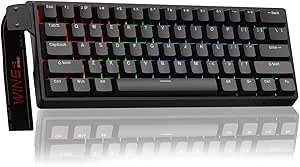

| mechanical gaming keyboard | Backlighting | Connectivity | Switch type | Compatibility |
|---|---|---|---|---|
| Redragon K668 108-Key Hot-Swap | RGB | Wired USB-C | Linear, hot-swappable | PC, laptop |
| RisoPhy Mechanical Gaming Keyb | RGB | Wired USB-A | Blue switch | PC, Mac, Xbox |
| AULA WIN68 HE Mechanical Gamin | RGB | Wired USB-C | Hall effect magnetic | Windows |
| SteelSeries USB Apex 5 Hybrid | Per-key RGB | Wired USB | Hybrid blue, tactile and clicky | — |
| Logitech G413 SE Full-Size Mec | White LED | Wired USB 2.0 | Tactile mechanical | — |
| Razer BlackWidow V4 X Mechanic | Customizable RGB | Wired | Yellow linear | PC |
| Logitech MX Mechanical Wireles | — | Bluetooth and Logi Bolt receiver | Tactile Quiet | Windows, macOS, Linux, Chrome OS, iOS, iPadOS, Android |
| Redragon Mechanical Gaming Key | 11 modes | Wired | Red linear, hot-swappable | PC and Mac |
| Womier SK80 75% Mechanical Gam | RGB, 19 effects and 9 colors | USB-C | Linear, hot-swappable | Mac and Windows |
| AULA F75 75% Wireless Mechanic | RGB, 16.8 million colors | Bluetooth 5.0, 2.4GHz wireless, USB-C wired | Linear, hot-swappable | — |
| Redragon K580 Wired RGB Mechan | RGB | Wired USB-C | — | Windows, macOS, and Linux |
| Aula WIN60 HE 60% Mechanical G | RGB | Wired USB-C | — | Windows PC |
| AULA F75 Pro Wireless Mechanic | RGB with 16 preset effects and music rhythm effects | — | — | PC, laptops, tablets, smartphones, and PS/Xbox consoles |
More Details on Our Top Picks
Redragon K668 108-Key Hot-Swap Wired RGB Gaming Keyboard, Extra 4 Hotkeys
The K668 is a strong fit for players who want a full-size layout but also want room to change how it feels later. Its hot-swappable linear switches can be replaced without soldering, making experimentation easier than on the Logitech G413 SE, which offers tactile switches but no hot-swap feature in the supplied details. Four extra hotkeys and the full 108-key layout keep common functions within reach, while two included keycap sets let you alter the look. RGB presets and music sync add visual flair, though they matter less for performance than the switch flexibility. The tradeoff is desk space: this is a large wired board, and its linear feel will not suit everyone. I’d skip it if you prefer clicky feedback or need a compact setup.
Pros:- Hot-swappable switches allow switch changes without soldering
- 108-key layout includes a number pad and four extra hotkeys
- Two keycap sets offer a choice of appearance
- RGB lighting includes preset modes and music sync
Cons:- Large full-size footprint can crowd a limited desk
- Linear switches lack the tactile bump and click of alternatives such as the RisoPhy
- Water resistance does not make it spill-proof
Best for: PC and laptop gamers who want a full-size layout and plan to try different switches without soldering
Not ideal for: Small-desk users and typists who want pronounced tactile or clicky feedback
- Number of keys:108
- Switch type:Linear, hot-swappable
- Backlighting:RGB
- Connectivity:Wired USB-C
- Compatibility:PC, laptop
- Dimensions:17.3 × 4.7 × 17.3 in
- Weight:880 g
- Water resistance:Water resistant
Our verdict“Choose the K668 if switch customization and extra keys matter more to you than saving desk space or getting clicky feedback.”
RisoPhy Mechanical Gaming Keyboard, RGB 104 Keys Ultra-Slim LED Backlit USB Wired Keyboard with Blue Switch
The RisoPhy makes a clear choice for gamers who want every keypress to feel and sound deliberate. Its blue switches provide tactile, clicky feedback, unlike the smoother linear switches in the Redragon K668 or the magnetic switches in the AULA WIN68 HE. That audible response can suit solo play and typing, but it may be disruptive around roommates or during voice chat. The 104-key layout keeps a number pad, while 100% anti-ghosting helps register simultaneous inputs during busy gameplay. Spill-resistant construction and double-injection ABS keycaps add practical protection, though the board remains wired and uses a conventional USB-A connection. I’d pick it over the Logitech G413 SE when clicky sound and RGB are priorities, but not if a quieter shared-room keyboard is needed.
Pros:- Blue switches deliver distinct tactile and audible feedback
- Full anti-ghosting supports simultaneous key presses
- Spill-resistant design includes drainage holes
- RGB lighting and 12 multimedia keys add control and customization
Cons:- Clicky switches can disturb people nearby or enter microphone audio
- USB-A wired connection limits placement flexibility
- ABS keycaps are less wear-resistant than the PBT keycaps on the Logitech G413 SE
Best for: Players and typists who enjoy audible clicky switches, want a number pad, and use a PC, Mac, or Xbox
Not ideal for: Shared-room gamers, streamers with nearby microphones, and anyone seeking wireless freedom
- Number of keys:104
- Switch type:Blue switch
- Backlighting:RGB
- Connectivity:Wired USB-A
- Layout:QWERTY
- Anti-ghosting:100%
- Multimedia keys:12
- Compatibility:PC, Mac, Xbox
Our verdict“Pick the RisoPhy if you want a full-layout gaming keyboard with loud, tactile blue switches and can accommodate its wired connection.”
AULA WIN68 HE Mechanical Gaming Keyboard 60% with Hall Effect Magnetic Switches, RGB Backlit, Wired
For players who prize response tuning and a clear desktop, the WIN68 HE takes a different route from full-size boards such as the SteelSeries Apex 5 and Logitech G413 SE. Its 68-key compact layout frees space for mouse movement, while Hall effect magnetic switches and an 8,000Hz polling rate target fast, configurable input. Programmable keys and web-driver customization give competitive players more control than the straightforward RisoPhy, but that flexibility comes with setup effort. The layout also omits the familiar full-size arrangement, so number-pad users and anyone who depends on dedicated navigation keys may find it limiting. The driver supports Windows only, which narrows its appeal for Mac owners. I’d choose this for a Windows gaming setup focused on tuning and compactness, not as an all-purpose office keyboard.
Pros:- Hall effect magnetic switches support adjustable actuation
- 8,000Hz polling rate is aimed at fast input reporting
- 68-key layout leaves more room for mouse movement
- Detachable USB-C cable and programmable keys add flexibility
Cons:- Compact layout removes the number pad and many dedicated keys found on the Apex 5
- Web driver supports Windows only
- Advanced settings may take time to configure
Best for: Windows competitive gamers who want a compact board, magnetic switches, and programmable input settings
Not ideal for: Mac users, number-pad users, and buyers who prefer a familiar full-size layout with minimal configuration
- Number of keys:68
- Layout size:60%
- Switch type:Hall effect magnetic
- Polling rate:8,000Hz
- Backlighting:RGB
- Connectivity:Wired USB-C
- Compatibility:Windows
- Additional features:Programmable keys, hot-swappable, detachable USB cable
Our verdict“Choose the WIN68 HE for a compact Windows gaming setup where magnetic-switch tuning matters more than a full key layout.”
SteelSeries USB Apex 5 Hybrid Mechanical Gaming Keyboard – Per-Key RGB Illumination – Aircraft Grade Aluminum Alloy Frame – OLED Smart Display
The Apex 5 is the most feature-focused full-size choice here, pairing hybrid tactile-clicky switches with per-key RGB and an OLED display. That display gives it a more personalized feel than the simpler Logitech G413 SE, which has white lighting but a sturdier PBT keycap specification; the Apex 5 instead puts more emphasis on visual control and its on-board screen. Its aluminum frame and included magnetic wrist rest suit long sessions, while water resistance offers some reassurance around drinks. Those extras come with a large footprint and a fixed USB connection, making this less convenient for a cramped desk or flexible setup than the compact AULA WIN68 HE. The hybrid switches also remain audible, so they are not a quiet-room choice. I’d favor it when full-size comfort and customization outweigh simplicity.
Pros:- Aircraft-grade aluminum frame provides a rigid construction
- OLED display and per-key RGB offer extensive visual customization
- Magnetic wrist rest supports longer gaming sessions
- Tactile-clicky hybrid switches provide pronounced key feedback
Cons:- Large footprint takes more desk space than the AULA WIN68 HE
- Clicky switches may be distracting in shared rooms
- Wired USB connection offers no wireless placement flexibility
Best for: Full-size PC gamers who want per-key lighting, an OLED display, a wrist rest, and a sturdy frame
Not ideal for: Small-desk users, people who need a quiet keyboard, and buyers seeking a compact or wireless setup
- Number of keys:104
- Switch type:Hybrid blue, tactile and clicky
- Backlighting:Per-key RGB
- Connectivity:Wired USB
- Frame material:Aircraft-grade aluminum alloy
- Water resistance:Water resistant
- Display:OLED smart display
- Included accessory:Magnetic wrist rest
Our verdict“Choose the Apex 5 if you want a full-size, feature-rich wired board and have room for its larger footprint.”
Logitech G413 SE Full-Size Mechanical Gaming Keyboard – Black
The G413 SE is the straightforward pick for gamers who would rather have durable essentials than elaborate lighting or switch-tuning features. Its PBT keycaps resist heat and wear, and the aluminum top case gives it a sturdy foundation—practical strengths that set it apart from the RisoPhy’s ABS keycaps and the customizable Redragon K668. The tactile switches offer feedback without the blue-switch click of the RisoPhy or Apex 5, making this a more restrained option for shared spaces. Its white-only backlighting is less flexible than the RGB on those alternatives, and the supplied six-key anti-ghosting spec is more limited than the RisoPhy’s full anti-ghosting claim. The full-size 108-key layout and media controls keep everyday functions close, but there is no wireless connection or included wrist rest.
Pros:- PBT keycaps are specified as heat- and wear-resistant
- Aluminum top case adds a sturdy feel
- Tactile switches offer feedback without the blue-switch click of the RisoPhy
- Full-size layout includes media controls
Cons:- White LED backlighting offers less customization than RGB boards such as the Apex 5
- Six-key anti-ghosting is more limited than the RisoPhy’s 100% anti-ghosting specification
- Wired-only design has no wrist rest included
Best for: PC gamers who want a durable full-size board with tactile switches and do not need colorful lighting or hot-swapping
Not ideal for: RGB enthusiasts, Mac users seeking a Mac-compatible option, and players who want wireless use or a wrist rest
- Number of keys:108
- Switch type:Tactile mechanical
- Keycaps:PBT, heat- and wear-resistant
- Backlighting:White LED
- Key rollover:6-key anti-ghosting
- Connectivity:Wired USB 2.0
- Compatible devices:PC
- Supported operating systems:Windows, macOS
Our verdict“Choose the G413 SE if durable materials and a simple tactile full-size layout matter more than RGB effects or advanced customization.”
Razer BlackWidow V4 X Mechanical Gaming Keyboard, Yellow Switches, Black
I’d choose the BlackWidow V4 X for a wired PC setup where quick access to extra commands matters more than wireless flexibility. Its dedicated macro keys and media controls give it a more game-focused control layout than the Logitech MX Mechanical, which is better suited to switching between work devices. The yellow linear switches are described as quiet and responsive, a sensible fit for rapid inputs without the more pronounced tactile feedback of the MX’s switches. Sound dampening and stabilizers also support a less distracting typing feel, while customizable Chroma RGB adds lighting control. The tradeoff is a wired, PC-focused design with no stated water resistance; buyers wanting a compact or wireless board should look at the Womier SK80 or Logitech instead.
Pros:- Dedicated macro keys provide quick access to game commands.
- Quiet, responsive yellow linear switches suit fast inputs.
- Customizable Chroma RGB lighting offers extensive color options.
- Doubleshot ABS keycaps, sound dampening, and stabilizers support a durable, controlled typing feel.
Cons:- Wired-only connectivity limits portability and flexible desk setups.
- No water-resistance feature is specified.
- Designed primarily for PC use rather than broad multi-device compatibility.
Best for: PC players who use macros or media controls during games and prefer a full-size, wired keyboard with quiet linear switches.
Not ideal for: Players who need wireless connectivity, a compact desk footprint, broad multi-device support, or stated protection from spills.
- Switch type:Yellow linear
- Keys:104
- Connectivity:Wired
- Backlighting:Customizable RGB
- Keycaps:Doubleshot ABS
- Compatibility:PC
- Dimensions:20.5 × 8 × 2 in
- Additional features:Macro keys, media controls, sound dampening, stabilizers
Our verdict“Choose the BlackWidow V4 X if you want a full-size PC gaming board with dedicated macros and quiet linear switches, and can live with a wired connection.”
Logitech MX Mechanical Wireless Illuminated Keyboard Tactile – Graphite
The MX Mechanical is the lineup’s strongest fit for someone who games on the same desk where they work, rather than for a player seeking gaming-first extras. Its tactile quiet switches provide feedback that differs from the linear Razer BlackWidow V4 X and Redragon board, while Bluetooth and a Logi Bolt receiver let it connect across as many as three devices. Smart backlighting and a rechargeable battery add convenience for mixed-use setups. Compared with the wired Razer, this Logitech is easier to move between computers and operating systems, but it lacks the Razer’s dedicated macro keys and gaming-focused emphasis. Full customization depends on Logi Options+ software, and battery life changes with lighting use, so it suits flexible everyday play better than a no-compromise competitive setup.
Pros:- Pairs with up to three devices over Bluetooth or the Logi Bolt receiver.
- Tactile quiet switches offer feedback without a loud typing profile.
- Smart backlighting adjusts to ambient conditions.
- Rechargeable battery supports extended use, with stated life varying by backlight use.
Cons:- Full customization requires Logi Options+ software.
- Lacks the dedicated macro keys found on the Razer BlackWidow V4 X.
- Battery life varies with use and backlight settings.
Best for: Players who split time between gaming and work across several computers or mobile devices and want a quiet tactile full-size board.
Not ideal for: Competitive players who prioritize dedicated gaming macros, a wired connection, or a keyboard designed specifically around PC gaming.
- Switch type:Tactile Quiet
- Keys:104
- Connectivity:Bluetooth and Logi Bolt receiver
- Device pairing:Up to 3 devices
- Battery:Rechargeable Li-Po, 1500 mAh
- Stated battery life:Up to 15 days with backlight; up to 10 months with backlight off
- Compatibility:Windows, macOS, Linux, Chrome OS, iOS, iPadOS, Android
- Dimensions:17.08 × 5.18 × 1.02 in
Our verdict“Pick the MX Mechanical if multi-device flexibility and quiet tactile typing matter more to you than gaming-specific macro controls.”
Redragon Mechanical Gaming Keyboard Wired, 11 Programmable Backlit Modes, Hot-Swappable Red Switch, Anti-Ghosting, Double-Shot PBT Keycaps
This Redragon makes a practical case for players who want hot-swappable linear switches and durable PBT keycaps in a full-size layout. Its 104 keys and anti-ghosting support simultaneous inputs, while multimedia shortcuts and macro editing add gaming utility without the distinct dedicated macro-key emphasis of the Razer BlackWidow V4 X. The ability to replace switches gives it a customization route the Razer’s listed specs don’t offer, and water resistance is specified here—though that should not be read as full waterproofing. The limits are its wired-only connection and backlighting that cannot be freely changed beyond preset modes. It is also a less flexible lighting pick than the Womier SK80’s RGB effects, so choose it for switch swapping and straightforward full-size play rather than elaborate lighting control.
Pros:- Hot-swappable red linear switches allow replacement or customization.
- Double-shot PBT keycaps provide a durable keycap option.
- Anti-ghosting supports multiple simultaneous key presses.
- Water resistance is specified in the product data.
Cons:- Wired-only connectivity limits placement and portability.
- Backlighting is limited to preset modes rather than freely selected colors.
- Full backlight customization requires software.
Best for: PC or Mac players who want a full-size wired board with replaceable linear switches, PBT keycaps, and anti-ghosting.
Not ideal for: Wireless users or players who want fully selectable RGB colors and more lighting control than preset modes allow.
- Switch type:Red linear, hot-swappable
- Keys:104
- Connectivity:Wired
- Backlighting:11 modes
- Keycaps:Double-shot PBT
- Multimedia keys:12
- Compatibility:PC and Mac
- Additional features:Anti-ghosting, macro editing, water resistant
Our verdict“Choose this Redragon if switch swapping and full-size gaming controls matter more than wireless use or flexible RGB color selection.”
Womier SK80 75% Mechanical Gaming Keyboard with Color Multimedia Display
The Womier SK80 trades a full-size key field for an 82-key 75% layout, leaving more desk space for mouse movement while keeping more keys than a 60% board. Its color multimedia display, gasket mount, and hot-swappable linear switches make it the most distinctive compact customization pick here. Compared with the Redragon’s 104-key layout, the SK80 takes up less room but asks buyers to adjust to fewer keys; compared with the AULA F75, it has a display but the listed connection is USB-C rather than wireless modes. RGB offers multiple effects, though the customization options may feel involved for newcomers. There is no water resistance, so it calls for care around drinks. Choose it for compact desk use and visual controls, not for wireless freedom or a full-size layout.
Pros:- 75% layout saves desk space while retaining 82 keys.
- Color multimedia display adds a distinctive control and information feature.
- Hot-swappable linear switches support customization and replacement.
- Gasket mount is designed to provide a softer, stable typing feel.
Cons:- Fewer keys than the full-size Redragon and Razer options.
- USB-C connectivity is less flexible than the AULA F75’s wireless modes.
- Not water resistant, and its customization options may challenge beginners.
Best for: Desk-conscious gamers who want a compact 75% layout, hot-swappable switches, a multimedia display, and USB-C wired connectivity.
Not ideal for: Buyers who need a full-size number pad, wireless connections, simple customization, or stated spill protection.
- Layout:75%
- Keys:82
- Switch type:Linear, hot-swappable
- Connectivity:USB-C
- Backlighting:RGB, 19 effects and 9 colors
- Display:Color multimedia screen
- Compatibility:Mac and Windows
- Additional features:Gasket mount, customizable macros, music syncing mode
Our verdict“Pick the SK80 if you want a compact wired gaming keyboard with a display and switch-swapping options, and do not need a number pad.”
AULA F75 75% Wireless Mechanical Keyboard, Hot Swappable, RGB Backlit, 2.4GHz/Type-C/BT5.0, Creamy Linear Switches, White & Brown
The AULA F75 is the most flexible choice here for a compact gaming setup that may also connect to other devices. Its 75% layout keeps 81 keys in a smaller footprint, while Bluetooth 5.0, 2.4GHz, and USB-C cover wireless and wired use. That makes it more versatile than the USB-C-only Womier SK80, though the Womier adds a color display that the AULA does not list. Hot-swappable linear switches and a volume knob give this board both customization and convenient control, and N-key rollover supports simultaneous inputs. The tradeoffs are a linear-only switch listing and a setup that may require driver installation for full customization. Battery life also depends on lighting and use, so this is a better fit for adaptable everyday gaming than buyers seeking a simple, permanently wired board.
Pros:- Bluetooth, 2.4GHz wireless, and USB-C wired modes support varied setups.
- Hot-swappable switches allow replacement and customization.
- Compact 75% layout retains essential keys while saving desk space.
- Volume control knob and N-key rollover suit gaming and everyday use.
Cons:- Listed switch type is linear, which may not suit buyers who prefer tactile feedback.
- Full customization may require driver installation.
- Battery life depends on use and RGB lighting settings.
Best for: Gamers who want a compact 75% board that can switch between a PC, mobile devices, and wired play, with replaceable linear switches.
Not ideal for: Buyers who prefer tactile or clicky switches, want a full-size layout, or want to avoid setup software for customization.
- Layout:75%
- Keys:81
- Switch type:Linear, hot-swappable
- Connectivity:Bluetooth 5.0, 2.4GHz wireless, USB-C wired
- Battery capacity:4000 mAh
- Backlighting:RGB, 16.8 million colors
- Compatible devices:PC, laptop, tablet, smartphone, gaming consoles
- Additional features:Programmable keys, volume knob, N-key rollover, WIN key lock
Our verdict“Choose the AULA F75 if you want a compact hot-swappable gaming keyboard with both wireless and wired connections, and are comfortable with linear switches.”
Redragon K580 Wired RGB Mechanical Gaming Keyboard with Macro Keys and Media Wheel
The Redragon K580 suits players who want a full-size layout with gaming controls close at hand. Its five dedicated macro keys can keep repeated commands off the main key rows, while the media controls and wheel make volume adjustments easier mid-game. Compared with the compact Aula WIN60 HE, the K580 leaves room for a number pad and dedicated controls, but takes up more desk space and lacks the Aula’s magnetic-switch design. Its clicky Outemu Blue switches provide pronounced tactile and audible feedback; that can be satisfying for typing, yet distracting in shared or quiet rooms. Hot-swappable switches offer a route to customization without soldering, though the keyboard remains wired and its USB-C connection may need an adapter in some setups. I’d choose it for control access, not a quiet or minimalist desk.
Pros:- Five dedicated macro keys provide room for custom commands without sacrificing the standard layout
- Media controls and a wheel allow quick adjustments without leaving a game
- Hot-swappable switches allow switch changes without soldering
- Full anti-ghosting supports simultaneous inputs during fast play
Cons:- Clicky blue switches can be loud in shared spaces
- Wired-only connectivity offers no wireless setup
- Its full-size footprint takes more desk space than compact alternatives
Best for: PC players who want a full-size keyboard, dedicated macro keys, and quick media controls for gaming and everyday use
Not ideal for: People sharing a quiet room, wireless-first users, or players with limited desk space who would prefer a compact board like the Aula WIN60 HE
- Layout:104-key QWERTY
- Switches:Outemu Blue, clicky and hot-swappable
- Connectivity:Wired USB-C
- Backlighting:RGB
- Dedicated controls:Five macro keys and media controls with wheel
- Compatibility:Windows, macOS, and Linux
- Dimensions:15.75 × 5.91 × 0.98 inches
- Weight:1200 g
Our verdict“Choose the K580 if you want dedicated macros and media controls on a full-size gaming board and can live with clicky switches and a wired connection.”
Aula WIN60 HE 60% Mechanical Gaming Keyboard Wired with Magnetic Switches, RGB Backlit, Hot Swappable, Compact 60% Layout for PC
The Aula WIN60 HE is the space-saving choice here, with a 61-key 60% layout that leaves more room for mouse movement than the full-size Redragon K580. Its magnetic Hall effect switches are the defining difference: they offer a different, precision-focused feel from the K580’s clicky Outemu Blues, though players who prefer familiar mechanical switch feedback may not enjoy them as much. A web-based driver supports remapping and macros without a traditional software install, which helps players tailor the compact layout. The tradeoff is that fewer physical keys mean relying on layers or remapping for functions and navigation keys. It connects by USB-C and is listed for Windows PC, so it is less flexible across platforms than the wireless AULA F75 Pro. I’d pick it for a tidy gaming setup, not a multi-device workstation.
Pros:- Compact 60% layout frees desk space for mouse movement
- Magnetic Hall effect switches distinguish it from traditional clicky options such as the Redragon K580
- Web-based driver supports remapping and macro creation
- RGB lighting provides customizable visual effects
Cons:- Windows PC compatibility limits its appeal for multi-platform users
- The 61-key layout removes dedicated navigation and number-pad keys
- Magnetic switches may not suit players who prefer conventional mechanical switch feel
Best for: Windows PC gamers with limited desk space who want a compact board, magnetic switches, and customizable key mapping
Not ideal for: Console players, users on macOS or Linux, or anyone who wants a full-size layout with dedicated navigation and number-pad keys
- Layout:60%, 61-key QWERTY
- Switches:Graywood V3 magnetic Hall effect switches
- Connectivity:Wired USB-C
- Backlighting:RGB
- Customization:Hot-swappable and programmable keys; web-based driver
- Compatibility:Windows PC
- Power:USB powered
- Design:Compact, ambidextrous layout
Our verdict“Choose the WIN60 HE for compact Windows gaming and magnetic switches, but skip it if you need a full set of physical keys or broad platform compatibility.”
AULA F75 Pro Wireless Mechanical Keyboard, 75% Hot Swappable RGB Backlit Gaming Keyboard with Knob and PBT Side-Printed Keycaps
The AULA F75 Pro balances a space-saving layout with more everyday keys than a 60% board. Its 75% layout and 81 keys retain a more usable set of functions than the Aula WIN60 HE, while Bluetooth, 2.4GHz, and USB-C give it more connection choices than the wired Redragon K580. That flexibility suits a desk shared between a gaming PC and other devices, and the multi-function knob makes quick adjustments easier. Pre-lubed Reaper switches and hot-swap support invite later customization, while PBT side-printed keycaps are built for regular use. The compromises are real: it still omits some dedicated keys found on a full-size board, advanced features may require driver setup, and wireless battery life varies with lighting and use. I’d favor it for a mixed gaming and productivity setup over a single-purpose wired station.
Pros:- Bluetooth, 2.4GHz, and USB-C support varied device and desk setups
- 75% layout keeps more keys than the Aula WIN60 HE while saving space
- Hot-swappable switches support later customization without soldering
- PBT side-printed keycaps and a multi-function knob add practical features
Cons:- The 81-key layout lacks some dedicated keys available on full-size keyboards
- Advanced customization may require driver software setup
- Wireless battery life varies with lighting and usage
Best for: Gamers and multi-device users who want wireless connection choices, a compact-but-usable layout, and a control knob
Not ideal for: Buyers who need a full-size board with a number pad or prefer a simple wired keyboard without driver setup or battery management
- Layout:75%, 81 keys
- Switches:Pre-lubed Reaper switches, hot-swappable 3-pin or 5-pin
- Connection modes:Bluetooth 5.0, 2.4GHz wireless, and USB-C
- Battery capacity:4000mAh
- Backlighting:RGB with 16 preset effects and music rhythm effects
- Keycaps:Side-printed PBT, double injection molding
- Controls:Multi-function knob, programmable keys, and WIN key lock
- Compatibility:PC, laptops, tablets, smartphones, and PS/Xbox consoles
Our verdict“Choose the F75 Pro if you want a compact gaming keyboard that can switch between wireless and wired connections, but not if you rely on a number pad.”
How We Picked
I compared these 13 boards by how well their layouts, switches, controls, connectivity, and construction serve gaming use. I gave more weight to practical play benefits—such as responsive switch designs, useful programmable controls, stable wired or wireless connections, and layouts that fit common desk setups—than to lighting effects alone. I also considered whether a board can handle everyday typing and whether its features add value without making operation or maintenance more complicated.
The ranking favors models with a clear gaming role and a useful balance of performance, usability, and flexibility. That puts the BlackWidow V4 X ahead as a dedicated gaming pick, while Hall Effect boards rank highly for players who want their specific input behavior and accept a 60% layout. Wireless 75% options rise for versatile setups; boards with fewer gaming controls, hybrid switches, or a productivity-first design rank lower for gaming-first buyers. Since switch feel and compatibility depend on the exact configuration, I treated those as factors to verify rather than assuming every board or switch is interchangeable.
Factors to Consider When Choosing Mechanical Gaming Keyboards
Before choosing a board, decide which compromises will affect your play every day. Layout and switch behavior are harder to change than RGB effects, while connectivity, hot-swap support, and extra controls can matter more as your setup changes.
Choose a Layout Around the Games You Play
A 60% keyboard saves desk space and leaves more room for broad mouse movement, but it removes dedicated arrow, function, and navigation keys. Those keys may still be available through layers, though that can slow down tasks that rely on frequent shortcuts. A 75% layout keeps arrow keys and a function row in a smaller footprint, which often suits mixed gaming and general use. Full-size boards preserve the number pad, useful for certain games and everyday data entry, at the cost of more desk width. Before buying, check the exact key arrangement rather than relying on the layout percentage alone. A compact board is a poor fit if you routinely reach for keys it omits.
Match Switch Behavior to Your Input Preferences
Mechanical switches can differ in actuation force, travel, sound, and whether they provide a tactile bump or click. Linear switches move without a pronounced bump, while tactile and clicky designs give more feedback; neither style automatically makes a player faster. Hall Effect magnetic switches use magnetic sensing and may offer adjustable actuation on supported models, but that feature matters only if the keyboard software exposes it and the game benefits from the control. Do not choose by color labels alone, since switch naming and feel can vary between brands. If noise matters in a shared room, check the switch type and the board’s construction rather than assuming RGB or gaming branding says anything about sound. Prioritize a feel you can comfortably use for long sessions.
Treat Hot-Swap as an Upgrade Option, Not a Guarantee
Hot-swap sockets can let you replace switches without soldering, which is useful if a switch fails or you want to alter the feel later. Buyers often assume every mechanical switch will fit, but socket type, pin layout, and board compatibility can restrict choices. Read the keyboard’s supported-switch details before ordering replacements. A hot-swap board can also make maintenance easier, but it does not automatically mean the stabilizers, keycaps, or internal parts are simple to replace. If you already know you like the included switches, a non-hot-swap model may be a better fit than paying for upgrade flexibility you will not use. Think of hot-swap as a repair and tuning advantage, not a performance feature by itself.
Decide Whether Wireless Convenience Fits Your Gaming Setup
Wired keyboards avoid battery charging and keep the connection simple, which suits fixed gaming stations. Wireless models can clear cable clutter and make one keyboard easier to use across devices, especially when they support multiple connection modes. Check which modes are available and whether switching between them is convenient; a model’s wireless label alone does not tell you how it connects. For competitive play, verify the manufacturer’s stated latency or polling details rather than assuming all wireless links behave alike. Also account for charging habits and whether the board can be used while connected by cable. Choose wireless for flexibility, not on the assumption that it is automatically better for every gaming setup.
Pay for Controls You Will Actually Use
Macro keys, media wheels, extra hotkeys, displays, and knobs can make common actions easier to reach without interrupting play. They also take desk space and may require software setup, so their value depends on your games and habits. Dedicated macro keys can help with repeated commands, while a media wheel is more useful if you adjust volume often. An OLED display is a distinctive convenience feature, but it should not outweigh switch feel or layout fit if you will rarely use it. Check whether controls are programmable and whether the software supports your operating system and preferred games. A simpler board can be the better choice when extra controls would go unused.
Look Beyond RGB When Comparing Build and Maintenance
Lighting can help visibility and personalize a setup, but it rarely improves input performance. For long-term use, pay attention to frame construction, keycap material, stabilizer behavior, and whether replacement parts are available. PBT keycaps are often chosen for resistance to shine, though the full typing feel also depends on the keycap shape and board construction. A metal frame can add rigidity, while a lighter case may be easier to move; neither detail alone establishes overall quality. Consider how easy the keyboard is to clean, especially if you eat or drink near your desk. A well-matched board is one you can maintain and comfortably use, not simply one with the most lighting modes.
Frequently Asked Questions
Are Hall Effect keyboards a better choice for gaming than regular mechanical keyboards?
Not for every player. Hall Effect boards such as the WIN68 HE and WIN60 HE use magnetic sensing, which can support adjustable actuation on compatible models, but that advantage depends on the keyboard’s software and the games you play. A conventional mechanical board may be a better fit if you prefer a known switch feel, need a larger layout, or do not plan to adjust actuation. Compare the actual configuration and supported features rather than choosing by the Hall Effect label alone. Layout comfort and reliable controls still matter during everyday play.
Should I choose a 60%, 75%, or full-size keyboard for gaming?
Choose based on the keys you use and the space you have, not on a general claim that one size is best for gaming. A 60% board gives your mouse more room but puts many functions behind key combinations. A 75% model keeps arrow keys and a function row, making it a useful compromise for gaming and regular computer work. Full-size boards are better if you depend on a number pad or dedicated navigation keys. If possible, check a layout diagram and count the keys you would lose before deciding.
Is a wireless mechanical keyboard suitable for competitive gaming?
It can be, but the connection details matter more than the wireless label. Check the specific model’s supported connection modes and manufacturer information about latency or polling, then compare that with your requirements for competitive play. A wired board avoids battery management and offers a straightforward connection; wireless can reduce clutter and support use across devices. Some keyboards also allow wired operation when charging, though that capability should be confirmed for the exact model. Choose around the connection performance and convenience you need rather than assuming every wireless board behaves the same.
Does hot-swap support mean I can install any mechanical switch?
No. Hot-swap describes a way to remove and replace switches without soldering, but socket design and pin compatibility can limit which switches fit. Check the keyboard’s compatibility information before buying replacements, especially if you plan to mix switch types. The feature is useful for repairing a worn switch or experimenting with feel, but it does not guarantee access to every switch on the market. If you do not expect to change switches, prioritize the included switch type and the board’s other features. A compatible replacement can still require care during installation.
Which features are worth prioritizing if I want one keyboard for gaming and everyday work?
Start with a layout that supports your daily tasks as well as your games. A 75% or full-size board can be easier to use for shortcuts, navigation, and typing than a 60% layout, while wireless connectivity can help if you move between devices. Then choose a switch feel and noise level that suit long typing sessions, not just short gaming bursts. Programmable controls or media keys are useful only if you will use them regularly. In this roundup, the AULA F75 Pro and F75 emphasize wireless flexibility, while the Logitech MX Mechanical leans further toward mixed productivity use than dedicated gaming controls.
Conclusion
For a dedicated gaming keyboard with useful programmable controls, I would start with the Razer BlackWidow V4 X as the best overall pick. The Logitech G413 SE is the best value-style choice for buyers who want a straightforward full-size mechanical board without prioritizing extra controls. Beginners who want familiar keys and a simple setup should look first at the G413 SE or Redragon K668, then check which layout and switch type suit them. For a premium feature set, the SteelSeries Apex 5 stands out with its OLED display and aluminum frame, though its hybrid switches will not suit everyone. Players focused on compact Hall Effect input should compare the AULA WIN68 HE and Aula WIN60 HE; those who want a smaller wireless board with more everyday keys should look at the AULA F75 Pro or F75. The best fit comes down to whether you value gaming controls, compactness, wireless flexibility, or a more traditional typing layout most.
Halloween Picks
halloween
As an affiliate, we earn on qualifying purchases.