The best SanDisk storage device for most people is the Extreme Portable SSD, 1TB, with speeds up to 2000MB/s: it offers a useful balance of capacity, portability, and fast file transfers. For a lower-cost everyday SSD, the 1TB Portable SSD up to 1000MB/s is a more measured choice, while the Extreme PRO Portable SSD, 2TB suits buyers who need extra room and a higher-performance tier. The main tradeoffs are speed versus capacity, rugged protection versus a smaller everyday design, and broad device compatibility versus a connector made for one phone. Read on for the full comparison, including picks for iPhone users, creators, and people who want a simple flash drive.

Get the latest gadgets delivered free with Prime
- Fast, free delivery on millions of items
- Prime Video, Amazon Music and more included
- Member-only deals all year
Complete the kit



Key Takeaways
- The 1TB Extreme Portable SSD up to 2000MB/s is the strongest all-around fit in this lineup when fast transfers and portable capacity matter more than choosing the simplest or smallest device.
- Portable SSDs cover a wide range of performance tiers: the listed models span read-speed claims from 520MB/s to 2000MB/s, so paying for the fastest tier makes most sense for frequent large transfers or demanding workflows.
- Phone-first drives solve a different problem from general storage: the Creator Phone SSD targets MagSafe-compatible creator setups, while the 256GB Phone Drive offers USB-C and Lightning connectors for moving files between compatible iPhones and other devices.
- Flash drives win on size and convenience, not sustained creative workloads: the dual USB-C/USB-A model favors cross-device compatibility, while the Extreme Fit is designed to stay especially unobtrusive in a USB-C port.
- Ruggedness and capacity can outweigh speed: the 4TB G-Drive ArmorATD is the lineup’s high-capacity rugged hard drive, a better fit for backup and field storage than for buyers who prioritize SSD-like transfer performance.
| SanDisk Creator Phone SSD, 1TB, MagSafe Compatible, USB-C |  | Best for iPhone Pro Video Capture | Storage capacity: 1 TB | Read speed: Up to 1,000 MB/s | Interface: USB 3.0 | VIEW LATEST PRICE | See Our Full Breakdown |
| SanDisk Professional 4TB G-Drive ArmorATD Rugged Portable External Hard Drive |  | Best Rugged High-Capacity Hard Drive | Capacity: 4 TB | Interface: USB-C (USB 3.2 Gen 1) | Read speed: Up to 130 MB/s | VIEW LATEST PRICE | See Our Full Breakdown |
| SanDisk Ultra Dual Drive 256GB USB-C and USB-A Flash Drive | 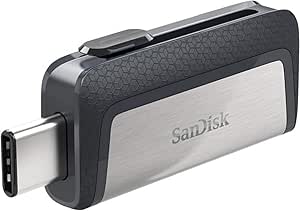 | Best for Moving Files Between USB-C and USB-A | Storage capacity: 256 GB | Connectors: USB Type-C and USB-A | Interface: USB 3.0 | VIEW LATEST PRICE | See Our Full Breakdown |
| SanDisk 256GB Phone Drive for iPhone with USB-C and Lightning Connectors |  | Best for iPhone and Lightning Device Transfers | Storage capacity: 256 GB | Connectors: USB-C and Lightning | Read speed: Up to 150 MB/s | VIEW LATEST PRICE | See Our Full Breakdown |
| SanDisk 1TB Portable USB-C Drive, Black |  | Best Compact Everyday SSD | Storage capacity: 1 TB | Read speed: Up to 600 MB/s | Connectivity: USB Type-C | VIEW LATEST PRICE | See Our Full Breakdown |
| SanDisk Extreme Portable SSD, 1TB, Up to 2000MB/s |  | Best for Speed and Ruggedness | Storage capacity: 1 TB | Read speed: Up to 2,000 MB/s | Interface: USB 3.0 | VIEW LATEST PRICE | See Our Full Breakdown |
| SanDisk Extreme Portable SSD, 1TB |  | Best Balanced Transfer Speeds | Storage capacity: 1 TB | Read speed: Up to 1,000 MB/s | Write speed: Up to 950 MB/s | VIEW LATEST PRICE | See Our Full Breakdown |
| SanDisk 1TB Portable SSD, Up to 1000 MB/s Read Speed, Black |  | Best Lightweight Everyday SSD | Storage capacity: 1 TB | Maximum read speed: Up to 1,000 MB/s | Interface: USB 3.0 | VIEW LATEST PRICE | See Our Full Breakdown |
| SanDisk Extreme Fit 512GB USB-C Flash Drive |  | Best Compact Plug-In Storage | Storage capacity: 512 GB | Interface: USB 3.2 Gen 1 | Connector: USB Type-C | VIEW LATEST PRICE | See Our Full Breakdown |
| SanDisk 1TB Portable SSD – Up to 520MB/s, USB-C, USB 3.2 Gen 2 |  | Best for Simple Rugged Carry | Capacity: 1 TB | Interface: USB 3.2 Gen 2 (USB-C) | Read speed: Up to 520 MB/s | VIEW LATEST PRICE | See Our Full Breakdown |
| SanDisk Extreme Portable 500GB External SSD | 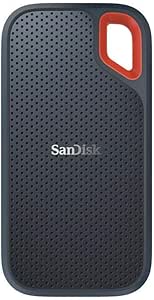 | Best Rugged Compact Pick | Storage capacity: 500 GB | Read speed: Up to 550 MB/s | Interface: USB 3.1 | VIEW LATEST PRICE | See Our Full Breakdown |
| SanDisk Extreme PRO Portable SSD, 2TB |  | Best for Demanding Creative Work | Storage capacity: 2 TB | Maximum read speed: Up to 4,000 MB/s | Maximum write speed: Up to 3,800 MB/s | VIEW LATEST PRICE | See Our Full Breakdown |
| SanDisk 1TB Portable SSD, Up to 800MB/s Read Speed, Black |  | Best Everyday Capacity and Speed Balance | Storage capacity: 1 TB | Maximum read speed: Up to 800 MB/s | Interface: USB 3.2 Gen 2 | VIEW LATEST PRICE | See Our Full Breakdown |
| SanDisk storage device | Storage capacity | Read speed | Interface | Dimensions |
|---|---|---|---|---|
| SanDisk Creator Phone SSD | 1 TB | Up to 1,000 MB/s | USB 3.0 | 3.25 × 2.7 × 0.43 inches |
| SanDisk Professional 4TB G-Dri | — | Up to 130 MB/s | USB-C (USB 3.2 Gen 1) | 7.2 × 4.8 × 2 inches |
| SanDisk Ultra Dual Drive 256GB | 256 GB | Up to 150 MB/s | USB 3.0 | 0.79 × 1.5 × 0.37 inches |
| SanDisk 256GB Phone Drive for | 256 GB | Up to 150 MB/s | — | 0.34 × 0.61 × 1.97 inches |
| SanDisk 1TB Portable USB-C Dri | 1 TB | Up to 600 MB/s | — | 2.95 × 1.77 × 0.39 inches |
| SanDisk Extreme Portable SSD | 1 TB | Up to 2,000 MB/s | USB 3.0 | 3.35 × 2 × 0.39 in |
| SanDisk Extreme Portable SSD | 1 TB | Up to 1,000 MB/s | — | — |
| SanDisk 1TB Portable SSD | 1 TB | — | USB 3.0 | 1.77 × 3.35 × 0.39 in |
| SanDisk Extreme Fit 512GB USB- | 512 GB | Up to 400 MB/s | USB 3.2 Gen 1 | 0.73 × 0.54 × 0.63 in |
| SanDisk 1TB Portable SSD | — | Up to 520 MB/s | USB 3.2 Gen 2 (USB-C) | 3.81 × 1.85 × 0.39 in |
| SanDisk Extreme Portable 500GB | 500 GB | Up to 550 MB/s | USB 3.1 | — |
| SanDisk Extreme PRO Portable S | 2 TB | — | — | — |
| SanDisk 1TB Portable SSD | 1 TB | — | USB 3.2 Gen 2 | — |
More Details on Our Top Picks
SanDisk Creator Phone SSD, 1TB, MagSafe Compatible, USB-C
For compatible iPhone Pro owners who record demanding video, this SSD’s standout advantage is that it can attach magnetically to the phone while supporting direct ProRes 4K capture at 60 fps. Its 1TB capacity and read speeds up to 1,000 MB/s suit large footage files, while the silicone shell adds IP65 water and dust resistance plus protection against drops up to 3 meters. Compared with the SanDisk 1TB Portable USB-C Drive, it offers a more phone-focused mounting setup and stronger stated durability, rather than simply serving as compact general-purpose storage. That specialization comes with limits: the high-frame-rate ProRes feature is for select iPhone Pro models, and it still needs a USB-C connection. Buyers who do not record directly to a compatible iPhone may get more utility from a simpler portable SSD.
Pros:- Supports direct ProRes 4K video capture at 60 fps on compatible iPhone Pro models.
- MagSafe-compatible attachment is designed for mobile recording.
- IP65 water and dust resistance with protection against drops up to 3 meters.
- 1TB capacity and read speeds up to 1,000 MB/s suit large video files.
Cons:- ProRes 4K at 60 fps support is limited to specified iPhone Pro models.
- Requires a USB-C connection, so the magnetic attachment alone does not connect it.
- Its phone-recording features may be unnecessary for buyers who only need everyday file storage.
Best for: iPhone 15 Pro, 15 Pro Max, 16 Pro, or 16 Pro Max owners who record ProRes video and want attached external storage.
Not ideal for: People seeking a general-purpose drive for multiple devices, or iPhone owners without a compatible Pro model who cannot use its direct ProRes capture feature.
- Storage capacity:1 TB
- Read speed:Up to 1,000 MB/s
- Interface:USB 3.0
- Connector:USB Type-C
- Durability:IP65 water and dust resistance; up to 3-meter drop protection
- Weight:1.92 ounces
- Dimensions:3.25 × 2.7 × 0.43 inches
- Included software:One month of Adobe Creative Cloud
Our verdict“Choose this for compatible iPhone Pro video capture; for ordinary portable storage, the SanDisk 1TB Portable USB-C Drive is a more straightforward fit.”
SanDisk Professional 4TB G-Drive ArmorATD Rugged Portable External Hard Drive
The G-Drive ArmorATD is the capacity-first pick here: 4TB gives field photographers and video crews room for extensive backups without stepping up to several smaller drives. Its anodized aluminum enclosure, protective bumper, shock resistance, and IP54 rain and dust resistance make it better suited to rougher handling than the pocket-sized SanDisk 1TB Portable USB-C Drive. The tradeoff is speed and portability. Read speeds top out at 130 MB/s, far below the SSD options in this roundup, so moving large project folders takes longer; at 12.32 ounces, it is also heavier and bulkier than those SSDs. It works natively with macOS, while Windows users must reformat it. I’d choose it for high-capacity field backups, not for fast editing directly from a portable drive.
Pros:- 4TB capacity accommodates large media libraries and backup sets.
- IP54 rain and dust resistance, shock resistance, and a protective bumper suit field use.
- Anodized aluminum enclosure provides a sturdy housing.
- USB-C connection and native macOS compatibility simplify use with Mac systems.
Cons:- Read speeds up to 130 MB/s are much slower than the SSDs in this roundup.
- Windows use requires reformatting the drive.
- At 12.32 ounces, it is heavier and bulkier than portable SSD alternatives.
Best for: Mac-based photographers, video crews, and field workers who need several terabytes of backup space in a rugged enclosure.
Not ideal for: Windows users who need immediate plug-and-play access, or mobile creators prioritizing fast transfers and a lightweight drive.
- Capacity:4 TB
- Interface:USB-C (USB 3.2 Gen 1)
- Read speed:Up to 130 MB/s
- Enclosure material:Anodized aluminum
- Form factor:2.5-inch
- Weight:12.32 ounces
- Dimensions:7.2 × 4.8 × 2 inches
- Compatibility:macOS native; Windows requires reformatting
Our verdict“Pick the ArmorATD for rugged 4TB backups, but choose an SSD such as the SanDisk 1TB Portable USB-C Drive when transfer speed and lighter carry matter more.”
SanDisk Ultra Dual Drive 256GB USB-C and USB-A Flash Drive
This flash drive earns its place through a practical pairing: USB-C and USB-A connectors let you move files between newer phones or tablets and computers with traditional USB ports, without carrying a separate adapter. At 256GB, it offers a useful pocket-sized transfer buffer, while read speeds up to 150 MB/s are suited to everyday documents, photos, and media. Compared with the SanDisk 256GB Phone Drive for iPhone, this model is the more flexible choice for mixing USB-A computers with USB-C devices; the iPhone-focused drive instead adds Lightning support and app-based backup features. The Ultra Dual Drive is not a fast replacement for an SSD, and its 75 MB/s stated write speed is lower than its read speed. Android phone transfers also depend on USB OTG support.
Pros:- USB-C and USB-A connectors support transfers across newer and older devices.
- Retractable design helps protect the connectors when carried.
- Read speeds up to 150 MB/s suit everyday file transfers.
- 256GB capacity provides room for documents, photos, and media.
Cons:- Write speed is listed at 75 MB/s, below the maximum read speed.
- Android phone transfers require USB-C and USB OTG support.
- Flash-drive capacity and performance may not suit large working media projects as well as an SSD.
Best for: People who regularly transfer files between USB-C phones or tablets and computers that still use USB-A.
Not ideal for: Buyers who need fast sustained transfers of large video libraries, or Android users whose devices lack USB OTG support.
- Storage capacity:256 GB
- Connectors:USB Type-C and USB-A
- Interface:USB 3.0
- Read speed:Up to 150 MB/s
- Write speed:75 MB/s
- Design:Retractable connectors; reversible USB-C connector
- Dimensions:0.79 × 1.5 × 0.37 inches
- Compatibility:Mobile devices, tablets, and computers; Android devices require USB-C and OTG support
Our verdict“Choose this dual-connector drive for routine transfers between USB-C devices and USB-A computers, rather than for high-speed media work.”
SanDisk 256GB Phone Drive for iPhone with USB-C and Lightning Connectors
For households or individuals moving files between Lightning and USB-C Apple devices, this drive’s dual connectors solve a compatibility problem that the SanDisk Ultra Dual Drive’s USB-C and USB-A combination does not. The 256GB capacity can hold a substantial batch of photos and videos, while the SanDisk Memory Zone app supports file management, backups, and password-protected encryption. USB-C devices can also access files through the iOS Files app. The tradeoff is that Lightning transfers and backup features rely on the SanDisk app, adding a software step that the USB-A/USB-C Ultra Dual Drive avoids for basic cross-device transfers. Write speeds vary from 10 to 50 MB/s, so large transfers may take time. I’d pick it for iPhone-to-iPad or iPhone-to-computer file moves, not as a fast working drive.
Pros:- USB-C and Lightning connectors support transfers across compatible Apple devices.
- 256GB capacity offers room for photos, videos, and other files.
- SanDisk Memory Zone supports manual and automatic backups.
- Password-protected file encryption is available through the app.
Cons:- Lightning transfers and backups require the SanDisk Memory Zone app.
- Write speeds of 10–50 MB/s can make large file transfers slow.
- Its Lightning connector is less useful for buyers whose devices use USB-C or USB-A.
Best for: iPhone and iPad users who need to move files between compatible Lightning and USB-C devices and want app-supported backup options.
Not ideal for: Buyers who want app-free Lightning transfers or routinely write large video files and need faster sustained transfers.
- Storage capacity:256 GB
- Connectors:USB-C and Lightning
- Read speed:Up to 150 MB/s
- Write speed:10–50 MB/s
- Compatible devices:Compatible iPhones, iPad Pro, Mac, smartphones, tablets, and computers
- Dimensions:0.34 × 0.61 × 1.97 inches
- App:SanDisk Memory Zone
- Color:Metallic Sky blue
Our verdict“Choose this for app-supported transfers between compatible Lightning and USB-C Apple devices; choose the SanDisk Ultra Dual Drive for USB-A and USB-C compatibility instead.”
SanDisk 1TB Portable USB-C Drive, Black
This is the straightforward pick for buyers who want 1TB of solid-state storage in a light, pocket-sized enclosure. Read speeds up to 600 MB/s make it better suited to moving large folders than either flash drive here, while the no-moving-parts design and stated protection against drops up to 2 meters offer reassurance for everyday travel. Compared with the SanDisk Creator Phone SSD, it is less specialized: there is no MagSafe mounting or direct ProRes capture feature, but its general-purpose design works with desktops, laptops, smartphones, and tablets that support USB-C. The main limitation is that 600 MB/s is below the faster SSD options in the roundup, and the provided specification gives no write-speed figure. Actual performance also depends on the host device and use conditions.
Pros:- 1TB capacity in a compact, 1.12-ounce design.
- Read speeds up to 600 MB/s support faster transfers than the listed flash drives.
- Solid-state design has no moving parts.
- Rated for drop protection up to 2 meters.
Cons:- Its maximum stated read speed is lower than faster SSD options in the roundup.
- No write-speed figure is provided, making sustained write performance harder to compare.
- Actual performance can vary with the host device and usage conditions.
Best for: Laptop, desktop, and USB-C mobile-device owners who want a light 1TB SSD for everyday file storage and transfers.
Not ideal for: Creators who need direct iPhone ProRes recording, higher listed read speeds, or a specified write-speed target for sustained work.
- Storage capacity:1 TB
- Read speed:Up to 600 MB/s
- Connectivity:USB Type-C
- Drop protection:Up to 2 meters
- Weight:1.12 ounces
- Dimensions:2.95 × 1.77 × 0.39 inches
- Compatible devices:Desktop, laptop, smartphone, tablet
- Platforms:Mac, PC
Our verdict“Choose this compact SSD for general 1TB USB-C storage, but opt for the Creator Phone SSD if direct iPhone ProRes capture is your priority.”
SanDisk Extreme Portable SSD, 1TB, Up to 2000MB/s
This Extreme Portable SSD is the speed-focused pick in this group: its read speeds reach up to 2,000 MB/s, twice the stated maximum of the 1TB Extreme model rated at 1,000 MB/s. That headroom can help when moving large project files or working across compatible devices, while IP65 protection and 3-meter drop protection add reassurance for travel and field work. It is still pocket-sized at 1.6 ounces, and 256-bit AES encryption adds a privacy option for sensitive files. The tradeoff is that the listed 2,000 MB/s figure is for reads; write speeds are lower, so it is not a guarantee of equally fast saves. Encryption also requires a software download and has stated OS requirements. Compared with the smaller Extreme Fit flash drive, this is a better choice for frequent large transfers, but less discreet to leave plugged in.
Pros:- Up to 2,000 MB/s read speed is the highest stated speed among these five picks.
- IP65 dust and water resistance plus drop protection up to 3 meters.
- Pocket-sized 1.6-ounce body suits mobile workflows.
- 256-bit AES encryption offers a way to protect sensitive files.
Cons:- Write speeds are lower than the advertised maximum read speed.
- Encryption requires a software download and is supported on Windows 10+ and macOS 12+.
- The USB 3.0 interface listed in the specs may limit performance versus the headline speed on some setups.
Best for: Photographers, video creators, and mobile professionals who move large files between compatible devices and want added physical protection.
Not ideal for: Buyers who mainly need a tiny plug-in drive for occasional documents, or who need fast writes matching the advertised maximum read speed.
- Storage capacity:1 TB
- Read speed:Up to 2,000 MB/s
- Interface:USB 3.0
- Connector:USB Type-C
- Water and dust resistance:IP65
- Drop protection:Up to 3 m
- Encryption:256-bit AES
- Weight:1.6 oz
- Dimensions:3.35 × 2 × 0.39 in
Our verdict“Choose this model if speed and rugged protection matter more than matching its peak read rate on writes.”
SanDisk Extreme Portable SSD, 1TB
This 1TB Extreme Portable SSD takes a balanced approach, listing both 1,000 MB/s read and 950 MB/s write speeds. That makes its performance picture clearer for buyers who regularly copy files onto the drive, unlike models in this group that state only a maximum read speed. It connects over USB-C and supports laptops, desktops, phones, and tablets; compatibility with Time Machine and the Files app also suits people moving between computer backups and mobile file handling. Compared with the 2,000 MB/s Extreme Portable SSD, this model has lower stated read speed and no listed IP65 or drop-protection rating, but its write figure is explicit and nearly as high as its read figure. The product details do not specify included cables or accessories, so check connection needs before relying on a particular setup.
Pros:- Both read and write speeds are specified, up to 1,000 and 950 MB/s.
- USB-C connection supports a range of computers and mobile devices.
- Listed compatibility with Time Machine and the Files app suits mixed-device workflows.
- 1TB capacity gives room for projects and media libraries.
Cons:- Its stated read speed is below the 2,000 MB/s Extreme Portable SSD in this roundup.
- The supplied product details do not list dust, water, or drop protection.
- Included cables and accessories are not specified.
Best for: Laptop and phone owners who want a 1TB SSD with stated read and write speeds for routine photo, video, and project-file transfers.
Not ideal for: Outdoor creators who need a specified dust, water, or drop rating, or buyers whose workflow depends on the highest available read speed.
- Storage capacity:1 TB
- Read speed:Up to 1,000 MB/s
- Write speed:Up to 950 MB/s
- Connectivity:USB Type-C
- Drive type:External solid-state drive
- Compatible devices:Laptop, desktop, smartphone, tablet, Mac
- Color:Black
- Model number:SDSSDE62-2T00-GAO
Our verdict“Pick this Extreme model for a clear, nearly balanced read-write speed profile across USB-C devices.”
SanDisk 1TB Portable SSD, Up to 1000 MB/s Read Speed, Black
For everyday backups and file transfers, this standard 1TB Portable SSD keeps the essentials straightforward: USB-C connection, up to 1,000 MB/s reads, and a 1.12-ounce body. Its small footprint and stated 2-meter drop protection make it easier to carry than a desktop-style drive, while the no-moving-parts design fits regular transport. Compared with the 1TB Extreme Portable SSD rated at 1,000 MB/s read and 950 MB/s write, this model has no listed write-speed figure or rugged water-and-dust rating. It is a simpler fit for buyers who prioritize a light carry and basic drop protection over a fuller performance and durability feature set. Write speeds may be lower than reads, and usable space will be below the stated capacity, so it is less suited to workflows where predictable write performance or a full terabyte of usable room matters.
Pros:- Lightweight at 1.12 ounces and compact enough for everyday carry.
- Up to 1,000 MB/s read speed supports transfers of larger files.
- Drop protection is rated up to 2 meters.
- USB-C connection works with listed desktop, laptop, smartphone, and tablet devices.
Cons:- Write speeds are lower than read speeds and are not specified.
- No water- or dust-resistance rating is listed.
- Usable storage is less than the stated 1 TB capacity.
Best for: Students and mobile professionals who want lightweight 1TB storage for everyday backups, documents, photos, and device space management.
Not ideal for: Video editors who need a stated high write speed, or travelers seeking specified water and dust resistance.
- Storage capacity:1 TB
- Maximum read speed:Up to 1,000 MB/s
- Interface:USB 3.0
- Connector:USB Type-C
- Drop protection:Up to 2 m
- Weight:1.12 oz
- Dimensions:1.77 × 3.35 × 0.39 in
- Color:Black
- Compatible platforms:Mac, PC
Our verdict“Choose this drive for light, everyday 1TB storage when a stated write speed and water resistance are not priorities.”
SanDisk Extreme Fit 512GB USB-C Flash Drive
The Extreme Fit is the most discreet option here: its tiny USB-C form is designed to stay attached to a compatible device, rather than sit at the end of a cable like the portable SSDs. Its 512GB capacity and read speeds up to 400 MB/s suit documents, photos, and smaller media collections, while the SanDisk Memory Zone app can help manage backups. Compared with the 1TB Portable SSD models, it offers half the listed capacity and lower peak read speed, but takes up far less space in a bag and avoids a separate drive body. That small format also brings limits: it needs a USB 3.2 port to reach its stated performance, and the app requires download and installation. It makes less sense for frequent large video transfers or for buyers who need a clearly specified ruggedness rating.
Pros:- Compact plug-and-stay format avoids carrying a separate SSD body and cable.
- 512GB capacity fits a substantial collection of documents and media.
- Read speeds reach up to 400 MB/s.
- Compatible with listed USB-C computers, tablets, and smartphones.
Cons:- Capacity is lower than the 1TB SSD options in this group.
- Stated performance requires a USB 3.2 port.
- Memory Zone backup and management features require an app download and installation.
Best for: USB-C laptop, tablet, and smartphone owners who want a low-profile drive for documents, photos, and files they keep close at hand.
Not ideal for: Creators moving large video projects or buyers who need 1TB capacity, a high-speed external SSD, or specified drop protection.
- Storage capacity:512 GB
- Interface:USB 3.2 Gen 1
- Connector:USB Type-C
- Read speed:Up to 400 MB/s
- Compatible devices:Tablet, smartphone, personal computer
- Color:Black
- Dimensions:0.73 × 0.54 × 0.63 in
- Additional feature:Lightweight
Our verdict“Pick the Extreme Fit when a discreet USB-C drive matters more than SSD-level capacity and transfer speed.”
SanDisk 1TB Portable SSD – Up to 520MB/s, USB-C, USB 3.2 Gen 2
This 1TB Portable SSD is the practical carry pick for buyers who want solid-state storage with a way to attach it to a bag or belt. Its rubber hook and 2-meter drop protection make it easier to keep close while traveling, and the 1.44-ounce body remains light. The stated read speed of up to 520 MB/s is well below the 1,000 MB/s Portable SSD and Extreme models in this lineup, so large transfers will take longer. That lower ceiling may be acceptable for routine backups, personal files, and general business use, especially if attachment and portability matter more than peak speed. The product details do not specify an included cable or adapter, and performance depends on the host device and interface. Compared with the lighter 1.12-ounce 1TB Portable SSD, this one trades some weight for its attachment hook.
Pros:- Rubber hook makes it convenient to attach to a belt or backpack.
- Drop protection is rated up to 2 meters.
- Compact 1.44-ounce design is easy to carry.
- 1TB capacity suits multimedia, personal, and business files.
Cons:- Maximum stated read speed of 520 MB/s is below the faster SSDs in this roundup.
- Performance can vary with the host device and interface conditions.
- Included cable or adapter is not specified.
Best for: Commuters and field workers who want a lightweight 1TB SSD that can clip onto a belt or backpack and withstand accidental drops.
Not ideal for: Video editors and other users who frequently transfer large files and would benefit from the faster 1,000 or 2,000 MB/s models.
- Capacity:1 TB
- Interface:USB 3.2 Gen 2 (USB-C)
- Read speed:Up to 520 MB/s
- Form factor:Portable, 2.5 inches
- Weight:1.44 oz
- Dimensions:3.81 × 1.85 × 0.39 in
- Compatibility:Desktop, laptop, PlayStation 5
- Drop protection:Up to 2 m
Our verdict“Choose this model for attachable, drop-protected everyday storage if portability matters more than faster transfers.”
SanDisk Extreme Portable 500GB External SSD
The SanDisk Extreme Portable 500GB suits travelers who want a small drive for active photo and video files, with more protection than a basic portable SSD. Its IP55 water and dust resistance and shock-resistant solid-state core add reassurance when it rides in a bag, while read speeds up to 550 MB/s are suited to everyday transfers rather than the most demanding editing work. Compared with the SanDisk 1TB Portable SSD with up to 800 MB/s, this model offers less capacity and a lower stated read speed, but adds a stated IP rating. The tradeoff is its 500GB capacity, which can fill quickly with large video libraries. Its enclosure must also be clean and dry before use, and actual speed depends on the host device and workload.
Pros:- IP55-rated protection against water and dust
- Shock-resistant solid-state core
- Compact 1.44-ounce design
- USB-C connection with read speeds up to 550 MB/s
Cons:- 500GB may be limiting for large photo and video libraries
- Stated read speed is lower than the 1TB Portable SSD rated up to 800 MB/s
- Drive must be clean and dry before use
Best for: Traveling photographers and students who need a pocket-sized drive for a moderate set of files and value stated water and dust resistance.
Not ideal for: Video editors storing large projects or moving frequent high-volume files; its 500GB capacity and 550 MB/s maximum read speed trail higher-capacity, faster options in this roundup.
- Storage capacity:500 GB
- Read speed:Up to 550 MB/s
- Interface:USB 3.1
- Connector:USB-C
- Water and dust resistance:IP55
- Shock resistance:Up to 1500G
- Weight:1.44 ounces
- Warranty:3-year limited manufacturer warranty
Our verdict“Choose this model for a compact travel drive with a stated IP55 rating, but pick a higher-capacity, faster SSD for heavier creative workloads.”
SanDisk Extreme PRO Portable SSD, 2TB
For people moving large project files regularly, the SanDisk Extreme PRO Portable SSD 2TB stands apart from the everyday portable models in this roundup. Its stated 4,000 MB/s maximum read speed and 3,100 MB/s average sustained write speed are aimed at demanding creative workflows, while 2TB leaves more room for active projects than the 500GB SanDisk Extreme Portable SSD. The IP65 rating and drop protection up to 3 meters add protection for travel, and 256-bit AES encryption can help safeguard files. That security feature requires a software download, adding setup before use. This is also a more specialized choice than the SanDisk 1TB Portable SSD rated up to 800 MB/s: its performance and capacity are greater on paper, but may be unnecessary for routine backups. Actual speed depends on the connected device and conditions.
Pros:- 2TB capacity for large active projects
- Up to 4,000 MB/s read speed and 3,100 MB/s average sustained write speed
- IP65 water and dust resistance with drop protection up to 3 meters
- 256-bit AES encryption with password protection
Cons:- Encryption software must be downloaded separately
- Actual performance varies with the host device and usage conditions
- Its high stated performance may be unnecessary for routine file backups
Best for: Video editors, photographers, and other creators who routinely move large projects, need 2TB of portable capacity, and want password-based encryption.
Not ideal for: Casual backup users with modest files or devices that cannot make use of the drive’s stated high speeds; a simpler portable SSD may better fit their workload.
- Storage capacity:2 TB
- Maximum read speed:Up to 4,000 MB/s
- Maximum write speed:Up to 3,800 MB/s
- Average sustained write speed:3,100 MB/s
- Connector:USB Type-C
- Water and dust resistance:IP65
- Drop protection:Up to 3 m
- Encryption:256-bit AES
- Weight:2.24 oz
Our verdict“Pick the Extreme PRO for large creative workloads that can benefit from its high stated transfer speeds, capacity, and encryption features.”
SanDisk 1TB Portable SSD, Up to 800MB/s Read Speed, Black
The SanDisk 1TB Portable SSD offers a practical middle ground for buyers who want more room than the 500GB SanDisk Extreme Portable SSD without stepping up to the specialist performance of the 2TB Extreme PRO. Its 1TB capacity and read speeds up to 800 MB/s fit routine backups, carrying work files, and moving photos between compatible laptops and tablets. The rubber enclosure is rated for drops up to two meters, and a rubber hook gives it an easy way to attach to a backpack or belt loop. That portability comes with limits: the supplied data lists read speed, not a comparable write-speed figure, and says write speeds are lower. It also lacks the stated IP water and dust rating of the 500GB Extreme, so I would not treat it as the better choice for wet or dusty environments.
Pros:- 1TB capacity for everyday backups and work files
- Read speeds up to 800 MB/s
- Rubber enclosure rated for drops up to two meters
- Rubber hook for attaching the drive to gear
Cons:- Write speeds are lower than read speeds
- Actual performance depends on the host device and usage conditions
- No water and dust-resistance rating is listed
Best for: Laptop and tablet owners who want 1TB for everyday backups and file transfers, plus drop protection and a way to attach the drive to a bag.
Not ideal for: Creators who need fast sustained writes or travelers who need a stated water and dust-resistance rating; the listed write speed is lower than its read speed and no IP rating is provided.
- Storage capacity:1 TB
- Maximum read speed:Up to 800 MB/s
- Interface:USB 3.2 Gen 2
- Connector:USB Type-C
- Form factor:Portable, 2.5 inches
- Drop protection:Up to 2 meters
- Enclosure material:Rubber
- Compatible devices:Laptops and tablets
Our verdict“Choose this model for portable 1TB storage and everyday transfers; opt for the 500GB Extreme for stated IP55 protection or the Extreme PRO for demanding workloads.”
How We Picked
I compared the 13 listed SanDisk devices by the jobs they are built to do: carry working files, expand phone storage, move files between connectors, or hold larger backups. I weighed stated capacity and speed alongside connection type, portability, and any clear design focus, such as MagSafe compatibility or rugged construction. Where models share a name but differ in stated speed, I treated them as separate choices rather than assuming their performance is interchangeable.
The ranking favors versatility for the overall pick, then gives each device a distinct role based on its strongest buyer benefit. A higher-speed SSD ranks ahead of slower portable drives for active file work, while phone drives, flash drives, and the 4TB rugged hard drive earn their place for specific needs that a general-purpose SSD does not serve as neatly. I also account for tradeoffs: faster models can be more than casual users need, flash drives have less room for ongoing work, and a rugged hard drive prioritizes capacity and protection over SSD speed.
| SanDisk storage device | Interface | Connector |
|---|---|---|
| SanDisk Creator Phone SSD | USB 3.0 | USB Type-C |
| SanDisk Professional 4TB G-Dri | USB-C (USB 3.2 Gen 1) | — |
| SanDisk Ultra Dual Drive 256GB | USB 3.0 | — |
| SanDisk 256GB Phone Drive for | — | — |
| SanDisk 1TB Portable USB-C Dri | — | — |
| SanDisk Extreme Portable SSD | USB 3.0 | USB Type-C |
| SanDisk Extreme Portable SSD | — | — |
| SanDisk 1TB Portable SSD | USB 3.0 | USB Type-C |
| SanDisk Extreme Fit 512GB USB- | USB 3.2 Gen 1 | USB Type-C |
| SanDisk 1TB Portable SSD | USB 3.2 Gen 2 (USB-C) | — |
| SanDisk Extreme Portable 500GB | USB 3.1 | USB-C |
| SanDisk Extreme PRO Portable S | — | USB Type-C |
| SanDisk 1TB Portable SSD | USB 3.2 Gen 2 | USB Type-C |
Factors to Consider When Choosing Best SanDisk Storage Devices
Before choosing among the best SanDisk storage devices, match the device to how files move through your day. The largest capacity or highest speed is not automatically the best fit; connector compatibility, backup habits, and the kind of files you handle can matter more.
Choose Speed for Your Workload, Not the Largest Number
Speed claims are most useful when you regularly move large batches of photos, video, or project files. A fast portable SSD can shorten transfers, but the source device, cable, port, and file type can all limit real-world performance. Small documents and occasional phone backups rarely need the fastest model in this roundup. Check whether a speed figure is a read or write claim, since copying files onto a drive depends on write performance too. Also confirm that your computer or phone has a compatible high-speed port before paying for a faster tier. For mixed everyday use, capacity and connection convenience may matter more than peak throughput.
Treat Capacity as a Workflow Choice
Capacity needs depend on whether the drive holds a temporary transfer, an active project, or a second copy of a growing library. A 256GB or 512GB device can be handy for phone files and documents, but large video libraries can fill it quickly. A 1TB SSD offers more room for working files without becoming as specialized as a multi-terabyte backup drive. The 4TB ArmorATD is aimed at buyers who need to keep substantial data together, though its hard-drive format favors capacity over SSD-style speed. Avoid buying only for your current free-space estimate; leave room for new files and future projects. For backups, one large drive should not be your only copy of important data.
Check Connectors Before Buying for a Phone
Phone storage can be convenient, but the right connector depends on the phone and the task. The Phone Drive’s USB-C and Lightning connectors target movement between compatible devices, while the Creator Phone SSD is oriented toward a MagSafe-compatible creator setup and USB-C connection. A connector that fits does not guarantee that every app or file workflow will work as expected, so verify device support and operating-system requirements. Think about whether you want to offload files occasionally or record and manage larger projects around an external drive. If the drive will also serve a computer, check that its connector and included cable suit that setup. A general portable SSD may be more flexible if phone-specific features are not central to your routine.
Pick Flash Drives for Convenience, With Their Limits in Mind
Flash drives are useful when small size and quick handoffs matter more than a large active workspace. A USB-C and USB-A model can bridge newer laptops and older devices without relying on adapters, while a low-profile USB-C drive stays less obtrusive when left connected. Their compact form makes them easy to carry, but also easier to misplace than a larger drive. A flash drive is not automatically a safer backup: it can be lost, and a single copy still leaves files exposed to failure or accidental deletion. Check the device’s available ports and physical clearance, especially if neighboring ports sit close together. For repeated transfers of large creative files, a portable SSD is usually a better match.
Decide Whether Rugged Protection Justifies the Form Factor
Rugged designs are most useful when a drive will travel in a field kit, work bag, or location shoot where bumps and weather exposure are more likely. The ArmorATD combines rugged positioning with 4TB of hard-drive capacity, a different balance from the speed-led portable SSDs. Protection claims are not a substitute for careful handling, and buyers should check the manufacturer’s specific limits for drops, water, and dust rather than treating “rugged” as indestructible. A bulkier drive can also be less convenient for daily pocket carry. If the drive mostly stays on a desk, a smaller standard SSD may be easier to use. Choose ruggedness for the conditions you face, not simply as a label.
Pay for Premium Performance Only When It Changes Your Routine
A premium SSD tier can be worthwhile when it supports frequent large transfers, demanding editing work, or a need for more capacity in one portable device. The 2TB Extreme PRO is the lineup’s premium-capacity choice, while the 1TB Extreme model with a 2000MB/s claim emphasizes speed in a smaller capacity. Those benefits have limited value if your device cannot use the available throughput or your files are mostly small. For casual backups and document storage, a less performance-focused portable SSD may leave more room in the budget for a second backup copy. Compare the actual capacity, speed claim, connector, and protection features rather than relying on product-family names alone. Choose the tier that removes a real bottleneck in your workflow.
Frequently Asked Questions
Which SanDisk device is the best starting point for a general-purpose portable drive?
The 1TB Extreme Portable SSD with a stated speed of up to 2000MB/s is the strongest starting point if you want a portable drive for a mix of large files and everyday storage. It stands out for combining useful capacity with a higher speed tier than the more basic portable SSD options here. If your transfers are modest, the 1TB model rated up to 1000MB/s may be a more sensible match. Check your computer’s port and cable support before choosing based on the speed claim alone. If you need a large backup rather than a fast working drive, the 4TB ArmorATD serves a different purpose.
Should I choose the 2000MB/s Extreme SSD or a slower 1TB portable SSD?
Choose the faster Extreme model if you often transfer large video files, photo collections, or project folders and your host device supports a high-speed connection. A slower 1TB portable SSD can be a better fit for routine backups, documents, and occasional file movement, where the additional speed may not change your day. The lineup includes several 1TB drives with different stated speed ceilings, so compare the exact model rather than relying on “portable SSD” in the name. Read and write speeds can differ, which matters when you are adding files to the drive. Your workflow and port capability should decide whether the faster tier is useful.
Which SanDisk option makes the most sense for moving files between an iPhone and a computer?
The 256GB Phone Drive is the clearest fit for buyers who need both USB-C and Lightning connectors for compatible devices. The Creator Phone SSD is more specialized, with MagSafe compatibility and USB-C aimed at creator-style phone setups. Before buying, confirm your iPhone connector and the app or operating-system support needed for the files you want to move. If you also need a general computer drive with more capacity, a portable SSD may serve as a better central storage device. Phone-focused convenience does not automatically make a drive the best option for every computer workflow.
Is a 4TB rugged hard drive a better backup choice than a portable SSD?
It can be a better fit when you need to store a large library in one device and value rugged construction over fast transfers. The 4TB G-Drive ArmorATD offers more listed capacity than the SSD picks in this roundup, but its hard-drive format is not the speed-first choice for active editing. A portable SSD is generally the better fit for frequently opening or moving project files. For either type, keep a separate copy of important data rather than treating one drive as a complete backup plan. Consider how often the drive will travel and the conditions it may face before prioritizing rugged design.
When should I choose a SanDisk flash drive instead of an SSD?
Choose a flash drive when you want a small, simple way to carry or hand off a limited set of files. The Ultra Dual Drive is useful when you need both USB-C and USB-A connections, while the Extreme Fit suits buyers who want a compact USB-C option that can stay unobtrusive in a port. An SSD is a stronger fit for larger libraries, frequent transfers, or files used as part of ongoing work. Check the flash drive’s capacity against your actual files, especially if you work with video. For important data, keep another copy regardless of which form factor you choose.
Conclusion
For most buyers, I recommend the 1TB Extreme Portable SSD up to 2000MB/s as the best overall: it pairs portable capacity with the lineup’s strongest stated speed among the 1TB general-purpose SSD picks. The best value fit is the 1TB Portable SSD rated up to 1000MB/s for everyday storage when peak speed is not a priority. The best premium choice is the 2TB Extreme PRO for buyers who want more SSD capacity in a performance-focused model, while the best option for beginners is the 1TB Portable SSD rated up to 800MB/s for a straightforward general-purpose starting point. For specific needs, choose the USB-C/Lightning Phone Drive for compatible iPhone file transfers, the dual-connector flash drive for USB-C and USB-A handoffs, or the 4TB ArmorATD for rugged, high-capacity backup storage. Match the device to your ports and workload, and keep a second copy of files that matter.