Among these budget gaming laptops, I’d put the Acer Nitro V 15 with RTX 4050 first for buyers who want the strongest dedicated graphics option in this lineup. The HP Victus with RTX 3050 is a more balanced pick with 16GB of memory, while the NIMO Ryzen 7 with Radeon 680M suits lighter games and everyday work without a dedicated graphics chip. The main tradeoff is clear: dedicated GPUs are better suited to demanding games, while integrated graphics often come with less gaming headroom. Memory and storage also vary widely, and several configurations start with only 8GB RAM or 256GB SSD. Read on for the full comparison and guidance on which compromises make sense for your games.

Get the latest gadgets delivered free with Prime
- Fast, free delivery on millions of items
- Prime Video, Amazon Music and more included
- Member-only deals all year
Complete the kit



Key Takeaways
- The Acer Nitro V 15 is the graphics leader here: its RTX 4050 and 165Hz display give it more gaming headroom than the RTX 3050 and GTX 1650 models, though its 8GB RAM deserves attention.
- The HP Victus RTX 3050 configuration is a ready-to-use middle ground: its 16GB RAM and 512GB SSD avoid two common entry-level limitations, even though its GPU sits below the Nitro V’s RTX 4050.
- Integrated Radeon graphics make a different kind of budget pick: the NIMO Ryzen 7 model pairs Radeon 680M with 16GB RAM, but it is better suited to lighter games than the dedicated-GPU laptops.
- Many listed configurations have tight memory or storage: several start with 8GB RAM and 256GB SSD, which can limit multitasking or require frequent game-library cleanup.
- Older Nitro 5 models are not interchangeable: listings range from a GTX 1650 configuration to an unspecified AN515-58-57Y8, so buyers should verify the exact GPU, RAM, and storage before choosing.
| NIMO 15.6-Inch Laptop with AMD Ryzen 7 7735HS, 8GB DDR5 RAM, and 256GB SSD |  | Best Integrated-Graphics Performance | Display: 15.6 inches | Processor: AMD Ryzen 7 7735HS, 8 cores, 16 threads, up to 4.75 GHz | Graphics: Integrated AMD Radeon 680M | VIEW LATEST PRICE | See Our Full Breakdown |
| HP Victus 15.6-Inch FHD 144Hz Gaming Laptop, Intel Core i5-12450H, NVIDIA GeForce RTX 3050, 16GB RAM, 512GB SSD, Wi-Fi 6, Windows 11 Pro |  | Best Overall Dedicated-Graphics Pick | Display: 15.6-inch FHD IPS, 1920 × 1080, 144Hz, anti-glare | Processor: Intel Core i5-12450H, up to 4.4 GHz | Graphics: NVIDIA GeForce RTX 3050, 6GB GDDR6 | VIEW LATEST PRICE | See Our Full Breakdown |
| Acer Nitro 5 17.3-Inch Gaming Laptop, Intel Core i5-9300H, 8GB RAM, 512GB SSD |  | Best Large-Screen Legacy Pick | Display: 17.3-inch LED LCD, up to 1920 × 1080 | Processor: 9th Gen Intel Core i5-9300H, 2.4 GHz | Graphics: NVIDIA GeForce GTX 1650, 4GB dedicated memory | VIEW LATEST PRICE | See Our Full Breakdown |
| NIMO N153 15.6-inch FHD Laptop with AMD Ryzen 5 6600H, 16GB DDR5 RAM, 256GB SSD, Radeon 660M Graphics, Backlit Keyboard, and Fingerprint Reader |  | Best for Beginners and Everyday Use | Display: 15.6-inch LCD, 1920 × 1080, non-touch | Processor: AMD Ryzen 5 6600H, 6 cores, up to 4.5 GHz | Graphics: Integrated AMD Radeon 660M | VIEW LATEST PRICE | See Our Full Breakdown |
| Lenovo 15.3-Inch Laptop with AMD Ryzen 5 7535HS, 8GB DDR5 RAM, 256GB SSD, Radeon 660M Graphics, and Windows 11 Home |  | Best Display for Everyday Play | Display: 15.3-inch WUXGA IPS, 1920 × 1200, anti-glare | Processor: AMD Ryzen 5 7535HS, 6 cores, 12 threads, up to 4.55 GHz | Graphics: Integrated AMD Radeon 660M | VIEW LATEST PRICE | See Our Full Breakdown |
| Acer Nitro 5 AN515-58-57Y8 15.6-Inch Gaming Laptop | 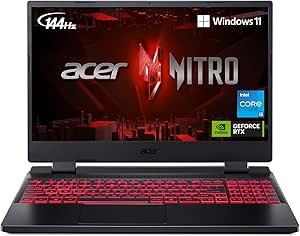 | Best Balanced Pick | Processor: Intel Core i5-12500H | Graphics: NVIDIA GeForce RTX 3050 Ti, 4GB GDDR6 | Display: 15.6-inch Full HD IPS, 1920 × 1080, 144Hz | VIEW LATEST PRICE | See Our Full Breakdown |
| NIMO 15.6-Inch Laptop with AMD Ryzen 7 7735HS, 16GB DDR5 RAM, 256GB SSD, Radeon 680M Graphics, and Backlit Keyboard |  | Best for Casual Gaming and Study | Processor: AMD Ryzen 7 7735HS | Graphics: Integrated AMD Radeon 680M | Display: 15.6-inch | VIEW LATEST PRICE | See Our Full Breakdown |
| HP Victus 15 Gaming Laptop with NVIDIA GeForce RTX 3050 and 12th Gen Intel Core i5-12500H |  | Best for Buyers Who Can Upgrade Memory | Processor: 12th Gen Intel Core i5-12500H | Graphics: NVIDIA GeForce RTX 3050 | Memory: 8GB DDR4 | VIEW LATEST PRICE | See Our Full Breakdown |
| Acer Nitro V 15 Gaming Laptop, Intel Core i5-13420H, NVIDIA GeForce RTX 4050, 15.6-inch FHD 165Hz Display, 8GB DDR5, 512GB SSD |  | Best Graphics Performance | Processor: Intel Core i5-13420H | Graphics: NVIDIA GeForce RTX 4050 Laptop GPU, 6GB GDDR6 | Display: 15.6-inch Full HD IPS, 1920 × 1080, 165Hz | VIEW LATEST PRICE | See Our Full Breakdown |
| Acer Nitro 5 Gaming Laptop, 15.6-inch Full HD, Intel Core i5-9300H, GeForce GTX 1650, 8GB RAM, 256GB SSD |  | Best for Older and Lighter Games | Processor: Intel Core i5-9300H, up to 4.1GHz | Graphics: NVIDIA GeForce GTX 1650, 4GB GDDR5 | Display: 15.6-inch Full HD IPS, 1920 × 1080, 60Hz | VIEW LATEST PRICE | See Our Full Breakdown |
| Lenovo 15.3-Inch Gaming Laptop, AMD Ryzen 5 7535HS, 8GB DDR5 RAM, 256GB SSD |  | Best for Portable Everyday Gaming | Processor: AMD Ryzen 5 7535HS | Memory: 8GB DDR5 | Storage: 256GB PCIe SSD | VIEW LATEST PRICE | See Our Full Breakdown |
| budget gaming laptop | Display | Processor | Graphics | Memory |
|---|---|---|---|---|
| NIMO 15.6-Inch Laptop with AMD | 15.6 inches | AMD Ryzen 7 7735HS, 8 cores, 16 threads, up to 4.75 GHz | Integrated AMD Radeon 680M | 8GB DDR5-4800; expandable to 64GB |
| HP Victus 15.6-Inch FHD 144Hz | 15.6-inch FHD IPS, 1920 × 1080, 144Hz, anti-glare | Intel Core i5-12450H, up to 4.4 GHz | NVIDIA GeForce RTX 3050, 6GB GDDR6 | 16GB RAM; supports up to 64GB DDR4-3200 |
| Acer Nitro 5 17.3-Inch Gaming | 17.3-inch LED LCD, up to 1920 × 1080 | 9th Gen Intel Core i5-9300H, 2.4 GHz | NVIDIA GeForce GTX 1650, 4GB dedicated memory | 8GB RAM |
| NIMO N153 15.6-inch FHD Laptop | 15.6-inch LCD, 1920 × 1080, non-touch | AMD Ryzen 5 6600H, 6 cores, up to 4.5 GHz | Integrated AMD Radeon 660M | 16GB DDR5, upgradeable |
| Lenovo 15.3-Inch Laptop with A | 15.3-inch WUXGA IPS, 1920 × 1200, anti-glare | AMD Ryzen 5 7535HS, 6 cores, 12 threads, up to 4.55 GHz | Integrated AMD Radeon 660M | 8GB DDR5 |
| Acer Nitro 5 AN515-58-57Y8 15. | 15.6-inch Full HD IPS, 1920 × 1080, 144Hz | Intel Core i5-12500H | NVIDIA GeForce RTX 3050 Ti, 4GB GDDR6 | 16GB DDR4 3200MHz; expandable to 32GB |
| NIMO 15.6-Inch Laptop with AMD | 15.6-inch | AMD Ryzen 7 7735HS | Integrated AMD Radeon 680M | 16GB DDR5; maximum 64GB |
| HP Victus 15 Gaming Laptop wit | 15.6-inch Full HD IPS, 1920 × 1080 | 12th Gen Intel Core i5-12500H | NVIDIA GeForce RTX 3050 | 8GB DDR4 |
| Acer Nitro V 15 Gaming Laptop | 15.6-inch Full HD IPS, 1920 × 1080, 165Hz | Intel Core i5-13420H | NVIDIA GeForce RTX 4050 Laptop GPU, 6GB GDDR6 | 8GB DDR5; two slots, maximum 32GB |
| Acer Nitro 5 Gaming Laptop | 15.6-inch Full HD IPS, 1920 × 1080, 60Hz | Intel Core i5-9300H, up to 4.1GHz | NVIDIA GeForce GTX 1650, 4GB GDDR5 | 8GB DDR4 2666MHz |
| Lenovo 15.3-Inch Gaming Laptop | 15.3-inch, 1080p | AMD Ryzen 5 7535HS | Integrated AMD Radeon 660M | 8GB DDR5 |
More Details on Our Top Picks
NIMO 15.6-Inch Laptop with AMD Ryzen 7 7735HS, 8GB DDR5 RAM, and 256GB SSD
Among these non-dedicated-graphics options, the Ryzen 7 7735HS and Radeon 680M give this NIMO the strongest gaming-oriented foundation. The processor’s 8 cores and 16 threads also suit schoolwork, streaming, and creative tasks, while the integrated graphics are better suited to lighter games and modest settings than the RTX 3050 in the HP Victus. That distinction matters: this is not a substitute for a dedicated gaming laptop when newer, demanding titles are the priority. Its main compromise is the starting configuration: 8GB of RAM and a 256GB SSD leave little room for multitasking or a game library, though memory can be expanded. Compared with the NIMO N153, this model offers a stronger processor and graphics, but less memory out of the box.
Pros:- Ryzen 7 processor has 8 cores and 16 threads for demanding everyday workloads.
- Radeon 680M integrated graphics are a stronger light-gaming fit than basic integrated graphics.
- Memory can be expanded up to 64GB.
- Backlit keyboard, fingerprint reader, and USB-C charging add useful daily features.
Cons:- Integrated graphics cannot match the HP Victus’s dedicated RTX 3050 for demanding games.
- 8GB of RAM may restrict multitasking until upgraded.
- 256GB SSD fills quickly with games and media.
Best for: Students or casual gamers who want a capable Ryzen processor for everyday work and lighter games, and are willing to upgrade memory.
Not ideal for: Players focused on demanding modern games, high graphics settings, or a large installed library; integrated graphics and 256GB of storage are limiting.
- Display:15.6 inches
- Processor:AMD Ryzen 7 7735HS, 8 cores, 16 threads, up to 4.75 GHz
- Graphics:Integrated AMD Radeon 680M
- Memory:8GB DDR5-4800; expandable to 64GB
- Storage:256GB PCIe 4.0 SSD
- Operating system:Windows 11
- Weight:3.8 pounds
- Battery:53.58Wh lithium polymer
Our verdict“Choose this NIMO for a strong integrated-graphics starting point and a fast processor, provided you accept upgrades and lighter gaming.”
HP Victus 15.6-Inch FHD 144Hz Gaming Laptop, Intel Core i5-12450H, NVIDIA GeForce RTX 3050, 16GB RAM, 512GB SSD, Wi-Fi 6, Windows 11 Pro
The HP Victus is the clearest choice here for buyers who want a laptop built around actual PC gaming rather than general use. Its GeForce RTX 3050 with 6GB of memory gives it a meaningful advantage over the integrated Radeon graphics in the NIMO and Lenovo models, while 16GB of RAM and a 512GB SSD make the starting setup more ready for games and multitasking. The 144Hz display can make supported games look smoother, though the 250-nit brightness figure may disappoint in bright rooms. Compared with the older Acer Nitro 5 and its GTX 1650, the Victus has newer RTX graphics and a faster-refresh screen. The tradeoff is portability: at 7 pounds, it is notably heavier than the 3.8-pound NIMO laptops.
Pros:- Dedicated RTX 3050 graphics with 6GB GDDR6 are better suited to PC gaming than integrated graphics.
- 144Hz FHD IPS screen supports smoother motion in compatible games.
- 16GB RAM and a 512GB PCIe SSD provide a more usable starting configuration than the 8GB, 256GB alternatives.
- Wi-Fi 6, Ethernet, HDMI, and USB-C provide useful connectivity.
Cons:- At 7 pounds, it is substantially heavier than the NIMO laptops in this roundup.
- Listed 250-nit brightness may look subdued in bright environments.
- The RTX 3050 is still a dedicated entry-level graphics option, not a high-end gaming GPU.
Best for: Budget-focused players who want dedicated NVIDIA graphics, a high-refresh 1080p display, and enough memory and storage to start gaming without an immediate upgrade.
Not ideal for: Frequent commuters or students who carry a laptop all day, and buyers who need a bright display for sunny rooms.
- Display:15.6-inch FHD IPS, 1920 × 1080, 144Hz, anti-glare
- Processor:Intel Core i5-12450H, up to 4.4 GHz
- Graphics:NVIDIA GeForce RTX 3050, 6GB GDDR6
- Memory:16GB RAM; supports up to 64GB DDR4-3200
- Storage:512GB PCIe SSD
- Operating system:Windows 11 Pro
- Wireless:Wi-Fi 6 and Bluetooth 5
- Weight:7 pounds
Our verdict“Pick the Victus if dedicated graphics and a 144Hz screen matter more than carrying a lightweight laptop.”
Acer Nitro 5 17.3-Inch Gaming Laptop, Intel Core i5-9300H, 8GB RAM, 512GB SSD
The Acer Nitro 5’s standout is its 17.3-inch Full HD display, which gives games and other content more room than the 15.6-inch HP Victus or the smaller-screen Lenovo. Its GTX 1650 with 4GB of dedicated memory also gives it a gaming-specific advantage over the integrated Radeon 660M and 680M options. But this is an older configuration: the 9th-generation Core i5 and 8GB of RAM put it behind the newer Victus, whose RTX 3050 and 16GB memory are a more capable starting point. The 512GB SSD is a useful capacity for this group, yet buyers should not mistake the larger screen for modern gaming performance. I’d shortlist it only for someone who specifically wants a larger display and accepts older hardware.
Pros:- 17.3-inch Full HD display gives games and media a larger viewing area.
- GTX 1650 has dedicated graphics memory, unlike the integrated Radeon options.
- 512GB SSD offers more storage than the 256GB drives in several alternatives.
- HDMI and three USB ports support common peripherals and external displays.
Cons:- Older 9th-generation processor and GTX 1650 trail the HP Victus’s newer RTX 3050 setup.
- 8GB RAM may constrain newer games and multitasking.
- Windows 10 Home is an older operating system version than Windows 11 on the other listed models.
Best for: A home-based casual gamer who values a large 17.3-inch screen and wants dedicated graphics for older or less demanding games.
Not ideal for: Players seeking newer graphics capabilities, a compact daily-carry laptop, or a configuration ready for demanding multitasking.
- Display:17.3-inch LED LCD, up to 1920 × 1080
- Processor:9th Gen Intel Core i5-9300H, 2.4 GHz
- Graphics:NVIDIA GeForce GTX 1650, 4GB dedicated memory
- Memory:8GB RAM
- Storage:512GB SSD
- Operating system:Windows 10 Home
- Connectivity:Bluetooth 4.2, USB, and HDMI
- Weight:5.7 pounds
Our verdict“Consider this Nitro if the 17.3-inch screen is your priority and older gaming hardware fits your expectations.”
NIMO N153 15.6-inch FHD Laptop with AMD Ryzen 5 6600H, 16GB DDR5 RAM, 256GB SSD, Radeon 660M Graphics, Backlit Keyboard, and Fingerprint Reader
For someone new to PC gaming who also needs a practical school or work laptop, the NIMO N153 offers a more balanced starting setup than the 8GB NIMO Ryzen 7 or Lenovo. Its 16GB of DDR5 memory helps with everyday multitasking, and the Ryzen 5 6600H is a capable six-core processor. The catch is graphics: its integrated Radeon 660M is better suited to lighter games than the dedicated GTX 1650 in the Acer Nitro 5 or RTX 3050 in the HP Victus. A 256GB SSD also leaves little room for a growing game collection. Upgradeable memory and storage offer a way to adapt it later, while the webcam privacy cover and dual full-function USB-C ports add useful everyday flexibility.
Pros:- 16GB DDR5 memory is a stronger out-of-box multitasking setup than the 8GB NIMO and Lenovo models.
- Upgradeable memory and storage provide room to adapt the laptop later.
- Dual full-function USB-C ports support power delivery and DisplayPort.
- Fingerprint reader and physical webcam privacy cover add useful everyday security.
Cons:- Integrated Radeon 660M graphics are less suitable for demanding games than the HP Victus’s RTX 3050.
- 256GB SSD leaves limited room for larger games and media.
- Non-touch display offers no touchscreen flexibility.
Best for: First-time PC gamers who mostly play lighter titles and want 16GB of memory, practical security features, and upgrade options for school or work.
Not ideal for: Gamers who want dedicated graphics for newer demanding games or enough storage for many large installations without upgrading.
- Display:15.6-inch LCD, 1920 × 1080, non-touch
- Processor:AMD Ryzen 5 6600H, 6 cores, up to 4.5 GHz
- Graphics:Integrated AMD Radeon 660M
- Memory:16GB DDR5, upgradeable
- Storage:256GB SSD, upgradeable
- Operating system:Windows 11
- Ports:HDMI 2.0, USB 3.2, dual full-function USB-C with power delivery and DisplayPort
- Weight:About 3.8 pounds
Our verdict“Choose the N153 for a ready-to-use everyday laptop with room for lighter gaming, not for dedicated-graphics performance.”
Lenovo 15.3-Inch Laptop with AMD Ryzen 5 7535HS, 8GB DDR5 RAM, 256GB SSD, Radeon 660M Graphics, and Windows 11 Home
The Lenovo stands apart from the NIMO laptops with a 15.3-inch WUXGA IPS display: its 1920 × 1200 resolution gives extra vertical space for browsing and productivity, and the anti-glare finish suits brighter rooms. That screen is a welcome everyday feature, but it does not make this a dedicated gaming machine. The integrated Radeon 660M is aimed at lighter gaming, while 8GB of RAM and a 256GB SSD make the starting configuration less roomy than the NIMO N153’s 16GB of memory. Compared with the NIMO Ryzen 7 model, the Lenovo also has a less powerful processor, though both rely on integrated graphics. Wi-Fi 6, an SD card reader, and a privacy-shutter webcam round out a useful general-purpose laptop; the limited memory and storage remain the key gaming compromises.
Pros:- 15.3-inch WUXGA IPS anti-glare display provides more vertical workspace than a standard FHD screen.
- USB-C supports Power Delivery and DisplayPort.
- Built-in SD card reader helps transfer files from compatible cards.
- Physical webcam privacy shutter gives direct control over camera privacy.
Cons:- Integrated Radeon 660M graphics are not a substitute for the HP Victus’s dedicated RTX 3050.
- 8GB DDR5 memory is less generous than the NIMO N153’s 16GB setup.
- 256GB SSD provides limited space for large games and media.
Best for: Students or casual players who want an anti-glare, taller-resolution display for coursework and light games, plus an SD card reader for file transfers.
Not ideal for: Gamers seeking dedicated graphics, substantial multitasking headroom, or enough built-in storage for a large game library.
- Display:15.3-inch WUXGA IPS, 1920 × 1200, anti-glare
- Processor:AMD Ryzen 5 7535HS, 6 cores, 12 threads, up to 4.55 GHz
- Graphics:Integrated AMD Radeon 660M
- Memory:8GB DDR5
- Storage:256GB PCIe NVMe SSD
- Operating system:Windows 11 Home
- Wireless:Wi-Fi 6 and Bluetooth 5.3
- Ports and connectivity:USB-C with Power Delivery and DisplayPort, HDMI, SD card reader
Our verdict“Pick the Lenovo for its useful anti-glare WUXGA screen and general-purpose features, as long as light gaming is enough.”
Acer Nitro 5 AN515-58-57Y8 15.6-Inch Gaming Laptop
The Acer Nitro 5 AN515-58-57Y8 is a well-rounded choice for buyers who want a gaming-ready graphics chip without accepting the 8GB memory starting point found in the Acer Nitro V 15 or HP Victus 15. Its RTX 3050 Ti, 16GB of RAM, and 144Hz Full HD screen make it a stronger ready-to-play package for fast-paced games, while the i5-12500H also suits everyday multitasking. Dual-fan cooling and Thunderbolt 4 add useful flexibility, though neither removes the limits of this budget-class GPU. The tradeoff is a heavier 5.51-pound chassis and a memory ceiling of 32GB. I’d rank it ahead of older GTX 1650 options for buyers seeking a capable, balanced setup, but the Nitro V 15 has the newer RTX 4050 and a faster 165Hz display.
Pros:- 16GB of RAM avoids the immediate memory upgrade the 8GB Acer Nitro V 15 may need.
- RTX 3050 Ti graphics provide dedicated hardware for gaming workloads.
- 144Hz Full HD IPS display can make supported games look smoother than a standard 60Hz panel.
- Thunderbolt 4, HDMI 2.1, and dual-fan cooling offer useful connectivity and airflow.
Cons:- The RTX 3050 Ti has 4GB of VRAM, limiting headroom in demanding games and high-resolution textures.
- Memory is expandable only up to 32GB.
- At 5.51 pounds, it is less convenient to carry than the 4.7-pound Acer Nitro V 15.
Best for: Players who want 16GB of memory and dedicated RTX graphics ready for Full HD gaming without an immediate RAM upgrade.
Not ideal for: Buyers prioritizing the strongest graphics performance or a lighter carry; the Nitro V 15 has an RTX 4050, and this model weighs 5.51 pounds.
- Processor:Intel Core i5-12500H
- Graphics:NVIDIA GeForce RTX 3050 Ti, 4GB GDDR6
- Display:15.6-inch Full HD IPS, 1920 × 1080, 144Hz
- Memory:16GB DDR4 3200MHz; expandable to 32GB
- Storage:512GB PCIe Gen 4 SSD
- Operating system:Windows 11 Home
- Connectivity:Wi-Fi 6, Ethernet, Bluetooth 5, Thunderbolt 4, HDMI 2.1
- Weight:5.51 pounds
Our verdict“Choose this Nitro 5 for a balanced budget gaming setup with 16GB of RAM; pick the Nitro V 15 if you prefer its newer RTX 4050 and can address its 8GB memory.”
NIMO 15.6-Inch Laptop with AMD Ryzen 7 7735HS, 16GB DDR5 RAM, 256GB SSD, Radeon 680M Graphics, and Backlit Keyboard
The NIMO 15.6-inch Ryzen 7 belongs on a budget gaming shortlist only if gaming means casual titles, older releases, or lighter play between school and work tasks. Its Radeon 680M integrated graphics are a step above basic integrated solutions, but they are not a substitute for the dedicated RTX chips in the Acer Nitro 5 or HP Victus 15. The benefit is a lighter 3.8-pound laptop with 16GB of DDR5 and a Ryzen 7 processor for multitasking, plus USB-C charging and a fingerprint reader. Compared with the gaming-focused Acer models, it gives up graphics headroom and a high-refresh gaming screen; its 256GB SSD also leaves less room for a game library. I’d choose it for a portable everyday laptop that can handle modest gaming, not as a primary machine for demanding games.
Pros:- Ryzen 7 7735HS and 16GB DDR5 support multitasking and everyday creative work.
- Radeon 680M can handle light gaming and media tasks better than basic integrated graphics.
- At 3.8 pounds, it is easier to carry than the dedicated-graphics Acer Nitro 5 models.
- Dual USB-C ports support charging, data, and display functions.
Cons:- Integrated graphics are not a match for the dedicated RTX 3050 or RTX 4050 in the gaming-focused alternatives.
- The 256GB SSD can fill quickly with games and larger applications.
- The stated battery life is up to nine hours, but gaming runtime is not specified.
Best for: Students or commuters who need a lightweight work-and-study laptop and play casual or older games rather than demanding new releases.
Not ideal for: Players seeking dedicated graphics, high-refresh gaming, or room for a large game library; the Nitro 5 and Nitro V 15 are better suited to those needs.
- Processor:AMD Ryzen 7 7735HS
- Graphics:Integrated AMD Radeon 680M
- Display:15.6-inch
- Memory:16GB DDR5; maximum 64GB
- Storage:256GB PCIe 4.0 SSD
- Operating system:Windows 11
- Battery:53.58Wh; up to 9 hours listed
- Weight:3.8 pounds
Our verdict“Pick this NIMO if portability and everyday performance matter more than demanding gaming; choose an RTX-equipped laptop for modern, graphics-intensive games.”
HP Victus 15 Gaming Laptop with NVIDIA GeForce RTX 3050 and 12th Gen Intel Core i5-12500H
The HP Victus 15 pairs an i5-12500H with dedicated RTX 3050 graphics, putting it in the same broad gaming tier as the Acer Nitro 5, but it arrives with only 8GB of RAM. That makes it a more conditional pick: buyers willing to add memory can get a capable Full HD gaming setup, while those wanting to play without upgrades should favor the Nitro 5’s included 16GB. Its 512GB SSD provides more breathing room than the older Acer Nitro 5’s 256GB drive, and the full-size backlit keyboard with numeric keypad is practical for both games and everyday use. The supplied details do not list a refresh rate, so I would not choose it over the 144Hz Nitro 5 for a smoother-screen priority. The glossy display and Wi-Fi 5 are also less appealing than the newer Nitro V 15’s matte panel and Wi-Fi 6.
Pros:- Intel Core i5-12500H and dedicated RTX 3050 graphics provide a solid foundation for Full HD gaming.
- 512GB SSD offers more storage than the 256GB drive in the older Acer Nitro 5.
- Full-size backlit keyboard includes a numeric keypad.
- IPS display has wide 178-degree viewing angles.
Cons:- 8GB of RAM is a restrictive starting point for modern games and multitasking.
- Glossy display finish may reflect nearby lights.
- Wi-Fi 5 is an older wireless standard than the Wi-Fi 6 offered by the Acer Nitro 5 and Nitro V 15.
Best for: Budget-conscious players comfortable upgrading memory who want an i5-12500H, dedicated graphics, and a 512GB SSD.
Not ideal for: Buyers who want 16GB RAM and a specified high-refresh display out of the box; the Acer Nitro 5 is better equipped for that use.
- Processor:12th Gen Intel Core i5-12500H
- Graphics:NVIDIA GeForce RTX 3050
- Memory:8GB DDR4
- Storage:512GB SSD
- Display:15.6-inch Full HD IPS, 1920 × 1080
- Operating system:Windows 11 Home
- Wireless:Wi-Fi 5, Bluetooth 5.2
- Weight:2.29kg
Our verdict“Choose the Victus if you plan to upgrade its 8GB RAM; for a better-equipped setup without that extra step, the Acer Nitro 5 is the safer pick.”
Acer Nitro V 15 Gaming Laptop, Intel Core i5-13420H, NVIDIA GeForce RTX 4050, 15.6-inch FHD 165Hz Display, 8GB DDR5, 512GB SSD
For buyers focused on gaming capability, the Acer Nitro V 15 has the strongest graphics card in this group: an RTX 4050 with 6GB of GDDR6. That gives it an advantage over the RTX 3050 Ti in the Acer Nitro 5 and RTX 3050 in the HP Victus 15, while its 165Hz matte Full HD screen is the fastest listed here. The catch is the configuration’s 8GB of DDR5 memory, which can hold back demanding games and multitasking until upgraded; its two memory slots support up to 32GB. Thunderbolt 4, Wi-Fi 6, Ethernet, and a 4.7-pound weight make it a versatile option, but the listed 300-nit brightness may be limiting in bright rooms. I’d put it ahead of the other dedicated-GPU picks for graphics headroom, provided the buyer accounts for the memory shortfall.
Pros:- RTX 4050 with 6GB GDDR6 is the most capable listed graphics option in this batch.
- 165Hz Full HD IPS display has a matte finish for reduced reflections.
- Thunderbolt 4, Wi-Fi 6, and Gigabit Ethernet provide flexible wired and wireless connections.
- At 4.7 pounds, it is lighter than the Acer Nitro 5 AN515-58-57Y8.
Cons:- 8GB of DDR5 memory is a limited starting point for current games and multitasking.
- The 300-nit listed brightness may be modest in brightly lit rooms.
- Memory is capped at 32GB.
Best for: Players who want the strongest listed GPU and a high-refresh matte display, and are prepared to upgrade from 8GB of RAM.
Not ideal for: Buyers seeking a ready-to-play 16GB configuration or a bright screen for sunlit spaces; the Acer Nitro 5 starts with 16GB RAM.
- Processor:Intel Core i5-13420H
- Graphics:NVIDIA GeForce RTX 4050 Laptop GPU, 6GB GDDR6
- Display:15.6-inch Full HD IPS, 1920 × 1080, 165Hz
- Memory:8GB DDR5; two slots, maximum 32GB
- Storage:512GB PCIe Gen 4 SSD
- Operating system:Windows 11 Home
- Connectivity:Wi-Fi 6, Bluetooth, Gigabit Ethernet, Thunderbolt 4, HDMI
- Weight:4.7 pounds
Our verdict“Choose the Nitro V 15 for the batch’s strongest graphics and fastest listed screen if you can upgrade its RAM; otherwise, the 16GB Acer Nitro 5 is more ready to use.”
Acer Nitro 5 Gaming Laptop, 15.6-inch Full HD, Intel Core i5-9300H, GeForce GTX 1650, 8GB RAM, 256GB SSD
The older Acer Nitro 5 with GTX 1650 is the entry-level choice here for players focused on lighter games or an older library, not the best match for demanding new releases. Its dedicated 4GB GTX 1650 is a more gaming-oriented option than the NIMO’s integrated Radeon 680M, but it sits well behind the RTX 3050-class HP Victus and the RTX 4050 Acer Nitro V 15. The 60Hz Full HD IPS screen, 8GB of RAM, and 256GB SSD also make this a dated starting configuration beside the newer Nitro 5’s 144Hz screen and 16GB memory. An available M.2 slot and hard drive bay give buyers room to expand storage, which helps offset the small drive. I’d consider it only when its older hardware suits the intended games and upgrades are part of the plan.
Pros:- Dedicated GTX 1650 graphics are a better fit for gaming than the NIMO’s integrated Radeon 680M.
- Full HD IPS display provides a clear 1920 × 1080 resolution.
- Available M.2 slot and hard drive bay allow storage expansion.
- Wi-Fi 6 and a backlit keyboard are useful everyday features.
Cons:- The 9th-generation Core i5-9300H and GTX 1650 are older than the hardware in the other dedicated-GPU picks.
- 8GB RAM and a 256GB SSD leave limited room for games and multitasking.
- The 60Hz display lacks the smoother refresh rates of the newer Acer gaming laptops.
Best for: Players with an older or lightweight game library who want dedicated graphics and plan to expand storage or memory.
Not ideal for: Buyers seeking high-refresh gaming or performance for demanding modern titles; the Acer Nitro V 15 and Acer Nitro 5 AN515-58-57Y8 have newer graphics and displays.
- Processor:Intel Core i5-9300H, up to 4.1GHz
- Graphics:NVIDIA GeForce GTX 1650, 4GB GDDR5
- Display:15.6-inch Full HD IPS, 1920 × 1080, 60Hz
- Memory:8GB DDR4 2666MHz
- Storage:256GB PCIe NVMe SSD
- Operating system:Windows 10 Home
- Wireless:Wi-Fi 6, Bluetooth 5
- Upgrade options:Two M.2 slots, one available; one available hard drive bay
Our verdict“Choose this older Nitro 5 for lighter games and planned upgrades, but spend your attention on the newer RTX-equipped options if you want more gaming headroom.”
Lenovo 15.3-Inch Gaming Laptop, AMD Ryzen 5 7535HS, 8GB DDR5 RAM, 256GB SSD
I’d place this Lenovo among the entry-level picks for buyers who want a portable laptop for school, everyday tasks, and lighter games—not demanding gaming performance. Its Ryzen 5 7535HS is paired with integrated Radeon 660M graphics, so it has less graphics headroom than the HP Victus models with dedicated RTX 3050 GPUs, or the Acer Nitro V 15 with an RTX 4050. That distinction matters for newer, graphics-heavy games. The 15.3-inch 1080p anti-glare display, Wi-Fi 6, and relatively light clamshell design suit everyday use, while HDMI and USB-C add useful connection options. The main compromises are 8GB of RAM and a 256GB SSD, which leave less room for multitasking and a large game library than several alternatives in this roundup. I’d choose it for portability and casual play, not as a substitute for a dedicated-GPU gaming laptop.
Pros:- Lightweight clamshell design is easier to carry between classes than larger gaming-focused laptops.
- 15.3-inch 1080p anti-glare display provides a practical workspace for schoolwork and casual play.
- Wi-Fi 6 and Bluetooth 5.3 provide current wireless connectivity.
- HDMI and USB-C support external displays and charging options.
Cons:- Integrated Radeon 660M graphics offer less gaming performance headroom than the dedicated GPUs in the HP Victus and Acer Nitro V.
- 8GB of RAM can constrain demanding multitasking.
- 256GB of storage leaves limited space for a sizable game library.
Best for: Students who want a portable Windows laptop for coursework, everyday use, and lighter games, and who do not need dedicated graphics.
Not ideal for: Players focused on newer, graphics-intensive games or multitasking with several demanding apps; the integrated graphics and 8GB of RAM are limiting compared with the HP Victus and Acer Nitro V options.
- Processor:AMD Ryzen 5 7535HS
- Memory:8GB DDR5
- Storage:256GB PCIe SSD
- Display:15.3-inch, 1080p
- Graphics:Integrated AMD Radeon 660M
- Operating system:Windows 11 Home
- Connectivity:Wi-Fi 6, Bluetooth 5.3
- Ports:HDMI, USB-C
- Battery life:Up to 8+ hours mixed use; gaming runtime varies by intensity
Our verdict“Choose this Lenovo if portability and everyday use matter more than dedicated-GPU gaming performance.”
How We Picked
I ranked these laptops by how well their listed hardware supports the budget-gaming use case, giving the most weight to graphics capability, processor generation, memory, storage, and display refresh rate. Dedicated graphics generally rank ahead of integrated graphics for demanding games, while a stronger configuration earns credit when it also includes enough RAM and SSD capacity for daily use. I also considered whether the listed specifications give buyers a clear picture of what they are getting.
The order reflects the tradeoffs visible in the supplied configurations, not unlisted performance figures or hands-on testing. That puts the RTX 4050 Acer Nitro V first for graphics potential, followed by discrete-GPU options with more complete memory and storage configurations. Integrated-graphics laptops and older GTX 1650 or less fully specified listings rank lower for gaming headroom, though they may still fit lighter workloads or less demanding games. Where a product listing leaves out key details, I treat that uncertainty as a drawback rather than filling in the gaps.
| budget gaming laptop | Operating system |
|---|---|
| NIMO 15.6-Inch Laptop with AMD | Windows 11 |
| HP Victus 15.6-Inch FHD 144Hz | Windows 11 Pro |
| Acer Nitro 5 17.3-Inch Gaming | Windows 10 Home |
| NIMO N153 15.6-inch FHD Laptop | Windows 11 |
| Lenovo 15.3-Inch Laptop with A | Windows 11 Home |
| Acer Nitro 5 AN515-58-57Y8 15. | Windows 11 Home |
| NIMO 15.6-Inch Laptop with AMD | Windows 11 |
| HP Victus 15 Gaming Laptop wit | Windows 11 Home |
| Acer Nitro V 15 Gaming Laptop | Windows 11 Home |
| Acer Nitro 5 Gaming Laptop | Windows 10 Home |
| Lenovo 15.3-Inch Gaming Laptop | Windows 11 Home |
Factors to Consider When Choosing Budget Gaming Laptops
Before choosing, match the laptop to the games and workloads you actually expect to run. The model name alone can hide major differences in graphics, memory, and upgrade options, so I’d compare the full configuration rather than assume two laptops from the same series perform alike.
Match the GPU to Your Games
Graphics hardware is often the deciding factor between a laptop for lighter games and one aimed at more demanding titles. A dedicated GPU such as an RTX 4050, RTX 3050, or GTX 1650 has its own graphics resources, while Radeon 660M and 680M graphics use system memory. That does not make integrated graphics useless: they can suit less demanding games and leave room for a lighter everyday setup. A common mistake is choosing by processor name alone, even when the graphics chip is the bigger limit for gaming. Check the games you play and their requirements, then leave some headroom rather than assuming every title will run well at high settings.
Treat 8GB RAM as a Configuration to Check
Memory affects more than the number of apps you can keep open; integrated graphics also draw on system memory. An 8GB configuration may be workable for basic use, but it can feel restrictive when a game, launcher, browser, and voice chat run together. Before buying, check whether the RAM is upgradeable, whether any slots are occupied, and what the maximum supported capacity is. Do not assume that two laptops with the same processor have the same memory layout. A laptop with 16GB already installed can be a better fit for someone who wants to play without opening the case or paying for an upgrade later.
Plan for Game Storage
A 256GB SSD can fill quickly once the operating system, applications, and a few large games are installed. If you keep a small rotation of titles, that capacity may be manageable; players with a large library will need to uninstall games or add storage sooner. A 512GB SSD offers more breathing room, but it still may not hold a large collection indefinitely. Check whether the laptop has an additional M.2 slot or supports a straightforward SSD replacement, and confirm the storage type before relying on an upgrade. It is easy to focus on the GPU and overlook the recurring hassle of managing limited drive space.
Read the Exact Configuration, Not Just the Series Name
Gaming laptop families often include several hardware combinations under similar names. A Nitro 5 label, for example, does not tell you by itself whether a listing has a GTX 1650, a newer GPU, or a particular amount of memory. Confirm the exact model number and every major component before ordering, especially when the listing omits a graphics chip or storage details. This also helps avoid confusing a general-purpose laptop with integrated graphics for a gaming configuration. If a seller page is unclear, treat that missing information as a risk rather than assuming it matches another version.
Choose a Display for the Games You Play
A faster refresh rate can make motion look smoother, particularly in competitive games, but it cannot compensate for a GPU that struggles to produce enough frames. A high-refresh display is most useful when the laptop’s graphics hardware and your games can take advantage of it. For slower-paced games, a sharp, comfortable screen may matter more than the highest refresh figure. Also check resolution, brightness, and panel details where available; these are not fully specified for every model in this roundup. Avoid paying extra for a display feature that your usual games and graphics settings cannot use.
Include Portability, Heat, and Noise in the Decision
Dedicated gaming graphics can deliver more game performance, but they also create heat and draw more power than integrated graphics in many workloads. That can affect fan noise, battery life while unplugged, and comfort during longer sessions. A larger laptop may offer a roomier screen, yet it can be less convenient to carry between classes or workspaces. If the laptop will mostly stay on a desk, gaming performance may matter more than weight; for regular travel, check the full dimensions and battery information. Do not assume a gaming laptop will replace a lightweight everyday notebook without tradeoffs.
Frequently Asked Questions
Is the Acer Nitro V 15 with RTX 4050 a better choice than the HP Victus with RTX 3050?
I’d choose the Nitro V 15 if graphics capability is the priority, since its RTX 4050 is the stronger listed GPU and its 165Hz display suits fast-paced play. The HP Victus is a more balanced configuration out of the box, with 16GB RAM and a 512GB SSD compared with the Nitro V’s listed 8GB RAM. That difference can matter for multitasking and storage convenience. Check whether the Nitro V’s memory can be upgraded and whether you are willing to do so. If you want a more complete starting configuration, the Victus may be the simpler choice.
Can a laptop with Radeon 660M or Radeon 680M graphics handle gaming?
These integrated graphics can suit lighter games and less demanding settings, but they are not a direct substitute for the dedicated RTX and GTX GPUs in this roundup. They share system memory, which makes having enough RAM especially relevant. I’d look up performance for the specific games you play rather than relying on the Radeon name alone. The Ryzen 7 NIMO with Radeon 680M also lists 16GB RAM, making it a more appealing integrated-graphics option than a configuration with just 8GB. Choose a dedicated-GPU model if demanding games are your main reason for buying.
Should I avoid a budget gaming laptop with 8GB of RAM?
Not automatically, but I would check the upgrade path before buying. Eight gigabytes can limit game performance and multitasking, especially if you keep a browser, launcher, or chat app open while playing. It matters even more on laptops using integrated graphics, which share system memory. Look for the number of memory slots, whether the RAM is replaceable, and the supported capacity rather than assuming an upgrade is possible. If you prefer a laptop that is ready for broader everyday use, a listed 16GB configuration may be the safer fit.
Is 256GB of SSD storage enough for a gaming laptop?
It can be enough if you install only a few games at a time and are comfortable removing titles when you need space. Larger game libraries, creative apps, and downloaded media can use that capacity quickly. A 512GB SSD gives you more room, as shown by the HP Victus and Nitro V configurations in this roundup, though it is not unlimited. Before deciding, check whether the laptop supports a second SSD or whether replacing the existing drive is practical. Storage capacity is worth weighing against the cost and effort of an upgrade.
What should I check when a laptop listing leaves out the GPU or exact model number?
I would pause before buying and verify the exact configuration with the seller or manufacturer. Similar product names can cover models with different graphics chips, memory, and storage, so the family name alone is not enough to judge gaming ability. Ask for the full model number and confirm the GPU, RAM layout, SSD capacity, and display specifications. If that information cannot be confirmed, compare the laptop only on the features clearly stated and treat the missing details as a real drawback. This is especially relevant for the broadly named Acer Nitro 5 AN515-58-57Y8 in this lineup.
Conclusion
For the strongest gaming graphics in this comparison, I’d choose the Acer Nitro V 15, while budgeting attention for its listed 8GB RAM. My best value-style pick is the HP Victus with RTX 3050: its 16GB RAM and 512GB SSD make it a more balanced starting point, though its GPU is less capable than the Nitro V’s RTX 4050. For a buyer who wants a premium choice within this budget-focused lineup, the Nitro V is the hardware leader, not a premium-class laptop by broader standards. Beginners who want a clearly specified, more ready-to-use configuration can start with the HP Victus; those focused on lighter games and everyday work can look at the NIMO Ryzen 7 with Radeon 680M and 16GB RAM. Choose the older Nitro 5 GTX 1650 models only if their exact configuration suits your needs, and verify any listing that leaves out key hardware before deciding.