The best portable monitors balance a useful screen size, easy connections, and a stand or cover that works wherever you set up. My best overall pick is the ASUS ZenScreen MB16ACV for a practical 15.6-inch Full HD format and USB-C simplicity; the ARZOPA 16-inch 2.5K is a stronger fit when sharper detail matters, while the ViewSonic 16-inch 4K OLED is the premium choice for image quality. The main tradeoffs are portability versus screen area, Full HD versus higher resolution, and simple USB-C setups versus broader connection needs. Brightness, power draw, stand stability, and compatibility can matter as much as panel specs. Read on for how all 15 options compare and which one best matches your setup.

Get the latest gadgets delivered free with Prime
- Fast, free delivery on millions of items
- Prime Video, Amazon Music and more included
- Member-only deals all year
Complete the kit



Key Takeaways
- The ASUS ZenScreen MB16ACV is the balanced everyday pick: its 15.6-inch Full HD size and USB-C focus suit laptop-based work without the bulk of the 18.5-inch models.
- The ARZOPA 16-inch 2.5K stands apart for detail: its 2560 x 1600 panel offers more workspace and sharper text than the many Full HD options, but buyers should check their device’s output and scaling support.
- The ViewSonic VX1655-4K-OLED is the image-quality specialist: 4K OLED is the most ambitious display here, while its premium panel makes less sense for routine spreadsheets or occasional second-screen use.
- Screen size changes the job: the VisionOwl and Acer 18.5-inch models provide more viewing area, while the Dell 14-inch option favors a smaller travel footprint.
- Most of the lineup targets practical Full HD use: the ASUS, AOC, MSI, Lenovo, KYY, cocopar, and MNN models differ more by stand, cover, connection setup, or ergonomics than by resolution.






| portable monitor | Screen size | Resolution | Refresh rate | Weight |
|---|---|---|---|---|
| cocopar 15.6-Inch Portable Mon | 15.6 inches | 1920 × 1080 (FHD) | 60 Hz | 1.5 lb without cover; 2.4 lb with cover |
| ARZOPA 16" 2.5K Portable Monit | 16 inches | 2560 × 1600 (2.5K) | 60 Hz | 1.46 lb |
| ASUS ZenScreen MB16ACV 15.6" 1 | 15.6 inches | — | 60 Hz | — |
| ViewSonic VX1655-4K-OLED 16 In | 16 inches | 3840 × 2160 (4K UHD) | 60 Hz | 1.5 lb |
| ASUS ZenScreen 15.6" Full HD P | 15.6 inches | 1920 × 1080 (Full HD) | 60 Hz | 3.2 lb |
| Dell Pro 14 Plus P1425 14-Inch | 14 inches | 1920 × 1200 (WUXGA) | 60 Hz | 0.65 kg |
| AOC 16T20 15.6-Inch Portable F | 15.6 inches | 1920 × 1080 (FHD) | 60 Hz | 1.5 pounds |
| ASUS ZenScreen MB169CK 15.6-In | 15.6 inches | 1920 × 1080 (FHD) | 60 Hz | 0.78 kg |
| VisionOwl 18.5-Inch Portable F | 18.5 inches | 1920 × 1080 (FHD) | 100 Hz | — |
| MSI PRO MP165 E6 15.6-Inch FHD | 15.6 inches | 1920 × 1080 | 60 Hz | 0.78 kg |
| Lenovo L15 Portable Monitor | 15.6 inches | 1920 × 1080 (FHD) | 60 Hz | 4.7 lb |
| Acer 18.5" FHD IPS 100Hz Slim | 18.5 inches | 1920 × 1080 (FHD) | 100 Hz | 2.5 lb |
| KYY 15.6-Inch 1080p Portable M | 15.6 inches | 1920 × 1080 | 60 Hz | 1.7 lb |
| ASUS ZenScreen MB16AHV 15.6-In | 15.6 inches | 1920 × 1080 (FHD) | 60 Hz | 2 lb |
| MNN 15.6-Inch FHD Portable Mon | 15.6 inches | 1920 × 1080 (FHD) | — | 1.5 lb |
More Details on Our Top Picks
cocopar 15.6-Inch Portable Monitor, 1080p FHD, 60Hz, IPS, USB-C and HDMI
The cocopar earns its place as a practical, connection-friendly choice for everyday laptop work. Its USB-C and HDMI inputs give it more flexibility than the ASUS ZenScreen MB16ACV, which centers on USB-C and USB-A connectivity, while the included cover doubles as a stand for travel. The matte 1080p IPS screen is suited to documents, browsing, and video calls, and portrait orientation or VESA mounting offers useful setup options at a desk.
The tradeoff is a familiar one for this category: 60Hz Full HD is adequate for work but offers less detail and motion smoothness than higher-resolution or faster panels. Single-cable USB-C use also depends on the connected device supporting video over USB-C. I’d choose this for adaptable everyday use, not color-critical work or fast-paced gaming.
Pros:- USB-C and HDMI inputs suit a wider range of laptops and other devices.
- Included cover serves as a protective case and stand.
- VESA mounting and portrait or landscape use allow flexible placement.
- Matte IPS panel includes low-blue-light, HDR, and FreeSync features.
Cons:- Full HD resolution and 60Hz refresh rate are basic beside higher-resolution or faster portable monitors.
- Single-cable USB-C display use requires a compatible video-capable port.
- The listed 85% color gamut is less suited to color-critical creative work.
Best for: Laptop owners who want an affordable-feeling, lightweight second screen with both HDMI and USB-C connection options.
Not ideal for: Buyers who need a high-resolution panel, refresh rates above 60Hz, or USB-C single-cable video from a device without DisplayPort Alt Mode or Thunderbolt.
- Screen size:15.6 inches
- Resolution:1920 × 1080 (FHD)
- Refresh rate:60 Hz
- Panel:IPS LCD
- Brightness:280 cd/m²
- Ports:2 USB-C, HDMI, 3.5 mm audio
- Weight:1.5 lb without cover; 2.4 lb with cover
- Mounting:VESA mountable; landscape or portrait use
Our verdict“Choose the cocopar for a straightforward portable work screen when connection flexibility matters more than extra resolution or refresh rate.”
ARZOPA 16″ 2.5K Portable Monitor, 2560×1600 QHD IPS Display, 123% sRGB
The ARZOPA is the productivity pick for buyers who want more room and sharper text without carrying a much larger display. Its 16:10 aspect ratio adds vertical workspace over the 16:9 cocopar, which can mean less scrolling through documents and spreadsheets. The 2560 × 1600 IPS panel also gives fine text and detailed images more definition than the Full HD ASUS ZenScreen MB16ACV. At 1.46 pounds, it remains easy to carry despite that resolution bump.
That sharper image comes with practical limits: the panel still runs at 60Hz, so it is not the pick for high-refresh gaming, and its 350-nit brightness may struggle in strong sunlight. It has no built-in battery, so it needs external power. I’d favor it for mobile office work and media viewing over the cocopar, but not for outdoor use or buyers seeking a self-powered screen.
Pros:- 2560 × 1600 resolution delivers sharper detail than Full HD portable monitors.
- 16:10 display provides more vertical room for documents and browsing.
- Lightweight 1.46-pound design is easy to pack.
- USB-C and HDMI connections support a range of devices.
Cons:- 60Hz refresh rate is less suited to fast-paced gaming.
- 350-nit brightness may be limiting in very bright environments.
- No built-in battery; the monitor requires external power.
Best for: Mobile professionals who work with long documents, spreadsheets, or detailed visuals and want a lightweight screen with extra vertical workspace.
Not ideal for: Frequent outdoor users, high-refresh-rate gamers, and travelers who need a monitor with its own battery.
- Screen size:16 inches
- Resolution:2560 × 1600 (2.5K)
- Aspect ratio:16:10
- Refresh rate:60 Hz
- Brightness:350 nits
- Color gamut:123% sRGB
- Ports:1 HDMI, 2 USB-C, 2 USB 3.0
- Weight:1.46 lb
Our verdict“Pick the ARZOPA if sharper text and extra vertical workspace matter more than high refresh rates or battery-powered use.”
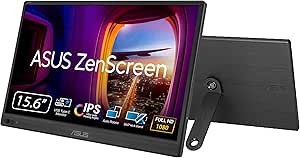
ASUS ZenScreen MB16ACV 15.6″ 1080p USB-C Portable Monitor
The ZenScreen MB16ACV stands out for buyers whose laptop setup may vary: its hybrid USB-C/USB-A connection can carry video and power through one cable, with the included cables supporting either connection type. That makes it a more practical match for older computers than the ASUS ZenScreen MB16ACE, which relies on USB-C or an adapter for USB-A. Its anti-glare Full HD IPS screen and adjustable kickstand suit temporary workspaces, and it can sit in portrait or landscape orientation.
Compared with the cocopar, the MB16ACV gives up HDMI, so it is less convenient for devices that use that input. Its 60Hz Full HD panel is aimed at office tasks rather than high-refresh gaming, and the supplied specs do not state the display resolution explicitly beyond the product description. I’d pick it for flexible laptop hookups, not for console-first setups.
Pros:- Hybrid USB-C and USB-A connection supports a wider range of laptops.
- Included cables make it easier to connect to compatible USB-C or USB-A devices.
- Adjustable kickstand supports portrait and landscape viewing.
- Anti-glare panel includes flicker-free and low-blue-light features.
Cons:- No native HDMI input for devices that rely on HDMI.
- 60Hz refresh rate is not aimed at fast-paced gaming.
- The supplied product data does not list a numeric display resolution.
Best for: Traveling office workers who use laptops with USB-C or USB-A ports and want a portable screen with a stand included.
Not ideal for: Console users or buyers who need a native HDMI input, and gamers seeking refresh rates above 60Hz.
- Screen size:15.6 inches
- Aspect ratio:16:9
- Refresh rate:60 Hz
- Display type:LED
- Screen finish:Anti-glare
- Viewing angle:178°
- Connectivity:Hybrid USB-C/USB-A
- Warranty:3 years with advanced replacement and repair
Our verdict“Choose the MB16ACV if USB-C and USB-A laptop compatibility is more useful to you than the cocopar’s HDMI input.”
ViewSonic VX1655-4K-OLED 16 Inch 4K UHD OLED Portable Monitor for Laptop
The ViewSonic is the standout when image quality takes priority over basic travel-screen duties. Its 4K OLED panel brings much finer detail and deeper blacks than the Full HD cocopar, making it a better fit for viewing high-resolution media or editing visuals on the go. It also offers USB-C with up to 60W power delivery, plus HDMI, and a built-in kickstand for portrait or landscape placement. At 1.5 pounds, its display ambition does not make it unusually heavy to carry.
The premium panel asks for compromises. It runs at 60Hz, so the ARZOPA’s 2.5K screen is a less demanding alternative if 4K detail is not a priority. The listed 400-nit brightness can also be limiting under strong outdoor light, and 4K may require more from a connected computer. I’d choose this for image fidelity, not for battery-free portability or bright-sun use.
Pros:- 4K OLED panel delivers much finer detail and deep blacks.
- USB-C supports video, data, and up to 60W power delivery.
- HDMI provides an alternative connection for compatible devices.
- Integrated kickstand supports portrait and landscape viewing.
Cons:- 60Hz refresh rate is not a high-refresh option for gaming.
- 400-nit brightness may be limiting in direct sunlight.
- 4K resolution can place greater demands on the connected device than Full HD.
Best for: Traveling creators and media enthusiasts who want a high-detail OLED screen for compatible laptops and can provide external power.
Not ideal for: Buyers focused on bright outdoor use, high-refresh gaming, or a simple Full HD monitor for routine office tasks.
- Screen size:16 inches
- Resolution:3840 × 2160 (4K UHD)
- Panel type:OLED
- Refresh rate:60 Hz
- Brightness:400 nits
- Connectivity:USB-C, mini HDMI, 3.5 mm audio
- Weight:1.5 lb
- Warranty:3-year limited
Our verdict“Choose the ViewSonic when OLED contrast and 4K detail justify the cost in power and outdoor brightness flexibility.”
ASUS ZenScreen 15.6″ Full HD Portable USB Monitor (MB16ACE) – IPS, USB‑C, Eye Care, Anti‑Glare, Lite Smart Case, External Screen for Laptop, 3‑Year Warranty
The ZenScreen MB16ACE makes sense for laptop owners who want a familiar Full HD second screen with minimal cable clutter. Its USB-C single-cable connection carries video and power, while USB-A support is available through an adapter. The anti-glare IPS panel, flicker-free operation, and low-blue-light features suit long work sessions better than the higher-resolution ARZOPA if the priority is a straightforward office setup rather than extra pixel detail. Its smart case also functions as a stand and supports automatic rotation.
Unlike the cocopar, this ASUS has no native HDMI input, so it is less flexible for consoles and other HDMI sources. The listed weight is 3.2 pounds, heavier than several options here, which weakens its appeal for frequent packing. Its Full HD, 60Hz specifications are sensible for productivity but not a reason to choose it for fast gaming or detailed creative work.
Pros:- Single USB-C cable carries video and power on compatible devices.
- USB-A support is available through an adapter.
- Anti-glare IPS panel includes flicker-free and low-blue-light features.
- Smart case doubles as a stand and supports auto-rotation.
Cons:- No native HDMI or DisplayPort input.
- Listed weight of 3.2 pounds is heavier than several portable alternatives.
- Full HD resolution and 60Hz refresh rate are modest beside higher-resolution or faster panels.
Best for: Laptop users who want an anti-glare work screen, eye-care features, and a case that also serves as an auto-rotating stand.
Not ideal for: Frequent travelers prioritizing the lowest carry weight, or buyers who need native HDMI or higher-than-Full-HD detail.
- Screen size:15.6 inches
- Resolution:1920 × 1080 (Full HD)
- Panel type:IPS
- Refresh rate:60 Hz
- Contrast ratio:800:1
- Viewing angle:178°
- Connectivity:USB-C; USB-A via adapter
- Weight:3.2 lb
- Warranty:3 years with advanced replacement and repair
Our verdict“Pick the MB16ACE for a familiar, eye-care-focused laptop companion if you can accept its weight and lack of native HDMI.”
Dell Pro 14 Plus P1425 14-Inch Portable Monitor
The Dell Pro 14 Plus P1425 earns its place for buyers who want a portable display that favors work documents over extra-wide viewing. Its 14-inch, 16:10 WUXGA panel adds vertical room compared with the 16:9 Full HD AOC 16T20, making spreadsheets and web pages less cramped without carrying a full-size monitor. At 0.65 kg, it is also lighter than the AOC and the larger VisionOwl 18.5-inch model. The 400 cd/m² brightness is a useful advantage in brighter workspaces, and USB-C keeps connections simple with compatible devices. The tradeoff is a glossy finish, which can reflect windows and overhead lights; the ASUS ZenScreen MB169CK is a better fit for glare-prone locations. Its 60 Hz refresh rate also favors everyday productivity over fast gaming.
Pros:- 16:10 WUXGA resolution provides more vertical workspace than standard 16:9 Full HD monitors.
- At 0.65 kg, it is lighter than the AOC 16T20 and VisionOwl 18.5-inch option.
- 400 cd/m² brightness is a strong fit for brighter work settings.
- USB-C connectivity and FreeSync support.
Cons:- Glossy screen can reflect surrounding light.
- 60 Hz refresh rate is less suited to high-frame-rate gaming.
Best for: Laptop workers who want a light second screen with extra vertical space for documents, email, and spreadsheets.
Not ideal for: People working under strong overhead lights or shoppers seeking a high-refresh display for fast-paced gaming.
- Screen size:14 inches
- Resolution:1920 × 1200 (WUXGA)
- Aspect ratio:16:10
- Brightness:400 cd/m²
- Refresh rate:60 Hz
- Connectivity:USB-C; 1 HDMI port; 2 USB ports
- Weight:0.65 kg
Our verdict“Choose the Dell P1425 if a lightweight, taller work screen matters more than a glare-resistant finish or gaming-focused refresh rate.”
AOC 16T20 15.6-Inch Portable FHD IPS Monitor
The AOC 16T20 is a straightforward choice for buyers who want a standard-size portable display and useful connection options without a complicated setup. Its USB-C and Mini HDMI ports give it more flexibility than the USB-C-only Dell P1425 when switching between compatible laptops, consoles, or other sources. A supplied smart cover also protects the screen in a bag and serves as a stand, so there is no separate accessory to pack. The 15.6-inch Full HD IPS panel offers a familiar workspace, though it does not provide the extra vertical room of Dell’s 16:10 screen. Its glossy finish is a drawback in bright environments, and the listed 20 ms response time makes it a less compelling gaming pick than the 100 Hz VisionOwl. For everyday work and media, the tradeoffs are easier to accept.
Pros:- USB-C and Mini HDMI support a wider range of source devices.
- Smart cover protects the display and supports portable use.
- 15.6-inch IPS Full HD panel provides a familiar screen size and wide viewing angles.
- Slim, lightweight design is practical for travel.
Cons:- Glossy finish can show reflections in bright surroundings.
- 20 ms response time is less suitable for fast-paced gaming.
- 60 Hz refresh rate does not match the VisionOwl’s 100 Hz capability.
Best for: Traveling students and office workers who want a conventional 15.6-inch screen, a protective cover, and USB-C or Mini HDMI connections.
Not ideal for: Fast-paced gamers or people who regularly work in bright rooms where a glossy display may reflect light.
- Screen size:15.6 inches
- Resolution:1920 × 1080 (FHD)
- Panel:IPS LED
- Refresh rate:60 Hz
- Viewing angle:170 degrees
- Ports:2 USB-C; 1 Mini HDMI
- Weight:1.5 pounds
Our verdict“Pick the AOC 16T20 for a practical travel display with a cover and flexible inputs, but choose the VisionOwl for smoother gaming or the ASUS ZenScreen for a matte screen.”
ASUS ZenScreen MB169CK 15.6-Inch 1080p Portable Monitor
The ASUS ZenScreen MB169CK stands apart from the glossy AOC 16T20 with a matte anti-glare screen, making it the better match for travel desks near windows or brightly lit offices. Its 15.6-inch Full HD IPS panel keeps the familiar proportions of most portable monitors, while the 360-degree kickstand and tripod socket offer more positioning options than a basic cover stand. USB-C can carry video and power through one cable when the source supports DisplayPort Alt Mode; Mini HDMI provides another connection route. At 0.78 kg and 11.8 mm thick, it is suited to regular packing, though the Dell P1425 is lighter and offers more vertical pixels. The 300-nit brightness and 60 Hz refresh rate are sensible for everyday work, not a standout choice for bright outdoor use or high-refresh gaming.
Pros:- Matte anti-glare finish is more practical in bright settings than the glossy AOC 16T20.
- 360-degree kickstand and tripod socket allow flexible placement.
- USB-C supports video and power through one cable with compatible devices.
- Flicker-free and low blue light features support extended viewing.
Cons:- USB-C video requires a device with DisplayPort Alt Mode.
- At 0.78 kg, it is heavier than the Dell P1425.
- 60 Hz refresh rate is not aimed at high-refresh gaming.
Best for: Mobile professionals who often work near windows or under bright indoor lighting and want flexible screen positioning.
Not ideal for: Buyers whose USB-C device lacks DisplayPort Alt Mode, or gamers seeking a refresh rate above 60 Hz.
- Screen size:15.6 inches
- Resolution:1920 × 1080 (FHD)
- Screen finish:Matte, anti-glare
- Brightness:300 nits
- Refresh rate:60 Hz
- Connectivity:Dual USB-C; mini-HDMI
- Weight:0.78 kg
- Stand:360-degree kickstand; tripod socket
Our verdict“Choose the ASUS ZenScreen MB169CK if glare control and adaptable positioning matter more than the Dell’s lighter weight or a faster gaming screen.”
VisionOwl 18.5-Inch Portable FHD Monitor with USB-C, HDMI, Built-In Stand and Speakers
The VisionOwl 18.5-inch is the pick for buyers willing to trade compactness for a roomier screen and smoother motion. Its 100 Hz refresh rate gives it an advantage over the 60 Hz Dell P1425, AOC 16T20, ASUS ZenScreen MB169CK, and MSI PRO MP165 E6 for compatible games and scrolling. The matte Full HD IPS panel, built-in stand, speakers, and VESA mounting holes also make it flexible as a travel display or a semi-permanent second screen. The larger size is the main compromise: at about 2.6 pounds, it is notably heavier than the other options here, including the 0.78 kg MSI and ASUS. USB-C single-cable operation depends on a compatible full-featured port, so HDMI may be the more dependable route for some devices. Product details also give conflicting weight and color-gamut figures.
Pros:- 18.5-inch screen gives more viewing area than the 14- and 15.6-inch options.
- 100 Hz refresh rate is higher than the 60 Hz alternatives in this group.
- Matte finish, built-in stand, speakers, and VESA mounting support varied setups.
- USB-C and HDMI allow connections to laptops, PCs, and consoles.
Cons:- At about 2.6 pounds, it is heavier than the other listed monitors.
- Single-cable USB-C operation requires a compatible full-featured port.
- Product information gives conflicting weight and sRGB coverage figures.
Best for: Console and laptop users who want a larger portable screen for smoother gaming, shared viewing, or a flexible desk setup.
Not ideal for: Frequent travelers prioritizing minimum bag weight, or buyers who need consistent, clearly specified weight and color-gamut figures.
- Screen size:18.5 inches
- Resolution:1920 × 1080 (FHD)
- Refresh rate:100 Hz
- Response time:3 ms
- Brightness:320 cd/m²
- Screen finish:Matte
- Ports:2 USB-C; 1 HDMI
- Mounting:Built-in stand; 75 × 75 mm VESA mount
Our verdict“Choose the VisionOwl if screen size and 100 Hz motion matter more than carrying weight and you can confirm your device supports its preferred connection.”
MSI PRO MP165 E6 15.6-Inch FHD Portable Monitor
The MSI PRO MP165 E6 suits buyers who want a standard 15.6-inch portable monitor that can move between a laptop stand, a tripod, and portrait orientation. Its foldable kickstand and 1/4-inch tripod mount give it a more adaptable setup than the AOC 16T20, whose supplied smart cover serves as its main stand. USB-C and Mini HDMI also offer a practical mix of connections, while built-in speakers and eye-comfort features support everyday work or media. At 0.78 kg, the MSI is light enough to carry, though the smaller Dell P1425 is lighter and gives more vertical workspace. The 60 Hz panel is not the faster gaming option in this lineup; the VisionOwl reaches 100 Hz. The supplied brightness figure is in lumens rather than screen nits, so direct brightness comparisons are unclear.
Pros:- Foldable kickstand and 1/4-inch tripod mount support adaptable placement.
- USB-C and Mini HDMI offer flexible device connections.
- Horizontal and vertical display orientations suit different work tasks.
- Built-in speakers and low blue light and flicker-free features add everyday convenience.
Cons:- 60 Hz refresh rate trails the VisionOwl’s 100 Hz for smoother gaming.
- Listed brightness is in lumens, making it hard to compare with monitors specified in nits.
- At 0.78 kg, it is heavier than the Dell P1425.
Best for: Remote workers, presenters, and creators who need a portable display that can sit on a desk or mount on a tripod.
Not ideal for: Gamers seeking refresh rates above 60 Hz or buyers who need a clearly stated brightness level for bright locations.
- Screen size:15.6 inches
- Resolution:1920 × 1080
- Panel:IPS
- Refresh rate:60 Hz
- Connectivity:USB Type-C; Mini HDMI
- Weight:0.78 kg
- Mounting:1/4-inch tripod mount; VESA-compatible
- Display orientations:Horizontal and vertical
Our verdict“Pick the MSI PRO MP165 E6 if you value tripod mounting and flexible orientation more than high refresh rate or a clearly documented brightness rating.”
Lenovo L15 Portable Monitor – 15.6″ FHD IPS, 250 nits, 60Hz, USB-C, Height-Adjustable Stand, Flicker-Free (Grey)
The Lenovo L15 stands out for portable desk work because its height-adjustable stand is built in, reducing the setup compromises common with cover-supported screens. Its 15.6-inch FHD IPS display and two USB-C ports suit a laptop-based workflow, and the 4.7-pound weight remains manageable for occasional travel. Compared with the lighter KYY 15.6-Inch, the Lenovo gives more deliberate screen-height adjustment, while the KYY adds a cover stand, speakers, and mini-HDMI. The Lenovo’s 250-nit brightness is a limitation near bright windows or outdoors, and its glossy finish can catch reflections. At 60Hz, it is aimed at documents, browser tabs, and video calls rather than high-frame-rate gaming; it also lacks built-in speakers.
Pros:- Height-adjustable stand makes it easier to set a comfortable screen position.
- FHD IPS panel offers wide 178-degree viewing angles.
- Two USB-C ports support a tidy laptop-centered setup.
- Flicker-free display features suit extended productivity sessions.
Cons:- 250-nit brightness and glossy finish are less suited to bright surroundings.
- At 4.7 pounds, it is heavier than portable-cover models such as the KYY.
- No built-in speakers, and 60Hz is not aimed at high-frame-rate gaming.
Best for: Laptop users who move between workspaces but want an adjustable screen height for longer desk sessions.
Not ideal for: Outdoor workers who need a bright, anti-glare display, or travelers who prioritize the lightest possible 15.6-inch monitor.
- Screen size:15.6 inches
- Resolution:1920 × 1080 (FHD)
- Panel:IPS LCD
- Brightness:250 nits
- Refresh rate:60 Hz
- Viewing angle:178 degrees
- Connectivity:2 USB-C ports
- Weight:4.7 lb
Our verdict“Choose the Lenovo L15 if an adjustable stand matters more than a lighter carry or stronger glare control.”
Acer 18.5″ FHD IPS 100Hz Slim Portable Monitor PM191Q
The Acer PM191Q is the lineup’s large-screen choice: its 18.5-inch FHD panel gives spreadsheets, timelines, and split windows more room than the 15.6-inch Lenovo L15. Its 100Hz refresh rate and Adaptive-Sync also make scrolling and supported games look smoother than on the Lenovo’s 60Hz screen. At just 2.5 pounds, it is unusually light for this size, though its wider footprint takes more bag space. Acer lists two USB-C ports and HDMI, giving it more connection options than a USB-C-only setup, but the description’s one-cable convenience depends on a compatible device. The tradeoff is positioning: there is no built-in stand or tilt adjustment, so buyers need a separate support or a stable surface to get a comfortable viewing angle.
Pros:- 18.5-inch FHD panel provides more workspace than standard 15.6-inch portable monitors.
- 100Hz refresh rate with Adaptive-Sync supports smoother motion.
- Light 2.5-pound build for a screen of this size.
- USB-C and HDMI connectivity accommodate a range of devices.
Cons:- No built-in stand or tilt mechanism.
- Large panel footprint is less convenient for tight desks and small bags.
- Brightness may not suit very bright work areas.
Best for: Traveling professionals and console users who want a roomy secondary display with smoother motion and can provide their own stand.
Not ideal for: Buyers who need a compact screen that stands on its own, or who work in very bright environments.
- Screen size:18.5 inches
- Resolution:1920 × 1080 (FHD)
- Panel:IPS LCD
- Refresh rate:100 Hz
- Contrast ratio:2000:1
- Weight:2.5 lb
- Video connections:2 USB-C ports and 1 HDMI 1.4 port
- Dimensions:0.54 × 16.6 × 10.06 inches
Our verdict“Pick the Acer PM191Q for a larger, smoother portable display if you are willing to bring a stand or prop it securely.”
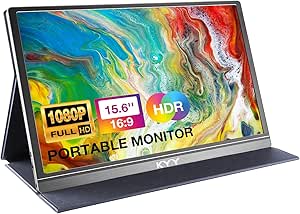
KYY 15.6-Inch 1080p Portable Monitor with Smart Cover
The KYY 15.6-Inch is a practical pick for travelers who connect to a mix of laptops, consoles, and other devices. Its USB-C and mini-HDMI inputs, built-in stereo speakers, and 3.5 mm audio input cover more situations than the Lenovo L15, which relies on USB-C and has no built-in audio. The matte FHD IPS screen can be easier to view under ambient light than the Lenovo’s glossy panel, while the KYY’s magnetic cover doubles as a stand and protects the display in a bag. That cover only offers two viewing-angle positions, however, so it cannot match the Lenovo’s height-adjustable setup or the ASUS ZenScreen MB16AHV’s kickstand and tripod socket. Its 60Hz refresh rate is fine for everyday work, but not a gaming-focused upgrade.
Pros:- USB-C and mini-HDMI support a broad range of devices.
- Matte 300-nit IPS screen helps reduce reflections.
- Magnetic cover protects the screen and serves as a stand.
- Built-in stereo speakers and 3.5 mm audio input add useful flexibility.
Cons:- Cover stand has only two viewing-angle positions.
- One-cable USB-C use requires a compatible device.
- 60Hz refresh rate is less suited to fast-paced gaming.
Best for: Travelers who switch between USB-C laptops and HDMI devices and want an included protective cover, stand, and basic audio.
Not ideal for: Users who need precise height adjustment, a high-refresh gaming display, or a single-cable connection from an incompatible device.
- Screen size:15.6 inches
- Resolution:1920 × 1080
- Panel:IPS LCD
- Brightness:300 cd/m²
- Screen finish:Matte
- Refresh rate:60 Hz
- Connectivity:2 full-function USB-C, mini-HDMI, 3.5 mm audio input
- Weight:1.7 lb
- Audio:2 built-in stereo speakers
Our verdict“Choose the KYY if varied connections and included audio matter more than adjustable positioning or a higher refresh rate.”
ASUS ZenScreen MB16AHV 15.6-Inch FHD Portable Monitor
The ASUS ZenScreen MB16AHV earns its place for buyers who need more ways to position a portable monitor than a basic cover stand allows. Its fold-out kickstand and tripod socket support desk setups and mounting options, while auto-rotate helps when switching between landscape and portrait work. The matte FHD IPS screen, flicker-free feature, and low blue light mode are suited to long work sessions. Compared with the KYY 15.6-Inch, the ASUS offers more flexible support and a three-year warranty, while the KYY is lighter and includes speakers. The ASUS weighs 2 pounds and reaches 250 nits, so it is not the brightest travel screen. Its listed dimensions also appear bulkier than the 10.5 mm profile suggests, making it worth checking the stated measurements against your bag.
Pros:- Fold-out kickstand and tripod socket allow flexible placement.
- Matte IPS display reduces glare compared with glossy options such as the Lenovo L15.
- Auto-rotate supports portrait-oriented work.
- Flicker-free and low blue light features support extended viewing.
Cons:- 250-nit brightness can be limiting in bright surroundings.
- No built-in speakers are listed.
- Listed dimensions may be less bag-friendly than the slim profile suggests.
Best for: Mobile professionals who alternate between desk, portrait, and tripod-mounted setups and value eye-care features and warranty coverage.
Not ideal for: Buyers who want the lightest screen, built-in speakers, or higher brightness for bright outdoor use.
- Screen size:15.6 inches
- Resolution:1920 × 1080 (FHD)
- Panel:IPS LCD/LED
- Brightness:250 nits
- Refresh rate:60 Hz
- Connectivity:USB-C and mini-HDMI
- Weight:2 lb
- Positioning features:Fold-out kickstand, tripod socket, auto-rotate
- Warranty:3 years
Our verdict“The MB16AHV suits buyers who prioritize adaptable positioning and eye-care features over maximum brightness or minimum weight.”
MNN 15.6-Inch FHD Portable Monitor
The MNN 15.6-Inch FHD is the lightest option in this group at 1.5 pounds, making it an appealing extra screen for commuters who want to keep their bag load down. Its matte 300-nit IPS display and 178-degree viewing angle suit everyday laptop work, while the included PU leather cover protects the panel and folds into a stand. Compared with the KYY 15.6-Inch, MNN weighs slightly less and lists HDMI alongside two USB-C ports, while KYY adds built-in speakers and a 3.5 mm audio input. MNN’s cover stand is convenient but less adaptable than the adjustable stand on the Lenovo L15 or the kickstand and tripod socket on the ASUS ZenScreen MB16AHV. A single-cable USB-C setup also depends on DisplayPort Alt Mode or Thunderbolt 3 support.
Pros:- At 1.5 pounds, it is lighter than the KYY and ASUS options in this group.
- Matte 300-nit IPS display offers wide viewing angles.
- USB-C and HDMI connections support varied laptop and console setups.
- Smart cover protects the screen and doubles as a stand.
Cons:- One-cable USB-C use requires DisplayPort Alt Mode or Thunderbolt 3 support.
- Cover stand offers less positioning flexibility than the Lenovo L15’s adjustable stand.
- No built-in speakers are listed.
Best for: Commuters who want a very light 15.6-inch secondary screen with a protective cover and USB-C or HDMI connections.
Not ideal for: Buyers who need built-in speakers, more adjustable stand positions, or a guaranteed one-cable connection with any USB-C device.
- Screen size:15.6 inches
- Resolution:1920 × 1080 (FHD)
- Panel:IPS LCD
- Brightness:300 nits
- Screen finish:Matte
- Response time:5 ms
- Ports:2 USB-C and 1 HDMI
- Weight:1.5 lb
- Included accessories:PU leather smart cover, Mini HDMI cable, full-function USB-C cable
Our verdict“Choose the MNN if low carry weight and a matte screen are your priorities, and its cover stand fits your preferred viewing angle.”

How We Picked
I ranked these monitors by how well they serve as genuinely portable second screens: useful display size and resolution, straightforward connection options, travel-friendly setup, and practical support from a case or built-in stand. I also weighed the stated panel characteristics, such as IPS viewing angles, the ARZOPA’s higher-resolution color coverage, the ViewSonic’s OLED panel, and the Acer’s 100Hz refresh rate. Where the listed specifications do not establish a performance advantage, I avoid treating a feature name as proof of better real-world results.
The order reflects the buyer a monitor is most likely to suit, not a claim that one display wins every task. The ASUS ZenScreen MB16ACV leads as a balanced mainstream choice; the ARZOPA and ViewSonic rank higher for specific image-quality priorities, while large-screen choices trade desk and bag space for viewing area. The remaining Full HD options are differentiated by size, stand, cover, and connection needs. I give less weight to small spec distinctions when a buyer’s laptop compatibility, power supply, or working position is likely to matter more.
Factors to Consider When Choosing Best Portable Monitors
Before choosing a model, I would match the monitor to the way it will connect and travel, rather than starting with resolution alone. These broader checks can prevent a portable display from becoming an awkward extra device that needs adapters, a separate power source, or a desk setup you cannot use.
Check the Laptop’s USB-C Capabilities
A USB-C port does not always carry video, even when it can charge devices or transfer files. Check whether your computer’s specific port supports DisplayPort Alt Mode or Thunderbolt before buying a monitor intended to connect with one cable. If it does not, an HDMI connection may be available on some models, but you may also need a compatible video adapter and a separate power connection. Those extras can erase some of the convenience of a portable screen. For a work laptop issued by an employer, verify port restrictions and supported resolutions with IT. I would treat compatibility as a pass-or-fail requirement, not a detail to sort out after purchase.
Choose Resolution for Your Workload
Full HD is a sensible match for many 15.6-inch portable screens: it keeps common text and office applications readable without demanding the same graphics output as a higher-resolution panel. A 2.5K or 4K screen can show finer detail and more content, but small interface elements may need scaling, and the host device has to drive the extra pixels. That can matter for older laptops, battery life, or video-heavy work. Higher resolution alone does not promise more accurate color or a better viewing experience. If your day is mostly documents, messaging, and browser windows, a dependable Full HD setup may be more useful than extra pixels. Prioritize higher resolution when fine detail, dense layouts, or creative work is central to your use.
Balance Screen Area Against Portability
A 14-inch monitor can fit more naturally beside a laptop on a small table and may be easier to carry with a compact computer. Moving up to 15.6 or 16 inches gives applications more room, while an 18.5-inch screen is better suited to a roomy desk, shared workspace, or stationary travel setup. The diagonal is only part of the burden: the case, stand, cables, and power adapter also take up bag space. Consider where you will open the display, not just whether it fits in your bag. A large panel can be the wrong choice for train trays or crowded café tables. If you work mostly at fixed locations, extra screen area may be worth the added footprint.
Treat the Stand as Part of the Display
A portable monitor is only useful at a comfortable angle, and a thin protective cover does not always provide the stability or height adjustment you need. Think about whether you work at a desk, on your lap, or in shared spaces where the surface may be uneven. A height-adjustable stand can help position the screen beside a laptop, while a folding cover may be lighter and simpler to pack. If neither gives a suitable position, a separate stand adds more weight and another item to carry. Check how the monitor is meant to sit in portrait orientation if you plan to use it for documents or coding. Good ergonomics can matter more over a full workday than a modest difference in panel specs.
Plan for Power and Brightness
Some portable monitors draw power from the connected laptop, which simplifies packing but can shorten the laptop’s unplugged runtime. Other setups may call for a separate power source, especially when the screen is bright or the host port cannot supply enough power. Confirm what cables are included and whether your intended connection carries both video and power. Brightness also affects usability: a screen that works well indoors may be hard to see beside a bright window or outdoors. Product listings do not always make comparable brightness claims easy to evaluate, so avoid assuming that a high resolution means good visibility in every setting. If you often work away from outlets, favor a simple power plan and test the expected setup within the return period.
Pay for Features You Will Use
A premium panel can make sense for photo, video, and design work, where fine detail or deep contrast has a visible role in the task. For routine office use, it may be more practical to spend attention on a reliable stand, a suitable screen size, and connections that work with your laptop. Refresh rate matters most when smoother motion is relevant to your work or play; it is less likely to change a spreadsheet-heavy day. Built-in speakers can save space for basic audio, but they do not replace headphones or a dedicated speaker when sound quality matters. Covers, eye-care labels, and extra features should be judged by how they fit your routine, not as automatic signs of a better monitor. Choose the least complicated model that meets your actual display and setup needs.
Frequently Asked Questions
Will a portable monitor work with any laptop that has USB-C?
No. The laptop’s USB-C port must support video output, often through DisplayPort Alt Mode or Thunderbolt, for a direct USB-C display connection. Some ports handle only charging or data, so the connector’s shape is not enough to confirm compatibility. Check the laptop’s specifications for video support and compare them with the monitor’s connection requirements. If the laptop lacks video over USB-C, check whether the monitor and computer can connect through HDMI with the needed adapter and separate power.
Should I choose a 2.5K or 4K portable monitor instead of Full HD?
Choose a higher-resolution screen when sharper detail or a denser workspace will improve tasks such as image work, document comparison, or detailed layouts. Full HD remains a practical choice for common office use and can place fewer demands on the laptop’s graphics output. Higher resolution may also require display scaling so text and controls remain comfortable to read. The ARZOPA 2.5K and ViewSonic 4K OLED offer clear step-ups in resolution, but they suit different priorities and are not automatic upgrades for every buyer. Check your computer’s output support and how you plan to use the screen before paying for extra pixels.
Can a portable monitor run from my laptop without a separate power adapter?
Some can draw both video and power through a compatible USB-C connection, but the result depends on the laptop port and the monitor’s power needs. A screen that draws from the laptop can reduce battery life, especially during long work sessions or at higher brightness. Other connection combinations may require a separate power source even when the video cable is connected. Check the monitor’s connection and power instructions before relying on a one-cable setup. If you often work away from outlets, plan for the monitor and laptop as a combined battery load.
Is an 18.5-inch portable monitor practical for travel?
It can be practical if you travel with a roomy bag and usually work at a full-size table, but it takes more space than a 14- to 16-inch display. The VisionOwl and Acer options offer a larger viewing area, which can help when you keep several windows open. That benefit may disappear on small café tables, train trays, or other tight work surfaces. Include the stand, cover, and cables when estimating what you will carry. For frequent movement between compact workspaces, a smaller screen is often easier to position.
Which portable monitor features matter more than built-in speakers?
For most buyers, a compatible video connection, a stable and comfortable stand, and a manageable power setup have more effect on everyday use than built-in speakers. A useful cover can protect the panel in a bag, but its support angle may not suit long sessions. Screen size should fit both your work and the surfaces where you will set up. Speakers may be handy for occasional calls or video, though headphones are often better for private or focused listening. I would settle compatibility and positioning first, then treat audio as a welcome extra if you need it.
Conclusion
For a balanced everyday setup, I recommend the ASUS ZenScreen MB16ACV as best overall: it pairs a familiar 15.6-inch Full HD size with a USB-C-centered approach. The best value direction is a straightforward Full HD model such as the AOC 16T20 or KYY 15.6-inch, chosen by whether you prefer a simple panel or a smart cover; confirm connections and setup details before deciding. For best premium image quality, the ViewSonic 4K OLED is the specialist pick, while the ARZOPA 2.5K is a more balanced higher-resolution option. For beginners, the ASUS ZenScreen MB16ACV or MB16ACE offers a familiar format, provided the laptop supports the intended connection. Choose the Dell 14-inch for a smaller footprint, the VisionOwl or Acer 18.5-inch for a larger work area, or the Lenovo L15 when height adjustment is a priority. The best fit is the one your laptop can drive and your usual workspace can comfortably hold.