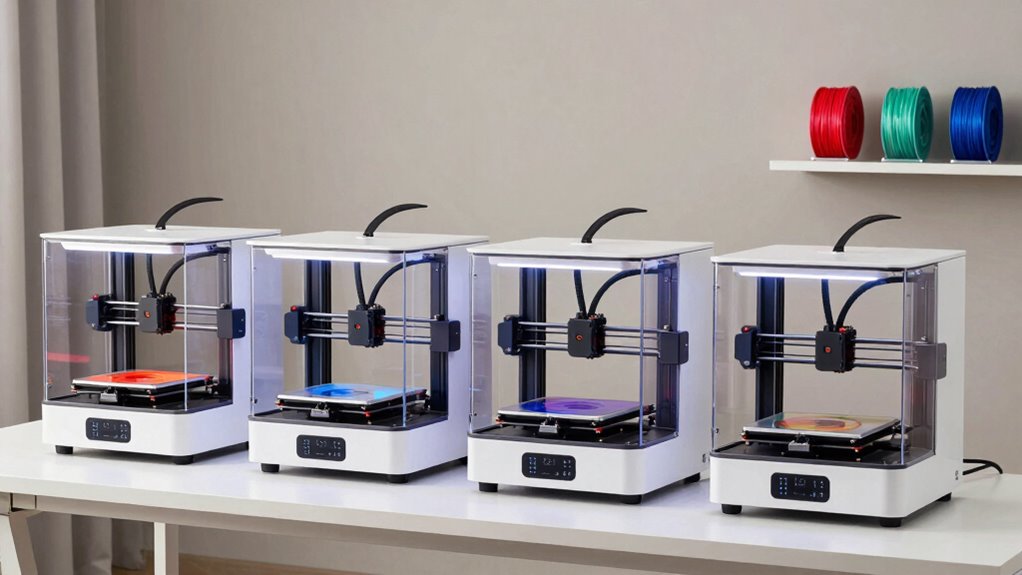
If you’re starting out with 3D printing, choosing the right machine can feel overwhelming. The FlashForge Adventurer 5M stands out for its high-speed printing and auto-leveling, making it easier for newcomers to produce quality models quickly. For a more budget-friendly option, the Creality Ender 3 V3 SE offers reliable performance with straightforward setup, though it may require some manual calibration. The main tradeoffs in this category often involve balancing ease of use against customization and upgrade potential. Continue reading for a detailed breakdown of these options and more to find the best fit for your experience level and goals.

Get the latest gadgets delivered free — and shop member deals
- Fast, free delivery on millions of items
- Access to Prime Big Deal Days deals on October 6–7
- Prime Video, Amazon Music and more included
Complete the kit


Key Takeaways
- Ease of setup and use was a primary factor in top rankings, especially auto-leveling and enclosed designs.
- Affordable options often sacrifice some print quality or speed but are better suited for absolute beginners.
- Higher-end models tend to offer faster printing and more features, but require a steeper learning curve.
- Mini and portable printers are ideal for limited space but often come with smaller print volumes.
- Versatility in filament compatibility and build volume can significantly influence long-term satisfaction.
| HEPHI3D TINA2S 3D Printer for Kids & Beginners |  | Best for Complete Beginners and Family Use | Product Dimensions: 8.27 x 8.72 x 11.42 inches | Item Weight: 5.68 pounds | Auto Bed Leveling: Yes | VIEW ON AMAZON | See Our Full Breakdown |
| AOSEED AI 3D Printer for Kids, Fast 400mm/s, 8000+ Models, Enclosed Safe |  | Best for Creative Kids and Speed Enthusiasts | Printing Speed: 400 mm/s | Model Library: Over 8,000 models | Precision: 0.05 mm | VIEW ON AMAZON | See Our Full Breakdown |
| FLASHFORGE Adventurer 5M 3D Printer, 600mm/s High-Speed, Fully Auto Leveling, Upgraded Direct Extruder, 280°C Nozzle, Dual-Sided PEI Coating Plate, 220x220x220mm Print Size |  | Best for Fast, High-Quality Prints with Advanced Features | Print Speed: 600mm/s | Print Size: 220x220x220mm | Nozzle Temperature: 280°C | VIEW ON AMAZON | See Our Full Breakdown |
| Bambu Lab A1 Mini 3D Printer + LED Lamp Kit |  | Best for Quiet, Easy, and Creative Home Use | Compatibility: LED Lamp Kit included | Features: Automatic calibration, quiet operation, high-speed printing | Ecosystem: MakerWorld library, Bambu Handy app | VIEW ON AMAZON | See Our Full Breakdown |
| TINA2S Fully Assembled Mini 3D Printer for Kids and Beginners, Starter Kit | 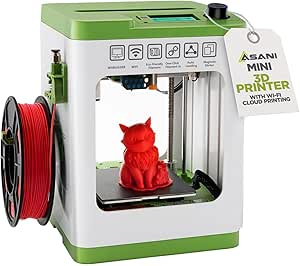 | Best Compact Starter Kit for Kids & Beginners | Product Dimensions: 8.3 x 8.3 x 11.4 inches | Item Weight: 6.4 pounds | ASIN: B0C9PBKFYH | VIEW ON AMAZON | See Our Full Breakdown |
| TINA2 3D Printer, HEPI3D Mini for Beginners, Fully Assembled |  | Best for Complete Beginners and Home Use | Display: 2.4-inch LCD | Auto Bed Leveling: Yes | Connectivity: Micro SD card, USB, Wiibuilder / Cura / Simplify3d / PrusaSlicer | VIEW ON AMAZON | See Our Full Breakdown |
| Bambu Lab P1S 3D Printer |  | Best for Multi-Color and Multi-Material Enthusiasts | Colors: Up to 16 | Max Speed: 500mm/s | Auto Bed Leveling: Yes | VIEW ON AMAZON | See Our Full Breakdown |
| Creality Ender 3 V3 SE Beginner-Friendly 3D Printer with Auto Leveling |  | Best for Reliable, High-Speed Entry-Level Printing | Print Speed: 250mm/s | Auto Leveling: Yes | Extruder Type: Sprite Direct Drive | VIEW ON AMAZON | See Our Full Breakdown |
| FlashForge Adventurer 5M 3D Printer with Auto Leveling and High-Speed Printing |  | Best for Fast, Versatile Prototyping | Print Size: 220x220x220mm | Max Temperature: 280°C | Print Speed: 600mm/s | VIEW ON AMAZON | See Our Full Breakdown |
| Entina Tina2C 3D Printer for Kids & Beginners, Fully Assembled Mini 3D Printer with WiFi & Auto Leveling |  | Best for Educational Use and Small Creative Projects | Print Volume: 3.9 × 3.9 × 3.9 inches | Connectivity: WiFi, TF card | Compatible OS: Windows, macOS, Linux, Chromebook | VIEW ON AMAZON | See Our Full Breakdown |
| Bambu Lab A1 3D Printer, Ready-to-Use FDM 3D Printer for Beginners and Kids |  | Best Overall for High-Speed, Accurate Prints with User-Friendly Features | Acceleration: 10,000 mm/s² | Color Printing: Multi-color with AMS lite | Calibration: Full-auto calibration | VIEW ON AMAZON | See Our Full Breakdown |
| Portable 3D Printer – Compact FDM 3D Printer with Removable Build Plate, PLA & TPU Compatibility, 0.4mm Nozzle, 100x100x100mm Build Volume, Easy Setup for Beginners |  | Best Compact and Portable for Small, Simple Projects | Build Volume: 100x100x100mm | Nozzle Diameter: 0.4mm | Filament Compatibility: PLA, TPU | VIEW ON AMAZON | See Our Full Breakdown |
| Fully Assembled Mini 3D Printer for Kids & Beginners – Complete Starter Kit with Auto Leveling and High-Speed Printing |  | Best for Kids and Complete Beginners Needing an All-in-One Starter Solution | Product Dimensions: 10.63 x 10.12 x 15.94 inches | Item Weight: 6.61 pounds | Max Speed: 250mm/s | VIEW ON AMAZON | See Our Full Breakdown |
| ELEGOO Neptune 3 Pro 3D Printer, Auto Leveling, Quick Assembly |  | Best for Reliable, Versatile Printing with Auto Bed Leveling and Quick Setup | Build Volume: 225x225x280 mm | Motherboard: STM32 | Noise Level: 47dB | VIEW ON AMAZON | See Our Full Breakdown |
More Details on Our Top Picks
HEPHI3D TINA2S 3D Printer for Kids & Beginners
The HEPHI3D TINA2S stands out as an ideal choice for absolute beginners and families seeking a simple, ready-to-go 3D printer. Its fully assembled design and auto-leveling feature eliminate setup frustrations, making it accessible to children and adults alike. Compared to the Bambu Lab A1 Mini, which offers more creative flexibility with advanced features, the TINA2S emphasizes ease of use and safety, though it sacrifices some precision and larger build volume. Its wireless cloud printing adds convenience but necessitates a stable internet connection, which could be a limitation in some settings. Overall, this pick makes the most sense for users prioritizing straightforward operation over advanced customization.
Pros:- Fully assembled and ready to use, minimal setup required
- Auto bed leveling simplifies initial calibration
- Wireless cloud printing enables easy access to models
Cons:- Limited to small print sizes due to compact design
- Some users report a 4-star average, indicating occasional issues
- Internet dependency for cloud features
Best for: Beginners, families, and educators new to 3D printing who want a hassle-free experience
Not ideal for: Experienced makers or users needing large build volumes or complex multi-material prints
- Product Dimensions:8.27 x 8.72 x 11.42 inches
- Item Weight:5.68 pounds
- Auto Bed Leveling:Yes
- Filament Compatibility:PLA, PLA Pro, TPU
- Print Speed:Up to 200mm/s
- Noise Level:40~50dB
Our verdict“This printer is best for newcomers and families seeking a straightforward, safe, and quiet 3D printing experience.”
AOSEED AI 3D Printer for Kids, Fast 400mm/s, 8000+ Models, Enclosed Safe
The AOSEED AI 3D Printer shines as a fast, feature-rich option for children who want quick results and engaging design tools. Its impressive 400mm/s speed surpasses many beginner models like the HEPHI3D TINA2S, making it suitable for those eager to see rapid prototypes or fun projects. The enclosed design adds a layer of safety, while the AI-powered customization streamlines creative process for kids. However, the support for only single-color PLA limits multi-color or more complex designs, and reliance on internet connectivity for AI features could be restrictive. This model is perfect for tech-savvy children or parents prioritizing speed and safety over multi-material flexibility.
Pros:- Fast printing speeds up to 400 mm/s for quick results
- Enclosed, safe design suitable for kids
- AI-powered design tools for easy customization
Cons:- Supports only single-color PLA, limiting design complexity
- Requires internet for AI features
- Limited filament compatibility (PLA only)
Best for: Parents of creative children interested in fast, safe, and AI-assisted 3D printing
Not ideal for: Users wanting multi-color or multi-material printing, or those who prefer offline operation
- Printing Speed:400 mm/s
- Model Library:Over 8,000 models
- Precision:0.05 mm
- Supported Platforms:iOS, Android, Windows
- Filament:PLA (single color)
- Included Accessories:Filament, tools, magnetic build plate, stickers
Our verdict“This printer works best for kids and parents who value speed and safety, with some compromise on multi-color options.”
FLASHFORGE Adventurer 5M 3D Printer, 600mm/s High-Speed, Fully Auto Leveling, Upgraded Direct Extruder, 280°C Nozzle, Dual-Sided PEI Coating Plate, 220x220x220mm Print Size
The FLASHFORGE Adventurer 5M is designed for newcomers who want speed and reliability, offering a high-speed 600mm/s print capability and automatic bed leveling. Its upgraded direct extruder and dual-sided PEI coating plate support a variety of filament types, giving it an edge over more basic models like the HEPHI3D TINA2S. However, its complexity and larger footprint might overwhelm complete beginners or those with limited workspace. This printer is suited for users who are ready for a more feature-rich machine that can deliver high-quality results quickly, with some learning curve involved.
Pros:- Very fast print speeds for quick prototyping
- Automatic bed leveling simplifies setup
- Supports multiple filament types and high-temperature printing
Cons:- May be too complex for complete first-time users
- Large size requires ample workspace
- Advanced features could be overwhelming initially
Best for: Enthusiasts ready to handle more advanced features and larger prints
Not ideal for: Absolute beginners or those with limited space, due to its size and feature set
- Print Speed:600mm/s
- Print Size:220x220x220mm
- Nozzle Temperature:280°C
- Heating Time:35 seconds to 200°C
- Extruder:Upgraded Direct Extruder
- Plate Type:Dual-Sided PEI Coating
Our verdict“This model is ideal for beginners who want speed and flexibility and are comfortable with a slightly steeper learning curve.”
Bambu Lab A1 Mini 3D Printer + LED Lamp Kit
The Bambu Lab A1 Mini makes a compelling choice for beginners seeking a quiet, reliable, and stylish machine, especially with its included LED Lamp Kit for creative projects. Its automatic calibration and simple interface reduce setup time, making it accessible for first-timers. While it offers fewer advanced features than the FLASHFORGE Adventurer 5M, its ecosystem and app support make it easier for newcomers to start printing and exploring design options. The main limitation is its focus on compatible lamp models, which could restrict creative options. Overall, this printer is perfect for home users who want an unobtrusive, versatile, and entertaining machine.
Pros:- Easy to set up and calibrate, ideal for beginners
- Quiet operation suitable for home environments
- Includes LED Lamp Kit for customization and décor
Cons:- Limited to compatible lamp models for LED customization
- Fewer advanced features compared to high-speed models
- Limited build size and material compatibility
Best for: Beginners interested in quiet operation, aesthetics, and light decorative projects
Not ideal for: Users seeking multi-material or high-temperature printing, or larger build volumes
- Compatibility:LED Lamp Kit included
- Features:Automatic calibration, quiet operation, high-speed printing
- Ecosystem:MakerWorld library, Bambu Handy app
Our verdict“This printer is best for home users wanting a quiet, easy-to-use machine with creative lighting projects in mind.”
TINA2S Fully Assembled Mini 3D Printer for Kids and Beginners, Starter Kit
The TINA2S is a compact, fully assembled 3D printer that suits those new to 3D printing, especially in classroom or dorm settings. Its small size and auto-leveling feature make it straightforward for beginners, while the included starter kit promotes immediate experimentation. Compared with the HEPHI3D TINA2S, this version emphasizes a complete package with models and accessories, but its limited build volume may restrict larger projects. Some users may find the magnetic build plate and filament options somewhat limiting, though overall it offers a balanced entry point for new users.
Pros:- Fully assembled and ready to go out of the box
- Includes a comprehensive starter kit with filament and models
- Auto-leveling and dual Z-axis for better print precision
Cons:- Limited build volume due to small size
- Requires magnetic build plate for proper sensor function
- Some filament compatibility limitations
Best for: Beginners, students, or hobbyists needing a small, ready-to-use machine with starter accessories
Not ideal for: Users wanting larger build capacity or multi-material options for complex projects
- Product Dimensions:8.3 x 8.3 x 11.4 inches
- Item Weight:6.4 pounds
- ASIN:B0C9PBKFYH
- Model Number:TINA2S
- Warranty:See manufacturer details
Our verdict“This compact, ready-to-use printer is perfect for beginners and educational settings where space and simplicity are priorities.”
TINA2 3D Printer, HEPI3D Mini for Beginners, Fully Assembled
The TINA2 3D Printer stands out for its straightforward setup and user-friendly interface, making it ideal for those new to 3D printing or for educational settings. Its auto bed leveling reduces calibration hassle, a common obstacle for beginners, and compatibility with popular slicing software offers flexibility. Compared to the Entina Tina2C, it has a larger build volume, though the latter is more portable for small projects. The small build area of the TINA2 might limit larger models, but its ease of use compensates for this. This printer is best suited for hobbyists or students who prioritize simplicity over large-scale printing.
Pros:- Easy to operate with a straightforward interface
- Auto bed leveling ensures precise first layers
- Supports multiple slicing software for customization
- Removable magnetic build plate for easy removal
Cons:- Limited to filament types like PLA and TPU, restricting material options
- Basic LCD display may lack advanced features for experienced users
- Small build volume limits larger projects
Best for: Beginners seeking an easy-to-use, fully assembled printer for home or classroom projects
Not ideal for: Experienced users or those needing larger prints, as its small build volume and basic LCD may fall short
- Display:2.4-inch LCD
- Auto Bed Leveling:Yes
- Connectivity:Micro SD card, USB, Wiibuilder / Cura / Simplify3d / PrusaSlicer
- Filament Compatibility:PLA, PLA Pro, TPU
- Build Plate:Removable magnetic
- Power Resume:Yes
Our verdict“This model makes the most sense for absolute beginners, especially in educational settings or small home projects.”
Bambu Lab P1S 3D Printer
The Bambu Lab P1S offers impressive multi-color and multi-material capabilities, making it suitable for users looking to expand beyond basic printing. Its automatic bed leveling and quick setup mean beginners can start printing within 15 minutes, yet its high-speed performance at up to 500mm/s is more aligned with experienced hobbyists or small professional projects. Unlike the Creality Ender 3 V3 SE, which emphasizes affordability and straightforward assembly, the P1S prioritizes advanced functionality, though it requires connection to Bambu Lab’s AMS for multi-color printing—adding complexity. The limited compatibility with carbon or glass fiber filaments restricts some professional uses but keeps the process simple for most beginners.
Pros:- Vibrant multi-color/multi-material prints
- High-speed operation for rapid prototyping
- Automatic bed leveling ensures consistent results
- Quick setup suitable for all skill levels
Cons:- Requires connection to Bambu Lab AMS for multi-color support
- Limited filament compatibility restricts some applications
- Higher price point compared to basic printers
Best for: Enthusiasts eager to explore multi-color and multi-material printing without a steep learning curve
Not ideal for: Users needing to work with reinforced or specialty filaments like carbon fiber, as it’s not recommended for these materials
- Colors:Up to 16
- Max Speed:500mm/s
- Auto Bed Leveling:Yes
- Supported Filaments:PLA, PETG, TPU, PVA, PET, ABS, ASA; Capable: PA, PC
- Design:Enclosed
- Setup Time:15 minutes
Our verdict“Ideal for users who want multi-material capabilities with minimal fuss, though not suited for advanced composite filaments.”
Creality Ender 3 V3 SE Beginner-Friendly 3D Printer with Auto Leveling
The Creality Ender 3 V3 SE combines the familiar reliability of the Ender series with enhanced features like auto leveling and quick assembly, making it highly appealing for beginners. Its high-speed capability of 250mm/s allows for faster print cycles, which is advantageous for those eager to see results quickly. The Sprite Direct Drive Extruder offers reliable extrusion, though some users report calibration hiccups, especially for those unfamiliar with fine-tuning. Compared to the FlashForge Adventurer 5M, it lacks built-in remote monitoring but compensates with a more open design and proven performance. Its compact size and quiet operation make it suitable for small spaces, though the build volume details remain vague, which might be a concern for larger projects.
Pros:- Auto leveling simplifies calibration
- Fast printing speeds improve productivity
- Quiet operation makes it suitable for home use
- Proven reliability with a familiar design
Cons:- Limited build volume details may restrict large projects
- Some calibration issues reported by users
- Warranty details not clearly specified
Best for: Beginners desiring a dependable, easy-to-assemble printer with fast turnaround times
Not ideal for: Users needing large, detailed prints or advanced remote features
- Print Speed:250mm/s
- Auto Leveling:Yes
- Extruder Type:Sprite Direct Drive
- Motion System:Dual Z-axis, Y-axis linear shafts
- Operation Noise:Silent
- Item Dimensions:15 x 19.6 x 15 inches
Our verdict“A solid choice for newcomers who want speed, reliability, and quiet operation in a compact setup.”
FlashForge Adventurer 5M 3D Printer with Auto Leveling and High-Speed Printing
The FlashForge Adventurer 5M emphasizes speed and ease of use, making it a compelling choice for those needing quick results. Its auto bed leveling combined with a direct drive extruder capable of 280°C supports a wide range of filaments, from flexible to high-temperature materials. The impressive 600mm/s print speed drastically cuts down production time, though this rapid operation can increase vibrations and noise, possibly affecting print quality if not stabilized. Compared with the Entina Tina2C, it offers a larger build volume but is more complex to set up, which could challenge absolute beginners. The CoreXY structure adds stability but raises the learning curve slightly.
Pros:- Automatic bed leveling ensures consistent first layers
- Extremely fast printing speeds for rapid prototyping
- Remote monitoring via app enhances convenience
- Supports a broad array of filament types
Cons:- Setup can be complex for complete novices
- High-speed operation may cause increased noise
- Limited build volume for large projects
Best for: Prototyping professionals or hobbyists who need fast turnaround and versatile filament options
Not ideal for: Complete beginners who don’t want to manage a more complex setup or noise-sensitive environments
- Print Size:220x220x220mm
- Max Temperature:280°C
- Print Speed:600mm/s
- Nozzle:3S Detachable
- Structure:CoreXY all metal
- Features:Auto leveling, app monitoring
Our verdict“This printer favors speed and versatility, best suited for users comfortable with slightly more complex initial setup.”
Entina Tina2C 3D Printer for Kids & Beginners, Fully Assembled Mini 3D Printer with WiFi & Auto Leveling
The Entina Tina2C is designed specifically for kids and first-time users, emphasizing simplicity and connectivity. Its auto leveling and self-cleaning nozzle boost print quality and reduce maintenance, making it easier for young users or beginners to focus on creation. Its compact print volume of 3.9 × 3.9 × 3.9 inches suits small projects but limits larger models, which could be a downside compared to the TINA2 3D Printer. The inclusion of WiFi and the dedicated app simplifies remote printing and management, ideal for educational environments. However, its limited size and primarily educational focus mean it isn’t suited for serious prototyping or larger hobby projects.
Pros:- Easy setup and child-friendly operation
- Supports WiFi and offline printing
- Auto leveling and self-cleaning nozzle improve quality and maintenance
- User-friendly app with a large library of models
Cons:- Limited print volume restricts larger or complex projects
- Requires app and software setup, which may be challenging for some
- Primarily aimed at educational and small craft uses
Best for: Parents, teachers, or kids exploring 3D printing for education and small creative tasks
Not ideal for: Users wanting to print larger models or requiring extensive material flexibility
- Print Volume:3.9 × 3.9 × 3.9 inches
- Connectivity:WiFi, TF card
- Compatible OS:Windows, macOS, Linux, Chromebook
- Features:Auto leveling, self-cleaning nozzle, power-loss recovery
- Model Library:3000+ models
- Modules:20+ creative DIY modules
Our verdict“This printer excels in educational settings or small creative projects but isn’t suited for large or advanced prints.”
Bambu Lab A1 3D Printer, Ready-to-Use FDM 3D Printer for Beginners and Kids
The Bambu Lab A1 stands out for its impressive combination of speed, precision, and ease of use, making it an excellent choice for beginners who want reliable results without complex setup. Its automatic calibration and active flow rate compensation simplify the printing process, especially compared to the Fully Assembled Mini 3D Printer, which offers convenience but less speed and multi-color support. The need for an additional purchase of AMS lite for multi-color printing can be a hurdle for new users on a budget. Despite its quiet operation, the setup can seem daunting for absolute novices unfamiliar with calibration nuances. High-speed printing and automatic calibration make this a top pick for those seeking a hassle-free experience, but the extra cost for multi-color features is worth considering.
Pros:- High-speed and precise printing for professional-quality results
- Automatic calibration streamlines setup and reduces errors
- Supports multi-color printing with optional AMS lite
- Quiet operation with noise canceling
Cons:- Requires additional purchase (AMS lite) for multi-color printing
- Setup can be complex for absolute beginners without prior tech familiarity
Best for: Beginners who want a fast, precise, and quiet printer with minimal manual setup
Not ideal for: Complete newcomers wary of optional extra purchases or complex initial setup
- Acceleration:10,000 mm/s²
- Color Printing:Multi-color with AMS lite
- Calibration:Full-auto calibration
- Flow Rate Compensation:Active
- Nozzle:1-Clip quick swap
- Operation Noise:Active motor noise canceling
Our verdict“Ideal for beginners seeking high-quality, fast printing with minimal manual calibration, provided they’re comfortable with optional upgrades.”
Portable 3D Printer – Compact FDM 3D Printer with Removable Build Plate, PLA & TPU Compatibility, 0.4mm Nozzle, 100x100x100mm Build Volume, Easy Setup for Beginners
This portable 3D printer excels for users who prioritize space-saving design and straightforward operation, making it ideal for hobbyists, students, or STEM classrooms. Its compact size and removable build plate facilitate easy model removal and storage, advantages over bulkier models like the ELEGOO Neptune 3 Pro. However, its limited build volume restricts larger projects, and beginners should be prepared for assembly and leveling, which can be frustrating without experience. The support for flexible filaments like TPU broadens creative possibilities, but basic features mean it may fall short for users seeking advanced settings or large-scale printing. This pick makes the most sense for those with limited space or needing a portable, starter-friendly device.
Pros:- Easy setup guided by video tutorials
- Supports flexible filaments like TPU for diverse projects
- Removable build plate simplifies removal and cleaning
- Compact and lightweight for small spaces
Cons:- Limited build volume restricts larger models
- Basic features may not satisfy advanced users or complex projects
Best for: Hobbyists, students, or educators needing a lightweight, easy-to-transport printer for small projects
Not ideal for: Users planning larger or more detailed prints who need a bigger build volume or advanced features
- Build Volume:100x100x100mm
- Nozzle Diameter:0.4mm
- Filament Compatibility:PLA, TPU
- Power Supply:12V Type-C
- Included Filament:10m PLA filament
- Connectivity:TF card + reader
Our verdict“Perfect for beginners and hobbyists who need a portable, space-efficient printer for small-scale printing tasks.”
Fully Assembled Mini 3D Printer for Kids & Beginners – Complete Starter Kit with Auto Leveling and High-Speed Printing
This fully assembled mini 3D printer caters well to newcomers and children, offering a plug-and-play experience with automatic features like auto-leveling and nozzle cleaning, which simplify initial setup. Its high speed of 250mm/s reduces waiting times, a feature that distinguishes it from more basic models like the Portable 3D Printer. The included starter kit, with filament and SD card, makes it a true all-in-one package for those new to 3D printing. On the downside, its size limits larger projects, and some reviews mention occasional calibration issues, which could be frustrating for absolute beginners without technical patience. Nevertheless, its ease of use and immediate readiness make it a strong choice for kids and hobbyists.
Pros:- Easy to operate with automatic features
- High-speed printing reduces wait times
- Complete starter kit with filament and SD card included
- Compact and fully assembled for immediate use
Cons:- Limited to small-scale printing
- Occasional calibration issues reported by some users
- Lacks advanced features for experienced users
Best for: Parents, educators, or beginners seeking a ready-to-use, compact printer for small projects and learning
Not ideal for: Advanced users or those wanting larger build volumes or complex features
- Product Dimensions:10.63 x 10.12 x 15.94 inches
- Item Weight:6.61 pounds
- Max Speed:250mm/s
- Print Precision:0.01mm
- Included Filament:1 roll of PLA
- Features:Auto Nozzle Cleaning, Auto-Leveling, One-Touch Filament Loading, Heated PEI Bed
Our verdict“A straightforward, all-in-one mini printer ideal for kids and beginners eager to start printing immediately with minimal fuss.”
ELEGOO Neptune 3 Pro 3D Printer, Auto Leveling, Quick Assembly
The ELEGOO Neptune 3 Pro earns its spot for users who want a dependable, versatile 3D printer with quick assembly and precise auto bed leveling. Its larger 225x225x280 mm build volume surpasses the smaller options, making it suitable for slightly bigger projects compared to the Mini 3D Printer. The auto bed leveling with 36-point calibration ensures consistent first layers, though some users report occasional clogging, which can be a common issue with direct drive extruders. Its quieter operation at 47dB appeals for home or classroom use, but the less responsive touchscreen can be a minor frustration. Overall, this model offers a balance of ease, reliability, and expandability, appealing to those who want a step up from basic beginner printers.
Pros:- Easy to assemble with pre-assembled parts
- Auto bed leveling with 36-point calibration for first-layer accuracy
- Supports multiple filament types including PLA, TPU, PETG, and ABS
- Quiet operation at 47dB
Cons:- Occasional clogging issues reported in reviews
- Limited build volume for very large projects
- Some find the touchscreen less responsive
Best for: Beginners and hobbyists seeking a larger, reliable printer with auto leveling and quick setup
Not ideal for: Users who prioritize ultra-quiet operation or advanced customization over ease of assembly
- Build Volume:225x225x280 mm
- Motherboard:STM32
- Noise Level:47dB
- Extruder Type:Dual-gear direct drive
- Filament Compatibility:PLA, TPU, PETG, ABS
- Auto Bed Leveling:36-point
Our verdict“Suitable for beginners who want a versatile, reliable machine that balances size, auto leveling, and quiet operation for diverse projects.”

How We Picked
The printers included in this list were evaluated based on several key criteria: ease of use, setup and calibration simplicity, print quality, reliability, and value for beginners. We prioritized models that balanced straightforward operation with solid performance, avoiding overly complex systems that could frustrate new users. Additionally, we considered build quality, safety features like enclosures or auto-shutdown, and the availability of support and documentation. The ranking reflects a combination of these factors, favoring models that help beginners produce successful prints without requiring extensive tinkering or technical expertise.Factors to Consider When Choosing 3d Printer For Beginners
Choosing a 3D printer as a beginner involves weighing several important factors. Ease of use is paramount, so look for features like auto-leveling, enclosed designs, and simple interfaces. Print quality can vary significantly, so consider the printer’s layer resolution and filament compatibility. Maintenance requirements and community support are also vital for avoiding frustration. Lastly, think about your budget and whether you prefer a plug-and-play model or one that allows upgrades and customization to grow with your skills.Ease of Use and Setup
For beginners, a printer that requires minimal assembly and offers automated features like auto-leveling reduces the learning curve. Enclosed designs improve safety and print quality, especially with sensitive filaments. Avoid models that demand complex calibration or frequent troubleshooting, as these can quickly turn a hobby into a chore.
Print Quality and Speed
Look for printers with a layer resolution of 100 microns or better for detailed models. While high speed can save time, it often compromises quality unless the machine is engineered for it. For most beginners, a balanced approach with reliable, consistent results is more important than raw speed.
Build Volume and Compatibility
Smaller build volumes are typically sufficient for hobby projects and prototypes, making a compact printer a good choice for limited space. Check filament compatibility—most beginners start with PLA, but if you plan to experiment with other materials, ensure the printer can handle them without additional modifications.
Support, Community, and Upgradability
A strong support network can be a lifesaver when facing initial hurdles. Choose brands with active user communities and good customer service. Upgradability is a bonus, allowing you to enhance features over time as you become more experienced, but should not be a requirement for beginners.
Budget and Long-Term Value
While low-cost printers are tempting, they often come with tradeoffs in print quality and durability. Investing a bit more can lead to a more satisfying experience, reducing frustration and the need for frequent replacements. Consider total ownership costs, including filament, replacement parts, and potential upgrades.
Frequently Asked Questions
Is an enclosed 3D printer better for beginners?
Enclosed 3D printers tend to be safer and produce more consistent results, especially with sensitive materials like ABS. They help keep the printing environment stable, reducing warping and other issues. However, they can be more expensive and less accessible for small spaces, so weigh these factors based on your setup and comfort level.
Should I choose a fully assembled or kit 3D printer?
Fully assembled printers are typically better for beginners because they require minimal setup and calibration, allowing you to start printing sooner. Kits can be educational but often demand technical skills and patience, which might be frustrating if you’re just starting out. For most new users, a pre-assembled model offers a smoother onboarding experience.
What is the most forgiving filament for a beginner?
PLA remains the most beginner-friendly filament due to its low warping, low odor, and ease of printing. It works well with most home 3D printers and doesn’t require a heated bed, making setup simpler. As you gain experience, you can explore other materials like PETG or TPU, but PLA is the safest bet initially.
How much should I expect to spend on my first 3D printer?
Budget options start around $200 to $300, offering decent print quality for beginners. Mid-range models between $300 and $600 provide better reliability, faster speeds, and more features like auto-leveling. For those willing to invest more, premium models over $600 offer advanced capabilities, but they may be overwhelming for first-time users.
What common mistakes do beginners make with 3D printers?
Many newcomers neglect proper bed leveling, which can cause failed prints. Using incompatible or low-quality filament can also lead to poor results or damage. Additionally, skipping calibration or maintenance routines often results in inconsistent quality. Learning basic troubleshooting early on helps avoid frustration and extends your printer’s lifespan.
Conclusion
For those new to 3D printing, the FlashForge Adventurer 5M offers a fantastic combination of ease of use and reliable results, making it ideal for beginners who want quick success. The Creality Ender 3 V3 SE provides excellent value, especially for users comfortable with some setup and calibration, and looking to grow their skills. If budget is tight, portable or mini printers like the Portable 3D Printer serve well for small projects and limited space. For users prioritizing features and future upgrade potential, higher-end models like the Bambu Lab A1 or ELEGOO Neptune 3 Pro are worth considering. Your choice should align with your comfort level, space, and long-term goals as a beginner in 3D printing.
Fall Picks
fall essentials
As an affiliate, we earn on qualifying purchases.