🔍 Read the full analysis: Compare 11 AI Transcription Software Options Before You Decide on ThorstenMeyerAI.com

Get the latest gadgets delivered free with Prime
- Fast, free delivery on millions of items
- Prime Video, Amazon Music and more included
- Member-only deals all year
TL;DR
A comparison published by ThorstenMeyerAI.com assesses 11 transcription options across accuracy, workflow, integrations and recording hardware. The guide says the central choice is between flexible software with human correction and hardware-software bundles that simplify capture, while cautioning that pricing, language performance and privacy need verification.
ThorstenMeyerAI.com has published a comparison of 11 AI transcription options, evaluating how they handle accuracy, editing, integrations and audio capture. The guide frames the main decision as a tradeoff between flexible software built around correction and dedicated recorder bundles that combine recording with transcription.
The comparison says tool choice should reflect the work being transcribed, rather than a single accuracy ranking. Its stated evaluation criteria include transcription accuracy, workflow efficiency and integration capabilities. For software, it considers audio playback controls, customizable hotkeys and export formats; for hardware bundles, it considers recording quality alongside the transcription workflow. For a related look at meeting-focused options, see AI meeting transcription tools.
The guide identifies Express Scribe Pro as a fit for manual correction workflows and says Philips SpeechExec has strong ecosystem and security features for medical and legal work. Those are the guide’s assessments, not independently verified benchmark results in the supplied material. It also discusses hardware-integrated products, including Vobot, OLZO and OM SYSTEM AS-2700, which combine recording equipment with transcription-related services or processing.
Among the comparison’s cautions: AI output can need human correction, and audio quality affects results. The source also says some devices advertise support for more than 140 languages, while transcription quality may be strongest in a smaller group of languages. It provides no test results or language-by-language measurements to substantiate that example. A related guide to choosing AI transcription software also covers what to evaluate.
The 11 picks
- 1
 Philips SpeechExec Transcription Kit with USB Foot Switch and HeadphonesView on Amazon →
- 2
 OM SYSTEM AS-2700 Audio Transcription Kit with USB Foot Pedal, Stereo Headpho…View on Amazon →
- 3
 Express Scribe Professional Transcription Software with Infinity IN-USB-3 Foo…View on Amazon →
- 4
 Philips SpeechExec Transcribe Software, 2-Year Subscription, Version 11.5View on Amazon →
- 5
 AI Voice Recorder with Automatic Transcription and 140+ Language TranslationView on Amazon →
- 6
 AI Podcast Summaries from Transcripted.aiView on Amazon →
- 7
 Vobot AI Voice Recorder with Transcription, Summaries, and NFC Business CardView on Amazon →
- 8
 Express Scribe Software Pro Transcription Software (CD-ROM)View on Amazon →
- 9
 OLZO AI Voice Recorder with Transcription and SummaryView on Amazon →
- 10
 Express Scribe Transcription SoftwareView on Amazon →
- 11
 AI VoiceWriter Dictation and AI Writing Assistant with USB Dongle and Mobile AppView on Amazon →
Matching Tools to Transcription Work
The comparison matters to people choosing a tool for interviews, dictation, legal records or clinical notes because capture, correction and compliance can matter as much as automated speed. A recorder that is convenient in the field may offer less editing control than desktop software, while a correction-focused product may demand more setup and hands-on work.
For sensitive recordings, the guide’s distinction between cloud processing and on-premise or secure options is relevant. Buyers should check where audio is stored and processed, what controls apply, and whether the service meets their organization’s obligations. The source does not provide product-specific compliance certifications or a legal assessment.
Products Worth Considering

DJI Mini 3 Drone with DJI RC Controller
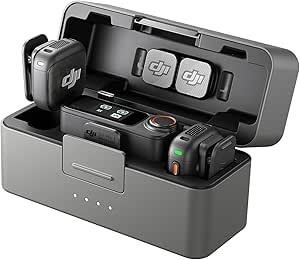
DJI Mic 3 Wireless Microphone (2 Transmitters, 1 Receiver, Charging Case)

Bose QuietComfort Wireless Noise Cancelling Headphones – Petal Pink Limited Edition
As an affiliate, we earn on qualifying purchases.
How the Comparison Frames the Market
The guide places the options into two broad categories: software-only tools, which process audio supplied by the user, and hardware-integrated recorders that capture audio and connect it to transcription services. It argues that office users with suitable microphones may prefer software flexibility, while field users may value an all-in-one recording process.
It also contrasts subscription plans with one-time licenses. The source says subscriptions may include updates, cloud storage or support, while one-time purchases avoid recurring fees. It does not list comparable prices, plan limits or total-cost calculations for all 11 options, so readers cannot infer which is least expensive from the supplied material alone.
Evidence Buyers Should Verify
The supplied source does not identify all 11 products or provide a full ranked list, prices, test recordings, accuracy scores or a dated methodology. Its characterizations of products as leading choices or especially robust are editorial assessments attributed to the guide, not results from an independently described head-to-head trial.
It is also unclear which specific devices support each language, how language quality was measured, and what privacy terms apply to each service. The source text ends during its privacy discussion. Readers should confirm current product features, subscriptions, data handling, integrations and compliance terms with vendors before relying on them.
Checks Before Choosing a Tool
The comparison offers no announced follow-up test or publication date. For prospective buyers, the next step is to test candidate tools using representative audio: the same accents, terminology, speaker overlap and recording conditions found in their actual work. Compare correction time and export quality, not just the initial transcript.
Before purchase, check the current plan price, supported languages, microphone requirements, file formats, editing controls and data-retention terms. Organizations handling medical, legal or other sensitive material should confirm security and compliance requirements with their own advisers and the vendor.
Key Questions
What is the main tradeoff in the comparison?
The guide contrasts flexible software with hands-on correction against recorder bundles that simplify audio capture and transcription but may limit editing flexibility.
Does the source prove which tool is most accurate?
No. The supplied material gives editorial recommendations but no accuracy scores, test set or comparative results that establish a winner.
What should users handling confidential recordings check?
They should verify where audio is processed and stored, data-retention and access terms, and whether the product meets their organization’s privacy and compliance requirements.
Are subscription plans always cheaper?
No comparative prices are provided. The guide says subscriptions may include ongoing updates or services, while one-time licenses avoid recurring fees; buyers need to compare current costs and included features.
Source: ThorstenMeyerAI.com