
TL;DR

Get the latest gadgets delivered free with Prime
- Fast, free delivery on millions of items
- Prime Video, Amazon Music and more included
- Member-only deals all year
Thorsten Meyer AI published a new comparison arguing that the Mac-versus-GPU-tower choice for local LLMs turns on two linked questions: whether the model fits in memory and how much heat and noise the user can tolerate. The report says GPU towers remain faster for models that fit in VRAM, while Apple Silicon can run larger quantized models more quietly through unified memory.
Thorsten Meyer AI has published a Mac-versus-GPU-tower comparison for local LLM users, arguing that the buying decision is not only about token speed but also about memory limits, power draw, heat and noise. The analysis matters for readers choosing between a quiet Apple Silicon machine and a high-throughput NVIDIA GPU tower for running AI models locally.
The article identifies memory bandwidth and memory capacity as the central hardware split. It says LLM inference speed is shaped largely by how fast a system can read model weights, while the ability to load a model at all depends on available memory. On that basis, the guide says an RTX 5090 tower favors bandwidth, while an Apple Silicon Mac Studio M3 Ultra favors capacity through unified memory.
According to the source material, an RTX 5090 provides about 1,792 GB/s of memory bandwidth, compared with about 819 GB/s for a Mac Studio M3 Ultra. The article says that bandwidth gap gives the GPU tower a clear speed lead on models that fit within GPU VRAM. It also says consumer GPU memory remains constrained at roughly 24GB to 32GB per card, and that two GPUs do not simply combine their VRAM into one larger pool for a single model.
The Mac case is different, according to the analysis. Apple Silicon systems can draw from a shared memory pool that the article says may reach 256GB to 512GB, depending on configuration. That can allow large quantized 70B-class models, and possibly larger ones, to run on one machine when they would not fit on a single consumer GPU. The tradeoff, as described by the source, is lower per-token speed.
Why It Matters
The practical impact is that buyers may be solving different problems while asking the same question. A developer who needs fast output from models that fit in 32GB of VRAM may get better throughput from a GPU tower. A researcher, builder or advanced hobbyist who wants to load larger models locally may find the Mac more useful despite slower generation.
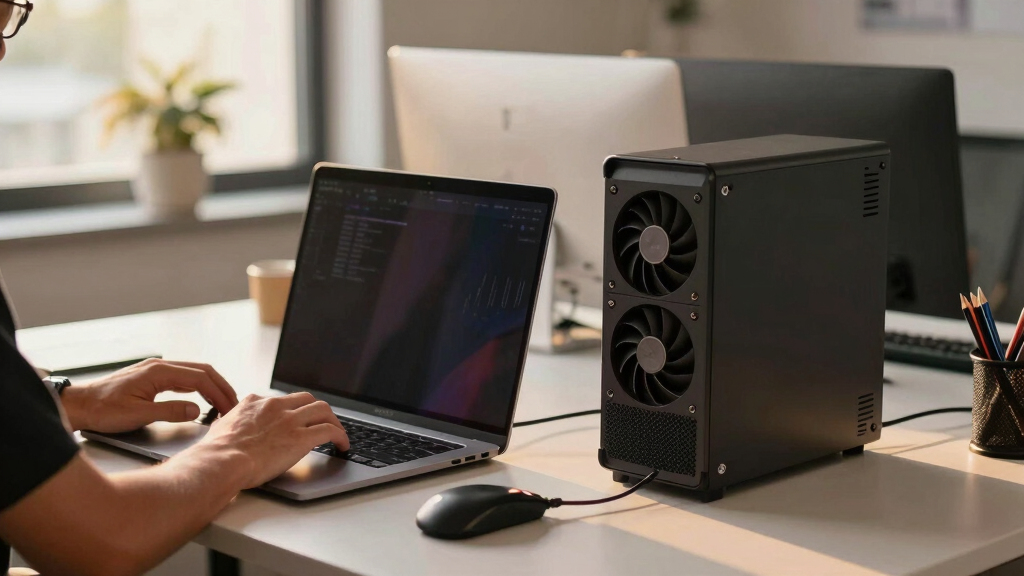
The heat-and-noise angle changes the cost of ownership. The source says a single RTX 5090 can draw 575W and that a dual-GPU tower can exceed 800W, with most of that power becoming room heat that must be removed by fans and airflow. That can affect where the system can be placed, how loud the workspace becomes, and whether users need to spend time tuning cooling, fans, undervolting, case airflow and workstation placement.
For readers working from a desk, home office or shared space, the report’s core point is that silence can be a product feature. The Mac is presented as slower for many fitted-model workloads but much easier to live with day to day. The GPU tower is presented as faster and more flexible for CUDA-heavy work, but harder to make quiet under sustained load.
As an affiliate, we earn on qualifying purchases.
Background
The article is positioned as the capstone to Thorsten Meyer AI’s series on reducing heat and noise in high-power AI workstations. Earlier pieces in the series focused on managing tower thermals through hardware and tuning. This installment asks whether some users should avoid much of that thermal problem by choosing a different machine class.
The comparison reflects a broader local-AI hardware split. NVIDIA GPU towers remain attractive for high token rates, fine-tuning, CUDA tooling and workloads that benefit from discrete GPU bandwidth. Apple Silicon systems compete on quiet operation, lower power draw and large unified memory pools that can hold models beyond the reach of a single consumer GPU.
“Silence is its default, not an achievement.”
— Thorsten Meyer AI
“The question that actually decides it is: does it fit? or how fast?”
— Thorsten Meyer AI
“Stop choosing — run both.”
— Thorsten Meyer AI
As an affiliate, we earn on qualifying purchases.
What Remains Unclear
The article gives ballpark token-rate guidance but says performance varies by model, quantization and workload. It does not provide a full independent benchmark table in the supplied material. Pricing, local availability, exact system configurations, sustained thermals and real-world noise levels can also change the outcome for a specific buyer.
As an affiliate, we earn on qualifying purchases.
What’s Next
Readers comparing systems should check the models they plan to run, the memory footprint of their chosen quantization, current hardware prices and the noise limits of their workspace. The source’s suggested path for users who need both quiet daily work and maximum GPU speed is a hybrid setup: a quiet Mac at the desk and a headless GPU tower in another room, accessed over SSH when raw throughput is needed.
As an affiliate, we earn on qualifying purchases.
Key Questions
Which is faster for local LLMs, a Mac or a GPU tower?
According to the source, a GPU tower is faster for models that fit inside GPU VRAM because discrete GPUs such as the RTX 5090 offer much higher memory bandwidth.
Why would someone choose a Mac for local LLMs?
The Mac may be a better fit when quiet operation, lower heat and large unified memory matter more than maximum tokens per second. The source says high-memory Apple Silicon systems can load large quantized models that may not fit on one consumer GPU.
Does adding two GPUs double usable model memory?
The source says no for the ordinary buyer decision described here. VRAM on consumer GPUs does not simply become one shared pool for a single model.
What is the heat-and-noise tradeoff?
The GPU tower can deliver higher throughput but may draw hundreds of watts under load, producing heat and fan noise. The Mac is described as much quieter and lower-power, but slower per token.
What setup does the article suggest for users who need both?
The source suggests a hybrid workflow: keep a quiet Mac at the desk for interactive work and use a GPU tower remotely for throughput jobs, fine-tuning and CUDA workloads.
Source: Thorsten Meyer AI
Halloween Picks
halloween
As an affiliate, we earn on qualifying purchases.


![Surveillance is not safety: A statement on the UK's latest threat to privacy [pdf]](https://theideamagazine.com/wp-content/uploads/2026/06/surveillance-is-not-safety-a-statement-on-the-uk-s-latest-threat-to-privacy-pdf-featured-560x300.jpg)