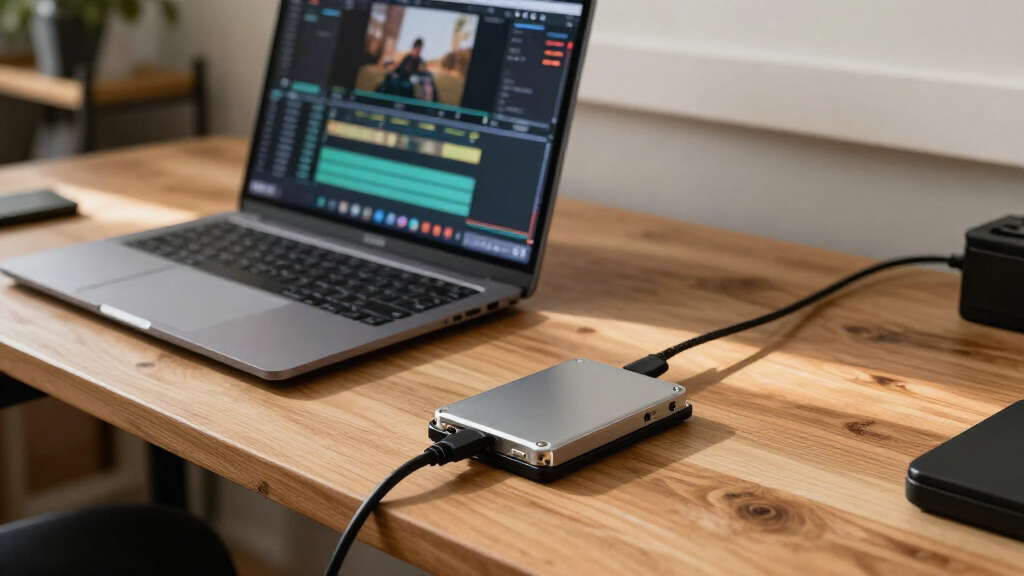
Choosing the best SSD drives depends heavily on whether you need raw internal speed for gaming and video editing or rugged portability for on-the-go workflows. For most users seeking the highest internal performance, the Samsung 990 PRO stands out as the definitive choice due to its exceptional PCIe 4.0 throughput and reliability. If you prioritize external storage for creative work, the Samsung T7 Shield offers a rare balance of high-speed USB 3.2 Gen 2 transfer rates and physical durability. The main tradeoff you will face is between interface speed and form factor; internal M.2 drives are faster but require compatible motherboards, while portable SSDs offer convenience at the cost of slightly lower peak performance. Continue reading for a detailed breakdown of these thirteen options to determine which drive fits your specific hardware and use case.

Get the latest gadgets delivered free with Prime
- Fast, free delivery on millions of items
- Prime Video, Amazon Music and more included
- Member-only deals all year
Complete the kit



Key Takeaways
- Internal NVMe drives like the Samsung 990 PRO deliver roughly 4-5x the speed of SATA options, making them mandatory for large file transfers and heavy multitasking.
- Portable SSDs have bifurcated into two distinct tiers: budget models capped at 1000 MB/s and premium models exceeding 2000 MB/s, with a significant price gap between them.
- Durability features such as IP65 ratings on drives like the Samsung T7 Shield add weight and bulk, which may be a drawback for ultra-minimalist setups.
- SATA III drives remain relevant only for older systems or mass storage expansion, as their 550 MB/s ceiling is no longer competitive for primary OS drives.
- Brand consistency matters more than specs alone; Samsung and SanDisk dominate this list because their firmware stability and thermal management outperform generic alternatives.
| SanDisk 1TB Portable SSD, Black |  | Best Rugged Everyday Carry | Capacity: 1 TB | Interface: USB 3.2 Gen 2 | Connector: USB-C | VIEW LATEST PRICE | See Our Full Breakdown |
| SanDisk Extreme Portable SSD, 1TB, Up to 2000MB/s |  | Best Protected Mid-Speed Portable SSD | Capacity: 1 TB | Connector: USB Type-C | Maximum read speed: Up to 2,000 MB/s | VIEW LATEST PRICE | See Our Full Breakdown |
| Samsung 990 PRO 2TB PCIe 4.0 M.2 2280 SSD |  | Best Internal SSD for Gaming and Heavy Workloads | Capacity: 2 TB | Interface: PCIe 4.0 x4 | Form factor: M.2 2280 | VIEW LATEST PRICE | See Our Full Breakdown |
| Samsung Portable SSD P7 1TB – Read/Write speeds up to 4,000/3,700 MB/s |  | Best USB4 Portable SSD | Capacity: 1 TB | Connectivity: USB Type-C | Maximum read speed: Up to 4,000 MB/s | VIEW LATEST PRICE | See Our Full Breakdown |
| SanDisk 2TB Extreme PRO Portable SSD – Up to 4000 MB/s Read Speed (New Model) |  | Best High-Capacity Rugged SSD for Creators | Capacity: 2 TB | Connector: USB Type-C | Maximum read speed: Up to 4,000 MB/s | VIEW LATEST PRICE | See Our Full Breakdown |
| Samsung T7 Portable SSD, 2TB, Titan Gray, USB 3.2 Gen 2 | 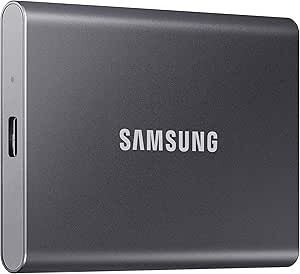 | Best Everyday Portable SSD | Capacity: 2 TB | Interface: USB | Read speed: Up to 1,050 MB/s | VIEW LATEST PRICE | See Our Full Breakdown |
| SanDisk 2TB Extreme Portable SSD – Up to 1050 MB/s Read Speed (Old Model) |  | Best for Rugged Travel | Capacity: 2 TB | Interface: USB 3.2 Gen 2 | Read speed: Up to 1,050 MB/s | VIEW LATEST PRICE | See Our Full Breakdown |
| Samsung 870 EVO 1TB SATA III 2.5-inch Internal SSD |  | Best SATA Upgrade | Capacity: 1 TB | Interface: SATA III 6 Gb/s | Form factor: 2.5 inches | VIEW LATEST PRICE | See Our Full Breakdown |
| Samsung 990 1TB NVMe Internal SSD |  | Best for High-Speed Internal Storage | Capacity: 1 TB | Interface: PCIe 4.0 x4 | Protocol: NVMe | VIEW LATEST PRICE | See Our Full Breakdown |
| Samsung T7 Shield Portable SSD 2TB |  | Best Rugged All-Rounder | Capacity: 2 TB | Interface: USB 3.2 Gen 2 | Read speed: Up to 1,050 MB/s | VIEW LATEST PRICE | See Our Full Breakdown |
| TEAMGROUP T-Force Vulcan Z 1TB 2.5″ SATA III Internal SSD |  | Best Budget Internal Upgrade | Form Factor: 2.5-inch (7mm slim) | Interface: SATA III (6 Gb/s) | NAND Type: 3D NAND TLC | VIEW LATEST PRICE | See Our Full Breakdown |
| Samsung T9 Portable SSD 1TB | 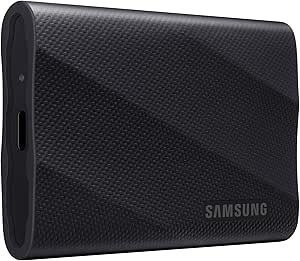 | Best High-Speed Portable Drive | Capacity: 1 TB | Interface: USB 3.2 Gen 2×2 | Max Read Speed: 2,000 MB/s | VIEW LATEST PRICE | See Our Full Breakdown |
| SanDisk 1TB Portable SSD – Up to 1000 MB/s Read Speed, Black (New Model) |  | Best Compact Everyday Carry | Capacity: 1 TB | Interface: USB 3.0 | Connectivity: USB-C | VIEW LATEST PRICE | See Our Full Breakdown |
| SSD drife | Capacity | Interface | Encryption |
|---|---|---|---|
| SanDisk 1TB Portable SSD | 1 TB | USB 3.2 Gen 2 | — |
| SanDisk Extreme Portable SSD | 1 TB | — | 256-bit AES |
| Samsung 990 PRO 2TB PCIe 4.0 M | 2 TB | PCIe 4.0 x4 | — |
| Samsung Portable SSD P7 1TB | 1 TB | — | — |
| SanDisk 2TB Extreme PRO Portab | 2 TB | — | 256-bit AES |
| Samsung T7 Portable SSD | 2 TB | USB | 256-bit AES hardware encryption |
| SanDisk 2TB Extreme Portable S | 2 TB | USB 3.2 Gen 2 | 256-bit AES hardware encryption |
| Samsung 870 EVO 1TB SATA III 2 | 1 TB | SATA III 6 Gb/s | AES 256-bit, TCG/Opal, IEEE1667 |
| Samsung 990 1TB NVMe Internal | 1 TB | PCIe 4.0 x4 | — |
| Samsung T7 Shield Portable SSD | 2 TB | USB 3.2 Gen 2 | Hardware encryption |
| TEAMGROUP T-Force Vulcan Z 1TB | — | SATA III (6 Gb/s) | — |
| Samsung T9 Portable SSD 1TB | 1 TB | USB 3.2 Gen 2×2 | AES 256-bit hardware encryption |
| SanDisk 1TB Portable SSD | 1 TB | USB 3.0 | — |
More Details on Our Top Picks
SanDisk 1TB Portable SSD, Black
I’d choose this 1TB SanDisk for routine file access and travel when durability matters more than headline speed. Its 800 MB/s read rate is a clear step below the SanDisk Extreme Portable SSD’s stated 2,000 MB/s and the newer high-speed portable options, so large video transfers will take longer. The payoff is a rubber enclosure, two-meter drop protection, and built-in attachment hook that make it practical to secure to a bag or belt. It also offers a straightforward USB-C connection for laptops, tablets, and Xbox Series S. The listing notes that write speeds are substantially lower than reads, and real performance depends on the host. I’d pick it for everyday portability, not sustained production work.
Pros:- Rubber enclosure with up to two-meter drop protection
- Built-in hook helps secure the drive to a bag or belt
- USB-C connectivity and compatibility with laptops, tablets, and Xbox Series S
- Compact portable design for carrying everyday files
Cons:- Up to 800 MB/s reads are slower than the faster portable SSDs in this roundup
- Write speeds are significantly lower than the stated read speed
- Actual performance varies with the host device and interface
Best for: Travelers and students who want a 1TB drive with a secure attachment point and drop protection for everyday files.
Not ideal for: Video editors moving large projects frequently, or buyers who need the fastest transfers; its stated read speed is well below the SanDisk Extreme Portable SSD and newer USB4 models.
- Capacity:1 TB
- Interface:USB 3.2 Gen 2
- Connector:USB-C
- Maximum read speed:Up to 800 MB/s
- Enclosure:Rubber
- Drop protection:Up to 2 meters
- Compatibility:Laptops, tablets, Xbox Series S
Our verdict“Choose this SanDisk for a rugged, easy-to-attach everyday drive, but opt for a faster model if large transfers are routine.”
SanDisk Extreme Portable SSD, 1TB, Up to 2000MB/s
This 1TB SanDisk Extreme is a sensible middle ground for buyers who want rugged protection and faster access than the basic SanDisk 1TB Portable SSD, without stepping up to the 4,000 MB/s claims of the SanDisk Extreme PRO or Samsung Portable SSD P7. Its stated 2,000 MB/s read speed suits photo libraries and project files, though write speed is lower and the interface details in the listing make host compatibility worth checking before buying. The IP65 rating and three-meter drop protection add reassurance for travel, while 256-bit AES encryption provides a security option for sensitive files. Encryption requires a software download and is limited to supported Windows and macOS versions. I’d favor it for protected everyday carry, not as a guaranteed full-speed choice on every USB-C device.
Pros:- Stated read speeds up to 2,000 MB/s for quicker file access
- IP65 water and dust resistance
- Up to three-meter drop protection in a pocket-sized design
- 256-bit AES password protection for supported systems
Cons:- Write speeds are below the stated maximum read speed
- Encryption requires a software download and supports only specified Windows and macOS versions
- Maximum performance depends on the host connection and conditions
Best for: Photographers, students, and mobile workers who carry a 1TB library and want water, dust, drop, and password protection.
Not ideal for: Buyers who need sustained write speeds or expect maximum performance from any USB-C port; write rates are lower and encryption has operating-system requirements.
- Capacity:1 TB
- Connector:USB Type-C
- Maximum read speed:Up to 2,000 MB/s
- Water and dust resistance:IP65
- Drop protection:Up to 3 m
- Encryption:256-bit AES
- Weight:1.6 oz
- Dimensions:3.35 × 2 × 0.39 in
Our verdict“Pick this model for a rugged, security-minded 1TB carry drive; choose the SanDisk Extreme PRO or Samsung P7 for higher stated transfer speeds.”
Samsung 990 PRO 2TB PCIe 4.0 M.2 2280 SSD
For a desktop or laptop with a compatible M.2 slot, the Samsung 990 PRO 2TB is the strongest fit here for fast internal storage. Its PCIe 4.0 interface and sequential speeds of up to 7,450 MB/s read and 6,900 MB/s write put it in a different category from every portable drive in this batch, including the Samsung P7 and SanDisk Extreme PRO. That speed can shorten large file transfers and support demanding game and creator workloads, while the 2TB capacity leaves more room for a substantial library. This is an internal M.2 drive, not a plug-and-play external backup device, and PS5 use may call for a separately sold heatsink. Actual performance also depends on system configuration and firmware.
Pros:- High sequential read and write speeds for demanding workloads
- 2TB capacity suits large game and project libraries
- PCIe 4.0 x4 NVMe interface for compatible systems
- Controller is designed to manage heat and power efficiency
Cons:- Requires a compatible M.2 2280 slot and installation
- A separately sold heatsink may be needed for PS5 thermal performance
- Real-world speeds vary with firmware, hardware, and configuration
Best for: PC gamers, creators, and PS5 owners with a compatible M.2 slot who want high-speed 2TB internal storage.
Not ideal for: Buyers seeking a portable backup drive or a simple USB-C connection; this requires an M.2 installation, and PS5 thermal needs may add a separate heatsink purchase.
- Capacity:2 TB
- Interface:PCIe 4.0 x4
- Form factor:M.2 2280
- Sequential read speed:Up to 7,450 MB/s
- Sequential write speed:Up to 6,900 MB/s
- Compatible devices:Desktop, laptop
- Compatible console:Sony PlayStation 5
Our verdict“Choose the 990 PRO for fast internal gaming or creator storage, rather than a portable drive for moving files between devices.”
Samsung Portable SSD P7 1TB – Read/Write speeds up to 4,000/3,700 MB/s
The Samsung Portable SSD P7 is the speed-focused external pick for buyers whose computers can use its stated USB4 performance. With reads up to 4,000 MB/s and writes up to 3,700 MB/s, it offers a more balanced transfer profile than the SanDisk 1TB Portable SSD, whose listed read speed is 800 MB/s and whose write speed is lower. The compact, shock-resistant body and USB-C compatibility make it useful across computers, mobile devices, and consoles, while Samsung Magician adds drive health and optimization tools. The catch is that the top speeds require a USB4 Gen 3×2 host and compatible cable; older ports can limit the benefit. Its listed interface details also merit checking against the intended setup before purchase.
Pros:- Stated read and write speeds of up to 4,000 and 3,700 MB/s
- Compact, lightweight design at 0.1 kg
- Shock-resistant construction
- Samsung Magician software offers health monitoring and optimization tools
Cons:- Maximum speeds require a USB4 Gen 3×2 host and compatible cable
- Older ports can sharply limit transfer performance
- No protective case or extra accessories are included
Best for: Video creators and mobile professionals with a USB4 Gen 3×2 computer who need fast external reads and writes in a compact drive.
Not ideal for: Buyers with older USB ports or those who want rugged water and dust protection; performance falls on older connections, and the listed protection is shock resistance rather than an IP rating.
- Capacity:1 TB
- Connectivity:USB Type-C
- Maximum read speed:Up to 4,000 MB/s
- Maximum write speed:Up to 3,700 MB/s
- Form factor:Portable
- Weight:0.1 kg
- Compatible devices:Gaming console, laptop, Mac, PC, smartphone, tablet
Our verdict“Choose the P7 when your USB4 setup can make use of its fast, balanced transfers; for older hosts, a less speed-dependent portable SSD may be a better match.”
SanDisk 2TB Extreme PRO Portable SSD – Up to 4000 MB/s Read Speed (New Model)
For field work that combines large files with rough handling, I’d rank the SanDisk Extreme PRO 2TB ahead of the 1TB Samsung P7 on capacity and stated durability, while the P7 lists a similarly high maximum read speed. The PRO pairs up to 4,000 MB/s reads with sustained 3,100 MB/s writes, giving photographers and video editors more room for active projects and faster write handling than the lower-speed SanDisk portable models. Its IP65 protection, three-meter drop rating, and 256-bit AES encryption make it better suited to field storage than a drive focused mainly on speed. The tradeoff is that its top performance depends on the host connection, and the listing notes a higher cost than standard consumer SSDs. I’d verify port compatibility before relying on maximum throughput.
Pros:- 2TB capacity for large photo, video, and business libraries
- Up to 4,000 MB/s reads and stated sustained writes around 3,100 MB/s
- IP65 water and dust resistance with up to three-meter drop protection
- 256-bit AES password protection
Cons:- Maximum performance requires a compatible host connection
- Higher cost than standard consumer SSDs, according to the product data
- Actual transfer speeds depend on the host and interface
Best for: Photographers and video editors who need 2TB of rugged portable workspace, fast sustained writes, and password-protected storage in the field.
Not ideal for: Casual users with modest storage needs or buyers without a suitable USB-C or USB 3.0 host; they may not benefit from its speed and capacity.
- Capacity:2 TB
- Connector:USB Type-C
- Maximum read speed:Up to 4,000 MB/s
- Write speed:Sustained up to 3,100 MB/s
- Water and dust resistance:IP65
- Drop protection:Up to 3 m
- Encryption:256-bit AES
- Dimensions:4.33 × 2.28 × 0.39 in
Our verdict“Choose the Extreme PRO for high-capacity creator work that needs rugged protection and fast writes; the Samsung P7 is the smaller-capacity alternative for USB4-focused setups.”
Samsung T7 Portable SSD, 2TB, Titan Gray, USB 3.2 Gen 2
The Samsung T7 is a balanced choice for carrying a large working library: its 2TB capacity and USB 3.2 Gen 2 speeds make transfers of video, project files, and backups quicker than a SATA-based portable drive. Its aluminum body is rated for drops up to 6 feet, and the included USB-C-to-C and USB-C-to-A cables make it easier to connect across newer and older devices. Compared with the more rugged Samsung T7 Shield, the standard T7 is slimmer in protection, lacking its listed IP65 water and dust resistance and greater drop rating. That makes this model a better fit for desk-to-bag use than rough outdoor work. Peak speeds also depend on a compatible host connection, and some systems may need reformatting.
Pros:- 2TB capacity suits large project folders and media libraries.
- Up to 1,050 MB/s read and 1,000 MB/s write speeds on a compatible connection.
- Aluminum body with drop protection up to 6 feet.
- Includes USB-C-to-C and USB-C-to-A cables.
Cons:- Maximum speeds require USB 3.2 Gen 2 and UASP support.
- Lacks the T7 Shield’s stated IP65 water and dust resistance.
- Some host devices or operating systems may require reformatting.
Best for: Laptop owners and mobile creators who want 2TB of fast, compact storage for regular transfers and backups.
Not ideal for: Photographers or field workers who need stated water and dust resistance; the T7 Shield offers stronger environmental protection.
- Capacity:2 TB
- Interface:USB
- Read speed:Up to 1,050 MB/s
- Write speed:Up to 1,000 MB/s
- Encryption:256-bit AES hardware encryption
- Material:Aluminum unibody
- Drop protection:Up to 6 feet
- Included cables:USB Type-C to Type-C and USB Type-C to Type-A
Our verdict“Choose the T7 for fast, everyday 2TB portable storage, but pick the T7 Shield if exposure to dust or water is part of the job.”
SanDisk 2TB Extreme Portable SSD – Up to 1050 MB/s Read Speed (Old Model)
The SanDisk Extreme Portable SSD pairs 2TB of storage with protection aimed at travel and outdoor workflows: it has an IP65 rating, drop protection up to 3 meters, and a carabiner loop for attaching it to a bag. Its listed read and write speeds match the Samsung T7, so the deciding difference is not transfer-rate claims but physical protection and carry options. Compared with the more compact-feeling Samsung T7, this SanDisk is the more convincing pick when dust, splashes, or accidental drops are a regular concern. Hardware encryption adds a privacy layer for work files. Its main limit is host dependence: older computers may not reach the advertised speeds, and this model does not list the T7 Shield’s broader stated compatibility.
Pros:- IP65 water and dust resistance for more demanding travel conditions.
- Drop protection rated up to 3 meters.
- Carabiner loop makes it easy to secure to a bag or belt.
- 2TB capacity, fast USB 3.2 Gen 2 performance, and 256-bit AES hardware encryption.
Cons:- Maximum speeds depend on a compatible host device.
- Older systems may deliver lower transfer rates.
- Its rugged features matter less for buyers who mainly store the drive on a desk.
Best for: Traveling photographers, field crews, and laptop users who want a 2TB drive with water and dust resistance and a bag-attachment loop.
Not ideal for: Buyers prioritizing the smallest everyday desk drive or those who need predictable peak speeds from an older USB host.
- Capacity:2 TB
- Interface:USB 3.2 Gen 2
- Read speed:Up to 1,050 MB/s
- Write speed:Up to 1,000 MB/s
- Drop protection:Up to 3 meters
- Ingress protection:IP65 water and dust resistance
- Encryption:256-bit AES hardware encryption
- Operating temperature:-20°C to 85°C
Our verdict“Pick this SanDisk over the standard Samsung T7 when water, dust, and drop protection matter more than a simple compact carry drive.”
Samsung 870 EVO 1TB SATA III 2.5-inch Internal SSD
The Samsung 870 EVO is the sensible choice for a desktop or older laptop with a standard 2.5-inch SATA bay. It reaches up to 560 MB/s read and 530 MB/s write, pushing the SATA interface near its practical ceiling and offering a clear upgrade from a hard drive. Its 600 TBW endurance rating and included Magician management tools also suit systems that see frequent writes or need drive-health monitoring. Compared with the Samsung 990 1TB NVMe, it is far slower on paper and cannot deliver the short transfer times available from a compatible PCIe 4.0 system. Its advantage is fit: many existing SATA machines can use it without an M.2 slot. Skip it if your computer has no 2.5-inch bay or you are building around NVMe performance.
Pros:- Near-ceiling SATA sequential speeds of up to 560 MB/s read and 530 MB/s write.
- 600 TBW endurance rating for sustained write workloads.
- Samsung Magician software supports drive management and health monitoring.
- Broad fit with standard 2.5-inch SATA bays.
Cons:- SATA performance is well below the Samsung 990 NVMe drive’s listed speeds.
- Requires a 2.5-inch SATA bay and connection.
- Does not suit many ultra-thin modern laptops.
Best for: Owners of desktops, NAS setups, and older laptops with an available 2.5-inch SATA bay who want a durable hard-drive replacement.
Not ideal for: Builders with an M.2 NVMe slot seeking high-speed game or creative-work transfers, or owners of ultra-thin laptops without a 2.5-inch bay.
- Capacity:1 TB
- Interface:SATA III 6 Gb/s
- Form factor:2.5 inches
- Sequential read speed:Up to 560 MB/s
- Sequential write speed:Up to 530 MB/s
- Endurance:600 TBW
- Warranty:5 years
- Encryption:AES 256-bit, TCG/Opal, IEEE1667
Our verdict“Choose the 870 EVO for a dependable 2.5-inch SATA upgrade, not for a new system built to take advantage of NVMe speeds.”
Samsung 990 1TB NVMe Internal SSD
The Samsung 990 1TB NVMe SSD is the speed-focused internal pick here, with a PCIe 4.0 x4 connection and claimed sequential reads up to 7,150 MB/s. That makes it a better match than the SATA-based Samsung 870 EVO for large game installs, creative project files, and workloads that benefit from fast storage—provided the computer supports an M.2 PCIe 4.0 drive. Hardware encryption, TRIM support, and tools for firmware updates and health monitoring add useful management features. The tradeoff is system dependence: actual performance varies with configuration and firmware, and the product data notes that TurboWrite performance depends on transfer size. At 1TB, capacity may also feel restrictive for buyers keeping a large media library or many current games installed.
Pros:- PCIe 4.0 x4 NVMe interface with sequential reads up to 7,150 MB/s.
- Sequential writes up to 6,450 MB/s for compatible workloads.
- Supports hardware encryption and TRIM.
- Includes tools for firmware updates and drive-health monitoring.
Cons:- Requires an M.2 PCIe 4.0-compatible system to make use of its interface.
- Real-world performance varies with system configuration and firmware.
- TurboWrite performance depends on transfer size, and 1TB can limit large libraries.
Best for: PC builders and laptop owners with an M.2 PCIe 4.0 slot who prioritize fast loading and large-file transfers over a larger storage capacity.
Not ideal for: Users with SATA-only systems, no available M.2 slot, or large game and media libraries that need more than 1TB.
- Capacity:1 TB
- Interface:PCIe 4.0 x4
- Protocol:NVMe
- Form factor:M.2
- Sequential read speed:Up to 7,150 MB/s
- Sequential write speed:Up to 6,450 MB/s
- Random read/write performance:Up to 700K/1,100K IOPS
- Features:Hardware encryption and TRIM support
Our verdict“Choose the Samsung 990 for a compatible M.2 system where fast internal transfers matter more than extra capacity.”
Samsung T7 Shield Portable SSD 2TB
The Samsung T7 Shield is the portable option I would favor when a drive needs to leave a controlled workspace. It combines IP65 water and dust resistance with drop protection up to 9.8 feet, while keeping the same listed 1,050 MB/s read and 1,000 MB/s write speeds as the standard Samsung T7. That added protection makes it a stronger fit for field shoots and frequent travel than the standard Samsung T7; unlike the SanDisk Extreme Portable SSD, it also lists compatibility with consoles and newer iPhones alongside PC, Mac, and Android. Its 2TB capacity works for sizeable project folders, though USB 3.2 Gen 2 and UASP support are needed for peak performance. Its rugged rating is not a substitute for careful handling in every environment.
Pros:- IP65 water and dust resistance with drop protection up to 9.8 feet.
- Up to 1,050 MB/s read and 1,000 MB/s write speeds over USB 3.2 Gen 2.
- Broad listed compatibility across computers, Android, consoles, and iPhone 15/16.
- Samsung Magician software supports optimization and health monitoring.
Cons:- Peak speeds require a compatible USB 3.2 Gen 2 host and UASP mode.
- Environmental protection can vary with actual conditions.
- Its extra rugged protection may be unnecessary for mostly stationary use.
Best for: Mobile creators and travelers who want 2TB of portable storage for PC, Mac, Android, consoles, or newer iPhones and face dust, splashes, or drops.
Not ideal for: Buyers who only need a protected indoor backup drive, or users whose host devices cannot support USB 3.2 Gen 2 and UASP speeds.
- Capacity:2 TB
- Interface:USB 3.2 Gen 2
- Read speed:Up to 1,050 MB/s
- Write speed:Up to 1,000 MB/s
- Drop resistance:Up to 9.8 feet (3 meters)
- Ingress protection:IP65 water and dust resistance
- Compatibility:PC, Mac, Android, gaming consoles, iPhone 15/16
- Encryption:Hardware encryption
Our verdict“Choose the T7 Shield over the standard T7 when you want the same listed transfer speeds with stronger protection for travel and field work.”
TEAMGROUP T-Force Vulcan Z 1TB 2.5″ SATA III Internal SSD
This drive stands out for cost-effective system revitalization, making it an ideal choice for older laptops or desktops that still rely on mechanical hard drives. While it cannot match the raw throughput of internal NVMe options like the Samsung 990 PRO, it offers a significant leap in responsiveness over traditional spinning disks. The 3D NAND TLC technology and SLC cache help sustain reasonable performance during typical daily tasks, though sustained heavy writes may see speed dips once the cache is exhausted. It is a pragmatic solution for users who prioritize budget over cutting-edge speed.
Pros:- Significantly reduces boot and load times compared to mechanical HDDs
- Slim 7mm design fits easily into most standard laptop bays
- Includes a 3-year limited warranty for peace of mind
Cons:- Interface speed is limited by the SATA III standard
- Performance can drop under sustained heavy write workloads
Best for: Users upgrading older laptops or desktops from HDDs who need a silent, reliable boot drive on a tight budget.
Not ideal for: Content creators or gamers needing high sustained write speeds for large file transfers, as SATA III caps out at 6 Gb/s.
- Form Factor:2.5-inch (7mm slim)
- Interface:SATA III (6 Gb/s)
- NAND Type:3D NAND TLC
- Max Read Speed:550 MB/s
- Max Write Speed:500 MB/s
- Warranty:3-Year Limited Warranty
Our verdict“A solid, low-cost entry point for anyone wanting to replace a slow mechanical drive with silent, instant-access storage.”
Samsung T9 Portable SSD 1TB
The Samsung T9 is engineered for users who demand desktop-class performance on the go. With read and write speeds reaching 2,000 MB/s via USB 3.2 Gen 2×2, it significantly outpaces the Samsung T7 and standard USB-C drives for large video projects. However, this extreme speed is contingent on your computer supporting Gen 2×2; without it, you will not see these peak numbers. It includes Dynamic Thermal Guard to prevent throttling during intensive transfers, making it a robust choice for professionals who cannot afford downtime due to overheating.
Pros:- Extremely fast sustained read/write speeds up to 2,000 MB/s
- Dynamic Thermal Guard maintains performance during heavy use
- Broad compatibility with PCs, Macs, consoles, and iPhone 15/16
Cons:- Requires specific host hardware (USB 3.2 Gen 2×2) for max speeds
- Enclosure material durability details are less transparent
Best for: Video editors and photographers who need to transfer massive files quickly and have modern USB 3.2 Gen 2×2 ports.
Not ideal for: General users with older laptops that only support USB 3.2 Gen 1 or 2, as they won’t utilize the drive’s full speed potential.
- Capacity:1 TB
- Interface:USB 3.2 Gen 2×2
- Max Read Speed:2,000 MB/s
- Max Write Speed:2,000 MB/s
- Encryption:AES 256-bit hardware encryption
- Drop Resistance:Up to 9.8 ft
Our verdict“The top choice for creative professionals who need rapid data offloading and have the modern ports to support it.”
SanDisk 1TB Portable SSD – Up to 1000 MB/s Read Speed, Black (New Model)
For those prioritizing portability and durability over raw speed, this SanDisk model is a compelling option. It is significantly smaller and lighter than the Samsung T9, fitting easily into a pocket while offering IP65 water and dust resistance. The 1,000 MB/s read speed is ample for everyday tasks like backing up photos or moving documents, though write speeds are lower and unspecified. It lacks the driver-free plug-and-play convenience of some competitors requiring specific software, but its ruggedness makes it a reliable companion for travel and fieldwork.
Pros:- Extremely compact and lightweight design (1.12 ounces)
- IP65 rated for water and dust resistance
- Drop protection up to 2 meters for added peace of mind
Cons:- Write speeds are lower than read speeds and not specified
- USB 3.0 interface limits maximum transfer potential compared to newer standards
Best for: Travelers and students who need a tiny, rugged drive for daily backups and file transfers on the go.
Not ideal for: Professionals handling 4K video editing or large database transfers, as the write speeds and interface bandwidth are limited.
- Capacity:1 TB
- Interface:USB 3.0
- Connectivity:USB-C
- Max Read Speed:1,000 MB/s
- Durability:IP65 Water/Dust Resistance, 2m Drop Protection
- Weight:1.12 ounces
- Dimensions:1.77″ L x 3.35″ W x 0.39″ H
Our verdict“A durable, pocket-sized solution for casual users who value physical resilience and size over maximum transfer speeds.”
How We Picked
I evaluated these thirteen SSDs by prioritizing real-world performance metrics over theoretical maximums. This meant focusing on sustained write speeds and thermal throttling behavior, which are often more indicative of daily user experience than peak burst speeds. I also considered interface compatibility, ensuring that each drive serves a distinct hardware need, from legacy SATA slots to modern PCIe 5.0-ready motherboards. Portability options were judged on their physical resilience and cable compatibility, as these factors dictate how often a drive will actually leave the desk.
The ranking logic prioritizes versatility and reliability. Drives that offer the best price-to-performance ratio for the largest user base appear higher, while niche products—such as budget SATA drives or ultra-rugged portable units—are ranked based on their specific utility. I excluded models with known firmware bugs or those lacking adequate thermal protection, as long-term data integrity is non-negotiable for storage devices.
Factors to Consider When Choosing Best SSD Drives
Selecting the right storage solution requires understanding how your specific workflow interacts with hardware limitations. Beyond just looking at read/write numbers, you must consider interface bottlenecks, thermal management, and physical durability. This guide breaks down the critical factors that will influence your decision between these thirteen distinct products.
Interface Speed and System Compatibility
The most common mistake buyers make is purchasing a high-speed NVMe drive for a motherboard that only supports PCIe 3.0. In such cases, you pay a premium for PCIe 4.0 speeds that the system cannot utilize, resulting in a bottleneck at the interface level. Check your motherboard manual to confirm the available lanes; if you are limited to SATA III, a drive like the Samsung 870 EVO is the logical choice, whereas a modern rig demands an M.2 NVMe drive like the Samsung 990 PRO. Understanding your system’s ceiling prevents wasted budget and ensures you actually experience the performance you paid for.
Sustained Performance and Thermal Management
Peak read speeds are marketing figures that rarely reflect real-world endurance. Many consumer SSDs throttle their performance after a few minutes of heavy writing because they lack adequate heatsinks or DRAM caches. DRAM-less drives may appear cheaper on the spec sheet but suffer from inconsistent latency during random write operations, which can cause system stuttering during multitasking. If you plan to edit 4K video or run virtual machines, prioritize drives with robust thermal controls and independent DRAM buffers to maintain consistent speeds under load.
Portability Versus Raw Speed
External SSDs introduce an additional layer of complexity: the USB controller. Even if a drive supports 4000 MB/s, your computer’s USB port must also support USB 3.2 Gen 2×2 or Thunderbolt to achieve those rates. Many laptops only offer standard USB 3.2 Gen 1 ports, which cap transfer speeds at 1000 MB/s regardless of the drive’s capability. Buyers should audit their port types before investing in high-end portable models like the Samsung T9, otherwise, you are paying for speed you cannot access.
Durability and Environmental Resilience
For professionals working in the field, mechanical durability is as important as transfer speed. Standard plastic-cased SSDs are vulnerable to drops and dust, whereas models with IP65 ratings offer protection against water jets and dust ingress. This ruggedness usually comes with a tradeoff in size and heat dissipation, as thicker casings insulate the internal components. If your drive stays on a desk, prioritize slim designs; if it travels in a backpack, the added bulk of a shielded case is a necessary insurance policy against physical damage.
Frequently Asked Questions
Do I need a heatsink for my NVMe SSD?
Most modern motherboards include built-in heatsinks for M.2 slots, which is sufficient for the Samsung 990 PRO and similar high-performance drives under typical gaming or productivity loads. However, if you are using a small form factor PC or performing sustained large-file transfers, the drive may reach thermal thresholds that trigger throttling. In these scenarios, an aftermarket heatsink can maintain peak speeds longer, but for the average user, the motherboard’s existing cooling solution is adequate. Always check your motherboard documentation before purchasing third-party cooling accessories to avoid clearance issues.
Is a SATA SSD still worth buying in 2027?
SATA SSDs like the Samsung 870 EVO remain valuable primarily for upgrading older laptops and desktops that lack M.2 slots. They also serve as excellent secondary storage drives for large media libraries where sequential speed is less critical than capacity and cost. For a primary operating system drive in a new build, however, SATA technology is obsolete due to its 600 MB/s speed cap. You should only choose SATA if your hardware interface limits you or if you need to expand storage cheaply without sacrificing boot times for secondary tasks.
Can I use a portable SSD as my main OS drive?
While technically possible, using an external drive like the Samsung T7 as a primary OS drive is generally discouraged for desktop users. USB connections introduce higher latency and potential disconnection risks compared to internal PCIe lanes, which can lead to system instability or data corruption during power fluctuations. External drives are best suited for portable workspaces, such as running Linux distributions or editing video directly from the drive to save internal space. For your main Windows or macOS installation, an internal M.2 drive provides the stability and speed required for a smooth computing experience.
What is the difference between SLC and TLC NAND in these drives?
Most consumer SSDs in this list use TLC (Triple-Level Cell) NAND, which offers a good balance between capacity, cost, and endurance. SLC (Single-Level Cell) is faster and more durable but prohibitively expensive for consumer capacities, while QLC (Quad-Level Cell) is cheaper but suffers from slower write speeds and lower endurance. The Samsung 990 PRO uses high-quality TLC with a dynamic SLC cache, which writes data to a fast buffer first before migrating it to the slower TLC cells. This hybrid approach provides the speed of SLC for burst tasks and the capacity of TLC for long-term storage.
How do I migrate my data to a new SSD?
Most major SSD manufacturers, including Samsung and SanDisk, provide free cloning software that simplifies moving your operating system and files from an old drive to a new one. These tools create a bit-for-bit copy of your current drive, allowing you to swap the hardware and boot up immediately without reinstalling Windows or configuring applications. Ensure your new drive has slightly more capacity than the used space on your old drive to avoid migration errors. If you are building a new PC from scratch, a clean installation is often preferable to cloning, as it prevents carrying over accumulated system bloat and registry errors.
Conclusion
Ultimately, the best SSD drives for you depend on your specific hardware constraints and workflow demands. For the majority of PC builders seeking the fastest internal performance, the Samsung 990 PRO is the clear winner, offering unmatched speed and reliability for gaming and professional applications. If you need a reliable, cost-effective upgrade for an older system or secondary storage, the Samsung 870 EVO remains the gold standard in the SATA category. For creators on the move, the Samsung T7 Shield provides the best blend of speed and physical protection, while the SanDisk Extreme Portable SSD offers a compelling balance of price and performance for general portability. Choose based on whether you need internal speed, external convenience, or legacy compatibility, and you will find the right drive in this lineup.