The best AI PC for most local AI workloads is the GEEKOM A9 Mega, pairing a Ryzen AI Max+ 395 with 128GB of memory and a 2TB SSD. For a compact workstation alternative, the MINISFORUM MS-S1 MAX offers the same high-memory processor class, while the HP OmniDesk AI is a more conventional business desktop with an Intel Core Ultra 7 and 32GB of RAM. The main tradeoff is between memory and graphics capacity for larger local models versus a smaller, quieter, or easier-to-manage system for everyday work. Processor names alone do not tell the whole story: memory capacity, upgrade options, cooling, and software support can matter just as much. Continue reading for the full breakdown and guidance on matching an AI PC to your workload.

Get the latest gadgets delivered free — and shop member deals
- Fast, free delivery on millions of items
- Access to Prime Big Deal Days deals on October 6–7
- Prime Video, Amazon Music and more included
Complete the kit



Key Takeaways
- High-memory Ryzen AI Max+ 395 systems lead this lineup for local experimentation. The GEEKOM A9 Mega, MINISFORUM MS-S1 MAX, and several GMKtec and BOSGAME models pair this processor class with 128GB of memory, giving them more room for demanding local workloads than the 16GB Intel mini PCs.
- Configuration details separate near-duplicates. The GMKtec EVO-X2 options differ by SSD capacity, while the EVO-X3 and BOSGAME M5 names appear more than once; buyers should verify the exact memory, storage, and model configuration before choosing.
- Business desktops prioritize a different kind of AI readiness. The HP OmniDesk AI and Dell Pro Micro QCM1250 have business-oriented positioning and Intel Core Ultra processors, making them better fits for managed office tasks than memory-heavy local model work.
- Intel mini PCs in this group suit everyday productivity better than large local models. The GEEKOM GT13 MAX and IT13 Max list 16GB of RAM, while the IT15 raises that to 32GB and uses a newer Core Ultra 9 generation.
- Mini workstation labels do not settle the buying decision. Cooling, ports, upgradeability, software compatibility, and sustained performance should shape the final choice, especially when several systems share a processor family and similar headline memory.
| GEEKOM A9 Mega AI Workstation Mini PC, Ryzen AI Max+ 395, 128GB RAM, 2TB SSD |  | Best for Local AI Workloads | Processor: AMD Ryzen AI Max+ 395, 16 Zen 5 cores | Graphics: AMD Radeon 8060S | Memory: 128GB LPDDR5X, 8000 MT/s | VIEW LATEST PRICE | See Our Full Breakdown |
| MINISFORUM AI X1 Pro Mini PC with AMD Ryzen AI 9 HX 370 | 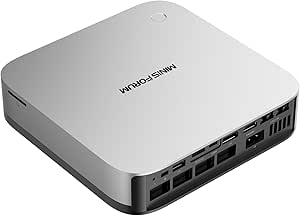 | Best for Upgrade Flexibility | Processor: AMD Ryzen AI 9 HX 370, 12 cores / 24 threads, up to 5.1 GHz | Graphics: AMD Radeon 890M | Memory: 32GB DDR5 5600MHz, removable; expandable to 128GB | VIEW LATEST PRICE | See Our Full Breakdown |
| GMKtec EVO-X3 AI Mini PC with Ryzen AI Max+ 395, 128GB LPDDR5X, and 2TB PCIe 4.0 SSD |  | Best for eGPU Expansion | Processor: AMD Ryzen AI Max+ 395, 16 cores / 32 threads, up to 5.1GHz | Graphics: AMD Radeon 8060S, 40 compute units, up to 2900MHz | NPU: AMD XDNA 2, up to 50 TOPS | VIEW LATEST PRICE | See Our Full Breakdown |
| GMKtec EVO-X2 Mini PC with AMD Ryzen AI Max+ 395, 128GB LPDDR5X, 2TB SSD |  | Best for Multi-Display Setups | Processor: AMD Ryzen AI Max+ 395, 16 cores / 32 threads, boost up to 5.1GHz | Graphics: Integrated AMD Radeon 8060S, 40 RDNA 3.5 compute units | Memory: 128GB LPDDR5X, up to 8000 MT/s | VIEW LATEST PRICE | See Our Full Breakdown |
| BOSGAME M5 Mini PC with AMD Ryzen AI Max+ 395 and 128GB LPDDR5X RAM |  | Best for SD Card Workflows | Processor: AMD Ryzen AI Max+ 395, 16 cores / 32 threads, up to 5.1GHz | Graphics: Integrated AMD Radeon 8060S | Memory: 128GB LPDDR5X, 8000MT/s | VIEW LATEST PRICE | See Our Full Breakdown |
| AMD Ryzen AI Halo Personal AI Desktop Computer |  | Best for Linux Local AI Development | Processor: AMD Ryzen AI Max+ 395, 16 cores and 32 threads | Graphics: AMD Radeon 8060S integrated graphics, 40 RDNA 3.5 compute units | NPU: AMD XDNA 2, up to 50 TOPS | VIEW LATEST PRICE | See Our Full Breakdown |
| HP OmniDesk AI Business Desktop, Intel Core Ultra 7 265, 32GB DDR5, 1TB SSD |  | Best for Windows Business Desktops | Processor: Intel Core Ultra 7 265, 20 cores and 20 threads | Memory: 32GB DDR5 at 5600MHz | Storage: 1TB Gen 4 NVMe SSD | VIEW LATEST PRICE | See Our Full Breakdown |
| MINISFORUM MS-S1 MAX Mini AI Workstation PC, AMD Ryzen AI Max+ 395, 128GB LPDDR5x RAM, 2TB SSD |  | Best for Expandable AI Workstation Setups | Processor: AMD Ryzen AI Max+ 395, 16 cores and 32 threads, up to 5.1GHz | Graphics: Integrated AMD RDNA 3.5 graphics | NPU: 50 TOPS; system AI performance listed at 126 TOPS | VIEW LATEST PRICE | See Our Full Breakdown |
| GEEKOM GT13 MAX Mini PC with Intel Core Ultra 9 185H, 16GB DDR5 RAM, and 1TB SSD |  | Best Compact Multi-Display PC | Processor: Intel Core Ultra 9 185H, 16 cores and 22 threads | Graphics: Intel Arc Graphics with 8 Xe cores | NPU: Up to 11 TOPS | VIEW LATEST PRICE | See Our Full Breakdown |
| BOSGAME M5 Mini PC with AMD Ryzen AI Max+ 395, 128GB RAM, 2TB SSD | | Best Windows AI Workstation | Processor: AMD Ryzen AI Max+ 395, 16 cores and 32 threads, up to 5.1GHz | Graphics: Integrated AMD Radeon 8060S | NPU: 50 TOPS; total AI performance listed up to 126 TOPS | VIEW LATEST PRICE | See Our Full Breakdown |
| GEEKOM IT13 Max Mini PC, Intel Core Ultra 9 185H, 16GB DDR5, 1TB SSD |  | Best for Multi-Display Setups | Processor: Intel Core Ultra 9 185H | Processor power: 65W | Memory: 16GB DDR5 | VIEW LATEST PRICE | See Our Full Breakdown |
| GMKtec EVO-X2 AI Mini PC with Ryzen AI Max+ 395, 128GB RAM, and 1TB SSD |  | Best for High-Memory AI Workloads | Processor: AMD Ryzen AI Max+ 395, 16 cores and 32 threads, up to 5.1GHz | Graphics: AMD Radeon 8060S integrated graphics | NPU: Up to 50 TOPS | VIEW LATEST PRICE | See Our Full Breakdown |
| GMKtec EVO-X3 Mini PC with AMD Ryzen AI Max+ 395, 128GB LPDDR5X, and 2TB PCIe 4.0 SSD |  | Best for External GPU Expansion | Processor: AMD Ryzen AI Max+ 395, 16 cores and 32 threads, up to 5.1GHz | Memory: 128GB LPDDR5X, up to 8000MT/s | Storage: 2TB PCIe 4.0 SSD | VIEW LATEST PRICE | See Our Full Breakdown |
| GEEKOM IT15 Mini PC, Intel Core Ultra 9 285H, 32GB DDR5 RAM, 1TB SSD |  | Best Intel Upgrade Pick | Processor: Intel Core Ultra 9 285H | AI performance: 99 TOPS total: 13 TOPS NPU, 77 TOPS Arc GPU, and 9 TOPS CPU | Graphics: Intel Arc 140T | VIEW LATEST PRICE | See Our Full Breakdown |
| Dell Pro Micro QCM1250 Mini Business Desktop, Intel Core Ultra 5 235T, Windows 11 Pro |  | Best for Managed Business Desks | Processor: Intel Core Ultra 5 235T, 14 cores, 2.2GHz base and up to 5GHz | Graphics: Integrated Intel Graphics | Memory: Configurable 8GB to 64GB DDR5 | VIEW LATEST PRICE | See Our Full Breakdown |
| AI PC | Processor | Graphics | Memory | Storage |
|---|---|---|---|---|
| GEEKOM A9 Mega AI Workstation | AMD Ryzen AI Max+ 395, 16 Zen 5 cores | AMD Radeon 8060S | 128GB LPDDR5X, 8000 MT/s | 2TB PCIe Gen4 NVMe SSD; upgrade support up to 8TB |
| MINISFORUM AI X1 Pro Mini PC w | AMD Ryzen AI 9 HX 370, 12 cores / 24 threads, up to 5.1 GHz | AMD Radeon 890M | 32GB DDR5 5600MHz, removable; expandable to 128GB | 1TB PCIe 4.0 SSD; supports up to 12TB total storage |
| GMKtec EVO-X3 AI Mini PC with | AMD Ryzen AI Max+ 395, 16 cores / 32 threads, up to 5.1GHz | AMD Radeon 8060S, 40 compute units, up to 2900MHz | 128GB LPDDR5X, 8000MT/s | 2TB PCIe 4.0 SSD |
| GMKtec EVO-X2 Mini PC with AMD | AMD Ryzen AI Max+ 395, 16 cores / 32 threads, boost up to 5.1GHz | Integrated AMD Radeon 8060S, 40 RDNA 3.5 compute units | 128GB LPDDR5X, up to 8000 MT/s | 2TB SSD |
| BOSGAME M5 Mini PC with AMD Ry | AMD Ryzen AI Max+ 395, 16 cores / 32 threads, up to 5.1GHz | Integrated AMD Radeon 8060S | 128GB LPDDR5X, 8000MT/s | SSD; capacity not specified |
| AMD Ryzen AI Halo Personal AI | AMD Ryzen AI Max+ 395, 16 cores and 32 threads | AMD Radeon 8060S integrated graphics, 40 RDNA 3.5 compute units | 128GB LPDDR5x unified memory at 8000 MT/s; maximum listed capacity 192GB | 2TB M.2 SSD |
| HP OmniDesk AI Business Deskto | Intel Core Ultra 7 265, 20 cores and 20 threads | Intel Graphics | 32GB DDR5 at 5600MHz | 1TB Gen 4 NVMe SSD |
| MINISFORUM MS-S1 MAX Mini AI W | AMD Ryzen AI Max+ 395, 16 cores and 32 threads, up to 5.1GHz | Integrated AMD RDNA 3.5 graphics | 128GB LPDDR5x-8000 listed in the description; other listing details conflict | 2TB SSD listed in the description; dual M.2 PCIe 4.0 slots, up to 16TB RAID 0/1 |
| GEEKOM GT13 MAX Mini PC with I | Intel Core Ultra 9 185H, 16 cores and 22 threads | Intel Arc Graphics with 8 Xe cores | 16GB DDR5, expandable to 96GB | 1TB SSD, expandable to 6TB |
| BOSGAME M5 Mini PC with AMD Ry | AMD Ryzen AI Max+ 395, 16 cores and 32 threads, up to 5.1GHz | Integrated AMD Radeon 8060S | 128GB LPDDR5X-8000 unified memory | 2TB PCIe 4.0 NVMe SSD; second M.2 2280 PCIe 4.0 slot |
| GEEKOM IT13 Max Mini PC | Intel Core Ultra 9 185H | Integrated Intel Arc Graphics | 16GB DDR5 | 1TB SSD |
| GMKtec EVO-X2 AI Mini PC with | AMD Ryzen AI Max+ 395, 16 cores and 32 threads, up to 5.1GHz | AMD Radeon 8060S integrated graphics | 128GB LPDDR5X-8000 unified memory | 1TB M.2 2280 PCIe 4.0 NVMe SSD |
| GMKtec EVO-X3 Mini PC with AMD | AMD Ryzen AI Max+ 395, 16 cores and 32 threads, up to 5.1GHz | Integrated AMD Radeon RX 8060S, 40 RDNA 3.5 compute units | 128GB LPDDR5X, up to 8000MT/s | 2TB PCIe 4.0 SSD |
| GEEKOM IT15 Mini PC | Intel Core Ultra 9 285H | Intel Arc 140T | 32GB DDR5, upgradeable to 128GB | 1TB NVMe Gen 4 SSD |
| Dell Pro Micro QCM1250 Mini Bu | Intel Core Ultra 5 235T, 14 cores, 2.2GHz base and up to 5GHz | Integrated Intel Graphics | Configurable 8GB to 64GB DDR5 | Configurable 256GB to 2TB M.2 NVMe PCIe SSD |
More Details on Our Top Picks
GEEKOM A9 Mega AI Workstation Mini PC, Ryzen AI Max+ 395, 128GB RAM, 2TB SSD
The GEEKOM A9 Mega is the strongest fit here for buyers who want a compact system with substantial memory for running local AI workloads. Its 128GB of LPDDR5X can allocate up to 96GB as VRAM, giving larger models and graphics-heavy applications more room than the MINISFORUM AI X1 Pro and its 32GB of expandable DDR5. The Ryzen AI Max+ 395, Radeon 8060S, and stated 126 TOPS of total AI compute also make this more than a basic office mini PC. Four-display support, Wi-Fi 7, and dual 2.5GbE add useful flexibility for a workstation setup. The tradeoff is that the memory is onboard, with no user upgrade path described, and the listing offers no independent benchmarks to substantiate its performance claims. I’d pick it for capacity and connectivity, not for proven workload results.
Pros:- 128GB of LPDDR5X with up to 96GB allocatable as VRAM
- Ryzen AI Max+ 395 and Radeon 8060S combine CPU, graphics, and NPU capability
- Supports up to four displays, including 8K output
- Wi-Fi 7, dual 2.5GbE, and a stated three-year limited warranty
Cons:- Onboard memory has no stated user-upgrade option
- Listing provides no independent benchmarks for its local AI performance claims
Best for: AI developers and creative professionals who want to run memory-hungry local models or applications on a compact PC.
Not ideal for: Buyers who need upgradeable memory or want independent performance benchmarks before choosing a workstation.
- Processor:AMD Ryzen AI Max+ 395, 16 Zen 5 cores
- Graphics:AMD Radeon 8060S
- Memory:128GB LPDDR5X, 8000 MT/s
- Allocatable VRAM:Up to 96GB
- Storage:2TB PCIe Gen4 NVMe SSD; upgrade support up to 8TB
- AI compute:126 TOPS total; 50 TOPS NPU
- Display support:Up to four displays, including 8K
- Networking:Wi-Fi 7 and dual 2.5GbE LAN
- Cooling and warranty:IceBlast 5.0 vapor chamber with dual fans; three-year limited warranty
Our verdict“Choose the A9 Mega if local AI memory capacity matters more than upgradeability or independently verified performance.”
MINISFORUM AI X1 Pro Mini PC with AMD Ryzen AI 9 HX 370
Unlike the 128GB onboard-memory systems in this group, the MINISFORUM AI X1 Pro starts with 32GB of removable DDR5 and supports expansion up to 128GB. That makes it the more adaptable choice for buyers who want to add memory later rather than commit to a fixed configuration. Its Ryzen AI 9 HX 370 and Radeon 890M suit everyday productivity and moderate creative work, while USB4 and OCuLink offer room to connect fast peripherals or an external GPU. The GEEKOM A9 Mega is better equipped for memory-heavy local AI tasks out of the box, with a much larger fixed pool and Radeon 8060S graphics. The X1 Pro’s 32GB is shared with graphics, so demanding models may run into limits before an upgrade. Four-display support and Wi-Fi 7 round out a flexible, less specialized workstation.
Pros:- Removable DDR5 memory supports expansion up to 128GB
- OCuLink provides an external GPU expansion path
- Supports up to four displays and 8K output
- Wi-Fi 7, dual 2.5GbE, and dual USB4 connectivity
Cons:- The included 32GB is shared between system and graphics workloads
- Radeon 890M is less suited to graphics-heavy work than the Radeon 8060S systems in this roundup
- At 2.45 kg, it is heavier than buyers may expect from a mini PC
Best for: Practical upgraders who want a compact Windows PC for productivity and creative work, with the option to expand memory or attach an external GPU.
Not ideal for: Buyers who need large local AI models to fit in memory immediately or want high-end integrated graphics without additional expansion.
- Processor:AMD Ryzen AI 9 HX 370, 12 cores / 24 threads, up to 5.1 GHz
- Graphics:AMD Radeon 890M
- Memory:32GB DDR5 5600MHz, removable; expandable to 128GB
- Storage:1TB PCIe 4.0 SSD; supports up to 12TB total storage
- Display support:Up to four displays; maximum resolution 7680 × 4320
- Ports:Dual USB4, HDMI 2.1, DisplayPort 2.0, and OCuLink
- Networking:Dual 2.5Gbps Ethernet, Wi-Fi 7, and Bluetooth 5.4
- Operating system:Windows 11
- Power and cooling:65W maximum power consumption; separate CPU and SSD fans
Our verdict“Pick the AI X1 Pro if replaceable memory and OCuLink expansion matter more than the large fixed memory pool of the Ryzen AI Max+ 395 models.”
GMKtec EVO-X3 AI Mini PC with Ryzen AI Max+ 395, 128GB LPDDR5X, and 2TB PCIe 4.0 SSD
The GMKtec EVO-X3 makes the most sense for buyers who want a compact AI workstation that can grow into an external-GPU setup. Its OCuLink PCIe Gen4 x4 connection gives it an expansion route the GEEKOM A9 Mega does not list, while the shared Ryzen AI Max+ 395 platform, Radeon 8060S graphics, and 128GB of fast memory put it in the same high-capacity class. That combination can serve local AI, creative work, and gaming without a separate graphics card at the outset. The EVO-X3 also lists USB4 with up to 100W power input and a triple-fan cooling design for a peak power target of 140W. It supports only two displays, however, unlike the A9 Mega’s four-display setup. Its onboard memory is fixed, and OCuLink devices must be connected or removed with the PC powered off.
Pros:- Ryzen AI Max+ 395, Radeon 8060S, and 128GB LPDDR5X suit demanding local workloads
- OCuLink PCIe Gen4 x4 supports external GPU expansion
- USB4 supports up to 40Gbps data transfer and up to 100W power input
- Triple-fan cooling design is specified for peak power up to 140W
Cons:- Display support is limited to two displays, fewer than the A9 Mega and EVO-X2
- Onboard memory is not described as user-upgradeable
- OCuLink devices must be connected or disconnected while the PC is powered off
Best for: AI and graphics users who want a 128GB mini workstation now and a practical OCuLink path to external GPU hardware later.
Not ideal for: Multi-monitor workstation users needing more than two displays, or buyers who want replaceable memory and hot-pluggable expansion.
- Processor:AMD Ryzen AI Max+ 395, 16 cores / 32 threads, up to 5.1GHz
- Graphics:AMD Radeon 8060S, 40 compute units, up to 2900MHz
- NPU:AMD XDNA 2, up to 50 TOPS
- Memory:128GB LPDDR5X, 8000MT/s
- Storage:2TB PCIe 4.0 SSD
- Expansion:OCuLink PCIe Gen4 x4
- Display output:HDMI 2.1 and USB4; up to two displays and 8K output
- Wireless and wired networking:Wi-Fi 7, Bluetooth 5.4, and 2.5G LAN
- Cooling and peak power:Triple fans and three copper pipes; up to 140W peak power
Our verdict“Choose the EVO-X3 if OCuLink expansion is a priority and two-display output is enough for your workstation.”
GMKtec EVO-X2 Mini PC with AMD Ryzen AI Max+ 395, 128GB LPDDR5X, 2TB SSD
The GMKtec EVO-X2 is the better match for a desk built around several monitors: it supports up to four displays, giving it an advantage over the two-display GMKtec EVO-X3. It retains the Ryzen AI Max+ 395, Radeon 8060S, and 128GB of onboard LPDDR5X, so it has the core hardware for memory-intensive creative applications and local AI experiments. Three power modes let buyers favor quieter operation at 54W, a middle setting at 85W, or performance up to 140W, which offers more control than a single maximum-power configuration. The tradeoffs are fixed memory and a one-year limited warranty, shorter than the three-year warranty listed for the GEEKOM A9 Mega. The 140W mode also makes power use and cooling a more relevant part of the setup.
Pros:- Supports up to four displays, including 8K output
- 128GB LPDDR5X and Ryzen AI Max+ 395 suit demanding AI and creative workloads
- Quiet, Balanced, and Performance modes provide power-use choices
- Wi-Fi 7, 2.5GbE, dual USB4, and an SD/TF 4.0 card reader
Cons:- Onboard memory is not described as user-upgradeable
- Performance mode can draw up to 140W
- One-year limited warranty is shorter than the three-year warranty listed for the GEEKOM A9 Mega
Best for: Multi-monitor creators and workstation users who want a compact system with four-display support and selectable power modes.
Not ideal for: Buyers who need upgradeable RAM, a longer stated warranty, or a low-power system for sustained demanding workloads.
- Processor:AMD Ryzen AI Max+ 395, 16 cores / 32 threads, boost up to 5.1GHz
- Graphics:Integrated AMD Radeon 8060S, 40 RDNA 3.5 compute units
- Memory:128GB LPDDR5X, up to 8000 MT/s
- Storage:2TB SSD
- AI NPU:AMD XDNA 2, 50+ peak AI TOPS
- Display output:Up to four displays; HDMI 2.1 up to 8K@60Hz, DisplayPort 1.4 up to 4K@60Hz, and dual USB4
- Networking:2.5GbE, Wi-Fi 7, and Bluetooth 5.4
- Performance modes:Quiet 54W, Balanced 85W, and Performance 140W
- Cooling and warranty:Three fans and three heatpipes; one-year limited warranty
Our verdict“Choose the EVO-X2 if four-display support and adjustable performance modes matter more than memory upgrades or a longer stated warranty.”
BOSGAME M5 Mini PC with AMD Ryzen AI Max+ 395 and 128GB LPDDR5X RAM
The BOSGAME M5 earns a distinct place for photographers and video creators who regularly bring media into a compact desktop: its SD 4.0 reader is rated for up to 300MB/s, a useful convenience not specified for the GEEKOM A9 Mega or GMKtec EVO-X3. Its Ryzen AI Max+ 395, Radeon 8060S, and 128GB of shared LPDDR5X put it in the same broad performance class as those systems on paper, and it supports up to four 8K displays. Dual USB4, Wi-Fi 7, and 2.5Gb Ethernet also give it a capable connection set. The shared memory remains a limitation for graphics and local AI work, and the listing gives inconsistent descriptions of warranty coverage. Compared with the EVO-X2, the M5’s clearest differentiator is the card reader rather than power modes or a clearly specified display-port mix.
Pros:- Ryzen AI Max+ 395 and 128GB LPDDR5X support demanding local workloads
- SD 4.0 card reader is specified for speeds up to 300MB/s
- Supports up to four 8K displays
- Dual USB4, Wi-Fi 7, and 2.5Gb Ethernet
Cons:- Radeon 8060S uses shared system memory rather than dedicated graphics memory
- Memory is onboard and has no stated user-upgrade path
- Warranty information is inconsistent, listing one-year full coverage alongside three-year parts protection and lifetime technical support
Best for: Photographers and video editors who want a high-memory AI mini PC with a built-in fast SD card reader and multi-display output.
Not ideal for: Buyers who need a clearly stated warranty term, dedicated graphics memory, or user-upgradeable system memory.
- Processor:AMD Ryzen AI Max+ 395, 16 cores / 32 threads, up to 5.1GHz
- Graphics:Integrated AMD Radeon 8060S
- Memory:128GB LPDDR5X, 8000MT/s
- Storage:SSD; capacity not specified
- Display output:HDMI 2.1, DisplayPort 1.4, and two USB4 ports; up to four 8K displays
- Networking:Wi-Fi 7, Bluetooth 5.4, and 2.5Gb Ethernet
- Card reader:SD 4.0, up to 300MB/s
- Operating system:Windows 11 Pro; supports Linux and Ubuntu
- Cooling and warranty:Copper vapor chamber and large fan; listing states one-year full warranty, three-year hardware parts protection, and lifetime technical support
Our verdict“Pick the BOSGAME M5 if a built-in fast SD card reader matters to your creative workflow and you can accept shared, non-upgradeable memory.”
AMD Ryzen AI Halo Personal AI Desktop Computer
The Ryzen AI Halo is the most purpose-built Linux choice here for running AI workloads locally: its 128GB of unified memory is designed to accommodate models up to 200 billion parameters, while ROCm support and preloaded development tools give AI developers a ready software starting point. Compared with the Windows-based BOSGAME M5, the Halo prioritizes a Linux development environment and adds 10GbE networking in a compact 6-inch-square enclosure. Its 16-core Ryzen AI Max+ 395 and Radeon 8060S also leave room for general compute and graphics tasks alongside inference. The tradeoff is a narrower fit for buyers who expect a standard Windows desktop, and the listed 192GB maximum exceeds its installed 128GB without explaining how to reach that capacity. The one-year limited warranty is also shorter than the GEEKOM GT13 MAX’s listed coverage.
Pros:- 128GB unified memory and stated support for models up to 200 billion parameters
- ROCm support and preloaded AI development tools
- Compact 6 × 6 × 2-inch design with 10GbE and Wi-Fi 7
- 16-core Ryzen AI Max+ 395 paired with Radeon 8060S graphics
Cons:- Ships with Linux, which may not suit Windows-dependent workflows
- The 192GB maximum memory figure is not accompanied by an upgrade configuration
- One-year limited warranty is shorter than the GEEKOM GT13 MAX’s listed three-year coverage
Best for: Linux developers and researchers who want a compact desktop with substantial shared memory for local model experimentation.
Not ideal for: Windows-first office users or buyers who need a discrete graphics card and a clearly documented memory upgrade path.
- Processor:AMD Ryzen AI Max+ 395, 16 cores and 32 threads
- Graphics:AMD Radeon 8060S integrated graphics, 40 RDNA 3.5 compute units
- NPU:AMD XDNA 2, up to 50 TOPS
- Memory:128GB LPDDR5x unified memory at 8000 MT/s; maximum listed capacity 192GB
- Storage:2TB M.2 SSD
- Operating system:Linux
- Networking:10GbE LAN, Wi-Fi 7, Bluetooth 5.4
- Dimensions:6 × 6 × 2 inches
Our verdict“Choose the Ryzen AI Halo if Linux-based local AI development and a large unified-memory pool matter more than Windows compatibility.”
HP OmniDesk AI Business Desktop, Intel Core Ultra 7 265, 32GB DDR5, 1TB SSD
The HP OmniDesk AI Business Desktop is the straightforward office pick in this group: it pairs a 20-core Core Ultra 7 265 with 32GB of memory, Windows 11 Pro, and wired keyboard and mouse. That makes it more immediately suited to managed business workflows than the Linux-based AMD Ryzen AI Halo, while its conventional tower offers familiar USB, HDMI, DisplayPort, and Ethernet connections. The 1TB Gen 4 SSD provides room for everyday documents and applications without relying on external storage. Its AI-PC credentials are less compelling for local model work, though: integrated Intel Graphics and 32GB of system memory cannot match the 128GB unified-memory configurations in the Halo, MINISFORUM MS-S1 MAX, or BOSGAME M5. Product details also conflict on whether Windows 11 Home or Pro is installed, so buyers should confirm the edition before ordering.
Pros:- 20-core Intel Core Ultra 7 265 processor
- 32GB DDR5 memory and a 1TB Gen 4 NVMe SSD
- Includes a wired keyboard and mouse
- Useful office ports including USB-C, HDMI, DisplayPort, and Ethernet
Cons:- Integrated Intel Graphics are a poor fit for demanding GPU workloads
- 32GB memory is far below the 128GB unified pools in several AI-focused alternatives
- Product details conflict on Windows 11 Home versus Pro
Best for: Small-business teams seeking a conventional Windows desktop for office applications, multitasking, and wired peripherals.
Not ideal for: Local AI developers, graphics-heavy creators, or buyers who need a clearly verified Windows edition before purchase.
- Processor:Intel Core Ultra 7 265, 20 cores and 20 threads
- Memory:32GB DDR5 at 5600MHz
- Storage:1TB Gen 4 NVMe SSD
- Graphics:Intel Graphics
- Operating system:Windows 11 Pro listed; product details also mention Windows 11 Home
- Wireless connectivity:Wi-Fi 6 and Bluetooth 5.4
- Ports:USB-C, USB-A, HDMI, DisplayPort 1.4, Ethernet RJ-45, and audio
- Dimensions and weight:13.27 × 12.4 × 6.1 inches; 12.72 lb
Our verdict“Pick the HP OmniDesk for a familiar, accessory-ready Windows office setup, not for large local AI models.”
MINISFORUM MS-S1 MAX Mini AI Workstation PC, AMD Ryzen AI Max+ 395, 128GB LPDDR5x RAM, 2TB SSD
The MINISFORUM MS-S1 MAX is the most expansion-focused option in this batch. Alongside the Ryzen AI Max+ 395 and 128GB of unified memory, it offers a PCIe x16 slot, dual M.2 slots, USB4 V2, and dual 10GbE—features that make it better suited to a growing workstation or rack deployment than the simpler compact AMD Ryzen AI Halo. Support for multi-unit clustering also gives teams a route to build beyond one small PC, though that brings more setup and infrastructure demands than a standalone desktop. Its six heat pipes and dual fans serve a powerful configuration, but fan noise under sustained load is a stated tradeoff. There is also a data discrepancy: the description specifies 128GB RAM and a 2TB SSD, while the specifications reportedly include conflicting 64GB values. Verify the exact configuration before relying on those capacities.
Pros:- Ryzen AI Max+ 395 with 128GB LPDDR5x unified memory as described
- PCIe x16 expansion slot and dual M.2 PCIe 4.0 slots
- Dual 10GbE and USB4 V2 connectivity
- Supports 2U rack deployment and multi-unit AI clustering
Cons:- Cooling fans may be audible during sustained heavy workloads
- Listed configuration details conflict on memory and storage capacities
- Expansion, rack, and clustering features may be unnecessary for a basic desktop setup
Best for: AI developers and technical teams who want a compact workstation with PCIe expansion, fast wired networking, and possible rack or cluster deployment.
Not ideal for: Quiet-workspace buyers or shoppers who need consistent, unambiguous confirmation of memory and storage configuration.
- Processor:AMD Ryzen AI Max+ 395, 16 cores and 32 threads, up to 5.1GHz
- Graphics:Integrated AMD RDNA 3.5 graphics
- NPU:50 TOPS; system AI performance listed at 126 TOPS
- Memory:128GB LPDDR5x-8000 listed in the description; other listing details conflict
- Storage:2TB SSD listed in the description; dual M.2 PCIe 4.0 slots, up to 16TB RAID 0/1
- Expansion:PCIe x16 slot
- Networking:Dual 10GbE and Wi-Fi 7
- Form factor and cooling:Mini PC supporting 2U rack deployment; six heat pipes and dual turbine fans
Our verdict“Choose the MS-S1 MAX if expansion and rack or cluster options matter more than quiet operation and simple setup.”
GEEKOM GT13 MAX Mini PC with Intel Core Ultra 9 185H, 16GB DDR5 RAM, and 1TB SSD
The GEEKOM GT13 MAX suits buyers who value a small, flexible desktop more than running large AI models immediately. Its Core Ultra 9 185H, Wi-Fi 7, dual 2.5G LAN, and support for up to four displays make it a capable hub for a multi-screen desk. Memory can be expanded from the included 16GB to 96GB, giving it more room to grow than the fixed 128GB unified-memory approaches of the BOSGAME M5 and MINISFORUM MS-S1 MAX—but those systems start with far more memory for local AI workloads. The GT13 MAX’s NPU is listed at up to 11 TOPS, so buyers should not mistake its AI branding for equivalent capacity in local inference. Its three-year limited warranty is a useful advantage; the main catch is that upgrades may be needed before demanding work feels comfortable.
Pros:- Core Ultra 9 185H with Intel Arc graphics
- Memory expandable to 96GB and storage expandable to 6TB
- Supports up to four displays with dual USB4 and dual HDMI outputs
- Wi-Fi 7, dual 2.5G LAN, and a three-year limited warranty
Cons:- Included 16GB memory is restrictive for demanding multitasking and local AI
- Listed NPU performance of up to 11 TOPS is modest beside the 50 TOPS NPUs in Ryzen AI Max+ 395 systems
- AI and graphics performance depend on workload and compatible software
Best for: Desk users who need a compact Windows mini PC for several displays, fast networking, and workloads that can start with 16GB and grow later.
Not ideal for: Researchers who want to run large local models straight away or buyers unwilling to upgrade beyond the included 16GB of memory.
- Processor:Intel Core Ultra 9 185H, 16 cores and 22 threads
- Graphics:Intel Arc Graphics with 8 Xe cores
- NPU:Up to 11 TOPS
- Memory:16GB DDR5, expandable to 96GB
- Storage:1TB SSD, expandable to 6TB
- Display support:Up to four displays; dual USB4, dual HDMI 2.0, and Mini DisplayPort 1.4
- Networking:Wi-Fi 7, Bluetooth 5.4, and dual 2.5G LAN
- Warranty:Three-year limited warranty
Our verdict“Choose the GT13 MAX for a compact, upgradeable multi-display desktop, but look to a 128GB Ryzen AI system for serious local model work.”
BOSGAME M5 Mini PC with AMD Ryzen AI Max+ 395, 128GB RAM, 2TB SSD
The BOSGAME M5 is the strongest all-around fit in this group for buyers who want a high-memory AI workstation without giving up a familiar Windows environment. Its Ryzen AI Max+ 395, Radeon 8060S, and 128GB unified memory make it much better equipped for local AI and creative workloads than the 32GB HP OmniDesk or the 16GB GEEKOM GT13 MAX. Windows 11 Pro also makes it easier to slot into a Windows-based development or production setup than the Linux-only Ryzen AI Halo. A second M.2 slot, dual USB4, and support for four displays add practical room for storage and peripherals. The compromise is that its integrated graphics still are not a substitute for a discrete GPU, and its listed 240-watt power consumption is substantial for a compact PC.
Pros:- 128GB LPDDR5X unified memory for memory-intensive local workloads
- Ryzen AI Max+ 395, Radeon 8060S, and 50 TOPS NPU
- Second M.2 slot supports additional PCIe 4.0 storage
- Windows 11 Pro, dual USB4, and support for up to four displays
Cons:- Integrated Radeon graphics may fall short of a discrete GPU in demanding graphics work
- Listed power consumption is 240 watts, high for a compact desktop
- At 3.8 kg, it is less suited to frequent travel than the smallest mini-PC designs
Best for: Windows-based AI developers and creative professionals who need a large unified-memory pool, strong connectivity, and room for another SSD.
Not ideal for: Buyers whose work depends on a discrete graphics card, or who want a low-power mini PC for basic office tasks.
- Processor:AMD Ryzen AI Max+ 395, 16 cores and 32 threads, up to 5.1GHz
- Graphics:Integrated AMD Radeon 8060S
- NPU:50 TOPS; total AI performance listed up to 126 TOPS
- Memory:128GB LPDDR5X-8000 unified memory
- Storage:2TB PCIe 4.0 NVMe SSD; second M.2 2280 PCIe 4.0 slot
- Operating system:Windows 11 Pro
- Display support:Up to four displays and up to 8K at 60Hz
- Connectivity:Dual USB4, HDMI 2.1, DisplayPort 1.4, Wi-Fi 7, Bluetooth 5.4, 2.5GbE, SD 4.0
- Power and dimensions:240 watts; 7.48 × 2.05 × 8.66 inches; 3.8 kg
Our verdict“Pick the BOSGAME M5 for a Windows-first local AI workstation with abundant unified memory, provided integrated graphics and power draw suit your workload.”
GEEKOM IT13 Max Mini PC, Intel Core Ultra 9 185H, 16GB DDR5, 1TB SSD
The GEEKOM IT13 Max is a compact choice for buyers who need an AI-capable Intel system to anchor a multi-screen workspace. Its Core Ultra 9 185H and support for up to four displays suit development, research, and productivity setups where several windows stay visible. Compared with the newer GEEKOM IT15, though, this model has just 16GB of memory rather than 32GB, leaving less room for large projects and demanding multitasking. The 1TB SSD and support for Windows or major Linux distributions keep it flexible, while dual Ethernet ports may appeal to network-heavy setups. IceBlast 3.0 cooling is specified for quiet 65W operation, but the fixed memory capacity is the main constraint for buyers planning heavier AI workloads.
Pros:- Core Ultra 9 185H in a compact mini PC
- Supports up to four displays with HDMI, DisplayPort, and USB-C outputs
- Supports Windows and major Linux distributions
- Dual Ethernet ports and a three-year warranty
Cons:- 16GB of memory can limit demanding AI, creative, and multitasking workloads
- Its older Core Ultra 9 185H platform is less appealing than the Core Ultra 9 285H in the GEEKOM IT15
Best for: Developers and desk-based professionals who want a compact Linux-capable PC connected to as many as four displays.
Not ideal for: Local AI practitioners or heavy multitaskers who need more than 16GB of memory without replacing the system.
- Processor:Intel Core Ultra 9 185H
- Processor power:65W
- Memory:16GB DDR5
- Storage:1TB SSD
- Graphics:Integrated Intel Arc Graphics
- Display support:Up to four displays; maximum resolution 7680 × 4320
- Video outputs:HDMI, DisplayPort, and USB-C
- Networking:Dual Ethernet ports
- Warranty:Three years
Our verdict“Choose the IT13 Max for a compact, multi-display Intel workspace, but pick the GEEKOM IT15 if you need more memory headroom.”
GMKtec EVO-X2 AI Mini PC with Ryzen AI Max+ 395, 128GB RAM, and 1TB SSD
The GMKtec EVO-X2 is built around a standout advantage for local AI work: 128GB of unified memory paired with the 16-core Ryzen AI Max+ 395 and Radeon 8060S graphics. That capacity gives large models and memory-hungry creative tasks more room than the 32GB GEEKOM IT15, while the integrated NPU reaches up to 50 TOPS. Selectable 54W, 85W, and 120W modes let buyers favor quieter, lower-power operation or higher performance, and the vapor-chamber cooling system is designed for that range. It also offers dual USB4, Wi-Fi 7, 2.5GbE, and support for four displays. The tradeoff is that its memory is onboard rather than described as upgradeable, and the included 1TB SSD leaves less storage than the GMKtec EVO-X3’s 2TB drive.
Pros:- 128GB of unified memory for memory-intensive local workloads
- 16-core Ryzen AI Max+ 395 with Radeon 8060S graphics and an NPU rated up to 50 TOPS
- Three selectable power modes, from 54W Silent to 120W Performance
- Dual USB4, Wi-Fi 7, 2.5GbE, and support for up to four displays
Cons:- Onboard memory is not described as upgradeable
- The 1TB SSD is smaller than the 2TB drive in the GMKtec EVO-X3
- Additional SSDs must be purchased separately
Best for: AI developers and content creators who need a large memory pool for local models, complex projects, or heavy multitasking in a compact desktop.
Not ideal for: Buyers who want user-upgradeable memory or substantial included storage for large media and model libraries.
- Processor:AMD Ryzen AI Max+ 395, 16 cores and 32 threads, up to 5.1GHz
- Graphics:AMD Radeon 8060S integrated graphics
- NPU:Up to 50 TOPS
- Memory:128GB LPDDR5X-8000 unified memory
- Storage:1TB M.2 2280 PCIe 4.0 NVMe SSD
- Expansion:Two M.2 2280 PCIe 4.0 x4 slots; up to 8TB per drive
- Display outputs:HDMI 2.1, DisplayPort 1.4, and two USB4; supports up to four displays
- Networking:Wi-Fi 7, Bluetooth 5.4, and 2.5GbE
- Performance modes:Silent 54W, Balanced 85W, and Performance 120W
Our verdict“Pick the EVO-X2 when 128GB of memory and adjustable performance matter more than upgradeable RAM or a larger included SSD.”
GMKtec EVO-X3 Mini PC with AMD Ryzen AI Max+ 395, 128GB LPDDR5X, and 2TB PCIe 4.0 SSD
The GMKtec EVO-X3 pairs the Ryzen AI Max+ 395 with 128GB of LPDDR5X memory, a 2TB SSD, and a feature that distinguishes it from the EVO-X2: an OCuLink connection for an external GPU. That gives buyers a path to add graphics hardware for workloads beyond its integrated Radeon RX 8060S, though the dock and graphics card are separate purchases. The 2TB drive also provides more ready-to-use space than the EVO-X2’s 1TB configuration, while dual M.2 slots allow further storage expansion. Wi-Fi 7 and 2.5GbE round out a capable compact workstation. The cost of this flexibility is limited memory serviceability: the LPDDR5X is onboard, and the listed one-year limited warranty is shorter than the three-year coverage on the GEEKOM IT15.
Pros:- 128GB of LPDDR5X memory for large local AI workloads
- OCuLink PCIe 4.0 x4 provides an external GPU expansion path
- Included 2TB PCIe 4.0 SSD and support for dual M.2 drives
- Wi-Fi 7, Bluetooth 5.4, and 2.5GbE networking
Cons:- Onboard memory is not described as upgradeable
- Using OCuLink for graphics requires a separate GPU dock and graphics card
- One-year limited warranty is shorter than the GEEKOM IT15’s three-year warranty
Best for: AI developers, creators, and compact-PC enthusiasts who want high memory capacity, more included storage, and the option to add an external GPU.
Not ideal for: Buyers who need upgradeable system memory, a longer stated warranty, or an external-GPU setup without extra hardware.
- Processor:AMD Ryzen AI Max+ 395, 16 cores and 32 threads, up to 5.1GHz
- Memory:128GB LPDDR5X, up to 8000MT/s
- Storage:2TB PCIe 4.0 SSD
- Additional storage support:Dual M.2 2280 PCIe 4.0 x4 slots; up to 16TB total
- Graphics:Integrated AMD Radeon RX 8060S, 40 RDNA 3.5 compute units
- AI performance:Up to 126 TOPS
- External GPU expansion:OCuLink PCIe 4.0 x4
- Networking:2.5GbE, Wi-Fi 7, and Bluetooth 5.4
- Warranty:One-year limited warranty
Our verdict“Choose the EVO-X3 over the EVO-X2 if you want a 2TB starting drive and OCuLink GPU expansion, and can accept onboard memory and a shorter warranty.”
GEEKOM IT15 Mini PC, Intel Core Ultra 9 285H, 32GB DDR5 RAM, 1TB SSD
The GEEKOM IT15 is the more balanced Intel pick here: it combines a Core Ultra 9 285H with 32GB of upgradeable DDR5, giving it twice the starting memory of the IT13 Max and a path to as much as 128GB. Its listed 99 TOPS of total AI performance spans the NPU, Arc GPU, and CPU, while Wi-Fi 7, 2.5Gbps Ethernet, and four-display support make it a strong fit for a connected workstation. Unlike the 128GB GMKtec EVO-X3, it starts with less memory and integrated Intel Arc 140T graphics, so buyers planning large local models or graphics-heavy work may prefer the AMD system. The IT15 instead offers memory upgrades, a 1TB Gen 4 SSD, and a three-year warranty. Its listed display-resolution details are inconsistent, so verify the output configuration for your monitors.
Pros:- Core Ultra 9 285H with listed total AI performance of 99 TOPS
- 32GB DDR5 memory, upgradeable to 128GB
- Supports up to four displays and includes dual USB4 Type-C ports
- Wi-Fi 7, Bluetooth 5.4, 2.5Gbps Ethernet, and a three-year warranty
Cons:- Starts with far less memory than the 128GB GMKtec EVO-X2 and EVO-X3
- Listed display-resolution specifications are inconsistent
- Integrated Intel Arc 140T is a less direct fit than the EVO-X3 for buyers seeking OCuLink external GPU expansion
Best for: Intel-focused creators and developers who want strong AI acceleration, four-display support, and room to upgrade memory later.
Not ideal for: Buyers running memory-intensive local models from day one or those who need verified display-resolution details without checking the configuration.
- Processor:Intel Core Ultra 9 285H
- AI performance:99 TOPS total: 13 TOPS NPU, 77 TOPS Arc GPU, and 9 TOPS CPU
- Graphics:Intel Arc 140T
- Memory:32GB DDR5, upgradeable to 128GB
- Storage:1TB NVMe Gen 4 SSD
- Display support:Up to four displays; listed as two 8K and two 4K
- Video outputs:Dual HDMI and two USB4 Type-C ports
- Wireless:Wi-Fi 7 and Bluetooth 5.4
- Warranty:Three years
Our verdict“Choose the IT15 for an upgradeable, well-connected Intel AI PC, but favor a 128GB GMKtec model for large local workloads right away.”
Dell Pro Micro QCM1250 Mini Business Desktop, Intel Core Ultra 5 235T, Windows 11 Pro
The Dell Pro Micro QCM1250 is the business-first option in this group: its Core Ultra 5 235T, Windows 11 Pro, and compact 2.56-pound chassis suit an office desk where space and familiar Windows administration matter more than maximum AI throughput. Compared with the GEEKOM IT15, it has a less powerful processor and supports two 4K displays rather than four, making it better suited to standard office work than advanced local AI or multi-screen creation. Configurable memory and NVMe storage can tailor the setup, but the actual configuration varies, and the computer has been resealed for memory or SSD upgrades. That adds uncertainty compared with the fixed specifications of the IT15. The seller provides a one-year warranty, so buyers should confirm the selected components and warranty terms before choosing it for a managed fleet.
Pros:- Compact 2.56-pound design for space-constrained desks
- Windows 11 Pro suits business environments
- Configurable DDR5 memory and M.2 NVMe storage
- Supports two external displays at up to 4K and 60 Hz
Cons:- Core Ultra 5 235T and integrated Intel Graphics are a weaker fit for demanding local AI workloads than the GEEKOM IT15
- The computer has been resealed for memory or SSD upgrades, and its configuration varies
- One-year warranty is provided by the seller
Best for: Small-business teams and office managers who need a compact Windows 11 Pro desktop for standard productivity on one or two 4K screens.
Not ideal for: AI developers and creators who need high local AI performance, four displays, or a clearly specified, factory-sealed configuration.
- Processor:Intel Core Ultra 5 235T, 14 cores, 2.2GHz base and up to 5GHz
- Graphics:Integrated Intel Graphics
- Memory:Configurable 8GB to 64GB DDR5
- Storage:Configurable 256GB to 2TB M.2 NVMe PCIe SSD
- Operating system:Windows 11 Pro
- Weight:2.56 pounds
- Display support:Two external displays up to 4K at 60Hz
- Wireless:Wi-Fi 6E and Bluetooth
- Warranty:One year from seller
Our verdict“Pick the Dell for compact Windows 11 Pro office computing, but choose the IT15 or a 128GB GMKtec model for heavier AI work.”

How We Picked
I ranked these PCs around the work buyers mean when they search for AI PCs: running AI-enabled applications, experimenting with local models, and handling creative or office tasks alongside AI features. I gave the most weight to the listed processor, memory capacity, storage, and whether the configuration appears suited to sustained, memory-intensive workloads. A 128GB Ryzen AI Max+ 395 system ranks ahead of a 16GB Core Ultra mini PC for local model headroom, but that does not make it the better office computer for every buyer.
I also considered fit, configuration clarity, and practical tradeoffs. Business desktops earn a place for buyers who value familiar office deployment over local-model capacity, while Intel mini PCs can make sense for lighter workloads and compact setups. Similar or repeated product names do not automatically earn a higher position: I distinguish configurations by their stated specs and treat missing information about cooling, upgrade paths, ports, and software support as a reason to verify details before buying. The ranking reflects the advertised configurations here, not hands-on testing or a claim that every product has equivalent AI software support.
Factors to Consider When Choosing Best AI PCs
Before choosing an AI PC, decide what “AI” means in your workload. A machine for browser-based assistants and office features has different needs from one that runs models locally or processes large media projects. These factors can help you compare the systems beyond their product names.
Match memory to the work you plan to run
Memory capacity can limit local AI work before the processor becomes the bottleneck. Larger models, multiple applications, and high-resolution creative projects can all compete for the same system memory. A 128GB configuration offers far more room for experimentation than a 16GB model, but it may be unnecessary if you use cloud services or built-in productivity features. Check whether the listed memory is upgradeable or soldered, since that affects how long the configuration can serve you. Avoid buying on capacity alone: the amount of usable memory can depend on how the system reserves resources for graphics and other components. Choose a capacity based on the models and applications you expect to run, not the most impressive number in a listing.
Separate local AI from cloud-based AI
Many AI features run in the cloud, so a local AI processor is not a requirement for every AI-enabled task. If your work depends on private data, offline access, or locally hosted models, check the application’s hardware requirements and whether it supports the PC’s processor and graphics architecture. A neural processing unit can help with supported, efficient on-device tasks, but it does not automatically make every AI application faster. Cloud use shifts more of the workload to a remote service and may bring account, connectivity, or data-handling requirements. Compare the software you actually intend to use before paying for specialized hardware. A PC that runs your required applications reliably can be a better fit than one with a stronger AI label but uncertain compatibility.
Check sustained performance and cooling
Compact PCs save desk space, but a small enclosure has less room for airflow than a tower. Long-running inference, rendering, and other heavy jobs can produce sustained heat, so brief processor specifications may not predict performance over a full work session. Look for clear information about cooling, noise, and power behavior from the manufacturer, and seek credible independent measurements when available. Buyers who plan to run workloads continuously should give these details more weight than a short burst speed claim. A larger workstation-style mini PC may be preferable to a thinner unit if it can manage heat more effectively. If the listing does not explain thermal behavior, treat that as an open question rather than assuming every system with the same processor performs alike.
Plan storage and future expansion
AI models, datasets, project files, and application caches can consume storage quickly, making a 1TB and 2TB configuration meaningfully different for some buyers. Estimate how much data you will keep locally and whether you can add another drive or use external storage without disrupting your setup. Confirm the drive interface and the number of available slots instead of assuming a mini PC has room to grow. Memory expansion deserves equal attention: a high-capacity soldered configuration may be powerful now but fixed for its full lifespan. If you work with large files, check port speeds and external-drive support as part of the storage plan. Buying only for today’s needs can lead to avoidable limits once your model library or project archive grows.
Choose a form factor that fits the whole setup
A mini PC is only compact if its power supply, cooling needs, and connected devices also fit your desk or workspace. Count the monitors and accessories you use, then check the available display outputs, USB connections, networking, and any specialized ports your workflow requires. Business-oriented systems can be a better match for office deployment, but their manageability and security features vary by configuration. A workstation-class mini PC may offer more headroom while needing more space and airflow than an everyday office unit. Buyers who move between locations should also account for the power adapter and cable setup. Compare the complete setup rather than the computer’s enclosure alone.
Pay for headroom only when your workflow can use it
More memory and a stronger processor can extend a PC’s usefulness, but those upgrades have little value if your software cannot use them. Before stepping up to a high-memory workstation, check whether your applications benefit from local execution and whether your workload has outgrown a standard office PC. A business desktop with moderate memory may be the more sensible fit for shared office tools, while a local-model user may benefit from the extra capacity of a Ryzen AI Max+ system. Also check warranty terms, service access, and the availability of replacement parts, since compact systems can differ in how easy they are to maintain. Think about the cost of a complete setup, including storage and peripherals, rather than the computer alone. Spend more for a specific capability you need, not simply for the broadest AI branding.
Frequently Asked Questions
Is 128GB of RAM necessary for an AI PC?
No. It is most useful for buyers who plan to run larger local models, keep several demanding applications open, or work with memory-heavy creative projects. For cloud-based AI tools and typical office tasks, a system with less memory may be a better match. The 128GB Ryzen AI Max+ 395 configurations in this roundup offer substantially more headroom than the Intel mini PCs listed with 16GB or 32GB, but the extra capacity only helps when your software can use it. Check whether the memory is upgradeable before treating the current configuration as a long-term plan.
Can these mini PCs replace a tower workstation for local AI?
They can suit some local AI workflows, particularly when compact size and high system memory matter more than a full-size expansion layout. A mini PC may offer fewer options for graphics upgrades, cooling changes, and additional storage than a tower. That can affect workloads that need a discrete graphics card or sustained processing over long periods. Compare the requirements of your model software with the exact PC configuration rather than relying on a workstation label. If you expect to upgrade components or run heavy jobs continuously, a larger system may be the safer fit.
Should I choose a Ryzen AI Max+ 395 PC or an Intel Core Ultra model?
Start with your applications and memory needs rather than choosing by processor brand. The Ryzen AI Max+ 395 systems in this roundup are paired with 128GB of memory, which gives them a clear configuration advantage for memory-intensive local work. The Intel options range from compact 16GB mini PCs to business desktops and a 32GB mini PC, making them more varied choices for office and everyday use. Software compatibility, thermal behavior, and the system’s ports can change which one fits better. Confirm that the apps you rely on support the hardware features you expect to use.
How should I compare products with repeated or similar model names?
Compare the exact configuration, not just the family name. In this roundup, EVO-X2 versions are listed with different SSD capacities, and EVO-X3 and BOSGAME M5 names appear in more than one entry. Check the processor, memory type and capacity, storage size, operating system, port selection, and upgrade options on the seller’s specific listing. Also confirm the model identifier and return or warranty terms in case the listing title is ambiguous. When two options share core specifications, details like cooling and service access may be the deciding factors.
What should I prioritize for a small business buying AI PCs?
For an office fleet, prioritize application compatibility, operating-system support, security and management features, warranty service, and consistent deployment over maximum local-model capacity. The HP OmniDesk AI and Dell Pro Micro QCM1250 are positioned as business desktops, while the high-memory mini workstations in this lineup target more demanding individual workloads. Check how the PC fits your existing management tools and whether staff will use local AI or cloud services. Standardizing on a configuration can simplify support, but make sure it has enough memory and storage for the actual software load. Ask the vendor about service and lifecycle support before selecting a compact PC for multiple employees.
Conclusion
For the broadest mix of local AI headroom and compact workstation capability, I would start with the GEEKOM A9 Mega, the best overall pick in this lineup. Buyers seeking a similarly high-memory setup should compare the MINISFORUM MS-S1 MAX and the GMKtec EVO-X2 or EVO-X3, checking the exact configuration and cooling details before deciding. My best value direction is a clearly specified Ryzen AI Max+ 395 model with 128GB of memory and the storage capacity your projects need; the listings here do not provide enough verified pricing or performance data to name a price-based winner. For a premium local-workstation role, the MINISFORUM MS-S1 MAX is a strong candidate on its listed specifications, while the HP OmniDesk AI is better suited to beginners and office users who want a conventional business desktop rather than a high-memory mini workstation. For business deployment, consider the Dell Pro Micro QCM1250; for lighter productivity in a compact footprint, compare the GEEKOM IT15 with the lower-memory Intel mini PCs. The right choice depends on whether your AI work happens locally, in the cloud, or mostly as part of everyday office use.
Halloween Picks
halloween
As an affiliate, we earn on qualifying purchases.