

The HP OmniDesk with AMD Ryzen 7 8700G takes the top spot among the best desktop computers in 2026 thanks to its rare combination of strong CPU muscle and integrated Radeon 780M graphics that can handle light gaming without a discrete GPU. Close behind, the Dell OptiPlex Tower with Core i7-12700K delivers raw processing power for demanding workloads, while the renewed Dell OptiPlex 7060 SFF is the standout budget play for anyone who wants 32GB of RAM and Windows 11 Pro without paying new-retail prices. The main tradeoff in this category is simple but sharp: modern Core Ultra machines offer efficiency and future platform support, while older 12th- and 14th-gen Intel chips often give you more raw cores for the money. Size matters too — small form factor models save desk space but limit upgrades. Keep reading for the full ranked breakdown, including who each machine suits and which ones you should skip.

Get the latest gadgets delivered free — and shop member deals
- Fast, free delivery on millions of items
- Access to Prime Big Deal Days deals on October 6–7
- Prime Video, Amazon Music and more included
Complete the kit



Key Takeaways
- The Ryzen 7 8700G-powered HP OmniDesk won best overall because it was the only machine in the lineup with integrated graphics strong enough for casual gaming and light creative work, eliminating the need for a discrete GPU.
- Renewed business desktops like the OptiPlex 7060 deliver 32GB RAM and NVMe storage at a fraction of new-retail pricing — the single biggest value lever in this category if cosmetic wear doesn’t bother you.
- Core Ultra 5 machines (the Dell Pro Tower Plus and Ect1250) struck the best balance of price, efficiency, and platform longevity, while Core Ultra 7 models only justified their premium for heavy multitaskers.
- Small form factor picks like the OptiPlex 7060 SFF and HP ProDesk 400 G9 trade upgradability for desk-space savings — fine for office work, limiting for gamers and tinkerers.
- Several budget towers shipped with 16GB RAM and 512GB storage, which is workable today but the weakest link tomorrow; RAM and SSD upgrades should be factored into the real cost before buying.


| desktop computer | Processor | Storage | Graphics | Operating System |
|---|---|---|---|---|
| DELL OptiPlex 7060 SFF Desktop | Intel Core i7-8700 (6 cores, up to 4.6GHz) | 512GB NVMe M.2 SSD | Intel UHD Graphics 630 (integrated) | Windows 11 Pro |
| Dell OptiPlex Business Tower D | Intel Core i7-12700K, 5.0GHz, 12 cores / 20 threads | 1TB PCIe SSD (up to 4TB supported) | Intel UHD 770 (integrated) | Windows 11 |
| HP OmniDesk M03 Business Deskt | Intel Core Ultra 7 265, 20 cores / 20 threads, up to 5.3GHz | 1TB SSD | Integrated, supports up to 4x 4K monitors | Windows 11 Pro |
| HP ProDesk 600 Microtower Busi | Intel Core i5-10400F (6 cores) | 512GB PCIe NVMe SSD | NVIDIA GeForce GT 610 2GB (dedicated) | Windows 11 Pro |
| Dell Pro Tower Plus Desktop | Intel Core Ultra 5 235 (14 cores) | 1TB PCIe SSD | Integrated Intel Graphics | Windows 11 Pro |
| ASUS V500 Home & Business Towe | Intel Core i7-13620H (10 cores, 16 threads, up to 4.9 GHz) | 1TB SSD (up to 2TB supported) | Intel UHD Graphics | Windows 11 Pro |
| Dell Ect1250 Tower Desktop PC | Intel Core Ultra 5 225 (10-core) | 1TB NVMe SSD | Intel UHD Graphics | Windows 11 Pro |
| Dell Pro Tower Business Deskto | Intel Core i5-14500 vPro (14 cores, up to 5.0 GHz) | 512GB PCIe SSD | Intel UHD 770 | Windows 11 Pro |
| Dell 2026 Tower PC with 14th G | Intel Core i3-14100 (4 cores, 3.5–4.7 GHz) | 512GB PCIe SSD | Intel UHD 730 | — |
| Dell Slim Desktop | Intel Core Ultra 5-225 with built-in AI | 512GB SSD | Intel integrated graphics | Windows 11 Home |
| HP Pro Tower 290 G9 Business D | Intel Core i5-12500, 6 cores up to 4.6GHz | 512GB PCIe NVMe SSD | Intel UHD Graphics 770 | Windows 11 Pro |
| Dell Pro Tower Plus Desktop | Intel Core Ultra 5 235, 14 cores up to 5.0GHz | 1TB SSD | — | Windows 11 Pro |
| HP OmniDesk Desktop PC | AMD Ryzen 7 8700G, 8 cores at 4.2GHz | 1TB PCIe Gen4 NVMe M.2 SSD | AMD Radeon 780M (integrated) | Windows 11 Home |
| Dell Tower Desktop | Intel Core Ultra 7-265, 20 cores up to 5.3GHz | 1TB PCIe NVMe SSD | Intel UHD Graphics (integrated) | Windows 11 Home |
| HP ProDesk 400 G9 SFF Business | Intel Core i7-14700, 20 cores / 28 threads | 1.5TB SSD | Intel UHD Graphics 770 | Windows 11 Pro |
More Details on Our Top Picks
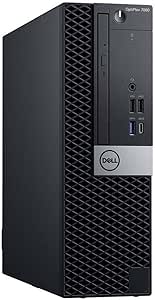
DELL OptiPlex 7060 SFF Desktop Computer, Intel i7-8700, 32GB RAM, 512GB NVMe SSD, Windows 11 Pro (Renewed)
For buyers who want a genuine business-class workstation without paying new-retail prices, this renewed OptiPlex 7060 is the entry point of this lineup. The six-core i7-8700 and 32GB of RAM hold up well for office work, browser-heavy multitasking, and dual-monitor setups, and the NVMe SSD means boot times feel current rather than dated. Compared with the HP ProDesk 600 below, the Dell trades a dedicated (but very old) graphics card for a cleaner, more modern platform with faster storage. The catch is that this is a refurbished machine with an older CPU generation — it will not keep pace with the Core Ultra chips in the HP OmniDesk M03 or Dell Pro Tower Plus, and the integrated UHD 630 graphics rule out any serious gaming or creative work. As a value play for office and home productivity, though, it earns its spot.
Pros:- Six-core i7 with 32GB RAM handles office multitasking comfortably
- Fast NVMe SSD storage rather than a slower SATA drive
- Built-in Wi-Fi, Bluetooth, and wireless keyboard and mouse included
- Dual DisplayPort outputs make dual-monitor setups simple
Cons:- Renewed/refurbished unit with an older 8th-generation processor
- Integrated UHD 630 graphics can’t handle gaming or GPU-heavy creative work
Best for: Students, home offices, and small businesses that need reliable multitasking performance on a tight budget
Not ideal for: Anyone wanting modern CPU performance, gaming capability, or a full factory warranty — the renewed status and 8th-gen chip are real limitations
- Processor:Intel Core i7-8700 (6 cores, up to 4.6GHz)
- Memory:32GB DDR4
- Storage:512GB NVMe M.2 SSD
- Graphics:Intel UHD Graphics 630 (integrated)
- Operating System:Windows 11 Pro
- Connectivity:Wi-Fi, Bluetooth, 5x USB 3.0, 2x USB 2.0, 2x DisplayPort
- Form Factor:Small Form Factor tower
- Condition:Renewed
Our verdict“A sensible budget choice for productivity-only buyers who care more about RAM and storage than having the latest silicon.”
Dell OptiPlex Business Tower Desktop, Intel Core i7-12700K, 32GB DDR5, 1TB PCIe SSD, Windows 11
This OptiPlex tower is the pick I’d point most buyers toward because it balances raw processing power against everyday practicality better than anything else here. The 12-core, 20-thread i7-12700K is a genuinely fast chip — it outmuscles the renewed OptiPlex 7060 by a wide margin and trades blows with the newer Core Ultra parts in the Dell Pro Tower Plus, while its high clock speeds favor applications that don’t scale across cores. With 32GB of DDR5, a 1TB PCIe SSD, Wi-Fi 6, and dual 4K monitor support, it’s ready for a professional workstation out of the box. The tradeoff versus slimmer rivals like the HP ProDesk 600 microtower is simple: this is a full-size tower, so it needs desk or floor space. And like most picks in this group, it relies on integrated UHD 770 graphics, so gamers and video editors should look elsewhere.
Pros:- Excellent 12-core/20-thread i7-12700K performance for demanding workloads
- 32GB DDR5 and 1TB PCIe SSD provide headroom for years of use
- Rich connectivity including USB-C, Wi-Fi 6, and dual 4K display support
- Room to expand up to 64GB RAM and 4TB storage later
Cons:- Integrated UHD 770 graphics limit gaming and graphics-intensive tasks
- Full-size tower footprint demands more space than small form factor rivals
Best for: Professionals and power users who run heavy multitasking workloads — spreadsheets, virtual machines, coding, many browser tabs — across multiple monitors
Not ideal for: Gamers or content creators needing GPU acceleration, and anyone with a cramped desk who can’t fit a full tower
- Processor:Intel Core i7-12700K, 5.0GHz, 12 cores / 20 threads
- Memory:32GB DDR5 (up to 64GB supported)
- Storage:1TB PCIe SSD (up to 4TB supported)
- Graphics:Intel UHD 770 (integrated)
- Operating System:Windows 11
- Connectivity:Wi-Fi 6, Bluetooth, USB-C, USB 3.2, HDMI 2.1 out, DisplayPort, Ethernet
- Dimensions:12.76 x 6.06 x 11.53 inches, 9.17 lbs
- Security:TPM 2.0, physical lock slot
Our verdict“The safest all-around choice for buyers who want workstation-grade CPU power today and upgrade room tomorrow.”
HP OmniDesk M03 Business Desktop PC, Intel Core Ultra 7 265, 32GB DDR5, 1TB SSD, Windows 11 Pro, 64GB USB Bundle
If raw modern horsepower is the priority, the OmniDesk M03 sits at the top of this lineup. The Core Ultra 7 265 with 20 cores brings the newest architecture here — newer than the i7-12700K in the OptiPlex tower — and paired with 32GB of DDR5 it chews through multitasking, data crunching, and Windows 11 Pro’s AI-assisted features without breaking a sweat. Quad-monitor 4K support also outdoes the dual-display setups of most rivals, which matters for traders, analysts, and anyone living in multiple windows. Two caveats temper the enthusiasm: this is an open-box unit with upgraded RAM and SSD, so warranty coverage may be thinner than a sealed machine like the Dell Pro Tower Plus, and there’s no dedicated graphics card despite the premium positioning. The bundled 64GB USB drive is a nice convenience rather than a deciding factor.
Pros:- Cutting-edge 20-core Core Ultra 7 processor with 5.3GHz turbo
- 32GB DDR5 plus 1TB SSD for immediate, lag-free multitasking
- Supports up to four 4K monitors — more than any other pick here
- Windows 11 Pro with AI features and a bundled 64GB USB drive
Cons:- Open-box status with upgraded components may carry limited warranty coverage
- No dedicated graphics card for gaming or GPU-heavy creative work
Best for: Power users, financial analysts, and professionals running heavy multitasking or AI-enabled workflows across three or four monitors
Not ideal for: Buyers who want maximum warranty peace of mind on a sealed unit, or anyone expecting a discrete GPU at this tier
- Processor:Intel Core Ultra 7 265, 20 cores / 20 threads, up to 5.3GHz
- Memory:32GB DDR5
- Storage:1TB SSD
- Graphics:Integrated, supports up to 4x 4K monitors
- Operating System:Windows 11 Pro
- Connectivity:Wi-Fi 6, Ethernet, HDMI, DisplayPort, multiple USB ports
- Bundle:64GB USB flash drive included
Our verdict“The strongest spec sheet in the roundup for buyers comfortable with an open-box purchase to get top-tier performance.”
HP ProDesk 600 Microtower Business Desktop, Intel i5-10400F, 16GB DDR4, 512GB PCIe SSD, GeForce GT 610, Windows 11 Pro
The ProDesk 600 takes a different angle than everything else here: it’s the only pick with a dedicated graphics card, albeit a very dated GeForce GT 610. That gives it basic multi-display flexibility the integrated-only machines can’t always match, but make no mistake — this is not a gaming card, and the i5-10400F sits well below the i7-12700K in the OptiPlex tower for demanding work. What this microtower does offer is a space-conscious footprint and dependable business-class construction at a mid-tier price, with a fast NVMe SSD and Windows 11 Pro ready to go. Compared with the renewed OptiPlex 7060, you give up half the RAM (16GB vs 32GB) and pay more, but gain a smaller chassis and newer platform flexibility. The tight 180W power supply and cramped interior also mean serious upgrades are effectively off the table.
Pros:- Compact microtower design fits cramped desks easily
- Fast 512GB PCIe NVMe SSD for quick boots and file access
- Wide port selection including HDMI, DVI, VGA, and USB-C for legacy and modern displays
- Windows 11 Pro pre-installed with enterprise-ready features
Cons:- GeForce GT 610 is a decade-old card that can’t handle modern gaming or graphics work
- Only 16GB of older DDR4 RAM for the price
- 180W power supply and compact case restrict future upgrades
Best for: Small-office users with limited desk space who need solid everyday business performance and flexible multi-display output
Not ideal for: Upgraders and performance seekers — the weak power supply, aging CPU, and dated GPU leave little room to grow
- Processor:Intel Core i5-10400F (6 cores)
- Memory:16GB DDR4
- Storage:512GB PCIe NVMe SSD
- Graphics:NVIDIA GeForce GT 610 2GB (dedicated)
- Operating System:Windows 11 Pro
- Form Factor:Microtower (5.98 x 11.93 x 13.27 inches)
- Power Supply:180W
- Connectivity:Wi-Fi adapter, Ethernet, HDMI, DVI-I, VGA, USB-C, USB 3.0/2.0
Our verdict“A sensible compact option for everyday business tasks, as long as you’re not counting on upgrading it later.”
Dell Pro Tower Plus Desktop, Intel 14-Core Ultra 5 235, 32GB DDR5, 1TB PCIe SSD, Windows 11 Pro
This Dell Pro Tower Plus lands in a sweet spot between the budget renewed OptiPlex and the pricier OmniDesk M03. You get a current-generation 14-core Core Ultra 5 235, 32GB of DDR5, and a 1TB PCIe SSD — a configuration that should stay comfortable for general and professional work for years. It trails the Core Ultra 7 265 in the HP OmniDesk for heavily threaded tasks, but for typical office and home-office workloads the difference is smaller than the spec gap suggests, and a sealed retail unit carries a cleaner warranty story than HP’s open-box offering. Against the OptiPlex with the i7-12700K, the newer architecture brings better efficiency and support for on-device AI features in Windows 11 Pro. The obvious weakness is graphics: integrated Intel graphics means no serious gaming, and the tower chassis takes up real space — the same tradeoffs found across most of this list.
Pros:- Latest-generation 14-core Core Ultra 5 processor with modern efficiency
- Generous 32GB DDR5 and 1TB PCIe SSD configuration
- Windows 11 Pro with support for on-device AI features
- Sealed new unit with a cleaner warranty situation than open-box alternatives
Cons:- Integrated graphics limit gaming and graphics-intensive workloads
- Ultra 5 trails the Ultra 7 and i7-12700K in heavy multi-threaded tasks
Best for: Buyers who want a brand-new, current-generation machine with strong specs that won’t feel outdated in five years
Not ideal for: Gamers and GPU-dependent creators, plus anyone needing the multi-monitor depth of the OmniDesk’s quad-display support
- Processor:Intel Core Ultra 5 235 (14 cores)
- Memory:32GB DDR5
- Storage:1TB PCIe SSD
- Graphics:Integrated Intel Graphics
- Operating System:Windows 11 Pro
- Form Factor:Tower
Our verdict“The best blend of new-condition peace of mind and current-gen specs for buyers who want longevity without paying flagship prices.”
ASUS V500 Home & Business Tower Desktop with Intel Core i7-13620H, 32GB DDR5, 1TB SSD, Windows 11 Pro
Between all the towers in this lineup promising “32GB and a 1TB SSD,” the ASUS V500 earns its slot by pairing that memory with a genuinely strong CPU: a 10-core Core i7-13620H that boosts to 4.9GHz. Compared with the Dell Ect1250 and its Core Ultra 5 225, this model pulls ahead in sustained, thread-heavy work like large spreadsheet models, video calls with a dozen browser tabs, or batch photo exports. The 1TB SSD is upgradable to 2TB, and the dual HDMI/DisplayPort outputs make a three-monitor desk setup painless. The tradeoff is honesty about its limits: integrated UHD graphics mean it’s a workhorse, not a gaming rig, and the 13-pound chassis demands real desk space. The bundled 64GB USB drive is a nice extra for backups, nothing more.
Pros:- 10-core i7-13620H handles demanding multitasking and sustained workloads well
- 32GB DDR5 RAM is upgradable to 64GB, adding long-term headroom
- HDMI plus DisplayPort supports a multi-monitor desk setup
- Wi-Fi 6 and a full port selection including USB-C keep connectivity simple
Cons:- Integrated UHD graphics rule out serious gaming or GPU-accelerated creative work
- 13.23-pound tower footprint is bulky for small workspaces
- Limited documentation on expandability beyond RAM and storage
Best for: Home-office professionals and small-business users who juggle heavy multitasking across multiple monitors
Not ideal for: Anyone with a cramped desk or gaming ambitions — it’s bulky and relies on integrated graphics
- Processor:Intel Core i7-13620H (10 cores, 16 threads, up to 4.9 GHz)
- Memory:32GB DDR5 (upgradable to 64GB)
- Storage:1TB SSD (up to 2TB supported)
- Graphics:Intel UHD Graphics
- Operating System:Windows 11 Pro
- Connectivity:Wi-Fi 6, Bluetooth, USB-C, USB-A, HDMI, DisplayPort, Ethernet
- Dimensions:13.66 x 6.10 x 11.65 inches, 13.23 lbs
- Bundle:64GB USB flash drive
Our verdict“Buy this if you want the strongest raw CPU performance per dollar in this batch and don’t need a dedicated graphics card.”
Dell Ect1250 Tower Desktop PC – Intel Core Ultra 5 225, 32GB DDR5 RAM, 1TB NVMe SSD, Windows 11 Pro
The Dell Ect1250 hits the sweet spot this roundup keeps circling: a modern Core Ultra 5 225, 32GB of DDR5, and a fast 1TB NVMe SSD, with a keyboard and mouse thrown in so it works out of the box. Its advantage over the Dell Pro Tower (B0G6ZS395T) is capacity and platform freshness — double the RAM and storage, plus an AI-capable architecture that will age more gracefully as Windows leans on NPUs. Against the ASUS V500, it gives up some raw CPU muscle but gains Dell’s cleaner business-ecosystem support. The honest downside: this is a configuration price trap in disguise, since a premium tower with integrated graphics only costs real money while still leaving gamers and 3D designers stranded. For everyone else, it’s the least-compromising everyday pick here.
Pros:- Modern Core Ultra 5 platform with 10 cores stays relevant for years
- 32GB DDR5 and 1TB NVMe SSD eliminate the two most common upgrade headaches
- Included keyboard and mouse make it truly ready out of the box
- Windows 11 Pro adds business-grade security and management features
Cons:- Integrated graphics limit creative and gaming performance despite the premium positioning
- Well-balanced specs command a price that undercuts its value proposition for simple use cases
Best for: Buyers who want a complete, modern, plug-and-play desktop for mixed office and family use without configuration guesswork
Not ideal for: Budget-limited shoppers — you pay a premium for a balanced spec sheet when a cheaper model covers basic needs
- Processor:Intel Core Ultra 5 225 (10-core)
- Memory:32GB DDR5
- Storage:1TB NVMe SSD
- Graphics:Intel UHD Graphics
- Operating System:Windows 11 Pro
- Connectivity:Wi-Fi 6, Bluetooth
- Included Accessories:Keyboard and mouse
Our verdict“The safest default choice in this lineup — modern, complete, and well-specced, as long as you don’t need GPU power.”
Dell Pro Tower Business Desktop, 14th Gen Intel Core i5-14500 vPro, 16GB DDR5, 512GB SSD, Windows 11 Pro
What separates the Dell Pro Tower from every other machine here is vPro technology — the remote management and security layer IT departments actually use to patch, image, and recover machines without touching them. The 14-core i5-14500 is no slouch either, boosting to 5.0GHz and comfortably outpacing the 4-core i3-14100 in the Dell 2026 Tower. Where it concedes ground is capacity: 16GB of RAM and a 512GB SSD look modest next to the 32GB/1TB standard set by the HP OmniDesk M03. Dual 4K monitor support via HDMI 2.1 and DisplayPort 1.4a keeps multi-display desks covered. This pick makes the most sense for fleet deployments where manageability matters more than headline specs — solo buyers wanting maximum hardware per dollar should look elsewhere in this guide.
Pros:- vPro enables enterprise remote management, imaging, and security
- 14-core i5-14500 with 5.0GHz boost handles demanding office workflows
- Dual 4K display support via HDMI 2.1 and DisplayPort 1.4a
- Windows 11 Pro rounds out the business security stack
Cons:- 16GB RAM and 512GB SSD trail the 32GB/1TB norm elsewhere in this roundup
- No dedicated GPU, so graphics-intensive work is off the table
- Compact chassis limits extensive internal expansion
Best for: IT managers and businesses deploying managed fleets where vPro remote administration is a requirement
Not ideal for: Solo buyers or home users — vPro features go unused while RAM and storage trail cheaper-feeling competitors
- Processor:Intel Core i5-14500 vPro (14 cores, up to 5.0 GHz)
- Memory:16GB DDR5
- Storage:512GB PCIe SSD
- Graphics:Intel UHD 770
- Operating System:Windows 11 Pro
- Display Support:Dual 4K monitors via HDMI 2.1 and DisplayPort 1.4a
- Connectivity:Gigabit Ethernet, USB-C, multiple USB-A, HDMI, DisplayPort
Our verdict“Choose this only if vPro manageability drives your purchase — otherwise the same money buys more RAM and storage elsewhere in this list.”
Dell 2026 Tower PC with 14th Gen Intel Processor, 16GB DDR5 RAM, 512GB SSD, Windows 11 Pro
Of the towers in this guide, the Dell 2026 Tower is the one that makes sense when the shopping brief is “a reliable office PC for the least money.” The 4-core i3-14100 is genuinely fine for documents, email, web apps, and video calls — but be clear-eyed that it’s the weakest CPU in this batch, a step behind the Dell Pro Tower’s 14-core i5 and far behind the ASUS V500’s i7. What you don’t sacrifice is the modern conveniences: Wi-Fi 6, Bluetooth, a media card reader, USB-C, and dual 4K display support are all here. The 180W power supply and lack of a graphics card slot-friendly budget mean this is a closed chapter for future gaming upgrades. For a reception desk, classroom, or second home-office machine, that tradeoff is exactly the right one.
Pros:- Modern 14th Gen platform with Windows 11 Pro at an accessible price point
- Dual 4K display support via HDMI 2.1 and DisplayPort 1.4a
- Uncommonly complete connectivity including Wi-Fi 6, Bluetooth, and a media card reader
- Compact 12.76-inch tower fits under most desks
Cons:- 4-core i3-14100 is the weakest processor in this lineup and stumbles under heavy multitasking
- No dedicated graphics and a 180W PSU close the door on meaningful upgrades
- 512GB storage fills quickly with media libraries or large project files
Best for: Schools, front-desk stations, and households needing a dependable everyday PC at a lower spend
Not ideal for: Power users — the 4-core i3 and 512GB SSD will feel tight under heavy multitasking or large file libraries
- Processor:Intel Core i3-14100 (4 cores, 3.5–4.7 GHz)
- Memory:16GB DDR5
- Storage:512GB PCIe SSD
- Graphics:Intel UHD 730
- Display Support:Dual 4K via HDMI 2.1 and DisplayPort 1.4
- Connectivity:Wi-Fi 6, Bluetooth, USB-C, USB 3.2/2.0, Gigabit Ethernet, media card reader
- Power Supply:180W
- Dimensions:12.76 x 6.06 x 11.53 inches
Our verdict“A smart economy pick for light office duty — just don’t ask it to be your only serious workstation.”
Dell Slim Desktop, Intel Core Ultra 5-225, 512GB SSD, Windows 11 Home
If the full-size towers here feel like furniture, the Dell Slim Desktop is the counterargument — a space-conscious machine built from recycled materials with a design that actually belongs on a desk rather than under it. Its standout trick is display flexibility: up to four FHD monitors via DisplayPort daisy-chaining, or two 4K screens, which is more monitor coverage than the pricier Dell Pro Tower offers. The Core Ultra 5-225 with built-in AI acceleration matches the Dell Ect1250’s processor, so everyday speed is identical — you mainly give up half the storage and swap Windows 11 Pro for Home, losing domain-join and remote-management features. Two genuinely thoughtful touches: tool-less entry for painless upgrades, and 1-year onsite service where Dell comes to you. That support cushion is rare at this tier and matters for non-tinkerers.
Pros:- Slim, sustainable design fits small workspaces where towers won’t
- Supports up to four FHD monitors via DisplayPort daisy-chaining
- Tool-less side panel makes RAM and storage upgrades genuinely easy
- 1-year onsite service plus hardware TPM security for peace of mind
Cons:- Windows 11 Home lacks the Pro security and management features businesses require
- 512GB SSD fills fast for media-heavy households
- Compact chassis limits the scale of internal upgrades compared with full towers
Best for: Home users and students in small spaces who value a tidy desk, easy upgrades, and onsite support
Not ideal for: Business buyers needing Windows 11 Pro features or large local storage — the 512GB SSD and Home edition hold it back
- Processor:Intel Core Ultra 5-225 with built-in AI
- Storage:512GB SSD
- Graphics:Intel integrated graphics
- Display Support:Up to four FHD monitors (DisplayPort 1.4a daisy-chaining) or two 4K displays (HDMI 2.1 + DisplayPort 1.4a)
- Operating System:Windows 11 Home
- Security:Hardware TPM chip, lock slot, padlock loop
- Service:1-year onsite service, 6 months Dell Migrate
- Form Factor:Slim desktop with tool-less entry
Our verdict“The best space-saving choice in this roundup for home users who still want modern performance and real support coverage.”
HP Pro Tower 290 G9 Business Desktop, Intel i5-12500, 16GB RAM, 512GB SSD
The HP Pro Tower 290 G9 earns its spot as the value play in this lineup. Its 12th Gen Intel i5-12500 handles everyday office multitasking without strain, and the 512GB NVMe SSD keeps boot times and file access quick. Compared with the Dell Pro Tower Business Desktop running a 14th Gen i5-14500, this HP gives up some raw speed, but the inclusion of Wi-Fi 6 and Bluetooth 5.3 means no dongles or cable runs — something the pricier Dell Pro Tower Plus below lacks entirely. The tradeoff is capacity: 16GB of DDR4 and 512GB of storage will feel tight for heavy multitaskers, and integrated UHD 770 graphics rule out gaming or 3D work. Still, for a straightforward office or classroom machine, this pick makes the most sense for buyers who want dependable performance without paying for headroom they won’t use.
Pros:- Wi-Fi 6 and Bluetooth 5.3 included, so no extra adapters needed
- 12th Gen i5 handles office multitasking smoothly
- Fast 512GB NVMe SSD for quick boot and load times
- Windows 11 Pro with dual-monitor support out of the box
Cons:- Only integrated Intel UHD 770 graphics — no gaming or GPU acceleration
- 16GB of older DDR4 RAM is the minimum for this lineup
Best for: Small offices and students who need a reliable, wireless-ready work desktop for documents, browsing, and video calls
Not ideal for: Power users and gamers — the 16GB of older DDR4 RAM and integrated graphics won’t keep up with demanding workloads
- Processor:Intel Core i5-12500, 6 cores up to 4.6GHz
- RAM:16GB DDR4
- Storage:512GB PCIe NVMe SSD
- Graphics:Intel UHD Graphics 770
- Connectivity:Wi-Fi 6, Bluetooth 5.3
- Operating System:Windows 11 Pro
- Power Supply:80 Plus Gold 180W
Our verdict“A sensible, no-frills business desktop for buyers who prioritize wireless convenience and dependable day-to-day performance over raw power.”
Dell Pro Tower Plus Desktop, Intel Core Ultra 5 235, 32GB RAM, 1TB SSD
Where most towers in this roundup stop at two or three displays, the Dell Pro Tower Plus pushes up to four 4K monitors through its DisplayPort and USB-C outputs — a genuine differentiator for traders, researchers, and developers living in sprawling workflows. The 14-core Core Ultra 5 paired with 32GB of DDR5 matches the memory of the HP OmniDesk M03 while offering more display headroom, and the 1TB SSD absorbs large project files comfortably. The catch is connectivity: there is no built-in Wi-Fi or Bluetooth, so this machine belongs at a desk with Ethernet — unlike the wire-free HP Pro Tower 290 G9. The DVD drive is a relic most buyers will never touch. This model is better suited to fixed workstations than flexible home setups, and within that constraint it is one of the strongest productivity platforms here.
Pros:- Drives up to four 4K displays natively — rare at this tier
- 32GB DDR5 RAM keeps dozens of tabs and apps responsive
- 1TB SSD with fast boot and large-project headroom
- ENERGY STAR and EPEAT Silver certified for efficient operation
Cons:- No Wi-Fi or Bluetooth built in — wired-only by design
- Legacy DVD drive adds bulk with little modern use
Best for: Developers, financial analysts, and researchers who run three or four 4K monitors from a wired desk
Not ideal for: Home users or anyone without Ethernet access — the complete absence of Wi-Fi and Bluetooth forces extra adapters
- Processor:Intel Core Ultra 5 235, 14 cores up to 5.0GHz
- RAM:32GB DDR5
- Storage:1TB SSD
- Display Support:Up to 4 displays at 4K
- Connectivity:Gigabit Ethernet, USB 3.2 Gen 2, Type-C, DisplayPort
- Optical Drive:DVD+/-RW
- Operating System:Windows 11 Pro
Our verdict“The clear choice for multi-monitor professionals at a fixed, wired workstation — just plan on Ethernet or adding a wireless card yourself.”
HP OmniDesk Desktop PC, AMD Ryzen 7 8700G, 32GB DDR5, Radeon 780M Graphics
The HP OmniDesk stands out as the most balanced machine in this batch because it solves the problem every Intel-integrated tower here shares: weak graphics. The Radeon 780M is the strongest integrated GPU in the lineup, capable of legitimate 1080p gaming and light creative work — something the HP ProDesk 400 G9 or HP Pro Tower 290 G9 simply cannot claim. With a Ryzen 7 8700G, 32GB of fast DDR5-5200, and a 1TB Gen4 NVMe drive, the spec sheet reads like a premium build, and the bundled keyboard and mouse make it genuinely plug-and-play for a first desktop. The tradeoffs are subtle: only a single HDMI port limits multi-monitor setups compared with the Dell Pro Tower Plus, and Windows 11 Home lacks the Pro management features business buyers may want. For a household that mixes work, gaming, and media, this is the pick I would put at the top of the list.
Pros:- Radeon 780M handles 1080p gaming and GPU-accelerated creative apps
- 32GB DDR5-5200 and 1TB Gen4 NVMe SSD — top-tier specs for the price
- Keyboard and mouse included for true out-of-box readiness
- Ryzen AI NPU (16 TOPS) ready for on-device AI features
Cons:- Only one HDMI output — dual-monitor users will need workarounds
- Windows 11 Home omits Pro-level business and security features
Best for: Home users and families who want one desktop that handles work, casual gaming, and media without a dedicated graphics card
Not ideal for: IT-managed office deployments — Windows 11 Home and a single HDMI output limit multi-monitor and enterprise setups
- Processor:AMD Ryzen 7 8700G, 8 cores at 4.2GHz
- RAM:32GB DDR5-5200
- Storage:1TB PCIe Gen4 NVMe M.2 SSD
- Graphics:AMD Radeon 780M (integrated)
- AI Hardware:Ryzen AI NPU, 16 TOPS
- Connectivity:Wi-Fi 6, Bluetooth 5.4, Ethernet, HDMI, 9 USB ports
- Operating System:Windows 11 Home
Our verdict“The best single-machine answer for a busy household that wants gaming-capable graphics and workstation-class specs in one box.”
Dell Tower Desktop, Intel Core Ultra 7-265, 32GB RAM, 1TB SSD
With a 20-core Core Ultra 7-265 boosting to 5.3GHz, this Dell Tower claims the performance crown among the consumer-oriented picks here — six more cores than the HP OmniDesk’s Ryzen 7 8700G and a newer AI-capable platform than the Dell Pro Tower Plus’s Ultra 5. That headroom translates into smoother heavy multitasking, faster video encodes, and better longevity. Dell’s tool-less side panel makes future RAM or storage upgrades painless, a thoughtful touch the HP Pro Tower 290 G9 doesn’t match, and the 1-year onsite service adds peace of mind for buyers who can’t afford downtime. The compromises: integrated UHD graphics mean the OmniDesk beats it easily for gaming, and Windows 11 Home skips domain-joining and remote-management tools businesses rely on. This pick makes the most sense for power users and creators who want CPU muscle and upgrade room rather than graphics punch.
Pros:- 20-core Core Ultra 7 with 5.3GHz boost — the strongest CPU in this batch
- Tool-less entry makes upgrading RAM and storage genuinely easy
- 1-year onsite service if hardware issues arise
- Supports up to four FHD or two 4K displays plus TPM security
Cons:- Integrated graphics limit gaming and GPU-heavy creative work
- Windows 11 Home lacks business management features some offices require
Best for: Power users, creators, and professionals who want maximum CPU headroom and easy self-upgrades for years to come
Not ideal for: Gamers — integrated UHD graphics fall well short of the HP OmniDesk’s Radeon 780M for any serious play
- Processor:Intel Core Ultra 7-265, 20 cores up to 5.3GHz
- RAM:32GB
- Storage:1TB PCIe NVMe SSD
- Graphics:Intel UHD Graphics (integrated)
- Display Support:Up to 4 FHD monitors or 2 4K displays
- Connectivity:Wi-Fi 6, Bluetooth, Ethernet, HDMI, DisplayPort
- Operating System:Windows 11 Home
Our verdict“The premium choice for buyers who prize processing power, upgradeability, and support coverage over gaming graphics.”
HP ProDesk 400 G9 SFF Business Desktop, Intel i7-14700, 16GB DDR5, 1.5TB Storage
The HP ProDesk 400 G9 proves a serious business machine doesn’t need a full tower. Its small form factor — roughly a third the footprint of the HP OmniDesk — fits under monitors or on shelves in cramped offices, yet it packs a 20-core i7-14700 that rivals the Dell Tower’s Core Ultra 7 for raw productivity muscle. The 1.5TB of storage is the largest in this lineup, and DDR5 memory expandable to 64GB gives it a clear upgrade path the fixed-config HP Pro Tower 290 G9 lacks. Wi-Fi 6 and Bluetooth 5.3 come standard, avoiding the wired-only limitation of the Dell Pro Tower Plus. The honest tradeoff: SFF cases leave little room for a dedicated GPU, and integrated UHD 770 graphics keep this strictly a productivity tool. For space-constrained offices that still want flagship CPU performance, nothing else here balances size and speed as well.
Pros:- 20-core i7-14700 delivers flagship-level productivity performance
- 1.5TB SSD — the most storage in this roundup
- Compact SFF chassis fits desks and shelves full towers can’t
- RAM expandable to 64GB DDR5 with Wi-Fi 6 and Bluetooth 5.3 built in
Cons:- No room for a dedicated graphics card due to the small form factor
- 16GB of RAM in the base config will need upgrading for heavy multitaskers
Best for: Office workers in tight spaces who need flagship CPU performance and big storage without a full-size tower
Not ideal for: Anyone needing graphics power or heavy internal expansion — the compact case precludes a dedicated GPU
- Processor:Intel Core i7-14700, 20 cores / 28 threads
- RAM:16GB DDR5 (up to 64GB)
- Storage:1.5TB SSD
- Graphics:Intel UHD Graphics 770
- Form Factor:Small Form Factor (10.0 x 3.7 x 12.1 inches)
- Connectivity:Wi-Fi 6 (802.11ax), Bluetooth 5.3
- Operating System:Windows 11 Pro
Our verdict“The smartest pick for cramped offices that refuse to sacrifice processor power or storage to save desk space.”

How We Picked
I ranked these desktops by weighing four factors in order of importance to most buyers: real-world performance (CPU generation, core count, RAM capacity and type), storage quality and capacity (NVMe vs. SATA, 512GB vs. 1TB), expandability and connectivity (tower vs. slim vs. small form factor, available slots and ports), and long-term platform viability — meaning how many years of Windows updates, driver support, and upgrade headroom each system realistically has left. Machines with DDR5 RAM, PCIe NVMe storage, and current-generation Core Ultra or Ryzen 8000 chips ranked higher because they anchor you to a platform with the longest useful life.
Ranking also reflected fitness for purpose over raw specs. A renewed 8th-gen OptiPlex ranked above several newer budget towers because its 32GB of RAM and low price make it a smarter buy for a home office than a brand-new machine with half the memory. Conversely, premium Core Ultra 7 towers ranked below the Ryzen 8700G OmniDesk despite strong specs, because they offered marginal gains over Core Ultra 5 siblings at a clear premium. Every pick was assigned a distinct buyer profile so no two entries compete for the same reader.
| desktop computer | Operating System |
|---|---|
| DELL OptiPlex 7060 SFF Desktop | Windows 11 Pro |
| Dell OptiPlex Business Tower D | Windows 11 |
| HP OmniDesk M03 Business Deskt | Windows 11 Pro |
| HP ProDesk 600 Microtower Busi | Windows 11 Pro |
| Dell Pro Tower Plus Desktop | Windows 11 Pro |
| ASUS V500 Home & Business Towe | Windows 11 Pro |
| Dell Ect1250 Tower Desktop PC | Windows 11 Pro |
| Dell Pro Tower Business Deskto | Windows 11 Pro |
| Dell 2026 Tower PC with 14th G | — |
| Dell Slim Desktop | Windows 11 Home |
| HP Pro Tower 290 G9 Business D | Windows 11 Pro |
| Dell Pro Tower Plus Desktop | Windows 11 Pro |
| HP OmniDesk Desktop PC | Windows 11 Home |
| Dell Tower Desktop | Windows 11 Home |
| HP ProDesk 400 G9 SFF Business | Windows 11 Pro |
Factors to Consider When Choosing Best Desktop Computers
Before settling on any single model, it helps to understand the broader forces shaping desktop value in 2026 — the mistakes that cost buyers money are predictable and avoidable.CPU Generation Matters More Than CPU Badges
The single most common mistake I see is comparing processors by tier name alone — assuming an i7 is always faster than an i5, or that any Core Ultra beats any Core i5. In this lineup, a 12th-gen i7-12700K outperforms several newer Core Ultra 5 chips in multi-core work, simply because it has more performance cores. What newer generations buy you instead is efficiency, integrated graphics improvements, and a longer support runway. If your workload is bursty office work, a modern mid-range chip is the smarter buy; if you run sustained multi-threaded loads like compilation or video encoding, older chips with more cores can still win. Check core counts and benchmark comparisons rather than trusting the badge, and remember that a CPU you can’t upgrade later is the one component you must get right at purchase.
RAM: 16GB Is the Floor, Not the Target
Every machine in this roundup ships with at least 16GB, but the divide between 16GB and 32GB systems showed up repeatedly in my rankings, and for good reason. Modern browsing habits — dozens of tabs, Slack, video calls, background sync tools — can consume 16GB on their own before you open actual work software. The catch is that many slim and small form factor desktops solder or tightly configure memory, so what you buy may be close to what you’re stuck with. On full towers, 16GB is a non-issue because DDR4 and DDR5 modules are cheap and easy to add. My advice: on a tower, buy the better CPU and add RAM yourself; on a compact machine, buy the RAM upfront. Also confirm the system uses DDR5 rather than DDR4 if you plan to keep it beyond five years.
Storage: NVMe or Bust, and 512GB Fills Faster Than You Think
Every pick here uses SSD storage, which is the right call — but capacity and speed vary. A 512GB NVMe drive feels roomy on day one and cramped within a year once Windows, applications, and a modest photo or game library accumulate. The 1TB systems in this lineup held a clear advantage not because of speed but because they delay the storage crunch that sends buyers back to the store. If you do end up with 512GB, prioritize towers with free 3.5-inch bays or M.2 slots so you can add a second drive cheaply; slim desktops and SFF units often lack this room. One more trap: some budget configurations pair a fast boot SSD with a slow mechanical hard drive for bulk storage. That hybrid approach is fine for documents but frustrating for games or video files, so check the storage configuration details before clicking buy.
Form Factor Is a One-Way Decision
Tower, slim, and small form factor desktops look similar in photos but live very differently on a desk. Full towers like the Dell Pro Tower Plus offer the only realistic path to a discrete graphics card, a bigger power supply, and multiple drive bays — the format to choose if gaming or GPU work is even a distant possibility. Slim desktops fit behind monitors and under shelves but typically use low-profile cards and proprietary power supplies that cap upgrades. SFF machines like the HP ProDesk 400 G9 are excellent space-savers for offices yet nearly locked in place after purchase. None of these is wrong; the mistake is buying compact for its tidiness and regretting it the first time you want a better GPU or a second drive. Match the format to where the machine will sit and what you might want it to become.
Integrated Graphics Have Genuinely Changed the Math
The old rule that you needed a discrete graphics card for anything beyond desktop work has weakened considerably. AMD’s Radeon 780M, found in the OmniDesk with the Ryzen 7 8700G, runs esports titles and photo editing comfortably from the CPU package itself, which is a large part of why that machine topped this list. Intel’s Core Ultra integrated graphics also handle multiple 4K displays and light creative work respectably — several picks here support dual 4K monitors without any added card. Where integrated graphics still fall short is modern AAA gaming at high settings and GPU-accelerated 3D or video rendering. The practical guidance: if your ceiling is office work, streaming video, and two monitors, save the graphics card budget entirely. If gaming or rendering is on the horizon, choose a full tower so a card can be added later.
Renewed Business Desktops: The Value Hack With Fine Print
Corporate off-lease machines like the renewed OptiPlex 7060 offer specs that punch far above their price — 32GB RAM, NVMe storage, Windows 11 Pro — because companies replace computers on fixed schedules, not when performance dies. The tradeoffs are real but manageable: older CPU generations, cosmetic wear, shorter remaining lifespans, and warranties that vary widely by refurbisher. Read what the renewal actually covers, confirm Windows 11 licensing is legitimate, and check that the specific CPU generation is still receiving full update support. For a home office, a kid’s homework machine, or a secondary computer, renewed business hardware is often the smartest money in this entire category. For a primary machine you plan to keep six-plus years, the newer platforms ranked higher here will age more gracefully.
Frequently Asked Questions
Is a Core Ultra 5 desktop fast enough, or should I pay more for a Core Ultra 7?
For the large majority of office, browsing, and home users, a Core Ultra 5 with 32GB of RAM is more than enough — and a better value — because everyday workloads rarely saturate even mid-range modern CPUs. The Ultra 7 265-class chips in this lineup pull ahead mainly in sustained multi-core tasks like heavy video editing, large spreadsheet processing, or running many virtual machines. What matters more than the tier letter is pairing: an Ultra 5 with 32GB of RAM and a 1TB SSD will feel faster in daily use than an Ultra 7 hampered by 16GB and a small drive. Pay the Ultra 7 premium only if you can name a specific workload that uses the extra cores. Otherwise, put that budget toward memory or a monitor.
Are renewed desktop computers actually reliable, or am I buying someone else’s problems?
Renewed business desktops like the OptiPlex 7060 come from corporate fleets that were maintained on schedules and retired early, so the hardware inside is usually in far better condition than a typical consumer trade-in. The components that wear out in computers — fans, drives, and thermal paste — are exactly what reputable refurbishers replace during renewal. What you are genuinely giving up is CPU generation: an 8th-gen i7 is a step behind current chips even if it still handles office work capably. The risk sits mostly with the seller, not the hardware, so verify the warranty length, return window, and that Windows 11 is properly licensed before purchasing. Handled that way, a renewed business machine is one of the safest value plays in the category.
Can any of these desktops handle gaming without a graphics card?
Only one pick in this roundup can genuinely claim it: the HP OmniDesk with the Ryzen 7 8700G, whose Radeon 780M integrated graphics run popular esports and older titles at playable settings without any added card. Intel’s Core Ultra integrated graphics are a solid step up from older generations and handle multiple 4K displays and casual games, but they’re not a real gaming solution beyond light titles. If gaming is a primary use, the better path is choosing a full tower like the Dell Pro Tower Plus and adding a discrete card later, since towers have the physical room and power headroom for it. Slim and small form factor models should be ruled out for gaming entirely — their low-profile constraints block most modern cards.
How much storage do I realistically need in 2026?
512GB works if you live mostly in the cloud, stream your media, and keep a modest application library — but it fills faster than most buyers expect, especially with Windows itself consuming a meaningful chunk. The 1TB configurations in this lineup are the safer default for anyone who stores photos, plays games, or works with large files, because the cost difference at purchase is much smaller than the hassle of migrating later. A practical middle path exists on full towers: buy the 512GB model if it saves real money, then add a second drive yourself, since M.2 and SATA drives are inexpensive and easy to install. What I’d avoid is assuming you’ll ‘clean it up later’ — storage creep is one of the most common causes of a computer feeling old before its time. Also confirm any bulk drive is SSD rather than a spinning hard disk, which drags down overall responsiveness.
Is Windows 11 Pro worth choosing over Windows 11 Home for a home user?
For most home users, Pro adds features you’ll never touch — BitLocker device encryption beyond the basics, remote desktop hosting, group policy management, and domain joining are primarily business tools. Where Pro earns its keep is remote work: if you need to connect into your home machine from elsewhere, or your employer’s IT department requires specific security policies, Pro is the right call. Several picks in this lineup, particularly the renewed OptiPlex 7060 and the business-class HP and Dell towers, ship with Pro at no meaningful premium because they were built for corporate buyers — which makes them free wins rather than something to pay extra for. If both versions are available at the same price, take Pro for the flexibility. If Pro costs meaningfully more and you’re a pure home user, spend the difference on RAM instead.
Conclusion
After comparing all fifteen machines, the right choice comes down to matching the desktop to the buyer rather than chasing the best spec sheet. For the best overall pick, the HP OmniDesk with Ryzen 7 8700G stands alone — its Radeon 780M graphics, 32GB of DDR5, and 1TB SSD make it the most versatile machine here, capable of office work and light gaming alike. The best value is the renewed Dell OptiPlex 7060 SFF, which delivers 32GB of RAM, NVMe storage, and Windows 11 Pro at a price new machines can’t approach, provided a slightly older CPU and minor cosmetic wear don’t put you off. For buyers who want maximum power, the Dell OptiPlex Tower with i7-12700K offers the strongest raw processing muscle in the lineup for sustained workloads.
If you’re a beginner or setting up a simple home office, the Dell Slim Desktop with Core Ultra 5 keeps things uncomplicated and affordable, while the HP Pro Tower 290 G9 is a fuss-free choice for small-business fleets. The best premium pick is the HP OmniDesk M03 with Core Ultra 7 265, whose modern platform, DDR5 memory, and 4K multi-monitor support give it the longest runway of any Intel machine here. Finally, for space-constrained desks, the HP ProDesk 400 G9 SFF packs a 14th-gen i7 into a compact chassis. Whatever your priority — value, power, longevity, or size — one of these fifteen machines fits it, and the profiles above should narrow the field to a single confident choice.
Fall Picks
fall essentials
As an affiliate, we earn on qualifying purchases.