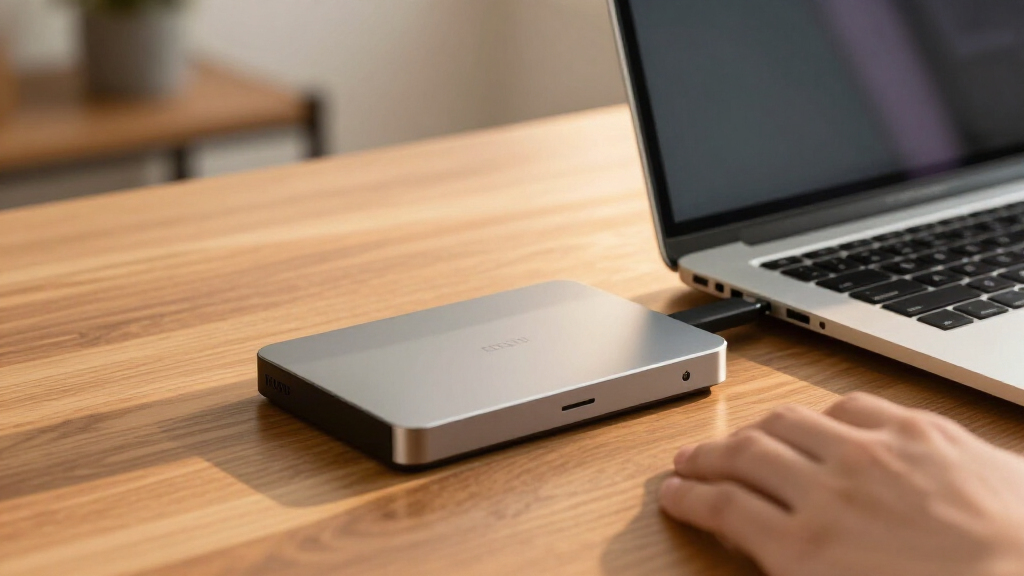

Choosing the best external hard drive in 2026 involves balancing speed, capacity, portability, and price. The Western Digital 5TB Elements Portable stands out for its affordability and reliable storage, making it ideal for everyday backups. For faster performance, the Samsung T7 Shield offers durable, fast SSD storage, perfect for on-the-go professionals. Meanwhile, those needing huge capacity might consider the Western Digital 14TB Elements Desktop, ideal for large media libraries or backups. The main tradeoffs typically involve choosing between speed and capacity, portability and storage size, or cost and durability. Keep reading for a full breakdown of the top options and what makes each one unique.

Get the latest gadgets delivered free — and shop member deals
- Fast, free delivery on millions of items
- Access to Prime Big Deal Days deals on October 6–7
- Prime Video, Amazon Music and more included
Complete the kit



Key Takeaways
- The best external hard drives balance capacity, speed, and portability based on user needs.
- SSD options like Samsung T7 Shield provide faster data transfer but at a higher price per gigabyte than HDDs.
- High-capacity desktop drives are best for extensive backups and media libraries, but are less portable.
- Durability features like ruggedized shells matter if you plan to carry drives in challenging environments.
- Price often correlates with performance and capacity, so prioritizing one can help narrow choices.
| Western Digital 5TB Elements Portable External Hard Drive |  | Best Overall Portable HDD | Capacity: 5TB | Connectivity: USB 3.2 Gen 1 / USB 3.0 | Compatibility: Windows, Mac | VIEW LATEST PRICE | See Our Full Breakdown |
| Samsung T7 Shield External 1TB USB 3.2 Portable SSD |  | Best Rugged Portable SSD | Capacity: 1TB | Transfer Speed: up to 1050MB/s | Interface: USB 3.2 Gen 2 | VIEW LATEST PRICE | See Our Full Breakdown |
| SanDisk 1TB Extreme Portable SSD |  | Best for Speed and Rugged Use | Capacity: 1TB | Max Read Speed: 1050MB/s | Max Write Speed: 1000MB/s | VIEW LATEST PRICE | See Our Full Breakdown |
| Western Digital 14TB Elements Desktop External Hard Drive – USB 3.0 |  | Best High-Capacity Desktop HDD | Capacity: 14TB | Connectivity: USB 3.0 | Compatibility: Windows PCs | VIEW LATEST PRICE | See Our Full Breakdown |
| Seagate Backup Plus Hub 8TB External Desktop Hard Drive |  | Best Versatile Desktop HDD with Charging | Storage Capacity: 8TB | Connectivity: USB 3.0 | Compatibility: Mac and Windows | VIEW LATEST PRICE | See Our Full Breakdown |
| Samsung T7 Portable SSD 1TB Titan Gray, USB 3.2 Gen 2, Up to 1,050MB/s |  | Best Overall Portable SSD | Capacity: 1TB | Interface: USB 3.2 Gen 2 | Max Speed: 1050MB/s | VIEW LATEST PRICE | See Our Full Breakdown |
| Seagate 8TB Expansion Desktop Hard Drive USB 3.0 |  | Best Large-Capacity Desktop HDD | Capacity: 8TB | Interface: USB 3.0 | Compatibility: Windows and Mac (reformatting required) | VIEW LATEST PRICE | See Our Full Breakdown |
| WD 2TB Black My Passport Ultra Portable External Hard Drive – USB 3.0 |  | Best Stylish Portable HDD for Windows Users | Storage Capacity: 2TB | Connectivity: USB 3.0 | Encryption: 256-bit AES hardware | VIEW LATEST PRICE | See Our Full Breakdown |
| Seagate Portable 2TB External Hard Drive HDD – USB 3.0 for PC, Mac, PlayStation, Xbox |  | Best Versatile On-the-Go HDD | Capacity: 2TB | Interface: USB 3.0 | Speed: 120 MB/s | VIEW LATEST PRICE | See Our Full Breakdown |
| WD 2TB Elements Portable External Hard Drive for Windows, USB 3.2 Gen 1/USB 3.0 |  | Best Budget Portable HDD for Windows | Capacity: 2TB | Interface: USB 3.2 Gen 1 / USB 3.0 | Compatibility: Windows, Mac | VIEW LATEST PRICE | See Our Full Breakdown |
| WD 5TB My Passport Portable External Hard Drive |  | Best Overall Portable Storage with Security Features | Capacity: 5TB | Color: Black | Interface: USB 3.1/USB 3.0 | VIEW LATEST PRICE | See Our Full Breakdown |
| Seagate Expansion 3TB Desktop External Hard Drive USB 3.0 |  | Best Desktop Solution for Easy, Fast Storage Expansion | Capacity: 3TB | Interface: USB 3.0 | Form Factor: 3.5 inches | VIEW LATEST PRICE | See Our Full Breakdown |
| WD_BLACK 5TB P10 Game Drive, Portable External Hard Drive for PS5, Xbox Series X, & PC |  | Best Gaming Storage for Speed and Compatibility | Capacity: 5TB | Interface: USB 3.0 | Form Factor: 2.5 inches | VIEW LATEST PRICE | See Our Full Breakdown |
| WD 2TB My Passport Portable External Hard Drive – Black |  | Best Compact Drive for Secure Portable Storage | Capacity: 2TB | Interface: USB 2.0/3.0 | Encryption: Yes | VIEW LATEST PRICE | See Our Full Breakdown |
| WD 4TB My Passport Portable External Hard Drive |  | Best Secure Storage with Large Capacity | Capacity: 4TB | Interface: USB 3.0 | Encryption: Yes | VIEW LATEST PRICE | See Our Full Breakdown |
| external hard drife | Capacity | Interface | Compatibility |
|---|---|---|---|
| Western Digital 5TB Elements P | 5TB | — | Windows, Mac |
| Samsung T7 Shield External 1TB | 1TB | USB 3.2 Gen 2 | — |
| SanDisk 1TB Extreme Portable S | 1TB | — | — |
| Western Digital 14TB Elements | 14TB | — | Windows PCs |
| Seagate Backup Plus Hub 8TB Ex | — | — | Mac and Windows |
| Samsung T7 Portable SSD 1TB Ti | 1TB | USB 3.2 Gen 2 | PC, mobile phones, iPhone 15 Pro |
| Seagate 8TB Expansion Desktop | 8TB | USB 3.0 | Windows and Mac (reformatting required) |
| WD 2TB Black My Passport Ultra | — | — | — |
| Seagate Portable 2TB External | 2TB | USB 3.0 | PC, Mac, PlayStation, Xbox |
| WD 2TB Elements Portable Exter | 2TB | USB 3.2 Gen 1 / USB 3.0 | Windows, Mac |
| WD 5TB My Passport Portable Ex | 5TB | USB 3.1/USB 3.0 | — |
| Seagate Expansion 3TB Desktop | 3TB | USB 3.0 | — |
| WD_BLACK 5TB P10 Game Drive | 5TB | USB 3.0 | PlayStation, Xbox, PC |
| WD 2TB My Passport Portable Ex | 2TB | USB 2.0/3.0 | — |
| WD 4TB My Passport Portable Ex | 4TB | USB 3.0 | — |
More Details on Our Top Picks
Western Digital 5TB Elements Portable External Hard Drive
This Western Digital drive stands out for offering a generous 5TB capacity combined with fast data transfer thanks to USB 3.2 Gen 1. Compared to smaller capacity options like the WD 2TB My Passport, it provides more space for large backups or media collections without a significant price increase. However, it doesn’t include any dedicated backup software, and its USB 3.2 Gen 1 interface isn’t the latest standard, which may limit transfer speeds slightly if paired with newer USB devices. This model makes the most sense for users who need reliable, large-capacity storage on a budget and primarily use Windows or Mac with simple plug-and-play setup.Pros:- Large 5TB storage capacity for extensive data needs
- Fast data transfer with USB 3.2 Gen 1
- Plug-and-play compatibility with Windows and Mac
Cons:- No included backup software details
- Limited to USB 3.2 Gen 1 speeds, not the latest standard
Best for: Users seeking affordable, high-capacity portable storage for backups, media, or large files.
Not ideal for: Professionals requiring ultra-fast transfer speeds or advanced security features, who should consider SSD options or drives with encryption.
- Capacity:5TB
- Connectivity:USB 3.2 Gen 1 / USB 3.0
- Compatibility:Windows, Mac
- Plug and Play:Yes
Our verdict“This drive is best for users who prioritize capacity and affordability over the latest transfer technology or security features.”
Samsung T7 Shield External 1TB USB 3.2 Portable SSD
The Samsung T7 Shield earns its spot by combining impressive transfer speeds up to 1050MB/s with rugged durability, including IP65 water and dust resistance and drop protection up to 3 meters. Compared with the SanDisk Extreme Portable SSD, it offers similar high-speed performance but distinguishes itself with a more robust build for outdoor use. Its support for only USB 3.1 Gen 2 and newer devices limits compatibility with older hardware, and it lacks included accessories, which could be inconvenient. This pick makes the most sense for professionals or adventurers who need fast, secure storage that can withstand tough environments.Pros:- Fast transfer speeds up to 1050MB/s
- Rugged design with IP65 water and dust resistance
- Drop resistant up to 3 meters with hardware encryption
Cons:- Supports only USB 3.1 Gen 2 and newer, limiting compatibility
- No included cables or accessories
Best for: Outdoor workers, travelers, or professionals needing fast, durable storage on the go.
Not ideal for: Users with older computers or devices that support only USB 3.0 or earlier, as compatibility might be limited.
- Capacity:1TB
- Transfer Speed:up to 1050MB/s
- Interface:USB 3.2 Gen 2
- Water and Dust Resistance:IP65
- Drop Resistance:up to 3 meters
- Encryption:AES 256-bit hardware
Our verdict“Ideal for users who need a resilient, high-speed external SSD for challenging environments and secure data transfer.”
SanDisk 1TB Extreme Portable SSD
The SanDisk Extreme Portable SSD delivers high-speed NVMe performance with read speeds up to 1050MB/s and similar write speeds, making it a top choice for fast data transfers. Compared with the Samsung T7 Shield, it emphasizes rugged durability with IP65 water and dust resistance, plus drop protection. Its security features, including hardware encryption, add further value for mobile professionals. However, performance might fluctuate depending on the host device, and some consider it slightly older compared to newer models with faster interfaces. This drive suits users who need a portable, ultra-fast, and durable option for on-the-go editing or backups.Pros:- High-speed transfer with up to 1050MB/s read speeds
- Rugged IP65 water, dust, and drop resistance
- Secure with hardware encryption and password protection
- Compact with a built-in carabiner loop
Cons:- Performance varies with host device
- Somewhat older model lacking the newest features
Best for: Photographers, videographers, and mobile professionals who need quick, secure access to large files in tough conditions.
Not ideal for: Those who require the absolute latest transfer speeds or plan to use with older USB ports, where performance may be limited.
- Capacity:1TB
- Max Read Speed:1050MB/s
- Max Write Speed:1000MB/s
- Water Resistance:IP65
- Drop Protection:Up to 3 meters
- Connectivity:USB-C, USB 3.2 Gen 2
Our verdict“Best for fast, durable storage for professionals who prioritize speed and security in portable devices.”
Western Digital 14TB Elements Desktop External Hard Drive – USB 3.0
This WD 14TB drive excels in providing massive storage for desktop use, especially when high capacity outweighs the need for speed. Its USB 3.0 interface offers decent transfer rates, although it’s slower compared to newer USB standards like 3.2 Gen 1 or Gen 2. Compared with the Seagate Backup Plus Hub, it provides more raw space but lacks additional features like device charging or USB ports. Its design is straightforward, mainly suited for users who need to archive large files or backups locally without portability as a priority. Keep in mind, it’s designed primarily for UK use, requiring adapters elsewhere.Pros:- Massive 14TB storage capacity
- Fast data transfer speeds for an HDD
- Plug-and-play with Windows, includes UK adapter
Cons:- Designed specifically for UK use, may need adapters outside the UK
- Not suitable for portable or on-the-go use
Best for: Home users or small businesses needing large, affordable storage for backups or media archives on a desktop.
Not ideal for: Mobile users or those seeking fast transfer speeds, where SSDs or newer interfaces would be better choices.
- Capacity:14TB
- Connectivity:USB 3.0
- Compatibility:Windows PCs
- Adapter:UK included
Our verdict“Ideal for users who require large, affordable storage for desktop backups without speed as a primary concern.”
Seagate Backup Plus Hub 8TB External Desktop Hard Drive
The Seagate Backup Plus Hub offers a balanced mix of 8TB storage and extra features like front USB ports for charging devices or connecting cameras. Compared to the WD 2TB My Passport Ultra, it provides significantly more space and USB ports, making it ideal for home or office desktops. Its dual-purpose design is especially valuable for users who need to back up multiple devices while also charging or sharing files via USB. A potential tradeoff is that it requires an NTFS driver for Mac, which adds complexity for Mac users, and it may not be ideal for portable use given its size.Pros:- Large 8TB capacity for extensive backups
- Includes USB ports for device charging and sharing
- Compatible with both Mac and Windows with driver adjustments
- Two-year warranty and rescue data recovery services
Cons:- Requires NTFS driver for Mac compatibility
- Size and design make it unsuitable for portable use
Best for: Home office users or small businesses needing large storage plus device charging and easy file sharing.
Not ideal for: Travelers or mobile users who prefer compact drives, as this is primarily a desktop solution.
- Storage Capacity:8TB
- Connectivity:USB 3.0
- Compatibility:Mac and Windows
- Warranty:2 years
- Additional Features:Charges mobile devices, USB sharing
Our verdict“Best suited for users who want large, versatile desktop storage with added USB ports for device management.”
Samsung T7 Portable SSD 1TB Titan Gray, USB 3.2 Gen 2, Up to 1,050MB/s
This Samsung T7 Portable SSD stands out for its rapid transfer speeds reaching 1,050 MB/s, which surpasses many traditional external drives like the Seagate 2TB HDD. Its compact, shock-resistant design makes it ideal for professionals and gamers who need quick, reliable storage on the go. Compared to the WD 2TB Elements, it offers significantly faster data transfer, but at a higher price and with limited capacity options in the description. This model is perfect for users prioritizing speed and durability over large capacity — especially those working with high-res video or large files regularly. Its solid aluminum unibody enhances durability, while broad device compatibility ensures seamless use across computers and smartphones. However, the cost may be prohibitive for casual users, and the lack of bundled accessories could be a downside. Best for fast, portable storage needs where speed matters most.
Pros:- Fast transfer speeds up to 1,050 MB/s
- Compact, shock-resistant, durable design
- Wide compatibility with various devices
- Supports high-resolution video recording
Cons:- Price not specified, potentially high for some budgets
- Limited capacity options in description (up to 4TB available)
Best for: Creative professionals, gamers, or power users needing rapid data transfers on the go.
Not ideal for: Casual users or those seeking large-capacity storage at a lower cost, as the price may be steep for 1TB.
- Capacity:1TB
- Interface:USB 3.2 Gen 2
- Max Speed:1050MB/s
- Compatibility:PC, mobile phones, iPhone 15 Pro
- Durability:Shock resistant, fall protection up to 6 feet
- Design:Solid aluminum unibody
Our verdict“This drive is ideal for users who need fast, portable storage with durability, and are willing to pay a premium for speed.”
Seagate 8TB Expansion Desktop Hard Drive USB 3.0
The Seagate 8TB Expansion Desktop Hard Drive offers massive storage capacity suitable for extensive media libraries or backups, making it a clear choice over smaller-capacity portable drives like the WD 2TB My Passport Ultra. Its plug-and-play setup and automatic recognition of Windows and Mac systems simplify initial use, especially for those managing large files regularly. While it provides slower transfer speeds compared to SSDs like the Samsung T7, it compensates with a much higher capacity at a lower price point. This pick makes sense for users who prioritize storage volume and cost-efficiency over speed, such as small businesses or media archivists. The need for an external power adapter and the bulkier form factor are tradeoffs that might deter frequent travelers. Best for users who need large, affordable storage for backups or media collections.
Pros:- Massive 8TB storage capacity
- Easy plug-and-play setup
- Automatic recognition for Windows and Mac
- Includes 1-year rescue data recovery
Cons:- Requires external power adapter
- Slower transfer speeds compared to SSDs
Best for: Small business owners, media collectors, or users with extensive storage needs on a budget.
Not ideal for: Users needing fast data transfer or portable, lightweight drives for mobile use, as this is a desktop model with slower speeds.
- Capacity:8TB
- Interface:USB 3.0
- Compatibility:Windows and Mac (reformatting required)
Our verdict“This drive suits those needing large, affordable storage for backups or media, with less emphasis on speed or portability.”
WD 2TB Black My Passport Ultra Portable External Hard Drive – USB 3.0
The WD My Passport Ultra combines a sleek, colorful design with reliable 2TB storage, making it attractive for users who want style along with functionality. Its hardware encryption adds an extra layer of security, which is beneficial for users storing sensitive data. Compared with the Seagate Portable 2TB, the WD offers a more durable and stylish build, though both support similar transfer speeds via USB 3.0. Its primary focus on Windows formatting means Mac users will need reformatting, which could be inconvenient for some. This pick is ideal for Windows users who value aesthetics and security but may not be the best for those requiring cross-platform compatibility without reformatting. The absence of included backup software and limited to USB 3.0 are minor tradeoffs. Best for Windows users seeking secure, stylish storage.
Pros:- Stylish design with multiple color options
- Hardware 256-bit AES encryption
- Automatic backup features
- Reliable 2TB capacity
Cons:- Requires reformatting for Mac compatibility
- Limited to USB 3.0 interface
Best for: Windows users wanting a stylish, secure portable drive with automatic backup options.
Not ideal for: Mac users or those needing cross-platform compatibility without reformatting, as it is primarily formatted for Windows.
- Storage Capacity:2TB
- Connectivity:USB 3.0
- Encryption:256-bit AES hardware
- Warranty:3 years
Our verdict“This drive is a good choice for Windows users who prioritize security and style in portable storage.”
Seagate Portable 2TB External Hard Drive HDD – USB 3.0 for PC, Mac, PlayStation, Xbox
The Seagate Portable 2TB HDD offers wide compatibility, supporting PCs, Macs, and gaming consoles like PlayStation and Xbox, which makes it highly versatile. Its simple plug-and-play design allows quick setup without software fuss, making it convenient for users who need reliable backups across multiple device types. While its 7200 RPM HDD provides decent read speeds of about 120 MB/s, it falls behind SSD options like the Samsung T7 in speed and durability. This model is best for users needing straightforward, portable storage for gaming or routine backups, especially if they value compatibility over raw speed. The bulkier build and lack of advanced backup features are tradeoffs for its simplicity. Best for multi-device users seeking reliable, portable storage.
Pros:- Compatible with PCs, Macs, and gaming consoles
- Plug-and-play simplicity
- Supports a wide range of devices
- Affordable 2TB capacity
Cons:- Slower speeds compared to SSDs
- Bulkier design
- No advanced backup or security features
Best for: Gamers and general users who need compatible, portable storage for multiple devices and platforms.
Not ideal for: Users seeking high-speed file transfer or lightweight portability, since HDDs are inherently bulkier and slower than SSDs.
- Capacity:2TB
- Interface:USB 3.0
- Speed:120 MB/s
- Compatibility:PC, Mac, PlayStation, Xbox
Our verdict“This drive is suited for versatile, portable storage needs across multiple devices with an emphasis on compatibility and ease of use.”
WD 2TB Elements Portable External Hard Drive for Windows, USB 3.2 Gen 1/USB 3.0
The WD Elements Portable offers a straightforward and affordable 2TB storage solution for Windows users needing reliable data space on the go. Its lightweight, compact design makes it easy to carry, while its support for USB 3.2 Gen 1 ensures decent transfer speeds. Compared with the WD My Passport Ultra, it lacks some security features and aesthetic options but provides similar core functionality at a lower price point. Its main limitation is the absence of included backup software and the need for USB power, which might be less convenient than bus-powered drives. This pick makes the most sense for budget-conscious users who want simple, portable storage for everyday files. The capacity restriction to 2TB in this model is worth noting for those with larger storage needs. Best for budget-conscious Windows users needing reliable, portable storage.
Pros:- Affordable 2TB capacity
- Compact and lightweight design
- Fast data transfer with USB 3.2 Gen 1
- Reliable for daily use
Cons:- Limited to 2TB in this model
- No included backup software
- Requires USB port for power
Best for: Budget-conscious Windows users looking for dependable, portable storage without extra features.
Not ideal for: Mac users or those desiring integrated backup software, as the drive is primarily formatted for Windows and lacks advanced backup options.
- Capacity:2TB
- Interface:USB 3.2 Gen 1 / USB 3.0
- Compatibility:Windows, Mac
- Features:Plug and Play
Our verdict“This drive delivers reliable, portable storage for Windows users at a budget-friendly price, with some limitations on features.”
WD 5TB My Passport Portable External Hard Drive
The WD 5TB My Passport stands out as the best overall portable external hard drive thanks to its balance of large capacity, durability, and security. Compared with the WD_BLACK 5TB P10 Game Drive, it offers better data protection features like ransomware defense and hardware encryption, making it more suited for sensitive data. However, it’s limited to 5TB and requires software for security, which could be a hassle for some users. Its compact, rugged design makes it ideal for those needing reliable storage on the go, especially when security is a priority. This model is best for users who want a large-capacity drive with built-in protection, but not for those seeking maximum capacity or plug-and-play simplicity without software setup.
Pros:- Large 5TB storage capacity for extensive backups
- Ransomware defense and hardware encryption for security
- Compact, durable design ideal for portability
Cons:- Limited to 5TB capacity, not the maximum available
- Requires software installation for backup and security features
- No hardware encryption key included
Best for: Individuals needing secure, portable storage for backups and sensitive files
Not ideal for: Users who prefer drives with higher capacity options or hardware encryption keys without software dependence
- Capacity:5TB
- Color:Black
- Interface:USB 3.1/USB 3.0
- Warranty:3 years
- Features:Ransomware defense, password protection, hardware encryption
Our verdict“This drive is perfect for security-conscious users who need a sizable, portable backup solution.”
Seagate Expansion 3TB Desktop External Hard Drive USB 3.0
The Seagate Expansion 3TB excels as an easy, plug-and-play desktop hard drive, making it a strong choice for users who want quick access to additional storage without fuss. Unlike the portable WD drives, it’s designed for stationary use, with a robust external power adapter for consistent performance. While reformatting is required to use with Mac, it’s compatible with Windows straight out of the box, providing a straightforward setup. Its 3.5-inch form factor and high data transfer rate of 5000 Mbps make it suitable for large file transfers and backups. Compared to portable options like the WD 2TB My Passport, it offers higher capacity but at the expense of portability. This pick is best for users who need a reliable desktop drive for regular backups or media storage, but not for those needing a portable or travel-ready solution.
Pros:- Easy to set up with plug-and-play design
- High transfer speeds for large file handling
- Includes external power adapter for stable operation
Cons:- Requires reformatting for Mac, erasing data during setup
- Bulkier size limits portability
- No included backup or encryption software
Best for: Home users or small offices needing a reliable, high-capacity desktop drive
Not ideal for: Travelers or mobile users due to its bulk and need for external power
- Capacity:3TB
- Interface:USB 3.0
- Form Factor:3.5 inches
- Included Features:External power adapter
- Data Transfer Rate:5000 Mbps
Our verdict“This drive is well-suited for those prioritizing large storage capacity and desktop use over portability.”
WD_BLACK 5TB P10 Game Drive, Portable External Hard Drive for PS5, Xbox Series X, & PC
The WD_BLACK P10 Game Drive is tailored for gamers who need quick, portable storage expansion for consoles and PC. Its 5TB capacity and 130MB/s transfer speed make it suitable for large game libraries, but compared to the portable SSDs like the Samsung T7 Shield, it sacrifices some speed for affordability and capacity. Its 2.5-inch form factor and compatibility with PlayStation, Xbox, and PC make it a flexible choice for gaming setups. However, transfer speeds can vary based on hardware setup, and it lacks advanced features like encryption or dedicated gaming optimizations. This pick is ideal for gamers who want a reliable, high-capacity drive to store titles on the go, but less suited for users seeking fast-loading SSDs or security features.
Pros:- High 5TB storage capacity for extensive game collections
- Decent speeds up to 130MB/s for gaming performance
- Compatible with multiple gaming consoles and PC
Cons:- Speed depends on hardware setup and may vary
- Limited to 2.5-inch size, not a full-sized desktop drive
- Lacks additional security features
Best for: Gamers needing large, portable storage for game libraries across consoles and PC
Not ideal for: Users wanting the fastest load times or drives with built-in encryption
- Capacity:5TB
- Interface:USB 3.0
- Form Factor:2.5 inches
- Read Speed:130 MB/s
- Compatibility:PlayStation, Xbox, PC
Our verdict“This drive suits gamers who prioritize capacity and portability over raw speed or security features.”
WD 2TB My Passport Portable External Hard Drive – Black
The WD My Passport 2TB offers a compact, stylish option for users seeking portable storage with built-in security. Its 2TB capacity is ideal for everyday files, photos, and videos, especially for users who need a secure device with hardware encryption and ransomware protection. Compared to larger drives like the 4TB My Passport, this model emphasizes portability and security, though its slower speed and limited capacity might be a drawback for heavy users. It’s compatible with USB 2.0 and 3.0, but lacks USB-C, potentially limiting future-proofing. This drive is perfect for on-the-go users prioritizing security and size, but not for those needing larger capacities or faster transfer speeds.
Pros:- Compact, lightweight design for portability
- Includes backup software with ransomware protection
- Hardware encryption for data security
Cons:- Limited to 2TB capacity, less for large backups
- No USB-C port, limiting future compatibility
- Slower speeds compared to larger or newer drives
Best for: Travelers or professionals needing secure, portable storage for everyday files
Not ideal for: Power users requiring high-capacity backup or fast data transfer
- Capacity:2TB
- Interface:USB 2.0/3.0
- Encryption:Yes
- Form Factor:2.5 inches
- Warranty:3 years
Our verdict“This drive is well-suited for security-minded users who need a small, portable storage device for routine use.”
WD 4TB My Passport Portable External Hard Drive
The WD 4TB My Passport provides a reliable, portable storage option with a focus on security features. Its 4TB capacity makes it a versatile choice for users managing large media libraries, with password protection, hardware encryption, and ransomware defense layered in. While it’s similar to the 2TB model, the larger capacity accommodates more extensive backups and media files. However, it’s limited to USB 2.0 and 3.0, lacking USB-C, which could hinder transfer speeds on newer devices. Its bulk is minimal, making it easy to carry, but it’s not designed for high-speed data transfer compared to SSDs. This drive is best for users wanting a secure, high-capacity portable drive, but not for those who prioritize fast transfer speeds or USB-C compatibility.
Pros:- Large 4TB capacity for extensive media storage
- Password protection and hardware encryption ensure data security
- Reliable, portable design for travel or on-site backups
Cons:- Limited to USB 2.0/3.0, no USB-C support
- Speed may be slower compared to SSDs or newer drives
- Bulkier than smaller portable drives
Best for: Photographers or videographers needing a secure, portable backup for large files
Not ideal for: Users seeking the fastest transfer speeds or newer connection types
- Capacity:4TB
- Interface:USB 3.0
- Encryption:Yes
- Form Factor:2.5 inches
- Warranty:3 years
Our verdict“This drive offers ample capacity and security for users needing portable media backups without requiring ultra-fast speeds.”
How We Picked
I evaluated these external hard drives based on performance benchmarks, build quality, ease of use, and value for money. Speed was assessed through real-world data transfer tests, while durability and portability were considered for on-the-go use. I also looked at capacity options to meet different storage needs and checked user reviews for reliability insights. The ranking reflects a balance of these factors, prioritizing models that excel in versatility and overall value while also highlighting standout options for specific use cases like gaming or professional work.| external hard drife | Interface |
|---|---|
| Western Digital 5TB Elements P | — |
| Samsung T7 Shield External 1TB | USB 3.2 Gen 2 |
| SanDisk 1TB Extreme Portable S | — |
| Western Digital 14TB Elements | — |
| Seagate Backup Plus Hub 8TB Ex | — |
| Samsung T7 Portable SSD 1TB Ti | USB 3.2 Gen 2 |
| Seagate 8TB Expansion Desktop | USB 3.0 |
| WD 2TB Black My Passport Ultra | — |
| Seagate Portable 2TB External | USB 3.0 |
| WD 2TB Elements Portable Exter | USB 3.2 Gen 1 / USB 3.0 |
| WD 5TB My Passport Portable Ex | USB 3.1/USB 3.0 |
| Seagate Expansion 3TB Desktop | USB 3.0 |
| WD_BLACK 5TB P10 Game Drive | USB 3.0 |
| WD 2TB My Passport Portable Ex | USB 2.0/3.0 |
| WD 4TB My Passport Portable Ex | USB 3.0 |
Factors to Consider When Choosing Best External Hard Drives
When choosing the best external hard drive, it’s important to consider several factors that influence how well a drive will serve your needs. Beyond basic storage capacity, aspects like speed, durability, and compatibility can significantly impact your experience. Knowing what to prioritize helps avoid common pitfalls such as buying a drive that’s too slow or not robust enough for your environment. Here are key factors to consider when selecting your ideal external hard drive.Performance and Speed
Speed is crucial if you frequently transfer large files or work with media editing. SSDs like the Samsung T7 Shield offer rapid data transfer rates, often exceeding 1,000MB/s, which can save hours over traditional HDDs. However, for simple backups or archiving, slower HDDs might suffice and are more budget-friendly. Consider your typical workload when choosing between these options, as investing in speed makes the most sense for demanding tasks.
Capacity and Scalability
Capacity needs vary widely—from 1TB for casual use to 14TB for extensive media libraries. Think about your current storage and future growth. Larger drives tend to be more expensive but reduce the need for frequent upgrades. Also, assess whether you need a portable drive or a desktop model; the latter usually offers higher capacity at a lower cost per gigabyte but sacrifices portability.
Portability and Durability
If you plan to carry your drive regularly, look for ruggedized or shock-resistant models like the Samsung T7 Shield. These often feature reinforced shells and water resistance, which protect your data in challenging environments. Desktop drives, while less portable, often provide better cooling and higher capacities, but they’re more suited to stationary setups. Balancing portability with durability depends on your use case.
Connectivity and Compatibility
Most drives now support USB 3.0 or 3.2, ensuring fast data transfer with modern computers. Check compatibility with your device’s ports—some drives also work with Thunderbolt or USB-C for even faster speeds. Compatibility across Windows, Mac, and gaming consoles can vary, so verify the drive supports your system to avoid issues during setup and use.
Price and Value
Price ranges from budget HDDs to premium SSDs, often reflecting performance and capacity. While SSDs cost more per gigabyte, they offer speed and durability advantages that justify the premium for many users. Balance your budget against your performance needs, and consider whether investing in a slightly more expensive model offers long-term savings through reliability and speed.
Frequently Asked Questions
Should I choose an SSD or HDD for my external drive?
Choosing between an SSD and HDD depends on your priorities. SSDs like the Samsung T7 Shield offer faster transfer speeds, durability, and quieter operation, making them ideal for professionals and frequent travelers. HDDs, on the other hand, typically provide larger capacities at a lower cost, which suits users needing massive storage for backups or media libraries without the need for speed. Consider your workflow, budget, and portability needs to make the best choice.
Is a rugged external drive worth the extra expense?
Rugged external drives are designed to withstand shocks, water, and dust, making them valuable if you often work outdoors or travel. While they tend to cost more, the added protection can prevent data loss due to accidental drops or environmental hazards. If your use involves rough handling or challenging conditions, investing in a rugged model offers peace of mind and long-term durability.
How much capacity should I get for casual use?
For casual backups, 1TB to 2TB of storage usually suffices, especially if you primarily store documents, photos, or a few media files. If you regularly work with large files or high-resolution videos, consider 4TB or more. Larger capacities also provide room for growth, reducing the need for frequent replacements or upgrades.
Do I need a portable or desktop external drive?
Portable drives are compact, lightweight, and ideal for on-the-go use, but they usually offer lower capacities and might have slower transfer speeds compared to desktop models. Desktop drives, while bulkier, often provide higher capacities and are better suited for stationary backups and media storage. Your choice should depend on whether you prioritize mobility or maximum storage capacity.
Can I use external drives with multiple devices?
Most external drives are compatible with multiple devices, including PCs, Macs, and gaming consoles, especially if they support standard USB interfaces. However, some drives are formatted specifically for one operating system—reformatting may be necessary for cross-platform use. Always check compatibility and formatting options before purchasing if you plan to switch between different systems frequently.
Conclusion
The best external hard drive for overall versatility is the Western Digital 5TB Elements Portable, offering a solid balance of capacity, affordability, and portability for most users. If speed is your priority, the Samsung T7 Shield excels as a rugged, fast SSD suitable for professionals or content creators. For those needing maximum storage without concern for portability, the Western Digital 14TB Elements Desktop provides extensive space at a lower cost per gigabyte. Beginners or casual users will appreciate the simplicity of plug-and-play models like the WD My Passport series, while gamers and power users might prefer specialized drives like the WD_BLACK P10. Identifying your primary use case helps narrow down the options and make a satisfying purchase.
As an affiliate, we earn on qualifying purchases.Fall Picks
fall essentials