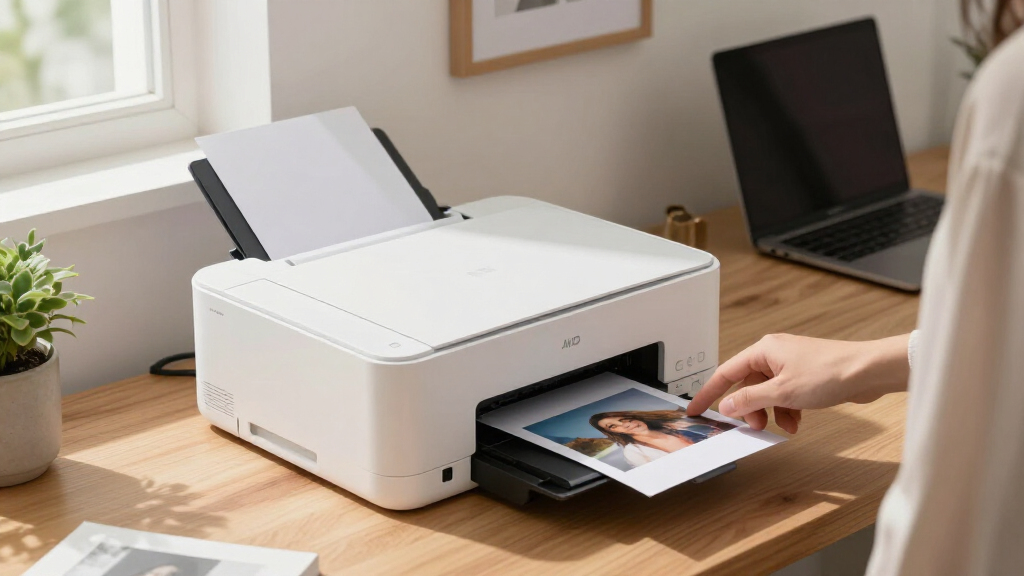

Finding the best home printer involves balancing print quality, cost, and usability. The HP Smart Tank 5003 stands out as the overall top choice thanks to its reliable performance and affordable ink system. For those prioritizing versatility, the Canon PIXMA TR8620a offers excellent all-in-one features with smart home compatibility. Meanwhile, the Epson EcoTank ET-2760 appeals to users seeking low running costs with high-volume printing. Many buyers face tradeoffs between upfront price, ongoing ink expenses, and multifunction capabilities. Continue reading for a detailed breakdown to match your specific needs.

Get the latest gadgets delivered free — and shop member deals
- Fast, free delivery on millions of items
- Access to Prime Big Deal Days deals on October 6–7
- Prime Video, Amazon Music and more included
Complete the kit



Key Takeaways
- Top printers balance high-quality output with affordable ongoing ink costs, especially with ink tank models like Epson EcoTank and Canon MegaTank.
- All-in-one functionality, including scanning and copying, is a key feature that adds value for most home users, but it often comes at a higher price point.
- Wireless connectivity and smart home compatibility are now standard, making setup and day-to-day use more seamless than ever.
- Compact designs are available but may sacrifice some features or print size capabilities, so consider your space and printing volume.
- Price varies widely, with some budget models offering good value but limited features, while premium options deliver advanced functionalities at a higher cost.
| HP Smart Tank 5003 Wireless All-in-One Ink Tank Printer, Scanner, Copier |  | Best for High-Volume, Cost-Effective Printing | Print Technology: Ink Tank | Functions: Print, Copy, Scan | Connectivity: Wireless, Mobile | VIEW LATEST PRICE | See Our Full Breakdown |
| Canon PIXMA TR8620a All-in-One Printer with Wireless Printing and Alexa Compatibility |  | Best for Versatile Home Office with Smart Features | Print Speed: 15/10 ipm | Sheet Capacity: 200 sheets | Auto Duplex Printing: Yes | VIEW LATEST PRICE | See Our Full Breakdown |
| Epson EcoTank ET-2760 Wireless Color All-in-One Printer |  | Best for Cost-Conscious, Long-Term Printing | Print Technology: PrecisionCore Heat-Free Technology | Ink System: High-capacity refillable ink tanks | Page Yield: Up to 7,500 black, 6,000 color pages | VIEW LATEST PRICE | See Our Full Breakdown |
| Canon PIXMA TR4720 All-in-One Wireless Printer | 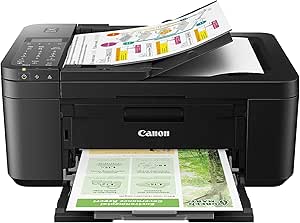 | Best for Compact, Multi-Function Home Use | Printer Type: All-in-One Wireless | Functions: Print, Copy, Scan, Fax | Print Speed: Approx. 8.8 ipm (Black), 4.4 ipm (Color) | VIEW LATEST PRICE | See Our Full Breakdown |
| Canon PIXMA TS4320 Wireless Color Inkjet Printer for Home Use |  | Best Budget-Friendly, Compact All-in-One | Printer Type: Color Inkjet | Connectivity: Wireless (Wi-Fi 2.4GHz/5GHz) | Media Support: Up to 8.5″ x 11″ | VIEW LATEST PRICE | See Our Full Breakdown |
| Canon PIXMA TS6520 Wireless Color Inkjet Printer with Duplex Printing |  | Best Overall Home Printer | Printer Type: Color Inkjet | Connectivity: Wireless (Wi-Fi 2.4GHz/5GHz) | Display: 1.42-inch OLED | VIEW LATEST PRICE | See Our Full Breakdown |
| Epson EcoTank ET-2720 Wireless Color All-in-One Supertank Printer with Scanner and Copier – White |  | Best Value with High-Yield Ink Tanks | Type: All-in-One Printer | Color: White | Connectivity: Wireless, Voice-Activated | VIEW LATEST PRICE | See Our Full Breakdown |
| Epson EcoTank ET-2720 Wireless Color All-in-One Supertank Printer with Scanner and Copier – Black |  | Best Eco-Friendly High-Volume Printing | Printer Type: All-In-One (Print, Scan, Copy) | Connectivity: Wireless | Color: Color | VIEW LATEST PRICE | See Our Full Breakdown |
| Canon MAXIFY GX2020 Wireless MegaTank All-in-One Color Printer Bundle |  | Best for High-Volume Small Business or Office Use | Model: GX2020 | Type: All-In-One Color Printer | Connectivity: Wireless, Ethernet, USB | VIEW LATEST PRICE | See Our Full Breakdown |
| HP Envy 6155 Wireless All-in-One Color Inkjet Printer |  | Best for Home Users with Easy Smart Features | Print Speed (Black): 10 ppm | Print Speed (Color): 7 ppm | Input Tray Capacity: 100 sheets | VIEW LATEST PRICE | See Our Full Breakdown |
| Epson EcoTank ET-2800 Wireless Color All-in-One Supertank Printer |  | Best Overall Home Printer for Cost Efficiency and Color Quality | Print Speed: 10 ppm | Color Printing: Yes | Print Technology: Micro Piezo Heat-Free Technology | VIEW LATEST PRICE | See Our Full Breakdown |
| HP OfficeJet Pro 8139 Wireless All-in-One Color Inkjet Printer |  | Best for Versatile Home-Office Functionality | Print Speed: Up to 20 ppm black, 10 ppm color | Input Tray Capacity: 225 sheets | Touchscreen: 2.7-inch color touchscreen | VIEW LATEST PRICE | See Our Full Breakdown |
| Epson EcoTank ET-3760 Wireless Color All-in-One Cartridge-Free Supertank Printer |  | Best for High-Volume Home and Small Office Use | Printer Type: All-in-One (Print, Scan, Copy) | Connectivity: Wireless, Ethernet, Voice-Activated | Ink System: Cartridge-Free EcoTank with refillable bottles | VIEW LATEST PRICE | See Our Full Breakdown |
| Canon PIXMA TR7120 Wireless Color Inkjet Printer with Duplex Printing |  | Best Budget-Friendly All-in-One for Light Home Use | Printer Type: All-in-one inkjet | Color: Color | Connectivity: Wireless (dual-band Wi-Fi) | VIEW LATEST PRICE | See Our Full Breakdown |
| Canon PIXMA TS8820 Wireless All-In-One Inkjet Printer Bundle |  | Best for High-Quality Photos and Creative Projects | Printer Type: All-in-One Inkjet | Color System: Six-color individual ink system | Connectivity: Wireless, Ethernet, USB | VIEW LATEST PRICE | See Our Full Breakdown |
| home printer | Connectivity |
|---|---|
| HP Smart Tank 5003 Wireless Al | Wireless, Mobile |
| Canon PIXMA TR8620a All-in-One | — |
| Epson EcoTank ET-2760 Wireless | Wireless, Voice-activated |
| Canon PIXMA TR4720 All-in-One | — |
| Canon PIXMA TS4320 Wireless Co | Wireless (Wi-Fi 2.4GHz/5GHz) |
| Canon PIXMA TS6520 Wireless Co | Wireless (Wi-Fi 2.4GHz/5GHz) |
| Epson EcoTank ET-2720 Wireless | Wireless, Voice-Activated |
| Epson EcoTank ET-2720 Wireless | Wireless |
| Canon MAXIFY GX2020 Wireless M | Wireless, Ethernet, USB |
| HP Envy 6155 Wireless All-in-O | Wireless dual-band Wi-Fi |
| Epson EcoTank ET-2800 Wireless | Wireless |
| HP OfficeJet Pro 8139 Wireless | Dual-band Wi-Fi, HP App |
| Epson EcoTank ET-3760 Wireless | Wireless, Ethernet, Voice-Activated |
| Canon PIXMA TR7120 Wireless Co | Wireless (dual-band Wi-Fi) |
| Canon PIXMA TS8820 Wireless Al | Wireless, Ethernet, USB |
More Details on Our Top Picks
HP Smart Tank 5003 Wireless All-in-One Ink Tank Printer, Scanner, Copier
This HP Smart Tank 5003 stands out for its ability to handle large printing volumes with up to 3 years of included ink, making it ideal for families or small home businesses. Unlike the Epson EcoTank ET-2760, which offers similar refillable ink tanks, the Smart Tank 5003 provides a straightforward refill process that reduces mess and downtime. However, it’s bulkier and might be less suitable for tight spaces, and its setup can be a bit complex for users unfamiliar with ink tank systems. The all-in-one functionality supports printing, copying, and scanning, but the initial size and learning curve are tradeoffs for its long-term savings and high yield.
Pros:- High-volume printing with up to 3 years of ink included
- Mess-free, easy ink refilling system
- Wireless and mobile printing capabilities
Cons:- Bulky design may not fit in small spaces
- Initial setup could be complicated for some users
Best for: Home users with high-volume printing needs who want to minimize ongoing ink costs
Not ideal for: Small apartments or offices with limited space, due to its bulky design
- Print Technology:Ink Tank
- Functions:Print, Copy, Scan
- Connectivity:Wireless, Mobile
- Included Ink:Up to 3 years
- Page Yield:Up to 6,000 color or black pages
Our verdict“This printer is best suited for users who prioritize high-volume, low-cost printing over compact size or quick setup.”
Canon PIXMA TR8620a All-in-One Printer with Wireless Printing and Alexa Compatibility
The Canon PIXMA TR8620a offers a well-rounded solution for home offices, combining printing, copying, scanning, and faxing with smart features like Alexa compatibility. Compared to the Canon PIXMA TS4320, which is more affordable but limited to basic functions, the TR8620a caters to users needing multiple functions and smart reordering. Its auto duplex printing and 200-sheet capacity support busy households, but the setup can be somewhat complex, and it lacks dedicated color printing specs in the description. It’s a solid choice for those who want an all-in-one with smart home integration, though it’s less suited for heavy photo printing or high-volume tasks.
Pros:- Wireless printing with Alexa compatibility
- Auto duplex printing to save paper
- High sheet capacity for busy households
Cons:- No specific mention of color print quality or speed
- Setup may be complicated for some users
Best for: Home office users needing multifunctionality and smart device integration
Not ideal for: Casual users seeking a simple, budget-friendly printer without smart features
- Print Speed:15/10 ipm
- Sheet Capacity:200 sheets
- Auto Duplex Printing:Yes
- Wireless Connectivity:Yes
- Compatibility:AirPrint, Android, Alexa
- Warranty:1 year
Our verdict“This printer is ideal for home users who want multifunctionality combined with smart home features and decent sheet capacity.”
Epson EcoTank ET-2760 Wireless Color All-in-One Printer
The Epson EcoTank ET-2760 is designed with long-term savings in mind, featuring high-capacity refillable ink tanks and a 2-year limited warranty. It compares favorably with the HP Smart Tank 5003 by offering a similar refillable system, but it’s more compact and easier to integrate into a small home space. The high page yields—up to 7,500 black and 6,000 color pages—make it ideal for users who print frequently and want to avoid ongoing cartridge costs. Nonetheless, initial setup can be tricky, and ink bottles must be purchased separately, which adds to the upfront investment. It’s best for users who prioritize low operating costs over immediate convenience.
Pros:- High page yield with refillable ink tanks
- Cost-effective in the long run
- Wireless and voice-activated printing
Cons:- Initial setup may be complex
- Requires separate purchase of ink bottles
Best for: Budget-conscious households that print frequently and want low running costs
Not ideal for: Users seeking a simple, plug-and-play device or those who print infrequently
- Print Technology:PrecisionCore Heat-Free Technology
- Ink System:High-capacity refillable ink tanks
- Page Yield:Up to 7,500 black, 6,000 color pages
- Connectivity:Wireless, Voice-activated
- Scanner Resolution:High-resolution flatbed
- Warranty:2-year limited
Our verdict“This printer fits users who prioritize low cost per page and long-term savings over initial simplicity or speed.”
Canon PIXMA TR4720 All-in-One Wireless Printer
The Canon PIXMA TR4720 offers a balanced mix of features suitable for everyday home printing, including auto document feeder, duplex printing, and support for mobile printing. Compared to the Canon PIXMA TS4320, which is more budget-friendly but less feature-rich, the TR4720 provides more automation and flexibility, making it better suited for busy households. Its print speeds are modest, which could be a downside for high-volume jobs, but its easy ink cartridge replacement and wireless setup make it appealing for those seeking simplicity. It’s less ideal for demanding photo printing or large document jobs but excels in versatility for daily tasks.
Pros:- Wireless connectivity and mobile printing support
- Auto duplex and document feeder for efficiency
- Easy ink cartridge replacement
Cons:- Slow print speed for high-volume tasks
- Limited to home use, not suitable for large office volume
Best for: Families who need a reliable all-in-one with automation features and mobile support
Not ideal for: Heavy-duty printing environments or users needing fast print speeds
- Printer Type:All-in-One Wireless
- Functions:Print, Copy, Scan, Fax
- Print Speed:Approx. 8.8 ipm (Black), 4.4 ipm (Color)
- Borderless Printing:Up to 8.5″ x 11″
- Auto Document Feeder:Yes
- Paper Capacity:100 sheets
Our verdict“This printer is best for families wanting an automatic, multi-function device that handles daily printing needs effortlessly.”
Canon PIXMA TS4320 Wireless Color Inkjet Printer for Home Use
The Canon PIXMA TS4320 shines as an affordable, compact inkjet printer suitable for casual home users, offering good print quality for documents and photos. Compared with the Canon PIXMA TR4720, it’s simpler and less feature-rich, making it ideal for those who prioritize affordability and space-saving design. Its automatic duplex printing helps reduce paper use, but with only two cartridges, replacement costs can add up if printing frequently. Limited media size support and no Ethernet connection make it less suited for users with more demanding or wired network needs. It’s a good entry-level option that balances cost and performance for everyday tasks.
Pros:- Affordable price point
- High-quality prints for documents and photos
- Compact design fits small spaces
Cons:- Limited media size (up to 8.5″ x 11″)
- Uses two cartridges which may increase per-page costs
Best for: Budget-conscious households needing a simple, space-efficient printer
Not ideal for: Users requiring high-volume, fast printing or wired network connectivity
- Printer Type:Color Inkjet
- Connectivity:Wireless (Wi-Fi 2.4GHz/5GHz)
- Media Support:Up to 8.5″ x 11″
- Functions:Print, Scan, Copy
- Eco Certification:EPEAT Silver, ENERGY STAR
Our verdict“This printer is perfect for casual, budget-minded users who want reliable printing in a small footprint.”
Canon PIXMA TS6520 Wireless Color Inkjet Printer with Duplex Printing
The Canon PIXMA TS6520 stands out for its versatile all-in-one functionality combined with high-quality color and black-and-white prints, making it ideal for households needing vibrant photos and sharp documents. Its compact design and intuitive OLED display simplify setup and everyday use, especially compared to bulkier models like the HP Envy 6155. However, it’s limited to standard media sizes and the small OLED can be hard to read in bright light, which might frustrate users with larger or more complex media needs. This pick is best for general home use where versatility and quality matter most. It offers print, scan, and copy functions with duplex support, making it suitable for students, casual photographers, and small families. The main tradeoff is its media size restriction and modest display.
- Printer Type: Color Inkjet
- Connectivity: Wireless (Wi-Fi 2.4GHz/5GHz)
- Display: 1.42-inch OLED
- Functions: Print, Scan, Copy
- Media Support: Up to 8.5″ x 11″
- Duplex Printing: Yes
Pros:- Affordable all-in-one with versatile features
- High-quality, vibrant color and sharp text
- Easy setup and mobile printing support
Cons:- Limited to standard media sizes (up to 8.5″ x 11″)
- Small OLED display less visible in bright environments
Best for: Families and students needing affordable, versatile printing with good photo quality
Not ideal for: Users requiring large-format, specialized media, or professional-grade photo printing
- Printer Type:Color Inkjet
- Connectivity:Wireless (Wi-Fi 2.4GHz/5GHz)
- Display:1.42-inch OLED
- Functions:Print, Scan, Copy
- Media Support:Up to 8.5″ x 11″
- Duplex Printing:Yes
Our verdict“This printer is an excellent all-rounder for households seeking reliable, quality color printing without high costs.”
Epson EcoTank ET-2720 Wireless Color All-in-One Supertank Printer with Scanner and Copier – White
The Epson EcoTank ET-2720 shines for its extremely low running costs thanks to high-capacity refillable ink tanks, making it perfect for low-to-moderate volume printing at home. Compared to the Canon PIXMA TS6520, it offers much higher page yields and fewer trips to buy ink cartridges, but the initial investment is higher, and it may print more slowly. Its compact design and wireless, voice-activated features add convenience, yet it’s less suited for users who need quick turnaround times or occasional print jobs. This model is best for budget-conscious households with steady printing demands. It includes scan and copy functions, making it a true all-in-one. The main tradeoff is its slower speed and higher upfront cost.
- Type: All-in-One Printer
- Color: White
- Connectivity: Wireless, Voice-Activated
- Features: Scanner, Copier, Color Display
- Ink System: EcoTank high-capacity refillable ink tanks
- Warranty: 2-year limited warranty
Pros:- Low cost per page with high-capacity ink tanks
- Wireless and voice-activated printing
- Includes scanner and copier functions
Cons:- Requires genuine Epson inks for optimal performance
- Slower print speed compared to laser printers
Best for: Home users seeking cost-effective printing with high page yields and minimal ink waste
Not ideal for: Users requiring fast print speeds or professional-quality photo output
- Type:All-in-One Printer
- Color:White
- Connectivity:Wireless, Voice-Activated
- Features:Scanner, Copier, Color Display
- Ink System:EcoTank high-capacity refillable ink tanks
- Warranty:2-year limited warranty
Our verdict“Ideal for households prioritizing low ongoing costs over rapid print turnaround.”
Epson EcoTank ET-2720 Wireless Color All-in-One Supertank Printer with Scanner and Copier – Black
This Epson EcoTank ET-2720 in black offers the same core features as the white version but with a sleek look for style-conscious homes. Its high-yield ink tanks and cartridge-free design make it a standout for those who want to reduce waste and save on ink costs long-term. Compared to the Canon PIXMA TS6520, it provides a more eco-friendly approach with less frequent ink purchases, though it can be slower and has a higher initial price. The built-in scanner and copier make it suitable for small office tasks, but its slower speed might be a drawback for high-volume needs. This model makes the most sense for eco-aware households with steady printing volume. The main tradeoffs involve speed and upfront cost.
- Printer Type: All-In-One (Print, Scan, Copy)
- Connectivity: Wireless
- Color: Color
- Technology: Micro Piezo Heat-Free
- Features: High-resolution flatbed scanner, color display
- Ink System: Cartridge-free high-capacity tanks
Pros:- Eco-friendly, cartridge-free design
- High-quality color and text
- Wireless connectivity for convenience
Cons:- Potentially higher initial cost
- Slower print speeds than laser printers
Best for: Environmentally conscious households with consistent printing needs
Not ideal for: High-speed or professional photo printing users
- Printer Type:All-In-One (Print, Scan, Copy)
- Connectivity:Wireless
- Color:Color
- Technology:Micro Piezo Heat-Free
- Features:High-resolution flatbed scanner, color display
- Ink System:Cartridge-free high-capacity tanks
Our verdict“A strong choice for eco-minded homes with regular, moderate printing demands.”
Canon MAXIFY GX2020 Wireless MegaTank All-in-One Color Printer Bundle
The Canon MAXIFY GX2020 is designed for demanding environments where high-volume, low-cost printing is essential. Its MegaTank high-yield pigment inks support rapid output, making it more suitable for small offices or serious home workflows than the slower Epson EcoTank models. Compared with the Epson models, the GX2020 offers faster speeds and added functionalities like faxing, but it comes with a higher initial price and requires more frequent ink refilling if used heavily. Its robust build and broad connectivity options, including Ethernet and USB, make it fit for small business contexts. This model is best for users who need frequent, high-volume printing with professional durability. The main tradeoffs are cost upfront and setup complexity.
- Model: GX2020
- Type: All-In-One Color Printer
- Connectivity: Wireless, Ethernet, USB
- Features: Print, Copy, Scan, Fax
- Ink System: MegaTank, high-yield pigment inks
- Included Accessories: Cleaning Kit, Printer Cable, Ethernet Cable
Pros:- High-volume, low-cost per page
- Fast output speeds
- All-in-one with fax capability
Cons:- Higher upfront cost
- Requires regular ink refilling for high usage
- Setup can be complex
Best for: Small businesses or advanced home offices with high-volume printing needs
Not ideal for: Casual users or households with infrequent printing or tight budgets
- Model:GX2020
- Type:All-In-One Color Printer
- Connectivity:Wireless, Ethernet, USB
- Features:Print, Copy, Scan, Fax
- Ink System:MegaTank, high-yield pigment inks
- Included Accessories:Cleaning Kit, Printer Cable, Ethernet Cable
Our verdict“Ideal for small business or serious home office users demanding high-volume, durable printing.”
HP Envy 6155 Wireless All-in-One Color Inkjet Printer
The HP Envy 6155 is tailored for casual home users who value ease of use and reliable color printing, thanks to its responsive 2.4-inch touchscreen and integrated wireless. Its auto duplex printing and compatible Instant Ink service help manage costs effectively, making it appealing compared to the more complex or slower models like the Canon PIXMA TS6520. However, it’s dependent on HP’s proprietary cartridges with chips, and firmware updates sometimes restrict non-HP inks, which might bother eco-conscious buyers. Its limited speed and volume capacity make it less suitable for high-demand environments. This printer makes sense for families or small households focusing on straightforward, quality color printing and scanning. Speed and high-volume capacity are notable tradeoffs.
- Print Speed (Black): 10 ppm
- Print Speed (Color): 7 ppm
- Input Tray Capacity: 100 sheets
- Touchscreen: 2.4 inches
- Connectivity: Wireless dual-band Wi-Fi
- Included Trial: 3 months of Instant Ink
Pros:- Easy-to-use touchscreen
- Reliable wireless and duplex printing
- Cost-effective with Instant Ink trial
Cons:- Dependent on proprietary HP cartridges
- Firmware updates may limit third-party ink use
- Limited speed for high-volume tasks
Best for: Home users who want simple, reliable color printing with minimal fuss
Not ideal for: High-volume or professional photo printing needs
- Print Speed (Black):10 ppm
- Print Speed (Color):7 ppm
- Input Tray Capacity:100 sheets
- Touchscreen:2.4 inches
- Connectivity:Wireless dual-band Wi-Fi
- Included Trial:3 months of Instant Ink
Our verdict“Best suited for families seeking straightforward, dependable color printing in a compact, user-friendly package.”
Epson EcoTank ET-2800 Wireless Color All-in-One Supertank Printer
This EcoTank model stands out for its cartridge-free design and high ink capacity, making it ideal for households that prioritize long-term savings and vibrant prints. Unlike the HP OfficeJet Pro 8139, which offers faster document handling and a more advanced touchscreen, the ET-2800 excels in reducing ongoing ink costs and waste, especially suited for casual use. However, it requires genuine Epson ink, which can be a drawback for those seeking budget-friendly refills. Its fast speeds and detailed color output make it perfect for families or hobbyists who print regularly but don’t need high-volume office features.
Pros:- Cartridge-free printing reduces waste and replacement costs
- High ink capacity for long periods between refills
- Vivid, detailed color printing with fast speeds
Cons:- Requires genuine Epson ink for optimal performance
- Limited to home and casual use, not suitable for high-volume office demands
Best for: Families or individual users who print frequently and want low-cost, eco-friendly color printing.
Not ideal for: High-volume offices or users needing premium print speeds and advanced document handling, where the initial investment and setup might feel limiting.
- Print Speed:10 ppm
- Color Printing:Yes
- Print Technology:Micro Piezo Heat-Free Technology
- Ink Replacement:Approx. 4,500 black pages, 7,500 color pages
- Connectivity:Wireless
- Ideal Use:Home and everyday printing
Our verdict“This printer is perfect for households seeking economical, vibrant color printing with minimal maintenance.”
HP OfficeJet Pro 8139 Wireless All-in-One Color Inkjet Printer
Compared with the Epson ET-2800, the HP OfficeJet Pro 8139 offers faster black and color printing speeds and a more advanced touchscreen interface, making it better suited for busy home offices. Its capability to scan, copy, fax, and duplex print adds to its versatility. Yet, it depends on original HP cartridges with specific chips, and firmware updates may restrict third-party cartridge use, which could increase ongoing costs. The inclusion of a 1-year Instant Ink trial makes it appealing for those wanting to reduce supply headaches, but the overall price may be higher for casual users.
Pros:- Fast color and black printing speeds
- Versatile all-in-one features including faxing
- Intuitive 2.7-inch touchscreen interface
- Includes 1-year Instant Ink trial for savings
Cons:- Requires specific HP cartridges, limiting third-party options
- Firmware updates may restrict third-party cartridge use
- Price may be prohibitive for light users
Best for: Home-office users needing a multifunction printer with quick color output and mobile connectivity.
Not ideal for: Users on a tight budget or those who prefer simpler, less feature-rich printers for occasional printing.
- Print Speed:Up to 20 ppm black, 10 ppm color
- Input Tray Capacity:225 sheets
- Touchscreen:2.7-inch color touchscreen
- Connectivity:Dual-band Wi-Fi, HP App
- Security:HP Wolf Essential Security
- Recycled Content:45% recycled plastic
Our verdict“This model is ideal for home offices that value speed, versatility, and integrated mobile printing features.”
Epson EcoTank ET-3760 Wireless Color All-in-One Cartridge-Free Supertank Printer
Compared to the ET-2800, the ET-3760 offers more features tailored to busy households or small offices, including a larger paper capacity and auto document feeder. Its high-capacity refillable ink tanks deliver significant savings on printing costs, especially with high-volume tasks. However, the initial setup can be complex, and its larger footprint might not suit compact spaces. The refill bottles, while cost-effective long-term, can be expensive upfront, making it less appealing for infrequent printers who prefer simpler solutions.
Pros:- Cost-effective with high-capacity refillable ink tanks
- Fast printing with high-quality output
- Multiple connectivity options including wireless and Ethernet
- Reduces cartridge waste and environmental impact
Cons:- Initial setup may be complex for some users
- Large footprint may not fit in small spaces
- Replacement ink bottles can be expensive
Best for: Small business owners or large households with high printing demands seeking cost-efficient, high-capacity printing.
Not ideal for: Users with limited space or those seeking a straightforward, plug-and-play device for occasional use.
- Printer Type:All-in-One (Print, Scan, Copy)
- Connectivity:Wireless, Ethernet, Voice-Activated
- Ink System:Cartridge-Free EcoTank with refillable bottles
- Page Yield:Up to 7,500 black pages, 6,000 color pages
- Display:2.4-inch color display
- Paper Capacity:250 sheets
Our verdict“This printer suits high-volume users who want long-term savings and versatile connectivity in a larger format.”
Canon PIXMA TR7120 Wireless Color Inkjet Printer with Duplex Printing
The PIXMA TR7120 offers a compelling blend of affordability and quality, especially compared to premium models like the PIXMA TS8820. It handles high-quality color printing, scanning, and copying with ease, making it suitable for casual home users or those balancing work and personal tasks. Its automatic duplex printing enhances efficiency, but the media size is limited to 8.5” x 11”, and the small OLED display may challenge users unfamiliar with compact interfaces. It’s a practical choice for light printing needs without the bells and whistles of more expensive models.
Pros:- Affordable price point
- High-quality color and document printing
- Automatic duplex printing saves paper
- Easy setup with mobile printing options
Cons:- Limited to 8.5” x 11” media size
- Small OLED display less intuitive for some
- May need frequent ink replacements with heavy use
Best for: Budget-conscious households or students needing reliable color printing with duplex features.
Not ideal for: High-volume or professional users requiring larger media support or advanced features.
- Printer Type:All-in-one inkjet
- Color:Color
- Connectivity:Wireless (dual-band Wi-Fi)
- Auto Document Feeder:Yes
- Display:1.42-inch Monochrome OLED
- Media Size:Up to 8.5” x 11”
Our verdict“This printer is ideal for casual users who want reliable color printing at an affordable price point.”
Canon PIXMA TS8820 Wireless All-In-One Inkjet Printer Bundle
Unlike the more straightforward PIXMA TR7120, the TS8820 is geared toward users who prioritize high-quality photo printing and media versatility. Its six-color individual ink system delivers vibrant, detailed images, making it perfect for photo enthusiasts or small creative projects. Wireless, Ethernet, and USB connectivity provide flexible printing options, and the bundled accessories enhance its appeal. However, its setup can be complex for non-technical users, and frequent ink replacements may be needed for high-volume photo printing, which could raise costs over time. It’s best suited for those who need premium photo quality rather than rapid document production.
Pros:- High-quality photo and document printing
- Six-color individual ink system for vibrant images
- Wireless, Ethernet, and USB connectivity
- Includes accessories like a 32GB Memory Card and Cleaning Kit
Cons:- Complex setup process for non-technical users
- Frequent ink replacements for high-volume photo printing
- Higher initial cost compared to simpler models
Best for: Photographers or hobbyists seeking vibrant, detailed prints and media flexibility at home.
Not ideal for: Users with high-volume printing needs or those requiring simple, hassle-free setup without frequent ink changes.
- Printer Type:All-in-One Inkjet
- Color System:Six-color individual ink system
- Connectivity:Wireless, Ethernet, USB
- Included Accessories:32GB Memory Card, Cleaning Kit, Printer Cable
- Media Support:Various paper sizes and media types
Our verdict“This model suits creative users who prioritize superior photo quality and media options over speed and simplicity.”
How We Picked
These printers were selected based on multiple factors that matter most to home users, including print quality, cost efficiency, ease of setup, and versatility. We prioritized models with reliable wireless connectivity, low running costs, and user-friendly interfaces. The ranking emphasizes value for money—balancing initial price with ongoing ink or toner expenses—along with durability and feature sets. We also considered reviews from a broad range of users, including students, families, and remote workers, to identify what truly makes a printer suitable for everyday home use.Factors to Consider When Choosing Best Home Printers
Choosing the best home printer requires weighing several key factors beyond basic features. Understanding your typical print volume, the importance of color accuracy, and how much you value convenience can help narrow your options. Common mistakes include overpaying for features you don’t need or selecting a model with high ongoing costs. By considering these factors carefully, you’ll find a printer that fits your budget and daily needs without surprises.Print Quality and Color Accuracy
For home use, especially with photos or creative projects, print quality matters. Inkjet printers generally excel at color vibrancy and photo printing, while laser models might be better for sharp text documents. Assess whether you need high resolution for photos or if basic quality suffices for everyday documents. Keep in mind that higher quality often comes with increased cost and slower print speeds, so match the specs to your typical printing tasks.
Cost of Ink and Toner
Many printers seem affordable upfront but can become costly over time due to ink or toner expenses. Ink tank models like Epson EcoTank or Canon MegaTank are designed to reduce ongoing costs by offering refillable bottles instead of cartridges. Consider your typical print volume—if you print frequently, investing in a printer with high-yield ink options can save money long-term. Avoid models with proprietary cartridges that have inflated prices, especially if you plan regular printing.
Ease of Use and Setup
Ease of setup and daily operation can significantly influence your satisfaction with a printer. Features like wireless connectivity, mobile printing, and touchscreen controls make printing more straightforward. Consider whether the printer supports your preferred devices and operating systems, and if the interface is intuitive. For less tech-savvy users, models with straightforward controls and clear instructions will reduce frustration and setup time.
Multifunctionality and Space
All-in-one printers that scan, copy, and sometimes fax add convenience but may increase size and cost. Think about your available space—compact models are suitable for small desks, but they might lack features like duplex printing or high-capacity trays. If you frequently scan or copy documents, prioritize models with easy-to-use feeders and reliable operation. Balance the need for multifunctionality against the footprint your space allows.
Speed and Volume Capacity
Print speed and tray capacity matter if you handle large volumes regularly. Laser printers tend to be faster for high-volume tasks, while inkjet models may suffice for occasional printing. Consider whether you need a printer that can handle multiple pages quickly or if a lower-volume model will meet your needs. Larger trays reduce the frequency of refills, saving time during busy periods.
Frequently Asked Questions
Should I choose an inkjet or laser printer for home use?
For most home users, inkjet printers offer better color and photo quality, making them ideal for printing photos, creative projects, or occasional documents. Laser printers, on the other hand, excel at high-speed, high-volume black-and-white printing, and generally have lower cost per page. If your printing is infrequent and mainly text-based, a laser model could be more cost-effective. Conversely, if you print photos or color documents regularly, an inkjet is likely the better choice.
Are all-in-one printers worth the extra cost?
All-in-one printers provide scanning, copying, and sometimes faxing, which adds convenience and saves space. For most households, these features justify the higher initial investment, especially if you frequently digitize documents or need copies. However, if your primary need is simple printing, a dedicated printer might be more affordable and reliable. Consider how often you’ll use the scanning or copying functions before paying extra for an all-in-one model.
How important is wireless connectivity for a home printer?
Wireless connectivity has become a standard feature that enhances convenience, allowing printing from multiple devices without cables. It simplifies setup and enables printing directly from smartphones, tablets, or laptops. If you share your printer among several family members or devices, wireless capability is highly beneficial. However, if your printer is dedicated to a single desktop setup, wired connections might suffice and sometimes offer more stability.
What should I consider regarding ongoing ink or toner costs?
Ongoing costs often outweigh initial purchase price, especially with cartridge-based models. Ink tank printers like Epson EcoTank or Canon MegaTank are designed to lower these expenses with refillable bottles, making them ideal for frequent printing. If you print rarely, cheaper cartridge models might be acceptable, but be aware of the cost per page. Always check the cost of replacement ink or toner and compare it to your typical usage to avoid surprises.
Is duplex printing worth paying extra for?
duplex printing, which automatically prints on both sides of the paper, saves paper and is environmentally friendly. It’s especially useful if you print large documents or books regularly. While some budget models lack this feature, investing in duplex-capable printers can reduce paper costs over time. If you print mostly single-sided documents, this feature may be less critical, but it remains a valuable convenience for many home users.
Conclusion
For casual home users or those new to printing, the Canon PIXMA TS4320 offers affordability and simplicity. Families or remote workers needing versatile all-in-one features should consider the HP Smart Tank 5003 or Epson EcoTank ET-2760 for their low running costs. Power users or those printing large volumes will benefit from the speed and capacity of models like the HP OfficeJet Pro 8139. Premium buyers seeking advanced features and premium build quality might look toward the Canon PIXMA TS8820. Ultimately, your choice depends on your budget, printing habits, and desired features, but this lineup covers every common home printing need.
As an affiliate, we earn on qualifying purchases.Fall Picks
fall essentials