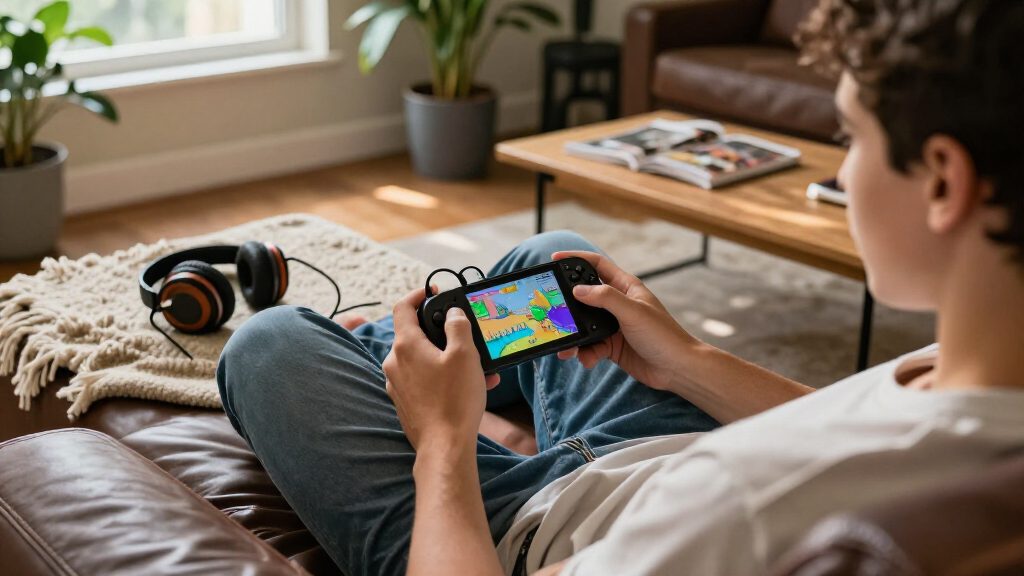

The best portable gaming handhelds depend on what you want to play: I rank the ASUS ROG Ally best overall for access to PC games, while the Retroid Pocket Flip 2 stands out for its AMOLED screen and Android flexibility, and the Anbernic RG40XX H offers a simpler retro-focused option. The main tradeoff is between game library and performance on one side and portability, battery demands, and ease of use on the other. A remote-play device such as PlayStation Portal also depends on a compatible gaming setup and reliable connectivity, unlike a handheld that runs games locally. Below, I compare all 15 options by their intended use, strengths, and drawbacks. Read on for the full breakdown and a guide to choosing the right kind of handheld for your routine.

Get the latest gadgets delivered free with Prime
- Fast, free delivery on millions of items
- Prime Video, Amazon Music and more included
- Member-only deals all year
Complete the kit



Key Takeaways
- The lineup splits into distinct use cases: PC handhelds, Android devices, retro-focused consoles, and remote-play or cloud devices do not offer interchangeable gaming libraries.
- The ASUS ROG Ally is the broadest-fit pick: its Windows-based PC game access makes it more versatile than the retro models, but it brings more setup and power demands.
- The Retroid Pocket Flip 2 stands out for screen quality and Android flexibility: its AMOLED display and 128GB storage are a different proposition from the simpler 4-inch retro handhelds.
- Screen size changes the portability equation: the compact Anbernic RG40XX H favors easy carrying, while the 7-inch Ally and 8-inch Legion Go S give games more room at the cost of bulk.
- Several entries are close variants, not separate categories: the two RG52MINI color options share the same stated core specifications, so buyers should choose by finish rather than expect a performance difference.
| Anbernic RG40XX H Retro Handheld Gaming Console – 4″ IPS Screen, WiFi, Bluetooth, HD TV Output, 64GB Preloaded Games (Black) |  | Best Compact Retro Pick | Display: 4-inch IPS LCD, 640 × 480 | Processor: Quad-core ARM Cortex-A53 | Memory: 1 GB RAM | VIEW LATEST PRICE | See Our Full Breakdown |
| RF40H Handheld Retro Gaming Console, 4-Inch IPS Display, 64GB Storage, Wi-Fi, Black |  | Best for a Ready-to-Play Library | Display: 4-inch IPS, 720 × 720 | Operating system: Linux | Storage: 64 GB | VIEW LATEST PRICE | See Our Full Breakdown |
| MANGMI AIR X Android Handheld Game Console, 5.5-inch FHD IPS, 4GB RAM, 64GB Storage, Black |  | Best Android Versatility | Display: 5.5-inch FHD IPS touchscreen, 1920 × 1080, 400 nits | Processor: Qualcomm Snapdragon 662 octa-core, up to 2.1 GHz | Operating system: Android 14 | VIEW LATEST PRICE | See Our Full Breakdown |
| RG52MINI Retro Handheld Game Console, 5.5-Inch IPS Screen, 64GB, Grey |  | Best for Expandable Retro Storage | Display: 5.5-inch IPS, 720 × 1280 | Processor: Rockchip RK3562 quad-core Cortex-A53, 2.0 GHz | Memory: 2+4 GB RAM, as listed | VIEW LATEST PRICE | See Our Full Breakdown |
| My Arcade Atari Gamestation Go Portable Console with 200+ Games |  | Best for Officially Licensed Classic Games | Display: 7-inch full-color display, 720p | Included games: 200+ from Atari, Jaleco, and PIKO Interactive | Storage: 5 GB | VIEW LATEST PRICE | See Our Full Breakdown |
| Retroid Pocket Flip 2 Android Handheld Game Console, 5.5-Inch AMOLED 1080p Display, 128GB Storage, Black | 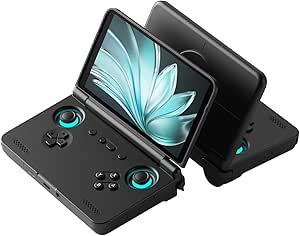 | Best Compact Android Handheld | Operating system: Android 13 | Processor: Qualcomm Snapdragon 865 | Memory: 8GB LPDDR4x | VIEW LATEST PRICE | See Our Full Breakdown |
| ASUS ROG Ally 7-Inch 120Hz FHD Gaming Handheld, Ryzen Z1, 16GB RAM, 512GB SSD, White |  | Best for Windows PC Gaming | Platform: Windows 11 | Processor: AMD Ryzen Z1 | Graphics: RDNA 3 | VIEW LATEST PRICE | See Our Full Breakdown |
| RG52MINI Retro Handheld Game Console, 5.5-Inch IPS Screen, 64GB, Black |  | Best for Retro-Focused Play | Processor: Rockchip RK3562 quad-core Cortex-A53, 2.0GHz | Memory: 2+4GB RAM | Display: 5.5-inch IPS, 720 × 1280 | VIEW LATEST PRICE | See Our Full Breakdown |
| PlayStation Portal Remote Player for PS5 | 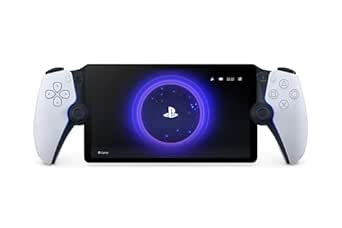 | Best for PS5 Remote Play | Compatible device: PlayStation 5 | Screen: 8-inch LCD | Resolution: 1080p | VIEW LATEST PRICE | See Our Full Breakdown |
| Abxylute One Pro Cloud Gaming Handheld, 7-Inch 1080p Touchscreen, 64GB |  | Best for Cloud Gaming Variety | Platform: Android | Chipset: MediaTek Genio 510 | Storage: 64GB | VIEW LATEST PRICE | See Our Full Breakdown |
| RG56PRO Retro Handheld Game Console with EVA Hard Case, 128GB |  | Best for a Large Preloaded Library | Operating system: Linux | Processor: Rockchip RK3562 quad-core, up to 2.0 GHz | Display: 5.5-inch IPS LCD, 1280 × 720 | VIEW LATEST PRICE | See Our Full Breakdown |
| DREAMHAX X7 Plus Handheld Game Console with 4.3-Inch Screen |  | Best for Simple Shared TV Play | Display: 4.3-inch TFT LCD | Built-in games: 10,000 | Players: Up to 2 | VIEW LATEST PRICE | See Our Full Breakdown |
| RG43H Pro Retro Handheld Game Console |  | Best for Expandable Retro Storage | Processor: Rockchip RK3562 quad-core | Systems: EmuELEC and RGBOX | Display: 4.3-inch IPS, 1024 × 768 | VIEW LATEST PRICE | See Our Full Breakdown |
| Lenovo Legion Go S Handheld Gaming Console, 8-inch 120Hz Display, Ryzen Z2 Go, 16GB RAM, 512GB Storage, Glacier White |  | Best for Windows PC Gaming | Platform: Windows | Processor: AMD Ryzen Z2 Go | Graphics: AMD Radeon | VIEW LATEST PRICE | See Our Full Breakdown |
| WELLST·G P30S Handheld Game Console for Kids with 220 Retro Games |  | Best for Young Beginners | Model: P30S | Display: 3.0-inch LCD | Included games: 220 | VIEW LATEST PRICE | See Our Full Breakdown |
| portable gaming handheld | Display | Connectivity | Storage | Battery |
|---|---|---|---|---|
| Anbernic RG40XX H Retro Handhe | 4-inch IPS LCD, 640 × 480 | Wi-Fi, Bluetooth, HDMI/TV output, wired controller | 64 GB | 3200 mAh; up to 8 hours |
| RF40H Handheld Retro Gaming Co | 4-inch IPS, 720 × 720 | Wi-Fi | 64 GB | 4000 mAh; listed for 6–8 hours |
| MANGMI AIR X Android Handheld | 5.5-inch FHD IPS touchscreen, 1920 × 1080, 400 nits | Wi-Fi, USB, 5G Wi-Fi mirroring | 64 GB; expandable via microSD | 5000 mAh; up to 8 hours |
| RG52MINI Retro Handheld Game C | 5.5-inch IPS, 720 × 1280 | 2.4 GHz Wi-Fi, HDMI, USB Type-C, 3.5 mm headphone jack | 64 GB; expandable up to 1 TB via TF card | 5000 mAh |
| My Arcade Atari Gamestation Go | 7-inch full-color display, 720p | Wi-Fi and HDMI | 5 GB | Built-in rechargeable battery |
| Retroid Pocket Flip 2 Android | 5.5-inch 1080p AMOLED, 60Hz, 500 nits | Wi-Fi 6, Bluetooth 5.1, USB-C DisplayPort, 3.5mm audio | 128GB UFS 3.1 | — |
| ASUS ROG Ally 7-Inch 120Hz FHD | 7-inch 1080p touchscreen, 120Hz | USB, Bluetooth, Wi-Fi; HDMI via ROG XG Mobile | 512GB PCIe SSD | — |
| RG52MINI Retro Handheld Game C | 5.5-inch IPS, 720 × 1280 | HDMI, USB-C with OTG and DP output, 3.5mm headphone jack | 64GB; expandable up to 1TB via TF card | 5,000mAh; up to 8 hours of gameplay |
| PlayStation Portal Remote Play | — | Wi-Fi | — | — |
| Abxylute One Pro Cloud Gaming | 7-inch 1080p touchscreen | Wi-Fi, HDMI, USB | 64GB | — |
| RG56PRO Retro Handheld Game Co | 5.5-inch IPS LCD, 1280 × 720 | Wi-Fi, HDMI output, USB Type-C | 128GB TF card | 5000mAh lithium-ion polymer |
| DREAMHAX X7 Plus Handheld Game | 4.3-inch TFT LCD | HDMI, mini USB, micro USB, 3.5mm headphone jack | — | Lithium-ion |
| RG43H Pro Retro Handheld Game | 4.3-inch IPS, 1024 × 768 | 2.4GHz Wi-Fi, HDMI output, USB Type-C with OTG, 3.5mm headphone jack | 64GB, expandable up to 512GB | Listed as 4000mAh; product details also mention an included D battery |
| Lenovo Legion Go S Handheld Ga | 8-inch IPS, 1920 × 1080, 120Hz, 500 nits | HDMI, USB, Bluetooth, Wi-Fi | 512GB | 55.5Wh |
| WELLST·G P30S Handheld Game Co | 3.0-inch LCD | — | 2GB | 860mAh lithium-ion |
More Details on Our Top Picks
Anbernic RG40XX H Retro Handheld Gaming Console – 4″ IPS Screen, WiFi, Bluetooth, HD TV Output, 64GB Preloaded Games (Black)
The Anbernic RG40XX H is the most straightforward choice here for players who want a light, pocket-friendly retro handheld rather than a larger Android device. At about 200 g, its 4-inch screen and claimed battery life of up to eight hours suit commutes and short trips; HDMI output and Bluetooth add ways to play at home. Compared with the MANGMI AIR X, it has a smaller, lower-resolution display and less memory, so it is a weaker fit for touch-led apps or cloud gaming. Its Linux system, 1 GB of RAM, and quad-core Cortex-A53 processor make it better suited to modest retro workloads than demanding games. The 64 GB card is convenient, but the listing does not establish the licensing or contents of the preloaded library, so buyers should check what is included.
Pros:- Lightweight 200 g body is easier to carry than the larger-screen options in this group.
- 4-inch IPS display keeps the device compact while providing a clear view for retro games.
- Wi-Fi, Bluetooth, HDMI output, and wired-controller support offer several ways to connect.
- Battery life is listed at up to eight hours.
Cons:- 1 GB of RAM and the Cortex-A53 processor limit its suitability for demanding titles.
- The 640 × 480 screen is smaller and less detailed than the MANGMI AIR X’s 1080p display.
- The preloaded-game listing does not clarify the library’s contents or licensing.
Best for: Retro players who prioritize a lightweight device, physical controls, and HDMI or Bluetooth options for occasional home play.
Not ideal for: Players who want a large, high-resolution screen, Android apps, or more headroom for demanding games; the MANGMI AIR X is better suited to those needs.
- Display:4-inch IPS LCD, 640 × 480
- Processor:Quad-core ARM Cortex-A53
- Memory:1 GB RAM
- Storage:64 GB
- Battery:3200 mAh; up to 8 hours
- Operating system:Linux
- Connectivity:Wi-Fi, Bluetooth, HDMI/TV output, wired controller
- Weight:About 200 g (7.2 oz)
Our verdict“Choose the RG40XX H for lightweight retro play and useful connection options, but pick the MANGMI AIR X if you want Android gaming on a sharper, larger screen.”
RF40H Handheld Retro Gaming Console, 4-Inch IPS Display, 64GB Storage, Wi-Fi, Black
The RF40H is aimed at buyers who want a compact retro handheld with a large advertised game selection already on its 64 GB storage. Its 720 × 720 IPS display gives it a squarer layout than the Anbernic RG40XX H, which may suit games designed around classic screens, though the listing’s 20,000-plus game claim is not a substitute for checking which titles are actually included. Wi-Fi supports online multiplayer, while the 4000 mAh battery is rated for six to eight hours. Unlike the MANGMI AIR X, this is a Linux-based retro device rather than an Android handheld with a touchscreen and broader app use. The included bag and screen film help with carrying and protection, but the listing recommends it for ages 12 and up, and its battery estimate is a range rather than a guaranteed runtime.
Pros:- Square 720 × 720 IPS display offers a different screen format from the RG40XX H’s 640 × 480 panel.
- Linux system lists support for more than 20 emulators.
- Wi-Fi enables online multiplayer.
- Includes a carrying bag, screen film, and Type-C charging cable.
Cons:- The advertised 20,000-plus game count does not identify the included titles.
- Battery life is stated as six to eight hours, so actual runtime is uncertain.
- The manufacturer recommends the device for ages 12 and up.
Best for: Retro-game newcomers aged 12 and up who want a compact device, Wi-Fi multiplayer, and an advertised library ready to browse.
Not ideal for: Buyers seeking Android apps, a touchscreen, or a clearly documented game catalog; the MANGMI AIR X offers a more flexible Android setup.
- Display:4-inch IPS, 720 × 720
- Operating system:Linux
- Storage:64 GB
- Battery:4000 mAh; listed for 6–8 hours
- Emulator support:20+ emulators
- Connectivity:Wi-Fi
- Audio:Stereo speakers and 3.5 mm headphone jack
- Included accessories:64 GB TF card, Type-C cable, organizer bag, screen film, user manual
Our verdict“Pick the RF40H if a compact, Wi-Fi-equipped retro handheld and included accessories matter most, provided you are comfortable verifying its advertised game library.”
MANGMI AIR X Android Handheld Game Console, 5.5-inch FHD IPS, 4GB RAM, 64GB Storage, Black
The MANGMI AIR X is the most adaptable handheld among these five: Android 14, a 5.5-inch 1080p touchscreen, and a Snapdragon 662 make it a better match for Android games and cloud streaming than the Linux-based Anbernic RG40XX H. Its 4 GB of RAM and expandable storage also give buyers more flexibility than that compact retro model, while Hall-effect joysticks and triggers are designed to reduce wear-related control drift. The screen’s 400-nit brightness and stated full sRGB coverage make it the clearest choice here for detailed, colorful play. That versatility comes with a larger body and no stated software-update support period. Battery life is listed at up to eight hours, but actual runtime will depend on use, especially with streaming or a bright screen. It supports TV mirroring, though the listing describes that as 5G Wi-Fi mirroring rather than a simple HDMI connection.
Pros:- 5.5-inch 1920 × 1080 touchscreen provides finer detail than the 4-inch displays on the RG40XX H and RF40H.
- Android 14 supports a wider range of apps and streaming uses than the Linux retro handhelds.
- Hall-effect joysticks and triggers are designed to resist wear-related drift.
- 64 GB storage can be expanded with a microSD card.
Cons:- Larger screen and Android functionality make it less compact than the RG40XX H.
- The listing does not specify how long software updates will be supported.
- Battery runtime is stated as up to eight hours and may be shorter during demanding play or streaming.
Best for: Players who want an Android handheld for touchscreen games, cloud streaming, and retro play, with a sharper display than compact Linux models.
Not ideal for: Buyers seeking the lightest, simplest retro device or a clearly specified long-term update commitment; the Anbernic RG40XX H is more compact and direct.
- Display:5.5-inch FHD IPS touchscreen, 1920 × 1080, 400 nits
- Processor:Qualcomm Snapdragon 662 octa-core, up to 2.1 GHz
- Operating system:Android 14
- Memory:4 GB RAM
- Storage:64 GB; expandable via microSD
- Battery:5000 mAh; up to 8 hours
- Controls:RGB Hall-effect joysticks and linear Hall triggers
- Connectivity:Wi-Fi, USB, 5G Wi-Fi mirroring
Our verdict“Choose the AIR X if you want Android, cloud streaming, and a high-resolution touchscreen in one portable device, rather than a smaller retro-focused handheld.”
RG52MINI Retro Handheld Game Console, 5.5-Inch IPS Screen, 64GB, Grey
The RG52MINI pairs a 5.5-inch portrait-oriented 720 × 1280 screen with dual operating systems, giving it a different feel from the smaller, landscape-oriented Anbernic RG40XX H. Its strongest practical advantage is storage expansion: a TF card can raise capacity to a stated 1 TB, which suits players who want room to add a substantial personal library. Wi-Fi multiplayer and HDMI output also let it move between portable play and a TV. The RK3562 quad-core processor and 2+4 GB memory listing are less compelling than the MANGMI AIR X’s Snapdragon 662 and 1080p touchscreen for Android-style versatility, and the RG52MINI’s product description does not clearly explain how its two systems work together. The listed weight is unusually low at 3.2 ounces, while the stated dimensions appear unreliable, so I would not choose it based on portability figures alone.
Pros:- 5.5-inch IPS screen gives more viewing area than the 4-inch RG40XX H and RF40H.
- TF-card storage expansion is listed up to 1 TB.
- Wi-Fi multiplayer and HDMI output support both portable and TV play.
- Dual operating systems provide a choice of EmuELEC and RGBOX.
Cons:- The listed weight of 3.2 ounces and dimensions of 1 × 1 × 1 inches may be inaccurate.
- The listing does not clearly explain the differences or setup for its two operating systems.
- Its 720 × 1280 screen is lower resolution than the MANGMI AIR X’s 1080p panel.
Best for: Retro players who want a larger portrait display, HDMI play, and room to expand storage substantially with a TF card.
Not ideal for: Buyers who need dependable size and weight information or want a clearly documented Android-focused device; the MANGMI AIR X has more explicit software and display details.
- Display:5.5-inch IPS, 720 × 1280
- Processor:Rockchip RK3562 quad-core Cortex-A53, 2.0 GHz
- Memory:2+4 GB RAM, as listed
- Storage:64 GB; expandable up to 1 TB via TF card
- Operating systems:EmuELEC and RGBOX
- Battery:5000 mAh
- Connectivity:2.4 GHz Wi-Fi, HDMI, USB Type-C, 3.5 mm headphone jack
- Controls:Dual 3D joysticks and mechanical buttons
Our verdict“Choose the RG52MINI for expandable storage and a larger retro screen, but verify its physical specifications and software details before buying.”
My Arcade Atari Gamestation Go Portable Console with 200+ Games
The My Arcade Atari Gamestation Go takes a different approach from the emulation-focused RG40XX H and RF40H: it centers on an officially licensed collection of more than 200 games from Atari, Jaleco, and PIKO Interactive. Its 7-inch 720p display is the largest here, and its built-in paddle, trackball, numeric keypad, and standard buttons are intended to suit different classic game controls without relying on a separate controller. Save options, Wi-Fi, HDMI, and a rechargeable battery add useful flexibility. The tradeoff is specialization: this is a curated classic-game machine, not an Android handheld like the MANGMI AIR X, and its 5 GB storage is far below the 64 GB offered by the retro handhelds. Buyers who want broad personal game-library support should look elsewhere; those who value a defined, licensed collection have a clearer fit.
Pros:- Includes more than 200 games from Atari, Jaleco, and PIKO Interactive.
- Seven-inch 720p screen is larger than the displays on the other four handhelds here.
- Paddle, trackball, numeric keypad, and standard buttons cover varied classic control styles.
- Offers save options, Wi-Fi, HDMI connectivity, and a rechargeable battery.
Cons:- The 5 GB storage capacity is much smaller than the 64 GB offered by the other retro handhelds here.
- Its licensed collection is more limited than an Android device’s app options or a configurable retro library.
- The listed software update support date is unknown.
Best for: Players who want a large screen and a defined collection of licensed Atari, Jaleco, and PIKO classics with controls tailored to different game styles.
Not ideal for: Buyers who want Android apps, expandable storage, or a broad personal library; the MANGMI AIR X and 64 GB retro handhelds offer more room to build around individual preferences.
- Display:7-inch full-color display, 720p
- Included games:200+ from Atari, Jaleco, and PIKO Interactive
- Storage:5 GB
- Controls:Paddle, D-pad, trackball, numeric keypad, bumpers, A/B/X/Y buttons
- Connectivity:Wi-Fi and HDMI
- Battery:Built-in rechargeable battery
- Save options:Game-save options included
- Model:My Arcade Gamestation Portable, DGUNL-7065
Our verdict“Pick the Gamestation Go for licensed classics, a large screen, and unusual built-in controls, not for a flexible all-purpose gaming handheld.”
Retroid Pocket Flip 2 Android Handheld Game Console, 5.5-Inch AMOLED 1080p Display, 128GB Storage, Black
The clamshell design makes the Retroid Pocket Flip 2 the most screen-protective pick here: it folds shut for a bag, unlike the open-screen Abxylute One Pro. Its 5.5-inch 1080p AMOLED panel gives Android games and supported emulation vivid color, while the Snapdragon 865, 8GB of RAM, and active cooling provide more headroom than a simple retro-focused device. Hall-effect sticks are designed to resist drift, and 128GB of storage leaves more room for apps than the Abxylute’s 64GB. The tradeoff is a smaller display than the seven-inch options, and Android setup takes more effort than a console built around a fixed library. Games are not included, and update support is unspecified, so I would choose it for portability and flexibility rather than out-of-box simplicity.
Pros:- Clamshell shell protects the display during transport
- 5.5-inch 1080p AMOLED screen offers vivid color
- Hall-effect analog sticks are designed to resist drift
- 128GB storage, active cooling, and 27W fast charging
Cons:- Games are not preloaded, so buyers must source and install their apps
- The 5.5-inch screen is smaller than the Abxylute One Pro and PlayStation Portal displays
- Software update support is unspecified
Best for: Android handheld buyers who want a foldable, bag-friendly device for downloaded games and emulation, with a vivid screen and more storage than the Abxylute One Pro.
Not ideal for: Players who want a large screen, preloaded games, or a turnkey console experience without downloading and configuring apps.
- Operating system:Android 13
- Processor:Qualcomm Snapdragon 865
- Memory:8GB LPDDR4x
- Storage:128GB UFS 3.1
- Display:5.5-inch 1080p AMOLED, 60Hz, 500 nits
- Battery and charging:5,000mAh; 27W fast charging
- Controls:Gamepad with Hall-effect analog sticks
- Connectivity:Wi-Fi 6, Bluetooth 5.1, USB-C DisplayPort, 3.5mm audio
- Weight:10.72 ounces
Our verdict“Choose the Retroid Pocket Flip 2 if a protected clamshell design and Android flexibility matter more than a larger screen or ready-to-play library.”
ASUS ROG Ally 7-Inch 120Hz FHD Gaming Handheld, Ryzen Z1, 16GB RAM, 512GB SSD, White
The ROG Ally is the most PC-oriented choice in this group: Windows 11 gives it access to PC game platforms, while the 512GB SSD and microSD slot offer more game storage options than the Abxylute One Pro’s 64GB. Its seven-inch 120Hz touchscreen also gives fast-moving games more room and smoother motion than the PlayStation Portal’s 60fps ceiling. That flexibility comes with more setup and upkeep than the Portal, which is built around PS5 remote play. The listed Ryzen Z1 and RDNA 3 graphics make this a handheld PC, but the supplied details do not establish how demanding games will perform or how long it runs unplugged. At 2.9 pounds, it is also heavier than the Android handhelds here. HDMI use requires a ROG XG Mobile external GPU, a notable limit for players expecting a simple TV connection.
Pros:- Windows 11 supports access to PC game platforms
- Seven-inch 1080p touchscreen with a 120Hz refresh rate
- 16GB LPDDR5 memory and 512GB PCIe SSD
- MicroSD slot provides expandable storage
Cons:- At 2.9 pounds, it is substantially heavier than the Android handhelds in this batch
- HDMI connectivity requires a ROG XG Mobile external GPU
- Windows handheld gaming can require more configuration than PlayStation Portal remote play
Best for: Players who want Windows access to PC game platforms and a high-refresh touchscreen in one handheld, and accept a heavier device and PC-style setup.
Not ideal for: Buyers prioritizing a lightweight carry, simple console-like operation, or straightforward HDMI output without the ROG XG Mobile accessory.
- Platform:Windows 11
- Processor:AMD Ryzen Z1
- Graphics:RDNA 3
- Memory:16GB LPDDR5
- Storage:512GB PCIe SSD
- Expandable storage:MicroSD slot
- Display:7-inch 1080p touchscreen, 120Hz
- Connectivity:USB, Bluetooth, Wi-Fi; HDMI via ROG XG Mobile
- Weight:2.9 pounds
Our verdict“Pick the ROG Ally if Windows game access and a 120Hz screen outweigh its weight and more involved setup.”
RG52MINI Retro Handheld Game Console, 5.5-Inch IPS Screen, 64GB, Black
The RG52MINI is the straightforward retro-oriented alternative to Android handhelds such as the Retroid Pocket Flip 2: it runs EmuELEC and RGBOX rather than asking buyers to build their game setup through Google Play. Its 5.5-inch IPS display, dual joysticks, mechanical buttons, and Hall linear triggers provide a more conventional handheld control layout than the clamshell Retroid. Storage can expand from 64GB to 1TB with a TF card, and HDMI output offers a way to connect to a larger screen. However, the RK3562 processor and listed 2+4GB RAM are a different proposition from the Retroid’s Snapdragon 865 and 8GB RAM; I would favor this model for its retro-focused software and controls, not assume equal performance with demanding Android games. The stated battery life is up to eight hours, and the game-library counts in the description conflict, so the included content is unclear.
Pros:- EmuELEC and RGBOX provide a retro-focused software setup
- 5.5-inch IPS screen with an anti-glare finish
- Storage can expand to 1TB with a TF card
- Dual joysticks, HDMI output, and a headphone jack
Cons:- The description gives inconsistent counts for the game library
- Battery life is stated as up to eight hours, which may not cover extended sessions
- The RK3562 and listed memory configuration offer less clearly established headroom than the Retroid Pocket Flip 2
Best for: Retro-focused buyers who want built-in EmuELEC and RGBOX software, dual joysticks, and expandable storage without configuring a general Android handheld.
Not ideal for: Players seeking a clearly documented game library, long sessions beyond the stated battery estimate, or performance comparable to the Snapdragon-based Retroid Pocket Flip 2.
- Processor:Rockchip RK3562 quad-core Cortex-A53, 2.0GHz
- Memory:2+4GB RAM
- Display:5.5-inch IPS, 720 × 1280
- Operating systems:EmuELEC and RGBOX
- Storage:64GB; expandable up to 1TB via TF card
- Wireless:2.4GHz Wi-Fi
- Controls:Dual 3D joysticks, mechanical buttons, Hall linear triggers
- Battery:5,000mAh; up to 8 hours of gameplay
- Connectivity:HDMI, USB-C with OTG and DP output, 3.5mm headphone jack
Our verdict“Choose the RG52MINI for a retro-focused interface and expandable storage, but skip it if the advertised game library needs to be clear before purchase.”
PlayStation Portal Remote Player for PS5
The PlayStation Portal has a narrower job than the ROG Ally or Abxylute One Pro: it brings compatible PS5 games to an eight-inch 1080p screen over Wi-Fi, rather than serving as a general gaming handheld. That focus is its advantage for PS5 owners, since compatible games retain DualSense haptics and adaptive triggers through the built-in controls. Its 60fps ceiling is less suited to buyers chasing high refresh rates than the ROG Ally’s 120Hz display, and it depends on a PS5, a PlayStation Network account, and broadband Wi-Fi for remote play. Select cloud-streaming features also require PlayStation Plus Premium. I would choose it for playing a home PS5 around the house, not for independent portable gaming: unlike the Abxylute, it does not offer a broad Android app and cloud-service role.
Pros:- Eight-inch 1080p LCD provides a large remote-play screen
- Supports compatible DualSense haptics and adaptive triggers
- Plays compatible games installed on a PS5 over Wi-Fi
- Can stream select games with PlayStation Plus Premium
Cons:- Remote play requires a PS5, PlayStation Network account, and broadband Wi-Fi
- Cloud-streaming features require PlayStation Plus Premium
- Game compatibility and performance depend on the title and network connection
Best for: PS5 owners who want to play compatible installed games on a dedicated handheld screen over a reliable home Wi-Fi connection.
Not ideal for: Travelers without dependable broadband Wi-Fi, people without a PS5, or buyers who want a standalone handheld with broad platform support.
- Compatible device:PlayStation 5
- Screen:8-inch LCD
- Resolution:1080p
- Frame rate:Up to 60 fps
- Connectivity:Wi-Fi
- Controls:Built-in controls with 15 buttons
- Power:Battery powered
- Weight:2.6 pounds
- Dimensions:14 × 3.88 × 6 inches
Our verdict“Buy the PlayStation Portal if you already own a PS5 and want a large-screen remote player, not a standalone handheld.”
Abxylute One Pro Cloud Gaming Handheld, 7-Inch 1080p Touchscreen, 64GB
The Abxylute One Pro suits players who want one device for cloud gaming and remote play across several services, rather than a handheld tied to one console. Its Android platform supports apps such as Xbox Cloud Gaming, GeForce NOW, PlayStation Remote Play, and Steam Link; that breadth contrasts with the PlayStation Portal, which centers on PS5 access. The seven-inch 1080p touchscreen gives streamed games room to breathe, and 4K video output adds flexibility when connected to a larger display. But the experience depends on broadband Wi-Fi, and some services require subscriptions, so this is not the right pick for offline-first play. Its 64GB storage is half the Retroid Pocket Flip 2’s 128GB, and the MediaTek Genio 510 is specified without memory details here. The advertised battery life is over eight hours, not a guarantee for every use.
Pros:- Supports cloud gaming, remote play, Android games, and retro emulation
- Seven-inch 1080p touchscreen
- Up to 4K video output and dual speakers
- Advertised battery life of over eight hours
Cons:- Cloud gaming and remote play depend on broadband Wi-Fi
- Some supported services require separate subscriptions
- 64GB storage is less than the Retroid Pocket Flip 2’s 128GB
Best for: Players with reliable broadband who want one Android handheld for multiple cloud services, remote-play apps, and Android games.
Not ideal for: Offline-first players, buyers who want PS5 remote play without a network dependency, or anyone seeking more than 64GB of stated storage.
- Platform:Android
- Chipset:MediaTek Genio 510
- Storage:64GB
- Display:7-inch 1080p touchscreen
- Video output:Up to 4K
- Connectivity:Wi-Fi, HDMI, USB
- Battery life:Over 8 hours advertised
- Weight:430g
- Color:Black Transparent
Our verdict“Choose the Abxylute One Pro if Wi-Fi-based access to several gaming services matters more than offline independence or larger built-in storage.”
RG56PRO Retro Handheld Game Console with EVA Hard Case, 128GB
The RG56PRO is a strong fit for players who want a retro-focused handheld with a large game selection ready to browse. Its 5.5-inch, 1280 × 720 IPS screen is roomier and sharper on paper than the DREAMHAX X7 Plus’s 4.3-inch TFT display, while the dual joysticks and Hall-effect shoulder controls offer more varied inputs than a basic button-only device. The included EVA case also makes it easier to pack and protect than options without a listed case.
That breadth comes with caveats: the Linux-based system and game compatibility may take more setup than the children’s WELLST·G P30S, and the stated battery estimates differ between product details. Wi-Fi multiplayer and HDMI output also depend on compatible games and equipment. I’d choose it for its screen, controls, and bundled library, not for guaranteed battery runtime or universal game support.
Pros:- 5.5-inch 1280 × 720 IPS display gives retro games a larger, sharper viewing area.
- 128GB TF card and more than 31,000 included games offer a broad starting library.
- Hall-effect shoulder controls and dual joysticks provide more input options than simple button-only handhelds.
- EVA hard case, active cooling, Wi-Fi, and HDMI output add portability and connection options.
Cons:- Battery life is described as up to eight hours but also listed as a six-hour average.
- Wi-Fi multiplayer and HDMI play depend on compatible games and connected devices.
- Linux retro gaming is a different fit from the Windows PC gaming offered by the Lenovo Legion Go S.
Best for: Retro players who want a large preloaded library, dual joysticks, and a protective case in one portable package.
Not ideal for: Buyers seeking modern Windows PC games, clearly documented battery runtime, or plug-and-play certainty across every listed game.
- Operating system:Linux
- Processor:Rockchip RK3562 quad-core, up to 2.0 GHz
- Display:5.5-inch IPS LCD, 1280 × 720
- Storage:128GB TF card
- Included games:More than 31,000
- Battery:5000mAh lithium-ion polymer
- Connectivity:Wi-Fi, HDMI output, USB Type-C
- Controls:Dual 3D joysticks and Hall-effect L1/L2/R1/R2 controls
- Included accessory:EVA hard case
Our verdict“Choose the RG56PRO if a large retro library, a roomy screen, and a protective case matter more than consistent battery estimates or modern PC gaming.”
DREAMHAX X7 Plus Handheld Game Console with 4.3-Inch Screen
The DREAMHAX X7 Plus makes the most sense for buyers who want a straightforward handheld that can also connect to a television. Its HDMI output and support for up to two players give it a shared-play angle the single-player WELLST·G P30S does not offer. The 10,000 built-in games and included HDMI cable mean there is a sizable library and a listed route to TV play in the box, while expandable memory and music and video playback add flexibility beyond gaming.
Compared with the more capable-feeling RG43H Pro, the X7 Plus has a smaller, lower-spec TFT screen and does not list dual joysticks or Wi-Fi. Its appeal is simpler: accessible features rather than a more advanced retro handheld setup. Charging instructions specify 5V 1A, so buyers should follow that limit. Some games also sit in a separate folder rather than on the main screen, which can make browsing less direct.
Pros:- 10,000 built-in games provide a broad selection without requiring a separate game purchase to get started.
- HDMI output and listed two-player support suit shared play on a compatible TV.
- Included HDMI cable, earphones, and USB cable provide useful accessories in the package.
- 8GB built-in memory can be expanded up to 32GB with a TF card, and the device also supports music and video playback.
Cons:- The 4.3-inch TFT screen is less appealing for buyers prioritizing the IPS displays on the RG43H Pro or RG56PRO.
- Charging is limited by the instructions to a 5V 1A supply.
- Some games are stored in a separate folder, making the library less straightforward to browse.
Best for: Families or casual players who want a built-in game library, occasional two-player sessions, and the option to connect the handheld to a TV.
Not ideal for: Players who want an IPS screen, dual joysticks, Wi-Fi features, or a clearly documented path to a broader retro-handheld setup.
- Display:4.3-inch TFT LCD
- Built-in games:10,000
- Players:Up to 2
- Built-in memory:8GB
- Expandable memory:Up to 32GB with TF card
- Connectivity:HDMI, mini USB, micro USB, 3.5mm headphone jack
- Battery:Lithium-ion
- Weight:8.8 ounces
- Included accessories:USB cable, HDMI cable, earphone, user manual
Our verdict“Pick the X7 Plus for casual shared TV play and a ready-made game library, but choose the RG43H Pro if screen quality and dual joysticks matter more.”
RG43H Pro Retro Handheld Game Console
The RG43H Pro is the more flexible pick for retro players who want room to build out a collection over time. Its 64GB storage expands up to 512GB, giving it a clearer upgrade path than the DREAMHAX X7 Plus, whose listed expansion limit is 32GB. A 4.3-inch 1024 × 768 IPS display, dual joysticks, shoulder buttons, and vibration make it a more feature-rich handheld than a simple children’s device such as the WELLST·G P30S.
EmuELEC and RGBOX, built-in Wi-Fi, HDMI output, and USB-C with OTG add ways to manage or connect the system, though the product details do not specify battery playtime. They also conflict on power: one entry gives a 4000mAh battery, while another mentions an included D battery. That uncertainty makes the RG43H Pro harder to recommend for long trips than a handheld with clearer runtime information. Its draw is storage flexibility and controls, not predictable endurance.
Pros:- Storage expands from 64GB up to 512GB, offering more headroom than the DREAMHAX X7 Plus.
- 4.3-inch IPS display has a listed 1024 × 768 resolution.
- Dual joysticks, shoulder buttons, and a vibration motor support a broader range of controls than the WELLST·G P30S.
- Wi-Fi, HDMI output, USB-C with OTG, and two listed systems give buyers several connection and software options.
Cons:- Battery playtime is not specified, making trip planning difficult.
- Battery information conflicts between a 4000mAh battery and a reference to one included D battery.
- At 4.3 inches, its display is smaller than the RG56PRO’s 5.5-inch screen.
Best for: Retro handheld owners who expect to add a large collection and want dual joysticks, HDMI output, and expandable storage.
Not ideal for: Travelers who need a clearly stated battery runtime or buyers who prefer a simple, no-setup handheld with a small fixed library.
- Processor:Rockchip RK3562 quad-core
- Systems:EmuELEC and RGBOX
- Display:4.3-inch IPS, 1024 × 768
- Storage:64GB, expandable up to 512GB
- Battery:Listed as 4000mAh; product details also mention an included D battery
- Connectivity:2.4GHz Wi-Fi, HDMI output, USB Type-C with OTG, 3.5mm headphone jack
- Controls:Dual 3D joysticks, shoulder buttons, action keys
- Dimensions:7.2 × 3.2 × 0.81 inches
Our verdict“Choose the RG43H Pro if expandable retro storage and versatile controls are priorities, but skip it if you need dependable battery-life information.”
Lenovo Legion Go S Handheld Gaming Console, 8-inch 120Hz Display, Ryzen Z2 Go, 16GB RAM, 512GB Storage, Glacier White
The Lenovo Legion Go S sits in a different class from the retro-focused handhelds here: it runs Windows and pairs an AMD Ryzen Z2 Go processor with Radeon graphics, 16GB of memory, and 512GB of storage. That makes it the lineup’s clearest fit for buyers who want a portable PC gaming device rather than a preloaded retro library like the RG56PRO’s. Its 8-inch 1920 × 1080, 120Hz touchscreen is also substantially larger than the screens on the other products in this batch, giving games and Windows menus more room.
The tradeoff is a less compact format than devices such as the 4.3-inch RG43H Pro, and the 55.5Wh battery has no stated runtime. Rapid charging helps shorten time plugged in, but it does not answer how long a session lasts. I’d favor the Legion Go S for screen size, PC-game flexibility, and ergonomic controllers, while buyers focused on lightweight retro play can choose a smaller option.
Pros:- Windows platform and Ryzen Z2 Go processor distinguish it from Linux retro handhelds such as the RG56PRO.
- 8-inch 1920 × 1080, 120Hz touchscreen provides the largest listed display in this batch.
- 16GB memory and 512GB storage provide room for PC games and applications.
- 55.5Wh battery supports rapid charging, with a listed charge time of 50% in 30 minutes.
Cons:- Battery runtime is not specified, so the battery capacity alone cannot predict playtime.
- The 8-inch format is less compact than the 4.3-inch RG43H Pro for small bags or quick portable sessions.
- Windows PC gaming offers a different setup and library experience from the simpler retro-focused handhelds.
Best for: Players who want a Windows handheld for PC gaming, a large high-refresh touchscreen, and more built-in storage than the retro-focused options offer.
Not ideal for: Retro-first buyers seeking a smaller, lighter device, a large preloaded classic-game library, or specified battery runtime.
- Platform:Windows
- Processor:AMD Ryzen Z2 Go
- Graphics:AMD Radeon
- Display:8-inch IPS, 1920 × 1080, 120Hz, 500 nits
- Memory:16GB
- Storage:512GB
- Battery:55.5Wh
- Connectivity:HDMI, USB, Bluetooth, Wi-Fi
- Rapid charging:50% in 30 minutes; full charge in 90 minutes
Our verdict“Choose the Legion Go S if portable Windows gaming and a large 120Hz display matter most, and accept a bigger handheld with unspecified runtime.”
WELLST·G P30S Handheld Game Console for Kids with 220 Retro Games
The WELLST·G P30S is the most child-specific handheld in this group. Its 6.4-ounce body, ergonomic grip, and 3.0-inch screen make it a smaller, simpler option than the 8.8-ounce DREAMHAX X7 Plus. The 220 preloaded games give young players a contained starting library, while the rechargeable battery avoids disposable cells. With a listed six-hour battery life, it also provides a clearer runtime claim than the RG43H Pro, whose product details do not state playtime.
This simplicity also sets firm limits. The P30S is single-player only, and its basic LCD and built-in speakers are unlikely to suit older players seeking a larger display or richer controls. Unlike the RG43H Pro or RG56PRO, it does not list joysticks, Wi-Fi, or HDMI output. I’d treat it as a compact starter device for children, not as a substitute for a more versatile retro handheld.
Pros:- Light 6.4-ounce body and ergonomic grip suit smaller hands better than the larger DREAMHAX X7 Plus.
- 220 preloaded games offer a contained library for a young beginner.
- Rechargeable 860mAh lithium-ion battery is listed for up to six hours of play.
- Simple button controls and built-in speakers keep the device focused on basic portable play.
Cons:- Single-player gameplay does not support shared two-player sessions like the DREAMHAX X7 Plus.
- The 3.0-inch LCD is smaller than the displays on the RG43H Pro and RG56PRO.
- No HDMI output, Wi-Fi, or joysticks are listed, limiting connection options and control styles.
Best for: Parents choosing a lightweight, rechargeable first handheld with a small built-in game library for a young child.
Not ideal for: Older players, siblings who want shared multiplayer, or buyers who want HDMI output, joysticks, Wi-Fi, or a larger screen.
- Model:P30S
- Display:3.0-inch LCD
- Included games:220
- Battery:860mAh lithium-ion
- Listed battery life:6 hours
- Storage:2GB
- Controls:Button control
- Dimensions:5.9 × 2.8 × 0.7 inches
- Weight:6.4 ounces
Our verdict“Pick the P30S as a simple first handheld for a child, but choose the DREAMHAX X7 Plus for two-player play or the RG43H Pro for more advanced controls.”
How We Picked
I compared these portable gaming handhelds by the experience they are built to deliver, rather than treating every device as a substitute for every other one. The main criteria were game access, stated hardware and screen specifications, portability, storage, control and setup demands, and how clearly each model suits a particular buyer. I also weighed whether a device can play games locally or depends on streaming, since that distinction affects where and how reliably it can be used.
The ranking gives more weight to versatility and practical fit for buyers who have not settled on a narrow use case, while focused retro, child-friendly, and remote-play devices rank for their intended audiences rather than broad capability. Among similar entries, I looked for meaningful differences in screen size, storage, form factor, or included accessories; near-duplicates do not receive an artificial advantage for color alone. Product names and listed specifications are the basis for comparison, and I avoid assuming unlisted battery life, game compatibility, or performance.
Factors to Consider When Choosing Portable Gaming Handhelds
Before choosing a model, decide what your games need from the device. The biggest buying mistake is comparing screen size or storage in isolation while overlooking where the games come from and whether they run on the handheld itself.
Match the Game Library to the Device Type
Start with the games you already own or expect to play, then check whether the handheld runs them locally, streams them, or comes with a fixed selection. A PC handheld can suit players seeking access to PC game libraries, while Android models support a different mix of apps and services. Retro consoles and preloaded-game systems are more focused, but their advertised libraries do not automatically mean they cover every game a buyer wants. Remote-play and cloud models depend on a network connection and, in some cases, another gaming system or service. Check compatibility for specific titles before buying, since the device category alone does not guarantee support. This step can prevent paying for broad hardware capability you will not use—or choosing a convenient device that cannot run your preferred games.
Choose Screen Size for Your Actual Carrying Habits
A larger display can make text, menus, and detailed games easier to see, but it also takes up more room in a bag and can be less comfortable to hold for long sessions. Compact screens favor pockets and short trips, though small text may become harder to read. Compare the full dimensions and weight when available, not just the display measurement; grip shape and control placement also affect comfort. If you mainly play at home or carry a backpack, a larger screen may be a sensible trade. For commuting, a smaller handheld may get used more often because it is easier to bring along. Avoid choosing by diagonal size alone when ergonomics matter as much as viewing area.
Separate Local Play From Streaming
Local play gives you the best chance of gaming away from Wi-Fi, while cloud and remote-play devices rely on a stable connection and can be less predictable on travel networks. A remote player may also require a compatible console, account, or service, so confirm the full setup before purchase. Streaming can make a slim device useful for games hosted elsewhere, but it does not turn that device into a standalone console. Think about where you plan to play: home Wi-Fi, a personal hotspot, and public networks can deliver different results. If offline access is a priority, focus on devices and games that run directly on the handheld. If you mostly play near a strong home connection, streaming may be an acceptable way to keep the handheld lighter and simpler.
Treat Storage as Part of the Game Plan
Storage capacity matters differently across PC, Android, and retro-focused handhelds. Larger PC games can consume substantial space, while a retro or app-based collection may have different storage needs. Check whether the stated capacity is built-in, expandable, or partly occupied by system software; do not assume an included memory card can be replaced or upgraded without confirming the device supports it. A larger capacity can reduce the need to manage installations, but it cannot fix a game library that the device does not support. Buyers who switch between many large titles should give storage more weight than someone who keeps a small rotation. Factor in the cost and convenience of any compatible expansion before deciding between configurations.
Budget for Setup, Power, and Accessories
Portable PC handhelds can offer wider game access, but they may call for more software setup and power management than a focused retro console. Simpler devices can be easier to pick up, yet may have a narrower library or fewer configuration options. Check what comes in the box and whether a charger, case, or other accessory is included; one listing in this group specifically includes a hard case, while accessories should not be assumed for the others. Also verify charging and power requirements against how you travel, since access to outlets can shape longer sessions. A premium feature is worth paying for only when it solves a real need, such as a larger screen, broader game access, or a folding design. Do not confuse a bigger specification sheet with a better fit for your routine.
Check Controls, Comfort, and Support Before You Commit
Control layouts can make a bigger difference than a modest hardware upgrade, especially for games that rely on sticks, triggers, or precise inputs. Look for a layout suited to your preferred genres and consider whether you can comfortably reach the controls with both hands. A folding form can protect the display during transport, while a conventional shape may feel more familiar; neither design is automatically more comfortable. For a child’s first device, simple menus and a focused game selection may matter more than raw capability, but parents should confirm content and supervision options. Check the manufacturer’s documentation for setup, updates, and support rather than relying on an advertised game count. A handheld is only portable if it is comfortable and dependable enough to take along regularly.
Frequently Asked Questions
Which portable gaming handheld is best if I want to play PC games?
I would start with the ASUS ROG Ally or Lenovo Legion Go S because both are listed as PC-style handhelds with Ryzen processors and 16GB of RAM. The Ally is the more compact screen choice here, while the Legion Go S has a larger 8-inch display that may suit players who value viewing space over easy packing. Neither should be assumed to run every PC game perfectly; check compatibility and control support for the titles you care about. PC handhelds can also take more setup than a retro console. Choose based on your library, preferred screen size, and tolerance for managing a full PC-style interface.
Can I use PlayStation Portal or a cloud handheld without an internet connection?
These devices are designed around streaming or remote access, so a reliable network is central to their use. PlayStation Portal is a remote player for PS5 rather than a standalone console, and the Abxylute One Pro is identified as a cloud gaming handheld. Neither is the safest choice if you need consistent offline gaming while traveling. Check each device’s current requirements and the services or hardware it supports before ordering. If you often play where Wi-Fi is unavailable or unreliable, prioritize a handheld that runs compatible games locally.
Are the two RG52MINI models different beyond color?
The supplied product details list both RG52MINI options with a 5.5-inch IPS screen and 64GB storage, with one in grey and one in black. No other differences are stated here, so I would not assume the color variants have different performance or features. Compare the exact listings for bundled accessories, included software, and model identifiers before choosing. If those details also match, select the finish you prefer rather than paying extra for an unverified specification difference. The RG52MINI’s fit should be judged against other 5.5-inch retro-focused devices, not the separate PC or cloud handhelds.
Is a preloaded-games handheld a good choice for a child?
A focused system such as the WELLST·G P30S or My Arcade Atari Gamestation Go may feel simpler to start than a handheld built around PC software or cloud services. Still, a stated game count does not tell you whether the included titles suit the child, whether menus are age-appropriate, or whether parental controls are available. Review the game list and device guidance before purchasing, and check how charging and volume controls work. A more capable handheld may offer a larger range of games but can require more supervision and setup. For a first device, prioritize clear controls and content fit over a large advertised library.
Should I choose a compact retro handheld or a larger-screen model?
Choose compactness if you expect to carry the device in a small bag, play during short breaks, or mainly enjoy games that work well on a smaller display. A larger screen can help with text-heavy games and modern titles, but it adds bulk and may feel less convenient on commutes. The RG40XX H is the compact 4-inch option in this group, while the lineup also includes 5.5-inch screens and larger 7- and 8-inch devices. Think about where you will store and hold the handheld, not only how large the screen looks at home. If possible, check the device’s physical dimensions and control layout before deciding.
Conclusion
For the widest mix of portable PC gaming, I recommend the ASUS ROG Ally as my best overall pick, with the Lenovo Legion Go S a strong alternative if its larger screen matters more than compactness. My best value direction is the Anbernic RG40XX H for buyers who want a smaller, retro-focused device without moving into PC-handheld complexity; compare its exact listing and game support before buying. The Retroid Pocket Flip 2 is my best premium-style Android pick for shoppers drawn to its AMOLED display, 1080p resolution, and 128GB storage. For beginners, I would favor a simple retro or fixed-library system such as the Atari Gamestation Go or WELLST·G P30S after checking its games and controls. For specific needs, choose PlayStation Portal for PS5 remote play, Abxylute One Pro for cloud gaming, or a compact retro model for easier carrying; skip streaming-focused options if offline play is a must.