
Finding the right laptop for students requires balancing affordability, portability, and performance. The HP 14″ HD Chromebook stands out as the best overall for its reliable Chrome OS and affordability, ideal for everyday tasks. Meanwhile, the Samsung Galaxy Chromebook Go offers a sleek design with solid performance for on-the-go learning. For those on a tight budget, the Dell Chromebook 3100 provides basic functionality at a lower price, but it sacrifices speed and storage. Conversely, the HP Ultrabook offers more power and storage for students with heavier multitasking needs. Keep reading for a detailed breakdown to find the best fit for your specific needs.

Get the latest gadgets delivered free with Prime
- Fast, free delivery on millions of items
- Prime Video, Amazon Music and more included
- Member-only deals all year
Complete the kit



Key Takeaways
- Chromebooks tend to be the most affordable and lightweight options, perfect for basic note-taking and browsing.
- Students who need more power or multitasking capability should consider models with at least 8GB RAM and larger SSDs or HDDs.
- Portability is often paired with smaller screens, but some larger 15.6-inch models offer better screens for media and study work.
- Budget options often cut corners on storage and processing speed, so consider future-proofing if possible.
- Choosing between Chrome OS and Windows depends heavily on whether your coursework relies on specific software or cloud-based tools.


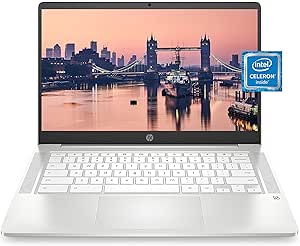


| student-friendly laptop | Processor | Storage | RAM | Display |
|---|---|---|---|---|
| HP 14" HD Chromebook Laptop fo | Intel Celeron N4120, 4 cores, 1.1GHz base / up to 2.6GHz boost | 64 GB eMMC | 4 GB LPDDR4x | 14.0" HD (1366 x 768), micro-edge, anti-glare |
| Samsung 14" Galaxy Chromebook | Intel Celeron N4500 | 64GB | 4GB | 14 inches |
| HP Stream 14 Student Business | Intel N150 Quad-core | 128GB UFS | 4GB | 14 inches |
| Dell Chromebook 3100 11.6" HD | Intel Celeron N4000 | 16GB SSD | 4GB | 11.6 inches |
| HP 14” Laptop Ultra-Portable C | Intel N150 Quad-Core up to 3.6 GHz | 128GB SSD + 500GB external | 4GB | 14-inch HD |
| HP 2026 Ultrabook Laptop for S | Intel N150 Quad-Core (up to 3.6GHz) | 256GB SSD + 128GB UFS | 8GB DDR4 | 14-inch HD anti-glare, micro-edge |
| HP 14-inch HD Student Laptop | Intel Celeron N4500 | 64GB eMMC | 4GB DDR4 | 14 inches, 1366 x 768 HD |
| HP Chromebook 14 Laptop | Intel Celeron N4000 | 32GB eMMC | 4GB | 14-inch HD (1366 x 768) |
| HP 14" Laptop | Intel N150 | 128GB UFS | 4GB DDR4 | 14 inches, HD 1366 x 768 |
| HP 14" Ultra-Light Laptop for | Intel Celeron N4500 | 128GB (64GB eMMC + 64GB SD Card) | 4GB DDR4 | 14-inch, anti-glare, 62.5% sRGB |
| HP Stream 14" HD Student & Bus | Intel Processor N150 | 1.12TB (128GB UFS + 1TB Docking Station) | 4GB DDR4 | 14.0-inch HD |
| Dell Chromebook 11 3100 | Celeron N4020 | 16GB Flash Memory | 4 GB | — |
| HP Chromebook 14 Laptop | Intel Celeron N4120 | 64 GB eMMC | 4 GB | 14" HD, anti-glare |
| Lenovo Flagship Chromebook 14" | MediaTek Kompanio 520 | 64GB eMMC | 4GB | — |
| 15.6" FHD IPS Student Laptop w | Intel Celeron J4105 | 256GB SSD | — | 15.6" FHD IPS |
More Details on Our Top Picks
HP 14″ HD Chromebook Laptop for Students, Intel Quad-Core N4120, 4GB RAM, 64GB eMMC
This HP Chromebook excels in offering a lightweight, affordable option for students who primarily need web browsing, document editing, and streaming. Compared with the Samsung Galaxy Chromebook Go, it provides a larger display and slightly better port options, but the lower screen resolution and limited RAM can slow down multitasking. The 14-hour battery life makes it a reliable companion for all-day classes, yet the 4GB RAM and 1366 x 768 HD display may feel restrictive for more demanding tasks or media consumption. Its broad compatibility with Google and Android apps makes it ideal for students on a tight budget who prioritize portability and simplicity over high performance or storage.
Pros:- Long-lasting battery life up to 14 hours
- Lightweight and budget-friendly for students
- Anti-glare micro-edge display for comfortable viewing
- Versatile ports including USB-C and HDMI
Cons:- Only 4GB of RAM limits multitasking capacity
- 64GB eMMC storage is minimal for files and apps
- HD resolution may not satisfy media or design needs
Best for: Students seeking an inexpensive, lightweight device mainly for browsing, note-taking, and streaming.
Not ideal for: Students planning to run intensive software or multitask heavily, as the 4GB RAM and lower resolution limit performance.
- Display:14.0″ HD (1366 x 768), micro-edge, anti-glare
- Processor:Intel Celeron N4120, 4 cores, 1.1GHz base / up to 2.6GHz boost
- Graphics:Intel UHD Graphics 600
- RAM:4 GB LPDDR4x
- Storage:64 GB eMMC
- Battery Life:Up to 14 hours
Our verdict“This Chromebook is an excellent choice for students who need a simple, portable device for basic tasks and long battery life at an affordable price.”
Samsung 14″ Galaxy Chromebook Go Laptop, Intel Celeron N4500, 4GB RAM, 64GB Storage, ChromeOS, Silver
This Samsung Galaxy Chromebook Go stands out for its slim, rugged design and impressive 12-hour battery life, making it perfect for students who carry their devices all day. Compared with the HP 14″ Chromebook, it offers superior portability and durability but sacrifices some screen size and connectivity options. Its 14-inch display, while smaller, provides clear visuals for typical schoolwork. However, with only 64GB of storage and a less powerful processor, it isn’t suited for multitasking or storing large files locally. This pick makes the most sense for students who prioritize mobility, durability, and a long-lasting battery over raw performance or extensive storage.
Pros:- Extremely lightweight and slim design
- Durable build to withstand daily bumps and drops
- Long battery life of 12 hours
- Fast Wi-Fi connectivity for quick browsing
Cons:- Limited storage capacity at 64GB
- Processor may struggle with multitasking
- Smaller screen may limit productivity for some tasks
Best for: Students who need a tough, portable device for daily use, travel, and light tasks.
Not ideal for: Students requiring more storage or planning to run multiple demanding applications concurrently.
- Display:14 inches
- Processor:Intel Celeron N4500
- RAM:4GB
- Storage:64GB
- Operating System:ChromeOS
- Battery Life:12 hours
Our verdict“Ideal for students who need a durable, portable Chromebook that can last all day without charging, but not for heavy multitaskers or storage-heavy users.”
HP Stream 14 Student Business Laptop, Intel N150 Quad-Core, 4GB RAM, 128GB UFS, Willow Green, Windows 11 Home
This HP Stream 14 excels as a highly portable Windows-based option with pre-installed Office 365 and Copilot AI, making it a strong choice for students needing a full OS and productivity suite. Its ultra-lightweight design and fast boot times set it apart from Chromebooks like the Samsung Galaxy Chromebook Go, which lack full Windows functionality. However, the 4GB RAM and modest 128GB UFS storage limit multitasking and file storage, especially for students juggling multiple applications or larger files. The inclusion of Wi-Fi 6 and a 720p webcam enhances remote learning, but the limited RAM might hinder performance during intensive multitasking or multitasking with multiple browser tabs open.
Pros:- Featherweight and slim design for easy carrying
- Pre-installed Office 365 and Copilot AI for productivity
- Fast boot times and Wi-Fi 6 support
- Good video quality with HD webcam and dual microphones
Cons:- Limited 4GB RAM restricts multitasking
- 128GB storage might be insufficient for large files
- Opened RAM seal could raise concerns about warranty
Best for: Students who prefer Windows and need a lightweight device for productivity, remote classes, and light multitasking.
Not ideal for: Students who require heavy multitasking or larger storage, as the 128GB may fill quickly and 4GB RAM can bottleneck performance.
- Display:14 inches
- Processor:Intel N150 Quad-core
- RAM:4GB
- Storage:128GB UFS
- Operating System:Windows 11 Home
- Weight:3.24 lbs
Our verdict“This Windows laptop strikes a balance between portability and productivity, ideal for students who need a full OS but don’t require heavy multitasking or large storage capacity.”
Dell Chromebook 3100 11.6″ HD, Celeron N4000, 4GB RAM, 16GB SSD, Chrome OS (Renewed)
This Dell Chromebook 3100 offers a compact, lightweight design with a smaller 11.6-inch screen, making it suitable for students who prioritize portability and basic functionality. It provides solid performance for browsing, note-taking, and remote learning, especially with its 4GB RAM and 16GB SSD. Compared to larger Chromebooks like the HP 14″ model, it’s more portable but offers less screen real estate and storage. The 90-day warranty on a renewed unit makes it a sensible budget choice, but the small SSD and basic display resolution limit its appeal for media-heavy or multitasking students. It makes sense for users who need a no-frills, highly portable device for simple tasks.
Pros:- Extremely portable with an 11.6-inch display
- Lightweight and easy to carry
- Affordable renewed option with warranty
- Solid performance for simple tasks
Cons:- Limited storage at 16GB SSD
- Basic HD display may feel restrictive
- Less suitable for multitasking or media editing
Best for: Students who need a tiny, portable device primarily for basic applications and browsing.
Not ideal for: Students planning to use demanding apps or store large files locally, due to limited storage and screen size.
- Display:11.6 inches
- Processor:Intel Celeron N4000
- RAM:4GB
- Storage:16GB SSD
- Operating System:Chrome OS
- Weight:2.9 pounds
Our verdict“This compact Chromebook is perfect for students needing a simple, portable device for light use and quick tasks, but not for multitasking or multimedia-heavy work.”
HP 14” Laptop Ultra-Portable Computer for Students and Business with Windows 11 Pro
This HP 14-inch model offers a rare combination of portability, Windows 11 Pro, and extensive storage options, including a 628GB total capacity with an external drive. Its quad-core Intel N150 processor and 4GB RAM deliver reliable performance for everyday multitasking, especially with the Windows environment and bundled Office 2024. Compared to the Chromebook options, it provides a more familiar interface and larger storage, but the 4GB RAM may limit multitasking efficiency for power users. The inclusion of accessories like a docking station and external drive makes it a strong pick for students needing a full Windows experience combined with extra storage for documents, media, and software.
Pros:- Lightweight and portable design
- Fast performance with SSD and quad-core CPU
- Includes Windows 11 Pro and Microsoft Office 2024
- Bundled accessories enhance productivity
Cons:- Limited 4GB RAM may hinder heavy multitasking
- No dedicated graphics card for demanding visuals
- External storage setup requires management
Best for: Students who need a full Windows environment with expandable storage and productivity tools for academic and professional tasks.
Not ideal for: Students who prioritize lightweight portability above all, as this model is slightly heavier and bulkier than dedicated Chromebooks or ultra-light laptops.
- Display:14-inch HD
- Processor:Intel N150 Quad-Core up to 3.6 GHz
- RAM:4GB
- Storage:128GB SSD + 500GB external
- Operating System:Windows 11 Pro
- Webcam:720p HD
Our verdict“This Windows laptop is well-suited for students who need a portable device with ample storage and the full Windows ecosystem for productivity and academic work.”
HP 2026 Ultrabook Laptop for Students & Home, 8GB RAM, 256GB SSD
This ultraportable HP 2026 model stands out for its sleek lightweight design and modern features that suit students juggling multiple classes and remote learning. Its 8GB RAM ensures smooth multitasking compared to the 4GB options like the HP 14-inch HD Student Laptop, which may struggle with multiple open apps. The 256GB SSD provides faster performance and more space than the 32GB Chromebook, making it better for storing documents and apps. However, the lower resolution display (1366 x 768) might not satisfy users needing sharp visuals for creative tasks. The privacy shutter and mic mute key add security, but the S Mode limits app flexibility. This model is perfect for students who need a balanced mix of portability, speed, and security, but not for those requiring high-resolution displays or extensive local storage.
Pros:- Stylish and lightweight for portability
- Fast performance with Quad-Core processor and 8GB RAM
- Secure privacy features including shutter and mic mute
Cons:- Lower resolution display may affect visual clarity
- Limited storage space for large files
- Pre-installed in S Mode restricting app installation outside Microsoft Store
Best for: Students who need a lightweight, fast, and secure device for daily tasks and remote learning.
Not ideal for: Power users or creative students who require high-res visuals or large storage capacity.
- Processor:Intel N150 Quad-Core (up to 3.6GHz)
- Display:14-inch HD anti-glare, micro-edge
- RAM:8GB DDR4
- Storage:256GB SSD + 128GB UFS
- Graphics:Intel UHD Graphics
- Weight:3.11 lbs
Our verdict“This pick makes the most sense for students prioritizing portability, speed, and basic security features over high-res visuals.”
HP 14-inch HD Student Laptop, Intel Celeron N4500, 4GB RAM, 64GB eMMC, Windows 11 S, White (Renewed)
This renewed HP 14-inch model offers an affordable entry point for students new to laptops. The Intel Celeron N4500 processor and 4GB RAM make it suitable for light tasks like browsing and streaming, outperforming the more limited 32GB Chromebook in storage capacity. Its 720p HD camera suits video calls, and the lightweight design at 3.42 lbs enhances portability. However, the limited 64GB storage can fill quickly, especially with updates and files, and the lower-resolution display (1366 x 768) may be less engaging for media. The device runs Windows 11 S, which is secure but less flexible for installing non-Microsoft apps. This pick is ideal for absolute beginners or students on a tight budget who mainly need browsing and streaming capabilities, but not for those handling larger files or requiring richer visuals.
Pros:- Affordable renewed option
- Lightweight at 3.42 lbs for portability
- Includes Wi-Fi 6 and multiple ports for connectivity
Cons:- Limited 64GB storage can be quickly filled
- Lower resolution display less vibrant
- Performance not suited for multitasking or demanding apps
Best for: Students just starting out who need a simple, portable device for basic tasks.
Not ideal for: Students who plan to store large media libraries or run demanding applications.
- Processor:Intel Celeron N4500
- Display:14 inches, 1366 x 768 HD
- RAM:4GB DDR4
- Storage:64GB eMMC
- Graphics:Intel UHD Graphics
- Weight:3.42 lbs
Our verdict“This device makes sense for beginners or budget-conscious students focused on browsing and streaming with minimal storage needs.”
HP Chromebook 14 Laptop, Intel Celeron N4000, 4GB RAM, 32GB eMMC, 14” HD Display, Chrome OS
The HP Chromebook 14 is a compelling choice for students who primarily work online and value battery life. Its Chrome OS platform prioritizes speed and simplicity, making it faster for web-based tasks than traditional Windows laptops like the HP 14″ Laptop with Intel N150. The 14-inch HD display with anti-glare coating reduces eye strain during long study sessions. However, the 32GB storage limits local files, and the lower resolution (1366 x 768) may not satisfy students needing detailed visuals. The device’s lightweight design at 3.24 lbs and battery life up to 13.5 hours make it ideal for portability, but demanding applications or offline work are less suitable. This model fits students who mainly need web browsing, streaming, and lightweight productivity on a budget, but it isn’t ideal for those requiring extensive offline storage or high-res visuals.
Pros:- Lightweight and portable at 3.24 lbs
- Long battery life up to 13.5 hours
- Secure, web-focused Chrome OS environment
Cons:- Limited 32GB storage capacity
- Lower resolution display may impact media quality
- Performance limited to web and basic apps
Best for: Students seeking a simple, long-lasting device for online tasks and media consumption.
Not ideal for: Students who need substantial local storage or plan to run demanding offline applications.
- Processor:Intel Celeron N4000
- Display:14-inch HD (1366 x 768)
- RAM:4GB
- Storage:32GB eMMC
- Battery Life:Up to 13 hours 30 minutes
- Weight:3.24 lbs
Our verdict“This Chromebook is best for students prioritizing long battery life and online use on a tight budget.”
HP 14″ Laptop, Intel N150, 4GB RAM, 128GB Storage
This HP 14″ Laptop offers a well-rounded package for students who need dependable productivity tools. Its Intel N150 processor and 4GB RAM deliver enough power for multitasking and Office applications, especially when paired with the included Microsoft 365 Personal subscription and 1TB OneDrive storage. The 128GB UFS storage surpasses many budget models, providing more space for files. The anti-glare HD display ensures comfortable viewing, and the device’s long battery life supports all-day use. Compared to the more basic models, this laptop offers a better balance of performance and storage for students juggling coursework, documents, and some media. However, the HD resolution may feel outdated for media-heavy tasks, and the modest specs limit heavy multitasking. This is a great choice for students who need a reliable, office-focused device that can handle multitasking without breaking the bank.
Pros:- Includes 1-year Microsoft 365 Personal and 1TB OneDrive
- Long battery life for all-day productivity
- Modern connectivity with Wi-Fi 6 and USB-C
Cons:- Only 4GB RAM may limit heavy multitasking
- HD 1366 x 768 resolution feels dated
- Moderate performance for demanding applications
Best for: Students who need a dependable, office-ready device with included cloud storage and multitasking capacity.
Not ideal for: Students requiring high-resolution visuals or extensive local storage for large media files.
- Processor:Intel N150
- Display:14 inches, HD 1366 x 768
- RAM:4GB DDR4
- Storage:128GB UFS
- Webcam:HD with mic
- Battery:Long battery life
Our verdict“This is a reliable, productivity-oriented laptop suited for students needing Office tools and cloud storage with moderate multitasking.”
HP 14″ Ultra-Light Laptop for Students & Home, Intel Celeron N4500, 4GB RAM, 128GB Storage, Windows 11 Home in S Mode, White
This HP 14″ ultralight model combines portability with long-lasting battery life, making it suitable for students constantly on the go. Its Intel Celeron N4500 processor and 4GB RAM handle daily tasks comfortably, and the up to 12 hours of battery life supports long school days or travel. The device includes a 1-year Microsoft 365 subscription and a full suite of connectivity options, including Wi-Fi 6E and HDMI. The 128GB storage offers a balance between local storage and cloud reliance, though it may fill quickly for media-heavy users. The anti-glare, micro-edge display enhances viewing comfort. However, the entry-level specs limit multitasking, and the screen’s color gamut is modest for creative work. This laptop makes sense for students needing a lightweight device with excellent battery life for daily commuting and basic tasks, but not for intensive offline media editing or large storage needs.
Pros:- Long-lasting battery up to 12 hours
- Includes a 3-year warranty on SD Card storage
- Lightweight and portable at a compact size
Cons:- Limited storage at 128GB can be restrictive
- Entry-level performance for multitasking
- Screen color gamut may be insufficient for creative work
Best for: Students who prioritize all-day portability and fast charging for everyday tasks.
Not ideal for: Students who require high-resolution displays or extensive local file storage.
- Processor:Intel Celeron N4500
- Display:14-inch, anti-glare, 62.5% sRGB
- RAM:4GB DDR4
- Storage:128GB (64GB eMMC + 64GB SD Card)
- Battery:Up to 12 hours
- Connectivity:Wi-Fi 6E, Bluetooth 5.4
Our verdict“This device is perfect for students needing a portable, reliable, and long-lasting laptop for daily use and commuting.”
HP Stream 14″ HD Student & Business Laptop with AI Copilot, Intel Processor N150, 4GB RAM, 1.12TB Storage, Windows 11, Willow Green
This HP Stream 14” strikes a balanced chord by combining portability, ample storage, and productivity features, making it a solid choice for students who need both work and entertainment capabilities. Compared with the HP Chromebook 14, its larger storage and Windows OS provide more flexibility for school files and applications. However, the 4GB RAM could hinder multitasking when running multiple apps, and the HD display might fall short for detailed visual tasks. The inclusion of a docking station enhances expandability, but the battery life remains unspecified, which could be a concern for all-day use.
Pros:- Lightweight and portable design at 3.24 lbs
- Large 1.12TB storage, including a docking station
- Responsive performance with Intel N150 processor
- Fast Wi-Fi 6 connectivity for online tasks
Cons:- Limited 4GB RAM may restrict multitasking efficiency
- HD display might not satisfy high-resolution media needs
- Battery life details are not provided, affecting portability expectations
Best for: Students seeking a lightweight, Windows-based device with ample storage for documents and media.
Not ideal for: Heavy multitaskers or those needing high-resolution graphics for photo or video editing.
- Display:14.0-inch HD
- Processor:Intel Processor N150
- RAM:4GB DDR4
- Storage:1.12TB (128GB UFS + 1TB Docking Station)
- Graphics:Intel Graphics
- Webcam:HD Webcam
- OS:Windows 11
- Wi-Fi:Wi-Fi 6
- Weight:3.24 lbs
Our verdict“This model is best suited for students who prioritize storage and portability over high-end graphics or multitasking capacity.”
Dell Chromebook 11 3100, 11.6-inch, 4GB RAM, 16GB Flash, Chrome OS, Celeron N4020, Bluetooth, Renewed
This Dell Chromebook 11 3100 offers a compact and affordable option for students just starting out, especially those who primarily need web browsing and light productivity. Unlike the HP Chromebook 14, it has a smaller display and less storage, making it less suited for media or large file storage, but its low price makes it accessible for budget-conscious learners. Its performance with the Celeron N4020 can be sluggish under heavy multitasking, and the low-resolution (1366 x 768) screen limits visual clarity for media consumption. This device excels in portability but sacrifices some power and storage capacity.
Pros:- Very lightweight and portable at a compact size
- Affordable price point for budget-conscious buyers
- Long battery life and quick startup with Chrome OS
- Ideal for web-based learning and simple tasks
Cons:- Limited 16GB storage constrains app and file space
- Low-resolution display not ideal for media or detailed work
- Performance may lag with multiple tabs or apps open
Best for: Primary school or middle school students focused on basic tasks and browsing.
Not ideal for: Students needing to run multiple applications or store large files locally.
- Storage:16GB Flash Memory
- OS:Chrome OS
- Screen Size:11.6″
- Processor:Celeron N4020
- RAM:4 GB
- Graphics:Intel HD Graphics
- Connectivity:Bluetooth
- Renewed:Yes
Our verdict“This Chromebook is a good starter device for young students focused on basic online tasks and browsing.”
HP Chromebook 14 Laptop (2022), Intel Celeron N4120, 4 GB RAM, 64 GB eMMC, 14″ HD Display, Mineral Silver (14a-na0226nr)
This HP Chromebook 14 stands out for its impressive battery life—up to 14 hours—and its lightweight, thin profile, making it perfect for students who need a device that lasts through long school days and commutes. Its 14-inch anti-glare display ensures comfortable viewing in various lighting conditions, unlike smaller or lower-quality screens on other budget models like the Dell Chromebook 11. However, with only 4GB RAM and 64GB of storage, multitasking can be limited, especially if you run multiple browser tabs or apps simultaneously. The relatively modest processor may also struggle with more demanding applications.
Pros:- Long battery life supports all-day use
- Lightweight and easy to carry
- Anti-glare display reduces eye strain
- Fast-charging feature adds convenience
Cons:- Limited 4GB RAM restricts multitasking
- Small 64GB storage can fill quickly with files
- Processor may lag with demanding apps
Best for: Students who prioritize battery longevity and portability for daily classroom use.
Not ideal for: Those who need extensive local storage or intensive multitasking capabilities.
- Display:14″ HD, anti-glare
- Processor:Intel Celeron N4120
- RAM:4 GB
- Storage:64 GB eMMC
- Webcam:Built-in
- Battery Life:Up to 14 hours
- Connectivity:Wi-Fi 5, Bluetooth
- Weight:3.3 lbs
Our verdict“This Chromebook is ideal for students who need a reliable, long-lasting device for everyday tasks and portability.”
Lenovo Flagship Chromebook 14″ FHD Touchscreen Laptop, MediaTek Kompanio 520, 4GB RAM, 64GB eMMC, Abyss Blue
This Lenovo Chromebook 14 with a Full HD touchscreen and octa-core MediaTek processor offers a modern, versatile experience for students who value touch interaction and sharp visuals. Its 14-inch IPS display provides wide viewing angles and better clarity than traditional budget screens, surpassing the HP Chromebook 14 in visual quality. The slim, lightweight design at just 2.86 lbs makes it easy to carry around, and the Wi-Fi 6 and Bluetooth 5.1 ensure fast wireless connections. Nevertheless, the 4GB RAM and 64GB storage limit multitasking and local file storage, which could be restrictive for more demanding users. The touchscreen, while a plus for interactive learning, may not be necessary for all students.
Pros:- Full HD IPS touchscreen with wide viewing angles
- Lightweight and portable at 2.86 lbs
- Wi-Fi 6 and Bluetooth 5.1 for fast connectivity
- Modern, slim design with a privacy shutter on the webcam
Cons:- Limited 4GB RAM restricts multitasking
- Only 64GB onboard storage
- Processor may not handle intensive tasks
Best for: Students who want a touchscreen device with excellent display quality and modern connectivity.
Not ideal for: Power users or those with large media libraries needing extensive storage and multitasking power.
- Screen:14″ FHD IPS Touchscreen (1920 x 1080)
- Processor:MediaTek Kompanio 520
- RAM:4GB
- Storage:64GB eMMC
- Webcam:720p with Privacy Shutter
- Connectivity:Wi-Fi 6, Bluetooth 5.1
- Weight:2.86 lbs
- Design:Slim, Abyss Blue
Our verdict“This Chromebook appeals to students who value a high-quality display and modern features in a lightweight package.”
15.6″ FHD IPS Student Laptop with AI Assistant and Office 365
This 15.6-inch FHD IPS laptop caters to students who prefer a bigger display for multitasking and media consumption. Its 180° hinge fosters sharing, while the built-in AI assistant and included Office 365 subscription enhance productivity. Compared to smaller Chromebooks like the HP Chromebook 14, it offers more screen real estate and a more traditional Windows environment, ideal for students needing to run Office applications or multitask extensively. The quad-core Celeron J4105 processor and 12GB RAM support smoother multitasking, but the device’s size and weight could be less convenient for on-the-go use. The 256GB SSD provides ample storage but might still be limiting for large media files.
Pros:- Large 15.6″ FHD IPS display for clear visuals
- Includes a 1-year Office 365 subscription and AI assistant
- 180° hinge for sharing and presentations
- 12GB RAM supports multitasking
Cons:- Celeron J4105 processor may limit performance for demanding tasks
- Base storage of 256GB SSD could fill quickly
- Battery life details are not specified
Best for: Students who need a larger display for multitasking and productivity software, with a preference for Windows OS.
Not ideal for: Highly mobile students who prioritize ultra-lightweight devices or long battery life over screen size.
- Display:15.6″ FHD IPS
- Processor:Intel Celeron J4105
- Memory:12GB RAM
- Storage:256GB SSD
- Webcam:Built-in
- Hinge:180° open
- Wireless:Wi-Fi 5, Bluetooth 4.2
- Battery:7000mAh
Our verdict“This laptop is best suited for students who value screen size and productivity features over ultra-portability.”

How We Picked
To determine the best student-friendly laptops, I evaluated key factors that matter most for student use: overall performance for everyday tasks, weight and portability for commuting, build quality for durability, battery life for all-day usage, and value for the price. I prioritized models that balance affordability with usability, ensuring they can handle typical student workloads without unnecessary extras. Devices were ranked based on these criteria, along with user reviews and features that support remote learning, note-taking, and multitasking. This approach ensures each recommended laptop offers a clear advantage for different student needs while avoiding unnecessary compromises.Factors to Consider When Choosing Student-friendly Laptops
Choosing a student-friendly laptop involves more than just picking the cheapest or most popular model. The right device should align with your specific academic needs, budget, and lifestyle. Considering factors like operating system, portability, and storage can help avoid costly mistakes, such as buying a device that can’t run essential apps or is too bulky to carry daily. Understanding the tradeoffs—like screen size versus weight or performance versus price—ensures you get the most value for your investment. Keep reading to learn about the key considerations that will help you select a laptop tailored for your studies.Performance and Speed
For most students, a laptop with at least an Intel Celeron or equivalent processor and 4GB of RAM suffices for browsing, word processing, and light multitasking. However, if your coursework involves more demanding tasks like video editing or running multiple applications simultaneously, opting for 8GB RAM and a faster processor becomes worthwhile. Remember, more power often means a higher price and increased weight, so evaluate your workload realistically. Sacrificing too much on performance can lead to frustration during busy school periods, but overspending on high-end specs might be unnecessary for basic tasks.
Portability and Size
Lightweight, compact laptops are ideal for students who commute or prefer studying on campus or in cafés. Chromebooks and ultrabooks typically weigh less than 3 pounds, making them easy to carry all day. Larger screens, such as 15.6 inches, offer more viewing space but add weight and bulk, which can be a burden for daily travel. Consider your daily routine—if you carry your device frequently, prioritize models that balance screen size with portability. Keep in mind that larger screens also tend to drain batteries faster, so look for models with good battery life if mobility is a priority.
Battery Life
Long battery life is essential for students who spend hours in lectures, libraries, or on commutes without easy access to power outlets. Many Chromebooks excel here, offering 10-12 hours of use on a single charge, while some Windows laptops may last around 8-10 hours. Be cautious with budget models that often compromise on battery longevity to cut costs. Reading reviews and checking manufacturer claims can help identify devices that truly last through a full school day. A laptop with poor battery life can disrupt your schedule and reduce productivity, so prioritize models with proven endurance.
Storage and Expandability
Storage capacity varies widely among student laptops, with Chromebooks often providing 32GB to 64GB of eMMC storage, which is sufficient for cloud-based work but limited for large files. Windows devices tend to offer more local storage, such as 128GB SSDs, which are better suited for storing documents, media, and software. Consider your file management habits—if you rely heavily on cloud services, lower storage may suffice. However, if you prefer offline access or work with large files, opting for a device with more built-in storage or the ability to expand via SD cards or external drives is wise. Underestimating storage needs can lead to frequent cleanups or slowdowns.
Operating System and Software Compatibility
The choice between Chrome OS and Windows significantly impacts your experience. Chrome OS offers simplicity, fast updates, and excellent integration with Google Workspace, making it ideal for students who primarily work online or use Google apps. Windows, on the other hand, supports a broader range of software, including specialized academic programs, and can run full versions of Microsoft Office. If your coursework depends on specific Windows-only applications, a Windows laptop is necessary. Conversely, for general browsing, note-taking, and cloud-based work, Chrome OS devices tend to be more affordable and easier to maintain.
Frequently Asked Questions
Is a Chromebook suitable for college coursework?
Yes, a Chromebook can work well for many college tasks, especially if your courses rely heavily on Google Workspace, online research, and cloud storage. They are lightweight, affordable, and have excellent battery life, making them perfect for students who primarily need browsing, note-taking, and document editing. However, if your coursework involves specialized software, programming, or offline media editing, a Windows laptop may be more appropriate. Always check your program requirements before choosing a Chromebook as your main device.
How much should I spend on a student laptop?
For most students, spending between $300 and $600 provides a good balance of performance, portability, and durability. Budget models like Chromebooks or entry-level Windows laptops often fall within this range and cover basic needs. If you require more power, larger storage, or better build quality—such as for design or programming tasks—consider investing closer to $700 or more. Avoid overspending on high-end features that won’t be used daily, but also be cautious about very cheap models that might lack reliability or necessary features.
Are refurbished laptops a good option for students?
Refurbished laptops can offer significant savings and often come with warranties, making them a smart choice for students on a tight budget. They typically undergo thorough testing and repairs to meet quality standards, providing reliable performance at a lower price point. However, it’s important to buy from reputable sources to avoid outdated hardware or limited support. Check the warranty terms and return policies before purchasing, and ensure the device still meets your course requirements in terms of specs and software compatibility.
What screen size is best for portability?
Most students find that screens between 13 and 14 inches strike the best balance between portability and usability. These sizes are light enough to carry comfortably and small enough to fit into backpacks easily. Larger screens, such as 15.6 inches, offer more workspace for multitasking and media, but tend to be heavier and less portable. If you prioritize mobility above all else, a 13-inch Chromebook or ultrabook is often the best choice, but if you mainly work at a desk or in dorms, a larger screen can enhance your productivity.
Should I prioritize battery life or performance?
For students, battery life often takes precedence over raw performance because it directly impacts your ability to study unplugged for extended periods. Devices with longer battery life—typically Chromebooks or ultraportables—allow you to attend classes, study in libraries, and travel without constantly searching for outlets. However, if your coursework involves demanding applications, you may need to compromise slightly on battery life to get the performance you require. In most cases, a well-balanced device with at least 8 hours of battery life and adequate specs will serve you best.
Conclusion
For students seeking overall value, the HP 14″ HD Chromebook offers a dependable, budget-friendly option that handles everyday tasks with ease. Those prioritizing performance and storage might prefer the HP Ultrabook, which balances power with portability. Beginners or casual users will find the Dell Chromebook 3100 sufficient, while students with more demanding needs or specific software requirements should consider higher-end Windows models. Ultimately, your choice depends on your academic workload, budget, and portability needs—select the device that best aligns with your daily routines and study habits.
As an affiliate, we earn on qualifying purchases.Fall Picks
fall essentials