For anyone looking to digitize large collections of photos quickly, a high speed photo scanner is essential. The Epson FastFoto FF-640 stands out as the best overall choice thanks to its rapid scanning speeds and auto photo feeder, ideal for bulk digitization. The Epson Perfection V850 Pro offers exceptional image quality for archival purposes, though at a higher price point. Meanwhile, the ScanSnap iX2400 provides a versatile option for faster photo and document scanning in smaller batches. Each of these options balances speed, quality, and usability differently, making the right pick vary based on your specific needs. Keep reading for a detailed breakdown of these models and more to find the perfect fit for your photo digitization projects.

Get the latest gadgets delivered free — and shop member deals
- Fast, free delivery on millions of items
- Access to Prime Big Deal Days deals on October 6–7
- Prime Video, Amazon Music and more included
Complete the kit



Key Takeaways
- Speed and batch capacity are the main factors distinguishing these scanners, with some prioritizing rapid throughput over image quality.
- Higher-end models like the Epson Perfection V850 Pro deliver superior resolution and color accuracy, suited for archival work, but come at a premium.
- Wireless and duplex scanning features add convenience for frequent users, though they often increase cost and complexity.
- Flatbed scanners generally offer better quality for delicate or high-resolution scans, but are slower than dedicated sheet-feed models.
- Price varies widely, with some high-speed options being affordable for casual users, while premium models target professionals needing top-tier results.
| Epson FastFoto FF-640 High-Speed Photo Scanning System with Auto Photo Feeder |  | Best Overall for Speed and Handling Fragile Photos | Scan Speed: 1 photo per second | Resolution: 600 dpi | Auto-Feed Capacity: 30 photos | VIEW ON AMAZON | See Our Full Breakdown |
| Epson Perfection V800 Photo Scanner |  | Best for Ultra-High-Resolution Archiving | Resolution: 6400 dpi | Grayscale Bit Depth: 16 bits | Dmax: 4.0 | VIEW ON AMAZON | See Our Full Breakdown |
| Epson Perfection V19 II Flatbed Photo Scanner 4800 dpi Optical Resolution |  | Best Compact Flatbed for Quality and Portability | Optical Resolution: 4800 dpi | Weight: 3.1 lbs | Connectivity: USB | VIEW ON AMAZON | See Our Full Breakdown |
| ScanSnap iX2400 High-Speed One-Touch Button Color Document Scanner, Black |  | Best for Document and Photo Quick Scanning in Small Offices | Scan Speed: Up to 45 pages per minute | Sheet Capacity: 100 sheets | Resolution: 600 dpi | VIEW ON AMAZON | See Our Full Breakdown |
| Canon imageFORMULA RS40 Photo and Document Scanner |  | Best for Versatile, Medium-Volume Digitization | Scan Speed: Up to 40 items per minute | Standard Sheet Capacity: 60 sheets | Resolution: 150-1200 dpi | VIEW ON AMAZON | See Our Full Breakdown |
| Visioneer High-Speed Color Photo and Document Scanner PH70 |  | Best Overall for Fast, Versatile Scanning | Scanner Type: Document, Photo | Connection Type: USB | Resolution: 600 dpi | VIEW ON AMAZON | See Our Full Breakdown |
| Epson FastFoto FF-680W Wireless High-Speed Photo and Document Scanner, Black & Workforce ES-580W Wireless Color Duplex Desktop Document Scanner for PC and Mac |  | Best for Wireless, All-in-One Photo and Document Scanning | FastFoto Speed: 1 photo/sec at 300 dpi | Photo Capacity: up to 36 photos batch | Scan Speed: 35 ppm / 70 ipm | VIEW ON AMAZON | See Our Full Breakdown |
| Plustek OpticSlim 2700 High-Speed Flatbed Scanner |  | Best for Fast, Simple Flatbed Scanning | Scan Speed: 3 seconds (300 dpi, color) | Connectivity: TWAIN support for Windows & Mac | Buttons: 4 one-touch (Copy/Scan/PDF/Custom) | VIEW ON AMAZON | See Our Full Breakdown |
| Epson Perfection V850 Pro Photo Scanner, 6400 dpi, Dual Lens, Digital ICE |  | Best for High-Resolution, Professional-Quality Scans | Resolution: 6400 dpi | Lens System: Dual lens | Color Depth: Pro quality | VIEW ON AMAZON | See Our Full Breakdown |
| Plustek Photo Scanner ePhoto Z300 |  | Best for Rapid Photo Digitization of Classic Prints | Supported Photo Sizes: 3×5, 4×6, 5×7, 8×10 | Optical Resolution: 600 dpi | Scan Speed: 2 seconds for 4×6 | VIEW ON AMAZON | See Our Full Breakdown |
| Epson Perfection V39 II Flatbed Photo Scanner 4800 dpi Optical Resolution | 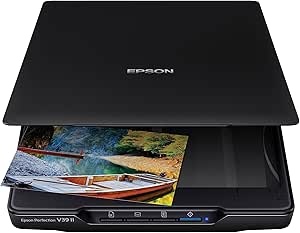 | Best Compact Flatbed for Detailed Scans | Optical Resolution: 4800 dpi | Connectivity: USB-powered | Removable Lid: Yes | VIEW ON AMAZON | See Our Full Breakdown |
| ScanSnap iX2500 Photo Edition Wireless and USB High-Speed Scanner, Black |  | Best Speed and Connectivity for Photos and Documents | Scanner Type: Document, ID Card, Insurance Card | Connection Type: USB, Wi-Fi | Resolution: 600 dpi | VIEW ON AMAZON | See Our Full Breakdown |
| Epson FastFoto FF-680W High-Speed Duplex Photo and Document Scanner |  | Best for Fast Batch Photo Digitization | Scan Speed: 1 photo per second | Batch Scan Capacity: 36 photos | Maximum Photo Size: 8 x 10 inches | VIEW ON AMAZON | See Our Full Breakdown |
| Plustek Photo Scanner Z300 with Carrying Bag |  | Best for Versatile, On-the-Go Photo Scanning | Supported Photo Sizes: 3×5, 4×6, 5×7, 8×10 inches | Maximum Paper Size: Letter and A4 | Optical Resolution: 600 dpi | VIEW ON AMAZON | See Our Full Breakdown |
| high speed photo scanner | Scan Speed | Resolution |
|---|---|---|
| Epson FastFoto FF-640 High-Spe | 1 photo per second | 600 dpi |
| Epson Perfection V800 Photo Sc | — | 6400 dpi |
| Epson Perfection V19 II Flatbe | — | — |
| ScanSnap iX2400 High-Speed One | Up to 45 pages per minute | 600 dpi |
| Canon imageFORMULA RS40 Photo | Up to 40 items per minute | 150-1200 dpi |
| Visioneer High-Speed Color Pho | — | 600 dpi |
| Epson FastFoto FF-680W Wireles | 35 ppm / 70 ipm | — |
| Plustek OpticSlim 2700 High-Sp | 3 seconds (300 dpi, color) | 300 dpi |
| Epson Perfection V850 Pro Phot | — | 6400 dpi |
| Plustek Photo Scanner ePhoto Z | 2 seconds for 4×6 | — |
| Epson Perfection V39 II Flatbe | As fast as 10 seconds for letter-sized scans at 300 dpi | — |
| ScanSnap iX2500 Photo Edition | — | 600 dpi |
| Epson FastFoto FF-680W High-Sp | 1 photo per second | — |
| Plustek Photo Scanner Z300 wit | 2 seconds for 4×6, 5 seconds for 8×10 at 300dpi | — |
More Details on Our Top Picks
Epson FastFoto FF-640 High-Speed Photo Scanning System with Auto Photo Feeder
The Epson FastFoto FF-640 stands out for its blazing fast scanning speed of 1 photo per second, making it ideal for large collections. Compared to the slower V19 II, it excels in batch processing, but it’s strictly designed for photos, not documents. Its auto-feed tray simplifies multi-photo scans, and it can handle fragile and panoramic images that others like the V800 might struggle with. However, the lack of wireless connectivity limits flexibility, and its price may be higher for casual users. This pick makes the most sense for enthusiasts or archives needing rapid digitization of extensive photo archives.
Pros:- Incredible scanning speed of 1 photo per second
- Handles fragile and panoramic photos effectively
- Auto-feed tray streamlines batch scans
- High-quality 600 dpi resolution
Cons:- Limited to photo scanning, not suitable for documents
- No wireless connectivity, relies on USB
- Price may be prohibitive for casual users
Best for: Photographers, archivists, or families with large photo collections needing quick, bulk digitization
Not ideal for: Casual users or document-only digitizers who don’t need high-speed photo batching or handling fragile prints
- Scan Speed:1 photo per second
- Resolution:600 dpi
- Auto-Feed Capacity:30 photos
- Connectivity:USB
- Designed For:Photos, panoramic images, fragile photos
Our verdict“This scanner is best suited for those who need rapid, high-volume photo digitization without sacrificing image quality.”
Epson Perfection V800 Photo Scanner
The Epson Perfection V800 offers a maximum of 6400 dpi, making it perfect for detailed enlargements and fine art reproduction. Unlike the FastFoto FF-640, it’s not designed for speed but prioritizes resolution and tonal accuracy, making it ideal for scanning individual photos or negatives. Its dual lens system ensures sharp, consistent images, but the tradeoff is slower throughput—unsuitable for bulk digitization. This model appeals most to professional photographers or archivists needing meticulous detail, yet it lacks wireless options and has no batch scanning capabilities, which limits efficiency for large projects.
Pros:- Exceptional 6400 dpi resolution for detailed images
- Dual lens system enhances image quality
- Supports multiple OS including Windows and Mac
- High tonal depth with 16-bit grayscale
Cons:- Slow scanning speed not suitable for bulk work
- No wireless connectivity or automatic batch features
- Price may be a barrier for casual users
Best for: Photographers and archivists seeking high-resolution, detailed scans for preservation or large-format enlargements
Not ideal for: Users with large collections needing quick batch processing or wireless convenience
- Resolution:6400 dpi
- Grayscale Bit Depth:16 bits
- Dmax:4.0
- Operating Systems:Windows 8.1, 8, 7, Vista, XP, Mac OS X 10.6 to 10.10
Our verdict“This scanner is best for those prioritizing absolute detail and quality over speed and bulk processing.”
Epson Perfection V19 II Flatbed Photo Scanner 4800 dpi Optical Resolution
The Epson Perfection V19 II offers a solid 4800 dpi resolution in a compact, lightweight form factor, making it suitable for users needing high-quality scans in a portable device. Unlike the V800, it’s designed for smaller batches and doesn’t support batch scanning, but its ease of use and OCR features make it ideal for casual photo enthusiasts and small-scale digitization. Its USB-only connection limits flexibility, and slower speeds may frustrate those with large collections. This model is perfect for users who need quality on the go without investing in a bulk scanner.
Pros:- High 4800 dpi optical resolution
- Compact and lightweight for portability
- Includes features like OCR and color restoration
- USB-powered for easy setup
Cons:- Limited to smaller batch sizes
- No wireless connectivity options
- Scanning speed may be slow for large jobs
Best for: Photographers or hobbyists needing portable, high-resolution scans for occasional use
Not ideal for: Large-scale digitizers or those needing wireless or high-volume batch processing
- Optical Resolution:4800 dpi
- Weight:3.1 lbs
- Connectivity:USB
- Features:One-touch scan, OCR, color restoration
Our verdict“This scanner is ideal for small projects requiring high-quality images in a portable package.”
ScanSnap iX2400 High-Speed One-Touch Button Color Document Scanner, Black
The ScanSnap iX2400 excels in high-speed duplex scanning of up to 45 pages per minute with a 100-sheet feeder, making it a strong choice for small offices or busy home setups. While it’s primarily a document scanner, its ability to scan photos quickly and reliably with automatic detection and cleanup enhances its versatility. Compared to the photo-centric FastFoto FF-640, it’s less specialized in fragile or panoramic photos but offers the benefit of organized digital files and easy operation. Its reliance on USB and software setup for full features could be a drawback for some users seeking plug-and-play simplicity.
Pros:- Fast duplex scanning up to 45 ppm
- Reliable automatic detection and cleanup
- Large 100-sheet capacity
- Easy one-touch operation
Cons:- Limited to USB connection, no wireless
- No dedicated photo features or handling for fragile images
- Requires software setup for optimal use
Best for: Small business owners or home office users needing fast, organized photo and document scans
Not ideal for: Casual hobbyists or those requiring wireless connectivity and advanced photo handling
- Scan Speed:Up to 45 pages per minute
- Sheet Capacity:100 sheets
- Resolution:600 dpi
- Connection Type:USB
Our verdict“This scanner works best for busy offices needing rapid, organized scans of both docs and photos with minimal fuss.”
Canon imageFORMULA RS40 Photo and Document Scanner
The Canon RS40 offers a combined approach, capable of scanning both photos and documents efficiently with a speed of up to 40 items per minute. Its versatility makes it appealing for users who want to digitize old photos alongside paperwork, yet its 60-sheet capacity means frequent reloading for large batches, unlike the faster or higher-capacity options. Compared to the FastFoto FF-640, it’s slower but handles documents more effectively. Its support for multiple formats and compatibility with both Windows and Mac adds to its flexibility, though the higher wattage and complex features might overwhelm casual users. It’s best for those balancing photo preservation with document management tasks.
Pros:- Fast 40 items per minute throughput
- Supports multiple file formats including searchable PDFs
- Compatible with Windows and Mac
- Includes photo editing and enhancement software
Cons:- Limited to 60-sheet capacity, requiring frequent reloading
- Higher power consumption at 22 watts
- Feature complexity may be daunting for casual users
Best for: Small offices or hobbyists digitizing both photos and documents regularly
Not ideal for: High-volume photo archiving projects or users seeking wireless, bulk processing
- Scan Speed:Up to 40 items per minute
- Standard Sheet Capacity:60 sheets
- Resolution:150-1200 dpi
- Connection Type:USB
- Wattage:22 watts
Our verdict“This scanner offers a well-rounded solution for those needing moderate-volume photo and document digitization with flexible file options.”
Visioneer High-Speed Color Photo and Document Scanner PH70
The Visioneer PH70 stands out for its impressive speed, capable of scanning up to 110 photos per minute and 70 documents per minute. Its large 50-photo automatic feeder reduces the need for frequent reloads, making it ideal for high-volume tasks. Compared with the Plustek Photo Scanner Z300, which is faster at photo scans but limited to photos only, the PH70 offers broader functionality for both photos and documents. However, its weight (11.5 pounds) and reliance on USB without wireless options can make it less convenient for mobile or space-constrained setups. This pick makes the most sense for those who need quick, high-capacity scanning and don’t mind a wired connection.Pros:- High-speed scanning for photos and documents
- Large 50-photo automatic document feeder
- Mobile scanning capabilities
Cons:- Relatively heavy at 11.5 pounds, less portable
- Limited to USB connection, no wireless support
Best for: Small businesses or offices needing rapid batch photo and document digitization
Not ideal for: Users seeking wireless or portable scanning options for on-the-go use
- Scanner Type:Document, Photo
- Connection Type:USB
- Resolution:600 dpi
- Color Depth:24 bits
- Standard Sheet Capacity:120
- Media Type:USB
- Item Dimensions:6.6″D x 12.5″W x 7.5″H
- Item Weight:11.5 pounds
Our verdict“This is best suited for users prioritizing speed and volume over wireless flexibility.”
Epson FastFoto FF-680W Wireless High-Speed Photo and Document Scanner, Black & Workforce ES-580W Wireless Color Duplex Desktop Document Scanner for PC and Mac
This bundle combines the Epson FastFoto FF-680W for rapid photo scans with the Workforce ES-580W for efficient document digitization. The wireless connectivity and support for cloud storage make it especially appealing for users who want flexibility and minimal desk clutter. Compared to the Visioneer PH70, which is wired and slightly faster in document speed, this duo excels in wireless ease and multimedia features like advanced photo enhancement. The setup can be complex, and the overall bulk requires ample space, which might be a concern for smaller offices. It’s best for those who need seamless wireless operation and high-quality photo restoration alongside document management.Pros:- Wireless connectivity with mobile app support
- Fast photo scanning at 1 photo per second
- Advanced image enhancement features
Cons:- Complex setup process
- Bulkier design requiring ample space
Best for: Photographers and office users who need wireless convenience and high-speed batch scanning
Not ideal for: Users with limited space or those preferring a wired-only setup for simplicity
- FastFoto Speed:1 photo/sec at 300 dpi
- Photo Capacity:up to 36 photos batch
- Scan Speed:35 ppm / 70 ipm
- Connectivity:Wireless, USB, Cloud
- Auto Document Feeder:100 sheets
- Media Sizes:Up to 8″ x 10″
Our verdict“Ideal for users seeking fast, wireless, versatile photo and document scanning with enhanced image quality.”
Plustek OpticSlim 2700 High-Speed Flatbed Scanner
The Plustek OpticSlim 2700 is designed for quick, straightforward flatbed scans, capturing images in about 3 seconds at 300 dpi. Its built-in PDF buttons simplify creating searchable documents, making it a good choice for occasional high-speed scanning tasks. However, unlike the Visioneer PH70, which offers higher speeds and document feeding, this model is limited to flatbed scanning without automatic document feeders or batch options. Its lack of wireless connectivity also makes it less suitable for mobile workflows. This scanner makes the most sense for users who prioritize speed in single-page scans and need easy PDF creation without complex features.Pros:- Fast scanning speed of 3 seconds at 300 dpi
- Built-in PDF button for searchable PDFs
- Supports image editing features like auto-rotate and crop
Cons:- Limited to 300 dpi resolution, not ideal for high-detail needs
- No wireless or batch scanning features
Best for: Small offices or individuals doing occasional, fast flatbed scans of documents and photos
Not ideal for: Users requiring batch scanning or wireless connectivity for frequent large-volume tasks
- Scan Speed:3 seconds (300 dpi, color)
- Connectivity:TWAIN support for Windows & Mac
- Buttons:4 one-touch (Copy/Scan/PDF/Custom)
- Supported OS:Windows 7-11, Mac 10.12-14
- Resolution:300 dpi
- Media Type:Flatbed
Our verdict“Best for users who need quick, simple flatbed scans without the need for high resolution or wireless features.”
Epson Perfection V850 Pro Photo Scanner, 6400 dpi, Dual Lens, Digital ICE
The Epson Perfection V850 Pro offers remarkable 6400 dpi resolution, making it ideal for detailed photo restoration and high-quality reproductions. Its dual lens system enhances clarity and tonal range, outperforming the Visioneer PH70 in resolution and image quality, though at a significantly higher price point. This model is less suited for quick batch scans or casual use due to its cost and complexity. It’s best for professional photographers or archivists who need the highest fidelity and detail, accepting that it’s not a fast or portable option. For everyday high-speed needs, this would be overkill, but for precision work, it’s unmatched.Pros:- High-resolution 6400 dpi scans for detailed images
- Dual lens system for optimal quality
- Supports multiple OS including Windows and Mac
Cons:- Expensive for non-professional use
- Not designed for high-volume or rapid batch scanning
Best for: Professional photographers and archivists requiring detailed, high-resolution scans
Not ideal for: Casual users or those needing quick, bulk scanning with wireless features
- Resolution:6400 dpi
- Lens System:Dual lens
- Color Depth:Pro quality
- Dmax:4.0
- Supported OS:Windows 8.1 to XP, Mac OS X 10.6-10.10
Our verdict“Best for users prioritizing ultimate detail and color fidelity over speed or cost.”
Plustek Photo Scanner ePhoto Z300
The Plustek ePhoto Z300 excels in quickly digitizing traditional photos, capturing 4×6 images in just 2 seconds, which surpasses the speed of the Visioneer PH70 for single photos. Its support for multiple photo sizes and image enhancement features makes it a strong choice for restoring older prints. However, it doesn’t support automatic document feeding or batch scanning, limiting its usefulness for large volumes or document digitization. Its 600 dpi resolution is sufficient for most photo reproduction needs, but it’s not designed for high-res professional scanning. This device works well for individuals or small studios focused solely on fast photo scans and photo restoration, not multi-purpose document workflows.Pros:- Very fast photo scanning speed
- Supports multiple photo sizes
- Includes image enhancement features
Cons:- Limited to photo and document scanning, not high-volume or high-res
- No automatic document feeder or batch mode
Best for: Photographers or hobbyists needing fast, high-quality photo scans and restoration
Not ideal for: Users needing document scanning, batch processing, or high-resolution professional scans
- Supported Photo Sizes:3×5, 4×6, 5×7, 8×10
- Optical Resolution:600 dpi
- Scan Speed:2 seconds for 4×6
- Compatibility:Windows & Mac
- Image Features:Auto-enhancement
Our verdict“Ideal for fast digitization and restoration of printed photos, especially old prints and memorabilia.”
Epson Perfection V39 II Flatbed Photo Scanner 4800 dpi Optical Resolution
This option stands out for its high-resolution 4800 dpi scans, making it ideal for preserving fine details in photos and artwork. Compared with the faster but more specialized FastFoto FF-680W, the V39 II offers superior image detail at a more manageable size, though it sacrifices speed and batch capacity. Its compact, portable design makes it perfect for home use or small offices, especially when detailed image quality matters most. The Easy Photo Fix feature simplifies restoration, but the need for an internet connection for software adds a layer of complexity for some users. It’s best suited for individuals who prioritize high-quality, detailed scans over speed or bulk processing. However, those needing rapid batch digitization of large photo collections might find this model too slow. Overall, this scanner is ideal for hobbyists and small-scale collectors focused on photo quality.Pros:- High-resolution 4800 dpi scans for detailed images
- Easy-to-use one-touch scanning with dedicated software
- Compact, portable design suitable for small spaces
- Effective photo restoration with Easy Photo Fix
Cons:- Requires internet connection for software downloads and cloud features
- Limited to letter-sized scans, not ideal for larger documents
- Some users may find software setup complex
Best for: Photographers and hobbyists seeking highly detailed scans of their photos or artwork in a compact form.
Not ideal for: Large families or businesses needing rapid bulk scanning, as it handles only letter-sized scans and is slower compared to dedicated high-speed scanners.
- Optical Resolution:4800 dpi
- Connectivity:USB-powered
- Removable Lid:Yes
- Built-in Kickstand:Yes
- Scan Speed:As fast as 10 seconds for letter-sized scans at 300 dpi
Our verdict“This flatbed excels for those prioritizing detailed, high-quality scans in a small, portable package, but it isn’t suited for high-volume batch processing.”
ScanSnap iX2500 Photo Edition Wireless and USB High-Speed Scanner, Black
This scanner makes the most sense for users who need to digitize large batches of photos quickly, with speeds reaching up to 100 images per minute. It offers automatic image enhancement, which ensures clarity without extra editing, and supports Wi-Fi 6 along with USB-C for flexible setup. Compared to the Epson FastFoto FF-680W, it provides a higher sheet capacity and faster throughput, making it suitable for busy households or small offices. However, its weight of 7.7 pounds and higher price point might deter casual users or those with limited space. Its 600 dpi resolution is adequate for most photo archiving needs but falls short of professional-grade detail. This pick is best for people who need swift, reliable scanning of large photo collections with minimal fuss.Pros:- High-speed scanning of up to 100 photos per minute
- Automatic image enhancement for clearer results
- Supports Wi-Fi 6 and USB-C for versatile connectivity
- Includes photo carrier sheets for delicate prints
Cons:- Relatively heavy at 7.7 pounds, less portable
- Higher price point compared to basic models
- Limited to 100 sheet capacity which may be restrictive
Best for: Small business owners or serious hobbyists who need rapid, reliable photo and document digitization with wireless convenience.
Not ideal for: Casual users or those with limited budgets, as the price and weight might be prohibitive for infrequent use or portable needs.
- Scanner Type:Document, ID Card, Insurance Card
- Connection Type:USB, Wi-Fi
- Resolution:600 dpi
- Standard Sheet Capacity:100
- Dimensions:6.26″D x 11.5″W x 6.34″H
- Weight:7.7 pounds
Our verdict“Ideal for users who need fast, wireless photo digitization with automatic enhancements in a sturdy, feature-rich package.”
Epson FastFoto FF-680W High-Speed Duplex Photo and Document Scanner
This scanner makes a compelling case for anyone needing rapid batch processing, with speeds of 1 photo per second and batch capacity up to 36 photos. Compared with the Plustek Z300, the FF-680W offers faster, more automated workflows and superior auto-enhancement features, though it comes with a higher price and larger footprint. Its wireless connectivity and OCR software make it suitable for archiving large collections efficiently. The maximum resolution of 1200 dpi caters well to preserving fine detail, but the device’s bulk and cost may be overkill for casual users. This model is best for small businesses or serious collectors who want to digitize entire photo albums fast and with minimal manual effort.Pros:- Fast scanning speed of 1 photo per second
- Batch capacity of 36 photos for efficient workflow
- Auto enhancement and color restoration features
- Wireless and USB connectivity for flexibility
Cons:- Expensive compared to entry-level scanners
- Large footprint requiring dedicated space
- Some features depend on internet connection
Best for: Small businesses or professional archivists needing quick, batch photo and document scanning with automated features.
Not ideal for: Casual users or families with smaller collections, due to its cost and size, which might be unnecessary for light use.
- Scan Speed:1 photo per second
- Batch Scan Capacity:36 photos
- Maximum Photo Size:8 x 10 inches
- DPI Options:300, 600, 1200 dpi
- Connectivity:USB, Wireless
Our verdict“This high-speed duplex scanner is geared toward users needing rapid, automated photo archiving in a professional or semi-professional setting.”
Plustek Photo Scanner Z300 with Carrying Bag
The Plustek Z300 is tailored for those who want quick, on-demand digitization of various photo sizes without fuss. Its 600 dpi resolution strikes a balance between detail and speed, making it suitable for family photos and standard prints. Compared with the Epson V39 II, the Z300 offers faster speeds for small photos and supports multiple sizes, but it does require manual insertion of each photo, which can slow down larger projects. Its compatibility with both Mac and Windows expands its usability. The inclusion of a carrying bag makes it convenient for mobile use or events. While it excels in speed for small images, it isn’t designed for high-volume batch scanning or large documents, making it less suitable for extensive archiving projects.Pros:- Fast and efficient for standard photo sizes
- Supports multiple photo sizes and standard paper formats
- Includes powerful image enhancement features
- Compatible with Mac and Windows
Cons:- Requires manual insertion of each photo, limiting speed for large collections
- Limited to photo and document scanning, not bulk processing
- No automated or batch scanning feature
Best for: Families or photographers needing quick, versatile scans of individual photos in various sizes, especially on the go.
Not ideal for: Users looking to scan large batches of photos or documents efficiently, because the manual process limits throughput.
- Supported Photo Sizes:3×5, 4×6, 5×7, 8×10 inches
- Maximum Paper Size:Letter and A4
- Optical Resolution:600 dpi
- Scan Speed:2 seconds for 4×6, 5 seconds for 8×10 at 300dpi
- Compatibility:Windows 7/8/10/11, Mac OS X 10.10 to 15.x
Our verdict“This scanner is an excellent choice for quick, versatile photo digitization on the move, though it’s less suited for large-scale archiving.”

How We Picked
To evaluate these high speed photo scanners, I considered scanning speed, image quality, ease of use, build quality, and value for money. Speed was measured by how many photos could be scanned per minute, while image quality involved optical resolution and color accuracy. Ease of use included features like automatic feeders, wireless connectivity, and interface design. Build quality and durability were also assessed, especially for models intended for frequent or professional use. The ranking reflects a balance between performance and affordability, prioritizing models that excel in speed without sacrificing essential scan quality or usability for typical users.Factors to Consider When Choosing High Speed Photo Scanner
Choosing the right high speed photo scanner involves balancing multiple factors beyond just raw speed. Consider the type of photos you’re scanning, your workspace setup, and your budget. Knowing what features truly impact your workflow can prevent costly mistakes and help you select a model that fits your needs perfectly.Scanning Speed and Capacity
Speed is often the primary reason to opt for a high speed photo scanner, especially if you have hundreds or thousands of photos to digitize. Pay attention to the photos per minute rate and whether the scanner can handle multiple photos simultaneously with auto feeders. However, faster models sometimes compromise on resolution or image quality, so ensure that speed doesn’t come at the expense of the clarity you need for archival or enlargements. Also, consider the maximum batch size or sheet capacity to avoid constant reloading during large projects.
Image Quality and Resolution
While speed is critical, the quality of scans must not be sacrificed if you want usable digital copies. Look for scanners with high optical resolution—preferably 4800 dpi or higher—especially if you plan to enlarge or archive photos. Color accuracy and digital enhancements like dust removal can improve results significantly. Keep in mind that a faster scanner with lower resolution might save time but produce images that lack detail or vibrancy, which is unacceptable for professional projects.
Ease of Use and Connectivity
Features like one-touch scanning, wireless connectivity, and user-friendly interfaces make high speed photo scanning more manageable, especially for frequent tasks. Wireless options enable scanning directly to cloud services or mobile devices, streamlining workflows. However, these features often add to the cost and sometimes introduce reliability issues. Consider the software compatibility and whether the scanner’s interface suits your technical comfort level—easy setup can save time and frustration.
Build Quality and Maintenance
Durability matters if you plan to use the scanner regularly or professionally. Higher-end models tend to have better build quality, with sturdy feeders and reliable motors. Maintenance features like automatic dust removal, easy cleaning, and replaceable parts extend the lifespan and ensure consistent quality. Cheaper models may require more frequent adjustments or repairs, which can offset initial savings. Think about your long-term needs and whether investing in a more robust model makes sense for your volume of scanning.
Price and Overall Value
High speed scanners range from budget-friendly to premium prices, and understanding what you get at each level helps avoid overpaying for features you don’t need. Cheaper models may lack advanced image correction or have slower speeds, while premium options often include advanced features like dual lenses and digital ICE technology for better scans. Reflect on your primary use—occasional digitization versus professional archiving—and choose a model that offers the best balance of speed, quality, and affordability for your situation.
Frequently Asked Questions
Will a faster scanner always produce better quality images?
Not necessarily. While many high speed photo scanners are designed to balance speed with acceptable quality, some prioritize quick throughput over resolution, which can result in lower detail or color fidelity. Always check the optical resolution; if you need high-quality archival images or enlargements, opt for a model with higher dpi capabilities. Speed should complement quality, not replace it, especially if your project demands detailed and accurate reproductions.
Can I scan different sizes of photos with a high speed scanner?
Most high speed photo scanners are optimized for standard photo sizes like 4×6 or 5×7 inches, but many also support larger or irregularly shaped images. Check the maximum bed or feeder size before purchasing, especially if you have oversized or vintage photos. Keep in mind that scanning larger or non-standard sizes may slow down the process or require manual adjustments, so plan accordingly for your typical collection.
Are wireless scanners reliable for high-volume projects?
Wireless scanners offer great convenience, especially for small batches or quick transfers. However, for large-volume projects, wired connections tend to be more stable and faster, reducing the chance of interruptions. Wireless setups can sometimes face connectivity issues or slower transfer speeds, which may negate the benefits of high scanning speed. For extensive digitization tasks, a wired connection may provide more consistent performance.
Is it worth investing in a dedicated photo scanner over a flatbed model?
Dedicated photo scanners generally provide faster and more efficient batch processing, making them ideal for bulk digitization. Flatbed scanners often produce higher-quality images and are better suited for fragile or high-resolution scanning, but they tend to be slower. If speed is your priority and you have a large collection, a dedicated high speed photo scanner will likely save you time and effort, whereas flatbeds are preferable for occasional use or delicate images requiring meticulous detail.
Should I prioritize resolution or speed if I plan to archive thousands of photos?
For large-scale archiving, balancing resolution and speed is key. While higher resolution ensures detailed and usable digital copies, it can slow down the scanning process. If your primary goal is to digitize vast quantities quickly, opt for a model with a respectable dpi (around 4800) that still offers rapid throughput. For critical images or professional archives, sacrificing some speed for better resolution may be worthwhile, but for casual or bulk scanning, speed often takes precedence.
Conclusion
For general bulk digitization where speed matters most, the Epson FastFoto FF-640 makes a compelling choice thanks to its rapid scanning and auto feeder. If image quality is paramount, especially for archival purposes, the Epson Perfection V850 Pro offers exceptional detail at a higher price. Beginners or casual users will appreciate the ease and affordability of models like the ScanSnap iX2400, while professionals with high-volume needs may prefer dedicated, robust options like the Epson FastFoto FF-680W. Ultimately, your selection should align with your workflow, volume, and quality expectations to make the most of your investment.
Fall Picks
fall essentials
As an affiliate, we earn on qualifying purchases.