
Portable external hard drives still make sense in 2026 for anyone who needs large storage capacity at a low price, whether that’s backing up a laptop, expanding a game console, or archiving photos. The WD 5TB Elements stands out as the best overall pick thanks to its rare combination of massive capacity, reliable hardware, and a low cost per terabyte. For tighter budgets, the Seagate Portable 4TB delivers excellent value with plug-and-play compatibility across PC, Mac, PlayStation, and Xbox, while the SanDisk 2TB Extreme Portable SSD is the clear choice if speed matters more than capacity. The main tradeoff in this category is simple: traditional spinning-disk drives give you terabytes cheaply but move files slowly, while SSD-based options are fast and rugged but cost far more per gigabyte. Capacity tiers, connector types (USB-A versus USB-C), and console compatibility also separate these models in ways that matter. Keep reading for the full breakdown of all 14 drives and who each one suits best.

Get the latest gadgets delivered free with Prime
- Fast, free delivery on millions of items
- Prime Video, Amazon Music and more included
- Member-only deals all year
Complete the kit



Key Takeaways
- Cost per terabyte was the single biggest differentiator: the WD Elements lineup (4TB, 5TB, 6TB) delivered the lowest price per TB of the entire field, while the two 500GB slim drives cost the most per gigabyte despite their tiny capacities.
- Spinning-disk drives dominated value, but the SanDisk 2TB Extreme Portable SSD was the only pick where paying a premium actually makes sense — its speed advantage is several times that of every HDD on this list.
- Console gamers get the most flexibility from Seagate‘s Portable drives, which explicitly support PlayStation and Xbox out of the box, whereas the WD Elements drives require reformatting on some devices before use with consoles.
- The 8TB generic-brand drive offered the highest capacity but with weaker documentation and warranty clarity — a reminder that off-brand capacity records come with support tradeoffs.
- Both YOTUO 1TB models distinguished themselves with dual USB 3.0 and USB-C connectors, making them the cheapest way to connect a drive directly to modern laptops and smartphones without an adapter.




| portable external hard drife | Capacity | Compatibility | Interface |
|---|---|---|---|
| Seagate Portable 1TB External | 1TB | PC, Mac, PlayStation, Xbox | USB 3.0 |
| Western Digital 5TB Elements P | 5TB | Windows, Mac, Desktop, Laptop, Tablet | USB 3.2 Gen 1 (USB 2.0 compatible) |
| 8TB External Hard Drive Portab | 8TB | PC, Mac, laptops, PS4, Xbox One, USB TVs | USB 3.0 (Micro-USB port) |
| Seagate Portable 4TB External | 4TB | PC, Mac, Xbox, PlayStation | USB 3.0 |
| UnionSine 500GB Ultra Slim Por | 500GB | Desktop, Laptop, Gaming Console, TV | USB 3.0 |
| Maxone 500GB Ultra Slim Portab | 500GB | Windows 7/8/10 | — |
| Seagate 2TB Portable Hard Driv | 2TB | Windows and Mac | — |
| 500GB External Hard Drive | 500GB | — | — |
| YOTUO 1TB External Hard Drive | 1TB | Windows, Mac, Linux, PS4, PS5, Xbox One, Xbox Series X/S | — |
| SanDisk 2TB Extreme Portable S | 2TB | — | — |
| Western Digital 2TB Elements P | 2 TB | Windows, Mac, Desktop, Laptop, Gaming Console | USB 3.0 / USB 3.2 Gen 1 |
| WD 4TB Elements Portable Exter | 4 TB | Windows, Mac | USB 3.2 Gen 1 / USB 3.0 |
| WD 6TB Elements Portable Exter | 6 TB | Windows, Mac | USB 3.2 Gen 1 / USB 3.0 |
| YOTUO 1TB External Hard Drive | — | Windows, Mac OS, Linux, Android, iOS (iPhone 15+) | — |
More Details on Our Top Picks
Seagate Portable 1TB External Hard Drive HDD – USB 3.0 for PC, Mac, PlayStation, & Xbox, Black
For someone buying their first portable drive, this Seagate model removes nearly every point of friction. It is plug-and-play across Windows, Mac, PlayStation, and Xbox, so a student backing up a laptop and a gamer expanding console storage can share the same device without wrestling with setup. Compared with the YOTUO 1TB, Seagate’s brand recognition and included 1-year rescue data recovery service give it a reliability cushion that generic drives cannot match.
The tradeoff is capacity-per-dollar: at 1TB, it costs more per gigabyte than the WD 5TB Elements. Mac users should also expect to reformat before first use. This pick makes the most sense for buyers who value simplicity and a trusted warranty over raw storage volume.
Pros:- True plug-and-play setup with no software installation
- Works with PCs, Macs, and both PlayStation and Xbox consoles
- Backed by Seagate’s 1-year rescue data recovery service
- Lightweight 190g body that slips into a laptop bag
Cons:- 1TB capacity costs more per gigabyte than higher-capacity rivals
- Mac users must reformat the drive before it will work
Best for: Students and casual users who want a dependable, no-fuss first drive for laptop backups and light console storage
Not ideal for: Media hoarders and video editors — 1TB fills up quickly with photos, game libraries, or video projects
- Capacity:1TB
- Interface:USB 3.0
- Read Speed:120 MB/s
- Rotational Speed:7200 RPM
- Compatibility:PC, Mac, PlayStation, Xbox
- Weight:190 g
- Dimensions:4.61 x 3.15 x 0.58 inches
Our verdict“Buy this if you want a trusted-name starter drive that just works everywhere; skip it if you already know you need multiple terabytes.”
Western Digital 5TB Elements Portable External Hard Drive for Windows and Mac
Once you price storage per terabyte, this 5TB WD Elements is hard to beat. Five terabytes is enough for a full photo archive plus years of video backups, something the Seagate Portable 1TB simply cannot attempt and the WD 4TB Elements only approaches at a worse dollar-per-GB ratio. WD’s Elements line also carries a long reputation for dependable, no-drama hard drives, which matters when the drive holds your only backup.
The compromise is speed: real-world transfer rates trail the UnionSine 500GB, so large video projects will take noticeably longer to copy. It is also a bare-bones product — no backup software, no encryption, no extras. Compared with the 8TB generic drive in this lineup, you give up three terabytes but gain a major-brand track record, which I would argue is the smarter trade for irreplaceable files.
Pros:- Excellent cost per terabyte for 5TB of storage
- Trusted WD Elements platform with a strong reliability reputation
- USB 3.2 Gen 1 connectivity with Windows and Mac support
- Still compact and bus-powered despite the high capacity
Cons:- Slower read speeds than comparable drives in this roundup
- No bundled backup or encryption software
Best for: Photographers and families who need to archive large media libraries on a trusted brand without paying SSD prices
Not ideal for: Anyone moving huge files regularly — transfer speeds are the slowest tier among drives this size
- Capacity:5TB
- Interface:USB 3.2 Gen 1 (USB 2.0 compatible)
- Form Factor:2.5 inches
- Read Speed:50 MB/s (rated)
- Compatibility:Windows, Mac, Desktop, Laptop, Tablet
- Color:Black
Our verdict“The smartest buy for bulk backups where capacity and brand trust matter more than transfer speed.”
8TB External Hard Drive Portable HDD, USB 3.0 for PC and Mac Storage
When even 5TB feels tight, this 8TB portable drive is the ceiling of what this roundup offers in a spinning-disk format. That is enough room for a full video editing archive, a complete raw-photo library, or a decade of family footage — capacity neither the WD 5TB Elements nor the Seagate Portable 4TB can match. The ABS injection-molded case adds a level of physical protection most budget plastic shells skip, and console compatibility extends its usefulness to PS4 and Xbox One owners.
The honest caveat is provenance: this is a generic-brand drive with no rescue service, no bundled software, and no encryption, unlike the Seagate options. Buyers trusting it with irreplaceable data should pair it with a second backup. Compared with the WD, you are trading brand assurance for three extra terabytes — a trade that only makes sense if capacity is your absolute priority.
Pros:- Highest capacity in the roundup at 8TB
- Durable ABS injection-molded protective case
- USB 3.0 speeds with USB 2.0 backward compatibility
- Works with PCs, Macs, PS4, Xbox One, and USB TVs
Cons:- Generic brand with no rescue or recovery service
- No backup software or encryption features included
- Performance drops on older USB 2.0 ports
Best for: Video editors and content creators with massive libraries who need maximum space at the lowest possible cost per terabyte
Not ideal for: Buyers storing irreplaceable files without a second backup — no data recovery service or encryption is included
- Capacity:8TB
- Interface:USB 3.0 (Micro-USB port)
- Backward Compatibility:USB 2.0
- Compatibility:PC, Mac, laptops, PS4, Xbox One, USB TVs
- Enclosure:ABS injection-molded case
Our verdict“Maximum storage for the money, but only for buyers who already practice redundant backups.”
Seagate Portable 4TB External Hard Drive HDD – USB 3.0 for PC, Mac, Xbox, & PlayStation
This 4TB Seagate sits at a genuine sweet spot for gaming: enough space for roughly 40 to 80 modern games on an Xbox or PlayStation, with plug-and-play recognition on both consoles plus PC and Mac. The included 18-inch USB 3.0 cable is a small but thoughtful touch — long enough to reach a console on a shelf, unlike the short stubs bundled with some rivals. Compared with the Seagate Portable 1TB, this is the same trusted platform scaled up for people whose game libraries outgrew the smaller drive within months.
Against the WD 5TB Elements, you give up a terabyte but gain Seagate’s brand warranty ecosystem and console-first positioning. The drawbacks are real though: no bundled backup software, and the shell is chunkier than slim options like the UnionSine 500GB, so it is better suited to a media cabinet than a jacket pocket.
Pros:- 4TB holds dozens of modern console games
- Plug-and-play on Xbox, PlayStation, PC, and Mac
- Includes a practical 18-inch USB 3.0 cable
- Recognizable brand with an established support network
Cons:- No included backup or management software
- Bulkier than slim portable rivals in this roundup
Best for: Xbox and PlayStation owners whose internal storage filled up long ago and want a trusted-brand expansion drive
Not ideal for: Ultra-mobile users who carry a drive daily — the chassis is bulkier than slim-format rivals
- Capacity:4TB
- Interface:USB 3.0
- Compatibility:PC, Mac, Xbox, PlayStation
- Included Cable:18-inch USB 3.0
- Setup:Plug-and-play, no software required
Our verdict“The console-storage sweet spot — enough capacity for a real game library from a brand gamers already trust.”
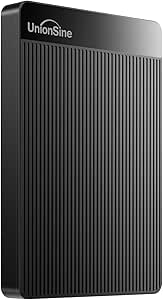
UnionSine 500GB Ultra Slim Portable External Hard Drive HDD-USB 3.0
Sometimes the right drive is simply the smallest and cheapest one that works. The UnionSine 500GB fits that brief: an ultra-slim body, 125 MB/s read speeds that actually beat the larger WD 5TB Elements, and a heat-dissipating striped chassis that keeps the 5400 RPM disk running quietly during long transfers. It is a sensible pick for a student carrying documents, a light photo collection, or extra storage for a laptop with a tiny SSD.
What holds it back is the ceiling. At 500GB, it holds a fraction of what the Seagate Portable 4TB offers, so anyone with a growing media library will outgrow it within a year. Its three-year warranty is generous for the price and outdoes the coverage story on the generic 8TB drive, but no warranty changes the physics of limited space. Compared with the similarly sized Maxone 500GB, the UnionSine’s stronger warranty and thermal design give it the edge.
Pros:- Ultra-slim, lightweight body for everyday carrying
- Fast 125 MB/s reads and 103 MB/s writes for the price class
- Heat-dissipating striped design keeps the drive cool and quiet
- Three-year manufacturer warranty beats most budget rivals
Cons:- 500GB capacity is limiting for media-heavy users
- 5400 RPM spindle is slower than 7200 RPM drives for demanding workloads
Best for: Students and light users who need an inexpensive, pocket-thin drive for documents and modest file collections
Not ideal for: Anyone with large photo or video libraries — 500GB fills up fast and cannot be expanded
- Capacity:500GB
- Interface:USB 3.0
- Read Speed:125 MB/s
- Write Speed:103 MB/s
- Rotational Speed:5400 RPM
- Form Factor:2.5 inches, ultra slim
- Compatibility:Desktop, Laptop, Gaming Console, TV
- Warranty:Three-year manufacturer’s warranty
Our verdict“A cheap, quiet, genuinely portable drive for light storage needs — just do not expect it to hold a media library.”
Maxone 500GB Ultra Slim Portable External Hard Drive HDD USB 3.0
At just 0.4 inches thick with an all-aluminum shell, this Maxone is the thinnest, most pocketable drive in this batch — noticeably slimmer than the chunkier YOTUO 1TB with its silicone sleeve. The metal chassis also pulls heat away from the drive during long transfer sessions, which plastic-bodied alternatives like the 500GB USB-C Mobile HDD can’t match. The tradeoff is straightforward: you get half the storage of the YOTUO for a similar price tier, and there’s no bundled backup software, so file management is entirely manual. This pick makes the most sense for buyers who prioritize carrying the drive everywhere over storing everything on it. Compared with the UnionSine 500GB, the Maxone wins on build quality, though both share the same modest capacity ceiling.
Pros:- Ultra-slim 0.4-inch profile slips into a shirt pocket or laptop sleeve
- All-aluminum construction dissipates heat and survives bag wear better than plastic
- USB 3.0 speeds up to 5 Gbit/s handle large file transfers without long waits
- Lighter than sleeved rivals like the YOTUO 1TB
Cons:- 500GB capacity is small by current standards and limits long-term usefulness
- No included backup software means manual file management
- Bus-powered only — unusable without a USB port, no external power option
Best for: Students and commuters who want a barely-there drive for documents and small media collections carried daily
Not ideal for: Anyone backing up a full laptop or photo library — 500GB fills up fast and forces constant pruning
- Capacity:500GB
- Thickness:0.4 inch
- Enclosure:All-aluminum, ultra slim
- Connectivity:USB 3.0
- Transfer Speed:Up to 5 Gbit/s
- Compatibility:Windows 7/8/10
- Power:USB bus-powered
Our verdict“Choose the Maxone if portability trumps capacity; skip it if your media library already exceeds a single terabyte.”
Seagate 2TB Portable Hard Drive USB 3.0
This Seagate is the safest default choice in the lineup: a name-brand 2TB drive that works the moment you plug it in, with true Windows and Mac compatibility out of the box — something the Maxone can’t claim with its Windows-only spec sheet. The drag-and-drop backup approach means no accounts, no subscriptions, no learning curve, which makes it friendlier for less technical buyers than the console-focused YOTUO. Its weaknesses are the flip side of its simplicity: no encryption, no rugged casing, and the USB 3.0 ceiling means it can’t approach the transfer speeds of the SanDisk Extreme SSD. If you want four times the capacity instead, the Seagate Portable 4TB elsewhere in this roundup offers better cost per gigabyte — this 2TB model is for people who want proven reliability without paying for space they won’t use.
Pros:- Genuine plug-and-play setup with zero software installation
- Cross-platform support for both Windows and Mac without reformatting hassles
- Established brand with a long reliability track record
- Generous 18-inch cable reduces awkward desk setups
Cons:- No hardware encryption or password protection for sensitive files
- USB 3.0 interface caps speeds well below SSD alternatives like the SanDisk Extreme
- No rugged protection against drops or water exposure
Best for: Everyday users and families who want a dependable, plug-and-play backup drive from an established brand
Not ideal for: Speed-sensitive users working with large video files — the USB 3.0 interface lags far behind SSD rivals
- Capacity:2TB
- Connection:USB 3.0
- Compatibility:Windows and Mac
- Setup:Plug-and-play, no software required
- Cable Length:18 inches
- Backup Method:Drag-and-drop
Our verdict“The low-risk pick for buyers who value brand reliability and simplicity over speed or capacity extremes.”
500GB External Hard Drive, USB 3.0 and USB-C Storage Expansion Mobile HDD
What separates this drive from the otherwise similar Maxone 500GB is dual-interface flexibility: both USB 3.0 and USB-C support mean it connects to modern laptops, smartphones, and consoles without hunting for adapters. The reinforced silicone casing adds impact protection the bare-metal Maxone lacks, making it the better pick for toss-in-a-backpack use. At 0.3 pounds and a 7200 rpm spin rate, it’s both lighter on paper and theoretically quicker to respond than many 5400 rpm budget rivals. The catch list is real, though: no USB-C cable is confirmed in the box, and like the YOTUO, it cannot run PS5 or Xbox Series X|S games directly — it’s an archive device for next-gen consoles, not an expansion drive. Buyers needing more room should step up to the Seagate 2TB instead.
Pros:- USB 3.0 and USB-C support covers older and newer devices without adapters
- Impact-resistant silicone casing survives drops and bag abuse
- Featherweight 0.3 lb body is effortless to carry daily
- 7200 rpm rotational speed beats typical 5400 rpm budget drives
Cons:- 500GB fills quickly with modern game and video file sizes
- Included cables are unclear — the USB-C advantage may require a separate purchase
- Cannot run or store PS5/Xbox Series X|S games directly
Best for: Multi-device owners juggling a USB-C laptop, a phone, and a last-gen console who want one drive for everything
Not ideal for: PS5 or Xbox Series X|S owners wanting to install or run current-gen games directly from the drive
- Capacity:500GB
- Interfaces:USB 3.0 / USB 2.0 / USB-C
- Form Factor:2.5 inches
- Rotational Speed:7200 rpm
- Transfer Rate:Up to 5 Gbps
- Enclosure:Plastic with silicone outer casing
- Weight:0.3 lbs
Our verdict“A smart choice for connector versatility on a budget, as long as 500GB covers your actual library.”
YOTUO 1TB External Hard Drive, Portable Storage Expansion HDD, USB 3.0 & USB-C
This YOTUO occupies a sweet spot between the 500GB options and the larger Seagate drives: 1TB of capacity with the broadest compatibility list in this batch, spanning Windows, Mac, Linux, PS4, PS5, and the full Xbox family. The shock-absorbing silicone sleeve mirrors the 500GB USB-C Mobile HDD’s armor, but the doubled storage makes it genuinely useful for game archives. That said, the console support comes with a big asterisk — PS5 and Xbox Series X|S games can’t run from it, so next-gen owners should treat it as cold storage for titles they’re not currently playing, or look at the SanDisk Extreme SSD if budget allows. Compared with the Seagate Portable 1TB elsewhere in this roundup, the YOTUO trades brand recognition for a lower price and added drop protection. For last-gen console owners, it’s the stronger value.
Pros:- 1TB doubles the storage of similarly priced 500GB rivals
- Widest compatibility in the lineup: PC, Mac, Linux, and four console platforms
- Silicone shock sleeve protects against everyday drops
- USB 3.0 speeds up to 5 Gbps move game files quickly
Cons:- Cannot run or store PS5/Xbox Series X|S games directly
- 1TB ceiling is tight for large game libraries plus general backups
- Lesser-known brand with a shorter track record than Seagate or WD
Best for: PS4 and Xbox One players archiving games, plus budget-conscious students backing up a laptop
Not ideal for: Next-gen console players who want to launch PS5 or Xbox Series X|S titles directly from the drive
- Capacity:1TB
- Interfaces:USB 3.0 / USB-C
- Transfer Speed:Up to 5 Gbps
- Compatibility:Windows, Mac, Linux, PS4, PS5, Xbox One, Xbox Series X/S
- Protection:Shock-absorbing silicone sleeve
- Weight:0.16 kg (about 5.6 oz)
Our verdict“The value play for last-gen console storage and cross-device backups — just don’t expect next-gen game support.”
SanDisk 2TB Extreme Portable SSD
The SanDisk Extreme plays in a different league from every spinning drive here. With NVMe speeds up to 1050MB/s read and 1000MB/s write, it transfers files roughly ten times faster than the Seagate 2TB Portable, turning hour-long backups into minutes. It’s also the only drive in this batch with IP65 water and dust resistance, 3-meter drop protection, and 256-bit AES hardware encryption — features that matter for photographers, journalists, and anyone working in the field. The tradeoffs are price and practicality: SSD storage costs far more per gigabyte than the WD 6TB Elements, and hitting those headline speeds requires a USB 3.2 Gen 2 port on the host device. Compared with the YOTUO 1TB, you get double the capacity and dramatic speed gains, but the budget-conscious buyer storing media archives gets more value from a big HDD.
Pros:- NVMe performance up to 1050MB/s read and 1000MB/s write — roughly 10x faster than USB 3.0 HDDs
- IP65 water/dust resistance plus 3-meter drop protection for field use
- Hardware 256-bit AES encryption with password protection for sensitive data
- Carabiner loop and pocket-size form factor attach easily to a bag
Cons:- Premium SSD pricing means far less capacity per dollar than mechanical rivals
- Maximum speeds require a compatible USB 3.2 Gen 2 host port
- Real-world performance varies with device, cable, and conditions
Best for: Content creators and field professionals who need rugged, encrypted, high-speed storage for active workloads
Not ideal for: Buyers seeking maximum capacity per dollar — large HDDs like the WD 6TB Elements deliver far more storage for less
- Capacity:2TB
- Drive Type:Portable NVMe SSD
- Read Speed:Up to 1050 MB/s
- Write Speed:Up to 1000 MB/s
- Drop Protection:Up to 3 meters
- Water/Dust Resistance:IP65 rated
- Encryption:256-bit AES with password protection
- Operating Temperature:-20°C to 85°C
Our verdict“The clear pick when speed, durability, and security justify the cost; overkill for passive archives.”
Western Digital 2TB Elements Portable External Hard Drive
The WD 2TB Elements lands on this list as the most sensible entry point for buyers who want reliable extra storage without paying for capacity they may never fill. Compared with the YOTUO 1TB, it doubles the storage for a similar price bracket and adds broad gaming console compatibility, which makes it a natural fit for PlayStation and Xbox owners expanding game libraries. Its plug-and-play USB 3.2 Gen 1 connection means no drivers, no setup friction, and transfer speeds that feel fast enough for photo and document backups. The tradeoffs are real, though: the 5400 RPM spin speed makes it noticeably slower than the SanDisk 2TB Extreme Portable SSD for large video files, and the plastic enclosure offers less drop protection than busier lifestyles demand. This model is better suited to desk-adjacent use than backpack abuse.
Pros:- 2TB capacity at an accessible price point
- USB 3.2 Gen 1 delivers fast everyday transfer speeds
- Works with Windows, Mac, and gaming consoles
- True plug-and-play setup with no drivers needed
Cons:- 5400 RPM rotational speed lags behind 7200 RPM and SSD alternatives
- Plastic enclosure offers minimal drop protection
Best for: Students and casual users who need dependable 2TB backup for documents, photos, and game libraries on a budget
Not ideal for: Video editors working with large 4K files — the 5400 RPM speed and 1MB cache bottleneck heavy sequential transfers
- Capacity:2 TB
- Interface:USB 3.0 / USB 3.2 Gen 1
- Transfer Rate:5 Gbps
- Rotational Speed:5400 RPM
- Cache:1 MB
- Compatibility:Windows, Mac, Desktop, Laptop, Gaming Console
- Enclosure:Plastic
Our verdict“A dependable, no-frills 2TB drive for budget buyers who value capacity and compatibility over raw speed.”
WD 4TB Elements Portable External Hard Drive for Windows and Mac
Value is the whole story here. The WD 4TB Elements hits the sweet spot where cost per terabyte drops sharply compared with the 2TB Elements model, making it the smartest economics in WD’s Elements lineup for anyone with a growing media library. Unlike the competing Seagate Portable 4TB, it skips preloaded utilities entirely — some will see that as cleaner, others as a gap, since there’s no bundled backup software to schedule automatic archives. File transfers over USB 3.2 Gen 1 keep pace with the Seagate alternative, and the lightweight body slips into a laptop bag without noticeable weight. The main compromise is physical fragility rather than performance: this is still a spinning platter drive, so it can’t match the SanDisk 2TB Extreme Portable SSD for shock resistance or speed.
Pros:- 4TB of storage with excellent cost per terabyte
- Compact and lightweight for the capacity
- Fast USB 3.2 Gen 1 transfers
- Plug-and-play on both Windows and Mac
Cons:- No included backup software
- Draws power from the USB port, limiting use with weak or occupied ports
Best for: Photographers and families amassing years of photos and videos who want maximum storage per dollar
Not ideal for: Buyers who want automated backup out of the box — no software is included, so you’ll need to supply your own
- Capacity:4 TB
- Interface:USB 3.2 Gen 1 / USB 3.0
- Compatibility:Windows, Mac
- Setup:Plug and play
- Design:Portable, lightweight
- Power:USB bus-powered
Our verdict“The best raw storage value in the lineup for buyers who bring their own backup routine.”
WD 6TB Elements Portable External Hard Drive for Windows and Mac
When one drive needs to hold an entire decade of digital life, the WD 6TB Elements is the answer among spinning drives here. It out-capacity-matches everything except the 8TB generic portable HDD elsewhere in this roundup, but WD’s established reliability track record justifies choosing it over lesser-known brands for irreplaceable data. Compared with stepping up from the 4TB Elements, the 6TB gives breathing room for video projects, raw photo archives, and system-wide backups on a single volume. The honest tradeoff is portability: at this capacity the chassis runs bulkier and heavier than the 2TB Elements, so it’s better described as movable rather than pocketable. Like its 4TB sibling, it ships without backup software, and USB bus power means it pairs best with laptops and desktops rather than dongles or hubs.
Pros:- Generous 6TB capacity in a single drive
- Fast USB 3.2 Gen 1 data transfer
- Plug-and-play on Windows and Mac
- WD brand reliability for long-term archival storage
Cons:- Bulky compared with smaller-capacity portable drives
- No backup software included
- Requires a USB port for power
Best for: Content creators and archivists who need a single large volume for video projects and full-system backups
Not ideal for: Travel-light users — the larger chassis is noticeably bulkier than the 2TB and 4TB Elements models
- Capacity:6 TB
- Interface:USB 3.2 Gen 1 / USB 3.0
- Compatibility:Windows, Mac
- Plug and Play:Yes
- Power:USB bus-powered
- Best Use:Photo, video, music, and document storage
Our verdict“The capacity king for HDD loyalists who want one trusted brand holding their entire archive.”
YOTUO 1TB External Hard Drive with Multiport Hub and Card Reader
This pick earns its slot by solving a different problem than every other drive here. The YOTUO 1TB folds a hard drive, a USB-C hub, and an SD/TF card reader into one pocket-sized accessory, which is exactly the combo a photographer offloading camera cards on a phone or tablet needs. Compared with the simpler YOTUO 1TB storage expansion model in this roundup, the multiport version trades a lower price for genuine workflow utility — one device handles card ingest, file storage, and device charging-adjacent port expansion. The compromises fit the price: 1TB fills quickly next to the 4TB WD Elements, and there’s no wireless connectivity, so everything happens over a cable. Apple support is also limited to iPhone 15 and later, leaving older iPhone owners out entirely.
Pros:- All-in-one design combining storage, hub, and SD/TF card reader
- Broad compatibility across Windows, Mac, Linux, and Android
- Works with iPhone 15 and later via USB-C
- Compact, lightweight body built for travel
Cons:- Only 1TB of storage capacity
- No wireless functionality — requires a direct cable connection
- Apple compatibility limited to USB-C iPhones
Best for: Mobile photographers and content creators who want storage, card reading, and port expansion in one travel accessory
Not ideal for: Owners of pre-USB-C Apple devices or buyers needing multi-terabyte capacity for video archives
- Storage Capacity:1 TB
- Interfaces:USB-C, USB 3.2, USB 2.0, SD card slot, TF card slot
- Compatibility:Windows, Mac OS, Linux, Android, iOS (iPhone 15+)
- Card Reader:SD and TF card slots
- Design:Compact and lightweight
- Connectivity:Wired only (no wireless)
Our verdict“A niche but genuinely useful three-in-one tool for USB-C mobile creators who value versatility over capacity.”

How We Picked
My ranking logic for this roundup came down to five factors, weighted by what actually drives buyer satisfaction with portable external hard drives. Price per terabyte carried the most weight, because capacity is the reason most people choose an HDD over an SSD in the first place. Real-world transfer performance came next — drives that consistently sustain higher USB 3.0 speeds save real time on large game and video files. I also scored connector flexibility (native USB-C is a growing advantage in 2026), device compatibility including consoles, and brand reliability signals like warranty terms and software support.
Ranking order follows a simple principle: the best picks deliver the most usable storage for the money with the fewest compromises. Established brands with proven track records (Seagate, WD, SanDisk) placed higher than generic-label drives at similar prices unless the generic offered a clear feature advantage, such as the YOTUO’s included hub and card reader. High-capacity models ranked above small 500GB drives because the price gap per gigabyte is dramatic, and buyers who only need 500GB are usually better served reading about flash storage anyway. The one deliberate exception to the value logic is the SanDisk SSD, which earns its spot on speed rather than capacity.
| portable external hard drife | Interface |
|---|---|
| Seagate Portable 1TB External | USB 3.0 |
| Western Digital 5TB Elements P | USB 3.2 Gen 1 (USB 2.0 compatible) |
| 8TB External Hard Drive Portab | USB 3.0 (Micro-USB port) |
| Seagate Portable 4TB External | USB 3.0 |
| UnionSine 500GB Ultra Slim Por | USB 3.0 |
| Maxone 500GB Ultra Slim Portab | — |
| Seagate 2TB Portable Hard Driv | — |
| 500GB External Hard Drive | — |
| YOTUO 1TB External Hard Drive | — |
| SanDisk 2TB Extreme Portable S | — |
| Western Digital 2TB Elements P | USB 3.0 / USB 3.2 Gen 1 |
| WD 4TB Elements Portable Exter | USB 3.2 Gen 1 / USB 3.0 |
| WD 6TB Elements Portable Exter | USB 3.2 Gen 1 / USB 3.0 |
| YOTUO 1TB External Hard Drive | — |
Factors to Consider When Choosing Portable External Hard Drives
Before settling on a specific model, it helps to understand the broader landscape of portable external hard drives — including the mistakes that catch out first-time buyers and the situations where spending more genuinely pays off.HDD or SSD: The Decision That Shapes Everything Else
The first fork in the road is whether you need a traditional spinning hard drive or a solid-state drive, and the difference is bigger than most buyers realize. HDDs like the Seagate and WD models in this roundup move files at roughly 100–140 MB/s, which is fine for backups and media libraries but sluggish when copying modern game installs that exceed 100GB. SSDs like the SanDisk Extreme run several times faster and have no moving parts, meaning a drop that would kill a spinning drive often leaves them unharmed. The catch is price: SSD storage costs several times more per gigabyte, which is why a 2TB SSD can cost as much as a 5TB HDD. My honest advice for most people is to buy an HDD for bulk storage and backups, and reserve SSD spending for when you actively work from the drive day to day.
Buy More Capacity Than You Think You Need
The most common regret among external drive buyers is undersizing, and the pricing structure of this category actively encourages the mistake. Moving from a 1TB drive to a 4TB drive typically costs only modestly more, yet quadruples your storage — the per-terabyte math heavily favors mid-size and large drives. Game libraries alone can consume a terabyte with fewer than a dozen modern titles, and photo or video collections grow faster than most people expect. A good rule of thumb is to estimate your current storage need, then double it to account for two to three years of growth. The only buyers who should stick to 500GB models are those with genuinely small needs who prioritize pocketability, and even then, a USB flash drive is often the better form factor.
Connector Compatibility in a USB-C World
Most HDDs in this price range still ship with USB-A (the traditional rectangular connector), which creates friction if your laptop only has USB-C ports. Adapters work, but they add cost, another point of failure, and sometimes throttle charging or data speeds. Drives with native USB-C or dual connectors — like the two YOTUO models and the SanDisk SSD — sidestep the problem entirely and future-proof your purchase. Console owners face a separate issue: PlayStation and Xbox both work with these drives, but you may need to reformat the drive to the console’s file system first, which wipes any existing data. Check your device’s ports before ordering, because a cheap drive that needs a $20 adapter isn’t cheap anymore.
Brand Reputation and Warranty Reality
Every hard drive eventually fails, so the question isn’t whether a drive can die but what happens when it does. Established brands like Seagate, Western Digital, and SanDisk back their drives with multi-year warranties and maintain diagnostic software that can warn you before a failure becomes total data loss. Generic-label drives — including several of the high-capacity options in this roundup — often list impressive specs but have unclear warranty terms, sparse documentation, and effectively no recovery support. That doesn’t mean off-brand drives are always bad value, but it does mean you should treat them as secondary or backup storage rather than the only home for irreplaceable files. Whatever you buy, follow the old rule: one copy is no copy.
Speed Ratings: Reading Between the Marketing Lines
Manufacturers love printing “USB 3.0” on the box, but that label only tells you the interface ceiling, not how fast the drive actually performs. A spinning 2.5-inch drive physically cannot exceed roughly 150 MB/s no matter which USB version it uses, so paying extra for a “faster” interface on an HDD buys you nothing. What does vary between HDDs is sustained write speed and how quickly speeds drop as the drive fills — cheaper drives with slower platters can lag noticeably on large transfers. If a listing doesn’t state real transfer speeds, assume mid-range performance and read buyer reviews for real-world numbers. And remember that a drive’s first-copy speed and its speed at 90% full can differ enough to matter on multi-terabyte models.
Console and Smart Device Use Cases
Consoles changed the portable drive market, and not every drive handles the job equally well. Both PlayStation and Xbox accept external drives for game storage, but games must be played from internal storage or an SSD on newer consoles — external HDDs work for storing and moving titles, and for playing last-generation games. That makes a 4TB–5TB HDD an excellent complement to a console with limited internal space, even if it won’t host your newest purchases. Smartphone users face a different hurdle: Android phones with USB-C can mount many of these drives directly, but iPhones need specific support, and file formats may need adjusting. If direct phone connection is your main use case, prioritize dual-connector models like the YOTUO picks over standard USB-A-only drives.
Frequently Asked Questions
Is a portable external hard drive fast enough for gaming?
It depends on what you mean by gaming. Modern consoles like the PS5 and Xbox Series X/S require SSD speeds to play current-generation titles, so an external HDD can only store those games or move them to internal storage — it can’t run them. However, last-generation games on PS4 and Xbox One run perfectly well from an external HDD, and a 4TB or 5TB drive makes an excellent archive for a growing game library. PC gaming follows the same rough split: older and lighter titles play fine from an HDD, while demanding open-world games benefit enormously from SSD speeds. If your goal is playing the newest releases directly from the external drive, an SSD like the SanDisk Extreme is the only sensible option in this lineup, and the HDDs are better treated as storage expansion.
Do these drives work on both Windows and Mac without reformatting?
Most of them work immediately on Windows but need reformatting on Mac, and that’s the detail that trips up cross-platform buyers. Drives like the WD Elements and Seagate Portable ship formatted as NTFS, which macOS can read but not write to, so Mac users must reformat to exFAT or APFS before transferring files. Reformatting takes only a few minutes but erases everything on the drive, so do it before loading any data. Choosing exFAT as your format is the smartest move for anyone who switches between Windows and Mac, since both systems can read and write it natively. Console users should also plan on a one-time reformat to the console’s preferred file system before first use.
Why are 500GB drives often a worse deal than 4TB drives?
The pricing in this category scales strangely, and small drives carry a hidden premium. A 500GB slim drive often costs only slightly less than a 2TB or even 4TB model from a major brand, meaning you pay nearly the same total price for a quarter or an eighth of the storage. That per-gigabyte math is why 500GB picks ranked at the bottom of this roundup — their only real advantage is pocket-sized portability and lower upfront cost for buyers who genuinely need just a little space. If you’re backing up documents and a modest photo library, 500GB may honestly suffice. But anyone storing games, video, or growing media collections gets dramatically better value by stepping up to a 4TB or 5TB model, where the cost per terabyte drops to its lowest point in the lineup.
Can I connect one of these drives directly to my smartphone?
Yes, but connector type determines how painless the experience is. Android phones with USB-C ports can mount external drives directly, though you’ll want a drive with a USB-C connector or an adapter for the standard USB-A plugs most HDDs use — models like the YOTUO 1TB with dual connectors are built exactly for this. Keep in mind that spinning hard drives draw more power than some phones will supply through their port, so a phone may fail to spin up a full-size HDD where a powered laptop succeeds. File format matters too: phones generally handle exFAT and FAT32 but choke on NTFS. iPhone users have the toughest path, since iOS support for external drives exists but works best with specific formats and file types. If phone storage expansion is your primary goal, factor in these compatibility questions before choosing a drive sized for a desktop setup.
How long will a portable HDD last, and how should I protect my data?
A quality portable HDD typically lasts three to five years of regular use, sometimes longer with light duty, but failure is always a possibility rather than a question of if over a long enough timeline. Spinning drives are also sensitive to physical shock — dropping one while it’s running is the most common cause of premature death, which is why careful handling matters more than brand choice. The single best protection isn’t buying a tougher drive; it’s never keeping your only copy of important files on one. Use the external drive as one copy alongside cloud storage or a second physical backup, and consider running the manufacturer’s free diagnostic tool every few months to catch warning signs early. If a drive starts making clicking noises or disappearing from your file explorer, stop writing to it and copy your data off immediately.
Conclusion
After comparing all 14 drives, the right choice comes down to what you’re storing and how you’ll use it. Best overall goes to the WD 5TB Elements, which pairs the lowest cost per terabyte in the lineup with dependable hardware and enough capacity to serve as a serious backup destination. Best value belongs to the Seagate Portable 4TB, which matches the WD on capacity economics while adding out-of-the-box console support for PlayStation and Xbox. Best premium pick is clearly the SanDisk 2TB Extreme Portable SSD — it’s the only drive here where the higher price buys something an HDD can’t deliver: dramatically faster transfers and drop resistance that protects your data on the move.
For beginners and casual users, the Seagate Portable 1TB or 2TB models are the simplest entry points, with plug-and-play setup and no formatting headaches for most Windows PCs. If your specific need is connecting to modern USB-C laptops and smartphones, the YOTUO 1TB with dual connectors — or the hub-equipped version with a card reader if you also transfer camera photos — solves the adapter problem for less than most competitors. Budget buyers with genuinely small storage needs can grab the slim 500GB UnionSine or Maxone drives, though stepping up to 4TB costs only a little more and quadruples the space. Whatever you pick, treat any single drive as one copy, not your only copy, and size up rather than down — storage regret is far more expensive than the price gap between tiers.
Evergreen bestsellers Picks
bestsellers
As an affiliate, we earn on qualifying purchases.