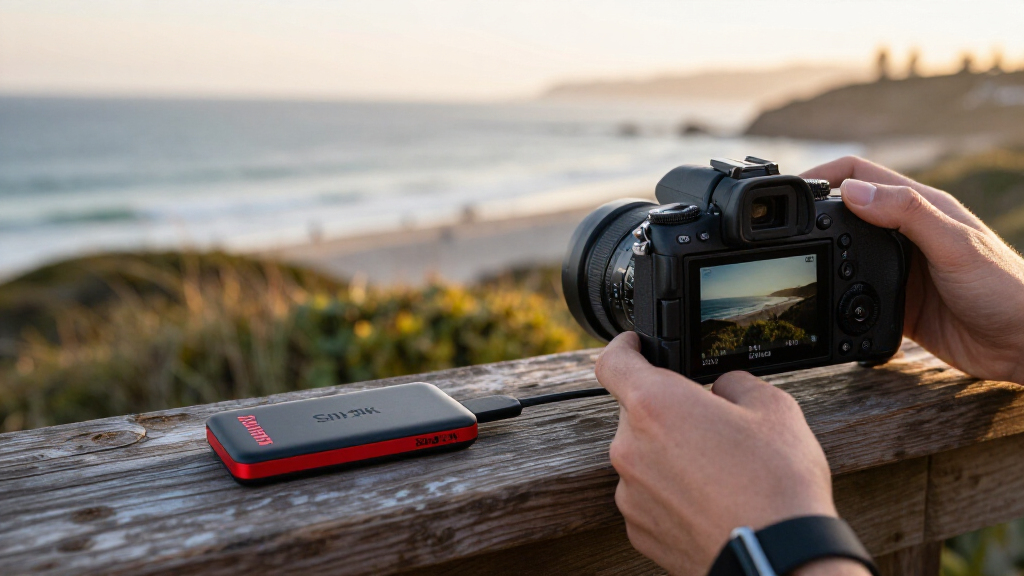

The best SanDisk storage device for most people is the 1TB Portable SSD, which balances useful capacity with faster transfers than a traditional portable hard drive. For demanding creative work, the G-Drive ArmorATD 6TB offers far more room, while the Extreme Fit 512GB USB-C keeps extra storage unobtrusive on compatible devices. The main tradeoffs are speed versus capacity, portability versus rugged protection, and choosing a USB-A, USB-C, or Lightning connection that fits your devices. A flash drive suits occasional file moves, while an SSD or hard drive is a better match for larger libraries and recurring backups. Read on for the full comparison and recommendations by buyer type.

Get the latest gadgets delivered free — and shop member deals
- Fast, free delivery on millions of items
- Access to Prime Big Deal Days deals on October 6–7
- Prime Video, Amazon Music and more included
Complete the kit



Key Takeaways
- The 1TB Portable SSD is the strongest everyday balance: it offers more speed than the 1TB Portable Drive, while avoiding the specialized needs of Thunderbolt or rugged pro gear.
- Capacity changes the value equation: the 6TB G-Drive ArmorATD is a better fit for large archives than the 2TB version, but its hard-drive design is not the speed pick.
- Connector choice can matter more than headline speed: Dual Drive models combine USB-C and USB-A, while the Phone Drive adds Lightning for compatible iPhones.
- SanDisk’s compact flash drives solve different problems: the Extreme Fit is designed to stay low-profile, while the Ultra Flair and Ultra USB-A are more conventional removable drives.
- Premium performance is specialized: the G-Drive G40’s Thunderbolt 3 connection and high stated speed suit compatible pro workflows, not every computer or everyday backup.
| SanDisk 512GB Ultra Flair USB-A Flash Drive – Up to 150 MB/s Read Speed |  | Best High-Capacity USB-A Flash Drive | Capacity: 512 GB | Connector: USB Type-A | Hardware interface: USB 2.0, USB 3.0 | VIEW LATEST PRICE | See Our Full Breakdown |
| SanDisk 64GB Ultra Dual Drive Go, USB-C & USB-A, Up to 300 MB/s Read Speed | 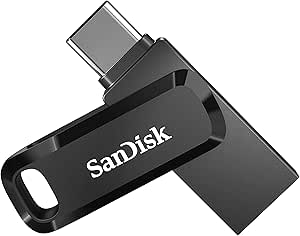 | Best Compact Drive for USB-C and USB-A Devices | Capacity: 64 GB | Connectors: USB-C and USB-A | Interface: USB 3.1 Type-A and USB Type-C | VIEW LATEST PRICE | See Our Full Breakdown |
| SanDisk 2TB Extreme PRO Portable SSD |  | Best Premium Drive for Heavy Workloads | Capacity: 2 TB | Maximum transfer speed: Up to 4,000 MB/s | Average sustained write speed: 3,100 MB/s for 2TB–4TB models | VIEW LATEST PRICE | See Our Full Breakdown |
| SanDisk 256GB Phone Drive for iPhone with USB-C and Lightning Connectors |  | Best for Backing Up iPhones Across Connector Generations | Capacity: 256 GB | Connectors: USB-C and Lightning | Maximum read speed: Up to 150 MB/s | VIEW LATEST PRICE | See Our Full Breakdown |
| SanDisk Ultra Dual Drive 128GB USB-C & USB-A, Up to 150 MB/s Read Speed | 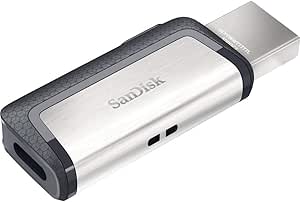 | Best Value for Everyday Cross-Device Transfers | Capacity: 128 GB | Connectors: USB Type-C and USB-A | Interface: USB 3.1 Gen 1 | VIEW LATEST PRICE | See Our Full Breakdown |
| SanDisk 256GB Ultra Dual Drive Go, USB-C & USB-A, Up to 400 MB/s Read Speed | | Best for Phone-to-Computer Transfers | Capacity: 256 GB | Connectors: USB-C and USB-A | Listed read speed: 150 MB/s | VIEW LATEST PRICE | See Our Full Breakdown |
| SanDisk 1TB Portable Drive, Up to 600MB/s Read Speed, Black |  | Best Simple 1TB Portable Drive | Capacity: 1 TB | Read speed: Up to 600 MB/s | Connectivity: USB | VIEW LATEST PRICE | See Our Full Breakdown |
| SanDisk 1TB Extreme PRO Portable SSD (Old Model) |  | Best for Rugged, High-Speed Workflows | Capacity: 1 TB | Read speed: Up to 2,000 MB/s | Write speed: Up to 2,000 MB/s | VIEW LATEST PRICE | See Our Full Breakdown |
| SanDisk 1TB Portable SSD, Up to 800MB/s, Black |  | Best Everyday Portable SSD | Capacity: 1 TB | Drive type: Portable SSD | Read speed: Up to 800 MB/s | VIEW LATEST PRICE | See Our Full Breakdown |
| SanDisk 512GB Extreme PRO Dual Drive USB-C + USB-A up to 1000MB/s read speeds | 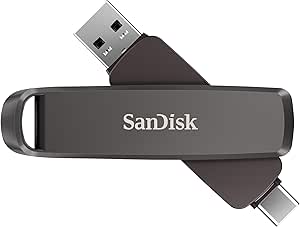 | Best High-Speed Dual-Connector Flash Drive | Capacity: 512 GB | Interface: USB 3.2 Gen 2 | Read speed: Up to 1,000 MB/s | VIEW LATEST PRICE | See Our Full Breakdown |
| SanDisk Professional G-Drive ArmorATD 2TB Rugged Portable External Hard Drive |  | Best Rugged 2TB HDD | Storage capacity: 2 TB | Drive type: External HDD | Connectivity: USB-C; Thunderbolt | VIEW LATEST PRICE | See Our Full Breakdown |
| SanDisk Professional 6TB G-Drive ArmorATD Rugged Durable Portable External Hard Drive | 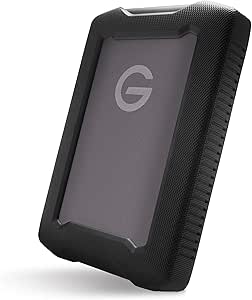 | Best for High-Capacity Field Backups | Capacity: 6 TB | Interface: USB 3.2 Gen 1 (USB-C) | Additional interface: Thunderbolt | VIEW LATEST PRICE | See Our Full Breakdown |
| SanDisk Ultra 256GB USB-A Flash Drive |  | Best for Everyday USB-A File Carrying | Storage capacity: 256 GB | Interface: USB 3.2 Gen 1 | Connector: USB Type-A | VIEW LATEST PRICE | See Our Full Breakdown |
| SanDisk Professional 1TB G40 External SSD |  | Best Premium Rugged SSD | Capacity: 1 TB | Interface: Thunderbolt 3 (40 Gbps) and USB-C (10 Gbps) | Read speed: Up to 3,000 MB/s | VIEW LATEST PRICE | See Our Full Breakdown |
| SanDisk Extreme Fit 512GB USB-C Flash Drive |  | Best Compact USB-C Flash Drive | Storage capacity: 512 GB | Interface: USB 3.2 Gen 1 | Connector: USB Type-C | VIEW LATEST PRICE | See Our Full Breakdown |
| SanDisk storage device | Capacity | Write speed |
|---|---|---|
| SanDisk 512GB Ultra Flair USB- | 512 GB | About 4 MB/s |
| SanDisk 64GB Ultra Dual Drive | 64 GB | Around 40 MB/s |
| SanDisk 2TB Extreme PRO Portab | 2 TB | — |
| SanDisk 256GB Phone Drive for | 256 GB | 10–50 MB/s |
| SanDisk Ultra Dual Drive 128GB | 128 GB | 10 MB/s |
| SanDisk 256GB Ultra Dual Drive | 256 GB | 15–30 MB/s |
| SanDisk 1TB Portable Drive | 1 TB | — |
| SanDisk 1TB Extreme PRO Portab | 1 TB | Up to 2,000 MB/s |
| SanDisk 1TB Portable SSD | 1 TB | — |
| SanDisk 512GB Extreme PRO Dual | 512 GB | Up to 900 MB/s |
| SanDisk Professional G-Drive A | — | — |
| SanDisk Professional 6TB G-Dri | 6 TB | — |
| SanDisk Ultra 256GB USB-A Flas | — | Up to 10x faster than standard USB 2.0 drives |
| SanDisk Professional 1TB G40 E | 1 TB | Up to 2,500 MB/s |
| SanDisk Extreme Fit 512GB USB- | — | — |
More Details on Our Top Picks
SanDisk 512GB Ultra Flair USB-A Flash Drive – Up to 150 MB/s Read Speed
The 512GB Ultra Flair is the straightforward pick here for buyers who need a lot of portable space in a conventional USB-A format. Its listed 150 MB/s read speed can make opening or copying stored files quicker than with basic USB 2.0 drives, while the metal casing is a sturdier choice for pockets and bags than a bare plastic shell. Compared with the Ultra Dual Drive Go, it trades phone-friendly USB-C connectivity for substantially more capacity in a single drive. The tradeoff is its roughly 4 MB/s write speed, which can make filling the drive or repeatedly moving large files slow. Maximum read performance also depends on a USB 3.0 port, and password protection adds a security option rather than changing the transfer limits.
Pros:- 512GB capacity keeps a sizable library on one compact drive
- Up to 150 MB/s read speed for accessing stored files
- Metal casing offers more protection from everyday knocks than a basic plastic body
- Optional password protection with 128-bit AES encryption
Cons:- Around 4 MB/s write speed can make large transfers take a long time
- Full read speed requires a USB 3.0 port
- USB-A connector does not directly serve USB-C-only devices
Best for: USB-A computer owners who want a high-capacity drive for keeping documents, media, and backups together.
Not ideal for: People who frequently write large video or photo files, or who need a direct USB-C or phone connection.
- Capacity:512 GB
- Connector:USB Type-A
- Hardware interface:USB 2.0, USB 3.0
- Maximum read speed:Up to 150 MB/s
- Write speed:About 4 MB/s
- Security:Optional password protection with 128-bit AES encryption
- Casing:Durable metal
- Dimensions:0.3 × 1.7 × 0.5 in
Our verdict“Choose the Ultra Flair if capacity and a durable USB-A body matter more than fast write transfers or phone connectivity.”
SanDisk 64GB Ultra Dual Drive Go, USB-C & USB-A, Up to 300 MB/s Read Speed
The Ultra Dual Drive Go earns its place for moving files between devices with different ports: its USB-C and USB-A connectors can link compatible phones, tablets, and computers without a separate adapter. That makes it more flexible for mobile handoffs than the USB-A-only Ultra Flair, and its listed read speed of up to 300 MB/s is higher than the older 128GB Ultra Dual Drive. A swivel body protects the connectors when the drive is carried, and the Memory Zone app can automate photo backup. The compromise is 64GB of capacity, which is modest beside the 256GB Phone Drive or 512GB Ultra Flair. Write speed is also lower than read speed, and phone use depends on USB-C OTG support; automatic backups require the app.
Pros:- USB-C and USB-A connectors cover many phones, tablets, and computers
- Up to 300 MB/s read speed for quick access to stored files
- Swivel design shields connectors and includes a keyring hole
- Memory Zone app supports automatic photo backup
Cons:- 64GB capacity is limited compared with the 256GB Phone Drive and 512GB Ultra Flair
- Write speed is around 40 MB/s and may vary by device
- Automatic backup needs the Memory Zone app, and phone connection requires OTG support
Best for: People who regularly transfer photos or documents between a USB-C phone and a USB-A computer and prefer a small, adapter-free drive.
Not ideal for: Videographers, large-file collectors, or anyone whose phone lacks USB-C OTG support or who wants backups without an app.
- Capacity:64 GB
- Connectors:USB-C and USB-A
- Interface:USB 3.1 Type-A and USB Type-C
- Maximum read speed:Up to 300 MB/s
- Write speed:Around 40 MB/s
- Dimensions:1.7 × 0.5 × 0.3 in
- Phone compatibility:USB-C devices with OTG support
- Additional features:Swivel connectors, keyring hole, Memory Zone app backup
Our verdict“Pick the Ultra Dual Drive Go for compact USB-C-to-USB-A file sharing, but choose a higher-capacity model for a large media library.”
SanDisk 2TB Extreme PRO Portable SSD
For demanding transfers and large working files, the 2TB Extreme PRO Portable SSD sits in a different performance class from the flash drives in this lineup. It lists up to 4,000 MB/s transfer speeds and average sustained writes of 3,100 MB/s for 2TB–4TB models, making it the most compelling choice here for workflows where repeated large-file writes matter. Its IP65 protection and protection against drops of up to 3 m add reassurance for mobile work, while password-protected 256-bit AES encryption addresses sensitive files. Compared with the USB-A Ultra Flair, this is far faster and better suited to active projects, but it is also more specialized than a simple thumb drive. The headline speed depends on device and workload compatibility, so older or slower equipment may not take full advantage.
Pros:- Up to 4,000 MB/s transfer speed for compatible setups
- Listed average sustained write speed of 3,100 MB/s for 2TB–4TB models
- IP65 protection and drop protection up to 3 m
- Password-protected 256-bit AES encryption
Cons:- Maximum speeds depend on device and workload compatibility
- Its high-performance SSD capability may be unnecessary for basic file storage
- The provided product data does not specify connector type or dimensions
Best for: Video editors, photographers, and other professionals who need 2TB of portable working space and fast sustained transfers.
Not ideal for: People who mainly store small documents or want a basic plug-in USB flash drive without speed-dependent equipment requirements.
- Capacity:2 TB
- Maximum transfer speed:Up to 4,000 MB/s
- Average sustained write speed:3,100 MB/s for 2TB–4TB models
- Ingress protection:IP65
- Drop protection:Up to 3 m
- Encryption:Password-protected 256-bit AES
Our verdict“Choose this SSD for large, active projects that can benefit from its sustained speed and rugged protection, not for occasional document storage.”
SanDisk 256GB Phone Drive for iPhone with USB-C and Lightning Connectors
The 256GB Phone Drive is the most iPhone-specific option in this group: its USB-C and Lightning connectors support compatible newer and older iPhones, helping households with different generations move files using one drive. Its capacity is four times that of the 64GB Ultra Dual Drive Go, which gives photo and video backups more room before the drive fills. Read speeds reach 150 MB/s, and the Memory Zone app handles backup and file management; USB-C connections can also access files through the iOS Files app. The main catch is that backup functions require Memory Zone, while Lightning copying and backup require the SanDisk app. Compared with the broader Ultra Dual Drive Go, this model offers more capacity and Lightning support but is less suited to general USB-A computer-to-phone transfers.
Pros:- USB-C and Lightning connectors support compatible newer and older iPhones
- 256GB capacity offers more backup space than the 64GB Ultra Dual Drive Go
- Memory Zone supports backups, file management, and password-protected encryption
- USB-C connection can access files through the iOS Files app
Cons:- Memory Zone is required for backup functions
- Lightning copying and backup require the SanDisk app
- Maximum read speed is 150 MB/s, below the listed 300 MB/s of the Ultra Dual Drive Go
Best for: iPhone households with both Lightning and USB-C models that want a shared drive for photo and file backups.
Not ideal for: Buyers who need a USB-A connector, prefer app-free backups, or want high-capacity storage for extensive video libraries.
- Capacity:256 GB
- Connectors:USB-C and Lightning
- Maximum read speed:Up to 150 MB/s
- Write speed:10–50 MB/s
- Dimensions:0.34 × 0.61 × 1.97 in
- USB-C compatibility:iPhone 15 or newer, compatible iPads, Macs, and other devices
- Lightning compatibility:iPhone 14 or older
- Backup and file access:Memory Zone required for backups; USB-C also supports the iOS Files app
Our verdict“Choose the Phone Drive if Lightning and USB-C iPhone compatibility is the priority; skip it if you need USB-A or app-free backup.”
SanDisk Ultra Dual Drive 128GB USB-C & USB-A, Up to 150 MB/s Read Speed
The 128GB Ultra Dual Drive is a practical middle ground for Android users who need to shift files between a USB-C device and a USB-A computer. Its retractable dual-connector design avoids carrying an adapter and protects the plugs when stored, while the 128GB capacity doubles the space of the 64GB Ultra Dual Drive Go. It is less phone-specialized than the Phone Drive, which adds Lightning support and twice the capacity, but it suits everyday Android-to-computer transfers without that iPhone-focused setup. The tradeoff is a listed 10 MB/s write speed, so large transfers can take patience, and the USB-C device needs OTG support. Its read speed reaches 150 MB/s, below the Go’s 300 MB/s figure, making it better for routine sharing than speed-first workloads.
Pros:- USB-C and USB-A connectors simplify transfers between phones and computers
- 128GB capacity provides more room than the 64GB Ultra Dual Drive Go
- Retractable connectors are protected when not in use
- Memory Zone app supports Android backup management
Cons:- 10 MB/s write speed can slow large file transfers
- USB-C device needs OTG support for phone use
- 150 MB/s read speed is lower than the Ultra Dual Drive Go’s listed 300 MB/s
Best for: Android users with a USB-C OTG phone who want one 128GB drive for moving everyday files to and from USB-A computers.
Not ideal for: Buyers who need fast writes, Lightning compatibility, or a USB-C phone that lacks OTG support.
- Capacity:128 GB
- Connectors:USB Type-C and USB-A
- Interface:USB 3.1 Gen 1
- Maximum read speed:Up to 150 MB/s
- Write speed:10 MB/s
- Design:Retractable connectors
- Compatible operating systems:Windows Vista/7/8/10, macOS 10.6+, Android
- Phone requirement:USB-C with OTG support
Our verdict“Pick this model for routine Android-to-computer transfers and more capacity than the Go, but choose a faster drive for frequent large writes.”
SanDisk 256GB Ultra Dual Drive Go, USB-C & USB-A, Up to 400 MB/s Read Speed
The Ultra Dual Drive Go is the easiest pick here for moving files between a USB-C phone or tablet and an older computer with USB-A. Its two connectors save you from carrying an adapter, while the retractable swivel design protects the unused plug and gives you a keyring attachment point. The Memory Zone app can automate photo backup on compatible devices, a convenience the portable SSDs in this roundup do not provide in the same flash-drive format. The tradeoff is speed: listed read speed is 150 MB/s, and write speed is 15–30 MB/s, far below the Extreme PRO Dual Drive and the portable SSD options. Choose it for everyday file access and photo transfers, not frequent writes of large video projects; backup also depends on app and device compatibility.
Pros:- USB-C and USB-A connectors work across newer mobile devices and older computers without an adapter.
- Memory Zone app supports automatic photo backup on compatible devices.
- Retractable swivel design and keyring hole make it easy to carry and help protect the connectors.
- 256 GB capacity suits routine photo, document, and media transfers.
Cons:- Listed write speed of 15–30 MB/s is slow for repeated transfers of large files.
- The 150 MB/s listed read speed is well below the SSD options in this roundup.
- Automatic backup requires a compatible device and installation of the Memory Zone app.
Best for: Phone and tablet owners who need a compact drive to move photos and documents between USB-C devices and USB-A computers.
Not ideal for: People who regularly write large video files or need faster transfers; its listed write speed trails the portable SSDs and Extreme PRO Dual Drive.
- Capacity:256 GB
- Connectors:USB-C and USB-A
- Listed read speed:150 MB/s
- Write speed:15–30 MB/s
- Backup feature:Automatic backup with SanDisk Memory Zone app
- Design:Retractable swivel connector with keyring hole
- Dimensions:1.7 × 0.5 × 0.3 in.
- Color:Black
Our verdict“Choose this drive for convenient USB-C-to-USB-A transfers and app-assisted photo backup, but pick an SSD for faster large-file work.”
SanDisk 1TB Portable Drive, Up to 600MB/s Read Speed, Black
This 1TB portable drive suits buyers who want more room than a flash drive offers without stepping up to the rugged, feature-heavy Extreme PRO SSD. Its stated read speed of up to 600 MB/s supports quicker access to large files than the Ultra Dual Drive Go, while the pocket-sized design and up-to-2-meter drop protection make it easier to carry than a desktop drive. The no-moving-parts construction also fits a mobile backup routine. Its position is a practical middle ground: the standard SanDisk Portable SSD lists up to 800 MB/s, and the Extreme PRO Portable SSD reaches much higher speeds while adding IP65 resistance and encryption. This model’s write speed is lower than its read speed, and no write-rate figure is supplied, so I would not choose it when sustained write performance is the priority.
Pros:- 1TB capacity provides room for backups and larger media collections.
- Read speeds of up to 600 MB/s exceed the listed speed of the Ultra Dual Drive Go.
- Pocket-sized design is convenient for travel and everyday carry.
- Drop-resistant up to 2 meters, with no moving parts.
Cons:- Write speed is lower than read speed, and no specific write-rate figure is provided.
- The standard Portable SSD lists a higher read speed of up to 800 MB/s.
- Does not list the IP65 water and dust resistance or hardware encryption of the Extreme PRO Portable SSD.
Best for: Laptop users who want a compact 1TB drive for everyday file storage and backups, with basic drop protection.
Not ideal for: Creators who need specified, high sustained write speeds or stronger weather protection and security features like those on the Extreme PRO Portable SSD.
- Capacity:1 TB
- Read speed:Up to 600 MB/s
- Connectivity:USB
- Drop protection:Up to 2 meters
- Construction:No moving parts
- Compatible devices:Desktop, laptop, smartphone, and tablet
- Color:Black
Our verdict“Pick this for simple, portable 1TB storage and drop protection, but choose the standard Portable SSD for a higher stated read speed.”
SanDisk 1TB Extreme PRO Portable SSD (Old Model)
The Extreme PRO Portable SSD is the performance-led choice here for buyers who need fast file access and stronger protection than the simpler 1TB Portable SSD provides. It lists up to 2,000 MB/s read and write, an aluminum chassis designed to dissipate heat, IP65 water and dust resistance, and up to 3-meter drop protection. Built-in 256-bit AES hardware encryption adds a security feature absent from the standard Portable SSD and the 1TB portable drive. That combination makes this model a better match for handling large working files in demanding settings, provided the host connection can support its full speed. Its USB-C USB 3.2 Gen 2 requirement matters: the listed USB 3.0 interface description is ambiguous, so buyers should confirm their port and cable support. It is also larger than a thumb drive and offers no more capacity than the less rugged 1TB SSD.
Pros:- Listed read and write speeds of up to 2,000 MB/s support demanding large-file workflows.
- IP65 water and dust resistance and up to 3-meter drop protection provide stronger protection than the standard Portable SSD.
- Built-in 256-bit AES hardware encryption helps protect stored data.
- Aluminum chassis is designed to act as a heatsink.
Cons:- Full speed requires a compatible USB-C USB 3.2 Gen 2 connection; the product data also describes the interface as USB 3.0.
- At 1TB, it offers the same capacity as less feature-rich portable SSD options.
- Its 2.5-inch portable form is less pocketable than a dual-connector flash drive.
Best for: Video editors, photographers, and mobile professionals who need fast 1TB storage with water, dust, drop, and encryption protections.
Not ideal for: Buyers with basic backup needs, older or slower USB connections, or a preference for a smaller and simpler drive like the Ultra Dual Drive Go.
- Capacity:1 TB
- Read speed:Up to 2,000 MB/s
- Write speed:Up to 2,000 MB/s
- Connectivity:USB-C, USB 3.2 Gen 2
- Water and dust resistance:IP65
- Drop protection:Up to 3 meters
- Encryption:256-bit AES hardware encryption
- Weight:2.72 oz.
- Dimensions:4.36 × 2.28 × 0.41 in.
Our verdict“Choose this older Extreme PRO model for high stated speeds and rugged security features, as long as your USB-C setup can support its performance.”
SanDisk 1TB Portable SSD, Up to 800MB/s, Black
The 1TB Portable SSD is a balanced choice for laptop owners who want faster everyday storage than a basic flash drive without paying in size or complexity for the Extreme PRO feature set. Its up to 800 MB/s read speed is higher than the 600 MB/s listed for the 1TB Portable Drive, and its solid-state design is built for carrying files on the move. Up to 2-meter drop protection and a rubber hook make it easier to attach to a bag or belt loop, a useful distinction from the more performance-focused Extreme PRO Portable SSD. The tradeoff is that write speeds are lower than read speeds, and actual performance can vary with the device and conditions. It also lacks the Extreme PRO model’s stated IP65 resistance, 3-meter drop protection, and hardware encryption, so it is a better fit for routine portability than harsh environments or sensitive work data.
Pros:- Up to 800 MB/s read speed is higher than the 600 MB/s listed for the 1TB Portable Drive.
- Portable solid-state storage is suited to carrying everyday files and backups.
- Up to 2-meter drop protection adds practical protection on the move.
- Rubber hook can attach the drive to a belt loop or backpack.
Cons:- Write speeds are lower than read speeds.
- Actual performance varies with the connected device and usage conditions.
- Lacks the IP65 rating and hardware encryption listed for the Extreme PRO Portable SSD.
Best for: Laptop owners who want a portable 1TB SSD for regular file access, backups, and travel, with a secure attachment point.
Not ideal for: Professionals who need the Extreme PRO’s higher stated read/write speeds, IP65 protection, longer drop rating, or hardware encryption.
- Capacity:1 TB
- Drive type:Portable SSD
- Read speed:Up to 800 MB/s
- Connectivity:USB 3.2 Gen 2, USB Type-C
- Drop protection:Up to 2 meters
- Form factor:Portable, 2.5 in.
- Compatible devices:Laptop
- Color:Black
Our verdict“Choose this as a straightforward 1TB portable SSD for laptop-based work, but step up to the Extreme PRO for faster performance and stronger protection.”
SanDisk 512GB Extreme PRO Dual Drive USB-C + USB-A up to 1000MB/s read speeds
The Extreme PRO Dual Drive combines unusually high stated speeds for a flash drive with the practical flexibility of both USB-C and USB-A. At up to 1,000 MB/s read and 900 MB/s write, it is better suited to repeated large-file transfers than the Ultra Dual Drive Go, whose listed write speed is 15–30 MB/s. The rugged metal housing and 128-bit AES encryption also make it a more work-oriented choice than a basic thumb drive. Compared with the Extreme PRO Portable SSD, this model gives up capacity, IP65 protection, and 3-meter drop protection, but its dual plugs can simplify transfers between phones, newer computers, and older USB-A systems. Its 512GB capacity is the main limit for users with large video libraries, and high speeds depend on a compatible USB 3.2 Gen 2 connection.
Pros:- Up to 1,000 MB/s read and 900 MB/s write speeds outpace the Ultra Dual Drive Go.
- Dual USB-C and USB-A connectors simplify transfers across newer and older devices.
- Rugged metal housing is suited to frequent carrying.
- Built-in 128-bit AES encryption provides added protection for sensitive files.
Cons:- 512GB capacity may be limiting for large video archives or extensive project libraries.
- Maximum listed performance requires a compatible USB 3.2 Gen 2 connection.
- Does not list the IP65 rating or up-to-3-meter drop protection of the Extreme PRO Portable SSD.
Best for: Mobile professionals who transfer large files between USB-C devices and USB-A computers and want a compact drive with encryption.
Not ideal for: Buyers who need more than 512GB, stronger environmental protection, or the 1TB capacity and rugged ratings of the Extreme PRO Portable SSD.
- Capacity:512 GB
- Interface:USB 3.2 Gen 2
- Read speed:Up to 1,000 MB/s
- Write speed:Up to 900 MB/s
- Connectors:USB-C and USB-A
- Encryption:128-bit AES
- Dimensions:3.54 × 0.8 × 0.51 in.
- Color:Multicolor
Our verdict“Pick this for fast cross-device transfers in a compact dual-connector format, but choose an SSD if you need more capacity or stronger weather protection.”
SanDisk Professional G-Drive ArmorATD 2TB Rugged Portable External Hard Drive
I’d choose this 2TB ArmorATD for portable backups when a conventional hard drive’s capacity matters more than SSD-level speed. Its IP54-rated enclosure, aluminum shell, and protective bumper offer resistance to splashes and limited dust—useful safeguards for moving between work sites, though not a substitute for careful handling around water. Read speeds reach 130 MB/s, so large transfers take longer than they would on the G-Drive G40 SSD or SanDisk’s portable SSD models. Compared with the 6TB ArmorATD, this version is easier to justify when 2TB is enough, but it leaves less room for expanding photo and video archives. It works with macOS out of the box; Windows users need to reformat it, adding a setup step.
Pros:- 2TB capacity suits backups and sizable working files.
- IP54-rated splash and limited dust resistance with an aluminum enclosure and bumper.
- USB-C connectivity and read speeds up to 130 MB/s.
- Works with macOS without reformatting.
Cons:- Windows users must reformat the drive before use.
- HDD transfer speeds lag far behind the G-Drive G40 SSD and other portable SSDs.
- Actual transfer speeds can vary by device and usage conditions.
Best for: Mac users, photographers, and field workers who want 2TB of portable backup space in a splash- and dust-resistant HDD.
Not ideal for: Windows users seeking plug-and-play setup, or editors who regularly move large files and need SSD-class transfer speeds.
- Storage capacity:2 TB
- Drive type:External HDD
- Connectivity:USB-C; Thunderbolt
- USB data rate:5 Gbps
- Read speed:Up to 130 MB/s
- Form factor:2.5 inches
- Compatibility:macOS; Windows after reformatting
- Model:SDPH81G-002T-GBA1D
Our verdict“Choose this ArmorATD if you want a rugged 2TB HDD for portable backups and can accept slower transfers than an SSD.”
SanDisk Professional 6TB G-Drive ArmorATD Rugged Durable Portable External Hard Drive
When a working archive has outgrown smaller portable drives, I’d favor this 6TB ArmorATD over the 2TB ArmorATD: the larger capacity gives you more room for video, photo libraries, or repeated backups without changing the rugged HDD format. Its IP54 rain and dust resistance and anodized aluminum enclosure suit travel and field work, but protection against splashes is not the same as waterproofing. USB-C transfer speeds reach 130 MB/s, and the 5400 rpm mechanism is slower than the G-Drive G40 SSD, particularly for frequent large-file work. This is a capacity-first choice, not a speed-first one. It is ready for macOS, while Windows users need to reformat it before use.
Pros:- 6TB capacity accommodates large media collections and backup sets.
- IP54-rated resistance to rain and dust in a rugged aluminum enclosure.
- USB-C interface with read/write speeds up to 130 MB/s.
- Works with macOS out of the box.
Cons:- 5400 rpm HDD performance is much slower than the G-Drive G40 SSD.
- Windows use requires reformatting.
- IP54 protection does not make the drive waterproof.
Best for: Videographers, photographers, and field teams who need several terabytes of portable backup storage with added weather resistance.
Not ideal for: Editors who need rapid project transfers, or Windows users who want a drive ready to use without reformatting.
- Capacity:6 TB
- Interface:USB 3.2 Gen 1 (USB-C)
- Additional interface:Thunderbolt
- Drive type and speed:External HDD; 5400 rpm
- Read/write speed:Up to 130 MB/s
- Protection:IP54 water and dust resistance
- Compatibility:Desktop and laptop; macOS ready, Windows after reformatting
- Model number:SDPHE1G-006T-GBAND
Our verdict“Pick this model over the 2TB ArmorATD when backup capacity matters more than SSD speed or a smaller footprint.”
SanDisk Ultra 256GB USB-A Flash Drive
This 256GB Ultra USB-A flash drive is a straightforward pick for carrying documents, photos, and other files between computers with a standard USB-A port. Its retractable connector removes the need for a separate cap, and the drive supports 128-bit AES password protection for files that need extra privacy. Read speeds reach 130 MB/s on a USB 3.0 or newer port; a USB 2.0 connection works too, but won’t deliver the fastest transfers. Compared with the USB-C Extreme Fit 512GB, this model offers less capacity and a different connector, but it suits older or mixed USB-A setups. Mac users should note that password protection requires a software download.
Pros:- 256GB capacity for documents, photos, and general file transfers.
- Retractable connector avoids a separate cap.
- Read speeds up to 130 MB/s with USB 3.0 or later.
- Offers 128-bit AES password protection.
Cons:- Fastest transfer speeds require a USB 3.0 or newer port.
- Mac users must download software to use password protection.
- USB-A connector is not a direct fit for USB-C-only devices.
Best for: Students and office users who move files between USB-A computers and want a compact drive with optional password protection.
Not ideal for: USB-C-only device owners, or anyone who regularly carries more than 256GB or needs the faster transfers of an SSD.
- Storage capacity:256 GB
- Interface:USB 3.2 Gen 1
- Connector:USB Type-A
- Read speed:Up to 130 MB/s
- Write speed:Up to 10x faster than standard USB 2.0 drives
- Encryption:128-bit AES password protection
- Design:Retractable
- Color:Black
Our verdict“Choose this drive for everyday transfers between USB-A computers; pick the Extreme Fit 512GB if your devices use USB-C or you need more space.”
SanDisk Professional 1TB G40 External SSD
The G-Drive G40 SSD is the performance pick here: with a Thunderbolt 3 connection, it reaches up to 3,000 MB/s read and 2,500 MB/s write, far outpacing the 130 MB/s ArmorATD HDDs. That difference can make repeated transfers of large video or project files much less of a wait. It also combines IP68 dust and water resistance with stated 3 m drop and 4,000 lb crush resistance, making it a stronger fit for demanding travel than the ArmorATD’s IP54 protection. The tradeoff is capacity: this model holds 1TB, not the 6TB offered by the ArmorATD. Maximum speed also depends on a Thunderbolt 3 host; USB-C fallback supports up to 10 Gbps.
Pros:- Thunderbolt 3 read and write speeds reach up to 3,000 MB/s and 2,500 MB/s.
- Also connects over USB-C at up to 10 Gbps.
- IP68 dust and water resistance with stated drop and crush protection.
- Aluminum core helps dissipate heat during transfers.
Cons:- Maximum speeds require a Thunderbolt 3 host.
- 1TB capacity is far below the 6TB ArmorATD HDD.
- USB-C fallback is slower than the Thunderbolt 3 connection.
Best for: Video professionals and mobile creators who need fast 1TB project storage and strong protection for travel or field production.
Not ideal for: Buyers prioritizing several terabytes for archives, or those whose devices lack Thunderbolt 3 and do not need high transfer speeds.
- Capacity:1 TB
- Interface:Thunderbolt 3 (40 Gbps) and USB-C (10 Gbps)
- Read speed:Up to 3,000 MB/s
- Write speed:Up to 2,500 MB/s
- Dust and water resistance:IP68
- Crush resistance:4,000 lb
- Drop resistance:Up to 3 m
- Cooling:Aluminum core
Our verdict“Choose the G40 when speed and rugged protection matter more than the larger backup capacity of the ArmorATD drives.”
SanDisk Extreme Fit 512GB USB-C Flash Drive
For a small amount of storage that can stay connected to a USB-C device, I’d choose the Extreme Fit 512GB over a larger portable drive. Its compact plug-and-stay design is suited to carrying files on a compatible laptop, tablet, or smartphone without the bulk of a portable SSD. Read speeds reach 400 MB/s, which is faster than the USB-A Ultra’s 130 MB/s, though it remains a flash drive rather than a rugged, high-performance external SSD such as the G-Drive G40. The 512GB capacity is useful for documents and media, but usable space will be lower than the stated amount. The Memory Zone app supports file management and backup, with a download and installation step required.
Pros:- Compact plug-and-stay design.
- 512GB capacity for files, photos, and videos.
- Read speeds up to 400 MB/s.
- USB-C compatibility across supported computers, tablets, and smartphones.
Cons:- Actual usable storage is less than the stated 512GB.
- Memory Zone requires download and installation.
- Does not offer the capacity of the 6TB ArmorATD or the rugged protection of the G-Drive G40.
Best for: USB-C laptop, tablet, and smartphone owners who want a low-profile drive for carrying files or adding storage.
Not ideal for: People needing large archive capacity, removable-cable flexibility, or the heavy-duty protection and transfer performance of the G-Drive G40 SSD.
- Storage capacity:512 GB
- Interface:USB 3.2 Gen 1
- Connector:USB Type-C
- Maximum read speed:Up to 400 MB/s
- Compatible devices:Tablet, smartphone, personal computer
- Dimensions:0.73 × 0.54 × 0.63 in
- Color:Black
- File management:SanDisk Memory Zone app for Windows and Mac
Our verdict“Pick the Extreme Fit for discreet USB-C storage and everyday file access, not for large archives or rugged professional workflows.”
How We Picked
I ranked these 15 devices by how well their capacity, connection, speed, and physical design fit a clear buyer need. I weighed the stated transfer speeds against the type of device: an SSD’s speed advantage matters for active projects, while a portable hard drive’s higher capacity can better suit bulk storage. I also considered whether a drive’s connector supports the devices a buyer is likely to use, and whether its design offers a meaningful benefit such as a low-profile fit or rugged construction.
The ranking favors useful versatility for common storage tasks over the largest specification alone. That places the 1TB Portable SSD ahead of slower portable-drive options for general use, while specialized picks such as the G-Drive G40 and Phone Drive rank for narrower needs. Models with similar roles are separated by capacity, connector flexibility, or stated speed; buyers should check their device’s port support and the exact model specification before purchase, especially where product names include older versions or different speed claims.
Factors to Consider When Choosing Best SanDisk Storage Devices
Before choosing a SanDisk device, I’d start with what you need to store and where you plan to use it. These options span thumb-sized flash drives, phone-transfer drives, portable SSDs, and high-capacity rugged hard drives, so the right choice depends on more than capacity alone.
Choose the storage type around your workload
For moving documents or a modest batch of photos, a flash drive is simple and easy to carry. If you regularly open, edit, or transfer large files, an SSD is a more suitable working drive because its speed advantage can reduce waiting during repeated transfers. A portable hard drive makes more sense when you need substantial room for archives and can accept slower access than an SSD. A common mistake is buying the smallest, fastest device for a growing media library; the drive may fill quickly and force extra copies or upgrades. Match the device to how often you access the files, not just how much you own today.
Check ports, cables, and device compatibility
USB-C is common on newer phones and computers, while USB-A remains useful on older laptops, desktops, and shared equipment. Dual Drive models can reduce the need for adapters when moving files between both port types, but the connector alone does not guarantee full speed. Phone users should check the specific phone model and operating-system support, particularly when comparing USB-C and Lightning options. Also confirm whether the drive’s connector can fit alongside a phone case or nearby ports. Choosing a connector that matches your everyday devices can save more hassle than buying a drive with a higher speed figure you cannot use.
Treat speed claims as a ceiling, not a promise
Product speed figures describe stated maximum performance, not a guarantee for every transfer. The host device, port generation, cable, file size, and drive capacity can all affect real-world results. Large sequential video files may move differently from thousands of small documents, so think about the kind of work you actually do. Paying extra for a high-speed SSD is easier to justify when you routinely transfer large projects or work directly from the drive. For occasional backups or simple file sharing, a lower-speed option may be adequate and easier to live with.
Balance capacity with portability and protection
A compact flash drive is convenient for a pocket or key ring, but small devices are easier to misplace and may offer less protection from rough handling. A rugged enclosure can suit field work and travel, though rugged construction does not replace a separate backup. Hard drives can deliver much more capacity for archives, but they contain moving parts and are less suited to frequent knocks than SSDs. Avoid treating water- or dust-resistance claims as permission to expose a device to any condition; check the product’s specified protection and limits. Think about where the drive will spend most of its time before deciding whether low weight, large capacity, or a tougher build deserves priority.
Plan capacity for growth and backups
Buying only enough space for your current files can make a drive inconvenient sooner than expected, especially for video, photo, or game libraries. Estimate the space you need now, then leave room for new files and working copies. A single large drive is not a complete backup plan because loss, damage, or failure can affect everything stored on it. For irreplaceable files, keep another copy on a separate device or in a separate location. The 2TB and 6TB ArmorATD options show the capacity tradeoff clearly: more room can simplify archiving, but it does not remove the need for redundancy.
Pay for specialized features only when they solve a real problem
Thunderbolt support, rugged protection, phone-specific connectors, and low-profile designs each help a particular type of buyer. A Thunderbolt 3 SSD is most useful with compatible hardware and a workflow that can take advantage of its connection; otherwise, the extra capability may go unused. A Lightning-equipped Phone Drive may simplify transfers for a compatible iPhone, while a USB-C-only flash drive can better suit newer devices. If you leave a drive plugged into a laptop, a low-profile design can reduce protrusion, but it may be less convenient to remove frequently. Choose the feature that removes a recurring inconvenience rather than collecting specifications you will rarely use.
Frequently Asked Questions
Should I choose the 1TB Portable SSD or the 1TB Portable Drive?
I’d choose the 1TB Portable SSD if you regularly move large files or want a more responsive drive for active work. The 1TB Portable Drive is the slower option, so it may suit routine backups and storage where capacity matters more than quick access. Check the connection and stated speed for your specific computer before deciding, since the host port can limit performance. If the drive will hold only occasional copies of files, paying for SSD speed may not improve your day-to-day use much.
Which SanDisk drive works best for moving files between a phone and a computer?
Start with the ports on both devices. A Dual Drive with USB-C and USB-A can move files between newer USB-C devices and computers that still use USB-A without requiring an adapter. For a compatible iPhone that uses Lightning, the Phone Drive is the more directly targeted option. Confirm the exact phone model and software support before buying, and remember that phone storage limits and transfer behavior can affect how smoothly large files move.
Is a high-speed USB flash drive a good replacement for a portable SSD?
It can work for occasional transfers, but a flash drive and an SSD are not interchangeable for every workload. Flash drives are smaller and convenient for passing files between devices, while a portable SSD is generally a better fit for repeated transfers, large projects, or files you open directly from the drive. Advertised read speed also does not tell you everything about sustained writing or performance with many small files. If the drive will be used as an active workspace or frequent backup target, compare SSD options rather than choosing by pocket size alone.
Should I get the 2TB or 6TB G-Drive ArmorATD?
The choice depends on how much material you need to keep together and how quickly that collection is growing. The 2TB model may be easier to manage for a smaller archive, while the 6TB model provides substantially more room for large libraries and longer-term storage. Both are portable hard drives, so neither is the right pick if fast editing access is your main priority; a portable SSD may fit that work better. For either capacity, keep a second copy of important files rather than treating a rugged drive as the only backup.
Can I use a Thunderbolt 3 SSD at its stated speed with any USB-C device?
No. A USB-C connector describes the plug shape, while Thunderbolt 3 is a separate connection standard that the host device must support to reach the drive’s stated Thunderbolt performance. A compatible USB-C connection may still allow the drive to work, but speeds can differ based on the port, cable, and computer. Check the specifications for both the drive and your device before paying for a premium Thunderbolt model. If your workflow does not benefit from its added connection capability, a standard portable SSD may be a better match.
Conclusion
For one drive that covers everyday transfers and storage, I’d pick the 1TB Portable SSD as best overall; it offers a useful middle ground between flash drives and specialized pro models. The best value for simple file moves is a USB-A Ultra flash drive, while the best choice for beginners is a Dual Drive model if they need to move files between USB-C and USB-A devices. For a premium creative workflow, the G-Drive G40 makes sense only with compatible Thunderbolt 3 hardware; for large archives, look to the 6TB G-Drive ArmorATD. iPhone owners who need a Lightning connection should focus on the Phone Drive, and anyone who wants storage that stays unobtrusive should consider the Extreme Fit. Choose by your ports, workload, and backup plan—not by capacity or speed claims alone.
Fall Picks
fall essentials
As an affiliate, we earn on qualifying purchases.