
TL;DR

Get the latest gadgets delivered free with Prime
- Fast, free delivery on millions of items
- Prime Video, Amazon Music and more included
- Member-only deals all year
An XDA Developers writer reports that a DIY NAS assembled from used hard drives of different brands, capacities and ages has proved dependable in their experience. The writer says varied drive histories may reduce the risk of shared batch defects, but the setup sacrifices usable capacity and can be limited by slower disks; this is a personal account, not evidence that mixed drives are safer for every NAS.
An XDA Developers writer says a DIY NAS built from used hard drives of different brands, capacities and ages has proved dependable in their experience, challenging the assumption that a NAS must use a uniform set of disks. The writer attributes some of that reliability to the drives’ differing histories, but the account is personal experience rather than a measured comparison, and the mixed array brings clear storage-efficiency and speed tradeoffs.
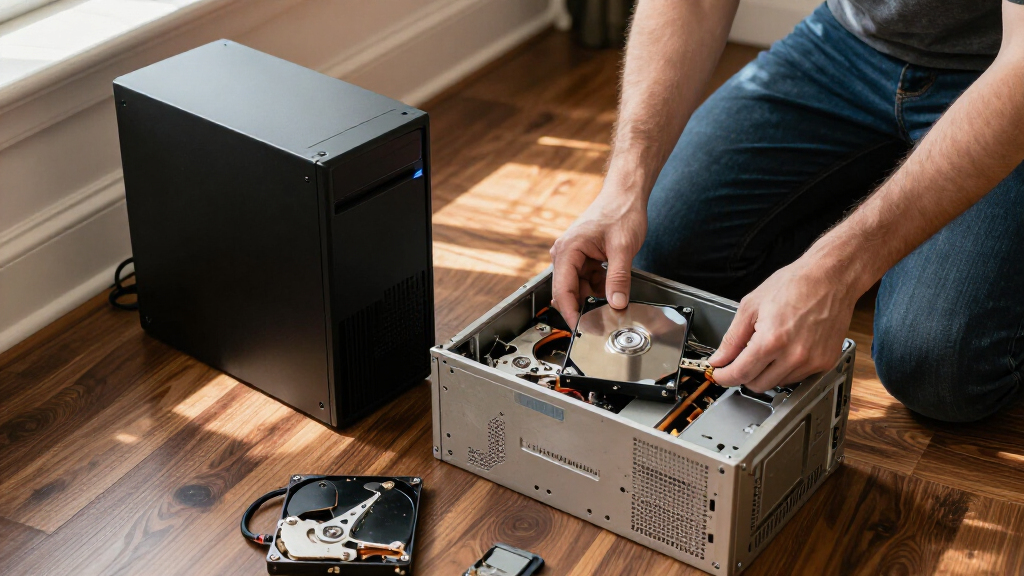
The writer assembled the NAS from drives removed from old PCs, accumulated through personal upgrades and discarded computers from friends. The disks vary in manufacturer, capacity, age and power-on hours. The writer says the system uses RAIDZ2 and provides about 14TB of usable storage, a figure specific to this setup.
The writer’s reasoning is that drives purchased together may share manufacturing defects or similar histories, potentially making failures less independent. By contrast, the disks in this NAS came from different factories and years and have logged different amounts of use. The writer says this diversity could lower the chance of simultaneous failures, but provides no failure-rate data or controlled comparison to establish that it does.
The arrangement also has costs. In the writer’s description, a RAID pool’s usable capacity is constrained by its smallest drives, so larger disks can leave some capacity unused; a 4TB and a 6TB disk in the same example leave 2TB of the larger disk unmatched. The NAS also mixes 5,400-rpm and 7,200-rpm drives, and the writer says slower disks limit the throughput the faster ones could otherwise offer. Their mostly write-once, seldom-changed files make that performance compromise acceptable to them.
Storage field note · XDA Developers · October 26, 2026
How Mismatched Drives From Old PCs Made My NAS More Reliable
One writer’s DIY NAS has stayed dependable with reused disks of different brands, sizes and ages. The account offers a practical case for reusing hardware, while leaving the reliability claim unproven and spelling out the capacity and speed costs.
Why this mixed-drive NAS worked for its owner
A useful real-world example of a low-cost build, with an important distinction between reported dependability and proven reliability.
Built from drives on hand
The disks came from personal upgrades and discarded computers from friends. Reusing them made a home NAS possible without buying a fresh, matched set.
Different histories may matter
The writer reasons that drives from different factories and years may be less exposed to one shared batch defect. No failure-rate data proves that here.
Archival use makes slower speeds acceptable
The collection is mostly written once and rarely changed. The writer says the speed gap has therefore been a minor issue for this workload.
“The NAS I built turned out to be incredibly dependable, and I now attribute a lot of that to the inconsistent hardware inside of it.”
— XDA Developers writer · personal accountThe tradeoffs are concrete
Mixed drives can keep useful hardware in service, but the pool’s constraints shape how much space and speed you get.
Capacity follows the smallest disks
- −Larger drives can have unmatched capacity left unused in a pool.
- ↳Example: pairing a 4 TB and 6 TB disk leaves 2 TB on the larger disk unmatched.
- ≈The reported ~14 TB usable applies to this particular RAIDZ2 array.
Speed follows the slower drives
- −A mix of 5,400-rpm and 7,200-rpm disks may limit overall throughput.
- ↳Frequent large transfers or demanding services may feel this more.
- ✓For this writer’s mostly archival files, the compromise has been acceptable.
From old PCs to an active storage pool
The writer’s choices reflect available hardware and personal needs, rather than a universal build recipe.
Collect old disks
Different brands, capacities, ages and power-on hours.
Build the pool
The writer reports using RAIDZ2 for this configuration.
Accept the limits
Some larger-drive space and potential speed go unused.
Keep separate backups
RAID can support availability; it is not a backup copy.
What the account cannot establish
Dependable for one writer ≠ proven safer
The article does not give the NAS’s operating duration, a complete failure history, drive-by-drive models, throughput measurements or a direct comparison with matched disks. The possibility of avoiding a shared batch defect is the writer’s reasoning, not a demonstrated result.
The writer also says failed disks have been replaced with other discarded hardware and that this has worked so far. That experience does not predict future reliability or the outcome of other drive mixes and workloads.
Key questions
What readers can take from the report—and where its evidence stops.
What made the NAS different?
It reused old-PC drives with different brands, capacities, ages and power-on hours. The writer says the system uses RAIDZ2.
Does this prove mixed drives are more reliable?
No. It is one person’s experience and hypothesis; there is no controlled comparison or failure-rate evidence.
How much usable storage did the writer report?
About 14 TB in this specific setup. Other combinations and layouts can produce different results.
Does RAID replace a backup?
No. RAID can help a pool remain available after certain disk failures, but it cannot prevent every kind of data loss. Keep a separate backup.
Reliability Without a Matched Drive Set
The account is relevant to people considering a low-cost home NAS from hardware they already own. It suggests that identical drives are not the only possible route to a functioning storage pool, and that reusing disks can make a NAS accessible without buying a complete new set. The writer reports that the system has continued to work well for their needs, rather than claiming that the approach is safer in all circumstances.
Drive diversity may also reduce exposure to a shared defect tied to a particular manufacturing batch, as the writer argues. But varied ages and wear do not remove the possibility of failures, and this account does not show that mixed drives fail less often overall. For readers, the practical point is to weigh potential differences in failure history against reduced capacity, uneven performance and the need for backups. RAID can help a system remain available after some disk failures, but it is not a substitute for a separate backup copy.
Products Worth Considering

Logitech MX Master 4 for Mac, Ergonomic Bluetooth Mouse with Haptic Feedback, Ultra-Fast Scrolling, USB-C Charging, for MacOS, iPadOS, Windo

Sonos Era 100 Wireless Smart Speaker, Black

LG UltraGear 27-Inch QHD OLED Gaming Monitor, 240Hz, 0.03ms, G-SYNC Compatible, FreeSync Premium Pro, HDMI 2.1
As an affiliate, we earn on qualifying purchases.
From Discarded PCs to RAIDZ2
The writer describes having been advised to use drives of the same size, and preferably the same model, when building a NAS. Uniform drives can provide consistent capacity and performance across a pool. The writer did not have a chance to build from a fresh, matched set, instead using storage already on hand from old computers and other discarded hardware.
The resulting arrangement reflects a practical choice, not a general recommendation. The writer uses RAIDZ2 and estimates about 14TB of usable storage, accepting that some capacity on larger disks is not put to use. The account also distinguishes workload: this NAS mainly holds data that is written once and rarely changed, so the writer is less concerned about throughput than someone running high-demand services or frequent large transfers.
““The NAS I built turned out to be incredibly dependable, and I now attribute a lot of that to the inconsistent hardware inside of it.””
— XDA Developers writer
What One NAS Cannot Establish
The account does not give the NAS’s operating duration, a complete drive-failure history, or data comparing its reliability with a pool of matched drives. It also does not identify every disk model or provide measurements of throughput and rebuild performance. The claim that varied drives may be less likely to fail together is presented as the writer’s reasoning, not as a demonstrated result for this system.
It is also unclear how the writer’s specific RAIDZ2 configuration would perform with different drive sizes or workloads. The reported 14TB usable capacity applies to this array and should not be taken as a general result for other mixes of disks. The writer says they replace failed drives with other discarded hardware and that this has worked so far; no future reliability can be inferred from that experience.
The Writer Keeps Reusing Disks
The writer says they plan to continue replacing failed disks with suitable drives from their collection of old hardware rather than automatically buying new replacements. They report that this approach has kept the NAS running to date, but give no planned replacement schedule or upcoming test of the setup.
For anyone considering a similar build, the next steps depend on their own storage needs: account for capacity lost to smaller drives, consider the slowest disks when estimating performance, and keep a separate backup of important files. The writer’s experience offers a practical example, but further information about long-term drive failures or a direct comparison with matched drives would be needed to test the reliability argument.
Key Questions
What made this NAS different from a typical matched-drive setup?
It uses reused hard drives from old PCs, with different brands, capacities, ages and power-on hours. The writer says the system runs RAIDZ2.
Does the account prove mixed drives are more reliable?
No. It reports one person’s experience and reasoning about possible shared defects in drives from the same batch. It does not provide a controlled comparison or failure-rate data showing that mismatched drives are safer.
What are the main tradeoffs of the mixed array?
The writer says capacity is constrained by the smallest drives, leaving some space on larger disks unused. Mixed 5,400-rpm and 7,200-rpm disks can also limit throughput, though the writer’s mostly archival workload makes speed less important.
How much usable storage does the writer report?
The writer reports about 14TB of usable storage in their RAIDZ2 NAS. That figure applies to this particular system and does not predict capacity for other drive combinations.
Is RAID a replacement for backups?
No. RAID can help keep a storage pool available after certain drive failures, but it does not protect against every kind of data loss. A separate backup is still needed for important files.
Source: XDA Developers