

The best Logitech computer accessories depend on whether you want a more comfortable desk, a simpler setup, or tools for gaming and streaming. My best overall pick is the Logitech MX Keys S Combo, which pairs a productivity-focused keyboard and mouse for a coordinated everyday workstation. The Lift Vertical Mouse stands out for an ergonomic pointer, while the MK270 Combo is a straightforward keyboard-and-mouse option for basic home or office tasks. The main tradeoffs are comfort versus compactness, specialized features versus simplicity, and a coordinated combo versus buying one accessory at a time. Read on for how all 12 options differ and which one fits your setup.

Get the latest gadgets delivered free with Prime
- Fast, free delivery on millions of items
- Prime Video, Amazon Music and more included
- Member-only deals all year
Complete the kit



Key Takeaways
- The MX Keys S Combo is the strongest all-around workstation choice here because it supplies both a productivity keyboard and mouse; buyers who only need a basic set can avoid its broader feature set with the MK270.
- Ergonomics and portability point in different directions: the right-handed Lift favors a more upright grip, while the Mobi Fold and compact M196 prioritize easier storage or a smaller footprint.
- Logitech’s combo kits solve different setup problems. The MK270 is a basic full-size pairing, the MK540 adds a more advanced keyboard-and-mouse experience, and the MX Keys S Combo targets a feature-rich work desk.
- Accessory choice depends on the screen and task: the Brio 101 adds a webcam for calls, the Litra Glow adds controllable lighting for video, and the K400 Plus is designed for couch-based control of a computer or TV.
- Several picks are specialist tools rather than universal upgrades: the G305 is aimed at wireless gaming, the MX Creative Console at customizable creative controls, and the Studio Series Desk Mat at improving the feel and organization of a desk surface.
| Logitech G305 Lightspeed Wireless Gaming Mouse – Black |  | Best for Wireless Gaming | Connectivity: LIGHTSPEED wireless | Sensor: HERO optical | DPI range: 200–12,000 DPI | VIEW LATEST PRICE | See Our Full Breakdown |
| Logitech Brio 101 Full HD 1080p Webcam, Black |  | Best for Everyday Video Calls | Resolution: 1080p Full HD | Connection: USB-A | Microphone: Built-in mono | VIEW LATEST PRICE | See Our Full Breakdown |
| Logitech Lift Vertical Ergonomic Wireless Mouse, Right-Handed, Graphite |  | Best for Ergonomic Comfort | Design: 57-degree vertical ergonomic shape | Hand orientation: Right-handed | Recommended hand size: Small to medium | VIEW LATEST PRICE | See Our Full Breakdown |
| Logitech MK270 Full-Size Wireless Keyboard and Mouse Combo, Black |  | Best Complete Desktop Value | Connectivity: 2.4 GHz wireless via USB-A nano receiver | Wireless range: Up to 33 ft (10 m) | Keyboard layout: QWERTY, 104 keys | VIEW LATEST PRICE | See Our Full Breakdown |
| Logitech Mobi Fold Foldable Wireless Mouse with Quiet Click, Graphite |  | Best for Travel | Connectivity: Bluetooth | Movement detection: Optical | Maximum sensitivity: 4,000 DPI | VIEW LATEST PRICE | See Our Full Breakdown |
| Logitech MX Keys S Combo Wireless Keyboard and Mouse, Graphite |  | Best Premium Keyboard and Mouse Combo | Connectivity: Bluetooth Low Energy or included Logi Bolt USB receiver | Device pairing: Up to 3 devices | Compatible operating systems: Windows, macOS, Linux, Chrome OS, iPadOS, Android | VIEW LATEST PRICE | See Our Full Breakdown |
| Logitech M196 Compact Ambidextrous Bluetooth Wireless Mouse, Rose |  | Best Compact Bluetooth Mouse | Connectivity: Bluetooth | Tracking: Optical, maximum sensitivity 1000 DPI | Buttons: 2 | VIEW LATEST PRICE | See Our Full Breakdown |
| Logitech Studio Series Desk Mat, Large, Mid Grey |  | Best Desk Mat for a Spacious Setup | Color: Mid Grey | Dimensions: 11.8 × 27.5 in (30 × 70 cm) | Surface: Fine-weave cloth | VIEW LATEST PRICE | See Our Full Breakdown |
| Logitech MK540 Advanced Wireless Keyboard and Mouse Combo |  | Best for a Comfortable Full-Size Workstation | Connectivity: USB wireless receiver | Wireless range: Up to 33 ft | Keyboard layout and keys: QWERTY; 104 keys | VIEW LATEST PRICE | See Our Full Breakdown |
| Logitech K400 Plus Wireless Touch TV Keyboard with Touchpad, Black |  | Best for PC-to-TV Control | Connectivity: Wireless RF via USB Unifying receiver | Wireless range: Up to 33 ft (10 m) | Keys and layout: 84 keys; QWERTY | VIEW LATEST PRICE | See Our Full Breakdown |
| Logitech MX Creative Console with 9 Customizable Keys, Graphite | 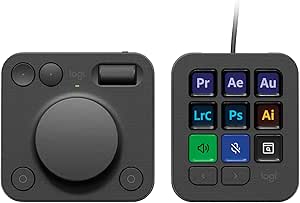 | Best for Creative App Control | Keys: 9 customizable LCD display keys | Controls: Low-friction dial and roller | Connectivity: USB-C | VIEW LATEST PRICE | See Our Full Breakdown |
| Logitech for Creators Litra Glow Premium LED Streaming Light, Graphite | 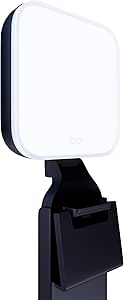 | Best for Video Calls and Streaming | Light source: Full-spectrum LED | Lighting features: TrueSoft LEDs and frameless diffuser | Mount adjustments: Height, tilt, and rotation | VIEW LATEST PRICE | See Our Full Breakdown |
| Logitech computer accessorie | Connectivity |
|---|---|
| Logitech G305 Lightspeed Wirel | LIGHTSPEED wireless |
| Logitech Brio 101 Full HD 1080 | — |
| Logitech Lift Vertical Ergonom | Bluetooth Low Energy or Logi Bolt USB receiver |
| Logitech MK270 Full-Size Wirel | 2.4 GHz wireless via USB-A nano receiver |
| Logitech Mobi Fold Foldable Wi | Bluetooth |
| Logitech MX Keys S Combo Wirel | Bluetooth Low Energy or included Logi Bolt USB receiver |
| Logitech M196 Compact Ambidext | Bluetooth |
| Logitech Studio Series Desk Ma | — |
| Logitech MK540 Advanced Wirele | USB wireless receiver |
| Logitech K400 Plus Wireless To | Wireless RF via USB Unifying receiver |
| Logitech MX Creative Console w | USB-C |
| Logitech for Creators Litra Gl | — |
More Details on Our Top Picks
Logitech G305 Lightspeed Wireless Gaming Mouse – Black
The G305 is my pick for buyers who want a responsive gaming mouse without a cable or a complex setup. Its 1 ms LIGHTSPEED report rate and HERO sensor make fast cursor movement feel like the priority, while the compact 3.4-ounce body suits quick repositioning. Compared with the comfort-first Logitech Lift, this shape is aimed at maneuverability, not a more upright wrist posture. Six programmable buttons cover everyday gaming controls, though players who need a larger bank of commands should look at a more feature-heavy gaming mouse. The AA-powered design can run for up to 250 hours in standard mode, but it does mean keeping spare batteries on hand instead of recharging an internal cell. Its plastic enclosure also feels less premium than the more polished options in Logitech’s lineup.
Pros:- LIGHTSPEED wireless connection with a 1 ms report rate
- HERO optical sensor supports sensitivity up to 12,000 DPI
- Lightweight 3.4-ounce body is easy to reposition
- Up to 250 hours of standard battery life from one AA battery
Cons:- Uses a replaceable AA battery rather than internal USB charging
- Six programmable buttons offer fewer controls than advanced gaming mice
- Plastic enclosure may feel less premium
Best for: PC and Mac gamers who want low-latency wireless tracking, a light mouse, and straightforward programmable controls.
Not ideal for: Buyers who want a rechargeable mouse, many programmable inputs, or an ergonomic vertical shape.
- Connectivity:LIGHTSPEED wireless
- Sensor:HERO optical
- DPI range:200–12,000 DPI
- Report rate:1 ms
- Weight:3.4 oz (99 g)
- Battery:1 included AA battery; up to 250 hours standard use
- Buttons:6 programmable
- Hand orientation:Ambidextrous
Our verdict“Choose the G305 if responsive wireless gaming and a lightweight build matter more than recharging or extra buttons.”
Logitech Brio 101 Full HD 1080p Webcam, Black
The Brio 101 is a practical webcam upgrade for people whose laptop camera leaves them looking dim or unclear on calls. 1080p Full HD video gives it a sharper starting point than a basic built-in camera, and RightLight is designed to brighten the image and reduce shadows. Unlike the Logitech Litra Glow, which adds dedicated lighting to a streaming setup, the Brio 101 keeps things simple with image adjustment built into the webcam. Its sliding privacy cover is a useful physical safeguard between meetings, and USB-A makes setup straightforward on compatible computers. The tradeoff is a fixed-focus lens and a 60-degree view, so it offers less framing flexibility than a more adjustable camera. The mono microphone is convenient for calls, but buyers seeking richer audio will want a separate mic or headset.
Pros:- Full HD 1080p video for clearer calls than a basic laptop camera
- RightLight helps brighten the image and reduce shadows
- Integrated sliding privacy cover
- USB-A connection and built-in mono microphone
Cons:- Fixed focus limits flexibility for changing subject distances
- 60-degree viewing angle offers a relatively narrow frame
- Built-in mono microphone may not suit users seeking richer audio
Best for: Remote workers and students who want a simple 1080p USB-A webcam with a built-in privacy shutter.
Not ideal for: Streamers, presenters who move around on camera, or users who need adjustable focus or a wider view.
- Resolution:1080p Full HD
- Connection:USB-A
- Microphone:Built-in mono
- Privacy:Integrated sliding cover
- Focus:Fixed focus
- Viewing angle:60 degrees
- Dimensions:1.26 × 2.87 × 2.62 inches
- Compatibility:Windows 7 or later, macOS 10.10 or later, Chrome OS
Our verdict“Pick the Brio 101 for uncomplicated, sharper video calls, but choose a more adjustable camera and separate audio gear for production work.”
Logitech Lift Vertical Ergonomic Wireless Mouse, Right-Handed, Graphite
The Lift earns its place for desk workers who want a mouse shaped around hand posture rather than gaming speed or travel size. Its 57-degree vertical design, thumb rest, and textured grip encourage a more upright forearm position, making it a distinct alternative to the conventional shape of the Logitech G305. Quiet clicks and the SmartWheel suit long work sessions, while Bluetooth or Logi Bolt connectivity lets it pair with different setups. The Lift also supports switching among up to three devices, a useful advantage for people moving between a computer and tablet. Its main limitation is fit: this right-handed model is intended for small to medium hands, so larger-handed users should look elsewhere. It is also heavier than a compact travel mouse, and some customization depends on Logi Options+ software.
Pros:- 57-degree vertical shape with a thumb rest supports a more upright posture
- Bluetooth Low Energy and Logi Bolt connection options
- Can switch between up to three devices
- Quiet clicks, SmartWheel, and up to 24 months of AA battery life
Cons:- Right-handed design is sized for small to medium hands
- At 125 g, it is heavier than compact travel-focused mice
- Some customization requires Logi Options+ on Windows or macOS
Best for: Right-handed office workers with small to medium hands who want a vertical mouse for regular computer use and multiple devices.
Not ideal for: Left-handed users, people with large hands, or gamers who prefer a low-profile shape and fast repositioning.
- Design:57-degree vertical ergonomic shape
- Hand orientation:Right-handed
- Recommended hand size:Small to medium
- Connectivity:Bluetooth Low Energy or Logi Bolt USB receiver
- Buttons:4 customizable
- Tracking:Optical, up to 4,000 DPI
- Weight:125 g
- Battery life:Up to 24 months with 1 AA battery
Our verdict“Choose the Lift for a posture-focused everyday mouse if its right-handed, small-to-medium fit matches your hand.”
Logitech MK270 Full-Size Wireless Keyboard and Mouse Combo, Black
The MK270 is the most straightforward way in this group to replace both a keyboard and mouse at once. Its full-size QWERTY layout, number pad, and eight multimedia hotkeys suit home offices where typing and common media controls matter more than compact dimensions. The included compact mouse makes it more of a complete desk starter set than the standalone Logitech G305, but it is less tailored to gaming and has no listed programmable controls. A single USB-A receiver connects both devices over a range of up to 33 feet, and the keyboard’s spill-resistant design adds some protection against routine desk mishaps. Battery life is a strong point, yet both pieces use batteries rather than rechargeable power. The mouse may also feel small to buyers accustomed to a full-size pointer.
Pros:- Full-size 104-key keyboard includes a number pad
- Eight multimedia hotkeys and adjustable tilt legs
- Spill-resistant keyboard with quiet, low-profile keys
- Up to 33 feet of wireless range and long stated battery life
Cons:- Keyboard and mouse both require batteries
- Included mouse is compact rather than full-size
- Listed operating-system compatibility is limited to Windows
Best for: Home-office users who need a full-size Windows keyboard and a basic wireless mouse in one package.
Not ideal for: Mac users, people seeking rechargeable peripherals, or buyers who want a larger or gaming-oriented mouse.
- Connectivity:2.4 GHz wireless via USB-A nano receiver
- Wireless range:Up to 33 ft (10 m)
- Keyboard layout:QWERTY, 104 keys
- Keyboard features:Spill-resistant design, low-profile keys, 8 multimedia hotkeys, adjustable tilt legs
- Mouse:Compact, ambidextrous
- Keyboard battery life:Up to 36 months
- Mouse battery life:Up to 12 months
- Compatibility:Windows
Our verdict“Choose the MK270 if you need a practical full-size keyboard-and-mouse set for a Windows desk and accept battery-powered operation.”
Logitech Mobi Fold Foldable Wireless Mouse with Quiet Click, Graphite
The Mobi Fold is the clearest choice here for people who carry a mouse between home, office, and mobile devices. Its foldable design prioritizes packing convenience, while quiet clicks help keep shared workspaces and travel settings less disruptive. Bluetooth pairing with up to three devices makes it more flexible across a laptop, phone, and tablet than the USB-receiver-based Logitech MK270. The 4,000 DPI optical sensor and Adaptive Touch Scrolling give it a more capable feature set than a bare-bones travel pointer, and the rechargeable battery can last up to a month per full charge. The tradeoffs are its right-handed shape and plastic enclosure, which may not suit every user or feel especially premium. A USB-C cable is not included, so charging requires having a compatible cable already available.
Pros:- Foldable design makes it easier to pack for travel
- Quiet clicks suit shared offices and public workspaces
- Bluetooth Easy-Switch supports up to three devices
- Up to one month of use per full charge, with a stated 22 hours from a one-minute charge
Cons:- Right-handed design excludes left-handed users
- USB-C charging cable is not included
- Plastic enclosure may feel less substantial than a full-size desk mouse
Best for: Mobile professionals who want a foldable, quiet mouse that can pair with a laptop, phone, and tablet.
Not ideal for: Left-handed users, people who prefer a full-size desktop mouse, or buyers without a compatible USB-C charging cable.
- Connectivity:Bluetooth
- Movement detection:Optical
- Maximum sensitivity:4,000 DPI
- Buttons:4
- Hand orientation:Right-handed
- Device support:PC, smartphone, tablet
- Battery life:Up to one month per full charge
- Operating systems:Windows, macOS, Chrome OS, Android, iPadOS
Our verdict“Pick the Mobi Fold if portability and multi-device Bluetooth matter more than an ambidextrous or full-size design.”
Logitech MX Keys S Combo Wireless Keyboard and Mouse, Graphite
The MX Keys S Combo is the most capable all-in-one desk setup in this group: its quiet, laptop-like keys pair with a seven-button mouse that tracks on glass, so it suits detailed work across varied surfaces. Both devices can switch among up to three paired devices, a useful advantage over the single-receiver MK540 when moving between a work computer and a tablet. Adaptive backlighting adds convenience in changing light, while rechargeable batteries avoid routine replacements. The tradeoff is a more involved setup: this combo does not work with other Logitech USB receivers, and Logi Options+ customization is limited to Windows and macOS. It is also a poor fit for anyone seeking a light travel set; the keyboard alone weighs 810 g. Choose it for flexibility and refined desk use, not simplicity or portability.
Pros:- Pairs with up to three devices for easier switching between computers and tablets.
- Spherically dished, laptop-like keys support quiet typing.
- Adaptive backlighting responds to nearby hands and ambient light.
- Darkfield sensor tracks on glass at least 4 mm thick.
Cons:- Cannot connect through other Logitech USB receivers.
- Logi Options+ customization is available only on Windows and macOS.
- The full-size keyboard is relatively heavy for carrying between workspaces.
Best for: People who switch among several computers or tablets and want a quiet, backlit keyboard with a precise mouse for a permanent desk.
Not ideal for: Travelers seeking a compact setup, or Linux, Chrome OS, and iPadOS users who need access to Logi Options+ customization.
- Connectivity:Bluetooth Low Energy or included Logi Bolt USB receiver
- Device pairing:Up to 3 devices
- Compatible operating systems:Windows, macOS, Linux, Chrome OS, iPadOS, Android
- Keyboard layout and keys:QWERTY; 104 keys
- Keyboard weight:810 g
- Keyboard battery:Rechargeable 1500 mAh Li-Po
- Mouse sensor and buttons:Darkfield optical, 8K DPI; 7 buttons
- Mouse battery:Rechargeable 500 mAh Li-Po
Our verdict“Choose the MX Keys S Combo for multi-device desk work and premium typing and tracking, but skip it if portability or receiver flexibility matters more.”
Logitech M196 Compact Ambidextrous Bluetooth Wireless Mouse, Rose
The M196 is the straightforward pick for a laptop bag or shared workspace: it connects directly over Bluetooth, so unlike the Logitech K400 Plus, it does not occupy a USB port with a receiver. Its light, ambidextrous shape also works for either hand, making it an easy everyday alternative to the right-handed Lift. That simplicity brings limits. The 1000 DPI optical sensor and two-button design are meant for ordinary pointing and scrolling, not the finer control or extra inputs offered by the MX Keys S Combo’s mouse. It also runs on a replaceable AA battery rather than a rechargeable one. The stated battery life of up to 12 months and auto-sleep help reduce battery changes, but buyers who want configurable controls or advanced tracking should choose a more capable model.
Pros:- Bluetooth connection works without a USB receiver.
- Compact, lightweight design is easy to carry.
- Ambidextrous shape accommodates left- and right-handed users.
- Auto-sleep helps extend the life of its included AA battery.
Cons:- Requires a replaceable AA battery rather than charging by cable.
- 1000 DPI tracking and basic controls are less suited to precision-heavy work.
- The listed buttons are not customizable.
Best for: Laptop and tablet owners who want a small, receiver-free mouse for everyday browsing and office tasks, including left-handed users.
Not ideal for: Users who need customizable buttons, high-precision tracking, or a rechargeable mouse for frequent intensive work.
- Connectivity:Bluetooth
- Tracking:Optical, maximum sensitivity 1000 DPI
- Buttons:2
- Hand orientation:Ambidextrous
- Compatible operating systems:Windows, macOS, Linux
- Battery:1 AA battery included
- Battery life:Up to 12 months
- Weight and dimensions:2.65 ounces; 3.9 x 2.36 inches
- Recycled plastic content:66% for Rose
Our verdict“Pick the M196 for uncomplicated, portable Bluetooth pointing, but choose the MX Keys S Combo mouse for more precise tracking and configurable controls.”
Logitech Studio Series Desk Mat, Large, Mid Grey
The Studio Series Desk Mat is the accessory in this group that improves the space around a Logitech mouse rather than replacing one. Its fine-weave surface offers a smooth, quiet glide, while the anti-slip rubber base helps keep the mat steady during routine work. The 30 × 70 cm footprint gives a mouse and keyboard room to share one surface, unlike a compact mouse-only pad. Spill resistance and wipe-clean care make it more practical for daily desk use, though the finish is not a reason to treat it as waterproof. Its large size can crowd a small desk, and the base contains latex—a meaningful limitation for people with latex sensitivities. Compared with the receiver-free M196, this is not a portable computer accessory; it makes the most sense as a fixed-desk upgrade.
Pros:- Fine-weave cloth provides smooth, quiet mouse movement.
- Anti-slip natural rubber base helps hold the mat in place.
- Spill-repellent surface can be wiped with a damp cloth.
- Surface fabric and inner layer use recycled polyester.
Cons:- The 30 × 70 cm size needs substantial desk space.
- Natural rubber base contains latex.
- Spill resistance does not mean the surface is waterproof.
Best for: Desk-based users who want a shared keyboard-and-mouse surface that protects a roomy work area and keeps mouse movement quiet.
Not ideal for: People with limited desk space, latex sensitivities, or a need for a portable accessory they can pack with a laptop.
- Color:Mid Grey
- Dimensions:11.8 × 27.5 in (30 × 70 cm)
- Surface:Fine-weave cloth
- Base:Anti-slip natural rubber; contains latex
- Materials:Surface fabric and inner layer made from recycled polyester
- Surface properties:Spill-resistant, wrinkle-resistant, shrink-resistant, anti-fray edges
- Warranty:1-year limited hardware warranty
Our verdict“Choose this mat for a spacious, settled desk that needs a quiet shared surface, but skip it if desk space or latex compatibility is a concern.”
Logitech MK540 Advanced Wireless Keyboard and Mouse Combo
The MK540 Advanced suits a traditional workstation where comfort and long battery intervals matter more than rechargeable hardware or multi-device switching. Its full-size keyboard includes a palm rest, three tilt positions, and programmable hotkeys, giving it a more supported typing setup than the compact, TV-oriented K400 Plus. The ambidextrous mouse also makes the set workable for left- or right-handed users. A single USB receiver provides a stated range of up to 33 feet, while the keyboard and mouse are rated for up to 36 and 18 months of battery life, respectively. The tradeoff is that both devices need replaceable batteries, and the listed compatibility is narrower than the MX Keys S Combo’s. Its spill-resistant keyboard handles only limited spills, so it should not be treated as waterproof.
Pros:- Palm rest and three tilt positions support a more adjustable typing setup.
- Programmable hotkeys provide quick access to common functions.
- Ambidextrous mouse works for either hand and has soft rubber side grips.
- Stated battery life reaches up to 36 months for the keyboard and 18 months for the mouse.
Cons:- Keyboard and mouse require separate AAA and AA batteries.
- Compatibility is listed for Windows and Chrome OS, not macOS or Linux.
- Spill resistance covers limited spills only; the keyboard must not be immersed.
Best for: Windows or Chrome OS desktop users who want a full-size keyboard with wrist support, adjustable tilt, and long stated battery life.
Not ideal for: People who switch among multiple devices, prefer rechargeable accessories, or need compatibility with macOS, Linux, or mobile systems.
- Connectivity:USB wireless receiver
- Wireless range:Up to 33 ft
- Keyboard layout and keys:QWERTY; 104 keys
- Keyboard dimensions and weight:7.62 x 18 x 0.94 in; 28.4 oz
- Keyboard battery and life:2 AAA batteries; up to 36 months
- Mouse buttons and orientation:3 buttons; ambidextrous
- Mouse battery and life:1 AA battery; up to 18 months
- Compatibility:Windows 7, 8, 10 or later; Chrome OS
Our verdict“Choose the MK540 for a comfortable, full-size Windows or Chrome OS workstation, but look to the MX Keys S Combo for rechargeable power and broader device pairing.”
Logitech K400 Plus Wireless Touch TV Keyboard with Touchpad, Black
The K400 Plus is built for a different job from the MK540: controlling a computer connected to a TV from across the room. Its integrated touchpad means there is no separate mouse to find, while the included USB receiver provides a stated range of up to 33 feet. That makes it a simpler couch setup than pairing a full-size keyboard and mouse combo, though the 84-key layout and compact touchpad offer less room for extended typing and precise pointer work. Quiet keys and a spill-resistant design suit casual home use, and the stated battery life reaches up to 18 months under specified conditions. Unlike the Bluetooth M196, it needs a receiver and two batteries. Choose it for media navigation and occasional typing, not as a substitute for a full workstation keyboard.
Pros:- Built-in touchpad combines pointer and keyboard control in one device.
- USB receiver setup is plug-and-play, with a stated range up to 33 feet.
- Quiet keys suit shared living spaces and media use.
- Spill-resistant design and stated battery life of up to 18 months support casual home use.
Cons:- Requires two batteries and a USB receiver.
- Compact 84-key layout and touchpad are less suited to extended typing or precise cursor work.
- Compatibility is limited to Windows, Android, and Chrome OS.
Best for: People using a Windows, Android, or Chrome OS computer connected to a television who want keyboard and pointer control from the couch.
Not ideal for: Desk workers who type for long stretches, users who want a separate ergonomic mouse, or owners of devices outside the listed operating systems.
- Connectivity:Wireless RF via USB Unifying receiver
- Wireless range:Up to 33 ft (10 m)
- Keys and layout:84 keys; QWERTY
- Touchpad dimensions:2.99 × 1.85 in (76 × 47 mm)
- Compatibility:Windows 7 and later, Android 7 and later, Chrome OS
- Battery life:Up to 18 months
- Power:2 batteries required
- Water resistance:Water-resistant, spill-resistant design
- Certification and footprint:Certified carbon neutral; product carbon footprint 4.9 kg CO2e
Our verdict“Pick the K400 Plus for couch-based PC-to-TV control without a separate mouse, but choose the MK540 for sustained desk typing.”
Logitech MX Creative Console with 9 Customizable Keys, Graphite
The MX Creative Console is the most specialized accessory in this roundup: its nine customizable LCD keys, dial, and roller put frequently used commands within reach rather than replacing a standard keyboard or mouse. That makes it a better fit for editing and design workflows than the everyday input focus of the MX Keys S Combo, while its profiles and up to 15 keypad pages can accommodate many app-specific shortcuts. The dial and roller offer tactile control for adjustments that can feel less direct with a mouse. The tradeoff is setup: customization depends on Logi Options+, so buyers who want a plug-in-and-go accessory may prefer the simpler Brio 101 webcam. It also runs on two batteries, rather than drawing power over its USB-C connection.
Pros:- Nine customizable LCD keys can display user-uploaded icons and launch assigned actions.
- Dial and roller offer tactile controls for precise adjustments.
- Up to 15 keypad pages per profile can organize shortcuts across supported workflows.
- Integrations and recommended profiles support creative and productivity apps.
Cons:- Customization requires the Logi Options+ app.
- Requires two batteries, adding a power-management task.
- Its specialized controls are less useful for buyers who mainly need standard typing and pointing.
Best for: Video editors, designers, and other frequent app users who want programmable shortcuts and tactile adjustment controls at their desk.
Not ideal for: Buyers seeking a general-purpose keyboard or mouse, or anyone who does not want to configure controls through Logi Options+ and manage battery power.
- Keys:9 customizable LCD display keys
- Controls:Low-friction dial and roller
- Connectivity:USB-C
- Compatible operating systems:Windows 10 or later; recent macOS versions
- Power:Battery powered; requires 2 batteries
- Material:Plastic enclosure; Graphite version contains 72% recycled plastic
- Color:Graphite
- Included software offer:3-month Adobe Creative Cloud All Apps membership
Our verdict“Choose the MX Creative Console if app-specific shortcuts and tactile adjustments matter more to your workflow than a conventional keyboard-and-mouse setup.”
Logitech for Creators Litra Glow Premium LED Streaming Light, Graphite
The Litra Glow addresses a different desk problem from the other picks: it improves how you appear on camera, rather than changing how you type or point. Its full-spectrum LEDs and wide, frameless diffuser are designed to soften illumination and reduce harsh shadows, giving it a more focused role than the Brio 101 webcam, which captures the image but does not light your face. Brightness and color temperature adjustments let you adapt the light to your room, while the three-way monitor mount helps direct it without a separate stand. That monitor-centered design is also its main limitation: placement options depend on having a suitable monitor, and app control through G HUB requires a computer. USB power makes setup straightforward, but it does tie the light to a powered USB connection.
Pros:- Frameless diffuser creates soft illumination designed to reduce harsh shadows.
- Adjustable brightness and color temperature suit different rooms and lighting preferences.
- Monitor mount adjusts for height, tilt, and rotation.
- Lightweight, USB-powered design supports straightforward setup.
Cons:- Monitor-based mounting can limit where the light can be positioned.
- G HUB app control requires a computer.
- USB power requires access to a suitable powered USB connection.
Best for: Remote workers, streamers, and video-call participants who use a monitor and want adjustable, softer front lighting.
Not ideal for: People who need flexible off-monitor lighting placement or want to adjust settings through G HUB without a computer.
- Light source:Full-spectrum LED
- Lighting features:TrueSoft LEDs and frameless diffuser
- Mount adjustments:Height, tilt, and rotation
- Controls:Adjustable brightness and color temperature; Logitech G HUB app
- Power:USB
- Weight:13.6 ounces
- Color:Graphite
- Warranty:1-year limited hardware warranty
Our verdict“Pick the Litra Glow if you make frequent video calls or stream from a monitor setup and want adjustable lighting rather than another camera or input device.”

How We Picked
I compared these 12 Logitech accessories by the job they do, rather than treating a mouse, webcam, desk mat, and lighting tool as interchangeable. The main criteria were practical performance for the intended task, ease of setup and everyday use, build and portability where relevant, and how well each product could serve a distinct type of buyer. I also weighed whether a product solved a common need or depended on a more specialized setup.
The order favors versatility and usefulness across everyday computer setups, with dedicated picks ranked for the people who benefit most from their specific purpose. That puts the MX Keys S Combo ahead as a broad productivity solution, while products such as the G305, K400 Plus, and MX Creative Console rank lower for general use but remain stronger choices within their niches. A bundle is not automatically a better fit: I considered whether buyers are likely to want both included devices and whether a standalone accessory addresses a more specific need.
Factors to Consider When Choosing Best Logitech Computer Accessories
Before choosing, I would start with the change you want your setup to make. A new mouse cannot solve a keyboard problem, and a webcam upgrade will not improve poor room lighting. These broader checks can help you avoid buying features you will not use.
Start With the Problem, Not the Product Type
List the friction you notice most often: discomfort, limited desk space, awkward calls, or control from across the room. This prevents a common mistake—choosing a familiar device category when another accessory would make a bigger difference. If your meetings look dim, lighting may matter as much as camera resolution. If you mostly work from a couch, a touchpad keyboard can suit the setup better than a standard desktop combo. A bundled keyboard and mouse only makes sense when you need both at once. Match the purchase to a recurring task rather than an appealing feature list.
Check Fit, Handedness, and Daily Comfort
Mouse shape is personal, so pay attention to hand size, grip, and which hand you use before prioritizing extra buttons or a small body. A vertical design is a distinct change in wrist and forearm position, not a universal comfort fix; some buyers may prefer a conventional shape. Right-handed ergonomic models also leave out left-handed users, making an ambidextrous option more flexible for shared desks. Compact mice travel well but can feel cramped during long sessions. Think about how many hours you use the pointer and whether portability or a relaxed grip matters more.
Choose Connectivity for Your Actual Devices
Wireless accessories can connect in different ways, and the right method depends on the computer or device you plan to use. Check whether your setup supports Bluetooth or needs a receiver, and note whether a work computer limits software installation or peripheral pairing. A receiver-based combo may be convenient when you want a dedicated connection, while Bluetooth can reduce the number of plugged-in accessories. For a living-room setup, also check the intended range and whether you can use the keyboard comfortably from your seating position. Confirm compatibility before buying rather than assuming every Logitech device connects the same way.
Treat Combo Kits as a Fit Decision
A combo can simplify purchasing and create a coordinated setup, but its value depends on whether both included devices suit you. If you already own a keyboard you like, a bundle may leave you with an unnecessary spare. Pay attention to layout, full-size versus compact dimensions, and mouse shape rather than judging the package as one unit. Shared household computers may benefit from a straightforward full-size set, while a specialized work setup may call for a more capable keyboard and a separate mouse choice. Compare the included devices with your current gear before replacing everything.
Separate Image Quality From Lighting Quality
For video calls and streaming, a webcam and a light solve related but separate problems. A camera captures the image, while lighting affects how clearly and evenly your face appears; upgrading only one may leave the other as the weak link. Consider the room’s existing light, where the monitor sits, and whether you need a tool for calls or a more controlled streaming setup. A dedicated light takes desk space and adds another device to position. Buyers who rarely appear on camera may get more from improving another part of their workstation.
Pay for Specialization Only When It Fits Your Routine
Dedicated gaming, creative-control, and living-room accessories can be useful, but their value depends on repeated use of the task they support. A customizable control surface makes more sense when your creative applications benefit from shortcuts you will actually assign. A gaming mouse is a focused choice for someone who wants a wireless pointer for play, not a guaranteed upgrade for every office task. A desk mat changes the surface and feel of a workspace, but it will not replace an ergonomic mouse or improve display quality. Before paying for a specialized tool, identify the repeated action it will simplify and check that your desk has room for it.
Frequently Asked Questions
Should I choose the MX Keys S Combo or buy a keyboard and mouse separately?
Choose the MX Keys S Combo when you want a coordinated productivity setup and expect to use both included devices. Buying separately makes more sense if you already own a keyboard you like, need a particular mouse shape, or want to prioritize one device first. A combo can reduce the work of matching products, but it also limits your ability to tailor each choice independently. Compare the keyboard layout and mouse fit against your daily habits before deciding. The convenience matters most when both pieces suit the same work routine.
Is a vertical mouse a good choice if my wrist feels uncomfortable?
A vertical mouse such as the Logitech Lift changes the hand’s orientation, which some buyers may find more comfortable than a conventional mouse. It is not a guaranteed remedy for wrist discomfort, and the right-handed shape may not suit everyone. Hand size, grip, desk height, and how you position your arm all affect comfort. If possible, try a similar shape before committing to a full-time change, and adjust gradually rather than assuming the new grip will feel natural immediately. Persistent pain is a reason to seek qualified advice, not just switch peripherals.
Which Logitech accessory makes the biggest difference for video calls?
The answer depends on what is currently limiting your image. The Brio 101 adds a dedicated Full HD webcam, while the Litra Glow is aimed at improving the light on your face. If your built-in camera is weak, a webcam can address image capture; if your face looks shadowed or uneven, lighting may be the more noticeable improvement. Some setups benefit from both, but you do not need to buy both automatically. Check your room lighting and camera position first so you address the actual problem.
What should I pick for a shared computer used by several people?
For a shared desk, prioritize familiar controls, a layout users can adapt to quickly, and a mouse that suits more than one person. The MK270 is a straightforward full-size combo, while the ambidextrous M196 offers a more flexible standalone mouse choice. A right-handed ergonomic model may work well for its main user but can be less convenient when handed between people. Also check whether users need a full keyboard or whether a couch-oriented touchpad keyboard better fits the computer’s location. Shared use favors simple, broadly comfortable choices over highly specialized shapes.
When is a specialized accessory better than another general-purpose upgrade?
A specialized accessory is the stronger choice when it supports a task you repeat often and a general device cannot handle as conveniently. The MX Creative Console is aimed at customizable creative controls, the G305 at wireless gaming, and the K400 Plus at controlling a computer or TV from a distance. If those tasks are occasional, a general keyboard or mouse may serve you better. Consider available desk space, device compatibility, and whether you will use the feature regularly. A clear, recurring use case is a better reason to choose specialization than the product’s extra capabilities alone.
Conclusion
For the broadest everyday productivity setup, I recommend the Logitech MX Keys S Combo as best overall; it is the clearest pick when you want both a keyboard and mouse built for desk work. The MK270 is my best value-style choice for buyers who want a basic full-size combo without a specialized workflow, while the MX Creative Console is the premium specialist option for creative users who will make use of customizable controls. Beginners setting up a straightforward computer station can start with the MK270, while the Lift suits right-handed buyers seeking a different mouse posture. For specific needs, choose the G305 for gaming, the K400 Plus for couch-based control, or the Brio 101 and Litra Glow when video calls need camera or lighting help. I would pick the accessory that fixes your most frequent annoyance first, then add specialized tools only when your routine calls for them.