
Set up your wireless earbuds, connect them to a phone or computer, and use their noise-cancelling mode. This guide is for first-time users and covers fit, Bluetooth pairing, sound controls, and basic checks. Allow about 15-25 minutes; you will need the earbuds, their charging case, and a compatible device.

Get the latest gadgets delivered free with Prime
- Fast, free delivery on millions of items
- Prime Video, Amazon Music and more included
- Member-only deals all year
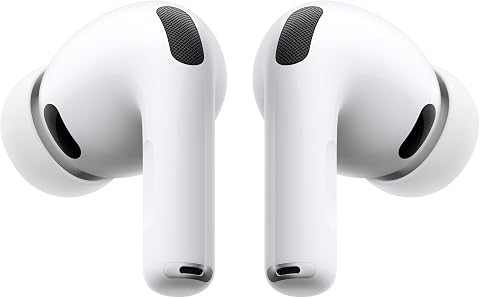
Apple AirPods Pro 3 Wireless Earbuds with Active Noise Cancellation
- ✔ ANC battery life: Up to 8 hours
- ✔ Transparency mode battery life: Up to 10 hours with Hearing Aid feature
- ✔ Ear-tip sizes: 5

TOZO Hybrid Active Noise Cancelling in Ear Wireless Earbuds, 68H Playtime
- ✔ ANC type: Hybrid active noise cancellation
- ✔ ANC battery life: Up to 9.5 hours per charge; 40 hours with case
- ✔ Battery life with ANC off: Up to 13 hours per charge; 68 hours with case

soundcore P30i by Anker Noise Cancelling Earbuds, Hands-Free Viewing
- ✔ ANC battery life: Up to 6 hours per charge; 25 hours with case
- ✔ Battery life with ANC off: Up to 10 hours per charge; 45 hours with case
- ✔ Noise reduction claim: Up to 42 dB
Difficulty: Beginner | Time: 15-25 minutes
What You’ll Need
Tools & Materials:
- Wireless earbuds with active noise cancellation
- Charging case and charging cable
- Phone, tablet, or computer with Bluetooth
- The earbuds’ companion app, if the manufacturer provides one
Knowledge:
- Basic ability to open Bluetooth settings and select a device
- Ability to follow the device’s on-screen pairing instructions
Charge the earbuds and case before setup. Keep the earbuds’ manual or product name nearby in case you need the manufacturer’s pairing or reset instructions. Active noise cancellation reduces steady background sound; it does not make every sound disappear.
Apple AirPods Pro 3 Wireless Earbuds with Active Noise Cancellation
For listeners who put noise cancellation first, AirPods Pro 3 are the clearest overall pick in this group. Apple claims up to twice as much unwanted-noise removal as AirPods Pro 2, and the earbuds pair that emphasis with Adaptive EQ, inward-facing microphones, and five ear-tip sizes. The extra tip options matter because a more secure seal can improve both comfort and the consistency of noise isolation. The stated battery life is up to eight hours with ANC on, which falls between the P30i’s six hours and the NC3’s 9.5 hours per charge.Apple also gives these earbuds a broader role than commuting: heart-rate sensing, workout tracking, hearing-health tools, and Live Translation add value for people already using an iPhone. Automatic Switching and Audio Sharing are especially relevant to households with several Apple devices. Compared with the TOZO NC3, AirPods Pro 3 offer a richer set of connected features but less stated ANC-on runtime. Compared with the soundcore P30i, they focus on listening and ecosystem tools instead of a case built for watching videos.The main limitation is ecosystem dependence: several headline features require an iPhone or Apple Intelligence, so Android buyers lose much of the model’s distinctive appeal. Apple’s noise claim is also a manufacturer comparison with its previous generation, not a direct test against the other earbuds here. Choose this pair for premium ANC and Apple integration; skip it if you want the longest listed battery life or platform-neutral extras.
Pros:
- Apple claims up to twice the noise reduction of AirPods Pro 2.
- Five ear-tip sizes support a more personalized seal.
- Up to eight hours of listening with ANC on.
- Apple device features include automatic switching and hearing-health tools.
Cons:
- Several standout functions depend on Apple devices and services.
- Stated ANC-on battery life is shorter than TOZO NC3’s.
- The noise claim is not a direct comparison with the other picks.
Best for: iPhone users seeking strong ANC, a tailored fit, and connected hearing or workout features.
Not ideal for: Android users who want the full feature set, or listeners who prioritize the longest stated ANC-on runtime.
Bottom line: AirPods Pro 3 are our top choice for Apple users who want ANC-led listening with useful ecosystem features and a tailored fit.
“AirPods Pro 3 are our top choice for Apple users who want ANC-led listening with useful ecosystem features and a tailored fit.”
TOZO Hybrid Active Noise Cancelling in Ear Wireless Earbuds, 68H Playtime
The TOZO NC3 stands out when long runtime and water resistance matter alongside ANC. TOZO lists up to 9.5 hours per charge with cancellation enabled and up to 40 hours total with the case; with ANC off, those figures rise to 13 and 68 hours. That makes it the strongest stated battery option in this lineup, ahead of both AirPods Pro 3 and soundcore P30i. Its IPX8 waterproof rating also makes it a more natural match for sweaty workouts or wet-weather use than the other two, whose supplied descriptions do not state the same level of protection.TOZO describes its hybrid ANC as reducing noise by up to 45 dB, with steady low-frequency sounds such as transit rumble and air-conditioning as examples. It also includes transparency mode and six microphones with ENC for calls. That combination makes the NC3 flexible for a commute that turns into a workday, while its app offers 32 EQ presets for adjusting the sound. Compared with AirPods Pro 3, it trades Apple’s hearing and ecosystem tools for longer stated runtime and a sport-oriented waterproof rating. Against the P30i, TOZO offers more ANC-on battery life and more EQ choices, while soundcore’s standout remains its phone-stand case.Buyers should treat the 45 dB figure as a product claim, not proof that it cancels more noise than Apple’s differently described claim; the supplied information gives no shared test method. A good fit remains important, and TOZO’s multiple ear-tip sizes are intended to help establish the seal. Its Bluetooth version is 5.3, one generation behind the P30i’s 5.4, and the short 10-minute charge is stated to add up to one hour, less than soundcore’s stated two hours. Choose NC3 for endurance and workout versatility; look elsewhere if Apple-specific features or a video-friendly case matter more.
Pros:
- Up to 9.5 hours per charge with ANC on and 40 hours with the case.
- IPX8 waterproof rating for sports and wet conditions.
- Transparency mode and six microphones with ENC for calls.
- App includes 32 EQ presets.
Cons:
- The 45 dB ANC claim is not directly comparable with Apple’s claim.
- A 10-minute charge is stated to add up to one hour of playback.
- Bluetooth 5.3 is older than the P30i’s Bluetooth 5.4.
Best for: Travelers, workout listeners, and call-heavy users who want long stated battery life and a waterproof design.
Not ideal for: Buyers seeking Apple ecosystem features or those who need ANC claims backed by a directly comparable test.
Bottom line: TOZO NC3 is the endurance pick, pairing the lineup’s longest stated ANC-on runtime with a waterproof build and flexible EQ.
“TOZO NC3 is the endurance pick, pairing the lineup’s longest stated ANC-on runtime with a waterproof build and flexible EQ.”
soundcore P30i by Anker Noise Cancelling Earbuds, Hands-Free Viewing
The soundcore P30i earns its place through practical travel convenience: the charging case opens into a phone stand, so a seat-back table or desk can become a hands-free viewing spot. It also provides adaptive ANC that detects external sound and selects a cancellation level, plus a transparency mode for hearing nearby announcements. These are useful touches for someone moving between a noisy journey and a show, though the viewing case is what most clearly separates it from AirPods Pro 3 and TOZO NC3.Battery life is the P30i’s clearest compromise for ANC-focused buyers. soundcore lists up to six hours per charge with cancellation on and up to 25 hours total with the case. That trails AirPods Pro 3’s stated eight hours and TOZO NC3’s 9.5 hours per charge with ANC enabled. The quick-charge claim—10 minutes for up to two hours of use—can help after a short top-up, and Bluetooth 5.4 is the newest version stated in this trio. Its 10 mm drivers and BassUp tuning point toward a bass-forward presentation, rather than the Apple model’s focus on adaptive listening features.Four microphones and an AI algorithm are intended to clarify calls, while the app provides EQ modes and adjustable ANC. The product description also lists IP54 protection, a more limited rating than TOZO’s IPX8 waterproof claim, so the P30i is the less compelling choice for demanding water exposure. Buyers should also note that six hours with ANC on may mean more frequent charging on long travel days. Choose it if the stand case is genuinely useful; pick TOZO for longer stated runtime or AirPods for Apple-centric features.
Pros:
- Case converts into a phone stand for hands-free viewing.
- Adaptive ANC and transparency mode support changing environments.
- 10-minute quick charge is stated to provide up to two hours of use.
- Bluetooth 5.4 and app-based ANC adjustment and EQ.
Cons:
- Up to six hours per charge with ANC on is the shortest stated runtime here.
- IP54 offers less water protection than TOZO NC3’s IPX8 rating.
- BassUp tuning may not suit listeners seeking a less bass-forward sound.
Best for: Commuters and travelers who watch shows on a phone and value an adjustable ANC app.
Not ideal for: Listeners who need the longest ANC-on battery life or stronger stated water protection for sports.
Bottom line: soundcore P30i is the practical travel pick when the phone-stand case matters more than maximum ANC-on endurance.
“soundcore P30i is the practical travel pick when the phone-stand case matters more than maximum ANC-on endurance.”
As an Amazon Associate we earn from qualifying purchases.
Before You Start
Set up the earbuds in a quiet, safe place where you can hear any prompts. If you are near traffic, cycling, or need to hear announcements, keep noise cancellation off or use the earbuds’ transparency mode. Avoid raising the volume to compensate for a poor seal; adjust the fit first.
Step-by-Step Instructions
Step 1: Charge and inspect the earbuds
Connect the charging case to power and place both earbuds in their charging slots. Check the case or app for a charging indicator, and remove any protective film covering the charging contacts. Let the earbuds charge until the indicator shows they are ready; the required time varies by model.
Tip:Make sure each earbud sits in its slot and the case closes fully. An earbud that is not seated correctly may not charge.
Check: The case or app shows that both earbuds have charge, or the earbuds power on when removed from the case.
Step 2: Choose and fit the ear tips
Try the tip size already fitted, then test the other included sizes if the earbuds feel loose or uncomfortable. Insert each earbud gently and rotate it as the manual shows. Aim for a stable, comfortable seal without pressing the tip deeply into the ear.
Tip:If the earbuds have an in-app fit test, run it after selecting a size. A poor seal can weaken bass and reduce noise-cancelling performance.
Check: The earbuds stay in place when you move your head, feel comfortable, and produce balanced sound in both ears.
Step 3: Put the earbuds in Bluetooth pairing mode
Open the charging case or remove the earbuds, then follow the model’s pairing instructions. Some models enter pairing mode automatically the first time; others require holding a case button or touching an earbud. Look for a flashing status light or a spoken pairing prompt.
Tip:If the earbuds connect to a device you used before, disconnect them there or turn off that device’s Bluetooth while pairing with a new one.
Check: The earbuds’ light or voice prompt indicates that they are discoverable.
Step 4: Pair the earbuds with your device
Open Bluetooth settings on your phone, tablet, or computer and turn Bluetooth on. Select the earbuds’ name from the available devices. Confirm any pairing prompt, and wait for the status to show connected. If two similarly named entries appear, follow the manual’s guidance and choose the main headset entry.
Tip:Keep the earbuds close to the device during pairing. Do not select an entry marked as a separate accessory or low-energy device unless the manufacturer instructs you to.
Check: Your device lists the earbuds as connected, and audio can play through them.
Step 5: Install the companion app and check updates
If the manufacturer offers an app, install it from your device’s official app store and open it with the earbuds connected. Follow its prompts to add the earbuds. Check the app for firmware updates, control customization, and a fit test. Keep the earbuds in the case or nearby as directed while an update runs, and do not interrupt power if the app warns against it.
Tip:Some earbuds work without an app. Use the manual for setup and controls if no companion app is available.
Check: The app recognizes the earbuds and shows their battery level or available controls.
Step 6: Turn on noise cancellation
Use the app or the earbud’s touch or button control to select noise cancellation. Manufacturers may label this mode ANC or Noise Canceling. Play audio at a low volume, then compare the sound of steady background noise with the mode on and off. Adjust the mode strength in the app if that option is available.
Tip:Noise cancellation works best with a good ear-tip seal and often reduces steady sounds more than sudden voices or sharp noises. Use transparency or ambient mode when you need to hear your surroundings.
Check: The app or device identifies noise cancellation as active, and steady background sound becomes less prominent.
Step 7: Test playback, controls, and calls
Play a familiar song or spoken recording and check both earbuds. Use the documented controls to pause, change volume, or switch listening modes. Make a short test call if you plan to use the earbuds for calls, and confirm that the other person can hear you clearly. Keep the volume at a comfortable level.
Tip:Control gestures vary by model. Check the manual or app if a tap, press, or swipe produces an unexpected action.
Check: Audio plays in both ears, the controls respond as expected, and the microphone works during a test call.
Step 8: Save the settings and store the earbuds
Set your preferred noise-control mode, touch controls, and any multipoint or device-switching options in the app. Return the earbuds to the case when you finish, and confirm they begin charging. Keep the case closed when not in use to help protect and recharge the earbuds.
Tip:If your earbuds support connection to multiple devices, check which device they prioritize so audio does not switch unexpectedly.
Check: The earbuds reconnect when you use them again, and the case or app shows that they are charging while stored.
Common Mistakes to Avoid
- Pairing the wrong entry from the Bluetooth list. — Use the manufacturer’s device name and instructions; remove old duplicate entries if they cause confusion.
- Using ear tips that are too small or too large. — Try the included sizes and run the app’s fit test when available. A secure seal should feel comfortable, not painful.
- Expecting noise cancellation to remove every sound. — Check that the mode is active and the fit is sealed. Expect some voices, sudden sounds, and high-pitched noise to remain audible.
- Turning the volume up to fix weak or uneven sound. — Check the fit, charging contacts, and audio balance first. Keep playback at a comfortable level to protect your hearing.
Troubleshooting
Problem: The earbuds do not appear in the Bluetooth list.
Solution: Put them back in pairing mode using the model’s instructions. Move them close to the device, turn off Bluetooth on any previously paired device, and scan again. If they still do not appear, charge them and follow the manual’s reset procedure.
Problem: Only one earbud connects or plays sound.
Solution: Place both earbuds in the case, confirm they are charging, and remove them together. Check the app for separate battery levels and clean visible charging contacts with a dry, soft cloth. Re-pair or reset them if the issue continues.
Problem: Noise cancellation seems weak.
Solution: Reseat the earbuds and try another tip size. Confirm that noise cancellation is selected rather than transparency or normal mode, then check the app for adjustable strength or a fit-test result.
Problem: Audio cuts out or the earbuds disconnect.
Solution: Keep the connected device nearby and remove obstacles between it and the earbuds. Charge the earbuds, disconnect unused paired devices, and update the companion app or firmware if an update is available.
What Success Looks Like
The earbuds appear as connected in Bluetooth settings, play audio in both ears, and respond to their controls. Noise cancellation is selected and reduces steady background sound when the earbuds fit well. The microphone works in a test call, and the earbuds charge in their case after use.
Next Steps
Store the earbuds in their case after use and recharge them when the app or case shows a low battery. Clean the tips and earbud surfaces according to the manufacturer’s care instructions; do not soak the earbuds or push debris into openings. Repeat the fit check if the sound changes or the earbuds begin to loosen. Consult the manual or manufacturer’s support if an earbud will not charge, pair, or respond after the documented reset steps.
Frequently Asked Questions
Do noise-cancelling earbuds block all outside sound?
No. Active noise cancellation reduces some background sound, especially steady low-frequency noise, but voices and sudden sounds may still be audible. Use transparency mode when you need to hear your surroundings.
Can I use noise cancellation without playing music?
Many models allow noise cancellation with no audio playing. Select the mode using the app or earbud control, then check the manual if the mode turns off automatically on your model.
Why does noise cancellation sound different in each ear?
Check that both earbuds fit securely and use matching tip sizes if those suit your ears. Clean the tips and openings as directed, confirm both earbuds have charge, and run the app’s fit test if available.
Will the earbuds connect to more than one device?
Some models support multipoint connections, while others connect to one active device at a time. Check the app or manual, then enable multipoint and pair the second device if supported.
What should I do if the earbuds will not pair again?
Check that Bluetooth is on and the earbuds have charge. If they are still linked to another nearby device, disconnect that device. Then enter pairing mode again; use the manufacturer’s reset steps if the connection still fails.