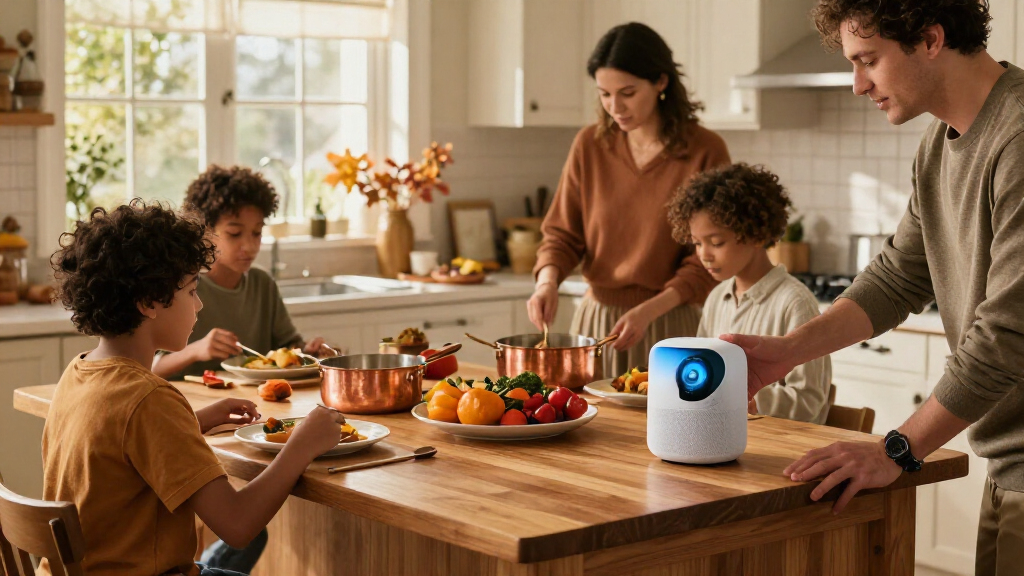

Thanksgiving hosts comparing smart home devices face a practical choice: buy a few reliable tools for the busiest parts of the day, or build a more connected setup that automates lighting, climate, entertainment, and guest access. The Thanksgiving Essentials Setup focuses on devices such as smart plugs, a video doorbell, and a speaker; the Premium Thanksgiving Setup adds features such as smart lighting, a thermostat, sensors, and a display. The main difference is breadth: essentials can address immediate hosting needs for less, while premium devices can coordinate more of the home but require more setup and spending. Choose essentials if you want targeted help for one gathering; choose premium if you host often and will use the added automation year-round.

Get the latest gadgets delivered free with Prime
- Fast, free delivery on millions of items
- Prime Video, Amazon Music and more included
- Member-only deals all year
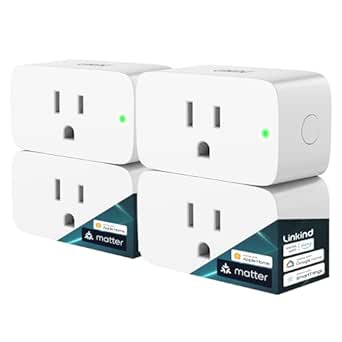
Linkind Matter Smart Plug, Work with Apple Home, Alexa, Siri, Google Home
- ✔ Connectivity: Matter over 2.4 GHz Wi-Fi
- ✔ Network requirements: 2.4 GHz Wi-Fi and IPv6
- ✔ Supported platforms: Apple Home, Alexa, Google Home, SmartThings, AiDot

Kasa Smart Plug HS103P4, Smart Wi-Fi Outlet, Touch Actuator, Works with Alexa, Echo, Google Home, No Hub Required, 15 Amp, UL Cer…
- ✔ Model: HS103P4
- ✔ Connectivity: Wi-Fi, 2.4 GHz required
- ✔ Supported assistants: Amazon Alexa and Google Assistant
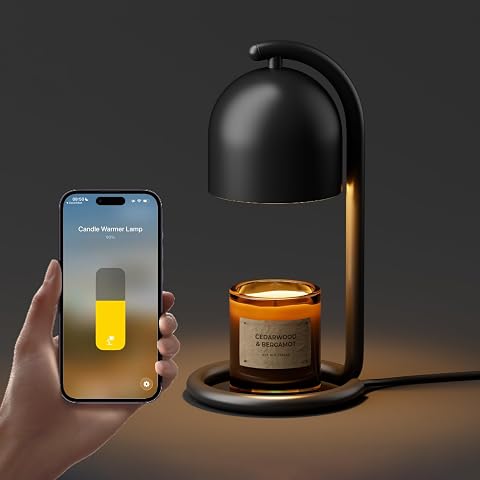
SwitchBot Smart Candle Warmer Lamp App & Voice Control, Flameless Wax Melter with Timer, Bulb x2, for Jar Candles, 1%-100% Dimmab…
- ✔ Device type: Smart candle warmer lamp
- ✔ Connectivity: Matter
- ✔ Supported platforms: Apple Home, Alexa, Google Home, Home Assistant, SmartThings
At a Glance
| Criteria | Thanksgiving Essentials Setup | Premium Thanksgiving Setup | Winner |
|---|---|---|---|
| Upfront cost | Lower; buy only a few devices tied to specific needs | Higher; costs rise with lighting, climate, sensors, and a hub or display | A |
| Setup effort | Usually quick; fewer devices and automations to configure | More involved; devices, routines, and household permissions need configuration | A |
| Guest arrival and access | A smart doorbell can show visitors, but entry management stays simple | Can combine a doorbell, smart lock, and arrival routines where compatible | B |
| Cooking and household tasks | Smart plugs can control selected lamps or approved small appliances; they do not replace kitchen supervision | A display or sensors can offer reminders and status, but they cannot manage cooking safely on their own | B |
| Lighting and atmosphere | A speaker or existing lamps can add music and basic ambiance | Smart bulbs or switches can create more coordinated scenes and schedules | B |
| Compatibility and reliability | Fewer devices reduce setup complexity, though compatibility still depends on the home’s ecosystem | More cross-device dependencies create more points to configure and troubleshoot | A |
| Long-term usefulness | Strong if the devices solve recurring needs; limited if the host wants broader automation | Better for frequent hosts who will use automation and devices throughout the year | Depends |
Linkind Matter Smart Plug, Work with Apple Home, Alexa, Siri, Google Home
For a Thanksgiving routine that may involve a living room lamp, decorative lights, or another compatible appliance, the Linkind Matter Smart Plug offers the broadest platform choice in this lineup. It supports Matter integrations with Apple Home, Alexa, Google Home, and SmartThings, while its AiDot app can be used without a separate hub. For the named platforms, however, the product details specify a Matter-certified controller; that is a meaningful setup requirement if the household does not already have one.Its best distinction from the Kasa is the claim of local network control after setup, allowing Matter devices on the LAN to communicate when internet access is down. That can matter during a holiday gathering, when a basic local light routine is preferable to depending on cloud access. Kasa remains the simpler fit for shoppers who only need its app, Alexa, or Google Assistant and do not want to consider Matter controllers. Linkind also needs 2.4 GHz Wi-Fi and IPv6, and voice control depends on the chosen platform and compatible setup.We would choose it for a home already investing in Matter, especially when one app or voice assistant should manage seasonal lighting. The compact form and 15 A / 1800 W rating add practical flexibility, but that capacity does not make every appliance suitable for a smart plug. It is less compelling if a household uses only Kasa’s supported controls, or if adding a controller and checking network compatibility would turn a simple holiday task into setup work.
Pros:
- Matter support for Apple Home, Alexa, Google Home, and SmartThings
- Local network communication can continue without internet after setup
- App remote control, voice control, schedules, and timers
- Compact body with 15 A / 1800 W capacity
Cons:
- A Matter-certified controller is required for the named smart home platforms
- Requires 2.4 GHz Wi-Fi and IPv6
- Platform compatibility and setup involve more dependencies than the Kasa’s stated app flow
Best for: Households with a Matter-compatible controller that want Thanksgiving lighting and compatible devices managed through an existing platform.
Not ideal for: Buyers who want the fewest setup dependencies, lack a compatible controller for their preferred platform, or use a Wi-Fi network without 2.4 GHz and IPv6 support.
Bottom line: Choose Linkind for the broadest smart home flexibility in this group, provided your network and controller meet its requirements.
“Choose Linkind for the broadest smart home flexibility in this group, provided your network and controller meet its requirements.”
Kasa Smart Plug HS103P4, Smart Wi-Fi Outlet, Touch Actuator, Works with Alexa, Echo, Google Home, No Hub Required, 15 Amp, UL Cer…
If your Thanksgiving plan is simply to have a lamp or string of compatible seasonal lights switch on at a chosen time, the Kasa HS103P4 keeps the job familiar. Setup runs through the Kasa app on 2.4 GHz Wi-Fi, and schedules or countdown timers can handle a daily welcome routine without requiring a separate smart home hub. Alexa and Google Assistant voice control are supported, so it fits naturally into homes already using those assistants.Compared with Linkind, Kasa asks less of a buyer who wants basic app scheduling: its supplied details do not call for a Matter controller. The tradeoff is that it lacks the described Matter support and local network fallback, and the listed voice assistants are narrower than Linkind’s platform range. For a home centered on Apple Home or SmartThings, Linkind is the better match. For Alexa or Google households with reliable Wi-Fi and a straightforward automation goal, Kasa may be easier to place in the holiday routine.The four-plug pack is useful when more than one room needs a schedule, though it is still a general outlet accessory rather than an ambiance device like the SwitchBot warmer. Its 15 A / 1800 W rating and UL certification provide useful specification points, but buyers should still confirm that the connected appliance is suitable for a smart plug. It is not the pick for anyone who needs offline local control, Matter integration, or Apple Home voice support.
Pros:
- Four-plug pack for automating several compatible devices
- Schedules and countdown timers through the Kasa app
- Works with Alexa and Google Assistant
- 15 A / 1800 W rating and UL certification
Cons:
- Requires 2.4 GHz Wi-Fi
- No Matter support is listed
- Offline local control is not specified
Best for: Alexa or Google Assistant households that want app-based schedules for compatible lamps, fans, or holiday lighting without a hub.
Not ideal for: Buyers who need Matter, Apple Home or SmartThings integration, offline local control, or a candle-warming centerpiece.
Bottom line: Pick Kasa for uncomplicated scheduled control in an Alexa or Google Assistant home that does not need Matter.
“Pick Kasa for uncomplicated scheduled control in an Alexa or Google Assistant home that does not need Matter.”
SwitchBot Smart Candle Warmer Lamp App & Voice Control, Flameless Wax Melter with Timer, Bulb x2, for Jar Candles, 1%-100% Dimmab…
Thanksgiving hosting is not only about turning lights on and off. The SwitchBot Smart Candle Warmer is the lineup’s dedicated atmosphere pick: it warms jar candle wax without an open flame and pairs fragrance with dimmable warm light. That makes it a more focused choice than either plug if the goal is a softly lit dining or living space. Unlike the Linkind and Kasa, though, it is not a general smart outlet for controlling other appliances.Its 1%–100% dimming, app control, cord controller, and timer allow brightness and operation to be adjusted for different moments, such as a subdued evening glow after dinner. Matter integration is listed for Apple Home, Alexa, Google Home, Home Assistant, and SmartThings, with no hub required according to the supplied product details. That gives it a broad ecosystem role compared with Kasa, while the included bulbs and specialized candle function make it less interchangeable with Linkind’s everyday plug automation.The main constraints are physical and practical. The lamp fits jar candles up to 3.74 inches wide and 5.51 inches tall, and the candle itself is not included. It is also a desktop device with a cord and indoor-only use, so it needs a suitable surface and a candle that matches the dimensions. Buyers seeking a simple way to automate existing lamps should choose one of the plugs; those who want flameless scent and adjustable light may find this the more distinctive seasonal addition.
Pros:
- Warms candle wax without an open flame or smoke
- Dimming from 1% to 100% with app and voice control
- Matter integration is listed for several major platforms
- Includes two bulbs and has a manual cord controller
Cons:
- Candle is not included
- Only fits jars up to 3.74 inches in diameter and 5.51 inches tall
- Desktop indoor device with a cord, rather than a general-purpose outlet
Best for: Hosts who want a flameless fragrance option and adjustable warm light for a table, living room, or guest space.
Not ideal for: Buyers who need a general smart plug, want an included candle, or have jar candles outside the stated size limits.
Bottom line: Choose SwitchBot when fragrance and controllable ambient light are the Thanksgiving priorities, and the jar candle fits.
“Choose SwitchBot when fragrance and controllable ambient light are the Thanksgiving priorities, and the jar candle fits.”
As an Amazon Associate we earn from qualifying purchases.
Key Differences
The Essentials Setup concentrates spending on visible, manageable problems: seeing who has arrived, adding music, and controlling a lamp or other suitable device without getting up. Its advantage is focus. With fewer devices to install and connect, a host has less to learn before guests arrive and fewer routines that could behave unexpectedly. Its limits are just as clear: it does not coordinate the whole home, and a smart plug is not a substitute for safe cooking practices or appliance instructions.
The Premium Setup can make the house feel more coordinated. Lighting scenes, thermostat schedules, a smart lock, and a display may help frequent hosts manage repeated routines. That extra coverage has value when the devices will be used well beyond Thanksgiving. For a single annual meal, the added cost and setup may bring little practical benefit. Neither setup can guarantee uninterrupted service: device compatibility, Wi-Fi, power, and account settings matter. Hosts should test routines before guests arrive and keep ordinary controls available.
Detailed Comparison
Upfront cost (Thanksgiving Essentials Setup wins — major)
The Essentials Setup wins by a major margin because it lets hosts start with one or two devices and stop when the main need is met. The Premium Setup can involve lighting, climate controls, a display, sensors, and access hardware, so the bill can grow quickly. For one holiday, that extra spending is hard to justify unless the devices address needs that recur throughout the year.
Setup effort (Thanksgiving Essentials Setup wins — moderate)
Essentials wins by a moderate margin: fewer apps, device pairings, and routines make it easier to get ready without turning holiday preparations into a technology project. Premium requires more configuration and testing, particularly when devices come from different brands. That work can pay off for a regular host, but it is an avoidable burden if the devices will rarely be used.
Premium wins by a moderate margin if it includes a compatible doorbell and smart lock: hosts may see arrivals and manage entry without leaving the kitchen. Essentials can cover visitor notifications with a doorbell, but usually offers less control over access. A smart lock is only useful when the household is comfortable with its security settings and keeps a working physical access plan.
Premium wins by a minor margin when a display or suitable sensors help surface timers, reminders, or room conditions. Neither setup should be treated as an autonomous kitchen manager. Essentials can operate compatible plugs for low-risk tasks, but hosts should follow appliance guidance and avoid remotely switching devices that need supervision. For most meal preparation, ordinary timers and attention remain central.
Premium wins by a moderate margin because coordinated bulbs or switches can create different scenes for dinner, conversation, and cleanup. Essentials can play music and control a lamp, which is enough for a modest gathering, but offers less room-by-room control. The benefit matters most in a home where guests use several spaces and the host will reuse those lighting routines.
Compatibility and reliability (Thanksgiving Essentials Setup wins — minor)
Essentials wins by a minor margin through simplicity: fewer connected devices mean fewer pairings and routines to troubleshoot. Premium can work smoothly when devices share a compatible ecosystem, but a mismatch can add friction. In either case, confirm compatibility with the existing phone, network, and smart home platform, then test each device before Thanksgiving rather than relying on a first-time setup during arrivals.
Long-term usefulness (major difference)
This depends on how often the household hosts and what it already owns. Premium can be better value for frequent hosts who will use smart lighting, climate controls, and access features every week. Essentials is better value when the goal is occasional help and the selected devices also serve everyday needs. Buying a larger system solely for one meal rarely makes financial sense.
Thanksgiving Essentials Setup: Pros and Cons
Pros:
- Lower initial spend and room to add devices gradually
- Less configuration before guests arrive
- Useful for targeted needs such as visitor alerts, music, or lamp control
Cons:
- Limited coordination across rooms and routines
- Fewer options for managing access and lighting scenes
- May not help much if the household already has these basic devices
Pros:
- More control over lighting, climate, and compatible entry devices
- Can support repeatable routines for frequent hosting
- Potentially greater year-round utility across household tasks
Cons:
- Higher total cost, especially when several device categories are added
- More setup and compatibility checks
- Additional automation can create more troubleshooting points
Who Should Choose What
Choose Thanksgiving Essentials Setup if:
- You want a modest, low-effort improvement for one holiday gathering.
- Your main needs are visitor alerts, background music, or controlling a suitable lamp.
- You prefer to buy only what you will use regularly and expand later.
Choose Premium Thanksgiving Setup if:
- You host often and will use the devices outside Thanksgiving.
- You want coordinated lighting or compatible smart access controls across the home.
- You already have a stable smart home platform and are comfortable configuring routines.
Skip both if: Skip a new setup if your existing devices already cover your needs, your Wi-Fi or ecosystem compatibility is uncertain, or you would rather avoid connected controls for household access and appliances.
Value for Money
Pay more only if the premium devices will earn their keep beyond Thanksgiving. A smart lock, lighting controls, or thermostat can be worthwhile for a household that hosts repeatedly and values those features on ordinary days. For an occasional host, a small Essentials Setup is the better value: it limits spending and setup to specific problems. Reuse existing speakers, lamps, timers, and kitchen tools before buying devices that duplicate them.
Final Verdict
For most occasional Thanksgiving hosts, choose the Thanksgiving Essentials Setup. A doorbell or speaker and a carefully selected smart plug can make the day easier without asking you to configure a full system. Choose the Premium Thanksgiving Setup if you host regularly, already use compatible devices, and will benefit from coordinated lighting, climate, or guest access throughout the year. The deciding factor is repeat use: if the extra devices will sit idle after the holiday, the premium spend is not worthwhile.
Frequently Asked Questions
What smart home devices are most useful for Thanksgiving?
Start with devices that solve a real hosting task: a compatible video doorbell for arrival alerts, a speaker for music, or smart lighting for rooms guests use. Check what you already own before adding more.
Is a premium smart home setup worth it for one Thanksgiving?
Usually not. It can make sense if you will use its lighting, climate, or access features regularly after the gathering. For a once-a-year event, targeted essentials are generally better value.
Can smart plugs help with Thanksgiving cooking?
They can control compatible devices when used within the manufacturer’s guidance, but they do not replace supervision or safe cooking practices. Do not remotely control an appliance if its instructions or the task call for direct attention.
Should I set up smart home devices on Thanksgiving Day?
No. Pair devices, confirm compatibility, and test routines ahead of time. Keep standard switches and controls accessible in case the network or automation does not respond as expected.