🔍 Read the full analysis: A Closer Look At 8 Drawing Tablets For Digital Art In 2027 on ThorstenMeyerAI.com

Get the latest gadgets delivered free with Prime
- Fast, free delivery on millions of items
- Prime Video, Amazon Music and more included
- Member-only deals all year
TL;DR
This is a product-comparison guide, not a report of a new 2027 product launch. The ThorstenMeyerAI.com guide compares eight drawing tablets across screen-based, screenless and standalone setups, naming the HUION Kamvas 13 (Gen 3) as its overall pick while emphasizing that compatibility, workspace and workflow should shape a buyer’s choice.
A ThorstenMeyerAI.com buying guide compares eight drawing tablets for digital art, recommending the HUION Kamvas 13 (Gen 3) as its overall pick for artists who want a connected display and dial controls. The guide’s main takeaway is that buyers should match a tablet to their setup—screen, screenless or standalone—rather than choose by pen specifications alone; it does not report a new product launch or independent testing results.
The ThorstenMeyerAI.com guide divides the options by how artists work. A screen tablet shows the artwork beneath the pen but typically needs a compatible computer and display connection. A screenless pen tablet sends pen input to a separate computer display, while a standalone tablet can run supported drawing apps without a computer connection for those tasks. Each arrangement has different requirements and tradeoffs.
ThorstenMeyerAI.com ranks the Kamvas 13 (Gen 3) first for its screen-and-controls combination, and names the HUION Inspiroy H1060P as a value option with a larger drawing area for computer users. The guide also covers compact pen tablets, two XP-Pen listings that may describe closely related devices, and two standalone models. It does not provide a dated test protocol or enough model-by-model specifications here to independently verify performance comparisons.
The 8 picks
- 1
 HUION Kamvas 13 (Gen 3) 13.3-Inch Drawing Pen Display with Dual Dial and StandView on Amazon →
- 2
 PicassoTab 10" Standalone Drawing Tablet (A10)View on Amazon →
- 3
 XP-Pen Artist 13.3 Pro V2 Drawing Tablet with Screen, 16K Pressure Levels, Re…View on Amazon →
- 4
 XPPen Artist 13.3 Pro V2 Drawing Tablet with ScreenView on Amazon →
- 5
 Frunsi RubensTab T11 Pro Standalone Drawing TabletView on Amazon →
- 6
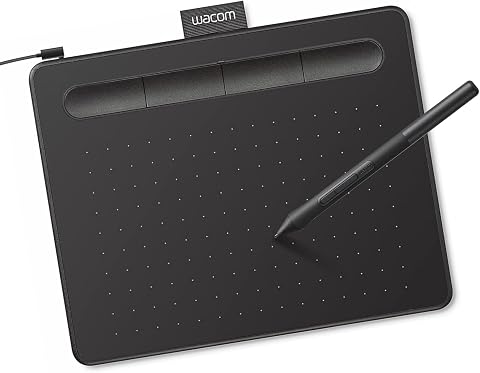 Wacom Intuos Small Wired Drawing Tablet with PenView on Amazon →
- 7
 HUION Inspiroy H1060P Graphics Drawing Tablet, 10 x 6.25 inView on Amazon →
- 8
 HUION Inspiroy H640P 6 × 4-Inch Drawing Tablet with Battery-Free StylusView on Amazon →
How Setup Shapes the Choice
The ThorstenMeyerAI.com comparison matters because these devices are not interchangeable. A screen can make it easier to draw directly on the image, but it adds a computer and connection requirement. A screenless tablet may cost less and suit an existing desktop workflow, though drawing while looking at another display takes adjustment. Standalone use reduces reliance on a computer for supported tasks, but app availability and workflow may be narrower.
The guide also cautions against equating more features with a better fit. Drawing area, portability, software compatibility and controls affect day-to-day use. A larger surface may give room for broad strokes but occupy more desk space; compact devices travel more easily but may constrain large gestures. These are practical distinctions for buyers to check before comparing advertised pen features.
Products Worth Considering

DJI Mini 3 Drone with DJI RC and 3-Axis Gimbal

Amazon Kindle Paperwhite (2024, 16 GB) – 7-inch Display, Black

Apple AirPods Pro (2nd Generation) Wireless Earbuds with USB-C MagSafe Charging Case
As an affiliate, we earn on qualifying purchases.
Three Tablet Workflows Compared
The ThorstenMeyerAI.com guide evaluates products by workspace, portability, controls and setup, rather than treating one specification as decisive. It positions screen tablets for artists who want to draw where the image appears. Screenless models are aimed at people comfortable working with a separate monitor, while standalone devices are for supported drawing tasks without a connected computer.
The guide identifies the HUION Inspiroy H1060P as having more drawing area than the smaller HUION H640P and Wacom Intuos Small. It says the H640P and Intuos Small favor portability, and advises buyers to check the exact package and specifications for the two XP-Pen Artist 13.3 Pro V2 listings rather than infer a meaningful difference from their names. The source supplies no prices, availability details or independent benchmark results.
Details Buyers Must Verify
The ThorstenMeyerAI.com source does not establish when the guide was published, whether the products or packages have changed, or what testing supports its ranking. It also does not specify prices, regional availability, or a full compatibility list for every tablet. Those details may affect whether a recommendation fits a particular buyer.
For the two XP-Pen Artist 13.3 Pro V2 listings, the guide says they appear closely related but does not resolve whether their specifications or included accessories differ. It likewise does not identify which drawing apps are supported on the Frunsi RubensTab T11 Pro or the PicassoTab A10. Buyers should check current manufacturer information for their computer, operating system, connection and preferred apps before purchasing.
Check Compatibility Before Buying
The ThorstenMeyerAI.com source describes no upcoming product announcement or testing milestone. The practical next step for readers is to compare current manufacturer listings and confirm the tablet’s software support, connection needs and included accessories. For screenless models, compare active drawing area with desk space and preferred hand movement; for screen tablets, check computer and display connections; for standalone devices, confirm the drawing apps required for the intended workflow.
Because the guide is framed for 2027 but gives no publication date or update schedule, whether its rankings and product details remain current is not established. Readers should treat the ranking as a starting point for comparison, not as confirmation that every model will work with a particular setup.
Key Questions
Which tablet does the guide recommend overall?
ThorstenMeyerAI.com names the HUION Kamvas 13 (Gen 3) as its overall pick for artists seeking a screen tablet with dial controls. The guide says it still requires a compatible computer and suitable connection.
Which option is presented as a value choice?
The ThorstenMeyerAI.com guide identifies the HUION Inspiroy H1060P as a value option for people who already have a computer and want a larger screenless drawing area.
What is the difference between screenless and standalone tablets?
A screenless pen tablet sends input to a separate computer display. A standalone model can run supported drawing apps without a computer connection for those tasks, but buyers need to check app compatibility and workflow.
Are the two XP-Pen listings different products?
The ThorstenMeyerAI.com source says the two Artist 13.3 Pro V2 listings appear closely related, but does not resolve their differences. It advises checking the exact specifications and included accessories.
Source: ThorstenMeyerAI.com