
TL;DR
The source compares eight gaming monitors, from a dual-mode 4K MSI display to 1080p competitive models and QD-OLED and ultrawide options. The right fit depends on the games, desk space and graphics card; the source does not provide independent test results, pricing comparisons or evidence about 2027 availability.
A buying guide from Thorsten Meyer AI compares eight high-refresh gaming monitors, ranging from a 27-inch dual-mode 4K MSI to compact 1080p screens, a curved 34-inch ultrawide and a QD-OLED Samsung. The comparison highlights a practical choice for PC players: higher resolution can improve image detail, but reaching high frame rates may place more demand on a graphics card.

Get the latest gadgets delivered free with Prime
- Fast, free delivery on millions of items
- Prime Video, Amazon Music and more included
- Member-only deals all year
The guide names the MSI MAG 272URDFA E16 as its overall pick for buyers seeking a combination of high resolution and refresh rate. Its listed modes are UHD at 160Hz and FHD at 320Hz. That flexibility comes with a tradeoff: the highest listed refresh rate is available at the lower resolution, and the guide says driving high frame rates at 4K requires a capable graphics card.
For a more conventional 27-inch QHD choice, the guide points to the AOC Q27G41ZE, an IPS monitor listed at 240Hz with a 260Hz overclocked mode. The Samsung Odyssey OLED G6 is the QD-OLED option, pairing QHD resolution with the contrast characteristics associated with OLED. The guide says its OLED Safeguard feature helps reduce burn-in risk, while noting that it does not remove that risk.
The other entries cover different sizes and priorities: the ASUS TUF VG259QM5A and Dell SE2426HG are 24-inch-class FHD displays listed at 240Hz; the 27-inch curved AOC C27G4ZH reaches 280Hz over DisplayPort and 240Hz over HDMI; and the 32-inch curved SANSUI is listed at 240Hz. The 34-inch Sceptre C345B-QU240T offers a 21:9, 3440-by-1440 view, but its wide body calls for substantial desk space.
Choose your gaming display for smooth play
Eight monitors span compact FHD screens to a 34-inch ultrawide. The best fit depends on your games, desk space and graphics card.
Resolution meets refresh rate
More pixels can demand more from your graphics card when targeting high frame rates.
- Lower resolution can suit systems prioritizing high frame rates.
- MSI reaches 320Hz in FHD mode.
- More pixels offer greater image detail.
- Actual performance depends on the graphics card, game and settings.
Match a monitor to your setup
The roundup groups options by the needs they may suit.
MSI MAG 272URDFA E16
The overall pick offers UHD at 160Hz or FHD at 320Hz; the top refresh rate uses the lower resolution.
AOC Q27G41ZE
A 27-inch IPS option listed at 240Hz, with a 260Hz overclocked mode.
ASUS and Dell
The ASUS TUF VG259QM5A and Dell SE2426HG are 24-inch-class displays listed at 240Hz.
Samsung and Sceptre
Samsung offers QD-OLED contrast characteristics; Sceptre pairs a 34-inch 21:9 view with a substantial desk-space requirement.
Check before buying
Specifications help narrow the choice, but they do not establish real-world performance.
- Match supported resolution and refresh modes to your graphics card and games.
- Check screen dimensions and stand fit for your desk.
- Confirm current price and availability with retailers.
- OLED Safeguard helps reduce burn-in risk, but does not remove it.
Matching Refresh Rate to Resolution
Refresh rate is only one part of a gaming display’s fit. The comparison shows how resolution and frame rate interact: 1080p models can be a more manageable target for systems prioritizing high frame rates, while QHD and UHD offer more pixels to render. Actual performance depends on the graphics card, game and settings; the guide provides no benchmark results to quantify those differences.
Panel and form factor also affect the decision. Buyers weighing image contrast may favor the QD-OLED Samsung, while a 21:9 ultrawide can suit games that benefit from a wider view. The guide’s listed specifications help readers narrow options, but do not establish that any one model is best for every player or setup.
Products Worth Considering

Kindle Paperwhite Signature Edition, 32 GB (12th Generation, 2024), Metallic Black

Kindle Paperwhite (12th Generation, 2024), 16 GB, 7-inch Display, Black
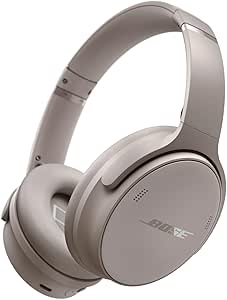
Bose QuietComfort Wireless Noise-Cancelling Headphones, Sandstone
As an affiliate, we earn on qualifying purchases.
Eight Displays, Different Tradeoffs
The roundup groups monitors with substantially different specifications under the same high-refresh category. Its options span FHD, QHD and UHD, screen sizes from 23.8 to 34 inches, flat and curved formats, and IPS and QD-OLED panels. This makes the guide a comparison of priorities rather than a direct ranking based on a single measure.
Several recommendations are tied to specific use cases: the guide positions the ASUS and Dell for compact competitive gaming, the AOC QHD model for a balance of detail and speed, and the Sceptre for ultrawide immersion. It also flags practical compromises, including limited stand adjustment on the AOC Q27G41ZE and relatively low pixel density on large FHD screens. These are the source’s buying assessments, not results from reported lab testing.
Availability and Testing Details
The supplied material does not state when the guide was published, whether all eight monitors will remain available in 2027, or what they currently cost. It does not include independent measurements of response time, brightness, color accuracy, input lag or real-world gaming performance. Refresh rates and other specifications are presented as listed figures, without details about testing conditions or required settings.
It is also unclear which graphics cards or games were used to assess the displays, and the guide does not compare warranty terms or regional configurations. Its note that OLED Safeguard helps reduce burn-in risk does not specify the feature’s limits or guarantee that burn-in will not occur. Readers should treat the roundup as a specification-based starting point rather than a verified performance ranking.
Check Fit Before Buying
Before choosing, buyers can compare the monitor’s supported resolution and refresh modes with their PC’s graphics capability, then check that the stand and screen dimensions fit their desk. Those considering the MSI dual-mode display should confirm which resolution is active at the refresh rate they want; buyers considering the ultrawide should check whether their games and workspace suit its wider format.
The guide provides no product links with confirmed current prices in the supplied material, so availability and pricing remain to be checked with retailers. A fuller comparison would need dated prices, hands-on testing and details on warranty, connectivity and stand adjustment across all eight models.
Key Questions
Which monitor does the guide recommend overall?
It names the MSI MAG 272URDFA E16 as its overall pick, citing UHD at 160Hz and FHD at 320Hz. The highest listed refresh rate is at FHD, not UHD.
Which option is listed for QHD at 240Hz?
The AOC Q27G41ZE is listed as a 27-inch QHD IPS display with a 240Hz native refresh rate and a 260Hz overclocked mode.
Which monitor in the roundup uses a QD-OLED panel?
The Samsung Odyssey OLED G6 is the QD-OLED entry. The guide associates it with QHD resolution and deep blacks, and says its OLED Safeguard feature reduces but does not eliminate burn-in risk.
Does the guide confirm 2027 prices or availability?
No. The supplied material gives no confirmed 2027 pricing or availability and does not specify its publication date.
Source: Thorsten Meyer AI