The best Black Friday smart home deals depend on whether you want an easy starter upgrade, wider compatibility, or a device that solves a specific household problem. My best overall pick is the Kasa Smart Plug Mini EP10P4, a practical four-pack for automating everyday lamps and appliances; the Linkind Matter Smart Plug stands out for homes built around Matter, while the Sensi Lite Thermostat is a focused choice for adding app-based temperature control. The main tradeoffs are ecosystem compatibility, installation needs, and whether a device’s extra features will get regular use. A smart lock or thermostat can make a larger change to daily routines, but a plug is simpler to set up and works across more situations. Read on for the full breakdown of all 15 options and how I’d choose between them.

Get the latest gadgets delivered free with Prime
- Fast, free delivery on millions of items
- Prime Video, Amazon Music and more included
- Member-only deals all year
Complete the kit



Key Takeaways
- The Kasa Smart Plug Mini EP10P4 is my best overall pick because a four-pack of 15A outlets makes it a flexible starting point for automating lamps and other compatible devices.
- The Linkind Matter Smart Plug is the clearest fit for multi-platform homes; Matter support can reduce ecosystem lock-in, but buyers still need a compatible controller and should check device requirements.
- The plug lineup has meaningful differences despite similar uses: Kasa offers familiar app-based control, while outdoor-rated EP40 outlets target yard equipment and seasonal lighting.
- Thermostats and smart entry devices need more planning than plugs. Wiring and HVAC compatibility matter for thermostats, while lock fit and entry preferences matter for the fingerprint-and-passcode deadbolt.
- The Echo devices serve different spaces, not just different budgets: the Show 11 is suited to a larger shared display, the Show 5 fits a compact counter or bedside table, and the Spot is purpose-built for an alarm-clock role.
| GHome Smart Wi-Fi Plug with Alexa and Google Home Compatibility, 4-Pack | 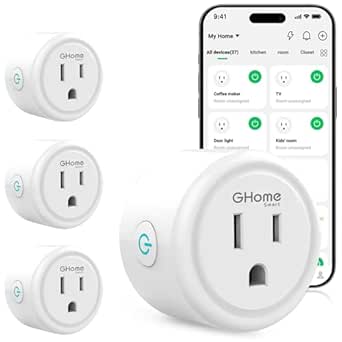 | Best Value for Adding Smart Control | Model: WP3 | Quantity: 4 smart plugs | Connectivity: Wi-Fi and Bluetooth | VIEW LATEST PRICE | See Our Full Breakdown |
| Sensi Lite Wi-Fi Smart Thermostat (ST25) | 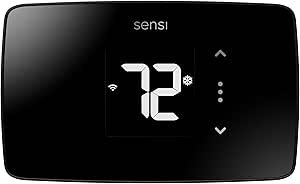 | Best for DIY Thermostat Upgrades | Model: ST25 | Connectivity: Wi-Fi; 2.4 GHz required | Power: Battery or C-wire; 2 AAA batteries included | VIEW LATEST PRICE | See Our Full Breakdown |
| Kasa Smart Wi-Fi Light Switch HS200-BL, Single Pole, Neutral Wire Required |  | Best for Hardwired Lighting | Model: HS200-BL | Switch type: Single-pole, one-way | Wiring requirement: Neutral wire required | VIEW LATEST PRICE | See Our Full Breakdown |
| Philips Wi-Fi Smart Deadbolt Lock with Fingerprint and Passcode Entry |  | Best for Flexible Keyless Entry | Model: DDL242X-1HW | Lock type: Smart deadbolt | Unlock methods: App, passcode, fingerprint, physical key, and compatible Alexa or Google Assistant voice control | VIEW LATEST PRICE | See Our Full Breakdown |
| Honeywell Home T5 Smart Wi-Fi Thermostat |  | Best for Detailed Weekly Scheduling | Model: RTH8800WF2022 | Connectivity: Wi-Fi | Display: 4.95-inch LCD touchscreen | VIEW LATEST PRICE | See Our Full Breakdown |
| Kasa Outdoor Smart Plug EP40 with Two Independently Controlled Outlets |  | Best Outdoor Pick | Model: EP40 | Outlets: 2, independently controlled | Maximum load: 15 A / 1875 W per outlet | VIEW LATEST PRICE | See Our Full Breakdown |
| GHome Smart Plug Mini, Wi-Fi Smart Outlet with Alexa and Google Home Compatibility, App Control, Timer, 4-Pack | 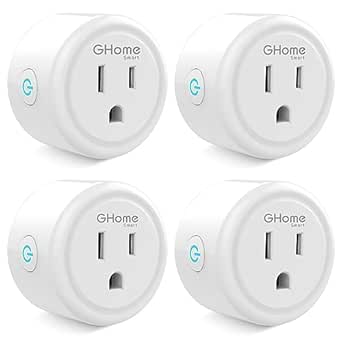 | Best for Beginners | Model: WP3 | Pack size: 4 plugs | Wireless network: 2.4 GHz Wi-Fi; does not support 5 GHz | VIEW LATEST PRICE | See Our Full Breakdown |
| Govee Smart Wi-Fi Plugs with Bluetooth, Alexa and Google Assistant Compatibility, 4-Pack |  | Best for Flexible Connectivity | Model: B5081 | Quantity: 4 plugs | Connectivity: Bluetooth and 2.4 GHz Wi-Fi | VIEW LATEST PRICE | See Our Full Breakdown |
| Amazon Echo Show 5 Smart Display with Alexa, Charcoal |  | Best Smart-Home Control Hub Display | Display: 5.5-inch touchscreen | Camera: 2 MP with built-in shutter | Speaker: 1.75-inch full-range speaker | VIEW LATEST PRICE | See Our Full Breakdown |
| EIGHTREE Wi-Fi Smart Plug, 15 A, 4-Pack |  | Best for SmartThings Users | Model: ET01 | Quantity: 4 plugs | Operating voltage: 120 V | VIEW LATEST PRICE | See Our Full Breakdown |
| Kasa Smart Plug Mini EP10P4, 15A Wi-Fi Outlet, 4-Pack | 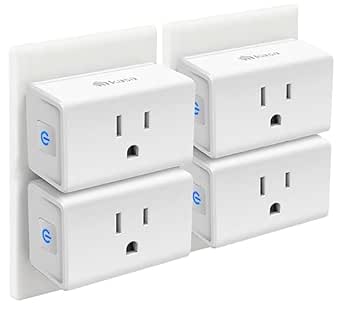 | Best Value for Simple Room-by-Room Automation | Pack size: 4 plugs | Maximum current: 15 A | Maximum wattage: 1,800 W | VIEW LATEST PRICE | See Our Full Breakdown |
| Amazon Echo Show 11 Smart Display with Full HD Touchscreen and Spatial Audio, Graphite |  | Best Premium Smart-Home Control Center | Display: 10.95-inch Full HD touchscreen, 1920 × 1200 | Dimensions: 10 × 5 × 7.2 in | Weight: 45.92 oz | VIEW LATEST PRICE | See Our Full Breakdown |
| Linkind Matter Smart Plug, 4-Pack | 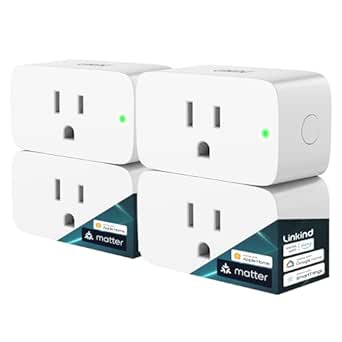 | Best for Matter-Ready Homes | Pack size: 4 plugs | Connectivity: Matter and 2.4 GHz Wi-Fi | Maximum power: 1,800 W | VIEW LATEST PRICE | See Our Full Breakdown |
| Honeywell Home RTH9585WF1004 Wi-Fi Smart Color Programmable Thermostat |  | Best for Colorful, Data-Rich Climate Control | Model: RTH9585WF1004 | Display: Customizable color LED touchscreen | Connectivity: Wi-Fi | VIEW LATEST PRICE | See Our Full Breakdown |
| Amazon Echo Spot Smart Alarm Clock with Alexa, Black |  | Best Compact Bedside Smart-Home Pick | Display: 2.83-inch touchscreen, 240 × 320 pixels | Dimensions: 4.5 × 4.1 × 4.4 in | Weight: 14.3 oz | VIEW LATEST PRICE | See Our Full Breakdown |
| Black Friday smart home deal | Model | Connectivity |
|---|---|---|
| GHome Smart Wi-Fi Plug with Al | WP3 | Wi-Fi and Bluetooth |
| Sensi Lite Wi-Fi Smart Thermos | ST25 | Wi-Fi; 2.4 GHz required |
| Kasa Smart Wi-Fi Light Switch | HS200-BL | — |
| Philips Wi-Fi Smart Deadbolt L | DDL242X-1HW | — |
| Honeywell Home T5 Smart Wi-Fi | RTH8800WF2022 | Wi-Fi |
| Kasa Outdoor Smart Plug EP40 w | EP40 | — |
| GHome Smart Plug Mini | WP3 | — |
| Govee Smart Wi-Fi Plugs with B | B5081 | Bluetooth and 2.4 GHz Wi-Fi |
| Amazon Echo Show 5 Smart Displ | — | — |
| EIGHTREE Wi-Fi Smart Plug | ET01 | 2.4 GHz Wi-Fi |
| Kasa Smart Plug Mini EP10P4 | — | 2.4 GHz Wi-Fi |
| Amazon Echo Show 11 Smart Disp | — | — |
| Linkind Matter Smart Plug | — | Matter and 2.4 GHz Wi-Fi |
| Honeywell Home RTH9585WF1004 W | RTH9585WF1004 | Wi-Fi |
| Amazon Echo Spot Smart Alarm C | — | — |
More Details on Our Top Picks
GHome Smart Wi-Fi Plug with Alexa and Google Home Compatibility, 4-Pack
For a Black Friday smart-home refresh, this four-pack offers a straightforward way to add schedules and voice control to ordinary plug-in appliances. No hub is required, and the plugs work with Alexa and Google Assistant as well as the GHome, Smart Life, and Tuya apps. That app flexibility gives it a different appeal from the Kasa HS200-BL: the GHome plugs automate lamps and appliances without replacing a wall switch or checking for neutral wiring.
The tradeoff is that these plugs need 2.4 GHz Wi-Fi, and setup starts in the GHome app, even if you later use another compatible app. Their 1200 W rating also makes them a poor choice for appliances beyond that limit. Pick this bundle for simple, distributed automations; skip it if you want to control a hardwired fixture or need a higher-capacity outlet.
Pros:- Four plugs support automation in multiple rooms from one bundle
- Works with Alexa and Google Assistant voice control
- Schedules, timers, grouping, and family sharing are supported
- No separate smart-home hub is needed
Cons:- Requires a 2.4 GHz Wi-Fi connection
- Initial setup must be completed through the GHome app
- 1200 W capacity limits which appliances are suitable
Best for: Shoppers adding schedules and voice control to several lamps or small appliances without installing a hub or replacing switches
Not ideal for: People with only 5 GHz Wi-Fi or anyone automating appliances that draw more than 1200 W
- Model:WP3
- Quantity:4 smart plugs
- Connectivity:Wi-Fi and Bluetooth
- Wi-Fi requirement:2.4 GHz
- Voice assistants:Amazon Alexa and Google Assistant
- Compatible apps:GHome, Smart Life, and Tuya
- Operating voltage and wattage:120 V; 1200 W
- Dimensions:2.1 x 2.1 x 1.1 in
Our verdict“Choose this four-pack to add basic app and voice control to several compatible appliances without changing your home’s wiring.”
Sensi Lite Wi-Fi Smart Thermostat (ST25)
The Sensi Lite is a practical Black Friday smart-home pick for buyers who want remote temperature control without taking on a complicated thermostat project. It supports scheduling, geofencing, and usage reports, and its battery option means many homes can install it without a C-wire. That gives it a more approachable installation profile than the Honeywell Home T5, which may need a C-wire or compatible power adapter.
It also works with Alexa, Google Assistant, and SmartThings, so it can fit into more than one connected-home setup. Still, “most systems” is not every system: some heating-only, cooling-only, and heat-pump configurations need extra power wiring or an accessory. Check system compatibility before buying, and note that this thermostat, like the T5, depends on Wi-Fi for remote features. It suits buyers who want core smart scheduling rather than a larger touchscreen interface.
Pros:- Battery or C-wire power supports more installation situations
- Includes scheduling, geofencing, remote access, and usage reports
- Compatible with Alexa, Google Assistant, and SmartThings
- Designed for DIY installation with a built-in level and step-by-step guidance
Cons:- Some system types still require a C-wire or compatible power accessory
- Requires a 2.4 GHz Wi-Fi connection for connected features
- LCD display is a simpler interface than the Honeywell Home T5 touchscreen
Best for: Homeowners with a compatible 24-volt heating or cooling system who want app scheduling and DIY installation, especially where a C-wire is absent
Not ideal for: People with an incompatible system, no suitable 2.4 GHz Wi-Fi, or a preference for a larger touchscreen thermostat
- Model:ST25
- Connectivity:Wi-Fi; 2.4 GHz required
- Power:Battery or C-wire; 2 AAA batteries included
- Voltage:24 volts
- Display:LCD
- Compatible assistants and platform:Amazon Alexa, Google Assistant, and SmartThings
- Supported systems:Air conditioner, boiler, furnace, and heat pump
- Features:Scheduling, geofencing, remote access, and usage reports
- Warranty:3 years
Our verdict“Choose the Sensi Lite for a DIY-friendly smart thermostat with flexible control, provided your heating system and wiring are compatible.”
Kasa Smart Wi-Fi Light Switch HS200-BL, Single Pole, Neutral Wire Required
Unlike the GHome smart plugs, the Kasa HS200-BL controls a hardwired light or compatible fixture from the wall, by app, or through Alexa and Google Assistant. For a Black Friday smart-home project, that makes it a better fit for a frequently used ceiling light where a plug-in adapter would not help. Schedules, timers, countdowns, and Away Mode can automate lighting without adding a separate hub.
The installation requirement is the dividing line: this is a single-pole switch that needs a neutral wire, so it is not a universal retrofit. Anyone unfamiliar with household wiring may need an electrician. Compared with the GHome four-pack, it offers cleaner control for a fixed fixture but covers just one switch location and takes more effort to install. Confirm the wiring and switch configuration before choosing it.
Pros:- Controls hardwired lights, ceiling fans, and other compatible fixtures
- Offers remote access, schedules, timers, countdowns, and Away Mode
- Works with Alexa and Google Assistant
- Connects over Wi-Fi without a hub
Cons:- Neutral wire is required for installation
- Electrical installation may call for a qualified electrician
- Single-pole design does not suit every switch arrangement
Best for: Homeowners replacing a single-pole wall switch who have neutral wiring and want app or voice control for a hardwired fixture
Not ideal for: Renters, homes without a neutral wire at the switch, or buyers seeking a simple plug-in option for multiple devices
- Model:HS200-BL
- Switch type:Single-pole, one-way
- Wiring requirement:Neutral wire required
- Wireless connectivity:2.4 GHz Wi-Fi (IEEE 802.11b/g/n)
- Voice assistants:Amazon Alexa and Google Assistant
- Operating voltage and wattage:120 V; 600 W
- Mounting:Wall mount
- Certification:UL
Our verdict“Pick the HS200-BL for permanent smart control of one compatible wall-switch circuit if your wiring meets its requirements.”
Philips Wi-Fi Smart Deadbolt Lock with Fingerprint and Passcode Entry
Among these Black Friday smart-home options, this Philips deadbolt makes the biggest change to everyday access: it combines fingerprint, passcode, app, physical-key, and compatible voice-assistant entry. That mix is more access-focused than the thermostats or plug-in controls here, and built-in Wi-Fi enables remote access without a hub. Custom codes, access history, alerts, and auto-lock settings can also help households manage guests without handing out a permanent key.
The convenience comes with fit and connectivity checks. The lock supports doors 1 3/8 to 2 inches thick and needs a 2.4 GHz router within the stated 65-foot range. AA alkaline batteries are not included, and there is no door sensor, so it cannot report door position through an included sensor. Compared with a plug or switch, installation affects the entry door itself; check dimensions and setup before choosing this more involved upgrade.
Pros:- Five entry methods include fingerprint, passcode, app, key, and compatible voice control
- Built-in Wi-Fi supports remote access without a separate hub
- Supports up to 100 custom passcodes, including one-time and scheduled guest codes
- Auto-lock delay can be set from 10 to 180 seconds
Cons:- AA alkaline batteries are required but not included
- Only supports 2.4 GHz Wi-Fi, with the router advised to be within 65 feet
- A door sensor is not included
Best for: Households that want fingerprint access and temporary or scheduled guest codes, with a compatible deadbolt door and nearby 2.4 GHz Wi-Fi
Not ideal for: Buyers whose door falls outside the supported thickness range, whose Wi-Fi is distant, or who need an included sensor to monitor whether the door is open
- Model:DDL242X-1HW
- Lock type:Smart deadbolt
- Unlock methods:App, passcode, fingerprint, physical key, and compatible Alexa or Google Assistant voice control
- Wi-Fi:Built-in 2.4 GHz; no hub required
- Maximum custom passcodes:100
- Auto-lock delay:10–180 seconds
- Compatible door thickness:1 3/8–2 in (38–50 mm)
- Battery requirement:AA alkaline (LR6); not included
Our verdict“Choose this Philips deadbolt if your priority is multiple keyless entry options and your door and Wi-Fi meet its fit requirements.”
Honeywell Home T5 Smart Wi-Fi Thermostat
The Honeywell Home T5 is the thermostat pick for buyers who want more schedule control and a larger on-device interface. Its 7-day programming, geofencing, and automatic home-and-away modes let households shape heating and cooling around changing routines, while monthly energy reports and personalized tips provide a way to track usage. Compared with the Sensi Lite, the T5 offers a 4.95-inch touchscreen and wider stated platform support, including Apple HomeKit.
That broader feature set does not remove the wiring homework: a C-wire or compatible power adapter may be needed, and heating-only oil furnace systems require a C-wire. Compatibility also depends on the home’s heating setup. The Sensi Lite may be a simpler fit where battery power helps avoid wiring work; the T5 makes more sense for buyers who value its display, weekly programming, and platform options enough to check system compatibility first.
Pros:- Seven-day schedule supports routines that vary across the week
- Geofencing and automatic home-and-away modes can adjust comfort around household location
- Large touchscreen and smartphone app provide two control methods
- ENERGY STAR certified, with monthly energy reports and personalized tips
Cons:- A C-wire or compatible power adapter may be required
- Heating-only oil furnace systems require a C-wire
- System compatibility depends on the home’s heating and cooling setup
Best for: Households with a compatible heating and cooling system that want seven-day scheduling, a large touchscreen, and support for Apple HomeKit or voice assistants
Not ideal for: Homes with heating-only oil furnaces and no C-wire, or buyers who want to avoid checking wiring and system compatibility
- Model:RTH8800WF2022
- Connectivity:Wi-Fi
- Display:4.95-inch LCD touchscreen
- Scheduling:7-day programmable
- Compatible assistants and platforms:Amazon Alexa, Google Assistant, Apple HomeKit, Android, and iOS
- Features:Geofencing, auto home and away, auto changeover, fan control, and vacation mode
- Supported systems:Air conditioner, furnace, and heat pump; compatible with most heat/cool oil furnace systems
- Power:24 volts; C-wire or compatible power adapter may be required
- Certification:ENERGY STAR
Our verdict“Choose the Honeywell Home T5 if you want a large touchscreen and detailed weekly control, and your system has compatible wiring.”
Kasa Outdoor Smart Plug EP40 with Two Independently Controlled Outlets
For seasonal lights, patio equipment, or other outdoor devices, the Kasa EP40 adds remote control without requiring a hub. Its two outlets operate independently, so I can schedule separate devices rather than switch both on together. IP64 weather resistance and protective covers make it better suited to outdoor use than the indoor GHome and EIGHTREE plugs in this roundup. App control, Alexa and Google Assistant support, and sunrise or sunset settings give it useful scheduling flexibility for changing daylight. The tradeoff is that it needs 2.4 GHz Wi-Fi and is rated for up to 15 A / 1875 W per outlet, so buyers should check their devices’ loads. For indoor plug quantity, a four-pack offers more outlets; for outdoor control, this is the clear fit.
Pros:- Two independently controlled outlets allow different schedules for separate devices.
- IP64 weather resistance and protective outlet covers suit outdoor placement.
- Supports app control, voice commands, timers, and sunrise or sunset settings.
- Works with Alexa and Google Assistant without a hub.
Cons:- Requires a 2.4 GHz Wi-Fi connection.
- Each outlet is limited to 15 A / 1875 W.
Best for: Homeowners who want separate schedules for two outdoor devices, such as patio lights and a seasonal decoration.
Not ideal for: Buyers who need smart plugs for indoor appliances, use only 5 GHz Wi-Fi, or need a load above 15 A per outlet.
- Model:EP40
- Outlets:2, independently controlled
- Maximum load:15 A / 1875 W per outlet
- Weather resistance:IP64
- Wi-Fi requirement:2.4 GHz
- Voice assistants:Amazon Alexa, Google Assistant
- Hub required:No
- Warranty:2 years
Our verdict“Choose the Kasa EP40 for two independently scheduled outdoor devices; pick an indoor four-pack instead for broader household coverage.”
GHome Smart Plug Mini, Wi-Fi Smart Outlet with Alexa and Google Home Compatibility, App Control, Timer, 4-Pack
The GHome Smart Plug Mini four-pack is a straightforward way to start automating lamps and other modest-load indoor devices across several rooms. It offers app control, timers, schedules, and auto-off, while Alexa and Google Home compatibility provide familiar voice controls without a separate hub. Compared with the Govee four-pack, this model has a clearly specified 10 A / 1200 W maximum, which makes the load limit easier to evaluate before plugging in an appliance. Its compact body is useful when outlets sit close together. The compromise is a 2.4 GHz-only connection, and setup must begin in the GHome app before linking a voice assistant. I’d choose it for simple room-by-room routines, not for higher-draw devices or buyers who want to avoid an extra setup step.
Pros:- Four plugs provide coverage for several rooms in one set.
- Compact 2 × 2 × 1-inch design helps preserve access to neighboring outlets.
- Supports app control, schedules, timers, and auto-off.
- ETL- and FCC-listed, with no hub required.
Cons:- Requires 2.4 GHz Wi-Fi and does not support 5 GHz.
- Must be configured in the GHome app before linking Alexa or Google Home.
- Maximum power is 1200 W, which rules out some higher-load uses.
Best for: First-time smart-home buyers who want four compact plugs for lamps and similar devices controlled through Alexa or Google Home.
Not ideal for: People with only 5 GHz Wi-Fi, higher-draw appliances, or a preference for setting up devices directly in their voice-assistant app.
- Model:WP3
- Pack size:4 plugs
- Wireless network:2.4 GHz Wi-Fi; does not support 5 GHz
- Voice assistants:Amazon Alexa, Google Home
- Maximum power:1200 W
- Amperage:10 A
- Dimensions:2 × 2 × 1 in
- Certifications:ETL, FCC
Our verdict“Pick this four-pack for accessible lamp and small-device automation, provided its 1200 W limit and app-first setup suit your home.”
Govee Smart Wi-Fi Plugs with Bluetooth, Alexa and Google Assistant Compatibility, 4-Pack
The Govee four-pack stands apart from the GHome and EIGHTREE sets by adding Bluetooth alongside 2.4 GHz Wi-Fi. That gives buyers another connection option, while app control, Alexa, Google Assistant, schedules, and group operation cover everyday switching needs. Grouping plugs is particularly useful when several lamps should follow the same routine. Like the other indoor four-packs here, it needs no hub and is not suitable for 5 GHz-only networks. I’d be cautious about choosing it for devices near its power limit: the provided specifications list 11 A, while the product information also cites a 10 A rated load. That inconsistency makes the load ceiling less clear than the GHome plug’s stated 10 A / 1200 W. It makes the most sense for lower-load devices when Bluetooth support is a useful extra, not a reason to ignore the rating discrepancy.
Pros:- Bluetooth and 2.4 GHz Wi-Fi provide two connection methods.
- Four plugs can be grouped for simultaneous control.
- Supports app control, schedules, Alexa, and Google Assistant.
- ETL- and FCC-certified, with no hub required.
Cons:- Does not support 5 GHz Wi-Fi.
- The listed 11 A specification conflicts with a separate 10 A rated-load statement.
- The product data does not state a maximum wattage.
Best for: People automating several lamps or other lower-load devices who value Bluetooth as an additional connection option and want shared schedules.
Not ideal for: Buyers who need support for 5 GHz Wi-Fi or a clearly consistent amperage rating for devices near the plug’s stated limit.
- Model:B5081
- Quantity:4 plugs
- Connectivity:Bluetooth and 2.4 GHz Wi-Fi
- Voice assistants:Amazon Alexa, Google Assistant
- Maximum voltage:120 V
- Amperage:11 A listed; product information also cites a 10 A rated load
- Hub required:No
- Certifications:ETL, FCC
Our verdict“Choose Govee for grouped control and Bluetooth on lower-load devices, but consider the clearer GHome rating if load limits are a priority.”
Amazon Echo Show 5 Smart Display with Alexa, Charcoal
The Echo Show 5 is the only screen-based control point among these five picks, making it more than a plug for buyers who want Alexa, video calls, and smart-home controls in one compact device. Its 5.5-inch touchscreen can show at-a-glance information and compatible camera feeds, while the camera and microphone controls give privacy-conscious households a physical way to disable them. Compared with the Echo Show 11 elsewhere in this roundup, the Show 5 takes up less space but offers a much smaller display and a 1.75-inch speaker, so it is better suited to a bedside table or kitchen counter than a room-filling media setup. Some skills and services may involve extra fees, and it does not support ad-hoc or peer-to-peer Wi-Fi networks. Choose it for compact Alexa access, not as a substitute for a larger screen.
Pros:- Compact touchscreen combines Alexa controls, video calls, and at-a-glance information.
- Camera can support video calls and checking compatible cameras.
- Built-in camera shutter and microphone/camera-off button add privacy controls.
- Includes recycled materials and recyclable packaging.
Cons:- The 5.5-inch display is much smaller than the Echo Show 11’s screen.
- Some skills and services may require subscriptions or other fees.
- Does not support ad-hoc or peer-to-peer Wi-Fi networks.
Best for: Alexa households that want a small touchscreen for smart-home controls, compatible camera checks, and occasional video calls.
Not ideal for: Buyers who want a large screen for shared viewing, stronger room-filling audio, or access through ad-hoc or peer-to-peer Wi-Fi.
- Display:5.5-inch touchscreen
- Camera:2 MP with built-in shutter
- Speaker:1.75-inch full-range speaker
- Wi-Fi:Dual-band 802.11a/b/g/n/ac
- Bluetooth:A2DP and AVRCP support
- Dimensions:5.8 × 3.6 × 3.2 in
- Weight:16.1 oz
- Processor:MediaTek MT 8169
Our verdict“Choose the Echo Show 5 for a compact Alexa touchscreen and camera controls, or the Echo Show 11 if a larger shared display matters more.”
EIGHTREE Wi-Fi Smart Plug, 15 A, 4-Pack
For buyers already using SmartThings, the EIGHTREE four-pack offers a compatibility route that the GHome and Govee plugs in this group do not list. It also works with Alexa and Google Assistant, and its 15 A / 1800 W rating exceeds the GHome plug’s stated 10 A / 1200 W limit. Scheduling, countdowns, cycles, and random schedules give it more routine options than a basic remote on/off plug. That wider platform fit comes with a setup wrinkle: buyers must configure the plugs through the Smart Life app before using Alexa or Google voice control. It also remains limited to 2.4 GHz Wi-Fi and requires no hub. I’d rank it ahead of the simpler GHome set for SmartThings households and higher rated loads, but not for anyone who wants 5 GHz support or a single-app setup.
Pros:- Lists compatibility with SmartThings, Alexa, and Google Assistant.
- Four plugs support remote and voice control without a hub.
- Rated for 15 A / 1800 W, above the GHome plug’s stated 10 A / 1200 W limit.
- Supports schedules, timers, countdowns, cycles, and random schedules.
Cons:- Requires 2.4 GHz Wi-Fi and does not list 5 GHz support.
- Must be set up through the Smart Life app before Alexa or Google voice control is available.
Best for: SmartThings households seeking four indoor plugs with scheduling options and a stated 15 A / 1800 W rating.
Not ideal for: People who rely on 5 GHz Wi-Fi or want to skip the Smart Life app setup before linking voice control.
- Model:ET01
- Quantity:4 plugs
- Operating voltage:120 V
- Wattage:1800 W
- Connectivity:2.4 GHz Wi-Fi
- Compatible platforms:Amazon Alexa, Google Assistant, SmartThings
- Setup app:Smart Life
- Warranty:2 years
Our verdict“Choose EIGHTREE if SmartThings compatibility and its higher stated load rating matter more than 5 GHz support or app simplicity.”
Kasa Smart Plug Mini EP10P4, 15A Wi-Fi Outlet, 4-Pack
For a Black Friday smart-home starter kit, the Kasa Smart Plug Mini EP10P4 is a practical way to automate several lamps or small appliances without adding a hub. Its four-plug pack, scheduling, timers, and Away Mode suit buyers who want routines more than a complex connected-home setup. The compact design also leaves the neighboring wall outlet available, a useful difference from bulkier plugs. Compared with the Linkind Matter Smart Plug, setup is more straightforward if you are happy using Kasa or Tapo, but Linkind offers broader Matter-platform options. The tradeoff is that these plugs depend on 2.4 GHz Wi-Fi and the Kasa or Tapo app; they are less suited to homes built around a hub or cross-platform Matter devices. At 15 A and 1,800 W, they have capacity for compatible higher-load devices, but buyers still need to follow each appliance’s requirements.
Pros:- Four plugs make it easy to automate multiple rooms from one pack.
- Compact shape helps keep the adjacent outlet usable.
- Scheduling, timers, Away Mode, and remote control cover common automation needs.
- Supports Alexa, Google Assistant, and Samsung SmartThings.
Cons:- Requires 2.4 GHz Wi-Fi and the Kasa or Tapo app.
- Does not offer the Matter-based platform flexibility of the Linkind smart plug.
Best for: People setting up several lamps or compatible appliances who want app and voice control without buying a hub.
Not ideal for: Households building around Matter or devices that require a hub-based platform, or anyone whose Wi-Fi network lacks 2.4 GHz.
- Pack size:4 plugs
- Maximum current:15 A
- Maximum wattage:1,800 W
- Connectivity:2.4 GHz Wi-Fi
- Hub required:No
- Control:Kasa or Tapo app, voice, and push button
- Compatible assistants:Amazon Alexa, Google Assistant, Samsung SmartThings
- Features:Scheduling, timers, Away Mode, and remote control
Our verdict“Choose the Kasa four-pack for straightforward, hub-free routines across several rooms; choose Linkind instead if Matter compatibility is a priority.”
Amazon Echo Show 11 Smart Display with Full HD Touchscreen and Spatial Audio, Graphite
The Echo Show 11 earns its premium role by combining a room-friendly smart display with a built-in hub for Zigbee, Matter, and Thread. That makes it a stronger foundation for a mixed-device home than the compact Echo Spot, which is better suited to a bedside clock and basic Alexa control. The 10.95-inch Full HD screen gives routines, video calls, and smart-home controls more space, while spatial audio makes it more capable for entertainment than a small alarm-clock speaker. Its 13 MP auto-framing camera and privacy controls add flexibility for calls, though buyers who prefer a camera-free device may favor the Echo Spot. This is a substantial device, not a discreet bedside accessory, and its hub features matter most if you plan to connect compatible devices. Sidewalk is enabled by default unless previously turned off, so privacy-minded buyers should check that setting.
Pros:- Built-in Zigbee, Matter, and Thread support can reduce reliance on separate hubs.
- Large Full HD touchscreen gives controls and video calls more room than the Echo Show 5.
- Spatial audio and a dedicated woofer suit music and video better than a compact clock speaker.
- Camera and microphone disable controls provide direct privacy options.
Cons:- Its size and weight make it less suited to a small bedside table than the Echo Spot.
- Sidewalk is enabled by default unless it was turned off previously.
- Bluetooth speakers requiring PIN codes are not supported.
Best for: Households wanting a central Alexa display that can manage compatible Zigbee, Matter, and Thread devices alongside calls and entertainment.
Not ideal for: Buyers seeking a small, camera-free bedside clock, or people who do not need a smart-home hub or large display.
- Display:10.95-inch Full HD touchscreen, 1920 × 1200
- Dimensions:10 × 5 × 7.2 in
- Weight:45.92 oz
- Camera:13 MP with auto framing
- Audio:One 2.8-inch woofer and two full-range drivers
- Wi-Fi:Wi-Fi 6E
- Bluetooth:Version 5.4
- Smart-home hub:Zigbee, Matter, and Thread Border Router
- Sensors:Ambient temperature, ambient light, presence detection, and camera
Our verdict“Pick the Echo Show 11 if you want a large Alexa hub and entertainment display in one device, but choose the Echo Spot for a smaller camera-free clock.”
Linkind Matter Smart Plug, 4-Pack
The Linkind Matter Smart Plug stands apart from the Kasa EP10P4 by targeting buyers who want one plug family to work across Apple Home, Alexa, Google Home, and SmartThings. That flexibility can make a Black Friday smart-home expansion easier if your household mixes platforms or may change its preferred assistant. Matter devices can communicate over the local network when internet access is unavailable, while schedules and timers cover everyday automation. The catch is setup: those major platforms require a Matter-certified hub, and the network must support 2.4 GHz Wi-Fi and IPv6. The AiDot app can be used without a hub, but that is a different path from native platform integration. Compared with Kasa’s simpler hub-free setup, Linkind asks more of the network and setup process in exchange for wider compatibility. Its 15 A, 1,800 W rating and overload protection add useful practical safeguards.
Pros:- Matter support spans several major smart-home platforms.
- Local-network communication can keep Matter control working during an internet outage.
- Four plugs support schedules, timers, remote access, and automatic shutdown.
- Fire-resistant materials and short-circuit and overload protection are specified.
Cons:- Apple Home, Alexa, Google Home, and SmartThings use requires a Matter-certified hub.
- Requires both 2.4 GHz Wi-Fi and IPv6.
- The AiDot app is the hub-free option, rather than native Matter platform control.
Best for: People with a Matter-certified hub who want four plugs to work across Apple Home, Alexa, Google Home, or SmartThings.
Not ideal for: Buyers without a Matter hub or IPv6-capable 2.4 GHz network who want simple setup through a single app.
- Pack size:4 plugs
- Connectivity:Matter and 2.4 GHz Wi-Fi
- Maximum power:1,800 W
- Amperage:15 A
- Compatible platforms:Apple Home, Alexa, Google Home, SmartThings, AiDot
- Hub requirement:Matter-certified hub for Apple Home, Alexa, Google Home, and SmartThings; none for AiDot app use
- Network requirement:2.4 GHz Wi-Fi and IPv6
- Protection:Short-circuit and overload protection
- Certification:FCC and ETL
Our verdict“Choose Linkind if you already have a Matter hub and value platform choice; the Kasa EP10P4 is simpler if hub-free setup matters more.”
Honeywell Home RTH9585WF1004 Wi-Fi Smart Color Programmable Thermostat
The Honeywell Home RTH9585WF1004 is the feature-rich thermostat pick in this group, pairing a customizable color touchscreen with remote control and energy reports. Those reports, weather information, and equipment reminders give owners more context than a basic programmable schedule alone. It also supports a broad set of compatible systems, including forced-air, hot-water, steam, and certain heat-pump setups. Compared with the Honeywell Home T5 Smart Wi-Fi Thermostat, this model is the better fit for buyers who want on-device visual controls and extra information; it is less compelling for anyone seeking the simplest thermostat upgrade. The main purchase hurdle is compatibility: it needs a C-wire and does not support 120–240 V electric baseboard heat. Check the existing wiring and system type before choosing it, since its smart features cannot compensate for an incompatible installation.
Pros:- Customizable color touchscreen makes local controls easy to read and personalize.
- Wi-Fi enables remote temperature changes and programmable schedules.
- Energy reports, weather information, and equipment reminders add useful context.
- Works with Amazon Alexa and Google Home.
Cons:- Requires a C-wire, which may complicate installation in older homes.
- Not compatible with 120–240 V electric baseboard heat.
- Heating-only oil furnace installations also require a C-wire.
Best for: Homeowners with a compatible central heating or heat-pump system who want a color touchscreen, flexible schedules, and energy-use information.
Not ideal for: Renters or owners of 120–240 V electric baseboard systems, and households without a C-wire.
- Model:RTH9585WF1004
- Display:Customizable color LED touchscreen
- Connectivity:Wi-Fi
- Scheduling:Flexible programmable scheduling
- Compatible systems:Forced-air gas, oil, or electric; hot water; steam; and heat pumps with electric backup
- Wiring requirement:C-wire required
- Incompatible systems:120–240 V electric baseboard heat
- Smart-home compatibility:Amazon Alexa and Google Home
- Additional features:Energy reports, weather forecasts, equipment reminders, Smart Response Technology
Our verdict“Choose this Honeywell for a compatible system if the color display and energy information matter; skip it if you lack a C-wire or use baseboard heat.”
Amazon Echo Spot Smart Alarm Clock with Alexa, Black
The Echo Spot makes the most sense when a Black Friday smart-home purchase needs to fit on a nightstand, not act as the home’s main control center. Its 2.83-inch touchscreen can show the time, weather, and song information, while Alexa routines can link wake-ups with compatible smart-home devices. The camera-free design and microphone-off button also suit bedrooms better than the camera-equipped Echo Show 11. That tradeoff is clear: the Spot has a small display and built-in speaker, while the Show 11 offers a much larger Full HD screen, stronger entertainment hardware, and Zigbee, Matter, and Thread hub support. The Spot is best for voice-led routines and clock duties, not browsing visual controls. Its eero Wi-Fi extension feature is a bonus only for households with a compatible eero router, so I would not choose it as a standalone network upgrade.
Pros:- Compact design and clock-focused touchscreen suit bedside use.
- Alexa routines can connect wake-up habits with compatible smart-home devices.
- No camera, with a physical microphone-off button and app-based privacy controls.
- Built-in speaker supports music, podcasts, and audiobooks.
Cons:- Small, low-resolution screen is less useful for visual controls than the Echo Show 11.
- Does not include the Echo Show 11’s Zigbee, Matter, and Thread hub.
- Wi-Fi extension requires a compatible eero router and account setup.
Best for: People who want an Alexa alarm clock for a bedside table, with basic smart-home routines and no camera.
Not ideal for: Buyers wanting a large visual control panel, built-in smart-home hub, or Wi-Fi extension without a compatible eero router.
- Display:2.83-inch touchscreen, 240 × 320 pixels
- Dimensions:4.5 × 4.1 × 4.4 in
- Weight:14.3 oz
- Camera:None
- Speaker:1.73-inch full-range built-in speaker
- Wi-Fi:Dual-band 802.11a/b/g/n/ac, 2.4 and 5 GHz
- Bluetooth:A2DP audio streaming and AVRCP support
- eero Built-in:Up to 1,000 sq. ft. additional coverage with a compatible eero router
- Privacy:Microphone-off button and in-app controls
Our verdict“Pick the Echo Spot for a compact, camera-free Alexa clock and bedside routines; choose the Echo Show 11 for a larger hub and display.”
How We Picked
I ranked these products by how well they match common Black Friday smart-home goals: straightforward setup, useful everyday control, compatibility with major voice platforms or Matter where specified, and fit for the space or device being automated. I also weighed practical limits such as required neutral wiring, thermostat-system compatibility, outdoor suitability, outlet capacity, and whether a larger display or premium feature set adds real value for a particular household.
The order reflects usefulness across a broad range of buyers, not a claim that every category can be compared directly. That puts the Kasa Smart Plug Mini EP10P4 first as a versatile starter purchase, while specialized picks such as the outdoor plug, thermostats, smart lock, and Echo displays rank by how well they serve their narrower needs. Where several products overlap, I favor clear differentiation and setup fit over duplicated features; buyers should confirm current compatibility and installation requirements before purchasing.
Factors to Consider When Choosing Black Friday Smart Home Deals
A Black Friday smart-home purchase is most useful when it fits your existing setup and fixes a real friction point. Before choosing a device, I’d map where it will go, who needs to control it, and what extra hardware or installation it may require.
Start With the Household’s Smart-Home Ecosystem
Write down which voice assistant, phone platform, and smart-home controller your household already uses before choosing a device. Compatibility listed for Alexa or Google Home does not automatically mean every feature works through every app or hub. Matter can help devices communicate across supported ecosystems, but it still depends on compatible controllers and setup conditions. A common mistake is buying a Matter device and assuming it needs no additional hub or platform configuration. If more than one person controls the home, check whether each person can use the same routines and permissions. A familiar ecosystem is usually more valuable than a feature you cannot easily access.
Match the Device to the Size of the Problem
Choose a plug when you want a low-effort way to schedule a lamp or control a compatible appliance, not as a substitute for a purpose-built smart device. Thermostats can affect daily comfort and energy routines, but they bring HVAC compatibility and wiring questions that a plug does not. A smart deadbolt changes how people enter the home, so consider guest access, backup entry, and household comfort with passcodes or fingerprints. Displays make sense when a screen has a regular job, such as showing timers or serving as a bedside clock. Buying a more capable product is not a win if its extra functions go unused. Start with the routine you want to change, then choose the smallest device category that can handle it.
Check Installation and Fit Before Buying
Smart plugs are generally the simplest category here, but even they can block neighboring outlets or be unsuitable for equipment with demanding power needs. For a switch, check for the required neutral wire before placing an order; a wall box that lacks it can turn a simple replacement into a wiring project. Thermostat buyers should verify their HVAC type, existing wiring, and any system-specific requirements rather than relying only on the thermostat’s product name. For a deadbolt, measure the existing door hardware and confirm the lock’s fit and installation method. Outdoor devices need a location and weather exposure appropriate to their stated use. A few minutes of measuring and checking compatibility can prevent a device from sitting unused after delivery.
Compare Multi-Packs by Placement, Not Outlet Count
Four-pack smart plugs can be a useful way to automate several rooms, but only if you have enough suitable devices and outlets to use them. List the intended locations first, including whether plugs need to fit behind furniture or beside other adapters. Indoor and outdoor plugs are not interchangeable; yard lighting and seasonal decorations call for outdoor-rated hardware. Two independently controlled outlets can be more useful than a single outlet when separate schedules are needed, even if both products automate the same general category. Avoid buying a larger pack just because the per-device count looks convenient. A smaller, well-planned setup is easier to name, group, and maintain.
Decide When a More Feature-Rich Device Is Worth It
Paying for a larger display, color interface, fingerprint access, or expanded controls makes sense only when that feature addresses a frequent task. A bigger smart display can be easier to read across a shared room, while a compact model may suit a bedside table where space matters more. A thermostat with a more elaborate interface can be appealing for direct household control, but it still needs to fit the heating and cooling system. For entry, biometric access can speed up a routine, yet some households may prefer a simpler passcode approach or a conventional key backup. Think about who will use the device and how often before prioritizing the feature list. Black Friday is a good time to compare models, but a feature is not a saving if it adds complexity without changing daily use.
Frequently Asked Questions
Which smart plug is the safest starting point if I have not built a smart home before?
I’d start with the Kasa Smart Plug Mini EP10P4 if your goal is simple indoor automation across several rooms and you already use a compatible voice assistant. Its four-pack gives you room to try schedules and voice control without committing to switches or wiring changes. If you want broader cross-platform flexibility, compare it with the Linkind Matter Smart Plug, but check that your controller supports Matter. For outdoor lights, neither indoor plug should replace the purpose-built Kasa EP40. Begin with one routine you can name clearly, such as turning a lamp on at a set time.
Does Matter mean the Linkind plug will work with every smart-home system?
No. Matter is intended to improve compatibility across supported platforms, but the phone app, controller, network setup, and available features still matter. Check that your preferred smart-home platform supports the device and that you have any controller or hub it requires. Some households may find a plug designed around an existing assistant simpler to set up. Matter is most appealing when flexibility across platforms matters more than keeping everything in one brand’s app. It is not a reason to skip compatibility checks.
Should I choose a smart thermostat or a smart plug for my first upgrade?
Choose a plug if you want a quick, low-complexity change to lamps or compatible appliances. A thermostat can affect a more central household routine, but it is only a suitable purchase if it matches your HVAC system and wiring. The Sensi Lite, Honeywell Home T5, and Honeywell color programmable thermostat are not interchangeable choices; compare their installation needs and the controls you want. If you are uncertain about wiring or system compatibility, confirm those details before buying or ask a qualified installer. A plug is the lower-risk first step when the thermostat fit is not clear.
What should I verify before buying a smart switch or smart deadbolt?
For the Kasa HS200-BL switch, check that the switch box has a neutral wire and that the circuit is a compatible single-pole setup. A missing neutral wire can make installation unsuitable without electrical work. For the Philips Wi-Fi smart deadbolt, confirm door and lock fit, understand the installation process, and decide whether fingerprint, passcode, and backup entry methods suit everyone who uses the door. These products involve more than app setup: one interacts with house wiring and the other with physical security. If either installation or fit is unclear, pause before ordering.
Which Echo device makes the most sense for a bedroom?
The Echo Spot is the most directly suited to an alarm-clock role, while the Echo Show 5 offers a compact smart-display format for a bedside surface. The Echo Show 11 is better suited to buyers who want a larger screen for a shared room rather than a small nightstand. Consider how much space you have, whether you want a touchscreen, and how often you will use visual information. A bigger display is not automatically better beside a bed, where brightness and footprint may matter more. Choose based on the device’s main location and routine.
Conclusion
For the best overall fit, I’d choose the Kasa Smart Plug Mini EP10P4 as a flexible, low-effort way to add automation around the home. For value across several indoor locations, compare the GHome and Kasa four-packs against your preferred app and voice assistant; the best choice depends on the ecosystem you already use. For a premium shared-room display, the Echo Show 11 is the standout, while the Echo Show 5 and Echo Spot are better suited to compact spaces and bedside routines. For beginners, start with a compatible indoor smart plug rather than a wired thermostat or lock. For specific needs, pick the Kasa EP40 for outdoor control, the Linkind plug for a Matter-based setup, a compatible Honeywell or Sensi thermostat for temperature routines, or the Philips deadbolt for app-based entry. Check fit, wiring, and platform requirements before choosing, then buy the device that solves the routine you actually want to change.