The best wireless gaming mouse for most players is the Logitech G502 LIGHTSPEED, thanks to its versatile controls and broad game suitability. For a lighter, simpler design, the Razer DeathAdder V3 Pro is a standout, while the Razer Naga V2 HyperSpeed caters to MMO players who need more buttons close at hand. The main tradeoffs are weight and battery approach, extra controls versus a cleaner shell, and premium features versus a more basic setup. This roundup also includes several Logitech G305 color variants, so buyers can compare availability without mistaking color for a different feature set. Read on for the full breakdown and a guide to choosing the right wireless gaming mouse for your grip, games, and habits.

Get the latest gadgets delivered free with Prime
- Fast, free delivery on millions of items
- Prime Video, Amazon Music and more included
- Member-only deals all year
Complete the kit



Key Takeaways
- The G502 LIGHTSPEED is the broadest all-rounder in this group, pairing flexible controls with a shape and feature set aimed at varied games; players who prioritize a lighter feel may prefer the DeathAdder V3 Pro.
- Shape and weight separate the leading picks more than headline DPI. Ergonomic, multi-button models and lighter, simpler designs suit different hands and play styles, so sensor numbers alone are a poor shortcut.
- The Razer Naga V2 HyperSpeed has the clearest specialist role: its MMO-oriented control layout favors players who want many commands on the mouse, while that layout is less useful for buyers seeking a minimal FPS mouse.
- The G305 appears in four color listings, not four distinct designs. Blue, black, lilac, and white are color choices within the same model family, so compare fit and features rather than treating each as a separate performance tier.
- Redragon and INPHIC broaden the list toward feature-focused alternatives, but buyers should weigh their particular control and setup needs against the more clearly differentiated Logitech and Razer options.
| Logitech G502 LIGHTSPEED Wireless Gaming Mouse | 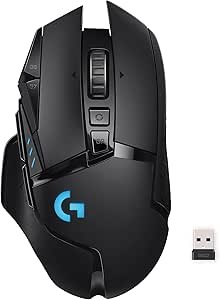 | Best Overall for Button-Rich Play | Connectivity: LIGHTSPEED wireless | Sensor: HERO optical sensor | Maximum sensitivity: 25,600 DPI | VIEW LATEST PRICE | See Our Full Breakdown |
| Razer Viper V3 HyperSpeed Wireless Gaming Mouse |  | Best for Long Battery Life | Connectivity: HyperSpeed wireless; USB | Sensor: Focus Pro optical sensor | Maximum sensitivity: 30,000 DPI | VIEW LATEST PRICE | See Our Full Breakdown |
| Redragon M810 PRO Wireless RGB Gaming Mouse |  | Best for Customizable Controls | Connectivity: 2.4 GHz wireless | Sensor: Pixart PAW3325 optical | Onboard DPI levels: 500, 1,000, 2,000, 3,000, and 10,000 | VIEW LATEST PRICE | See Our Full Breakdown |
| Razer Basilisk V3 Pro Wireless Gaming Mouse |  | Best Premium Feature Set | Connectivity: 2.4 GHz wireless, Bluetooth, and USB | Sensor: Razer Focus Pro 30K optical sensor | Maximum sensitivity: 30,000 DPI | VIEW LATEST PRICE | See Our Full Breakdown |
| Razer DeathAdder V3 Pro Wireless Gaming Mouse | 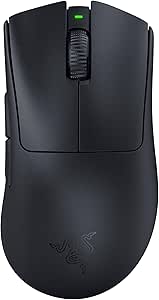 | Best Lightweight Ergonomic Pick | Weight: 63 g | Connectivity: Bluetooth and USB | Sensor: Focus Pro 30K optical sensor | VIEW LATEST PRICE | See Our Full Breakdown |
| Logitech G305 LIGHTSPEED Wireless Gaming Mouse, Blue |  | Best Lightweight Battery-Life Pick | Sensor: HERO optical | Sensitivity: 200–12,000 DPI | Connectivity: 2.4 GHz LIGHTSPEED via USB receiver | VIEW LATEST PRICE | See Our Full Breakdown |
| Logitech G305 LIGHTSPEED Wireless Gaming Mouse, Black |  | Best Ambidextrous Budget-Friendly Layout | Sensor: HERO optical | Sensitivity: 200–12,000 DPI | Connectivity: 2.4 GHz LIGHTSPEED via USB receiver | VIEW LATEST PRICE | See Our Full Breakdown |
| Razer Basilisk V3 X HyperSpeed Wireless Gaming Mouse |  | Best for Programmable Controls | Sensor: 5G Advanced optical | Maximum sensitivity: 18,000 DPI | Connectivity: Bluetooth and Razer HyperSpeed wireless | VIEW LATEST PRICE | See Our Full Breakdown |
| Logitech G703 Lightspeed Wireless Gaming Mouse |  | Best Rechargeable Ergonomic Pick | Sensor: HERO 25K optical | Sensitivity: 100–25,600 DPI | Tracking speed: 400+ IPS | VIEW LATEST PRICE | See Our Full Breakdown |
| Redragon M612 PRO Wireless RGB Optical Gaming Mouse |  | Best for Multi-Device Connectivity | Connectivity: Bluetooth and 2.4 GHz wireless | Sensor: Optical | Sensitivity: 500–8,000 DPI; listed levels include 500, 1,000, 2,000, 3,000, and 8,000 | VIEW LATEST PRICE | See Our Full Breakdown |
| Logitech G305 Lightspeed Wireless Gaming Mouse – Lilac |  | Best for Portable Play | Sensor: HERO 12K optical | DPI range: 200–12,000 DPI | Weight: 99 g | VIEW LATEST PRICE | See Our Full Breakdown |
| Logitech G305 LIGHTSPEED Wireless Gaming Mouse, White |  | Best Simple All-Rounder | Sensor: HERO optical | Sensitivity: 200–12,000 DPI | Response time: 1 ms | VIEW LATEST PRICE | See Our Full Breakdown |
| Razer Naga V2 HyperSpeed Wireless MMO Gaming Mouse, Black |  | Best for MMO Hotkeys | Sensor: Focus Pro 30K optical | Maximum sensitivity: 30,000 DPI | Programmable buttons: 19 | VIEW LATEST PRICE | See Our Full Breakdown |
| Redragon M656 Wireless Optical Gaming Mouse |  | Best for Basic Customization | Sensor: PAW3104 optical | DPI levels: 1,000, 1,500, 2,000, 2,400, 4,000 | Polling rate: 500 Hz | VIEW LATEST PRICE | See Our Full Breakdown |
| INPHIC A9 V2 Explorer Wireless Gaming Mouse – 12800 DPI Silent |  | Best for Quiet Multi-Device Use | Connectivity: 2.4 GHz wireless, Bluetooth, USB-C wired | DPI: 12,800 DPI | DPI presets: 6 adjustable settings | VIEW LATEST PRICE | See Our Full Breakdown |
| wireless gaming mice | Connectivity | Sensor | Buttons | Weight |
|---|---|---|---|---|
| Logitech G502 LIGHTSPEED Wirel | LIGHTSPEED wireless | HERO optical sensor | 11 programmable | — |
| Razer Viper V3 HyperSpeed Wire | HyperSpeed wireless; USB | Focus Pro optical sensor | Six programmable | 82 g |
| Redragon M810 PRO Wireless RGB | 2.4 GHz wireless | Pixart PAW3325 optical | — | 4 ounces |
| Razer Basilisk V3 Pro Wireless | 2.4 GHz wireless, Bluetooth, and USB | Razer Focus Pro 30K optical sensor | 11 | — |
| Razer DeathAdder V3 Pro Wirele | Bluetooth and USB | Focus Pro 30K optical sensor | Five programmable | 63 g |
| Logitech G305 LIGHTSPEED Wirel | 2.4 GHz LIGHTSPEED via USB receiver | HERO optical | 6 programmable | 99 g (3.4 oz) |
| Logitech G305 LIGHTSPEED Wirel | 2.4 GHz LIGHTSPEED via USB receiver | HERO optical | 6 programmable | 99 g (3.4 oz) |
| Razer Basilisk V3 X HyperSpeed | Bluetooth and Razer HyperSpeed wireless | 5G Advanced optical | — | — |
| Logitech G703 Lightspeed Wirel | LIGHTSPEED wireless | HERO 25K optical | 6 programmable | 95 g |
| Redragon M612 PRO Wireless RGB | Bluetooth and 2.4 GHz wireless | Optical | — | 3.84 oz |
| Logitech G305 Lightspeed Wirel | LIGHTSPEED wireless | HERO 12K optical | 6 programmable | 99 g |
| Logitech G305 LIGHTSPEED Wirel | — | HERO optical | 6 programmable | 99 g |
| Razer Naga V2 HyperSpeed Wirel | 2.4 GHz wireless, Bluetooth, USB | Focus Pro 30K optical | — | — |
| Redragon M656 Wireless Optical | 2.4 GHz wireless | PAW3104 optical | 7 programmable | 2.88 oz |
| INPHIC A9 V2 Explorer Wireless | 2.4 GHz wireless, Bluetooth, USB-C wired | — | 7 | 106 g |
More Details on Our Top Picks
Logitech G502 LIGHTSPEED Wireless Gaming Mouse
I’d pick the G502 LIGHTSPEED for players who want wireless freedom without giving up plentiful controls. Its 11 programmable buttons make it easier to bind abilities, macros, or media controls than the six-button Razer Viper V3 HyperSpeed, while the included adjustable weights let right-handed users tune the feel. Logitech’s 1 ms LIGHTSPEED connection and HERO sensor rated up to 25,600 DPI suit responsive play, though maximum DPI matters less than finding a comfortable sensitivity. Battery life reaches 60 hours, and the mouse can work with the separately sold POWERPLAY charging system. The tradeoffs are its right-handed shape and more involved, weight-adjustable design; players seeking a simpler, lighter mouse may prefer the Viper V3 HyperSpeed.
Pros:- 11 programmable buttons offer flexible game and productivity shortcuts.
- LIGHTSPEED wireless connection has a stated 1 ms response time.
- Six adjustable weights allow users to tune the feel.
- Battery life is rated for up to 60 hours.
Cons:- Right-handed design does not suit left-handed users.
- POWERPLAY wireless charging system is sold separately.
Best for: Right-handed PC or Mac players who want many programmable controls and the option to adjust mouse weight.
Not ideal for: Left-handed players or anyone prioritizing a lightweight, minimal design; POWERPLAY charging also requires a separate purchase.
- Connectivity:LIGHTSPEED wireless
- Sensor:HERO optical sensor
- Maximum sensitivity:25,600 DPI
- Report rate:1,000 Hz (1 ms)
- Buttons:11 programmable
- Battery life:Up to 60 hours
- Adjustable weights:Six
- Compatibility:PC and Mac
Our verdict“Choose the G502 LIGHTSPEED if you want a customizable, button-rich wireless mouse and do not mind its right-handed build.”
Razer Viper V3 HyperSpeed Wireless Gaming Mouse
The Viper V3 HyperSpeed puts endurance and a light, uncomplicated control layout ahead of extras. At 82 g, it is lighter than the feature-heavy Logitech G502 LIGHTSPEED, and its ambidextrous shape is suited to claw and fingertip grips. The Focus Pro sensor reaches 30,000 DPI, but its clearest practical distinction is the stated up to 280 hours of battery life from one included AA battery—useful for players who would rather replace a cell than plan regular charging. Six programmable buttons and on-mouse DPI control cover common needs without the G502’s larger button array. The tradeoffs are the reliance on a disposable-style AA battery and a listed Windows 11 minimum, which may limit fit for some setups. I’d favor another option if USB-C recharging or broader button customization matters more.
Pros:- 82 g weight suits players who prefer a lighter mouse.
- Battery life is rated for up to 280 hours from one included AA battery.
- Focus Pro optical sensor supports sensitivity up to 30,000 DPI.
- Ambidextrous shape and six programmable buttons offer a straightforward setup.
Cons:- Uses an AA battery rather than a built-in rechargeable battery.
- Listed minimum operating system is Windows 11.
Best for: Claw- or fingertip-grip players who want a relatively light wireless mouse with long stated battery life and straightforward controls.
Not ideal for: Buyers who prefer a built-in rechargeable battery, need more than six programmable buttons, or use an operating system outside the listed Windows 11 requirement.
- Connectivity:HyperSpeed wireless; USB
- Sensor:Focus Pro optical sensor
- Maximum sensitivity:30,000 DPI
- Buttons:Six programmable
- Weight:82 g
- Battery:One included AA battery
- Battery life:Up to 280 hours
- Switch lifespan:60 million clicks
- Operating system:Windows 11 listed
Our verdict“Pick the Viper V3 HyperSpeed if long battery life and a lighter claw- or fingertip-grip design matter more than rechargeable power or extra buttons.”
Redragon M810 PRO Wireless RGB Gaming Mouse
The M810 PRO is a sensible fit for players who want several programmable controls and RGB customization without stepping up to the premium feature set of the Razer Basilisk V3 Pro. Its eight programmable buttons, including rapid-fire and macro controls, offer more ways to map actions than the Razer DeathAdder V3 Pro’s five buttons. Five onboard DPI levels provide quick sensitivity changes, and the rechargeable battery is rated for up to 45 hours in eco mode. That mix makes it more adaptable than a basic wireless mouse, though the listed maximum sensitivity is inconsistent between the product title and specifications, so I would not choose it on DPI claims alone. The right-handed shape excludes some players, and its battery-life figure depends on eco mode. It is a better match for feature seekers than for buyers focused on minimal weight or verified high-end tracking.
Pros:- Eight programmable buttons include rapid-fire and macro controls.
- Five onboard DPI levels allow quick sensitivity changes.
- Customizable RGB lighting adds visual personalization.
- Rechargeable battery is rated for up to 45 hours in eco mode.
Cons:- Maximum sensitivity claims vary between the title and specifications.
- Right-handed design may not fit left-handed users.
- Stated battery life is tied to eco mode.
Best for: Right-handed players who want programmable macros, onboard sensitivity options, RGB lighting, and a rechargeable wireless mouse.
Not ideal for: Left-handed players or competitive buyers who need clearly specified sensor performance and prioritize a lighter design.
- Connectivity:2.4 GHz wireless
- Sensor:Pixart PAW3325 optical
- Onboard DPI levels:500, 1,000, 2,000, 3,000, and 10,000
- Programmable buttons:Eight
- Polling rate:1,000 Hz
- Battery life:Up to 45 hours in eco mode
- Battery type:Rechargeable lithium polymer
- Weight:4 ounces
- Hand orientation:Right-handed
Our verdict“Choose the M810 PRO for its macro-friendly controls and rechargeable feature set, not for an unclear maximum-DPI claim.”
Razer Basilisk V3 Pro Wireless Gaming Mouse
I’d put the Basilisk V3 Pro at the premium end of this group for buyers who want the most connection choices and extensive customization. Its 11 buttons match the Logitech G502 LIGHTSPEED’s count, while Bluetooth, 2.4 GHz wireless, and USB let it serve different devices and play styles. The 13-zone Chroma RGB and HyperScroll tilt wheel add more personalization and scrolling options than the simpler Viper V3 HyperSpeed. Battery life is rated up to 150 hours over Bluetooth or 110 hours on HyperSpeed at 1,000 Hz, but high polling has a substantial catch: 8,000 Hz requires a separate dongle or Mouse Dock Pro, and battery life falls to up to 32 hours at that rate. I’d skip this feature-rich model if a basic, lightweight mouse is the priority.
Pros:- 11 buttons and a HyperScroll tilt wheel support varied controls and navigation.
- Offers Bluetooth, 2.4 GHz wireless, and USB connectivity.
- 13-zone Chroma RGB lighting provides detailed customization.
- Battery life is rated up to 110 hours on HyperSpeed at 1,000 Hz.
Cons:- 8,000 Hz polling requires a separately sold dongle or Mouse Dock Pro.
- Battery life drops to up to 32 hours at 8,000 Hz.
- Right-handed design may not suit left-handed users.
Best for: Right-handed players who want extensive button and lighting customization, a versatile scroll wheel, and Bluetooth alongside gaming wireless.
Not ideal for: Buyers seeking a lightweight, simple setup or those who expect 8,000 Hz polling without buying a separate accessory.
- Connectivity:2.4 GHz wireless, Bluetooth, and USB
- Sensor:Razer Focus Pro 30K optical sensor
- Maximum sensitivity:30,000 DPI
- Buttons:11
- Lighting:13-zone Chroma RGB
- Scroll wheel:HyperScroll tilt wheel
- Battery life:Up to 150 hours on Bluetooth; up to 110 hours on HyperSpeed at 1,000 Hz
- Hand orientation:Right-handed
Our verdict“Choose the Basilisk V3 Pro if you want a premium, configurable mouse with multiple connection options and accept the cost and battery tradeoffs of high polling.”
Razer DeathAdder V3 Pro Wireless Gaming Mouse
The DeathAdder V3 Pro is the clearest choice here for players who value low weight and an ergonomic shape over a large button array. At 63 g, it is lighter than the 82 g Razer Viper V3 HyperSpeed, and its shape is designed for comfort during long sessions. The Focus Pro 30K sensor and Gen-3 optical switches rated for 90 million clicks give it a performance-focused spec sheet, while battery life reaches up to 90 hours with USB-C charging. Compared with the 11-button Logitech G502 LIGHTSPEED, its five programmable buttons are a real limitation for players who map many abilities or macros. The supplied details also describe its hand orientation inconsistently, so buyers wanting a dedicated handed shape should check the fit carefully. Some features require Razer Synapse.
Pros:- 63 g weight supports a lightweight feel.
- Ergonomic shape is designed for comfort during long sessions.
- Battery life is rated for up to 90 hours with USB-C charging.
- Gen-3 optical switches are rated for 90 million clicks.
Cons:- Five programmable buttons offer fewer controls than the G502 LIGHTSPEED or Basilisk V3 Pro.
- Some features require the Razer Synapse app.
- Hand-orientation details are inconsistent in the supplied specifications.
Best for: Players who prioritize a lightweight, ergonomic mouse for long sessions and prefer a focused set of controls over many programmable buttons.
Not ideal for: Macro-heavy players who need numerous buttons, buyers who avoid companion software, or users who want certainty about the mouse’s handed shape before purchase.
- Weight:63 g
- Connectivity:Bluetooth and USB
- Sensor:Focus Pro 30K optical sensor
- Maximum sensitivity:30,000 DPI
- Buttons:Five programmable
- Battery life:Up to 90 hours
- Switches:Gen-3 optical, rated for 90 million clicks
- Polling rate:1,000 Hz
- Compatibility:Mac and PC
Our verdict“Choose the DeathAdder V3 Pro if low weight and ergonomic comfort matter more than a large button layout or software-free customization.”
Logitech G305 LIGHTSPEED Wireless Gaming Mouse, Blue
The blue Logitech G305 is a strong fit for players who want responsive wireless performance without charging between sessions. Its 1 ms LIGHTSPEED connection and HERO sensor up to 12,000 DPI cover everyday competitive play, while the compact body is easier to pack than the larger Logitech G703. Battery life is the standout trade: one AA cell is rated for up to 250 hours, though replacing batteries is less convenient than recharging a built-in battery. The six programmable buttons keep the layout straightforward rather than crowded, and the receiver stores inside the mouse for travel. I’d choose this over the G703 for portability and long battery intervals, but skip it if you want rechargeable power or a shape designed for left-handed use.
Pros:- LIGHTSPEED wireless connection with a 1 ms report rate
- HERO sensor offers sensitivity from 200 to 12,000 DPI
- Up to 250 hours of stated battery life from one AA cell
- Receiver storage and a 99 g body suit portable setups
Cons:- Requires replacing an AA battery rather than charging internally
- Designed for right-handed use
Best for: Players who want a compact, travel-friendly wireless mouse with long AA battery life and a simple programmable layout
Not ideal for: Left-handed users or players who prefer built-in rechargeable power over replacing an AA battery
- Sensor:HERO optical
- Sensitivity:200–12,000 DPI
- Connectivity:2.4 GHz LIGHTSPEED via USB receiver
- Report rate:1 ms
- Buttons:6 programmable
- Weight:99 g (3.4 oz)
- Battery:1 AA battery; up to 250 hours
- Compatibility:PC and Mac
Our verdict“Choose the blue G305 for compact LIGHTSPEED performance and long battery life, provided an AA-powered design suits your routine.”
Logitech G305 LIGHTSPEED Wireless Gaming Mouse, Black
The black G305 brings the same core strengths as the blue G305: a HERO sensor, 1 ms LIGHTSPEED wireless, six programmable buttons, and up to 250 hours from one AA battery. Its listed ambidextrous design gives it broader appeal than the right-handed Basilisk V3 X HyperSpeed, though the compact shape may still be less comfortable for players who want a pronounced ergonomic contour. The 99 g weight keeps it manageable for quick repositioning, and built-in receiver storage helps when moving between a desk and a laptop bag. The tradeoff is a fairly basic setup: one 2.4 GHz receiver connection, AA power, and a listed wireless range of 1 meter. I’d pick it for a no-frills gaming setup, not for Bluetooth flexibility or elaborate controls.
Pros:- LIGHTSPEED connection has a 1 ms report rate
- HERO sensor supports 200–12,000 DPI
- Up to 250 hours of stated battery life on one AA
- Built-in receiver storage and 99 g weight aid portability
Cons:- Uses a replaceable AA battery instead of built-in rechargeable power
- Listed wireless range is 1 meter
- Compact shape may not suit players who prefer a larger ergonomic shell
Best for: Players seeking a compact, ambidextrous-style mouse with low-latency wireless and a straightforward six-button layout
Not ideal for: Gamers who need Bluetooth, a highly sculpted right-handed grip, or more than the listed 1-meter wireless range
- Sensor:HERO optical
- Sensitivity:200–12,000 DPI
- Connectivity:2.4 GHz LIGHTSPEED via USB receiver
- Report rate:1 ms
- Buttons:6 programmable
- Hand orientation:Ambidextrous
- Weight:99 g (3.4 oz)
- Battery:1 AA battery; up to 250 hours
- Wireless range:Listed as 1 meter
Our verdict“Pick the black G305 for a simple, portable LIGHTSPEED mouse with an ambidextrous-style layout, but not for extended wireless range or Bluetooth.”
Razer Basilisk V3 X HyperSpeed Wireless Gaming Mouse
The Razer Basilisk V3 X HyperSpeed suits players who want more commands under their fingers than the six-button Logitech G305 provides. It offers nine programmable controls, plus both HyperSpeed 2.4 GHz and Bluetooth, making it easier to move between a gaming PC and another compatible device. Its 18,000 DPI sensor gives more sensitivity headroom than the G305’s 12,000 DPI maximum, although high DPI alone does not guarantee better aim. Battery life is rated up to 285 hours over HyperSpeed or 535 hours over Bluetooth, with actual results varying by use. Chroma RGB adds personalization, but the right-handed shape excludes left-handed players, and an AA battery means it is not a rechargeable alternative to the G703. I’d choose it for control flexibility, not for a simple, ambidextrous profile.
Pros:- Nine programmable controls offer more command options than the G305
- HyperSpeed wireless and Bluetooth support two connection modes
- Sensor sensitivity reaches 18,000 DPI
- Chroma RGB lighting is customizable
Cons:- Right-handed design does not suit left-handed players
- Uses one AA battery rather than an internal rechargeable battery
- Stated battery life varies with usage conditions
Best for: Right-handed players who want extra programmable controls, dual wireless modes, and RGB customization
Not ideal for: Left-handed users or gamers who want built-in rechargeable power and a simpler, lighter-feeling setup
- Sensor:5G Advanced optical
- Maximum sensitivity:18,000 DPI
- Connectivity:Bluetooth and Razer HyperSpeed wireless
- Controls:9 programmable
- Switches:Gen-2 mechanical; rated for up to 60 million clicks
- Battery:1 AA battery
- Battery life:Up to 285 hours on HyperSpeed; up to 535 hours on Bluetooth
- Hand orientation:Right-handed
- Lighting:Razer Chroma RGB
Our verdict“Choose the Basilisk V3 X if programmable controls and dual wireless modes matter more than an ambidextrous shape or rechargeable power.”
Logitech G703 Lightspeed Wireless Gaming Mouse
The Logitech G703 is the more feature-focused choice for players who value its HERO 25K sensor and rechargeable design over the G305’s longer stated battery life. Sensitivity reaches 25,600 DPI, and tracking speed is listed above 400 IPS; that gives fine adjustment headroom, though most players will choose a much lower everyday setting. At 95 g, it is not the lightest option here, but its rubber side grips add hold and comfort during extended play. LIGHTSYNC RGB is built in, and POWERPLAY compatibility can support wireless charging if you buy the charging system separately. That extra ecosystem cost and up to 35 hours of battery life with RGB enabled make it less convenient for long stretches away from a charger than either G305. I’d favor it for a rechargeable, grip-focused setup.
Pros:- Rechargeable lithium polymer battery avoids AA replacements
- HERO 25K sensor supports sensitivity up to 25,600 DPI
- Rubber side grips help maintain control during long sessions
- POWERPLAY wireless charging is available with a separate system
Cons:- Battery life is up to 35 hours with RGB lighting enabled
- POWERPLAY charging hardware is sold separately
- At 95 g, it is heavier than many lightweight-focused options
Best for: Players who want a rechargeable wireless mouse with side grips, customizable RGB, and a high-ceiling sensor
Not ideal for: Travel-focused gamers who prioritize long battery intervals, a lighter body, or charging without a separate POWERPLAY system
- Sensor:HERO 25K optical
- Sensitivity:100–25,600 DPI
- Tracking speed:400+ IPS
- Connectivity:LIGHTSPEED wireless
- Buttons:6 programmable
- Weight:95 g
- Battery:Included lithium polymer; up to 35 hours with RGB enabled
- Wireless charging:POWERPLAY compatible; charging system sold separately
- Lighting:LIGHTSYNC RGB
Our verdict“Choose the G703 for a rechargeable, grip-focused feel and POWERPLAY support, but expect more frequent charging than with the G305.”
Redragon M612 PRO Wireless RGB Optical Gaming Mouse
The Redragon M612 PRO makes the most sense for players who want both Bluetooth and 2.4 GHz receiver connectivity, plus a larger set of onboard commands. Its nine programmable buttons and seven RGB modes offer more customization than the six-button G305, while the textured right-handed grip is aimed at users who prefer a more sculpted hold. Sensitivity tops out at 8,000 DPI, below the G305’s 12,000 DPI and the Basilisk V3 X’s 18,000 DPI, but that range is ample for many everyday gaming setups. The listed 10-meter wireless range and included USB-C cable add flexibility. The main compromises are the right-handed-only design and compatibility details that list Windows 10, PC, and tablet rather than broad current-platform support. I’d choose it for connection options and controls, not maximum sensor headroom.
Pros:- Bluetooth and 2.4 GHz receiver connectivity offer flexible pairing
- Nine programmable buttons and seven RGB modes provide customization
- Textured matte grip supports a more sculpted right-handed hold
- Sensitivity is adjustable up to 8,000 DPI
Cons:- Right-handed shape is unsuitable for left-handed users
- Maximum sensitivity is lower than the G305 and Basilisk V3 X
- Listed operating system support is limited to Windows 10
Best for: Right-handed PC players who want Bluetooth and receiver wireless, extra programmable buttons, and a textured ergonomic grip
Not ideal for: Left-handed gamers or buyers who need clearly listed support beyond Windows 10 and the specified PC and tablet devices
- Connectivity:Bluetooth and 2.4 GHz wireless
- Sensor:Optical
- Sensitivity:500–8,000 DPI; listed levels include 500, 1,000, 2,000, 3,000, and 8,000
- Programmable buttons:9
- Lighting:7 RGB modes
- Weight:3.84 oz
- Battery:Included lithium polymer battery
- Wireless range:10 meters
- Compatibility:PC and tablet; Windows 10 listed
Our verdict“Pick the M612 PRO for Bluetooth, extra controls, and a textured right-handed grip, but skip it if you need broader listed compatibility or higher DPI headroom.”
Logitech G305 Lightspeed Wireless Gaming Mouse – Lilac
The G305 Lightspeed makes a strong case for wireless gaming away from a fixed desk: it weighs 99 g, stores its USB receiver inside the mouse, and runs for up to 250 hours on one AA battery. Its 1 ms LIGHTSPEED connection and HERO 12K sensor suit responsive play, while the lilac finish gives this version a distinct look. Compared with the more button-heavy Razer Naga V2 HyperSpeed, the G305 keeps its controls simple and its shape easier to pack, but it is less suited to MMO command setups. The tradeoffs are the replaceable AA battery and a listed wireless range of just 1 meter, which limits placement flexibility. I’d choose it for portable, straightforward gaming rather than extensive customization.
Pros:- LIGHTSPEED wireless has a stated 1 ms response time.
- HERO 12K sensor supports sensitivity settings from 200 to 12,000 DPI.
- Up to 250 hours of battery life from one AA battery.
- 99 g body and receiver storage suit travel.
Cons:- Requires replacing the AA battery rather than charging the mouse.
- Listed wireless range is limited to 1 meter.
Best for: PC or Mac players who carry a mouse between locations and want responsive wireless play without a built-in rechargeable battery.
Not ideal for: Players who need a long wireless range, a rechargeable setup, or many dedicated buttons for MMO abilities.
- Sensor:HERO 12K optical
- DPI range:200–12,000 DPI
- Weight:99 g
- Battery life:Up to 250 hours
- Battery:1 AA, included
- Buttons:6 programmable
- Connectivity:LIGHTSPEED wireless
- Wireless range:1.0 m
- Compatibility:PC and Mac
Our verdict“Choose the lilac G305 if you want a portable, responsive wireless mouse with long AA battery life and do not need a rechargeable design or extended range.”
Logitech G305 LIGHTSPEED Wireless Gaming Mouse, White
The white Logitech G305 is a sensible pick for players who want familiar gaming-mouse basics without extra modes or a crowded button layout. Its HERO sensor spans 200–12,000 DPI, and the stated 1 ms LIGHTSPEED response keeps wireless play focused on quick input rather than convenience features. The ambidextrous design and six programmable buttons make it more flexible for shared setups than the right-handed Redragon M656, while its receiver storage helps keep the small USB adapter from getting lost. Its 99 g weight is portable, though not as light as some wired-focused designs. The main compromises are shared with the other G305 color options: an AA battery that needs replacement and a listed range of only 1 meter. I’d pick this white version for a clean, uncomplicated setup, not for long-range play or extensive button programming.
Pros:- 1 ms LIGHTSPEED response is suited to responsive gaming.
- HERO sensor offers a broad 200–12,000 DPI range.
- Ambidextrous design and six programmable buttons fit varied setups.
- Receiver storage and 99 g weight help with portability.
Cons:- Uses a replaceable AA battery rather than USB charging.
- Listed wireless range is only 1 meter.
Best for: PC and Mac players who want a straightforward wireless gaming mouse for everyday use, with an ambidextrous shape and a small set of programmable controls.
Not ideal for: Players seeking rechargeable power, long-range wireless placement, or a large bank of MMO-specific buttons.
- Sensor:HERO optical
- Sensitivity:200–12,000 DPI
- Response time:1 ms
- Weight:99 g
- Buttons:6 programmable
- Battery life:Up to 250 hours
- Battery:1 AA
- Hand orientation:Ambidextrous
- Wireless range:1.0 m
Our verdict“Pick the white G305 for uncomplicated, portable wireless gaming if its short stated range and AA-powered design suit your setup.”
Razer Naga V2 HyperSpeed Wireless MMO Gaming Mouse, Black
For players who bind abilities, macros, and menus to the mouse, the Razer Naga V2 HyperSpeed has a clear advantage over the six-button Logitech G305: it provides 19 programmable buttons and a dual-mode HyperScroll wheel. That extra control can reduce how often MMO players reach for the keyboard, while 2.4 GHz wireless and Bluetooth offer a choice between gaming responsiveness and broader device flexibility. The Focus Pro 30K sensor has far more sensitivity headroom than many players will need, but the Naga’s defining benefit is its command capacity, not its maximum DPI. Its right-handed shape excludes left-handed users, and the AA-powered design still calls for battery replacement. I’d favor it over simpler mice for complex MMO layouts, but it is more mouse than a player wanting a light, minimal FPS setup needs.
Pros:- 19 programmable buttons support complex MMO command layouts.
- 2.4 GHz wireless and Bluetooth provide two connection modes.
- Up to 250 hours on 2.4 GHz or 400 hours on Bluetooth.
- Dual-mode HyperScroll wheel supports different scrolling preferences.
Cons:- Right-handed design does not suit left-handed players.
- Requires a replaceable AA battery.
- The extensive controls may feel unnecessary for players who prefer a simple layout.
Best for: Right-handed MMO players who want numerous programmable controls for abilities, macros, and game commands.
Not ideal for: Left-handed players and those who prefer a compact, minimal-button mouse for straightforward FPS play.
- Sensor:Focus Pro 30K optical
- Maximum sensitivity:30,000 DPI
- Programmable buttons:19
- Connectivity:2.4 GHz wireless, Bluetooth, USB
- Scroll wheel:Dual-mode Razer HyperScroll
- Battery life:Up to 250 hours on 2.4 GHz; up to 400 hours on Bluetooth
- Battery:1 AA, included
- Hand orientation:Right-handed
- Wireless range:10 m
Our verdict“Choose the Naga V2 HyperSpeed if MMO hotkeys matter more to you than a minimal layout or a rechargeable battery.”
Redragon M656 Wireless Optical Gaming Mouse
The Redragon M656 offers more programmable controls than either Logitech G305, with seven buttons and macro support, while keeping its sensitivity choices to five defined steps from 1,000 to 4,000 DPI. That narrower range is less flexible than the G305’s 12,000 DPI ceiling, but preset steps can be easier to manage for players who want a few dependable settings rather than fine-grained adjustment. It also has a stated 10-meter wireless range, well beyond the G305’s listed 1 meter, plus a 500 Hz polling rate. The tradeoffs are an AA battery that is not included, right-handed shaping, and compatibility information limited to older Windows versions. Red LED lighting adds a visible style cue but is not the reason to choose it. I’d consider it for basic macros and adjustable presets, not for buyers who need broad platform support.
Pros:- Seven programmable buttons include macro support.
- Five DPI presets range from 1,000 to 4,000 DPI.
- Listed wireless range is 10 meters.
- 500 Hz polling rate and energy-saving sleep mode.
Cons:- AA battery is required and not included.
- Listed compatibility covers Windows XP through Windows 10 only.
- Right-handed design limits its fit for left-handed users.
Best for: Right-handed PC players who want a few adjustable DPI presets, extra programmable buttons, and a longer stated wireless range.
Not ideal for: Mac or newer-platform users who need clearly listed compatibility, or players who want a rechargeable battery and a wider DPI range.
- Sensor:PAW3104 optical
- DPI levels:1,000, 1,500, 2,000, 2,400, 4,000
- Polling rate:500 Hz
- Buttons:7 programmable
- Connectivity:2.4 GHz wireless
- Wireless range:10 m
- Weight:2.88 oz
- Power:1 AA, not included
- Compatibility:PC; Windows XP, Vista, 7, 8, 10
Our verdict“Choose the M656 for simple DPI presets, macros, and longer stated range, provided its battery and listed Windows compatibility work for you.”
INPHIC A9 V2 Explorer Wireless Gaming Mouse – 12800 DPI Silent
The INPHIC A9 V2 Explorer stands apart from the Logitech G305 by combining silent clicks with three connection modes: 2.4 GHz wireless, Bluetooth, and USB-C wired. That mix suits a desk shared between gaming and quieter work, and the wired option lets you keep using the mouse while it charges. Its 12,800 DPI sensor and six adjustable presets provide plenty of sensitivity choice, though the product data is less clear about the rechargeable setup: it lists a built-in rechargeable battery and also an AA battery. I’d verify the power arrangement before buying. At 106 g, it is heavier than the 99 g G305, and RGB customization is limited to Windows driver software. It makes most sense when quiet clicks and device flexibility matter more than the lightest feel or unambiguous battery details.
Pros:- Tri-mode connectivity includes 2.4 GHz, Bluetooth, and USB-C wired use.
- Silent click design suits quiet rooms and shared workspaces.
- 12,800 DPI sensor offers six adjustable sensitivity presets.
- Can be used as a wired mouse while charging.
Cons:- Product data lists both a rechargeable battery and an AA battery, leaving the power setup unclear.
- At 106 g, it is heavier than the 99 g Logitech G305.
- RGB customization is limited to Windows driver software.
Best for: Players who share a mouse between gaming and quiet work across different devices and want wireless, Bluetooth, and wired connection options.
Not ideal for: Buyers prioritizing a lighter mouse, clear battery specifications, or RGB customization outside Windows.
- Connectivity:2.4 GHz wireless, Bluetooth, USB-C wired
- DPI:12,800 DPI
- DPI presets:6 adjustable settings
- Buttons:7
- Weight:106 g
- Dimensions:4.8 × 1.6 in
- Battery information:Rechargeable battery listed; AA battery also listed
- Range:33 ft
- Compatibility:Windows, macOS, Android, iOS, Linux
Our verdict“Choose the A9 V2 if silent clicks and three connection modes are priorities, but confirm its battery configuration before purchase.”
How We Picked
I ranked these wireless gaming mice by how well their designs serve distinct player needs, rather than treating high DPI or a long feature list as a win by itself. My main criteria were shape and likely grip fit, weight and control layout, connection and battery approach, ease of setup, build and upkeep considerations, and versatility across game types. I also separated genuine design differences from duplicate listings: the four G305 colors are presented as one model family rather than four competing performance options.
The order favors mice with a clear, useful role and a strong balance of playability and flexibility. The G502 LIGHTSPEED leads as the most adaptable choice, while lighter designs and MMO-focused layouts rank highly for buyers whose priorities are narrower. More budget-oriented or less clearly differentiated options sit lower, not because they cannot suit a player, but because buyers should have a specific reason to choose them over the stronger all-round and specialist alternatives.
Factors to Consider When Choosing Wireless Gaming Mice
Before choosing a wireless mouse, I would start with the parts that affect daily comfort and control, then compare connectivity and extras. A long specification sheet cannot tell you whether a mouse fits your hand or whether its added buttons will help in your games.
Match the Shape to Your Grip and Hand
Shape is personal, but it has consequences beyond comfort: it affects how easily you lift, reposition, and make small corrections. An ergonomic shell may give your palm more support, while a simpler or more compact form can feel easier to move for some claw and fingertip grips. Compare the mouse’s length, width, hump, and button reach with a device you already find comfortable. A common mistake is choosing by appearance or sensor claims before checking dimensions. If possible, buy from a seller with a clear return policy, since written measurements cannot fully predict how a shell will sit in your hand. A well-fitting basic mouse can be a better gaming tool than a feature-rich model that causes tension.
Choose Weight and Controls for Your Games
Weight changes how a mouse feels during repeated flicks and long sessions, while extra controls can reduce reliance on keyboard shortcuts. Players focused on fast aiming often prefer fewer obstacles and a lighter-feeling design; strategy and MMO players may gain more from thumb buttons and command access. More buttons are not automatically better: awkward placement can cause accidental presses or make the mouse harder to grip securely. Think through the actions you would actually assign before paying for an expanded control layout. Also check whether the software lets you save profiles onboard if you move between computers. That keeps a useful control setup from becoming a reason to avoid the mouse.
Look Beyond the Wireless Label
Wireless models can differ in their receiver, supported connection modes, and how they recharge or replace batteries. Check the maker’s stated connection options and compatibility for your computer or console rather than assuming every wireless mouse supports the same setup. A rechargeable design reduces disposable-battery changes, while a replaceable battery can be convenient when you can swap in a fresh one. Consider where the receiver will sit: a port behind a desktop tower may leave it farther from the mouse than a front or extension position. Battery life claims depend on use and settings, so treat them as guidance rather than a guarantee. If uninterrupted play matters, plan how you will charge or replace power before buying.
Treat DPI as One Part of Tracking
A maximum DPI figure describes a sensor setting, not a direct measure of gaming accuracy. Many players use a lower sensitivity that gives them more control, and the useful range is the one that feels predictable with their game and display. Look for clear information about sensitivity adjustment, polling settings, and the software needed to configure them. Avoid choosing a mouse just because its advertised DPI is higher than a rival’s; that number alone does not show how well the mouse suits your aim or grip. If you already have a familiar sensitivity, check whether you can set it directly rather than relying on default presets. Consistency between games matters more than chasing the largest specification.
Pay for Features You Will Actually Use
Premium wireless mice can add more controls, multiple connection choices, advanced configuration, or a more specialized design, but those extras only help when they fit your routine. Before spending more, identify the feature that would change how you play, such as a thumb-button layout for command-heavy games or an ergonomic shell you prefer. RGB lighting and software customization may be enjoyable, but they should not outrank fit, weight, and dependable setup. On the other hand, the least expensive-looking option can bring tradeoffs in software polish or the clarity of available support information. Compare the complete package rather than the sensor headline. For an everyday player, a comfortable, easy-to-configure model may offer more practical value than a more elaborate one.
Avoid Treating Color Listings as Different Mice
Product listings can split one mouse family into several color entries, which makes a roundup look broader than its design range really is. In this selection, four G305 listings differ by color, so the meaningful comparison is between the G305 family and other shapes or control layouts. Check the exact model name and version before comparing specifications, especially when listing titles use inconsistent capitalization or add a color suffix. Accessories and bundles can also vary by seller, so confirm what comes in the box rather than inferring it from the product name. This check is useful across the category: similar names do not always mean identical connectivity or included parts. Compare actual design differences first, and use color as a final preference.
Frequently Asked Questions
Should I choose the G502 LIGHTSPEED or a lighter mouse for FPS games?
Choose based on how the mouse feels during quick movement, not on the model’s all-round reputation. The G502 LIGHTSPEED offers a broader control set that can help across game types, but buyers who prioritize a lighter, simpler feel may be better served by the DeathAdder V3 Pro or another streamlined design. Extra buttons are useful if you assign them; otherwise, they may add bulk without improving your play. If FPS is your main use, compare shape and weight against your current mouse and grip. If you play several genres, the G502’s versatility may justify its more feature-rich design.
Are the four Logitech G305 listings different gaming mice?
The listed G305 options are color variants—blue, black, lilac, and white—not four separate mouse designs in this roundup. The color does not give one version a different role or make it a higher performance tier. Check the exact listing for any bundle or included-accessory differences, since seller packages can vary. For a feature comparison, treat the G305 as one model family and compare it with mice that have different shapes, controls, or connectivity. Pick among the colors based on preference and confirmed listing details.
Is an MMO mouse with many buttons a good choice for everyday gaming?
It can be a good fit if you regularly use several commands and want them within thumb reach. The Razer Naga V2 HyperSpeed has a clear MMO-oriented role, but a large control layout may feel unnecessary if you mostly play games that use only a few mouse inputs. Extra buttons can also take time to learn and may be easy to press by mistake if their placement does not suit your grip. Consider which commands you would assign before choosing this style. If you do not have a concrete use for the added controls, a simpler all-round mouse is likely easier to live with.
Does a higher DPI rating mean a wireless gaming mouse is more accurate?
No. DPI indicates how far the pointer moves in response to physical movement at a given setting; it does not by itself prove better tracking or more accurate aim. Many players use a much lower sensitivity than a mouse’s maximum, so adjustment range and consistent control matter more than the biggest number on the box. Shape, weight, grip fit, and a comfortable sensitivity setting all affect practical results. Compare the control options you can actually configure, then choose a setting that feels repeatable in your games. Do not pay extra for a headline DPI figure unless it serves a real use case.
What should I check before buying a wireless mouse for a console or multiple devices?
Check the product’s stated compatibility and connection methods for each device you plan to use; the word wireless alone does not promise universal support. Look for details about the receiver, any alternate connection mode, and whether the mouse can switch between devices if that matters to your setup. Confirm that the games you play recognize mouse input on the target platform, since hardware support and game support are separate questions. Also consider where you can plug in the receiver and how you will handle charging or battery replacement. When listings are unclear, the manufacturer’s compatibility information is more useful than assuming a feature from a similar model name.
Conclusion
For the best overall choice, I recommend the Logitech G502 LIGHTSPEED for players who want one versatile mouse across several genres. The best value direction in this lineup is the Logitech G305 family when a straightforward design and color choice matter more than a larger feature set. For a premium-focused pick, the Razer Basilisk V3 Pro suits buyers seeking a more feature-rich wireless setup, while beginners may find the simpler G305 easier to approach. Choose the DeathAdder V3 Pro if a lighter, streamlined feel is your priority, or the Naga V2 HyperSpeed if you want MMO-oriented controls. The right pick is the one whose shape, weight, and controls fit your games—not the one with the longest specification list.
Halloween Picks
halloween
As an affiliate, we earn on qualifying purchases.