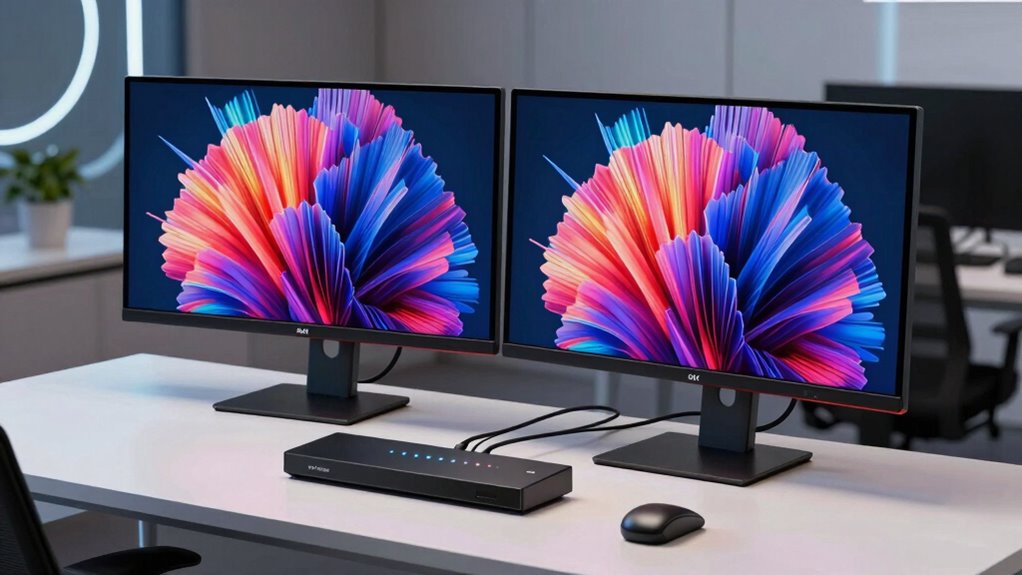
Finding the right KVM switch for 2 computers and 2 monitors at 4K resolution can be tricky, especially with so many options that differ in features and build quality. The UGREEN HDMI KVM Switch stands out as the best overall choice, offering reliable 4K@60Hz support with multiple USB ports. For those prioritizing ultra-high resolutions, the 8K HDMI KVM Switch provides support for even higher resolutions and extended display capabilities. The main tradeoffs involve balancing performance, ease of setup, and price—more advanced features often come with higher costs or complexity. Continue reading for a detailed breakdown of these options and what makes each one unique.

Get the latest gadgets delivered free — and shop member deals
- Fast, free delivery on millions of items
- Access to Prime Big Deal Days deals on October 6–7
- Prime Video, Amazon Music and more included
Complete the kit



Key Takeaways
- High-resolution support (4K vs. 8K) significantly impacts compatibility with future-proof setups.
- USB port count and type influence peripheral sharing and device compatibility.
- Ease of setup and management varies, with some switches offering advanced controls like remote switching.
- Build quality and cable support are critical for long-term reliability, especially at 4K@60Hz or higher.
- Price correlates strongly with feature set; more expensive options generally support higher resolutions and additional features.
| UGREEN HDMI KVM Switch 2 Monitors 2 Computers 4K@60Hz with 4 USB 3.0 Ports |  | Best Overall for Versatile High-Resolution Multitasking | Resolution: 4K@60Hz | USB Ports: 4 (3 USB-A + 1 USB-C) | HDMI Version: HDMI 2.0 | VIEW ON AMAZON | See Our Full Breakdown |
| 4K HDMI KVM Switch 2 Port, USB HDMI Switch for 2 Computers, Supports UHD 4K@60Hz, Includes Cables |  | Best for Simplicity and Compatibility in Two-Device Setups | Resolution: UHD 4K@60Hz | Ports: 2 HDMI, 2 USB | Compatibility: Windows, Mac OS, Linux, Chrome OS | VIEW ON AMAZON | See Our Full Breakdown |
| 8K HDMI KVM Switch for Dual Monitors and Computers, 2-Port with USB 3.0 Hub, Extended Display Support |  | Best for Ultra-High-Resolution Enthusiasts and Extended Display Capabilities | Resolution Support: 8K@60Hz, 4K@120Hz | USB Ports: 4 USB 3.0 | HDMI Ports: 2 HDMI | VIEW ON AMAZON | See Our Full Breakdown |
| 4K@144Hz Dual Monitor KVM Switch for 2 Computers with DisplayPort and USB 3.0 |  | Best for Gamers and High-Refresh-Rate Demands | Resolution Support: 4K@144Hz, 8K@60Hz | Number of Monitors: 2 | Number of Computers: 2 | VIEW ON AMAZON | See Our Full Breakdown |
| HDMI KVM Switch 2 Monitors 3 Computers 4K@60Hz 3 Ports Dual Monitor |  | Best for Multi-Device, Multi-Monitor Setups with Flexibility | Number of Monitors: 2 | Number of Computers: 3 | Resolution Support: 4K@60Hz | VIEW ON AMAZON | See Our Full Breakdown |
| 8K@60Hz DisplayPort KVM Switch for 2 Monitors and 2 Computers |  | Best for High-Resolution Professional Workflows | Resolution: 8K@60Hz, 4K@144Hz, 2K144Hz, 1080P | Ports: 2 DisplayPort, 4 USB 3.0 | Supported Modes: Extended, Copy | VIEW ON AMAZON | See Our Full Breakdown |
| UGREEN 8K@60Hz HDMI DisplayPort KVM Switch for 3 Monitors and 2 Computers |  | Best for Multi-Monitor Power Users | Number of Monitors: 3 | Number of Computers: 2 | DisplayPort Ports: 2 | VIEW ON AMAZON | See Our Full Breakdown |
| DisplayPort KVM Switch for 2 Monitors and 2 Computers, 4K@144Hz, USB 3.0 |  | Best for Gaming and High-Refresh-Rate Demands | Resolution: 3840×2160@144Hz | Ports: 2 DisplayPort, 4 USB 3.0 | Supported Modes: Extended and Copy | VIEW ON AMAZON | See Our Full Breakdown |
| HDMI KVM Switch for 2 Monitors and 2 Computers, 4K@60Hz Dual Monitor USB 3.0 Sharing | 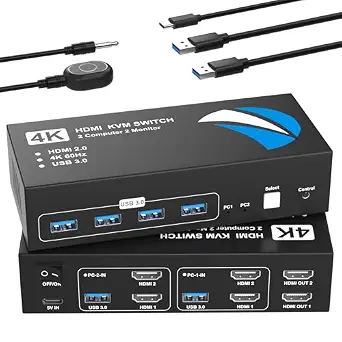 | Best for Office and Conference Room Setups | Supports Resolutions: 4K@60Hz | USB Ports: 4 USB 3.0 | HDMI Compatibility: HDMI 2.0, HDCP 2.2/1.4 | VIEW ON AMAZON | See Our Full Breakdown |
| HDMI KVM Switch 2 Monitors 4 Computers 4K@60Hz Audio RS232 EDID Emulation |  | Best for Complex Multi-Computer Installations | Number of Computers: 4 | Number of Monitors: 2 | Resolution Support: 4K@60Hz | VIEW ON AMAZON | See Our Full Breakdown |
| HDMI + DisplayPort KVM Switch for Dual Monitors and 2 Computers, 4K@60Hz, 4 USB 3.0 Ports, Supports Extended/Copy Mode with Desktop Controller and Cables |  | Best Overall for Versatile Multi-Display Control | Number of Monitors: 2 | Number of Computers: 2 | Resolution Support: 4K@60Hz | VIEW ON AMAZON | See Our Full Breakdown |
| HDMI KVM Switch 2 Monitors 2 Computers 4K@60Hz Dual Monitor KVM Switches with 4 USB 3.0 Ports |  | Best for Simple Dual HDMI Setup and Easy Switching | Number of Monitors: 2 | Number of Computers: 2 | Resolution Support: 4K@60Hz | VIEW ON AMAZON | See Our Full Breakdown |
| HDMI KVM Switch for 3 Monitors and 2 Computers, 4K@60Hz, with 4 USB 3.0 Ports |  | Best for Multi-Monitor Power Users with High-Resolution Needs | Number of Monitors: 3 | Number of Computers: 2 | Resolution Support: 4K@60Hz | VIEW ON AMAZON | See Our Full Breakdown |
| kvm switch for 2 computers 2 monitors 4k | USB Ports | Resolution Support | Power Supply | Number of Monitors |
|---|---|---|---|---|
| UGREEN HDMI KVM Switch 2 Monit | 4 (3 USB-A + 1 USB-C) | — | — | — |
| 4K HDMI KVM Switch 2 Port | — | — | — | — |
| 8K HDMI KVM Switch for Dual Mo | 4 USB 3.0 | 8K@60Hz, 4K@120Hz | 12V external power adapter | — |
| 4K@144Hz Dual Monitor KVM Swit | 4 USB 3.0 | 4K@144Hz, 8K@60Hz | — | 2 |
| HDMI KVM Switch 2 Monitors 3 C | 4 USB 3.0 | 4K@60Hz | — | 2 |
| 8K@60Hz DisplayPort KVM Switch | — | — | DC12V/1A | — |
| UGREEN 8K@60Hz HDMI DisplayPor | — | — | — | 3 |
| DisplayPort KVM Switch for 2 M | — | — | 12V DC adapter | — |
| HDMI KVM Switch for 2 Monitors | 4 USB 3.0 | — | — | — |
| HDMI KVM Switch 2 Monitors 4 C | — | 4K@60Hz | 12V/2A | 2 |
| HDMI + DisplayPort KVM Switch | 4 USB 3.0 | 4K@60Hz | 12V/1A DC adapter | 2 |
| HDMI KVM Switch 2 Monitors 2 C | 4 USB 3.0 | 4K@60Hz | 12V adapter | 2 |
| HDMI KVM Switch for 3 Monitors | 4 USB 3.0 | 4K@60Hz | 12V DC adapter | 3 |
More Details on Our Top Picks
UGREEN HDMI KVM Switch 2 Monitors 2 Computers 4K@60Hz with 4 USB 3.0 Ports
This UGREEN model stands out for combining dual monitor support with high-resolution 4K@60Hz output, making it ideal for professional workflows that demand vivid visuals and multitasking. Compared with the 8K HDMI KVM Switch for Dual Monitors and Computers, it offers a more accessible setup at a lower price point while still supporting HDR and HDR10+ for enhanced display quality. However, it lacks hotkey switching and EDID emulation, which could hinder seamless operation in some multi-device environments. Its four USB 3.0 ports facilitate fast data transfer, and the dual monitor support boosts productivity. The main tradeoff is the need for external power for USB device compatibility, which might complicate portable setups. Overall, this pick makes the most sense for users who want a reliable, high-res dual-monitor solution with straightforward controls.
Pros:- Supports 4K@60Hz with HDR for vibrant, detailed visuals
- Dual monitor support enhances multitasking efficiency
- Four USB 3.0 ports enable fast data transfer
Cons:- Lacks hotkey switching, limiting quick toggling
- Requires external power for full USB device support
Best for: Professionals or home office users needing vivid, high-res dual monitor setups with quick USB data transfer
Not ideal for: Users requiring hotkey switching or EDID emulation for more seamless multi-device control
- Resolution:4K@60Hz
- USB Ports:4 (3 USB-A + 1 USB-C)
- HDMI Version:HDMI 2.0
- HDR:Yes
- HDR10+:Yes
- Supported Systems:Windows, MacOS, Linux
Our verdict“A strong choice for users who prioritize high-resolution dual monitors and straightforward USB connectivity without complex features.”
4K HDMI KVM Switch 2 Port, USB HDMI Switch for 2 Computers, Supports UHD 4K@60Hz, Includes Cables
This switch is designed for users who want a straightforward, plug-and-play solution for controlling two computers with a single monitor at 4K@60Hz. Its simplicity stands out compared to the more advanced 8K HDMI KVM Switch for Dual Monitors, which offers higher resolution options but at increased complexity and cost. The included cables and driver-free operation make it particularly appealing for those who prefer quick setup. Its limitation lies in being restricted to controlling only two computers, making it less suitable for multi-device environments. Additionally, the lack of external power options could limit performance with some high-demand peripherals. This makes it ideal for users who need quality 4K visuals without the need for extended features or multi-monitor support.
Pros:- Supports UHD 4K@60Hz for crisp, clear images
- Includes all necessary cables for quick setup
- Driver-free, plug-and-play operation
Cons:- Limited to controlling only two computers
- No external power option may restrict performance with some devices
Best for: Home users or small office setups needing reliable 2-device 4K control with minimal fuss
Not ideal for: Power users or professionals requiring multi-monitor extension or hotkey switching
- Resolution:UHD 4K@60Hz
- Ports:2 HDMI, 2 USB
- Compatibility:Windows, Mac OS, Linux, Chrome OS
- Included Cables:2 HDMI, 2 USB
- Power:No external power required
Our verdict“A practical choice for users seeking a simple, reliable 2-device 4K switch with minimal setup fuss.”
8K HDMI KVM Switch for Dual Monitors and Computers, 2-Port with USB 3.0 Hub, Extended Display Support
This model excels for users aiming for the highest possible display resolutions, supporting 8K@60Hz and 4K@120Hz, making it ideal for professional video editing or high-end graphics work. Unlike the UGREEN 4K@60Hz KVM, it offers support for dual monitor extension at ultra-high resolutions, along with a 4-port USB 3.0 hub for fast data sharing. The need for an external power supply and PCs with dual HDMI outputs are notable tradeoffs, potentially complicating setup. Hotkey switching is absent, replaced by panel buttons and remote control, which may not suit fast-paced workflows. Still, for those needing top-tier visuals and multi-monitor control, this switch delivers impressive performance with some setup overhead.
Pros:- Supports up to 8K@60Hz and 4K@120Hz for stunning, ultra-high-res displays
- Includes USB 3.0 hub for fast data transfer
- Supports extended and copy monitor modes
Cons:- Requires PCs with dual HDMI outputs
- External power supply needed for full operation
Best for: Creative professionals or high-end users demanding 8K and 4K@120Hz displays with USB device sharing
Not ideal for: Casual users or those with limited space or hardware constraints, due to power and output requirements
- Resolution Support:8K@60Hz, 4K@120Hz
- USB Ports:4 USB 3.0
- HDMI Ports:2 HDMI
- Power Supply:12V external power adapter
- Switching Method:Panel buttons and remote controller
Our verdict“Best suited for professionals needing the highest resolution support and multi-monitor extension with USB sharing capabilities.”
4K@144Hz Dual Monitor KVM Switch for 2 Computers with DisplayPort and USB 3.0
This switch caters to users who prioritize ultra-smooth visuals, supporting 4K@144Hz and even 8K@60Hz, making it ideal for gamers or graphic professionals needing high refresh rates. Its support for two DisplayPort monitors sets it apart from HDMI-only options like the UGREEN HDMI KVM, though it demands that each computer has dual DisplayPort outputs, which can be a limiting factor. The inclusion of a remote control and hotkey options makes switching flexible, but the need for DP cables not included might increase setup complexity. It’s a compelling choice for high-performance environments where refresh rate and resolution are critical, though setup requirements are more demanding.
Pros:- Supports 4K@144Hz and 8K@60Hz for ultra-smooth visuals
- Enables sharing of two monitors and four USB devices
- Remote and hotkey switching for quick control
Cons:- Requires dual DisplayPort outputs from each computer
- DP cables are not included, adding extra cost
Best for: Gamers or professionals with high-refresh-rate needs and dual DisplayPort outputs
Not ideal for: Users with only HDMI outputs or those seeking a simple plug-and-play experience
- Resolution Support:4K@144Hz, 8K@60Hz
- Number of Monitors:2
- Number of Computers:2
- USB Ports:4 USB 3.0
- Connection Type:DisplayPort
Our verdict“A prime choice for high-refresh-rate users with dual DisplayPort outputs seeking smooth, high-res multitasking.”
HDMI KVM Switch 2 Monitors 3 Computers 4K@60Hz 3 Ports Dual Monitor
This switch is tailored for users managing three computers with two monitors, supporting 4K@60Hz and multiple USB devices. It offers both button and wireless remote switching, making it versatile for busy environments. Its EDID support optimizes display performance across different systems, which is an advantage over simpler switches like the 4K HDMI KVM Switch 2 Port. However, the need for computers to have HDMI or USB-C ports and the potential complexity of setup can be barriers for less technical users. Its support for multiple systems and flexible switching modes make it ideal for shared workspaces or multi-system setups that require frequent switching.
Pros:- Supports 4K@60Hz with EDID for optimal display quality
- Controls three computers across two monitors
- Wireless remote and button switching provide flexible control
Cons:- Requires compatible HDMI or USB-C ports on all systems
- Setup may be complex for non-technical users
Best for: Shared workspaces or power users managing three systems needing dual monitors and flexible control modes
Not ideal for: Single or dual-system users seeking a straightforward, minimal setup
- Number of Monitors:2
- Number of Computers:3
- Resolution Support:4K@60Hz
- USB Ports:4 USB 3.0
- Switching Modes:Button and wireless remote
Our verdict“Ideal for multi-system environments demanding flexible, multi-monitor control and high display quality.”
8K@60Hz DisplayPort KVM Switch for 2 Monitors and 2 Computers
This DisplayPort KVM switch stands out for supporting up to 8K60Hz resolution, making it ideal for professionals needing ultra-crisp visuals. Compared with the DisplayPort KVM Switch for 2 Monitors and 2 Computers, 4K@144Hz, it offers higher resolution but requires dual DisplayPort outputs, which limits compatibility for some systems. Its easy switching via indicator lights and remote control enhances multitasking efficiency, yet it demands short cables (no longer than 1.5 meters) for optimal performance. The metal casing ensures durability, and it supports multiple OS including Linux and Windows.
Pros:- Supports ultra-high resolution up to 8K60Hz for crisp visuals
- Easy switching with indicator lights and remote controller
- Shared USB 3.0 ports for peripherals
Cons:- Requires computers with dual DisplayPort outputs
- Hotkeys for switching are not supported
Best for: Power users and content creators working with high-resolution media on dual displays who need reliable, seamless switching.
Not ideal for: Casual users or setups with computers lacking dual DisplayPort outputs, due to cable and compatibility constraints.
- Resolution:8K@60Hz, 4K@144Hz, 2K144Hz, 1080P
- Ports:2 DisplayPort, 4 USB 3.0
- Supported Modes:Extended, Copy
- Switching Method:Push-button, wired extension button
- Compatibility:Windows 7/8/8.1/10, Vista, XP, Linux, Chrome OS
- Power Supply:DC12V/1A
Our verdict“This switch makes the most sense for professionals who require top-tier resolution and reliable control, despite its compatibility limitations.”
UGREEN 8K@60Hz HDMI DisplayPort KVM Switch for 3 Monitors and 2 Computers
This KVM switch is suited for those needing to manage three monitors across two computers at 8K@60Hz, offering extensive display options. Unlike the DisplayPort KVM Switch for 2 Monitors and 2 Computers, 4K@144Hz, it supports three monitors and HDR, making it ideal for creative workflows. Its multiple switching options, including a desktop controller, add convenience, but it requires that both computers support triple-monitor output, which can be a limiting factor. The support for advanced features like VRR and FreeSync appeals to gamers and content creators. However, cable length constraints mean users should plan for cable management accordingly.
Pros:- Supports 8K@60Hz across three monitors for immersive workflows
- Compatible with HDR, VRR, and FreeSync for enhanced visual quality
- Multiple switching options including desktop controller and button
Cons:- Requires computers to support triple-monitor outputs
- Cables and monitors must be high-spec and within length limits
Best for: Content creators and advanced users needing extensive multi-monitor setups with high-resolution support.
Not ideal for: Users with limited port support or less powerful graphics hardware that can’t handle three displays at 8K resolutions.
- Number of Monitors:3
- Number of Computers:2
- DisplayPort Ports:2
- HDMI Ports:1
- Max Resolution:8K@60Hz
- Supported Systems:Windows, Linux
Our verdict“Ideal for demanding professionals who need three high-resolution monitors, but not suitable for systems with limited video output capabilities.”
DisplayPort KVM Switch for 2 Monitors and 2 Computers, 4K@144Hz, USB 3.0
This dual-monitor DisplayPort KVM switch excels in delivering 4K@144Hz visuals, making it suitable for gamers and high-refresh-rate applications. Compared to the HDMI KVM Switch for 2 Monitors and 2 Computers, 4K@60Hz, it offers significantly higher refresh rates, but it requires two DisplayPort cables and USB cables per computer, which might complicate setup. Hotkey switching is not supported, so physical control panels are the main method. The resolution and refresh rate depend heavily on the graphics card and cable quality, which can be a limiting factor for some users. Nonetheless, it provides fast data transfer and crisp visuals for competitive gaming or fast-paced workflows.
Pros:- Supports 4K@144Hz for ultra-smooth visuals
- Enables control of two computers with dual monitors and USB devices
- Easy switching via panel button or external controller
Cons:- Requires multiple cables for each computer
- No hotkey switching support
Best for: Gamers and users needing high-refresh-rate performance on dual 4K monitors.
Not ideal for: Users with limited space or those preferring simpler setups without multiple cables per computer.
- Resolution:3840×2160@144Hz
- Ports:2 DisplayPort, 4 USB 3.0
- Supported Modes:Extended and Copy
- Power Supply:12V DC adapter
Our verdict“Best suited for high-performance gaming setups where refresh rate and resolution are priorities, despite the cable complexity.”
HDMI KVM Switch for 2 Monitors and 2 Computers, 4K@60Hz Dual Monitor USB 3.0 Sharing
This HDMI KVM switch supports 4K@60Hz and is designed for straightforward office use, supporting dual monitors and up to four USB 3.0 devices. Unlike the HDMI KVM Switch 2 Monitors 4K@60Hz Dual Monitor USB 3.0 Sharing, it emphasizes ease of use with front panel buttons and a desktop controller, but it does not include HDMI cables, requiring users to purchase them separately. It’s compatible with multiple operating systems, including macOS and Chrome OS, making it flexible for varied environments. However, the lack of included cables and limited resolution at 60Hz may be less attractive for high-end multimedia editing or gaming setups.
Pros:- Supports high-resolution 4K@60Hz for clear visuals
- Enables dual monitor setup and USB sharing
- Easy to switch via front panel or desktop controller
Cons:- HDMI cables are not included, adding extra cost
- Limited to 4K@60Hz, less ideal for high-frame-rate needs
Best for: Small businesses or conference rooms where quick switching and multi-OS compatibility are needed without high-refresh-rate demands.
Not ideal for: Power users or gamers seeking 4K at 120Hz or higher, due to the 60Hz refresh rate limit and cable requirements.
- Supports Resolutions:4K@60Hz
- USB Ports:4 USB 3.0
- HDMI Compatibility:HDMI 2.0, HDCP 2.2/1.4
- Switching Method:Front panel, desktop controller
Our verdict“A solid choice for office environments that value simplicity and broad OS support, at the expense of higher refresh rates.”
HDMI KVM Switch 2 Monitors 4 Computers 4K@60Hz Audio RS232 EDID Emulation
This HDMI KVM switch provides management for up to four computers with two monitors, supporting 4K@60Hz and EDID emulation for stable display output. Unlike the HDMI KVM Switch for 2 Monitors and 2 Computers, 4K@60Hz, it offers remote control and RS232 serial options, making it suitable for server rooms or control centers. Its ability to emulate EDID helps prevent display flickering or resolution issues, but setup can be complicated for non-technical users, especially since HDMI cables and power supplies are sold separately. It’s a good choice for complex setups where stability and remote management outweigh plug-and-play simplicity.
Pros:- Supports 4K@60Hz resolution with stable output via EDID emulation
- Multiple switching modes including remote and serial control
- Suitable for managing multiple PCs simultaneously
Cons:- HDMI cables and power supply are not included
- Setup complexity may be a barrier for non-technical users
Best for: IT professionals and enterprise environments managing multiple systems with complex switching needs.
Not ideal for: Home users or small offices requiring simple, plug-and-play solutions without the need for remote or serial controls.
- Number of Computers:4
- Number of Monitors:2
- Resolution Support:4K@60Hz
- Control Methods:Push button, remote, serial
- EDID Emulation:Yes
- Power Supply:12V/2A
Our verdict“Best for technically proficient users managing complex multi-PC environments who need stable, remote-controlled switching.”
HDMI + DisplayPort KVM Switch for Dual Monitors and 2 Computers, 4K@60Hz, 4 USB 3.0 Ports, Supports Extended/Copy Mode with Desktop Controller and Cables
This model stands out for its flexible input options, combining both HDMI and DisplayPort, making it ideal for diverse setups. While other options like the B0H2YPSL9R focus solely on HDMI, this switch offers broader compatibility, especially with mixed monitor types. The inclusion of four USB 3.0 ports supports multiple peripherals and simplifies workspace management. However, it lacks hotkey switching, which may slow down quick toggling compared to products like the B0H7QZGH8T that offer remote switching. Its dual switching methods provide convenience, but the absence of hotkey support could be a disadvantage for fast-paced environments. Overall, this switch suits users needing high-quality visuals and multiple peripheral connections with flexible monitor inputs.
Pros:- Supports 4K at 60Hz for crisp, high-quality visuals
- Includes four USB 3.0 ports for multiple peripherals
- Dual switching options with panel button and wired controller
Cons:- Does not support hotkey switching, reducing speed for frequent toggling
- Requires compatible HDMI and DisplayPort cables, no signal conversion between them
Best for: Pro users with mixed monitor setups and a need for seamless peripheral sharing across different operating systems.
Not ideal for: Those who prefer hotkey switching for rapid toggling or use only HDMI monitors, as the lack of hotkey support and no HDMI-to-DisplayPort conversion could be limiting.
- Number of Monitors:2
- Number of Computers:2
- Resolution Support:4K@60Hz
- USB Ports:4 USB 3.0
- Input Ports:HDMI, DisplayPort
- Power Supply:12V/1A DC adapter
- Supported Systems:Windows, Mac OS, Linux, Unix
Our verdict“This pick is ideal for users who need flexible multi-monitor inputs and high-quality video support across different systems, but may miss hotkey convenience.”
HDMI KVM Switch 2 Monitors 2 Computers 4K@60Hz Dual Monitor KVM Switches with 4 USB 3.0 Ports
This switch offers straightforward control of two computers with two HDMI monitors, making it well-suited for users who prioritize simplicity. Unlike the Product 11, which supports both HDMI and DisplayPort, this model is limited to HDMI connections, streamlining setup but reducing compatibility with non-HDMI monitors. Its dual display modes—extended and duplicate—enhance productivity, yet it doesn’t support hotkey switching, unlike some remote-controlled options such as the B0H7QZGH8T. The physical button or remote extension allows flexible switching, but the need for both computers to have two HDMI ports may complicate setups. This switch is perfect for users with dedicated HDMI monitors seeking reliable high-resolution performance without extra features.
Pros:- Supports 4K at 60Hz, ensuring sharp visuals
- Dual display modes boost multitasking capabilities
- Easy switching with physical button or remote
Cons:- Requires computers with two HDMI ports, limiting flexibility
- No support for hotkey switching, reducing quick toggle options
Best for: Professionals or gamers using dual HDMI monitors who need reliable, straightforward switching without extra input options.
Not ideal for: Users with mixed display types or those requiring hotkey switching, as this model supports only HDMI and lacks hotkey functionality.
- Number of Monitors:2
- Number of Computers:2
- Resolution Support:4K@60Hz
- USB Ports:4 USB 3.0
- Switching Modes:Extended, Duplicate
- Power Supply:12V adapter
- Compatibility:Windows, Linux
Our verdict“This switch offers a simple, reliable solution for dual HDMI monitor setups but may fall short for users seeking advanced switching features.”
HDMI KVM Switch for 3 Monitors and 2 Computers, 4K@60Hz, with 4 USB 3.0 Ports
This model stands out for supporting three HDMI monitors, catering to users with extensive multi-display setups. Compared with the dual-monitor options like Product 12, this switch provides an extra monitor, ideal for professional workflows or detailed gaming environments. The inclusion of a dedicated remote switch adds convenience for frequent toggling, especially over hotkey-based switches like Product 11. However, the requirement for three HDMI cables per computer increases setup complexity and cost. Its stable operation with a dedicated power supply makes it a dependable choice for demanding tasks. This switch is best suited for power users who require multiple displays and appreciate flexible control options.
Pros:- Supports three HDMI monitors at 4K@60Hz for maximum workspace
- Flexible switching with panel button and remote control
- Stable operation with dedicated power supply
Cons:- Requires three HDMI cables per computer, increasing complexity and cost
- No hotkey support, potentially slower toggling for some users
Best for: Creative professionals or gamers with multi-monitor setups who want maximum display real estate and reliable switching options.
Not ideal for: Users with limited HDMI ports or those seeking a simple two-monitor solution, as this requires multiple HDMI connections per computer.
- Number of Monitors:3
- Number of Computers:2
- Resolution Support:4K@60Hz
- USB Ports:4 USB 3.0
- Switching Methods:Panel, Remote
- Power Supply:12V DC adapter
- Supported Systems:Windows, Mac OS, Linux, Unix
Our verdict“This switch delivers impressive multi-monitor support for high-end setups but demands a more complex and costly cable arrangement.”

How We Picked
These products were evaluated based on performance at 4K resolution, compatibility with dual monitor setups, build quality, ease of installation, and additional features like USB hub support or remote switching. We prioritized switches that deliver stable, lag-free video, especially at 60Hz or higher, and those that support extended or mirrored displays without artifacting. Value was considered by balancing feature set against price, ensuring options suit various budgets without sacrificing core functionality. The ranking reflects the best combinations of reliability, usability, and future-proofing, helping different types of users find a suitable solution.Factors to Consider When Choosing Kvm Switch For 2 Computers 2 Monitors 4k
Choosing the right KVM switch for 2 computers and 2 monitors at 4K involves understanding several key factors. Not all switches support high refresh rates, multiple monitors, or USB peripherals equally. Making an informed decision requires evaluating your specific needs—whether for gaming, professional work, or general use—and balancing those against your budget. Here are the main considerations to keep in mind before purchasing:Resolution and Refresh Rate Compatibility
Ensuring the switch supports 4K at 60Hz is essential for smooth, flicker-free visuals, especially for gaming or detailed professional work. Some switches claim 4K support but only at lower refresh rates, which can cause lag or artifacts. Higher-end models support 8K or 144Hz, offering more future-proofing but often at a premium. Consider your current display capabilities and future needs to avoid bottlenecks or needing to upgrade again soon.
Number of USB and Peripheral Support
Many KVM switches include USB hubs, but the number and type of ports vary. If you rely on multiple peripherals—such as keyboards, mice, external drives, or audio devices—look for switches with sufficient USB ports and support for USB 3.0 speeds. Some models also support audio switching, which is vital for multimedia setups. Overlooking this can lead to inconvenient peripheral management or the need for additional hubs.
Ease of Use and Switching Mechanisms
Switching between computers should be straightforward, whether via hotkeys, remote control, or physical buttons. Advanced features like auto-switching or software control add convenience but can increase complexity. Consider how frequently you’ll switch and your comfort with setup procedures—more intuitive interfaces tend to reduce frustration over time.
Build Quality and Cable Support
At 4K, signal integrity is critical. Poorly built switches or low-quality cables can introduce flickering or artifacts. Look for sturdy construction, good shielding, and support for the necessary cable lengths. Some models include EDID emulation or other features to maintain display stability during switching, which is especially important for professional workflows.
Price and Future-Proofing
Higher prices often reflect better resolution support, build quality, and additional features like extended display support or remote control. Determine your budget but be cautious of cheap switches that promise 4K at 60Hz but deliver inconsistent performance. Investing a bit more can provide a more reliable setup that remains useful as your needs grow.
Frequently Asked Questions
Will a KVM switch support my dual monitors at 4K60Hz?
Most modern KVM switches designed for 4K support dual monitors at 60Hz, but it’s essential to verify the specifications. Some lower-priced models may only support 4K at 30Hz or have limited bandwidth, resulting in reduced performance. Always check for explicit support for dual 4K monitors at 60Hz to ensure smooth visuals, especially if you work in graphics or video editing.
Can I connect USB peripherals through the KVM switch without issues?
Yes, but the number and type of USB ports matter. Many switches include USB 3.0 support, which ensures fast data transfer for peripherals like external drives or high-speed devices. Compatibility issues can arise if the switch’s USB implementation isn’t robust or if it lacks sufficient ports for your needs. Checking for dedicated audio and peripheral support can prevent connectivity frustrations.
Are there any drawbacks to using an 8K KVM switch for a 4K setup?
While 8K switches support higher resolutions and future-proofing, they tend to be more expensive and complex to set up. Some models might have limited availability or require specific cables and hardware to function properly. For most users, a 4K@60Hz switch offers ample performance without the added cost and complexity of 8K support, unless you plan to upgrade soon.
Is remote switching necessary for most users?
Remote switching is a convenience feature that allows you to change control between computers without physically pressing buttons. It’s particularly useful in server rooms or professional environments with multiple users. For casual or single-user setups, physical buttons or hotkeys usually suffice, making remote control a nice-to-have rather than a necessity.
What should I consider if I want to upgrade to triple monitors someday?
If future expansion to three monitors is a possibility, choose a KVM switch that explicitly supports three displays and higher bandwidth. Not all switches handle three outputs at 4K, so verifying compatibility upfront saves hassle later. Also, consider the switch’s overall build quality and whether it offers enough USB ports and video support to accommodate larger setups.
Conclusion
The best overall pick for most users is the UGREEN HDMI KVM Switch, offering reliable 4K@60Hz support with straightforward usability. Budget-conscious buyers will appreciate the 4K HDMI KVM Switch 2 Port for its balance of features and affordability. For those seeking maximum future-proofing and high resolutions, the 8K HDMI KVM Switch makes sense, though at a higher cost. Beginners or casual users should prioritize simplicity and ease of setup, while professionals needing high performance might invest in premium options with extended display support and robust build quality. Matching the right switch to your specific needs ensures a seamless, productive experience at 4K resolution.
As an affiliate, we earn on qualifying purchases.Halloween Picks
halloween