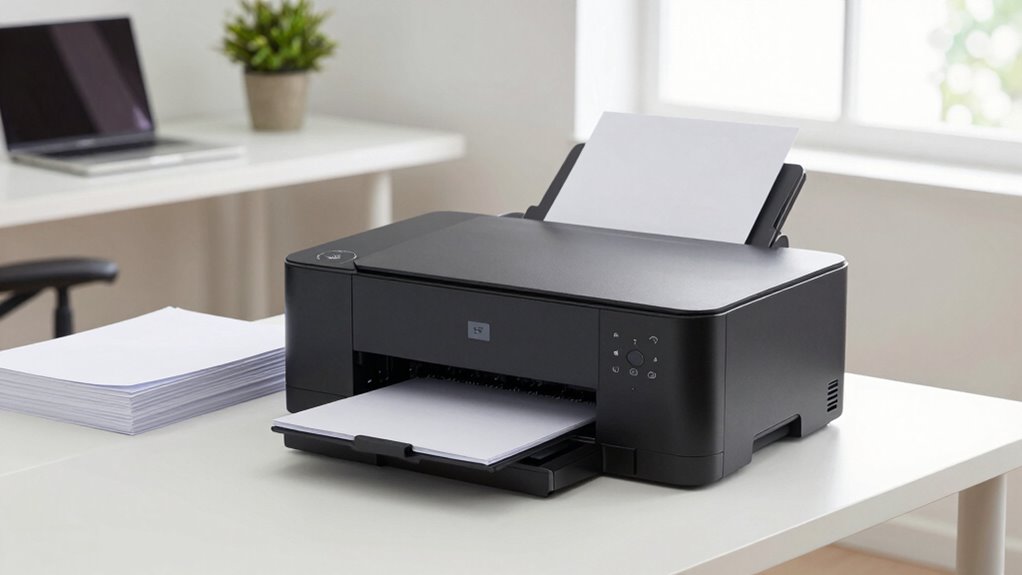

If you’re looking for a monochrome laser printer capable of handling heavy printing loads at home, this guide is for you. The Brother HL-L2480DW stands out as the best overall choice, offering reliable performance and versatile features. The HP LaserJet Pro MFP 3101sdw is an excellent all-in-one option for those needing scanning and copying, while the Brother HL-L5210DN provides high-volume duplex printing for demanding workloads. Be aware that tradeoffs often involve balancing initial cost against ongoing maintenance and paper handling capacity. Continue reading to see how these options compare and which one fits your home office needs best.

Get the latest gadgets delivered free — and shop member deals
- Fast, free delivery on millions of items
- Access to Prime Big Deal Days deals on October 6–7
- Prime Video, Amazon Music and more included
Complete the kit



Key Takeaways
- The top picks balance print volume capacity, connectivity options, and ease of use for heavy daily printing.
- Duplex printing and mobile connectivity are key features distinguishing high-volume models from basic ones.
- Build quality and warranty coverage are critical for durability in a home office environment.
- Price varies significantly based on features; premium models often include advanced scanning and duplexing.
- Choosing the right model depends on balancing initial investment versus ongoing running costs and features.
| Brother HL-L2480DW Wireless Monochrome Multi-Function Laser Printer with Copy and Scan |  | Best Overall for Small Home Offices with Versatile Connectivity | Print Speed: 36 ppm | Paper Capacity: 250 sheets | Connectivity: Wi-Fi, Ethernet, USB | VIEW ON AMAZON | See Our Full Breakdown |
| HP LaserJet Pro MFP 3101sdw Wireless Black and White All-in-One Laser Printer |  | Best for Small Teams Needing All-in-One Functionality | Print Speed: up to 35 ppm | Input Tray Capacity: 250 sheets | Auto Duplex: Yes | VIEW ON AMAZON | See Our Full Breakdown |
| Brother HL-L5210DN Business Monochrome Laser Printer with Duplex Printing and Mobile Connectivity |  | Best for High-Volume, Security-Conscious Offices | Print Speed: up to 48 ppm | Paper Capacity: 250 sheets, expandable to 1,390 | Connectivity: Gigabit Ethernet, mobile printing | VIEW ON AMAZON | See Our Full Breakdown |
| Canon imageCLASS MF465dw Monochrome Duplex Wireless Laser Printer, All-in-One with Scanner, Copier, Fax, Auto Document Feeder, Mobile Ready, 3-Year Warranty |  | Best for High-Volume, All-in-One Home or Small Office Use | Print Speed: 42 PPM | Paper Capacity: Up to 900 sheets | Touchscreen: 5-inch color | VIEW ON AMAZON | See Our Full Breakdown |
| Brother HL-L2405W Wireless Monochrome Laser Printer with Mobile Printing |  | Best for Budget-Conscious Small Home Offices | Print Speed: 30 pages per minute | Connectivity: Wireless, USB | Paper Capacity: 250 sheets | VIEW ON AMAZON | See Our Full Breakdown |
| HP LaserJet M110w Wireless Black & White Printer |  | Best Overall for Small Teams | Print Speed: Up to 21 pages per minute | Connectivity: Wireless, Mobile Printing | Color: Black & White | VIEW ON AMAZON | See Our Full Breakdown |
| Canon imageCLASS LBP6030w Monochrome Wireless Laser Printer – Print Only, Compact Design |  | Best for Personal and Space-Conscious Use | Printer Type: Laser | Print Speed: 19 pages per minute | Connectivity: Wireless | VIEW ON AMAZON | See Our Full Breakdown |
| Canon imageCLASS LBP122dw Wireless Monochrome Duplex Laser Printer |  | Best for Home and Small Office Automation | Printer Type: Laser | Print Speed: 30 pages per minute | Maximum Media Size: 8.5 x 14 inches | VIEW ON AMAZON | See Our Full Breakdown |
| Brother Monochrome Laser Printer MFCL2710DW with Wireless Networking and Duplex Printing |  | Best for Multifunction and Moderate Volume Printing | Form Factor: Print/Copy/Scan/Fax | Connectivity Technology: Wi-Fi | Features: Duplex Printing, Manual Feed Slot | VIEW ON AMAZON | See Our Full Breakdown |
| Brother HL-6210DW Monochrome Duplex Wireless Laser Printer |  | Best for High-Volume Office Printing | Print Speed: 50 ppm | Main Tray Capacity: 520 sheets | Maximum Tray Capacity: 1,660 sheets | VIEW ON AMAZON | See Our Full Breakdown |
| Brother HL-L2460DW Wireless Monochrome Laser Printer with Duplex and Mobile Printing |  | Best Overall for Small Home Offices with Heavy Printing Needs | Print Speed: 36 pages per minute | Connectivity: Wi-Fi (dual-band), Ethernet, USB | Paper Capacity: 250 sheets | VIEW ON AMAZON | See Our Full Breakdown |
| monochrome laser printer for home office heavy printing | Print Speed | Connectivity | Paper Capacity |
|---|---|---|---|
| Brother HL-L2480DW Wireless Mo | 36 ppm | Wi-Fi, Ethernet, USB | 250 sheets |
| HP LaserJet Pro MFP 3101sdw Wi | up to 35 ppm | Wireless | — |
| Brother HL-L5210DN Business Mo | up to 48 ppm | Gigabit Ethernet, mobile printing | 250 sheets, expandable to 1,390 |
| Canon imageCLASS MF465dw Monoc | 42 PPM | Wireless, Mobile | Up to 900 sheets |
| Brother HL-L2405W Wireless Mon | 30 pages per minute | Wireless, USB | 250 sheets |
| HP LaserJet M110w Wireless Bla | Up to 21 pages per minute | Wireless, Mobile Printing | — |
| Canon imageCLASS LBP6030w Mono | 19 pages per minute | Wireless | 150 sheets |
| Canon imageCLASS LBP122dw Wire | 30 pages per minute | Wi-Fi, Ethernet | — |
| Brother Monochrome Laser Print | — | — | — |
| Brother HL-6210DW Monochrome D | 50 ppm | Gigabit Ethernet, dual band wireless | — |
| Brother HL-L2460DW Wireless Mo | 36 pages per minute | Wi-Fi (dual-band), Ethernet, USB | 250 sheets |
More Details on Our Top Picks
Brother HL-L2480DW Wireless Monochrome Multi-Function Laser Printer with Copy and Scan
The Brother HL-L2480DW stands out for its compact design, making it ideal for tight home office spaces. Its 36 ppm speed and automatic duplex printing support high-volume workloads, comparable to larger models like the Canon MF465dw, but without the extensive high-volume features. Its wireless and cloud printing capabilities make it easy to integrate into a busy home environment. However, being monochrome-only limits its usefulness for those needing color, and the basic touchscreen can feel less intuitive. The requirement for subscription toner services adds ongoing costs, but overall, this model balances speed, versatility, and affordability for everyday heavy printing.
Pros:- Compact and space-efficient design
- Fast printing speeds up to 36 ppm
- Wireless and cloud connectivity options
- Automatic duplex reduces paper waste
Cons:- Limited to monochrome printing only
- Requires subscription for toner savings
- Basic touchscreen interface
Best for: Small home office users who need fast, versatile printing without high upfront costs
Not ideal for: Users needing color printing or advanced document management features
- Print Speed:36 ppm
- Paper Capacity:250 sheets
- Connectivity:Wi-Fi, Ethernet, USB
- Functions:Print, Copy, Scan
- Touchscreen:2.7 inches
- Energy Star:Yes
Our verdict“This printer is perfect for small home offices prioritizing speed and connectivity over color versatility.”
HP LaserJet Pro MFP 3101sdw Wireless Black and White All-in-One Laser Printer
Compared with the Brother HL-L2480DW, the HP LaserJet Pro 3101sdw offers similar speed but adds the convenience of a built-in scanner, copier, and auto document feeder suitable for small teams. Its 35 ppm speed and wireless setup make it reliable for multi-user environments, yet it’s less suited for very high-volume printing or color needs. The cartridge system is somewhat restrictive, favoring HP’s proprietary supplies, which could increase ongoing costs. This model makes the most sense for users who need multifunction capabilities in a compact footprint but don’t require advanced security or large paper capacity.
Pros:- Fast print speed of up to 35 ppm
- All-in-one functionality (print, scan, copy)
- Reliable wireless connectivity
- Auto duplex printing
Cons:- Limited to HP cartridges, which can be costly
- Designed mainly for small team use, not heavy-duty
- No large capacity paper tray
Best for: Small teams or home offices requiring all-in-one features with reliable wireless connectivity
Not ideal for: High-volume or color printing users who need more capacity or color options
- Print Speed:up to 35 ppm
- Input Tray Capacity:250 sheets
- Auto Duplex:Yes
- Auto Document Feeder:50 sheets
- Connectivity:Wireless
- Color:Black and White
Our verdict“Ideal for small offices needing multifunction printing in a compact, wireless package without high-volume demands.”
Brother HL-L5210DN Business Monochrome Laser Printer with Duplex Printing and Mobile Connectivity
The Brother HL-L5210DN excels for demanding environments with a 48 ppm speed and expandable paper capacity, making it suitable for larger workloads than the HP 3101sdw. Its robust security features and mobile printing options support sensitive documents, but the initial setup can be complex, especially for less tech-savvy users. While it shares the monochrome-only limitation with the others, its high speed and security focus make it well-suited for busy home offices or small businesses that prioritize confidentiality and volume. The tradeoff is a larger footprint and more involved setup process.
Pros:- Fast printing up to 48 ppm
- Expandable paper capacity to 1,390 sheets
- Built-in security features
- Supports mobile printing
Cons:- Limited to monochrome printing
- Complex setup process
- Larger size may require dedicated space
Best for: Workplaces with high-volume printing needs and security requirements
Not ideal for: Home users with minimal space or those needing color output
- Print Speed:up to 48 ppm
- Paper Capacity:250 sheets, expandable to 1,390
- Connectivity:Gigabit Ethernet, mobile printing
- Security:Triple Layer Security
- Toner Cartridge:3,000 pages
- Functions:Print
Our verdict“This model is best for high-volume, security-focused small offices that need fast, reliable monochrome printing.”
Canon imageCLASS MF465dw Monochrome Duplex Wireless Laser Printer, All-in-One with Scanner, Copier, Fax, Auto Document Feeder, Mobile Ready, 3-Year Warranty
The Canon imageCLASS MF465dw combines high speeds—up to 42 ppm—with a large paper capacity of up to 900 sheets, making it suitable for heavy-duty workloads. Its 5-inch color touchscreen offers intuitive control, surpassing the basic interfaces of models like the Brother HL-L2480DW. The inclusion of fax and a robust automatic document feeder enhances its multifunction appeal. However, its large footprint and monochrome-only output limit its appeal for space-constrained or color-reliant users. Compared to the Brother HL-L5210DN, it provides more features but at a higher cost and size, making it better suited for users with substantial printing needs who want a streamlined all-in-one solution.
Pros:- Fast speeds up to 42 ppm
- Massive paper capacity of 900 sheets
- Intuitive 5-inch color touchscreen
- All-in-one functionality (print, scan, fax, copy)
Cons:- Size and footprint are large
- Limited to monochrome printing
- Setup may be complex
Best for: Heavy-duty home offices or small businesses requiring fast, high-capacity monochrome printing with multifunction features
Not ideal for: Users with limited space or those needing color printing options
- Print Speed:42 PPM
- Paper Capacity:Up to 900 sheets
- Touchscreen:5-inch color
- Automatic Document Feeder:50 sheets
- Connectivity:Wireless, Mobile
- Warranty:3 years
Our verdict“Best suited for high-volume, multifunction needs where space allows and color is non-essential.”
Brother HL-L2405W Wireless Monochrome Laser Printer with Mobile Printing
The Brother HL-L2405W offers a straightforward, compact design with a modest speed of 30 ppm, making it suitable for light to moderate workloads. Its wireless capability and 250-sheet paper tray provide reliable everyday performance, comparable to the less feature-rich Brother HL-L2480DW. While lacking multifunction features like scanning or copying, it’s a good choice for those prioritizing affordability and simplicity. The absence of color limits its versatility, but its limited feature set keeps costs down and setup straightforward, which is ideal for budget-conscious users with basic printing needs.
Pros:- Decent speed of 30 ppm
- Wireless and mobile printing
- Large 250-sheet paper tray
- Simple setup and operation
Cons:- Limited to monochrome printing only
- No scanning or copying capabilities
- Requires toner replacement for ongoing use
Best for: Home users needing reliable monochrome printing on a budget
Not ideal for: Users requiring multifunction features or color printing
- Print Speed:30 pages per minute
- Connectivity:Wireless, USB
- Paper Capacity:250 sheets
- Warranty:1 year limited
- Printer Type:Monochrome laser
Our verdict“This printer is well-suited for budget-minded home users focused on basic, reliable monochrome printing.”
HP LaserJet M110w Wireless Black & White Printer
The HP LaserJet M110w stands out as the most balanced choice for small home offices with light-to-moderate heavy printing needs. Its compact size makes it ideal for limited spaces, yet it doesn’t sacrifice speed, offering up to 21 pages per minute—faster than the Canon imageCLASS LBP6030w, which only hits 19 ppm. The M110w’s wireless and mobile printing support simplifies workflows, especially compared to the Brother HL-6210DW, which leans more toward high-volume office environments with larger capacity trays. The main tradeoff is its focus on small teams; it lacks multi-function features like scanning or copying, unlike Brother’s all-in-one models. Overall, this pick makes the most sense for small teams needing reliable, fast monochrome printing without extra features, but not for users who need multifunctionality or larger paper capacities.
Pros:- Compact size fits easily into small spaces
- Fast printing speeds of up to 21 ppm
- Supports wireless and mobile printing for flexibility
Cons:- Limited to black-and-white printing only
- Requires original HP cartridges with chips, which can be costly
- Designed solely for small team use, not suitable for heavy or shared multi-user environments
Best for: Small teams of 1-3 people who prioritize speed, compactness, and wireless convenience.
Not ideal for: Users needing multi-function capabilities or high-volume paper handling in a single device.
- Print Speed:Up to 21 pages per minute
- Connectivity:Wireless, Mobile Printing
- Color:Black & White
- Intended Users:Small teams (1-3 people)
- Size:Smallest in its class
Our verdict“This printer is perfect for small home offices that need quick, reliable monochrome printing without extra functions.”
Canon imageCLASS LBP6030w Monochrome Wireless Laser Printer – Print Only, Compact Design
The Canon imageCLASS LBP6030w offers a highly space-efficient option for individuals or very small offices, with a straightforward wireless setup that makes printing from mobile devices simple. While its 19 ppm speed is slightly slower than the HP M110w, it compensates with a compact footprint and a low energy footprint, consuming less than 2 watts in energy saver mode. Compared to the Brother HL-6210DW, which supports higher volume printing and larger trays, this model is better suited for occasional, moderate printing in tight spaces. Its limitations are evident—no scanning or copying, and basic features that won’t satisfy users with multi-function needs. It’s best for those who prioritize a small footprint and ease of use over multifunctional capabilities or high-volume capacity.
Pros:- Extremely compact and space-efficient design
- Wireless connectivity for convenient mobile printing
- Low energy consumption in standby mode
- Reliable for basic monochrome printing
Cons:- Print-only device, no scanning or copying
- Limited to black-and-white output
- Basic features may not meet more demanding office needs
Best for: Individuals or small offices needing a space-saving, wireless monochrome printer for light to moderate printing.
Not ideal for: Workgroups requiring multi-function features like copying or scanning, or high-volume printing needs.
- Printer Type:Laser
- Print Speed:19 pages per minute
- Connectivity:Wireless
- Paper Capacity:150 sheets
- Energy Consumption:Less than 2 watts in Energy Saver mode
- Toner:Canon Genuine Toner 125 (1,600 pages yield)
Our verdict“This printer is ideal for individuals or small spaces where simplicity and compactness matter most, not multi-functionality.”
Canon imageCLASS LBP122dw Wireless Monochrome Duplex Laser Printer
The Canon imageCLASS LBP122dw excels with its faster speed—up to 30 ppm—making it suitable for small offices with consistent printing demands. Its automatic duplex printing helps reduce paper use, a feature not available on the Canon LBP6030w or HP M110w, which lack duplex capability. Its 150-sheet capacity is modest, similar to other compact models, but the inclusion of an LCD display and network options like Ethernet and Wi-Fi makes it more user-friendly for everyday office tasks. Unlike the Brother MFCL2710DW, which can scan and copy, this model sticks to printing, so it’s less versatile but more streamlined for straightforward printing jobs. It’s best for users who need faster monochrome output with duplexing in a compact, network-ready package.
Pros:- Faster print speeds of up to 30 ppm
- Automatic duplex printing reduces paper usage
- Network-ready with Wi-Fi and Ethernet
- Compact design with user-friendly LCD display
Cons:- Print-only function limits versatility
- Limited paper capacity at 150 sheets
- Basic display may be less intuitive for some
Best for: Home or small office users who need fast, duplex-capable monochrome printing with reliable network support.
Not ideal for: Offices requiring multi-function devices, such as scanning or copying, or high-volume paper handling.
- Printer Type:Laser
- Print Speed:30 pages per minute
- Maximum Media Size:8.5 x 14 inches
- Maximum Sheet Capacity:150 sheets
- Connectivity:Wi-Fi, Ethernet
- Additional Features:Auto-Duplex, LCD display
Our verdict“This printer is well-suited for users who value speed and duplexing in a compact, networked monochrome printer.”
Brother Monochrome Laser Printer MFCL2710DW with Wireless Networking and Duplex Printing
The Brother MFCL2710DW offers a versatile set of features, including printing, copying, scanning, and faxing, making it a strong choice for users who need more than just printing. Its wireless connectivity and automatic duplex printing support moderate to heavy workloads. Compared to the Canon LBP122dw, which is strictly a printer, the MFCL2710DW provides added flexibility, though at the cost of increased complexity and size. It also includes a free toner subscription trial, which can be a significant saving over time for high-volume users. The main tradeoff is that it’s bulkier and potentially more complex to set up than single-function models, which might be overkill for simple home use. This model suits those who need multifunctionality in a space where size isn’t a primary concern.
Pros:- Versatile with printing, copying, scanning, and faxing
- Wireless connectivity and automatic duplexing
- Includes a 4-month toner subscription trial
- Good for moderate to high-volume printing
Cons:- Larger and heavier than single-function printers
- Setup can be complex for some users
- Requires toner replacement for ongoing use
Best for: Home office users who require multifunction features—print, scan, copy, fax—and moderate to high volume workloads.
Not ideal for: Users needing only basic monochrome printing or with limited space for larger devices.
- Form Factor:Print/Copy/Scan/Fax
- Connectivity Technology:Wi-Fi
- Features:Duplex Printing, Manual Feed Slot
- Subscription:4 Month Refresh Trial
- Replenishment:Amazon Dash Replenishment Enabled
Our verdict“This multifunction printer is ideal for those needing a versatile, high-volume capable device in a home office setting where space allows.”
Brother HL-6210DW Monochrome Duplex Wireless Laser Printer
The Brother HL-6210DW is designed for heavy-duty office environments, offering an impressive 50 ppm speed and a massive paper capacity with up to 1,660 sheets across multiple trays. Its dual-band wireless and Ethernet support make it easy to share across a network, and the high-yield toner cartridges reduce the frequency of replacements, lowering costs over time. Compared to smaller, more compact options like the Canon LBP122dw, this model prioritizes throughput and capacity, making it less suitable for small, space-constrained home offices. Its bulk and professional features are overkill for light or occasional printing, but for those managing large print volumes regularly, it delivers efficiency and security in one package. It’s a clear choice for high-volume, professional-grade monochrome printing, not casual or space-limited setups.
Pros:- Exceptional print speed of 50 ppm
- Large capacity trays for minimal refilling
- Supports Ethernet and Wi-Fi for flexible network sharing
- High-yield toner reduces operational costs
Cons:- Bulky and less suitable for small spaces
- Primarily designed for monochrome output, not color
- More expensive initial investment
Best for: Workplaces with high-volume, consistent monochrome printing needs in a professional environment.
Not ideal for: Very small or casual home offices lacking space for its size or not requiring such high capacity.
- Print Speed:50 ppm
- Main Tray Capacity:520 sheets
- Maximum Tray Capacity:1,660 sheets
- Connectivity:Gigabit Ethernet, dual band wireless
- Toner Yield:Up to 18,000 pages
- Security:Advanced security features
Our verdict“This model is best for users with demanding high-volume monochrome printing needs in a professional or large home office.”
Brother HL-L2460DW Wireless Monochrome Laser Printer with Duplex and Mobile Printing
The Brother HL-L2460DW stands out for its combination of speed, versatility, and ease of use, making it an excellent choice for home offices that require frequent, high-volume printing. With a rapid 36 pages per minute output, it outpaces models like the Canon LBP122dw, which is slower but more compact. Its wireless connectivity via dual-band Wi-Fi and Ethernet simplifies setup and remote printing, crucial for busy households. The automatic duplex feature cuts down on paper waste, a smart addition for those printing large batches regularly. Compared to multifunction options like the HP LaserJet Pro MFP 3101sdw, this model focuses solely on printing, which keeps costs and complexity down but limits functionality. Its main tradeoff is the lack of a scanner or copier, so if multifunctionality is needed, other models are better suited. The manual feed slot, while helpful for specialty media, adds an extra step that might be less convenient for frequent use. Overall, this pick makes the most sense for small teams or individuals prioritizing speed and straightforward operation over multifunction features.
Pros:- High printing speed of 36 ppm reduces wait times
- Dual-band Wi-Fi and Ethernet for flexible connectivity
- Automatic duplex printing cuts paper costs
- Supports mobile printing via Brother Mobile Connect
Cons:- Limited to monochrome printing only, no color option
- Manual feed slot can be less convenient for frequent specialty media use
- Requires genuine Brother toner, which can add to long-term costs
Best for: Small home-office users who need fast, reliable printing and occasional mobile management.
Not ideal for: Users needing scanning, copying, or faxing capabilities within the same device.
- Print Speed:36 pages per minute
- Connectivity:Wi-Fi (dual-band), Ethernet, USB
- Paper Capacity:250 sheets
- Automatic Duplex:Yes
- Mobile Printing:Supported via Brother Mobile Connect
- Warranty:1 year
Our verdict“This model is best for small home offices that prioritize high-volume monochrome printing with minimal multifunction needs.”

How We Picked
The products were evaluated based on their print volume capacity, connectivity options, ease of setup, durability, and overall value for heavy home office use. We prioritized models with high monthly duty cycles, reliable wireless features, and straightforward maintenance. Our rankings reflect a combination of performance, feature set, and long-term cost-efficiency, ensuring that each pick caters to different user priorities—from budget-conscious buyers to those seeking premium features. This approach guarantees that the top selections are not only capable of heavy printing but also practical for everyday home office workflows.Factors to Consider When Choosing Monochrome Laser Printer For Home Office Heavy Printing
When selecting a monochrome laser printer for demanding home office use, understanding key factors beyond initial cost can save you money and frustration. Heavy printing requires robust build quality, high duty cycles, and reliable connectivity. Considering these factors carefully will help you choose a printer that remains efficient and hassle-free over time.Print Volume and Duty Cycle
For heavy printing, a high monthly duty cycle is essential. Look for a printer rated for at least 15,000 pages per month to prevent breakdowns or excessive wear. Knowing your typical printing volume helps avoid models that are either underpowered or unnecessarily expensive. Choosing a machine with a higher duty cycle than your average volume provides extra headroom and prolongs the printer’s lifespan.
Connectivity and Ease of Use
Wireless connectivity, including Wi-Fi and mobile printing options, is vital for seamless integration into a home workflow. Many models also support Ethernet or cloud services, enabling flexible printing setups. An intuitive interface and easy setup process save time and reduce frustration, especially if multiple users share the printer. Be wary of models with complicated controls or inconsistent wireless connections.
Print Speed and Duplexing
Speed matters when printing large volumes; look for models with fast pages-per-minute (PPM) ratings, ideally above 30 PPM for heavy workloads. Duplex printing—automatic double-sided printing—can halve paper costs and streamline document handling. If your printing needs include frequent multipage documents, prioritize models with reliable duplexing and fast processing.
Cost of Consumables and Maintenance
Laser printers typically have higher upfront costs but lower per-page costs due to toner efficiency. Check the cost and yield of toner cartridges; high-yield cartridges reduce replacement frequency and total cost of ownership. Also, consider maintenance features like automatic cleaning and accessible toner compartments, which simplify ongoing upkeep and reduce downtime.
Build Quality and Warranty
Heavy usage demands durable construction. Look for models with sturdy frames and high-quality components to withstand frequent printing. Longer warranties, often 3 years or more, provide peace of mind and protect your investment. Also, check for reliable customer support options, as heavy-duty printers may require service or replacement parts over time.
Frequently Asked Questions
How do I estimate the right duty cycle for my heavy printing needs?
To determine the appropriate duty cycle, first estimate your average monthly print volume. Choose a printer rated for at least 20-30% more than this figure to account for peak periods and prevent wear. For instance, if you print around 10,000 pages a month, look for a model rated for 15,000 pages or more. This ensures the printer can handle your workload without risking damage or frequent breakdowns.
Is wireless connectivity reliable enough for heavy printing tasks?
Modern wireless connections are generally reliable for heavy printing if the network is stable and the printer supports the latest standards. For high-volume environments, wired Ethernet connections can offer more consistent performance and faster data transfer. Ensure your home network has sufficient bandwidth, especially if multiple devices are printing simultaneously, to avoid delays or interruptions.
Should I prioritize a higher upfront cost for a more durable model?
Investing in a higher-priced, durable model often pays off in the long run, especially with heavy printing workloads. Premium models typically feature better build quality, higher duty cycles, and longer warranties, reducing maintenance costs and downtime. However, ensure that the added features align with your actual needs to avoid paying for capabilities you won’t use.
What are the main benefits of duplex printing for heavy workloads?
Automatic duplex printing can significantly reduce paper consumption, lowering ongoing costs. It also speeds up the document handling process by eliminating manual flipping of pages. For dense printing tasks, duplexing helps maintain workflow efficiency and contributes to a more sustainable printing environment, making it a worthwhile feature for home offices with high volume needs.
Are high-yield toner cartridges worth the extra cost?
Yes, high-yield toner cartridges provide a greater number of pages per replacement, which reduces the frequency of cartridge changes and associated downtime. Although they cost more upfront, their lower cost per page makes them more economical over time. For heavy printing, investing in high-yield cartridges enhances productivity and minimizes ongoing expenses.
Conclusion
For those seeking the best overall balance of performance, the Brother HL-L2480DW stands out as a reliable, versatile choice suitable for most home offices with heavy printing needs. Buyers prioritizing value should consider models like the Brother HL-L2405W, which offers essential features at a lower price point. For users who demand premium features and maximum durability, the Canon imageCLASS MF465dw provides advanced scanning, faxing, and a longer warranty. Beginners or those on a tight budget will find the HP LaserJet M110w straightforward and easy to operate, while high-volume users should focus on models with duplexing and high duty cycles. Ultimately, your choice should align with your specific workload, connectivity preferences, and long-term cost considerations.
Halloween Picks
halloween
As an affiliate, we earn on qualifying purchases.