
TL;DR

Get the latest gadgets delivered free with Prime
- Fast, free delivery on millions of items
- Prime Video, Amazon Music and more included
- Member-only deals all year
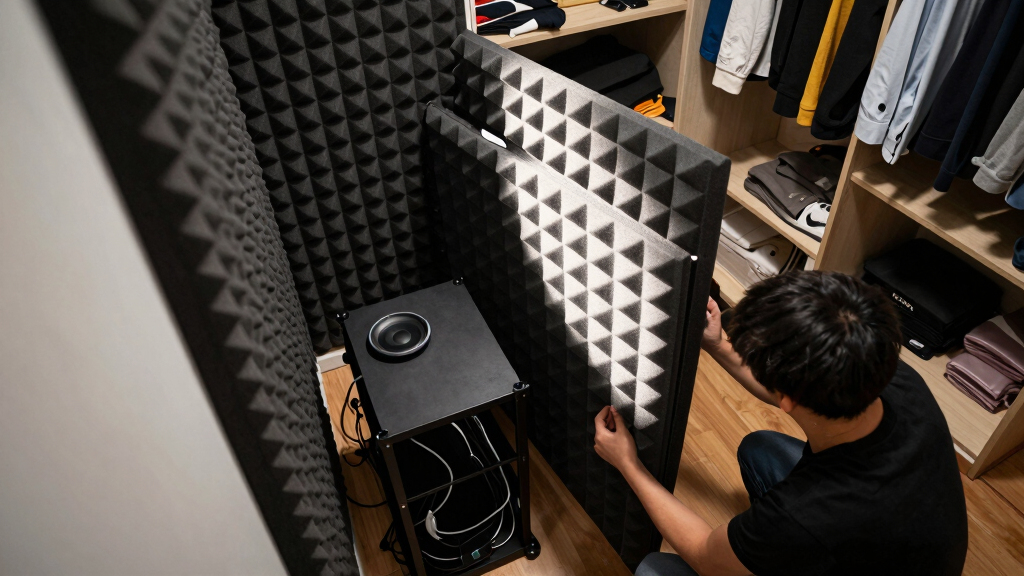
Thorsten Meyer AI has published guidance arguing that the strongest noise fix for loud AI workstations and gaming rigs is placement, not foam. The report says distance, isolation, gap sealing and ventilation matter more than wall panels alone, while exact noise reduction depends on the room and enclosure.
Thorsten Meyer AI has published new guidance saying users trying to quiet loud AI workstations or gaming PCs should prioritize moving the rig into a closet or separate room over adding acoustic foam, a recommendation that matters as high-power desktop systems create more fan noise and heat in home studios and workspaces.
The guide ranks distance and isolation as the strongest noise-control method, followed by reducing noise at the source, blocking sound transmission through doors or barriers, and absorbing reflections with foam. Thorsten Meyer AI states that many users start with foam first, but says the more effective step is often changing the floor plan: placing the machine where it cannot be heard directly.
The source distinguishes between airborne noise, such as fan whoosh and GPU hum, and structure-borne noise, such as vibration traveling through a desk, floor or wall. According to the guide, foam can reduce reflections inside a room, while barriers help block sound from leaving a space. Anti-vibration pads, rubber feet, soft-mounted drives or SSDs are presented as better responses to mechanical hum.
The report also warns that enclosing a high-power rig can create a heat problem if the closet or cabinet is sealed. Thorsten Meyer AI says a closet setup needs a passive airflow path or a quiet exhaust fan, and that soundproof server cabinets combine foam lining with controlled exhaust. It cites manufacturer specifications from StarTech, SysRacks and UCoustic for cabinet figures, while saying results vary by enclosure and room conditions.
Why It Matters
The guidance is aimed at readers using noisy desktop systems for AI work, gaming, streaming, recording or studio production. For those users, fan noise can interfere with microphones, calls and concentration, while poor placement can make a rig sound louder through reflections or vibration.
The report matters because it shifts attention from acoustic products alone to system layout and heat control. A closet or separate-room setup can reduce perceived noise, but the same enclosure can raise temperatures if hot air is trapped. That tradeoff is central for workstations that may draw hundreds of watts under sustained GPU load.
acoustic soundproof closet for PC
As an affiliate, we earn on qualifying purchases.
As an affiliate, we earn on qualifying purchases.
Background
Thorsten Meyer AI frames the closet setup as the final placement step in a broader noise-reduction sequence for high-performance rigs. The guide says users should first understand whether they are dealing with airborne sound, vibration, or both, because each problem requires different treatment.
The source also says small-space acoustic treatment should be placed strategically, including behind the microphone, on side-wall reflection points and on the ceiling where needed. It says sealing gaps around doors and walls can improve isolation, while blankets, rugs and foam can help control reflections when placed with adequate coverage.
“The most powerful noise fix isn’t a material — it’s a floor plan.”
— Thorsten Meyer AI guide
“Distance beats foam — by a lot.”
— Thorsten Meyer AI guide
“Never fully seal a 24/7 rig.”
— Thorsten Meyer AI guide
As an affiliate, we earn on qualifying purchases.
What Remains Unclear
The source does not present independent lab testing for every setup, and it says cabinet performance varies by enclosure and environment. It is also not yet clear how much noise reduction an individual user will get without knowing the rig’s wattage, fan curve, room shape, wall construction, door gaps and ventilation path.
Manufacturer figures cited in the guide are presented as reference points, not universal results. The report also includes an affiliate disclosure, which readers may weigh when reviewing product suggestions.
anti-vibration pads for desktop PC
As an affiliate, we earn on qualifying purchases.
As an affiliate, we earn on qualifying purchases.
What’s Next
Readers applying the guidance are advised to identify the main noise path first, then test placement, vibration isolation, gap sealing and ventilation before buying large acoustic treatments. The next practical milestone is confirming that any closet or cabinet setup can move hot air out while keeping fan noise, vibration and reflections under control.
soundproof server cabinet with exhaust
As an affiliate, we earn on qualifying purchases.
As an affiliate, we earn on qualifying purchases.
Key Questions
Is acoustic dampening the same as soundproofing?
No. Dampening reduces reflections inside a space, while soundproofing blocks sound from entering or leaving. The guide says users often need both, but they solve different problems.
Why does the guide favor a closet or another room?
Thorsten Meyer AI says physical distance and a wall between the user and the rig can reduce direct noise more effectively than foam panels alone.
What is the main risk of putting a rig in a closet?
Heat buildup. The source warns that a sealed closet can trap hot exhaust, forcing the GPU and fans to work harder and potentially reducing performance.
Do acoustic foam panels still help?
Yes, but mainly for reflections and room tone. The report says foam is less effective for blocking sound transmission or stopping mechanical vibration.
What happens next for someone building this setup?
The next step is to test airflow and noise together: place the rig, add vibration isolation, seal major gaps, and confirm that an exhaust path keeps temperatures stable under load.
Source: Thorsten Meyer AI
Fall Picks
fall essentials
As an affiliate, we earn on qualifying purchases.